Mass Assignment leads to the victim’s account being inaccessible forever
The profile update endpoint for first and last name accepted an extra email parameter, allowing the attacker to change their email to an existing victim's email. This created duplicate emails, making the victim's account inaccessible for login and password reset.

Hi Guys, My name is m7arm4n and today I wanna talk about one of my findings on a private program that was vulnerable to Mass Assignment leads to make victim’s accounts inaccessible. I discovered many Mass Assignment in different programs and functions but this one is my favorite and the first one.
The full write-up lives on its author's site
It belongs to its author, so we link to it rather than copy it. The other two tabs are our own rewrites, checked against it.
Context
This write-up covers a finding on a private bug bounty program. The researcher, Arman (@M7arm4n), describes it as the first mass assignment issue he found and his favourite of the ones he has discovered across different programs and functions. The affected application is a website with a user registration flow and a profile editing feature. The feature normally lets a signed-in user change their own account data through two separate update endpoints: one for the email address, which requires the current password, and one for the first name and last name, which does not require a password.
The report does not name the program, the product or the framework behind the site.
What mass assignment is
Before walking through the steps, the researcher gives his own definition. Mass assignment is a weakness in web applications where the application lets a user change an object in multiple ways with a single request, without properly filtering or validating the input. It happens because developers often rely on a framework feature that automatically maps incoming data onto object properties. An attacker can exploit that mapping by submitting crafted input that includes additional properties, or that modifies existing ones which were never meant to be modified. The result can be access to or modification of sensitive data, including user account information, payment information or other sensitive information.
His illustrative example: an application lets a user update profile information including name, email address and password. If the input is not prepared or validated properly, the attacker can send a request that includes an additional parameter such as isAdmin=true, which would give them administrative access to the application.
Setup
The researcher skipped subdomain enumeration and went straight to the website, where he registered as a normal user. No specific tools beyond Burp are mentioned for capturing requests, and no versions, headers or hostnames are given. The precondition for the attack is simply a registered account on the target and the ability to intercept and modify requests, which Burp provides.
Finding it
After a few minutes on the site, the researcher understood that it had two endpoints for updating user data:
- One for the email address, which required a password to update it.
- One for the first name and last name only, which did not require a password.
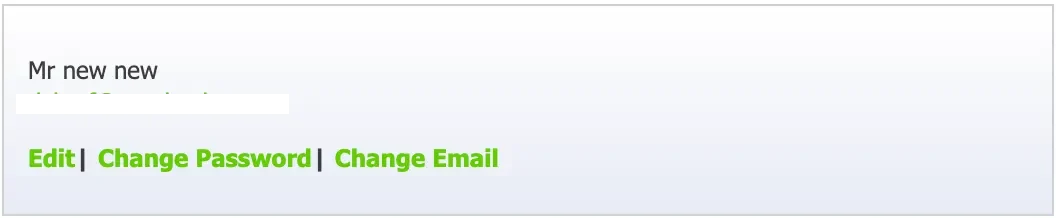
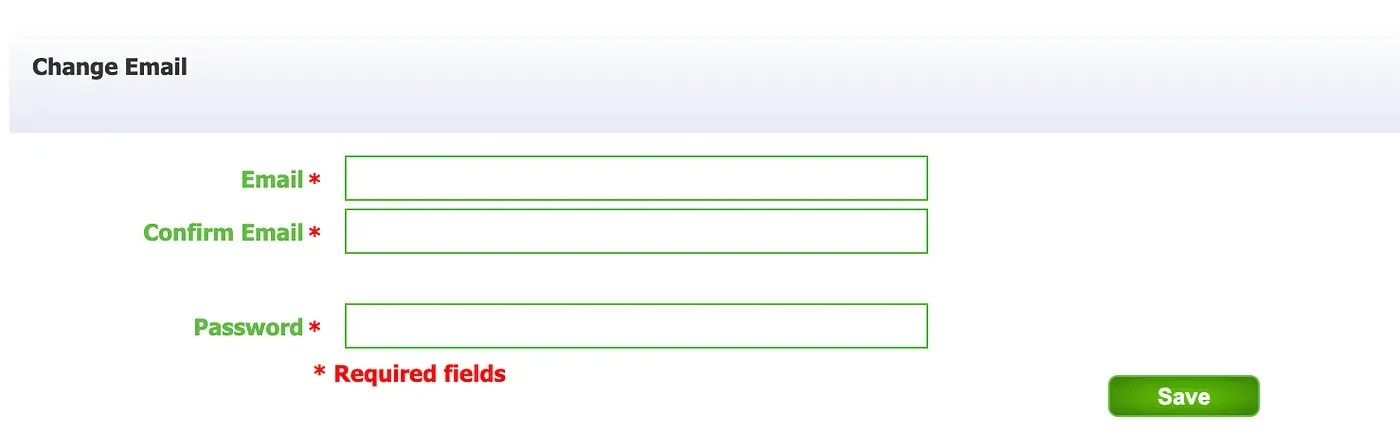
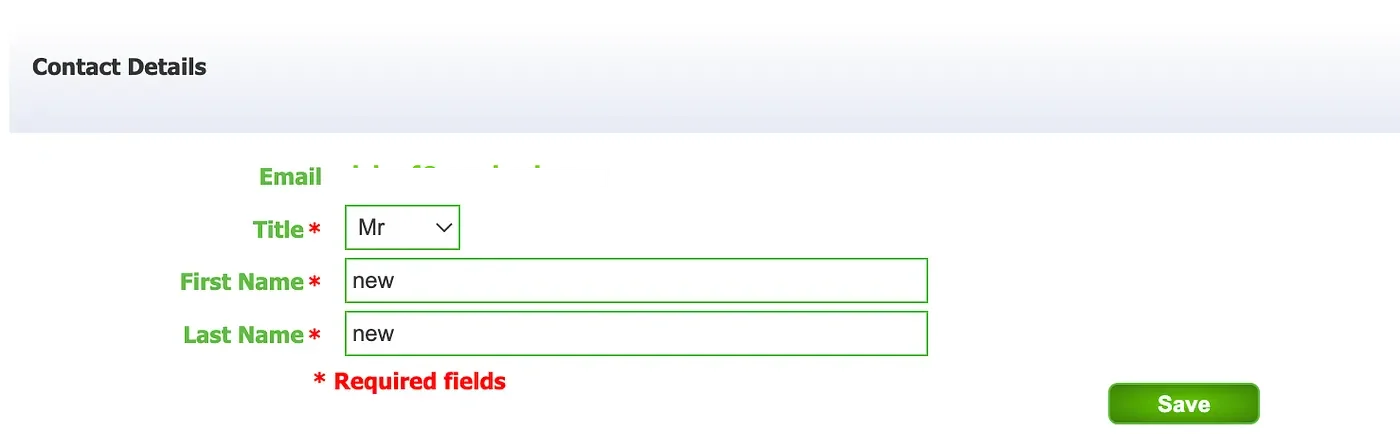
The split is the interesting part. The email endpoint is protected by a password check, which suggests the developers treated the email address as sensitive. The name endpoint is not, which is reasonable for a display name but means it is the weaker of the two surfaces. The researcher first tried to update his email to an email address that already existed, but got an error.
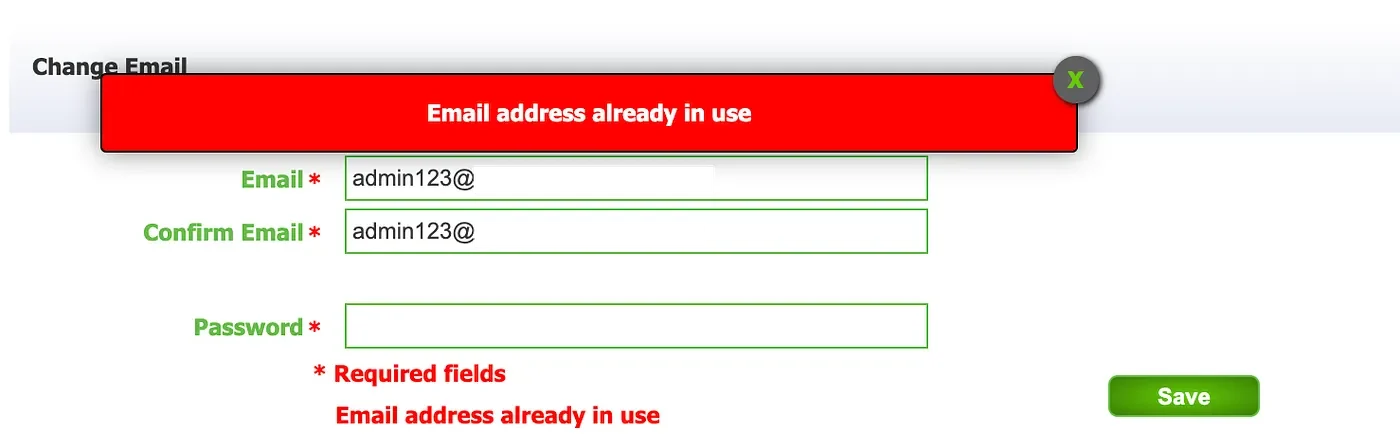
That error is the first sign of a uniqueness check on the email column. It also means the straightforward path, changing your own email to someone else's through the email endpoint, is blocked.
Exploitation
Step 1: capture the name update request
He thought a little differently and opened the Edit part of the profile to update the first name and last name, capturing the update request in Burp.
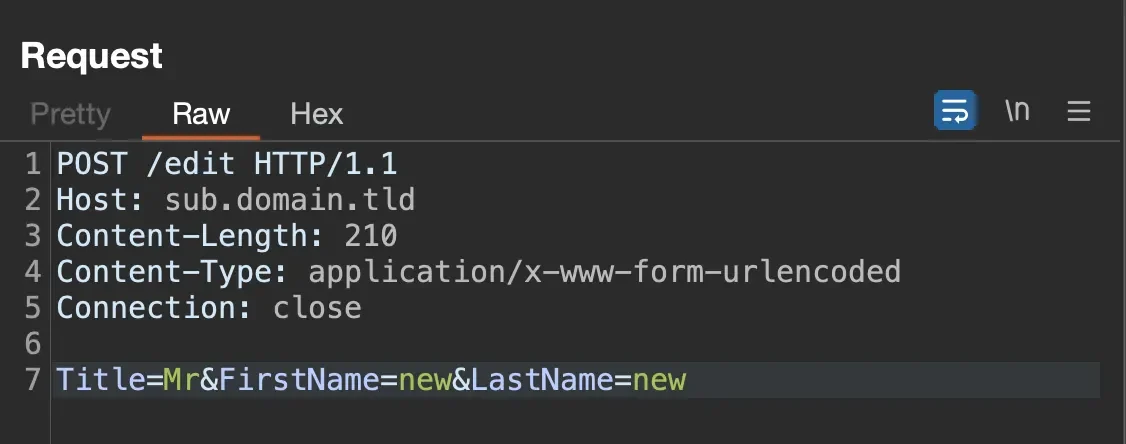
This is the request that does not require a password, so it is the natural place to try adding fields the UI never sends.
Step 2: look for hidden parameters
He looked for an interesting parameter to exploit, but the response was a redirection page that did not expose any hidden parameters. In other words, the response gave him nothing to work with, so he moved to guessing parameter names instead. He tried adding parameters of interest such as isAdmin and similar.
Step 3: add an Email parameter to the name update body
He added an Email parameter to the body of the name update request and set a new email address. Surprisingly, his email was updated to the new email.
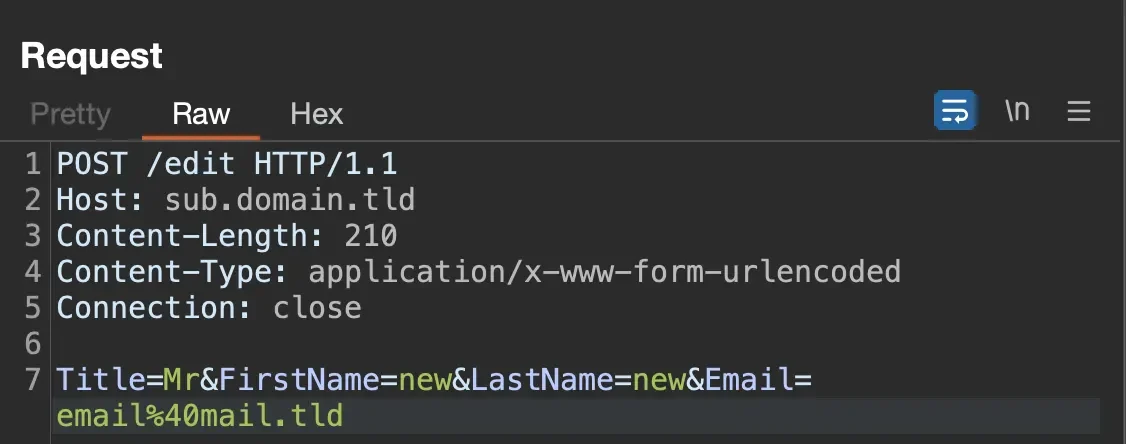
The name endpoint, which was never supposed to touch the email address, accepted an Email field in the request body and wrote it to the account. The password requirement that guarded the dedicated email endpoint was bypassed entirely by using the other endpoint.
Step 4: escalate to a victim's email
At this point the impact was only information or P5 in his rating, so he escalated. He set the Email parameter to an existing victim's email address and forwarded the request. It succeeded: his own account's email address was updated to the victim's email address.
Step 5: check the victim's account
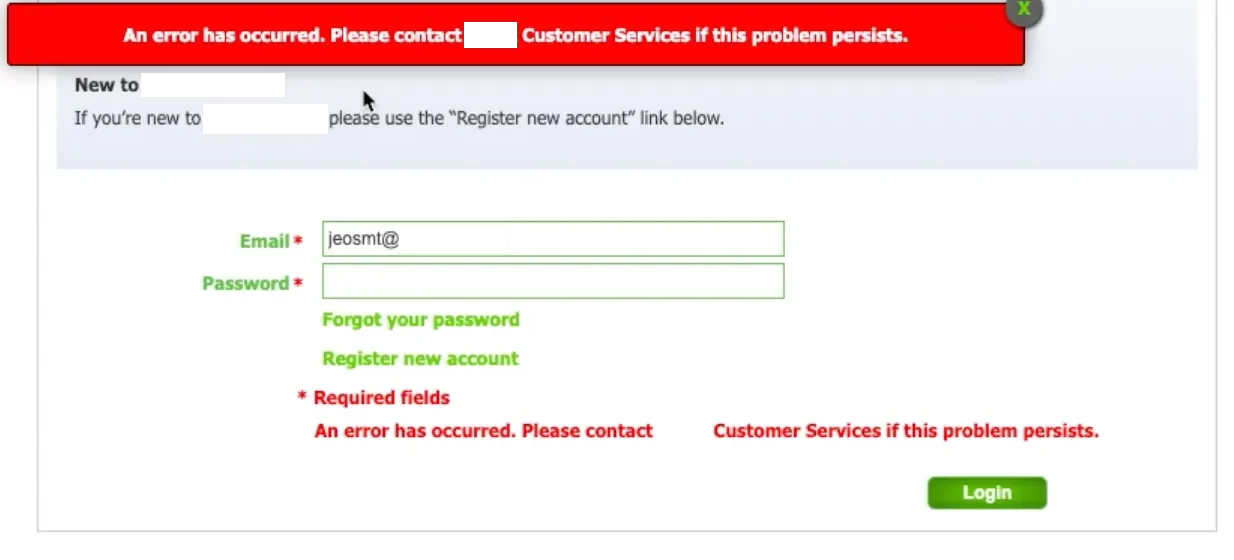
On the victim side, he tried to log in with valid credentials but got an error. He then tried the forgot password flow and got the same error.
Root cause
The name update endpoint accepted an Email field it was not meant to accept. An Email field sent to the name endpoint was written to the account. The email was changed through the name endpoint, which had no password check.
The error from the first attempt did not prevent the escalation. The researcher's explanation of what happened next is that two accounts ended up with the same email address. When functions ask the database for that email, the database either returns nothing or returns two accounts, so those functions do not work correctly. The victim's account becomes inaccessible permanently.
The report does not explain why the duplicate was accepted through the name endpoint. The duplicate was accepted through the name endpoint after the earlier attempt returned an error.
Impact
An attacker with a normal registered account can change their email to a victim's known email address without knowing that user's password. The immediate effect on the victim is that they can no longer log in with valid credentials, and the forgot password flow fails as well, so the account is inaccessible. The researcher describes this as permanent.
The attacker does not gain the victim's session or password from what is shown here; the impact is denial of access to the victim plus control of the email value on the attacker's own account.
Fix
The general remedy for this class of bug is to stop binding the raw request body to the user object and instead accept only an explicit allowlist of fields on each endpoint, so that the name endpoint can only write first name and last name. A general remedy is to accept only an explicit allowlist of fields per endpoint and keep the email change behind the password-protected endpoint.
Variants to test
- Other profile endpoints. Capture every update request the UI makes (name, address, phone, avatar, preferences) and add fields the UI never sends, such as
Email,email,isAdmin,role,verified,id. A positive result is any field being written and reflected in the account state or in a later response. - Case and naming variations. If
Emailis filtered, tryemail,EmailAddress,e_mailand nested objects such asuser[email]. A positive result is the same unauthorised write under a different key. - Password-protected versus unprotected routes. Where one route requires a password for a sensitive change, look for any other route that writes the same model. A positive result is the sensitive field changing through the unprotected route.
- Duplicate values on unique columns. Try setting a field to a value already used by another account through each write path. A positive result is a duplicate being accepted where another path rejected it, followed by checking whether the original owner can still log in and reset their password.
- Registration and invitation flows. Mass assignment is not limited to profile updates; add extra fields to sign-up and invite acceptance bodies. A positive result is a privilege or ownership field being set at creation time.
What happened, in plain words
A security researcher signed up for a normal account on a website and found a way to change his own email address to somebody else's email address, without knowing that person's password. The website had two separate places where you could edit your account details: one for changing your email, which asked for your password first, and one for changing your first and last name, which did not ask for a password. The researcher sent the name-change request with an extra field for email tucked inside it, and the website accepted it. He then put a victim's email address in that field, and the victim could no longer log in or reset their password. The account was locked out for good.
This kind of bug is called mass assignment. The rest of this article explains, from scratch, what that means, how the researcher found it, and why it broke the victim's account.
What mass assignment is
Before the steps, the researcher gives his own definition. Mass assignment is a weakness in web applications where the application lets a user change an object in multiple ways with a single request, without properly filtering or validating the input.
A few of those words need unpacking.
- An object here means a record in the application, such as your user account. It has properties: first name, last name, email address, password, and so on.
- Input is whatever the user sends to the website: the text typed into a form, or the data a browser sends when a form is submitted.
- Validating input means checking that it is what you expect: that a name is text, that an email looks like an email, and that the user is allowed to change this particular field at all.
The weakness happens because developers often rely on a framework feature that automatically maps incoming data onto object properties. Think of a hotel check-in form where the clerk copies every line you wrote onto your room record without reading it. If you sneak in a line saying "room type: penthouse", the clerk copies that too. The framework does the same with a request: whatever field names arrive get matched to properties on the account record and written there.
An attacker can exploit that mapping by submitting crafted input that includes additional properties, or that modifies existing ones which were never meant to be modified. The result can be access to or modification of sensitive data, including user account information, payment information or other sensitive information.
His illustrative example: an application lets a user update profile information including name, email address and password. If the input is not prepared or validated properly, the attacker can send a request that includes an additional parameter such as isAdmin=true, which would give them administrative access to the application. In plain terms, the form was meant to change your name, but you add a line saying "make me an administrator", and the application believes you.
Setting the scene
The researcher skipped subdomain enumeration. Subdomain enumeration is the usual first step of a test where you look for other parts of a company's website, such as shop.example.com or admin.example.com, by guessing names. He did not do that; he went straight to the website itself.
There he registered as a normal user. The only precondition for the attack is a registered account on the target and the ability to intercept and modify requests. Intercepting means catching the request your browser sends before it reaches the website, so you can read it and change it. The researcher used a tool called Burp for this. Burp is a program that sits between your browser and the website like a postman who opens every letter, lets you rewrite it, and then delivers it. No versions, headers or hostnames are given in the report.
Finding it
After a few minutes on the site, the researcher understood that it had two endpoints for updating user data. An endpoint is a specific address on a website that does one job, like a counter in a building: one counter for passports, another for driving licences. Your browser talks to endpoints whenever you click a button that saves something.
The two endpoints were:
- One for the email address, which required a password to update it.
- One for the first name and last name only, which did not require a password.
The split is the interesting part. The email endpoint is protected by a password check, which suggests the developers treated the email address as sensitive. That makes sense: your email address is often how you log in and how you receive password reset links, so changing it is like changing the lock on your front door. The name endpoint is not protected, which is reasonable for a display name but means it is the weaker of the two surfaces. If the name endpoint can be tricked into writing an email address, the password check on the other endpoint becomes pointless.
The researcher first tried to update his email to an email address that already existed, but got an error.
That error is the first sign of a uniqueness check on the email column. A database is the application's storage cupboard, organised in tables with columns, much like a spreadsheet. A column is one field across all rows, for example the email column holds every user's email address. A uniqueness check means the database refuses to store the same value twice in that column, the way a school would refuse two pupils with the same student number. The error also means the straightforward path, changing your own email to someone else's through the email endpoint, is blocked.
Exploitation
Step 1: capture the name update request
He thought a little differently and opened the Edit part of the profile to update the first name and last name, capturing the update request in Burp.
This is the request that does not require a password, so it is the natural place to try adding fields the UI never sends. The UI, or user interface, is what you see on screen: the boxes and buttons. The UI only shows boxes for first name and last name, but the request that leaves your browser is just text, and text can be edited before it is sent. Capturing it in Burp is how you get hold of that text.
Step 2: look for hidden parameters
He looked for an interesting parameter to exploit, but the response was a redirection page that did not expose any hidden parameters. A parameter is a named piece of data in a request, a label with a value attached, like firstName=Arman. A response is what the website sends back after receiving a request. A redirection is the website telling your browser "the page you want is over there, go and load it instead". Because the response was just a redirect, it gave him nothing to work with, so he moved to guessing parameter names instead. He tried adding parameters of interest such as isAdmin and similar.
Step 3: add an Email parameter to the name update body
He added an Email parameter to the body of the name update request and set a new email address. Surprisingly, his email was updated to the new email.
The body of a request is the part that carries the data you are submitting, as opposed to the address line at the top. Think of an envelope: the address on the front tells the postal service where it goes, and the letter inside is the body. The name endpoint, which was never supposed to touch the email address, accepted an Email field in the request body and wrote it to the account. The password requirement that guarded the dedicated email endpoint was bypassed entirely by using the other endpoint. Bypassed means got around: the guard was still standing at the email counter, but the attacker walked in through the name counter instead.
Step 4: escalate to a victim's email
At this point the impact was only information or P5 in his rating, so he escalated. P5 is the lowest severity level on a common five-point scale used in bug bounty programmes, where P1 is the most serious. A bug bounty programme is a scheme where a company invites outside researchers to test its systems and pays for valid findings. He wanted something more serious, so he set the Email parameter to an existing victim's email address and forwarded the request. Forwarding in Burp means sending the edited request on to the website. It succeeded: his own account's email address was updated to the victim's email address.
Step 5: check the victim's account
On the victim side, he tried to log in with valid credentials but got an error. Credentials are the username and password you use to prove who you are. He then tried the forgot password flow and got the same error. The forgot password flow is the usual "I lost my password, email me a reset link" feature.
Why it broke the victim's account
The name update endpoint accepted an Email field it was not meant to accept. Binding is the automatic copying of incoming field names onto the account record. An Email field sent to the name endpoint was written to the account. The email was changed through the name endpoint, which had no password check.
The error from the first attempt did not prevent the escalation. The researcher's explanation of what happened next is that two accounts ended up with the same email address. When functions ask the database for that email, the database either returns nothing or returns two accounts, so those functions do not work correctly. The victim's account becomes inaccessible permanently.
A useful comparison: imagine a cloakroom that files coats by the owner's name. If two people are both called Smith, the attendant looking for "Smith" either finds nothing or finds two coats and cannot decide which one is yours. Login and password reset both look up your account by email, so both get confused in the same way.
The report does not explain why the duplicate was accepted through the name endpoint. The duplicate was accepted through the name endpoint after the earlier attempt returned an error.
What an attacker gets
An attacker with a normal registered account can change their email to a victim's known email address without knowing that user's password. The immediate effect on the victim is that they can no longer log in with valid credentials, and the forgot password flow fails as well, so the account is inaccessible. The researcher describes this as permanent.
The attacker does not gain the victim's session or password from what is shown here. A session is the state of being logged in, usually kept alive by a cookie, which is a small piece of data your browser stores and sends back with each request so the site remembers you. The impact is denial of access to the victim plus control of the email value on the attacker's own account. The report does not describe any further use of the hijacked email, such as receiving the victim's mail or resetting other accounts.
How to fix it
The general remedy for this class of bug is to stop binding the raw request body to the user object and instead accept only an explicit allowlist of fields on each endpoint, so that the name endpoint can only write first name and last name. An allowlist is a list of things that are permitted, with everything else refused. A general remedy is to accept only an explicit allowlist of fields per endpoint and keep the email change behind the password-protected endpoint.
Other places to try the same idea
- Other profile endpoints. Capture every update request the UI makes (name, address, phone, avatar, preferences) and add fields the UI never sends, such as
Email,email,isAdmin,role,verified,id. A positive result is any field being written and reflected in the account state or in a later response. - Case and naming variations. If
Emailis filtered, tryemail,EmailAddress,e_mailand nested objects such asuser[email]. A positive result is the same unauthorised write under a different key. - Password-protected versus unprotected routes. Where one route requires a password for a sensitive change, look for any other route that writes the same model. A positive result is the sensitive field changing through the unprotected route.
- Duplicate values on unique columns. Try setting a field to a value already used by another account through each write path. A positive result is a duplicate being accepted where another path rejected it, followed by checking whether the original owner can still log in and reset their password.
- Registration and invitation flows. Mass assignment is not limited to profile updates; add extra fields to sign-up and invite acceptance bodies. A positive result is a privilege or ownership field being set at creation time.
Glossary
- Allowlist: a list of items that are explicitly permitted, with everything not on the list refused.
- Binding: the automatic copying of incoming request field names onto properties of an object such as a user account.
- Body: the part of a request that carries the submitted data, as opposed to the address line.
- Bug bounty programme: a scheme where a company invites outside researchers to test its systems and pays for valid findings.
- Burp: a tool that sits between your browser and a website, letting you read and edit requests before they are sent.
- Bypass: to get around a protection, for example by using a different route that lacks the check.
- Column: one field across all rows of a database table, such as the email column.
- Cookie: a small piece of data your browser stores and sends back with each request so the site remembers you.
- Credentials: the username and password used to prove who you are.
- Database: the application's organised storage, arranged in tables with rows and columns.
- Endpoint: a specific address on a website that performs one job.
- Forgot password flow: the feature that emails you a reset link when you cannot log in.
- Framework: a set of ready-made building blocks developers use to build a web application.
- Information disclosure: a bug that reveals information rather than changing anything.
- Input: whatever the user sends to the website, whether typed into a form or sent by the browser.
- Intercept: to catch a request before it reaches the website so you can read or change it.
- Mass assignment: a weakness where an application copies every field in a request onto an object, letting an attacker write fields that were never meant to be changed.
- Object: a record in the application, such as a user account, with named properties.
- P5: the lowest severity level on a common five-point scale, where P1 is the most serious.
- Parameter: a named piece of data in a request, a label with a value attached.
- Redirection: the website telling your browser to load a different page instead.
- Response: what the website sends back after receiving a request.
- Session: the state of being logged in, usually kept alive by a cookie.
- Subdomain enumeration: looking for other parts of a company's website by guessing names such as
shop.example.com. - UI (user interface): what you see on screen, the boxes and buttons you interact with.
- Uniqueness check: a rule that refuses to store the same value twice in a column.
- Validating: checking that input is what you expect and that the user is allowed to change it.