ZSATrayManager Arbitrary File Deletion (CVE-2023-41969)
The ZSATrayManager service, running as SYSTEM, allowed arbitrary file deletion via a symbolic link attack on the REPORT_ISSUE_REQUEST RPC function. An attacker could delete arbitrary files with SYSTEM privileges, potentially leading to privilege escalation.

medium.com
Published on medium.com
Cybersecurity
The full write-up lives on its author's site
It belongs to its author, so we link to it rather than copy it. The other two tabs are our own rewrites, checked against it.
Context
GovTech's Cybersecurity Group (CSG) worked with CSIT to evaluate products in the Zscaler suite for Zero Trust Network Access. The research covered the Zscaler Client Connector, a lightweight endpoint agent that encrypts and forwards user traffic to the Zscaler Zero Trust Exchange. The findings described here affect versions prior to 4.2.1 and were assigned CVEs by Zscaler:
- Revert password check incorrect type validation (CVE-2023-41972)
- Lack of input sanitisation on Zscaler Client Connector enabling arbitrary code execution (CVE-2023-41973)
- ZSATrayManager arbitrary file deletion (CVE-2023-41969)
The Client Connector consists of two main processes. ZSATrayManager is the service running as NT AUTHORITY\SYSTEM, handling high-privileged actions such as network management, configuration enforcement and updates. ZSATray is the user-facing frontend, built on the .NET Framework.
Like most client-server software on Windows, the two processes communicate over Microsoft Remote Procedure Call (RPC). When a user asks the interface to dump logs, for example, ZSATray calls ZSATrayManager through the native sendZSATrayManagerCommand method from ZSATrayHelper.dll, with serialised inputs:
public bool dumpLogs(ZSATrayManagerConfigDumpLog configData) => this.sendZSATrayManagerCommandHelper(ZSCALER_APP_RPC_COMMAND.DUMP_LOGS, (object) configData) == 0;private int sendZSATrayManagerCommandHelper( ZSCALER_APP_RPC_COMMAND commandCode, object configData = null) { ZSATrayManagerCommand structure = new ZSATrayManagerCommand(); structure.commandCode = (int) commandCode; if (configData != null) structure.configJson = JsonConvert.SerializeObject(configData); IntPtr num1 = Marshal.AllocCoTaskMem(Marshal.SizeOf((object) structure)); Marshal.StructureToPtr((object) structure, num1, false); int num2 = NativeMethods.sendZSATrayManagerCommand(num1); ZSALogger.zsaLog("sendZSATrayManagerCommandHelper retVal: " + num2.ToString()); Marshal.FreeCoTaskMem(num1); return num2; }
Accepting RPC calls from any process without validation is a significant risk, particularly when some calls trigger high-privileged actions. Most software, including the Client Connector, therefore checks that RPC calls originate from trusted processes. The research set out to bypass those checks.
Setup
The work was done against Zscaler Client Connector builds prior to 4.2.1 on Windows. The researchers were Eugene Lim and Winston Ho.
- The symboliclink-testing-tools suite by James Foreshaw of the Project Zero team for symbolic link testing.
The precondition for the whole chain is the ability to make RPC calls to ZSATrayManager that pass its caller validation. Everything else builds on that.
Finding it
Since CVE-2020-11635, the Client Connector has added validation checks for RPC connections to ZSATrayManager. They run in the IfCallbackFn function and consist of two parts:
- Process ID (PID) validation: the caller's PID must match a process whose image path belongs to an executable signed by Zscaler (Authenticode check).
- Caller process validation: the caller must be either a high-privileged SYSTEM-owned process, or ZSATray.exe.
ZSATrayManager decides whether a PID belongs to ZSATray by consulting an in-memory cache, keyed with a Fowler-Noll-Vo hash function (FNV-1a) and storing the process name, allowed status and last access timestamp:
2023-08-05 14:54:53.960564(+0800)[8528:17868] DBG ZSATrayManager: addRpcCallerInCache: - - - - - - - - - - - - entries - - - - - - - - - - - - -2023-08-05 14:54:53.960564(+0800)[8528:17868] DBG PID | name | is_allowed | last_access_ts2023-08-05 14:54:53.960564(+0800)[8528:17868] DBG 37352 | C:\Program Files\Zscaler\ZSATray\ZSATray.exe | true | 1691247282094 ms2023-08-05 14:54:53.960564(+0800)[8528:17868] DBG 39296 | C:\Program Files\Zscaler\ZSATray\ZSATray.exe | true | 1691244684011 ms2023-08-05 14:54:53.960564(+0800)[8528:17868] DBG 39144 | C:\Program Files\Zscaler\ZSATray\ZSATray.exe | true | 1691246922202 ms
When ZSATrayManager first starts ZSATray, it stores its PID in the cache. Every time it successfully validates an RPC connection, it also stores the hashed PID of the calling process. On later requests, if the hashed caller PID is already in the cache, the Authenticode and caller process checks are skipped.
ZSATrayManager does not regularly prune this cache. Because PIDs are non-random, a cached PID can be brute forced. An attacker can populate the cache with many allowed PIDs by repeatedly killing the ZSATray process and triggering ZSATrayManager to launch a new one, which adds a new PID after a successful connection. Repeatedly starting and killing an exploit binary then produces a cache collision when Windows reuses a PID that is already in the cache. The attacker-controlled binary can then make arbitrary RPC connections that bypass validation. Since ZSATray already contains an RPC client implementation in sendZSATrayManagerCommandHelper, that code can be reused from a custom .NET binary.
The report also notes an alternative: injecting the user-owned ZSATray.exe process to run arbitrary code. That process passes all the checks, but the approach is more complex because ZSATray is a .NET assembly with managed code, and the injection can fail if the Client Connector's anti-tampering feature is enabled.
Exploitation
With arbitrary RPC calls available, the researchers looked for supported functions that could be abused. Three were chained: a password check bypass, a path traversal leading to DLL hijacking, and, separately, an arbitrary file deletion.
Step 1: Bypass the revert password check (CVE-2023-41972)
Zscaler added authentication to some functions, including PERFORM_APP_REVERT. This function reverts the Client Connector to a previous version by executing an older installer. It accepts previousInstallerName, pwdType and password. The latter two are used when an administrator has set a password for the action, and the function should only run when the correct password is supplied.
ZSATrayManager does not check that pwdType matches PASSWORD_TYPE.ZCC_REVERT_PWD (7). The password check function therefore trusts whatever pwdType arrives over RPC and performs the corresponding check. If ZIA_DISABLE_PWD is supplied, for example, ZSATrayManager checks the password against the one set for Zscaler Internet Access rather than the revert password:
case 90: v66 = sub_1400949C0(v294, (__int64)v371); if ( (unsigned __int8)PasswordCheck(v67, pwdType, v66, 1) )
Some password types, including ZCC_REVERT_PWD, return true by default when no password has been configured:
case 6u:sub_14025D9B0(a1); LOBYTE(isCorrectPassword) = 0; if ( passwordConfigured ) { … } else { v8::internal::wasm::ErrorThrower::CompileError( (v8::internal::wasm::ErrorThrower *)&LogHandle, "Skip password check - ZAD is not enabled"); }
So even when a password is set for PERFORM_APP_REVERT, an attacker can bypass it by setting pwdType to SHOW_ADVANCED_SETTINGS (6) in the RPC.
Step 2: Path traversal in previousInstallerName (CVE-2023-41973)
PERFORM_APP_REVERT appends previousInstallerName to *C:\Program Files\ZScaler\RevertZcc*; the value is normally {VERSION NUMBER}.exe. ZSATrayManager executes the file at that path as NT AUTHORITY\SYSTEM. Because the parameter is controllable, a path traversal string such as ......{ATTACKER-CONTROLLED PATH} can point execution at an attacker payload.
An additional check stands in the way: Microsoft Authenticode signature verification through the WinVerifyTrust function, an OS-level trust check that the executable was properly signed by Zscaler. The verification appears to be done properly, checking the SHA-2 hash of the signer and issuer thumbprints:
if ( CertCompareIntegerBlob(&v19, (PCRYPT_INTEGER_BLOB)(v6 + 24)) ) { initString(v28, "[redacted]", 0x28ui64); initString(v26, "[redacted]", 0x28ui64); if ( (unsigned __int8)validateSignerAndIssuerThumbprints(v26, v28, a2) ) { LogInfo(&LogHandle, 1i64, "Signer matches Zscaler SHA2 02/28/2018");LABEL_20: v4 = 1; } }
Attempting to launch Microsoft Word through the traversal produced this log output:
INF validateSignerAndIssuer Thumbprints returned trueINF Signer matches Zscaler SHA2 March 1, 2021INF Signer trust released.INF Process executable is signed by Zscaler.INF UserSID: "0, 0, 0, 0, 0, 5", SECURITY_LOCAL_SYSTEM_RID: "0, 0, 0, 0, 0, 5"INF SID matched with SECURITY_LOCAL_SYSTEM_RIDINF ZSAService RPC: Accepting RPC from a SYSTEM owned Zscaler processINF ZSAService RPC command: PERFORM_APP_REVERTINF Starting revertDBG Running zscaler executable: C:\Program Files\Zscaler\RevertZcc\..\..\..\Program Files\Microsoft Office\root\Office16\WINWORD.EXE - revertzcc 1 - mode unattendedERR Signer does not match ZscalerINF Signer trust released.ERR Executable [C:\Program Files\Zscaler\RevertZcc\..\..\..\Program Files\Microsoft Office\root\Office16\WINWORD.EXE] is not Zscaler binary.INF Done with ZSAService RPC command: PERFORM_APP_REVERT with return value:0
The signature check rejects the unsigned binary, so another link in the chain was needed.
Step 3: DLL hijacking in ZSAService
DLL hijacking is often not treated as a vulnerability in its own right, but it becomes a privilege escalation gadget when two conditions hold: the hijacked process runs at a higher privilege than the attacker, so a security boundary is crossed, and the hijack path is in a location the low-privileged attacker can write to.
One of the Client Connector binaries, ZSAService, is vulnerable to DLL hijacking because its search path starts with the current directory. One hijackable DLL is userenv.dll. The payload is a standard DLL hijacking template:
#include "pch.h"#include <iostream>BOOL APIENTRY DllMain(HMODULE hModule, DWORD ul_reason_for_call, LPVOID lpReserved){ switch (ul_reason_for_call) { case DLL_PROCESS_ATTACH: system("whoami > C:\\hacked.txt"); case DLL_THREAD_ATTACH: case DLL_THREAD_DETACH: case DLL_PROCESS_DETACH: break; } return TRUE;}extern "C" __declspec(dllexport) void DestroyEnvironmentBlock(){ return;}extern "C" __declspec(dllexport) void LoadUserProfileW(){ return;}extern "C" __declspec(dllexport) void UnloadUserProfile(){ return;}extern "C" __declspec(dllexport) void LoadUserProfileA(){ return;}extern "C" __declspec(dllexport) void CreateEnvironmentBlock(){ return;}
Compiled as a DLL, renamed to userenv.dll and placed in the same directory as ZSAService.exe, launching ZSAService.exe executes the commands inside the malicious DLL. ZSATrayManager executes the DLL-hijacked ZSAService.exe that passes the Authenticode check.
The full chain to SYSTEM is:
- Attacker brute forces cached PIDs to make RPC calls to ZSATrayManager.
- Attacker bypasses password protection for the PERFORM_APP_REVERT function.
- Attacker sends a path traversal payload in the previousInstallerName argument.
- The hijacked DLL causes the attacker's commands to be executed as NT AUTHORITY\SYSTEM.
- Pwned.
Step 4: Arbitrary file deletion via REPORT_ISSUE_REQUEST (CVE-2023-41969)
The researchers also examined another RPC function, REPORT_ISSUE_REQUEST, which facilitates issue reporting. It accepts three parameters: requestJson, containing information about the issue; zipFilePath, the location of the ZIP archive to upload; and mobileSupportUrl, the URL endpoint to connect to.
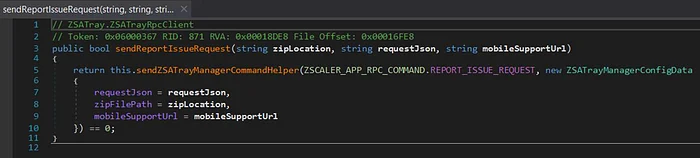
In the function logic, the file specified by zipFilePath is encrypted with a .enc2 suffix. When the function exits, the encrypted .enc2 archive created by ZSATrayManager is deleted. Both creation and deletion are performed by the ZSATrayManager service running as NT AUTHORITY\SYSTEM, which makes the behaviour a candidate for privileged file operation abuse.
The researchers turned to the symboliclink-testing-tools suite and began symbolic link testing. The delete function appears capable of deleting both files and directories, as the IDA screenshot shows:
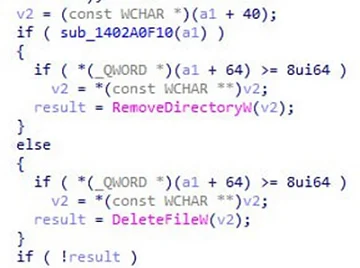
For the proof of concept, a copy of cmd.exe was created as the deletion target. REPORT_ISSUE_REQUEST is invoked with zipLocation = "C:\Tools\arb_delete\POC\deleteme.bin", requestJson = {} and mobileSupportURL = "http://localhost:8080".

The full chain for the arbitrary file deletion PoC:
- The attacker creates an empty file at C:\Tools\arb_delete\POC\deleteme.bin.
- The attacker brute forces cached PIDs to make RPC calls to ZSATrayManager.
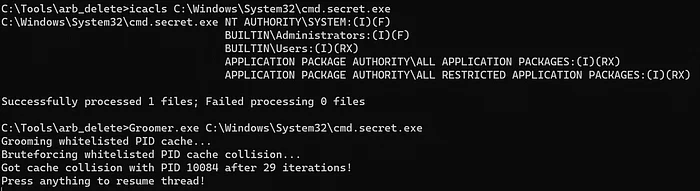
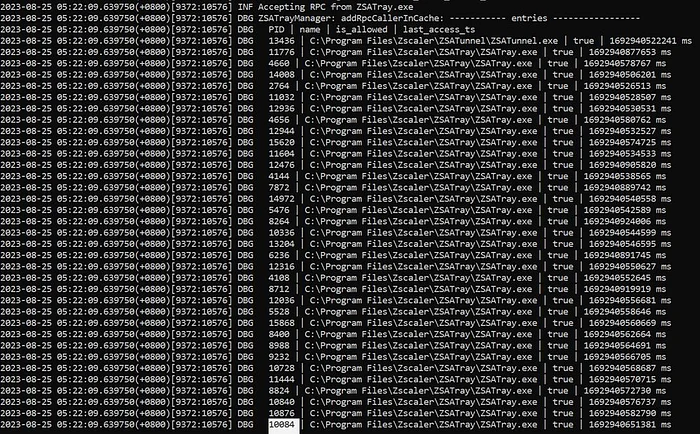
The logs show that the PID of the payload executable exists in the cache (PID 10084).
- The attacker creates a web server listening at http://[redacted]:8080.
- The attacker sends the malicious issue report request to the REPORT_ISSUE_REQUEST function.
- ZSATrayManager creates an encrypted ZIP archive of C:\Tools\arb_delete\POC\deleteme.bin at C:\Tools\arb_delete\POC\deleteme.enc2.
- ZSATrayManager attempts to connect to http://[redacted]:8080/poc. The attacker accepts the incoming connection, holds it and leaves it hanging.
- While holding the connection, the attacker deletes the C:\Tools\arb_delete\POC directory.
- The attacker creates a directory junction at C:\Tools\arb_delete\POC pointing to \RPC Control.
- The attacker creates a symlink object at the junction \RPC Control\deleteme.enc2 pointing to the target file to delete, the C:\Windows\System32\cmd.secret.exe that was created.

- The attacker closes the hanging connection and lets ZSATrayManager proceed to delete the target file through the symlink.
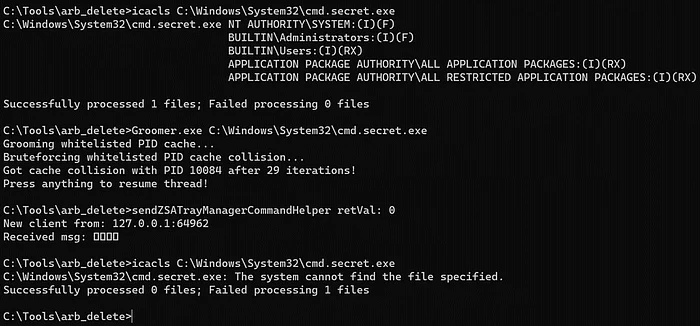
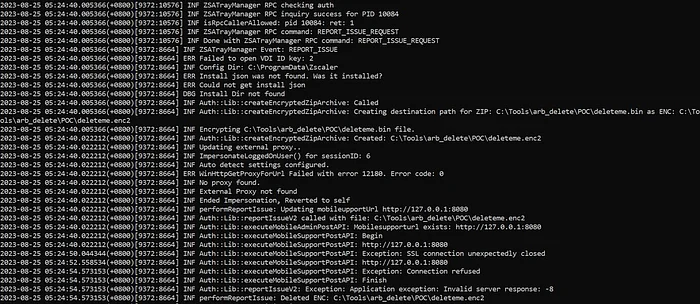
The deletion can be verified in the logs of the ZSATrayManager service.
Using this privileged file deletion primitive, the researchers note it can potentially be chained with other vulnerabilities on the Windows machine, such as deleting the C:\Config.Msi directory to perform a local privilege escalation, as described by the Zero Day Initiative and Mandiant.
Root cause
The chain rests on several distinct mistakes.
The RPC caller validation caches allowed PIDs in memory and never prunes the cache. Because PIDs are non-random and reused by Windows, an attacker who can grow the cache (by repeatedly killing ZSATray and letting ZSATrayManager relaunch it) can eventually collide with a cached PID and skip the Authenticode and caller process checks entirely. The cache is keyed by an FNV-1a hash of the PID, and it is not regularly pruned.
The revert password check trusts the caller-supplied pwdType instead of verifying it against the expected ZCC_REVERT_PWD (7), so the wrong password policy is applied. Some password types also return true by default when no password is configured.
PERFORM_APP_REVERT appends the caller-controlled previousInstallerName to a fixed directory without sanitising path traversal. The Authenticode check on the resulting executable is what limits the damage, and it is implemented properly, checking the SHA-2 thumbprints of signer and issuer. The chain therefore does not defeat that check; it routes around it by making a legitimately signed Zscaler binary, ZSAService, load an attacker-supplied userenv.dll from its current directory. ZSAService's DLL search order starting with the current directory is the design flaw that turns a signed-binary execution into code execution.
For the file deletion, REPORT_ISSUE_REQUEST creates and then deletes a file at a path derived from the caller-supplied zipFilePath, as SYSTEM, without protecting against reparse points. The attacker holds the outbound connection open, then replaces the directory with a junction to \RPC Control and a symlink to the real target. The attacker closes the hanging connection and ZSATrayManager proceeds to delete the target file via the symlink.
Impact
By chaining the low-level vulnerabilities and bypasses, the researchers escalated a standard user's privileges to execute arbitrary commands as the high-privileged NT AUTHORITY\SYSTEM service account on Windows. The arbitrary file deletion primitive on its own deletes files as SYSTEM and can potentially be chained with other Windows vulnerabilities, such as deleting the C:\Config.Msi directory, to achieve local privilege escalation. All of this requires the ability to make RPC calls to ZSATrayManager, which the cache collision provides. The report notes that the process injection alternative can fail if the Client Connector's anti-tampering feature is enabled.
Fix
Zscaler addressed the issues in two releases:
- Zscaler Client Connector [redacted] / [redacted], released 01 September 2023, fixes CVE-2023-41972 and CVE-2023-41973.
- Zscaler Client Connector 4.2.1 / [redacted], released 06 December 2023, fixes CVE-2023-41969.
The report does not describe the code changes themselves. The general lesson it draws is that even with proper validation of the calling process, RPC inputs must be sanitised and validated as well.
Variants to test
- PID cache collision on other privileged services. Look for services that cache validated caller PIDs in memory without pruning. A positive result is a log entry showing an attacker-controlled binary's PID present in the cache, followed by an accepted RPC call that skips signature checks.
- Password type confusion. Enumerate RPC functions that take a password type or policy selector alongside a password. A positive result is a function executing with a password policy other than the one intended, or a policy that returns true when no password is configured.
- Path traversal in installer or updater arguments. Test parameters appended to a fixed directory, such as installer names. A positive result is the service attempting to execute a file outside the intended directory, visible in its logs even if a signature check then rejects it.
- DLL search order in signed binaries. Check whether signed service binaries load DLLs from their current directory. A positive result is a signed binary executing attacker code from a DLL placed next to it.
- Reparse point races in file create-then-delete flows. For any privileged service that creates a file at a caller-influenced path and deletes it later, hold open any outbound connection or other blocking operation in between, swap the directory for a junction to \RPC Control, and plant a symlink. A positive result is the service deleting the symlink target instead of its own file, confirmed in the service logs.
Disclosure timeline
- 15 August 2023: password check bypass and path traversal reported to Zscaler.
- 31 August 2023: Zscaler acknowledged the findings.
- 28 August 2023: arbitrary file deletion reported to Zscaler.
- 01 September 2023: Client Connector [redacted] / [redacted] released, fixing CVE-2023-41972 and CVE-2023-41973.
- 06 December 2023: Client Connector 4.2.1 / [redacted] released, fixing CVE-2023-41969.
- 11 January 2024: Zscaler informed the team that CVEs had been reserved.
- 26 March 2024: Zscaler publicly disclosed the CVEs.
What happened, in plain words
A security team at GovTech's Cybersecurity Group (CSG), working with CSIT, spent time testing a piece of software called the Zscaler Client Connector. It is a small program that many companies install on their employees' laptops and desktops. Its job is to quietly send the computer's internet traffic through Zscaler's cloud service, so that the company can apply security rules to everything the employee does online.
The team found several weaknesses in versions of the Client Connector older than 4.2.1. Zscaler, the company that makes the software, gave each weakness an official identifier called a CVE (Common Vulnerabilities and Exposures). A CVE is like a reference number in a public catalogue of known security flaws, so that everyone can talk about the same bug unambiguously. The three CVEs were:
- Revert password check incorrect type validation (CVE-2023-41972)
- Lack of input sanitisation on Zscaler Client Connector enabling arbitrary code execution (CVE-2023-41973)
- ZSATrayManager arbitrary file deletion (CVE-2023-41969)
On their own, each of these is fairly small. But the researchers, Eugene Lim and Winston Ho, found a way to connect them together, like links in a chain. The result was that a normal user, someone with no special rights on the computer, could make the machine run any command they wanted with the highest level of permission Windows offers: the NT AUTHORITY\SYSTEM account. That account is the computer's own built-in superuser. Getting from an ordinary user to SYSTEM is called privilege escalation, and it is one of the most serious things an attacker can achieve on a Windows machine.
The article walks through how they did it, from the first discovery to working proof-of-concept code. This beginner's version follows the same path, explaining each idea as it comes up.
The product and its two halves
To understand the bugs, you first need to understand how the Client Connector is built. It is not one program but two, and they have very different levels of power.
- ZSATrayManager is a Windows service. A service is a program that starts automatically when the computer boots and runs in the background, with no window and no user watching it. This one runs as NT AUTHORITY\SYSTEM, which means it can do almost anything on the machine: change network settings, enforce company policies, install updates.
- ZSATray is the part you actually see. It is the little icon in the notification area of the taskbar, with menus and buttons. It is built on the .NET Framework, a Microsoft platform for running programs written in languages like C#. ZSATray runs with the ordinary permissions of whoever is logged in.
Think of it like a hotel. ZSATray is the front desk that guests talk to. ZSATrayManager is the back office with the master keys. Guests are not supposed to walk into the back office, so the front desk passes requests along on their behalf.
Because the two halves are separate programs, they need a way to talk to each other. On Windows, the standard mechanism for this is Microsoft Remote Procedure Call, or RPC. RPC lets one program ask another program to run a function, as if the function were local, even though it lives in a different process. When you click "dump logs" in the ZSATray interface, ZSATray makes an RPC call to ZSATrayManager asking it to collect the logs.
The code that does this lives in a file called ZSATrayHelper.dll. A DLL is a Dynamic Link Library: a file full of reusable code that other programs can load and call, rather than each program carrying its own copy. The relevant method is called sendZSATrayManagerCommand, and it takes the request already turned into a serialised form. Serialised means converted from a live object in memory into a stream of bytes or text that can be sent across a process boundary and rebuilt on the other side.
public bool dumpLogs(ZSATrayManagerConfigDumpLog configData) => this.sendZSATrayManagerCommandHelper(ZSCALER_APP_RPC_COMMAND.DUMP_LOGS, (object) configData) == 0;private int sendZSATrayManagerCommandHelper( ZSCALER_APP_RPC_COMMAND commandCode, object configData = null) { ZSATrayManagerCommand structure = new ZSATrayManagerCommand(); structure.commandCode = (int) commandCode; if (configData != null) structure.configJson = JsonConvert.SerializeObject(configData); IntPtr num1 = Marshal.AllocCoTaskMem(Marshal.SizeOf((object) structure)); Marshal.StructureToPtr((object) structure, num1, false); int num2 = NativeMethods.sendZSATrayManagerCommand(num1); ZSALogger.zsaLog("sendZSATrayManagerCommandHelper retVal: " + num2.ToString()); Marshal.FreeCoTaskMem(num1); return num2; }
Line by line, in plain words:
public bool dumpLogs(...)declares a method calleddumpLogsthat returns true or false. It immediately callssendZSATrayManagerCommandHelper, passing the command codeDUMP_LOGSand the configuration data, and checks whether the result equals zero. Zero conventionally means success.private int sendZSATrayManagerCommandHelper(...)is the shared helper that every RPC call goes through. It takes a command code (which action to perform) and an optional object of data.ZSATrayManagerCommand structure = new ZSATrayManagerCommand();creates an empty message object.structure.commandCode = (int) commandCode;stores the numeric command code in the message.if (configData != null) structure.configJson = JsonConvert.SerializeObject(configData);if there is data to send, converts it to JSON text. JSON is a simple text format for structured data, like{"key": "value"}.IntPtr num1 = Marshal.AllocCoTaskMem(Marshal.SizeOf((object) structure));reserves a block of memory big enough to hold the message.IntPtris a pointer, a number that refers to a location in memory.Marshal.StructureToPtr(...)copies the message into that memory block in the layout the native Windows function expects.int num2 = NativeMethods.sendZSATrayManagerCommand(num1);calls the actual Windows RPC function, passing the pointer. This is the moment the request leaves ZSATray and travels to ZSATrayManager.ZSALogger.zsaLog(...)writes the return value to a log file, which is useful for debugging.Marshal.FreeCoTaskMem(num1);releases the memory block so it does not leak.return num2;hands the result back to the caller.
The key point is that this helper is a complete, working RPC client. If an attacker can run their own program, they can copy this code and use it to send the same kinds of messages. They do not need to reverse-engineer the protocol from scratch.
Now, accepting RPC calls from any program on the machine would be dangerous, because some of those calls do very powerful things. So, like most well-built software, the Client Connector checks who is calling. The researchers' goal was to get past those checks.
The setup
The work was done against Client Connector builds older than 4.2.1, on Windows.
- Static analysis means examining a compiled program without running it, reading its machine code the way you might read a book, to understand what it does. IDA presents that code in a readable form.
- The symboliclink-testing-tools suite by James Foreshaw of the Project Zero team. Project Zero is a security research team at Google. These tools let a researcher create symbolic links and junctions, which are special filesystem objects that act as shortcuts. We will explain them properly when they come up.
- A web server is a program that answers requests from a browser or another program.
[redacted]is the special address that always means "this same computer", and8080is a port number, a numbered door on the machine that a program can listen on.
The one thing everything else depends on is the ability to make RPC calls to ZSATrayManager that pass its caller validation. Without that, none of the rest works. So that is where the research started.
Finding it: how the caller check works, and how it was beaten
Since an earlier vulnerability, CVE-2020-11635, the Client Connector has added validation checks for RPC connections to ZSATrayManager. They run in a function called IfCallbackFn and have two parts:
- Process ID (PID) validation: the caller's PID must match a process whose image path belongs to an executable signed by Zscaler. A PID is the number Windows assigns to every running program so it can tell them apart. An image path is the location of the program file on disk. Signed means the file carries a cryptographic signature, a mathematical seal that proves who made it and that it has not been altered. On Windows the signature format is called Authenticode, and checking it is called an Authenticode check.
- Caller process validation: the caller must be either a high-privileged SYSTEM-owned process, or ZSATray.exe itself.
So to talk to ZSATrayManager, your program must either be ZSATray, or be signed by Zscaler, or already be running as SYSTEM. An attacker's own program is none of those.
But ZSATrayManager does not re-check the signature on every single call. Instead, it keeps an in-memory cache. A cache is a small store of recently used information kept close at hand so you do not have to look it up again. Here the cache records which PIDs have already been validated, so that later calls from the same PID can skip the expensive checks. The cache is keyed with a Fowler-Noll-Vo hash function (FNV-1a). A hash function takes some input and produces a fixed-size number from it, like a fingerprint. The same input always gives the same fingerprint, but you cannot work backwards from the fingerprint to the input. The cache stores the process name, whether it is allowed, and the last time it was accessed:
2023-08-05 14:54:53.960564(+0800)[8528:17868] DBG ZSATrayManager: addRpcCallerInCache: - - - - - - - - - - - - entries - - - - - - - - - - - - -2023-08-05 14:54:53.960564(+0800)[8528:17868] DBG PID | name | is_allowed | last_access_ts2023-08-05 14:54:53.960564(+0800)[8528:17868] DBG 37352 | C:\Program Files\Zscaler\ZSATray\ZSATray.exe | true | 1691247282094 ms2023-08-05 14:54:53.960564(+0800)[8528:17868] DBG 39296 | C:\Program Files\Zscaler\ZSATray\ZSATray.exe | true | 1691244684011 ms2023-08-05 14:54:53.960564(+0800)[8528:17868] DBG 39144 | C:\Program Files\Zscaler\ZSATray\ZSATray.exe | true | 1691246922202 ms
What this log shows, line by line:
- The first line is a header saying that entries are being added to the RPC caller cache.
- The second line names the four columns: PID, name, is_allowed, last_access_ts. The last one is a timestamp, a record of when the entry was last used.
- The next three lines are three separate entries. Each one records a PID (37352, 39296, 39144), the path of the program that PID belongs to (all three are ZSATray.exe), the fact that it is allowed (
true), and a timestamp in milliseconds.
The important detail is that there are three entries for ZSATray, not one. That is because ZSATray has been started, stopped and started again, and each new run got a new PID, and each new PID was added to the cache.
When ZSATrayManager first starts ZSATray, it stores its PID in the cache. Every time it successfully validates an RPC connection, it also stores the hashed PID of the calling process. On later requests, if the hashed caller PID is already in the cache, the Authenticode and caller process checks are skipped entirely.
Here is the flaw. ZSATrayManager does not regularly prune this cache. Prune means remove old entries to keep the store small and current. Because it never prunes, the cache keeps growing. And because PIDs are not random, a cached PID can be brute forced. Brute forcing means trying many possibilities one after another until one works, like trying every key on a keyring. Windows hands out PIDs in a fairly predictable sequence and reuses numbers once programs close, so an attacker can guess which numbers are likely to be in the cache.
The attacker can make the cache grow on demand. They repeatedly kill the ZSATray process and let ZSATrayManager notice and launch a new one. Each new ZSATray makes a successful connection, and each successful connection adds a new PID to the cache. After enough rounds, the cache holds many allowed PIDs. The attacker then repeatedly starts and kills their own exploit program. Eventually Windows reuses a PID that is already in the cache, and the attacker's program inherits the trust that was granted to the old ZSATray. This is called a cache collision: two different things landing on the same slot.
Once that happens, the attacker's program can make arbitrary RPC connections to ZSATrayManager that bypass the validation checks. And because ZSATray already contains a working RPC client in sendZSATrayManagerCommandHelper, the attacker can reuse that code from a custom .NET binary instead of writing it from scratch.
The report also mentions an alternative route: injecting code into the user-owned ZSATray.exe process. Process injection means forcing a running program to execute code it was not designed to run. That process already passes all the checks, so anything running inside it inherits its trust. But this approach is more complex, because ZSATray is a .NET assembly with managed code. Managed code is code that runs under the control of a runtime (here the .NET Framework), which handles memory and other details for it, making some classic injection techniques harder. The injection can also fail if the Client Connector's anti-tampering feature is enabled. Anti-tampering means the software actively detects and blocks attempts to modify or interfere with it.
Exploitation: three functions chained together
With arbitrary RPC calls available, the researchers looked through the list of functions ZSATrayManager supports, to see which ones could be abused. They chained three: a password check bypass, a path traversal that led to DLL hijacking, and, separately, an arbitrary file deletion.
Step 1: Bypass the revert password check (CVE-2023-41972)
Zscaler added authentication to some functions, including PERFORM_APP_REVERT. Authentication is the process of proving you are who you claim to be, usually with a password. This function reverts the Client Connector to a previous version by running an older version's installer. An installer is a program whose job is to set up or change software on the machine.
The function accepts three arguments: previousInstallerName, pwdType and password. The latter two are used when an administrator has set a password for this action, and the function should only run when the correct password is supplied. An argument is a value you hand to a function when you call it, like filling in the fields of a form.
The bug is that ZSATrayManager does not check that pwdType matches PASSWORD_TYPE.ZCC_REVERT_PWD (7). The number 7 is the internal code for "the password that protects the revert action". Because that check is missing, the password check function trusts whatever pwdType arrives over RPC and performs the corresponding check. If ZIA_DISABLE_PWD is supplied, for example, ZSATrayManager checks the password against the one set for Zscaler Internet Access rather than the revert password. In other words, it checks the wrong lock against the key.
case 90: v66 = sub_1400949C0(v294, (__int64)v371); if ( (unsigned __int8)PasswordCheck(v67, pwdType, v66, 1) )
This is a fragment of the compiled code, shown in a C-like form. Line by line:
case 90:marks one branch of a large switch statement, which is how compilers often lay out a long list of options. This branch handles one particular command.v66 = sub_1400949C0(v294, (__int64)v371);calls a helper function and stores its result. The namessub_...andv...are placeholders that the analysis tool assigns when the original names are not available.if ( (unsigned __int8)PasswordCheck(v67, pwdType, v66, 1) )calls the password check, passingpwdTypestraight through from the caller. Theifmeans: if the check returns true, carry on. The point is thatpwdTypeis whatever the caller sent, with no verification that it is the expected value.
Some password types, including ZCC_REVERT_PWD, return true by default when no password has been configured:
case 6u:sub_14025D9B0(a1); LOBYTE(isCorrectPassword) = 0; if ( passwordConfigured ) { … } else { v8::internal::wasm::ErrorThrower::CompileError( (v8::internal::wasm::ErrorThrower *)&LogHandle, "Skip password check - ZAD is not enabled"); }
Line by line:
case 6u:is another branch, this time for password type 6. Theusuffix just means the number is unsigned, that is, not negative.sub_14025D9B0(a1);calls a helper.LOBYTE(isCorrectPassword) = 0;sets the "is the password correct" flag to false to begin with.if ( passwordConfigured )asks whether a password has actually been set up.- If it has, the
{ … }block (elided here) does the real comparison. elsecovers the case where no password is configured. In that case the code logs a message saying the password check is being skipped because ZAD is not enabled. ZAD is Zscaler's Application Data feature; the point is that when the feature is off, there is nothing to check against, so the check is skipped.
So even when a password is set for PERFORM_APP_REVERT, an attacker can bypass it by setting pwdType to SHOW_ADVANCED_SETTINGS (6) in the RPC. That is the type whose check is skipped when no password is configured. The attacker is choosing the easiest lock to pick.
Step 2: Path traversal in previousInstallerName (CVE-2023-41973)
PERFORM_APP_REVERT takes previousInstallerName and appends it to *C:\Program Files\ZScaler\RevertZcc*. Normally the value is something like {VERSION NUMBER}.exe, so the full path points at an installer inside that folder. ZSATrayManager then executes the file at that path as NT AUTHORITY\SYSTEM.
Because the parameter is controllable by the caller, an attacker can send a path traversal string such as ......{ATTACKER-CONTROLLED PATH}. Path traversal means using the special .. notation, which in a filesystem means "go up one folder", to climb out of the intended directory and reach somewhere else. Three .. segments climb three levels up from RevertZcc, and from there the attacker can point at their own program. The service will then run it, as SYSTEM.
There is one more obstacle: Microsoft Authenticode signature verification through the WinVerifyTrust function. This is an operating-system-level trust check that the executable was properly signed by Zscaler. The verification appears to be done properly, checking the SHA-2 hash of the signer and issuer thumbprints. A thumbprint is a short hash that identifies a certificate, the digital document that carries a signature. SHA-2 is the family of hash functions used to compute it. Checking the thumbprint is a precise way of saying "this must be signed by exactly this Zscaler certificate, issued by exactly this authority".
if ( CertCompareIntegerBlob(&v19, (PCRYPT_INTEGER_BLOB)(v6 + 24)) ) { initString(v28, "[redacted]", 0x28ui64); initString(v26, "[redacted]", 0x28ui64); if ( (unsigned __int8)validateSignerAndIssuerThumbprints(v26, v28, a2) ) { LogInfo(&LogHandle, 1i64, "Signer matches Zscaler SHA2 02/28/2018");LABEL_20: v4 = 1; } }
Line by line:
if ( CertCompareIntegerBlob(...) )compares two certificate-related numbers and only continues if they match.initString(v28, "[redacted]", 0x28ui64);loads the expected issuer thumbprint into a variable. The long hex string is the fingerprint of the certificate authority that issued Zscaler's certificate.initString(v26, "[redacted]", 0x28ui64);loads the expected signer thumbprint, the fingerprint of Zscaler's own certificate.if ( (unsigned __int8)validateSignerAndIssuerThumbprints(v26, v28, a2) )calls a function that checks the file's actual signer and issuer against those two expected values.- If they match,
LogInfo(...)writes "Signer matches Zscaler SHA2 02/28/2018" to the log, andv4 = 1;sets the success flag.
To see the check in action, the researchers tried to make the service launch Microsoft Word through the traversal. The log output was:
INF validateSignerAndIssuer Thumbprints returned trueINF Signer matches Zscaler SHA2 March 1, 2021INF Signer trust released.INF Process executable is signed by Zscaler.INF UserSID: "0, 0, 0, 0, 0, 5", SECURITY_LOCAL_SYSTEM_RID: "0, 0, 0, 0, 0, 5"INF SID matched with SECURITY_LOCAL_SYSTEM_RIDINF ZSAService RPC: Accepting RPC from a SYSTEM owned Zscaler processINF ZSAService RPC command: PERFORM_APP_REVERTINF Starting revertDBG Running zscaler executable: C:\Program Files\Zscaler\RevertZcc\..\..\..\Program Files\Microsoft Office\root\Office16\WINWORD.EXE - revertzcc 1 - mode unattendedERR Signer does not match ZscalerINF Signer trust released.ERR Executable [C:\Program Files\Zscaler\RevertZcc\..\..\..\Program Files\Microsoft Office\root\Office16\WINWORD.EXE] is not Zscaler binary.INF Done with ZSAService RPC command: PERFORM_APP_REVERT with return value:0
Reading the log in order:
- The first lines say the thumbprint check passed and the signer matches Zscaler. This is about the RPC caller, the program that made the request, not the target file.
INF UserSID: "0, 0, 0, 0, 0, 5"shows the caller's security identifier. A SID is the unique ID Windows gives to every user and group. The value ending in 5 is the well-known SID for SYSTEM. The next line confirms it matched.INF ZSAService RPC: Accepting RPC from a SYSTEM owned Zscaler processsays the service accepted the call because the caller looked like a SYSTEM-owned Zscaler process.INF ZSAService RPC command: PERFORM_APP_REVERTnames the function being run.INF Starting revertand theDBG Running zscaler executable:line show the path the service is about to execute. You can see the..\..\..traversal in the middle, climbing out of RevertZcc and into the Microsoft Office folder to reach WINWORD.EXE.- Then come the errors:
ERR Signer does not match ZscalerandERR Executable [...] is not Zscaler binary.The signature check rejected Word because it is not signed by Zscaler. INF Done with ZSAService RPC command: PERFORM_APP_REVERT with return value:0shows the function finished, having refused to run the file.
The signature check did its job, so another link in the chain was needed. The traversal alone was not enough.
Step 3: DLL hijacking in ZSAService
DLL hijacking is a technique that is often not treated as a vulnerability in its own right, and for good reason: on its own it usually achieves nothing. But it becomes a privilege escalation gadget when two conditions hold. First, the hijacked process runs at a higher privilege than the attacker, so a security boundary is crossed. Second, the hijack path is in a location the low-privileged attacker can write to, so no extra rights are needed to plant the file.
Here is the idea in everyday terms. Imagine a manager who needs a form from a filing cabinet. The manager looks first in a tray on their own desk, then in the main cabinet. If you can put a form in that tray, the manager will pick up yours without checking where it came from. DLL hijacking is the same: a program needs a DLL, looks for it in a list of places in a certain order, and if an attacker can put a file with the right name in an earlier place on that list, the program loads the attacker's file instead of the real one.
One of the Client Connector binaries, ZSAService, is vulnerable to DLL hijacking because its search path starts with the current directory. That means it looks for DLLs in whatever folder it happens to be running from, before looking in the system folders. One hijackable DLL is userenv.dll. The payload is a standard DLL hijacking template:
#include "pch.h"#include <iostream>BOOL APIENTRY DllMain(HMODULE hModule, DWORD ul_reason_for_call, LPVOID lpReserved){ switch (ul_reason_for_call) { case DLL_PROCESS_ATTACH: system("whoami > C:\\hacked.txt"); case DLL_THREAD_ATTACH: case DLL_THREAD_DETACH: case DLL_PROCESS_DETACH: break; } return TRUE;}extern "C" __declspec(dllexport) void DestroyEnvironmentBlock(){ return;}extern "C" __declspec(dllexport) void LoadUserProfileW(){ return;}extern "C" __declspec(dllexport) void UnloadUserProfile(){ return;}extern "C" __declspec(dllexport) void LoadUserProfileA(){ return;}extern "C" __declspec(dllexport) void CreateEnvironmentBlock(){ return;}
Line by line:
#include "pch.h"and#include <iostream>pull in standard headers, files that declare things the code needs.BOOL APIENTRY DllMain(HMODULE hModule, DWORD ul_reason_for_call, LPVOID lpReserved)is the entry point of every DLL. Windows calls this function automatically when the DLL is loaded or unloaded. Theul_reason_for_callargument says why it is being called.switch (ul_reason_for_call)branches on that reason.case DLL_PROCESS_ATTACH:is the branch for "the DLL has just been loaded into a process". This is where the payload goes.system("whoami > C:\\hacked.txt");runs a command.whoamiprints the name of the account the program is running as, and>redirects that output into a file called hacked.txt on the C: drive. So the file records which user the code ran as, which is how the researchers proved it was SYSTEM.- The other
caselabels (DLL_THREAD_ATTACH,DLL_THREAD_DETACH,DLL_PROCESS_DETACH) fall through tobreak;, meaning nothing happens for those events. return TRUE;tells Windows the DLL loaded successfully.- The
extern "C" __declspec(dllexport) void ...blocks define empty functions with the names the real userenv.dll exports:DestroyEnvironmentBlock,LoadUserProfileW,UnloadUserProfile,LoadUserProfileA,CreateEnvironmentBlock. A DLL must provide the functions its caller expects, or the program will fail to start. These empty stubs exist so that ZSAService finds everything it needs and keeps running, while the real work happens inDllMain.
Compiled as a DLL, renamed to userenv.dll and placed in the same directory as ZSAService.exe, launching ZSAService.exe executes the commands inside the malicious DLL. ZSATrayManager executes the DLL-hijacked ZSAService.exe that passes the Authenticode check. The signature check is not defeated; it is routed around. The service runs a genuinely signed program, and that program loads the attacker's DLL.
The full chain to SYSTEM is:
- Attacker brute forces cached PIDs to make RPC calls to ZSATrayManager.
- Attacker bypasses password protection for the PERFORM_APP_REVERT function.
- Attacker sends a path traversal payload in the previousInstallerName argument.
- The hijacked DLL causes the attacker's commands to be executed as NT AUTHORITY\SYSTEM.
- Pwned.
"Pwned" is informal security slang for "fully compromised".
Step 4: Arbitrary file deletion via REPORT_ISSUE_REQUEST (CVE-2023-41969)
The researchers also examined another RPC function, REPORT_ISSUE_REQUEST, which, as its name suggests, handles issue reporting. It accepts three parameters: requestJson, containing information about the issue; zipFilePath, the location of the ZIP archive to upload; and mobileSupportUrl, the URL endpoint to connect to. A ZIP archive is a single file that bundles other files together, usually compressed. An endpoint is a specific address that a program can send a request to.
In the function logic, the file specified by zipFilePath is encrypted with a .enc2 suffix. Encrypted means scrambled so that only someone with the right key can read it. When the function exits, the encrypted .enc2 archive that ZSATrayManager created is deleted. Both the creation and the deletion are performed by the ZSATrayManager service running as NT AUTHORITY\SYSTEM. That combination, a privileged program creating and then deleting a file at a path an attacker can influence, is a classic candidate for what is called privileged file operation abuse.
The researchers turned to the symboliclink-testing-tools suite and began symbolic link testing. A symbolic link (often shortened to symlink) is a filesystem object that acts as a pointer to another file or folder. When a program opens the symlink, it actually opens whatever the symlink points to. A junction is a similar Windows object, but it can only point to directories. These are collectively called reparse points: special markers in the filesystem that tell Windows "do not treat this as ordinary data, follow the pointer instead".
The delete function appears capable of deleting both files and directories, as the IDA screenshot shows:
For the proof of concept, a copy of cmd.exe was created as the deletion target. cmd.exe is the Windows command prompt, a program that runs text commands. REPORT_ISSUE_REQUEST is invoked with zipLocation = "C:\Tools\arb_delete\POC\deleteme.bin", requestJson = {} and mobileSupportURL = "http://localhost:8080".
The full chain for the arbitrary file deletion PoC:
- The attacker creates an empty file at C:\Tools\arb_delete\POC\deleteme.bin.
- The attacker brute forces cached PIDs to make RPC calls to ZSATrayManager.
The logs show that the PID of the payload executable exists in the cache (PID 10084).
- The attacker creates a web server listening at http://[redacted]:8080.
- The attacker sends the malicious issue report request to the REPORT_ISSUE_REQUEST function.
- ZSATrayManager creates an encrypted ZIP archive of C:\Tools\arb_delete\POC\deleteme.bin at C:\Tools\arb_delete\POC\deleteme.enc2.
- ZSATrayManager attempts to connect to http://[redacted]:8080/poc. The attacker accepts the incoming connection, holds it and leaves it hanging.
- While holding the connection, the attacker deletes the C:\Tools\arb_delete\POC directory.
- The attacker creates a directory junction at C:\Tools\arb_delete\POC pointing to \RPC Control.
- The attacker creates a symlink object at the junction \RPC Control\deleteme.enc2 pointing to the target file to delete, the C:\Windows\System32\cmd.secret.exe that was created.
- The attacker closes the hanging connection and lets ZSATrayManager proceed to delete the target file through the symlink.
The deletion can be verified in the logs of the ZSATrayManager service.
Why each step matters:
- Steps 1 and 2 are the setup. The empty file gives the service something to package, and the cache collision gives the attacker the right to ask.
- Step 3 gives the service somewhere to connect. The attacker controls that server, so they can choose when to answer and when to stop answering.
- Step 4 is the trigger. The service starts its work: it packages the file, then tries to upload it.
- Step 5 is the service doing its normal job, creating the encrypted archive next to the original.
- Step 6 is where the attacker accepts the incoming connection and holds it, leaving it hanging. During that wait, the service has already created the archive but has not yet deleted it. The attacker now has a moment to rearrange the filesystem underneath it.
- Steps 7 and 8 replace the folder the service is about to delete from. The real folder is removed, and a junction is put in its place that points to \RPC Control. The junction points to \RPC Control, where the attacker plants the symlink.
- Step 9 plants the symlink. The service thinks it is about to delete deleteme.enc2 in its own folder, but that name now resolves, through the junction and the symlink, to cmd.secret.exe in the Windows system folder.
- Step 10 releases the service. It finishes its work and deletes what it believes is its own temporary file. Because of the symlink, it actually deletes the target file, as SYSTEM.
Using this privileged file deletion primitive, the researchers note it can potentially be chained with other vulnerabilities on the Windows machine, such as deleting the C:\Config.Msi directory to perform a local privilege escalation, as described by the Zero Day Initiative and Mandiant.
Root cause: what actually went wrong
The chain rests on several distinct mistakes, and it is worth separating them, because each one is a lesson on its own.
The RPC caller validation caches allowed PIDs in memory and never prunes the cache. Because PIDs are non-random and reused by Windows, an attacker who can grow the cache, by repeatedly killing ZSATray and letting ZSATrayManager relaunch it, can eventually collide with a cached PID and skip the Authenticode and caller process checks entirely. The cache is keyed by an FNV-1a hash of the PID, and it is not regularly pruned.
The revert password check trusts the caller-supplied pwdType instead of verifying it against the expected ZCC_REVERT_PWD (7), so the wrong password policy is applied. Some password types also return true by default when no password is configured. In everyday terms, the guard asks for a password but lets the visitor choose which password to be checked against.
PERFORM_APP_REVERT appends the caller-controlled previousInstallerName to a fixed directory without sanitising path traversal. Sanitising means cleaning input so that dangerous characters or sequences cannot do harm. The Authenticode check on the resulting executable is what limits the damage, and it is implemented properly, checking the SHA-2 thumbprints of signer and issuer. The chain therefore does not defeat that check; it routes around it by making a legitimately signed Zscaler binary, ZSAService, load an attacker-supplied userenv.dll from its current directory. ZSAService's DLL search order starting with the current directory is the design flaw that turns a signed-binary execution into code execution.
For the file deletion, REPORT_ISSUE_REQUEST creates and then deletes a file at a path derived from the caller-supplied zipFilePath, as SYSTEM, without protecting against reparse points. The attacker holds the outbound connection open, then replaces the directory with a junction to \RPC Control and a symlink to the real target. The attacker closes the hanging connection and ZSATrayManager proceeds to delete the target file via the symlink. The service did exactly what it was told; the problem is that what it was told could be changed mid-flight.
Impact: what an attacker could actually do
By chaining the low-level vulnerabilities and bypasses, the researchers escalated a standard user's privileges to execute arbitrary commands as the high-privileged NT AUTHORITY\SYSTEM service account on Windows. That is the high-privileged NT AUTHORITY\SYSTEM service account on Windows.
The arbitrary file deletion primitive on its own deletes files as SYSTEM and can potentially be chained with other Windows vulnerabilities, such as deleting the C:\Config.Msi directory, to achieve local privilege escalation. All of this requires the ability to make RPC calls to ZSATrayManager, which the cache collision provides. The report notes that the process injection alternative can fail if the Client Connector's anti-tampering feature is enabled.
Fix: what Zscaler changed
Zscaler addressed the issues in two releases:
- Zscaler Client Connector [redacted] / [redacted], released 01 September 2023, fixes CVE-2023-41972 and CVE-2023-41973.
- Zscaler Client Connector 4.2.1 / [redacted], released 06 December 2023, fixes CVE-2023-41969.
The report does not describe the code changes themselves. The general lesson it draws is that even with proper validation of the calling process, RPC inputs must be sanitised and validated as well. In other words, checking who is calling is not enough; you also have to check what they are asking for.
Variants to test: where else to look
These are patterns other researchers can look for in similar software. Each one describes what to try and what a positive result looks like.
- PID cache collision on other privileged services. Look for services that cache validated caller PIDs in memory without pruning. A positive result is a log entry showing an attacker-controlled binary's PID present in the cache, followed by an accepted RPC call that skips signature checks.
- Password type confusion. Enumerate RPC functions that take a password type or policy selector alongside a password. A positive result is a function executing with a password policy other than the one intended, or a policy that returns true when no password is configured.
- Path traversal in installer or updater arguments. Test parameters appended to a fixed directory, such as installer names. A positive result is the service attempting to execute a file outside the intended directory, visible in its logs even if a signature check then rejects it.
- DLL search order in signed binaries. Check whether signed service binaries load DLLs from their current directory. A positive result is a signed binary executing attacker code from a DLL placed next to it.
- Reparse point races in file create-then-delete flows. For any privileged service that creates a file at a caller-influenced path and deletes it later, hold open any outbound connection or other blocking operation in between, swap the directory for a junction to \RPC Control, and plant a symlink. A positive result is the service deleting the symlink target instead of its own file, confirmed in the service logs.
Disclosure timeline
- 15 August 2023: password check bypass and path traversal reported to Zscaler.
- 31 August 2023: Zscaler acknowledged the findings.
- 28 August 2023: arbitrary file deletion reported to Zscaler.
- 01 September 2023: Client Connector [redacted] / [redacted] released, fixing CVE-2023-41972 and CVE-2023-41973.
- 06 December 2023: Client Connector 4.2.1 / [redacted] released, fixing CVE-2023-41969.
- 11 January 2024: Zscaler informed the team that CVEs had been reserved.
- 26 March 2024: Zscaler publicly disclosed the CVEs.
Glossary
- API: Application Programming Interface, a defined set of functions one program offers so that other programs can ask it to do things.
- Argument: a value passed to a function when it is called, like a field filled in on a form.
- Authenticode: Microsoft's system for digitally signing Windows programs, so that the system can verify who made a file and that it has not been altered.
- Binary: a compiled program file that the computer can run.
- Brute force: trying many possibilities in turn until one works, rather than being clever about it.
- Cache: a small store of recently used information kept close at hand so it does not have to be looked up again.
- Cache collision: two different things landing on the same slot in a cache, so one inherits the other's stored status.
- CVE: Common Vulnerabilities and Exposures, a public catalogue that gives each known security flaw a unique reference number.
- DLL: Dynamic Link Library, a file of reusable code that other programs load and call.
- DLL hijacking: making a program load an attacker-supplied DLL instead of the real one, usually by placing a file with the right name earlier in the program's search order.
- Encryption: scrambling data so that only someone with the right key can read it.
- Endpoint: a specific address that a program can send a request to.
- FNV-1a: Fowler-Noll-Vo, a simple hash function that turns input into a fixed-size number.
- Hash function: a function that turns any input into a fixed-size fingerprint, the same input always giving the same fingerprint, and the fingerprint not being reversible.
- IDA: a tool for static analysis of compiled programs, presenting machine code in a readable form.
- Installer: a program whose job is to set up or change software on a machine.
- JSON: a simple text format for structured data, such as
{"key": "value"}. - Junction: a Windows filesystem object that points to a directory, a kind of reparse point.
- Managed code: code that runs under the control of a runtime such as the .NET Framework, which handles memory and other details for it.
- NT AUTHORITY\SYSTEM: the built-in Windows account with the highest practical level of control over the machine.
- Path traversal: using
..sequences to climb out of an intended directory and reach another location. - PID: Process ID, the number Windows assigns to each running program so it can tell them apart.
- Privilege escalation: gaining a higher level of permission on a system than you started with.
- Process: a running instance of a program.
- Process injection: forcing a running program to execute code it was not designed to run.
- Reparse point: a special filesystem marker that tells Windows to follow a pointer rather than treat the entry as ordinary data; symlinks and junctions are examples.
- RPC: Remote Procedure Call, a mechanism that lets one program ask another to run a function, as if the function were local.
- Sanitising: cleaning input so that dangerous characters or sequences cannot do harm.
- Serialisation: converting a live object in memory into a stream of bytes or text that can be sent and rebuilt elsewhere.
- Service: a program that starts automatically at boot and runs in the background with no window.
- SHA-2: a family of cryptographic hash functions used, among other things, to compute certificate thumbprints.
- SID: Security Identifier, the unique ID Windows gives to every user and group.
- Signature: a cryptographic seal that proves who made a file and that it has not been altered.
- Static analysis: examining a compiled program without running it, to understand what it does.
- Symbolic link (symlink): a filesystem object that acts as a pointer to another file or folder.
- Thumbprint: a short hash that identifies a certificate.
- WinVerifyTrust: the Windows function that performs Authenticode signature verification.
- ZIP archive: a single file that bundles other files together, usually compressed.

