Listing of Amazon S3 Bucket accessible to any amazon authenticated user (metrics.pscp.tv)
The Amazon S3 bucket metrics.pscp.tv allowed any authenticated AWS user to list its contents. An attacker with a free AWS account could see the names of all files in the bucket, though they could not download, create, or remove files.

- Fixed in 3 days
- Paid in 10 days
- Disclosed after 33 days
Summary: It's possible to get a listing of every files in the S3 bucket metrics.pscp.tv
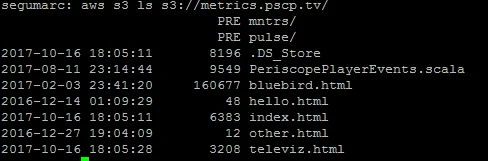
Description: The problem is using the AWS command line, it's possible to get a listing of files in the Amazon S3 Bucket with an AWS authentication. See screenshot F230035.
This user authentication is easy to get and it's free from Amazon.
The good news is that the ACL on the files are set the way that's impossible at moment to create, remove or download any file from the bucket using my authentication.
A secure amazon S3 bucket would show Access Denied like the hackerone-attachements bucket in screenshot F230036
Steps To Reproduce:
With the AWS command line installed and configured :
aws s3 ls s3://metrics.pscp.tv
Impact:
This give more information about your buckets to an attacker that are looking to attack you.
Also, considering that it's possible to set the wrong ACL on a file that you may upload and may be confidential in the bucket, a secure bucket will remove the possibly to access it without a proper authentication.
Attachments

Context
The report concerns an Amazon S3 bucket named metrics.pscp.tv, on the *.pscp.tv asset. S3 buckets are normally private: only principals named in the bucket policy or ACL can list or read objects. The report concerns the bucket's listing permission, not the objects themselves.
Setup
The only precondition is an AWS account and the AWS command line installed and configured with credentials for that account. The researcher notes that such authentication is easy to obtain and free from Amazon. No special role, permission or relationship with Periscope is required: any authenticated AWS user is enough.
Finding it
The researcher used the AWS CLI against the bucket name and found that the bucket returned a file listing to an AWS-authenticated user. A bucket that is correctly locked down should instead answer with Access Denied, which is exactly what the researcher observed on a comparison bucket (hackerone-attachements).
Exploitation
Step 1: list the bucket
With the AWS command line installed and configured, the researcher ran:
aws s3 ls s3://metrics.pscp.tv
The command asks S3 for the objects in the metrics.pscp.tv bucket using the caller's AWS credentials. Instead of an access error, it returned a listing of the files in the bucket.
The screenshot shows the output of the listing command against metrics.pscp.tv.
Step 2: compare with a secure bucket
The report says a secure bucket would show Access Denied, as the hackerone-attachements bucket does.
The screenshot shows the Access Denied response from the secure comparison bucket.
Limits observed
The ACLs on the files meant that, with that authentication, it was impossible at the time to create, remove or download any file from the bucket. The ACLs on the objects are set such that, with that authentication, it was impossible at the time to create, remove or download any file from the bucket. The exposure was therefore the listing only, not read or write access to object contents.
Root cause
The bucket returned a listing to an AWS-authenticated user; the report does not describe the policy or ACL responsible. The report does not describe the exact policy or ACL statement responsible, so the precise misconfiguration is not stated. The object ACLs were tight enough to block reads, writes and deletes, which is why the impact stayed at metadata disclosure.
Impact
The listing gives an attacker more information about the buckets, which is useful to someone looking to attack the organisation. The researcher also raises a forward-looking concern: if a file with a wrong ACL, possibly confidential, were uploaded to the bucket, a secure bucket would remove the possibility of accessing it without proper authentication. In other words, the loose listing permission is a sign that bucket-level access control is not being applied consistently, and the exposure could grow if object ACLs are ever set incorrectly. The report does not claim that any object contents were accessible at the time.
Fix
The implied fix is to restrict the bucket's list permission so that arbitrary AWS-authenticated users receive Access Denied, matching the behaviour of the comparison bucket.
Variants to test
- Run the same listing command against other bucket names derived from the target's hostnames and subdomains. A positive result is a file listing instead of
Access Denied. - Try listing buckets whose names match internal service names (for example metrics, logs, backups, assets). A positive result is any object key returned to your AWS identity.
- Where listing is blocked, try reading a known object key directly. A positive result is object contents returned without authorisation.
- Check whether the same credentials can write or delete. A positive result is a successful upload or removal, which would raise the severity well beyond information disclosure.
Hunting notes
The signal is a listing response rather than Access Denied when using a throwaway AWS account.
A bounty of 140.00 USD was awarded, and the report was disclosed on 2017-11-19.
What happened, in plain words
One of the subdomains on pscp.tv, metrics.pscp.tv, is the name of a storage bucket in Amazon S3. Think of an S3 bucket as a large online filing cabinet: you put files in it, and the service decides who is allowed to open the cabinet, look at the list of folders, or take anything out.
Normally a bucket is private. Only the people or programs the owner has named are allowed to do anything with it. In this case, the researcher found that the cabinet would happily show its list of contents to anyone who had a free Amazon account. Not the files themselves, just the list of what was inside. That is still useful to someone planning an attack, because a list of file names tells you what a company stores and how it names things.
The researcher proved it with one short command, and noted that a correctly locked bucket would answer Access Denied. The report was filed on HackerOne, a bounty of 140.00 USD was awarded, and it was disclosed on 2017-11-19.
Context
The report concerns an Amazon S3 bucket named metrics.pscp.tv, on the *.pscp.tv asset. A bucket is a container in Amazon's cloud storage; each bucket has a name that is unique across all of Amazon S3, and inside it you store files, which S3 calls objects.
S3 buckets are private by default. Access is controlled by rules: a bucket policy (a document attached to the bucket saying who may do what) and ACLs (access control lists, per-object or per-bucket lists of who is allowed which operations). Only the identities named in those rules, called principals, can list the objects in the bucket or read them.
This report is about the listing permission only, not about the contents of the files. Listing means asking the service "what is in here?" and getting back the names. Reading means actually downloading a file. The two are separate permissions, and here only the first one was open.
Setup
There is only one thing you need before you can try this: an Amazon Web Services account, plus the AWS command line tool installed on your computer and configured with the credentials of that account.
A few terms, from zero:
- AWS (Amazon Web Services) is Amazon's cloud platform. Companies rent computers and storage from it instead of buying their own.
- Credentials are the username-and-key pair that proves to Amazon who you are. When you sign up, Amazon gives you an access key and a secret key, which are long strings of characters. Programs use them to sign their requests so Amazon knows the request comes from your account.
- The AWS command line (often called the AWS CLI) is a program you run in a terminal window by typing commands, instead of clicking buttons on a website. It is the text-based equivalent of the AWS website console.
The researcher notes that such authentication is easy to obtain and free from Amazon. That matters: no special role, no permission from Periscope, and no relationship with the company is required. Any ordinary person who signs up for a free AWS account is enough.
Finding it
The researcher pointed the AWS command line at the bucket name and found that the bucket returned a file listing to an ordinary AWS-authenticated user. In other words, Amazon did not check whether this particular user had any business with Periscope; it only checked that the user was logged in to some AWS account.
A bucket that is correctly locked down should instead answer with Access Denied. That is the standard refusal message: the service understood the request, but the rules say no. The report points to a comparison bucket, hackerone-attachements, as an example of a secure bucket that shows Access Denied.
Exploitation
Step 1: list the bucket
With the AWS command line installed and configured, the researcher ran:
aws s3 ls s3://metrics.pscp.tv
Line by line, in plain words:
awsis the name of the command line program. Typing it tells your computer to run the AWS tool.s3is the part of AWS being addressed, namely the Simple Storage Service, Amazon's file storage.lsstands for "list". It is the same idea as thelscommand on Linux or macOS, which shows the files in a folder. Here it asks S3 to show the objects in a bucket.s3://metrics.pscp.tvis the address of the bucket. Thes3://part says which service the address belongs to, andmetrics.pscp.tvis the bucket name.
So the whole command means: "Amazon storage service, please list the contents of the bucket called metrics.pscp.tv, using the credentials I have configured." The tool signs the request with the caller's AWS credentials and sends it to Amazon.
Instead of an access error, the command returned a listing of the files in the bucket.
The screenshot shows the output of the listing command against metrics.pscp.tv: a list of file names came back where a refusal was expected.
Step 2: compare with a secure bucket
To show what the correct behaviour looks like, the researcher ran the same kind of listing against a bucket that is properly restricted, hackerone-attachements, and received Access Denied.
The screenshot shows the Access Denied response from the secure comparison bucket.
Limits observed
The ACLs on the files meant that, with that authentication, it was impossible at the time to create, remove or download any file from the bucket. The ACLs on the objects are set such that, with that authentication, it was impossible at the time to create, remove or download any file from the bucket.
In plain terms: the cabinet door was unlocked enough to read the labels on the folders, but not enough to take a folder out, put a new one in, or throw one away. The exposure was therefore the listing only, not read or write access to object contents.
Root cause
The bucket returned a listing to an AWS-authenticated user; the report does not describe the policy or ACL responsible. Imagine a building where the receptionist will read out the tenant directory to anyone who shows any ID card at all, instead of only to people on the visitor list. The ID card proves you exist; it does not prove you belong.
The report does not describe the exact policy or ACL statement responsible, so the precise misconfiguration is not stated. What is clear is that the object ACLs were tight enough to block reads, writes and deletes, which is why the impact stayed at metadata disclosure. Metadata here means information about the files, such as their names, rather than the files themselves.
Impact
The listing gives an attacker more information about the buckets, which is useful to someone looking to attack the organisation. None of that is a break-in on its own, but it is a map.
The researcher also raises a forward-looking concern: if a file with a wrong ACL, possibly confidential, were uploaded to the bucket, a secure bucket would remove the possibility of accessing it without proper authentication. In other words, the loose listing permission is a sign that bucket-level access control is not being applied consistently, and the exposure could grow if object ACLs are ever set incorrectly. The report does not claim that any object contents were accessible at the time.
Fix
The implied fix is to restrict the bucket's list permission so that arbitrary AWS-authenticated users receive Access Denied, matching the behaviour of the comparison bucket.
Variants to test
If you want to look for the same kind of mistake elsewhere, these are the directions the researcher's approach suggests:
- Run the same listing command against other bucket names derived from the target's hostnames and subdomains. A positive result is a file listing instead of
Access Denied. - Try listing buckets whose names match internal service names (for example metrics, logs, backups, assets). A positive result is any object key returned to your AWS identity. An object key is simply the name of a file inside a bucket.
- Where listing is blocked, try reading a known object key directly. A positive result is object contents returned without authorisation.
- Check whether the same credentials can write or delete. A positive result is a successful upload or removal, which would raise the severity well beyond information disclosure.
Hunting notes
Recon means the early information-gathering phase of a security test, where you collect names, addresses and technologies before trying anything.
The signal is a listing response rather than Access Denied when using a throwaway AWS account. A throwaway account is a fresh, free account created only for testing, so that nothing you do is tied to your real identity or your employer's account.
A bounty of 140.00 USD was awarded, and the report was disclosed on 2017-11-19.
Glossary
- AWS (Amazon Web Services): Amazon's cloud platform, where companies rent computers and storage over the internet.
- S3 (Simple Storage Service): Amazon's file storage service, where files are kept in containers called buckets.
- Bucket: a named container in S3 that holds files. Bucket names are unique across all of S3.
- Object: a single file stored inside an S3 bucket.
- Object key: the name that identifies an object inside a bucket.
- Listing: asking a storage service which objects a bucket contains, without downloading them.
- ACL (access control list): a list attached to a bucket or object saying which identities may perform which operations on it.
- Bucket policy: a document attached to a bucket that states who is allowed to do what.
- Principal: the identity (a user, account or role) that a permission rule refers to.
- Credentials: the access key and secret key that prove to AWS which account is making a request.
- AWS CLI (command line interface): a program that lets you use AWS by typing commands in a terminal instead of clicking in a website.
- Terminal: a text window on your computer where you type commands.
- Access Denied: the standard refusal message meaning the service understood the request but the rules do not allow it.
- Information disclosure: a weakness where information that should be hidden is revealed to someone who should not see it.
- Metadata: data about files, such as their names and sizes, rather than the files' contents.
- Recon: the information-gathering phase of a security test, before any attempt to exploit anything.
- Subdomain: a name that sits under a main domain, such as
metricsinmetrics.pscp.tv. - Bounty: a reward paid by an organisation to someone who reports a security problem to it.
- HackerOne: a platform where security researchers report vulnerabilities to organisations and organisations respond.

