Multiple XSS on account settings that can hijack any users in the company.
Several inputs in the MoPub account settings, including the currency field and company information fields, did not sanitise user input, so stored scripts ran when other users viewed those pages. An attacker with an account could hijack the session of another user, including an administrator, and vice versa.

- Triaged in 13 hours
- Fixed in 22 days
- Paid in 12 days
- Disclosed after 32 days
Note:
Hello Twitter Team, I just noticed that my report #485748 is already fixed, can you confirm? but my other duplicate reports aren't and still exists. #492444 #492913 are you sure it's on the same root cause? because I think the broad fix is already released but didn't fix the other issues. I will make a report here so you'll notice. I will merge #492444 #492913 here. I'm also thinking for Twitter Security. I'm monitoring MoPub since report #485748 was set on triage.
The broad fix didn't really fixed all issues, that's why I'm resubmitting these issues.
##Description: An issue that can be performed vice versa. That a member can hijack a admin or admin hijack a member by injecting a malicious scripts in the accounts settings.
##Steps to reproduce:
- Login to MoPub: https://app.mopub.com/account/login/
- Go to account settings (almost everything here is vulnerable to XSS)
- Inject on currency
- You can also inject on company's information (every input is vulnerable to XSS)
Cases of injecting on company's name
- When the victim go to report's tab XSS will trigger. (even if the victim is on his/her original company, attacker's company still visible on email drop down menu.)
- When the victim go to account settings XSS will trigger.
- When the victim go to edit user settings XSS will trigger.
Cases of injecting on currency(vice versa attack)
- Administrator can inject malicious payload in currency can hijack member's session. (XSS triggers on member's end)
- Member can inject malicious payload in currency can hijack administrator's session. (XSS triggers on administrator's end)
I provided a Full Demonstration of the vulnerability F432851
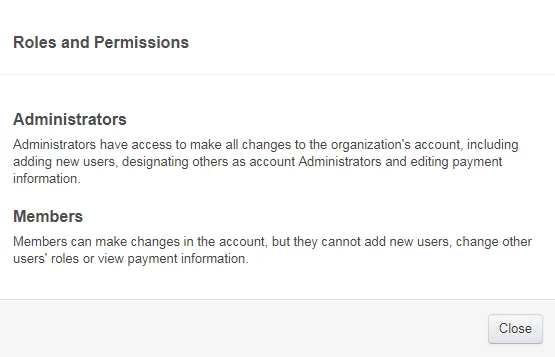
Based on Roles and Permissions: (Vice Versa Attack)
- Members can make changes in the account, but they cannot add new users, change other users' roles or view payment information. F432849
Impact
This vulnerability can impact other users invited by the attacker. And it is Stored XSS that every time the victim visits the vulnerable endpoints, XSS will trigger. The impact here is the attacker can hijack the victim's session.
It's also a vice versa attack. the attacker could be the administrator or the member.
Attachments
Context
MoPub is a mobile advertising platform, and the report concerns its account area at app.mopub.com. The feature in scope is the account settings screen, where a user manages company information, currency and user settings. The researcher describes almost every input on that screen as vulnerable to stored cross-site scripting, and frames the bug as a two-way attack: a member can hijack an administrator, and an administrator can hijack a member.
The report was filed against the X / xAI program on HackerOne by giddsec, rated critical, with a bounty of 700.00 USD, and disclosed on 2019-04-01. The asset named is mopub.com.
Setup
The report does not describe any special tooling, browser version or test accounts. The only precondition stated is a logged-in MoPub account, reached through the login page:
https://app.mopub.com/account/login/
The attack model depends on roles and permissions. The researcher notes that members can make changes in the account, but cannot add new users, change other users' roles or view payment information. That distinction matters because the payloads are stored in account-level fields that both roles can reach.
Finding it
The researcher had already reported the same class of issue in report #485748, which was fixed. Two further reports, #492444 and #492913, were still open, and the researcher disagreed that they shared the same root cause as the fixed one. The argument in the report is that the broad fix was released but did not cover the other issues, so the remaining cases were resubmitted and merged into this report.
The observation behind the finding is simple: values saved in account settings are stored and later rendered into pages that other users of the same account visit. Fields such as currency and company information are saved once and rendered later, so a payload entered by one user executes in the browser of another user who opens the affected pages.
Exploitation
Step 1: log in
- Log in to MoPub at the login URL above.
- Go to account settings. The researcher states that almost everything on this screen is vulnerable to XSS.
- Inject into the currency field.
- Alternatively, inject into the company's information, where every input is described as vulnerable.
No payload strings are included in the report, so the exact injection syntax is not documented here.
Step 2: trigger through the company name
When the payload is stored in the company name, the researcher lists three places where it fires:
- The victim opens the reports tab. The XSS triggers even if the victim belongs to their own original company, because the attacker's company remains visible in the email drop-down menu.
- The victim opens account settings.
- The victim opens edit user settings.
Step 3: trigger through currency, in both directions
The currency field produces the vice versa behaviour:
- An administrator injects a payload into currency and hijacks a member's session, because the XSS triggers on the member's side.
- A member injects a payload into currency and hijacks the administrator's session, because the XSS triggers on the administrator's side.
The report refers to a full demonstration of the vulnerability under the identifier F432851, and to a roles and permissions reference under F432849. Neither is reproduced in the text.
The attachments contain a screenshot and a screen recording of the full proof of concept.
Root cause
The report does not include code or a description of the server-side handling. What it establishes is that values saved in account settings, specifically currency and company information, are stored and later rendered into pages viewed by other users of the account without being neutralised. Because the stored value is shared across the account, the payload crosses the boundary between roles: whoever can write the field can execute script in the session of anyone who reads it. The researcher argued that the earlier broad fix did not cover every field or every rendering location, which is why he treated the remaining cases as separate issues rather than duplicates of the fixed one.
Impact
The researcher states that the vulnerability can affect other users invited by the attacker, and that because it is stored XSS, it triggers every time the victim visits the vulnerable endpoints. The stated impact is session hijacking of the victim. The attack works in both directions: the attacker can be the administrator or the member. The report does not describe what happens after a session is hijacked, nor does it quantify how many users could be reached.
Fix
It only records that the earlier broad fix for #485748 did not resolve the remaining cases, which is why they were resubmitted.
Variants to test
- Other account-level fields that are shared between roles, such as company name, currency and user settings. A positive result is a stored value that executes when a second user of the same account opens a page that renders it.
- Drop-down menus populated from stored data, such as the email selector mentioned in the report. A positive result is script execution when the menu is opened, even for a victim in a different company.
- Cross-role flows in general: any field a lower-privileged user can write and a higher-privileged user can read. A positive result is execution in the administrator's session from a member account.
- Pages that render the same stored value in several contexts, such as reports, account settings and edit user settings. A positive result is execution on each page independently, which shows the fix has to cover every rendering location.
Hunting notes
This kind of bug tends to sit in settings screens where values are saved once and displayed to other users of the same tenant, especially fields that feed drop-downs and summaries rather than the main profile page. During recon, the signal is a multi-user account model with distinct roles, where a low-privileged member can edit shared fields. The researcher showed impact by demonstrating execution in both directions, member to administrator and administrator to member, and by listing each page where the payload fires, arguing that the issue was broader than the already-fixed report and not a duplicate of it.
What happened, in plain words
Companies used it through a website, and each company had an account with several people in it: some were administrators with full control, others were ordinary members with fewer powers. The account had a settings page where you could change things like the company name and the currency.
The problem was that some of these settings were not cleaned up before being shown back to people. If someone typed a small piece of code into a settings box, the website saved it and later displayed it as if it were part of the page. When another person in the same company opened a page that showed that saved value, their browser ran the code. Code that runs inside someone else's browser session is called cross-site scripting, or XSS. Because the bad value is saved on the server and shown again and again, this particular kind is called stored XSS.
The researcher who found this had already reported a similar problem earlier, and it had been fixed. Two more reports of his were still open, and he did not believe they were duplicates of the fixed one. He argued that the broad fix had been released but had not covered every field or every page, so he merged the remaining cases into this report to make the point. The report was rated critical, paid a bounty of 700.00 USD, and was disclosed on 2019-04-01.
The most interesting part is that the attack works in both directions. A member can plant the code and catch an administrator, and an administrator can plant the code and catch a member. Whoever can edit the shared setting can reach whoever later looks at it.
The product and the feature
MoPub's account area lived at app.mopub.com. The feature in scope is the account settings screen. This is the page where a user manages company information, the currency, and user settings. Think of it like the shared settings of a team workspace: one person changes a value, and everyone in the team sees the new value the next time they open the workspace.
The report says almost every input on that screen is vulnerable to stored XSS. An input is simply a box on a web page where you can type something, like the box for a company name. When you press save, the browser sends what you typed to the server, the computer that runs the website. The server stores it in a database, a large organised store of information. Later, when any page needs to show that value, the server fetches it from the database and puts it into the page it sends to the browser.
The danger appears at that last step. If the server puts the saved text into the page without treating it as plain text, the browser cannot tell the difference between text a person typed and instructions that are part of the page. It simply does what the page says. That is the whole mechanism behind this bug.
Who can do what
The attack depends on roles and permissions. A role is a label that says what a person is allowed to do. A permission is one specific thing a role may do. The researcher notes that members can make changes in the account, but they cannot add new users, change other users' roles or view payment information.
That distinction matters. The payloads are stored in account-level fields, meaning fields that belong to the whole company rather than to one person. Both roles can reach those fields, so both roles can write into them, and both roles can end up reading what the other wrote.
Setting up
The report does not describe any special tooling, browser version or test accounts. The only precondition stated is a logged-in MoPub account, reached through the login page:
https://app.mopub.com/account/login/
This is the address of the login form. You open it in a browser, type your username and password, and the site gives your browser a session. A session is how a website remembers that you are logged in: after you sign in, the server hands your browser a small piece of data, often called a cookie, and the browser sends it back with every later request. The server looks at it and knows the request comes from you. If someone else can obtain that piece of data, they can pretend to be you, which is why taking over a session is the goal of this attack.
Finding it
The researcher had already reported the same class of issue in report #485748, which was fixed. Two further reports, #492444 and #492913, were still open, and he disagreed that they shared the same root cause as the fixed one. Root cause means the underlying reason a bug exists, as opposed to one visible symptom of it. His argument was that the broad fix had been released but did not cover the other issues, so the remaining cases were resubmitted and merged into this report.
The observation behind the finding is simple. The account settings screen saves values and later shows them again on pages that other users of the same account visit. Fields such as currency and company information are written once and rendered later. Render means to turn stored data into the visible page your browser displays. So a payload entered by one user executes in the browser of another user who opens the affected pages.
Exploitation
Step 1: log in and reach the settings
- Log in to MoPub at the login URL above. You need a real account, because the settings only exist for signed-in users.
- Go to account settings. The researcher states that almost everything on this screen is vulnerable to XSS.
- Inject into the currency field. Inject here means typing a value that the site will treat as code rather than as text.
- Alternatively, inject into the company's information, where every input is described as vulnerable.
The report does not include the payload strings themselves, so the exact text typed into the boxes is not documented. A payload, in this context, is the small piece of code that gets saved and later runs in the victim's browser.
Step 2: trigger through the company name
When the payload is stored in the company name, the researcher lists three places where it fires. Fires means the code runs.
- The victim opens the reports tab. The XSS triggers even if the victim belongs to their own original company, because the attacker's company remains visible in the email drop-down menu. A drop-down menu is the list that opens when you click a small arrow next to a box. If the menu is built from saved data, the saved code runs when the menu is built.
- The victim opens account settings.
- The victim opens edit user settings.
Each of these is a separate page that displays the saved company name. The fact that all three fire shows the problem is not confined to one screen.
Step 3: trigger through currency, in both directions
The currency field produces the vice versa behaviour:
- An administrator injects a payload into currency and hijacks a member's session, because the XSS triggers on the member's side. Hijack here means take control of the victim's logged-in session, so the attacker can act as the victim.
- A member injects a payload into currency and hijacks the administrator's session, because the XSS triggers on the administrator's side.
The report refers to a full demonstration of the vulnerability under the identifier F432851, and to a roles and permissions reference under F432849. Neither is reproduced in the text.
The attachments contain a screenshot and a screen recording of the full proof of concept. A proof of concept is a demonstration that the bug really works, usually recorded so others can follow the same steps.
Why it works
The report does not include code or a description of how the server handles the values. What it establishes is that values saved in account settings, specifically currency and company information, are stored and later rendered into pages viewed by other users of the account without being neutralised. Neutralising, also called escaping or encoding, means converting special characters into harmless text so the browser shows them instead of acting on them. For example, the angle brackets that mark the start and end of a piece of code are turned into characters that display as brackets on screen.
Because the stored value is shared across the account, the payload crosses the boundary between roles. Whoever can write the field can execute script in the session of anyone who reads it. The researcher argued that the earlier broad fix did not cover every field or every rendering location, which is why he treated the remaining cases as separate issues rather than duplicates of the fixed one.
Impact
The researcher states that the vulnerability can affect other users invited by the attacker, and that because it is stored XSS, it triggers every time the victim visits the vulnerable endpoints. An endpoint is one specific address on a website that does one specific job, such as the address that shows the reports tab. The stated impact is session hijacking of the victim. The attack works in both directions: the attacker can be the administrator or the member. The report does not describe what happens after a session is hijacked, nor does it quantify how many users could be reached.
Fix
It only records that the earlier broad fix for #485748 did not resolve the remaining cases, which is why they were resubmitted. Output encoding is the escaping described above, applied at the moment the page is built. Input validation means checking what a user typed before accepting it, for example rejecting values that contain markup.
Variants to test
These are the same ideas applied elsewhere, for anyone learning how to look for this kind of bug.
- Other account-level fields that are shared between roles, such as company name, currency and user settings. A positive result is a stored value that executes when a second user of the same account opens a page that renders it.
- Drop-down menus populated from stored data, such as the email selector mentioned in the report. A positive result is script execution when the menu is opened, even for a victim in a different company.
- Cross-role flows in general: any field a lower-privileged user can write and a higher-privileged user can read. A positive result is execution in the administrator's session from a member account.
- Pages that render the same stored value in several contexts, such as reports, account settings and edit user settings. A positive result is execution on each page independently, which shows the fix has to cover every rendering location.
Hunting notes
This kind of bug tends to sit in settings screens where values are saved once and displayed to other users of the same tenant, especially fields that feed drop-downs and summaries rather than the main profile page. A tenant is one customer organisation inside a shared service, here one company's account. During recon, meaning the early phase of looking around a target to understand its shape, the signal is a multi-user account model with distinct roles, where a low-privileged member can edit shared fields. The researcher showed impact by demonstrating execution in both directions, member to administrator and administrator to member, and by listing each page where the payload fires, arguing that the issue was broader than the already-fixed report and not a duplicate of it.
Glossary
- XSS (cross-site scripting): a bug where a website lets someone's input be treated as code by another person's browser.
- Stored XSS: XSS where the malicious value is saved on the server and runs every time a page displays it.
- Payload: the small piece of code an attacker types in, meant to run in the victim's browser.
- Input: a box on a web page where a user can type a value.
- Render: to turn stored data into the visible page the browser displays.
- Endpoint: one specific address on a website that performs one specific job.
- Session: the state of being logged in, remembered by the site across your requests.
- Cookie: a small piece of data the site stores in your browser and receives back with each request, often used to identify your session.
- Session hijacking: taking control of someone else's logged-in session so you can act as them.
- Role: a label that defines what a user is allowed to do.
- Permission: one specific action a role is allowed to perform.
- Administrator: a user with full control over the account.
- Member: a user with limited powers, who cannot add users, change roles or view payment information.
- Account-level field: a setting that belongs to the whole company rather than to one person.
- Root cause: the underlying reason a bug exists, as opposed to one visible symptom.
- Duplicate: a report describing the same underlying issue as another report.
- Triage: the first review of a report, where a team decides whether it is valid and how serious it is.
- Bounty: a payment made to a researcher for a valid report.
- Disclosed: made public, usually after the issue has been fixed.
- Output encoding (escaping): converting special characters into harmless text so the browser displays them instead of acting on them.
- Input validation: checking what a user typed before accepting it.
- Drop-down menu: the list that opens when you click a small arrow next to a box.
- Tenant: one customer organisation inside a shared service, here one company's account.
- Recon: the early phase of exploring a target to understand how it is built.
- Proof of concept: a demonstration that a bug really works, often recorded as a video or screenshots.
- Database: an organised store of information kept by the server.
- Server: the computer that runs the website and stores its data.





