Twitter Periscope Clickjacking Vulnerability
The Periscope canary web hosts relied on an X-Frame-Options ALLOW-FROM directive that several browsers do not honour, so the pages could be framed by other sites. An attacker could lure a logged-in user to a page that frames the site and trick them into clicking controls, potentially deactivating their account.

- Triaged in 2 days
- Fixed in 9 days
- Paid in 3 days
- Disclosed after 43 days
Bonjour,
Summary
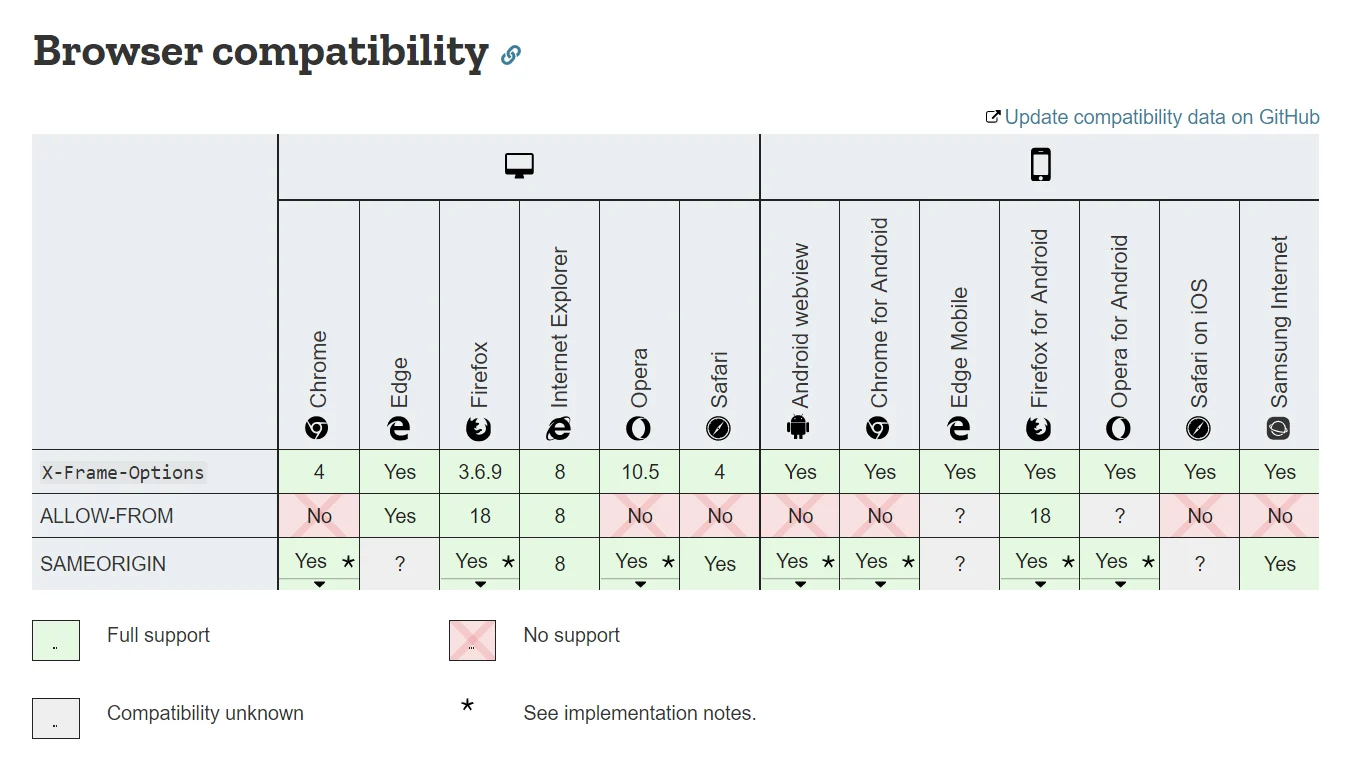
X-Frame-Options ALLOW-FROM https://twitter.com/ not supported by several Browser, this caused Clickjacking on Twitter Periscope subdomain (https://canary-web.pscp.tv & https://canary-web.periscope.tv)
Steps To Reproduce:
- Create a new HTML file
- Put <iframe src="https://vulnerable.site" frameborder="0"></iframe>
- Save the file
- Open document in browser
Impact
Attacker may tricked user, sending them malicious link then user open it clicked some image and their account unconsciously has been deactivated
Solution
The vulnerability can be fixed by adding "frame-ancestors 'self';" to the CSP (Content-Security-Policy) header.
NOTE
- POC & Attacking Scenarios (https://vimeo.com/338854681 PASS:Per!scop3^)
References
https://developer.mozilla.org/en-US/docs/Web/HTTP/Headers/X-Frame-Options https://www.owasp.org/index.php/Clickjacking https://github.com/OWASP/CheatSheetSeries/blob/master/cheatsheets/Clickjacking_Defense_Cheat_Sheet.md
Cheers!
Attachments
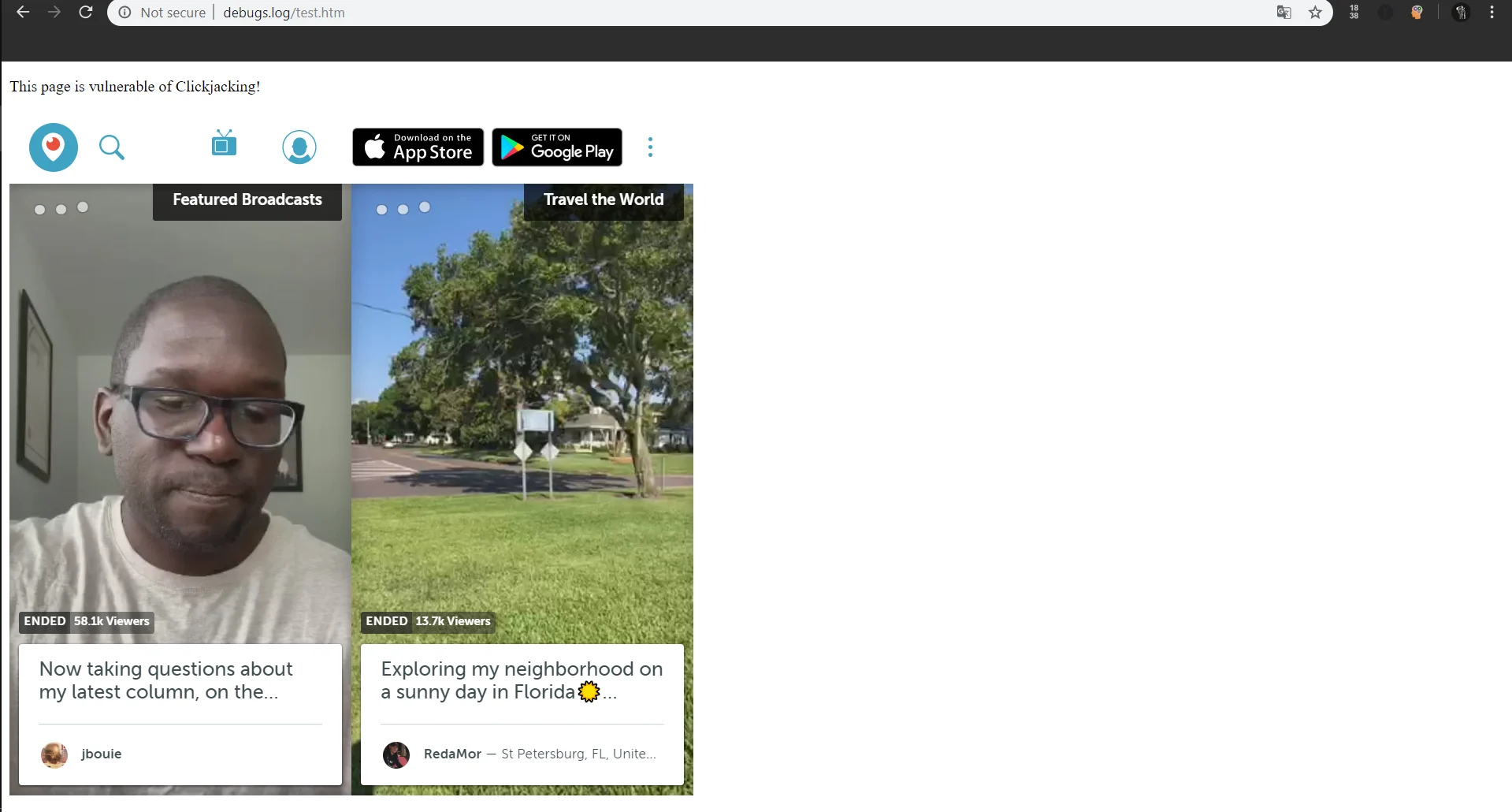
Context
Periscope was a live video streaming product that Twitter operated, and its web front end was served from the periscope.tv domain. This report concerns two hosts on that domain, https://canary-web.pscp.tv and https://canary-web.periscope.tv, which the researcher treats as the same application reachable under two names. The asset in scope is *.periscope.tv.
The weakness is UI redressing (clickjacking). The application tried to stop other sites from framing it by sending an X-Frame-Options header with the value ALLOW-FROM https://twitter.com/. The researcher's point is that this particular directive is not supported by several browsers, so the framing protection does not actually apply in those browsers and the pages can be embedded in an attacker's page.
Setup
No accounts, roles or special tooling are described. The reproduction needs only a text editor and a browser: the researcher creates a local HTML file containing an iframe that points at the vulnerable host, then opens that file in a browser. The browser used is not named, and the report does not say which browsers were tested or which ones ignore ALLOW-FROM.
Finding it
The Periscope web hosts sent an X-Frame-Options header of the form ALLOW-FROM https://twitter.com/. That header is meant to restrict which origins may frame the page, but the ALLOW-FROM directive has limited browser support. Where a browser does not understand it, the header provides no framing restriction at all, and the page can be loaded inside an iframe on any site. That is the condition the researcher set out to confirm.
Exploitation
Step 1: create a new HTML file
A local file is created to act as the attacker's page.
Step 2: put the iframe in it
The page contains a single iframe pointing at the vulnerable site:
<iframe src="https://vulnerable.site" frameborder="0"></iframe>
src is the address of the framed page, which in a real attack would be one of the Periscope hosts, and frameborder="0" removes the visible border so the framed content blends into the attacker's page. The report shows the placeholder https://vulnerable.site rather than the concrete Periscope URL.
Step 3: save the file
The file is saved locally.
Step 4: open the document in a browser
The file is opened in a browser. If the framed page renders inside the iframe, the framing protection is not being enforced by that browser, which is the clickjacking condition. The report does not include the response headers as captured, only the header value it is about.
Proof of concept
The report links a video demonstration of the proof of concept and attacking scenarios:
https://vimeo.com/338854681 PASS:Per!scop3^
The link is given with a password to open the video. The report does not describe what the video shows beyond the phrase "POC & Attacking Scenarios".
Two screenshots are attached to the report.
Root cause
The application relies on X-Frame-Options: ALLOW-FROM https://twitter.com/ as its anti-framing control. ALLOW-FROM is not honoured by several browsers, so in those browsers the page has no framing restriction and can be embedded by any origin, not only by https://twitter.com.
Impact
An attacker can embed the Periscope page in a page they control and trick a user into interacting with it. In the scenario the researcher describes, the attacker sends the user a malicious link; the user opens it, clicks some image, and their account is unconsciously deactivated. The impact therefore depends on the user being lured to the attacker's page and clicking on the framed content, and on the framed page offering an action such as account deactivation that can be triggered by a click. The report does not enumerate other actions that could be triggered this way.
Fix
The researcher's recommended fix is to add the following directive to the Content-Security-Policy header:
frame-ancestors 'self';
This restricts framing to the application's own origin through CSP, which is enforced independently of X-Frame-Options support.
Variants to test
- Look for
X-Frame-Options: ALLOW-FROM ...on any host in scope. A positive result is the page rendering inside an iframe in a browser that ignoresALLOW-FROM. - Check whether a
Content-Security-Policyheader is present and whether it containsframe-ancestors. If it is absent or does not restrict framing, theX-Frame-Optionsheader is the only control and the same bypass applies. - Test the same application under each of its hostnames, since the report lists two hosts for the same product. A positive result is the same framing behaviour on each.
- Identify state-changing actions reachable with a single click on the framed page, such as account settings toggles. A positive result is an action that completes from a click inside the iframe without further confirmation.
Hunting notes
This kind of bug hides in framing headers that look protective but are not: ALLOW-FROM is the main signal, because it is easy to spot in a response and easy to misread as a restriction. During recon, collect response headers from every host under the target's domains and flag any X-Frame-Options value other than DENY or SAMEORIGIN, then check whether a CSP frame-ancestors directive backs it up. The impact case here rests on a concrete one-click action on the framed page, account deactivation, which turns a header observation into a demonstrable attack.
What happened, in plain words
Periscope was a live video streaming product that Twitter ran. Its website lived on the periscope.tv domain. This report is about two addresses on that domain, https://canary-web.pscp.tv and https://canary-web.periscope.tv, which the researcher treats as the same application reachable under two names. The asset in scope is *.periscope.tv.
The problem is a type of attack called clickjacking, also known as UI redressing. To understand it, imagine someone places a transparent sheet of glass over a photo of a big red button on a wall. You think you are pressing the photo, but your finger actually lands on the real button underneath. On the web, the "sheet of glass" is an invisible frame that loads one website on top of another, and the "real button" is a genuine control on the site being framed.
Websites have a way to say "do not put me inside a frame on another site". One of the oldest ways is a response header called X-Frame-Options. A header is a small piece of information a web server sends alongside a page, like a label on a parcel telling the browser how to handle the contents. Periscope sent this header with the value ALLOW-FROM https://twitter.com/, which is meant to say "only Twitter may frame me".
The researcher's point is that this particular instruction, ALLOW-FROM, is not understood by several browsers. When a browser does not understand an instruction, it usually ignores it. So in those browsers the protection does nothing at all, and any website can put the Periscope page inside a frame. That is the clickjacking condition.
Setup
No accounts, roles or special tools are described. To reproduce the issue you only need a text editor and a browser. The researcher creates a local HTML file containing an iframe that points at the vulnerable host, then opens that file in a browser. The browser used is not named, and the report does not say which browsers were tested or which ones ignore ALLOW-FROM.
An HTML file is just a plain text document that a browser knows how to display. An iframe is a window inside a web page that shows another web page, like a picture frame hanging on a wall that contains a live view of a different room.
Finding it
The Periscope web hosts sent an X-Frame-Options header of the form ALLOW-FROM https://twitter.com/. That header is meant to restrict which origins may frame the page, but the ALLOW-FROM directive has limited browser support. Where a browser does not understand it, the header provides no framing restriction at all, and the page can be loaded inside an iframe on any site. That is the condition the researcher set out to confirm.
An origin, in web terms, is the combination of protocol, host and port, for example https://twitter.com. It is how browsers decide whether two pages belong to the same place.
Exploitation
Step 1: create a new HTML file
A local file is created to act as the attacker's page. This is the page the victim would be tricked into visiting. It does not need to be hosted anywhere for a quick test; opening it from your own computer is enough to see whether the framed site loads.
Step 2: put the iframe in it
The page contains a single iframe pointing at the vulnerable site:
<iframe src="https://vulnerable.site" frameborder="0"></iframe>
Line by line:
<iframestarts the frame element, the window that will show another page.src="https://vulnerable.site"is the address of the page to show inside the frame. In a real attack this would be one of the Periscope hosts. The report shows the placeholderhttps://vulnerable.siterather than the concrete Periscope URL.frameborder="0"removes the visible border around the frame, so the framed content blends into the attacker's page and the victim does not notice they are looking at a different site.></iframe>closes the element.
Step 3: save the file
The file is saved locally. Saving it is what turns the text into something the browser can open.
Step 4: open the document in a browser
The file is opened in a browser. If the framed page renders inside the iframe, the framing protection is not being enforced by that browser, which is the clickjacking condition. The report does not include the response headers as captured, only the header value it is about.
Proof of concept
The report links a video demonstration of the proof of concept and attacking scenarios:
https://vimeo.com/338854681 PASS:Per!scop3^
This is a link to a video on Vimeo, a video hosting site. The link is given with a password to open the video, shown after PASS:. The report does not describe what the video shows beyond the phrase "POC & Attacking Scenarios".
Two screenshots are attached to the report.
Root cause
The application relies on X-Frame-Options: ALLOW-FROM https://twitter.com/ as its anti-framing control. ALLOW-FROM is not honoured by several browsers, so in those browsers the page has no framing restriction and can be embedded by any origin, not only by https://twitter.com.
Content-Security-Policy, often shortened to CSP, is another header a server can send to tell the browser which things a page is allowed to do. One of its instructions, frame-ancestors, says which sites are allowed to frame the page. It is a newer and more widely supported way to do the same job as X-Frame-Options.
Impact
An attacker can embed the Periscope page in a page they control and trick a user into interacting with it. In the scenario the researcher describes, the attacker sends the user a malicious link; the user opens it, clicks some image, and their account is unconsciously deactivated. The impact therefore depends on the user being lured to the attacker's page and clicking on the framed content, and on the framed page offering an action such as account deactivation that can be triggered by a click. The report does not enumerate other actions that could be triggered this way.
In everyday terms: the victim thinks they are clicking a harmless picture, but the click actually lands on a real button on the hidden Periscope page underneath. The click lands on a real control on the hidden Periscope page underneath, and the action is carried out as if the victim had chosen it themselves.
Fix
The researcher's recommended fix is to add the following directive to the Content-Security-Policy header:
frame-ancestors 'self';
Line by line:
frame-ancestorsis the CSP instruction that controls who may frame the page.'self'means only the application's own origin is allowed to frame it. Every other site is refused.- The semicolon ends the instruction, which is how CSP separates one rule from the next.
This restricts framing to the application's own origin through CSP, which is enforced independently of X-Frame-Options support.
Variants to test
- Look for
X-Frame-Options: ALLOW-FROM ...on any host in scope. A positive result is the page rendering inside an iframe in a browser that ignoresALLOW-FROM. - Check whether a
Content-Security-Policyheader is present and whether it containsframe-ancestors. If it is absent or does not restrict framing, theX-Frame-Optionsheader is the only control and the same bypass applies. - Test the same application under each of its hostnames, since the report lists two hosts for the same product. A positive result is the same framing behaviour on each.
- Identify state-changing actions reachable with a single click on the framed page, such as account settings toggles. A positive result is an action that completes from a click inside the iframe without further confirmation.
Hunting notes
This kind of bug hides in framing headers that look protective but are not: ALLOW-FROM is the main signal, because it is easy to spot in a response and easy to misread as a restriction. During recon, collect response headers from every host under the target's domains and flag any X-Frame-Options value other than DENY or SAMEORIGIN, then check whether a CSP frame-ancestors directive backs it up. The impact case here rests on a concrete one-click action on the framed page, account deactivation, which turns a header observation into a demonstrable attack.
Recon, short for reconnaissance, simply means gathering information about a target before attacking it, in this case by looking at what each server sends back.
Glossary
- Header: a small piece of information a web server sends with a page, telling the browser how to treat it.
- X-Frame-Options: an older header that tells the browser whether a page may be shown inside a frame.
- ALLOW-FROM: a value for
X-Frame-Optionsthat names one site allowed to frame the page; several browsers do not support it. - Clickjacking / UI redressing: tricking a user into clicking something on a hidden page by placing it invisibly under content they think they are clicking.
- Iframe: a window inside a web page that displays another web page.
- Origin: the combination of protocol, host and port that identifies where a page comes from.
- Content-Security-Policy (CSP): a header that tells the browser which resources and actions a page is allowed to use.
- frame-ancestors: the CSP instruction that says which sites may frame the page.
- 'self': in CSP, a keyword meaning the page's own origin only.
- DENY / SAMEORIGIN:
X-Frame-Optionsvalues meaning no site may frame the page, or only the same site may. - Recon: gathering information about a target before attacking it.
- Proof of concept (POC): a demonstration that shows a vulnerability can actually be exploited.
- Session: the logged-in state a browser keeps for a user, so the site knows who they are on each request.


