CSRF leads to account takeover in Yahoo!
The user account update endpoint accepted cross-site requests without a CSRF token, and the session cookie lacked a SameSite attribute. An attacker could change a victim's email or password with a single click, leading to account takeover.

Bug Bounty Write-ups
The full write-up lives on its author's site
It belongs to its author, so we link to it rather than copy it. The other two tabs are our own rewrites, checked against it.
Context
The target was a Yahoo! asset that the researcher refers to throughout as vulnerable.com. The researcher does not name the real host. The feature in scope is the account settings update endpoint, which lets a signed-in user change their account data, in particular the email address associated with the account. The endpoint is reached over the API path /api/v2/users/update and, in normal use, is called by the application with the HTTP PATCH method and a JSON body.
The goal was a cross-site request forgery that would let an attacker change a victim's email address, and from there take over the account.
Setup
The researcher started by enumerating domains and filtering out the ones that did not run a web server, then deliberately picked a host whose name did not contain the word Yahoo! on the reasoning that such subdomains were more likely to hide a good flaw. No account roles, browser versions or tool versions are given beyond the use of Wappalyzer to fingerprint the backend, which identified Ruby on Rails. The attack relies on the victim's session cookie being sent with the forged request.
Finding it
The researcher went straight to the account data update functionality and changed the email from [redacted] to [redacted] while watching the request. The original request looked like this:
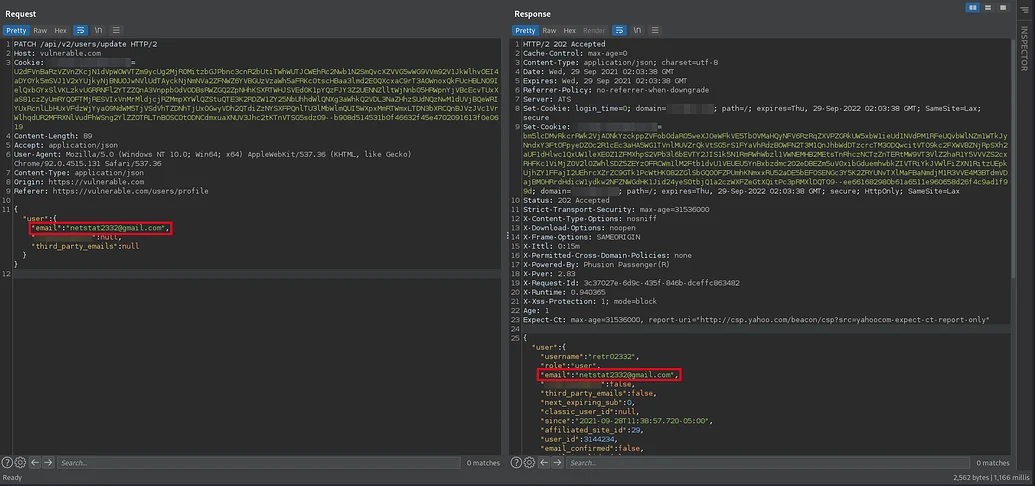
The important detail is the method: the application sends the update as PATCH with a JSON body, not as a simple form post. That is what makes a naive CSRF form fail, and it is the obstacle the rest of the work is about.
Exploitation
Step 1: check whether arbitrary origins are accepted
Before building anything, the researcher tested whether the server would accept a request carrying an arbitrary Origin. Some servers reject cross-origin requests outright. This one did not: it allowed any domain to send HTTP requests to it.
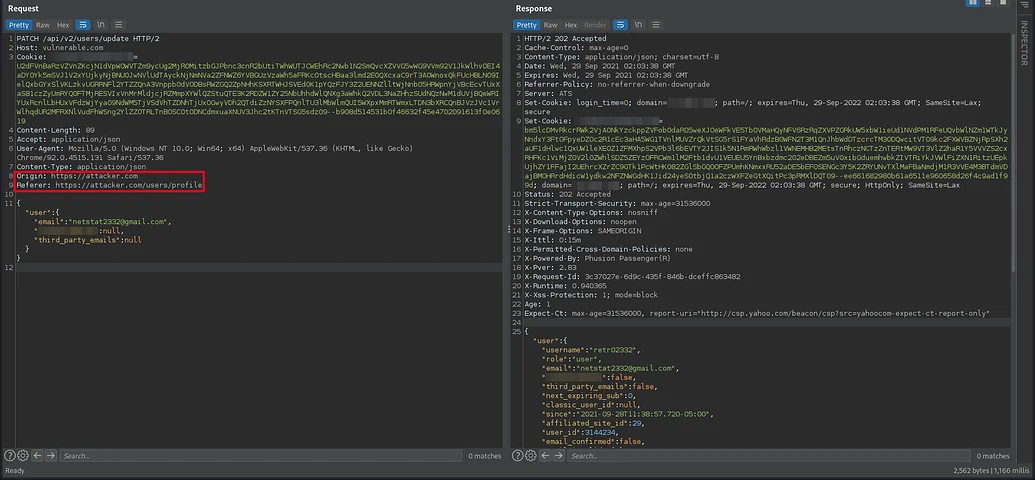
That removed the first possible blocker. A CSRF is only reachable if the server does not validate where the request came from.
Step 2: try changing the method to POST
HTML forms only support a limited set of HTTP methods, so a form cannot issue a PATCH. The obvious workaround was to resend the same request as POST. That did not work:
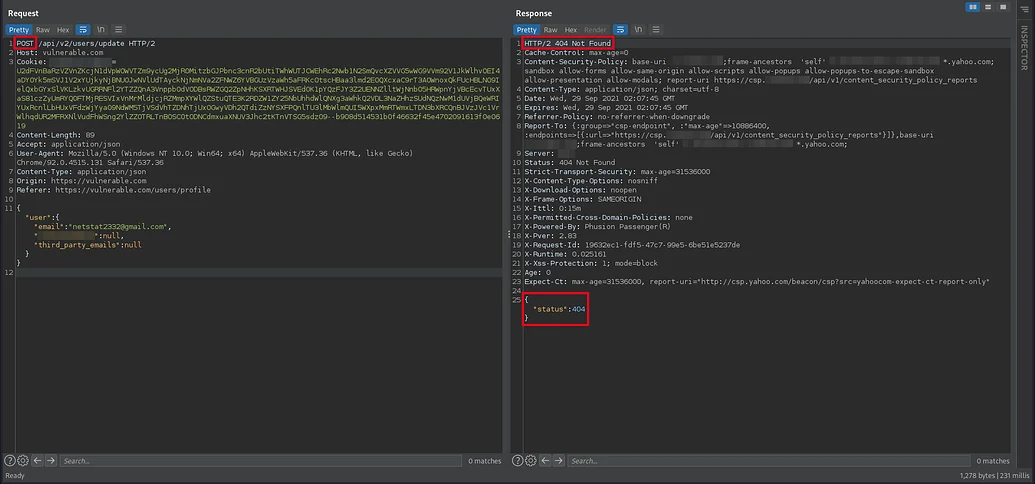
That did not work.
Step 3: change the Content-Type
The next idea was to provoke different behaviour on the server by changing the Content-type header from application/json to application/x-www-form-urlencoded:
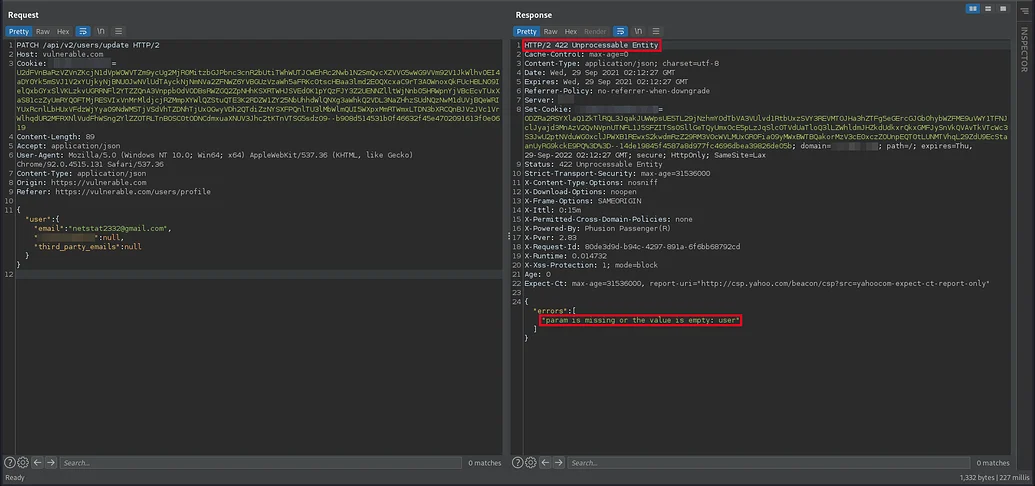
Having seen the result, the researcher rewrote the body from JSON to urlencoded form data to check whether the error persisted. This matters because an HTML form can only send urlencoded (or multipart) bodies, so the body format had to be acceptable to the backend before a form-based attack was possible.
Step 4: override the HTTP method
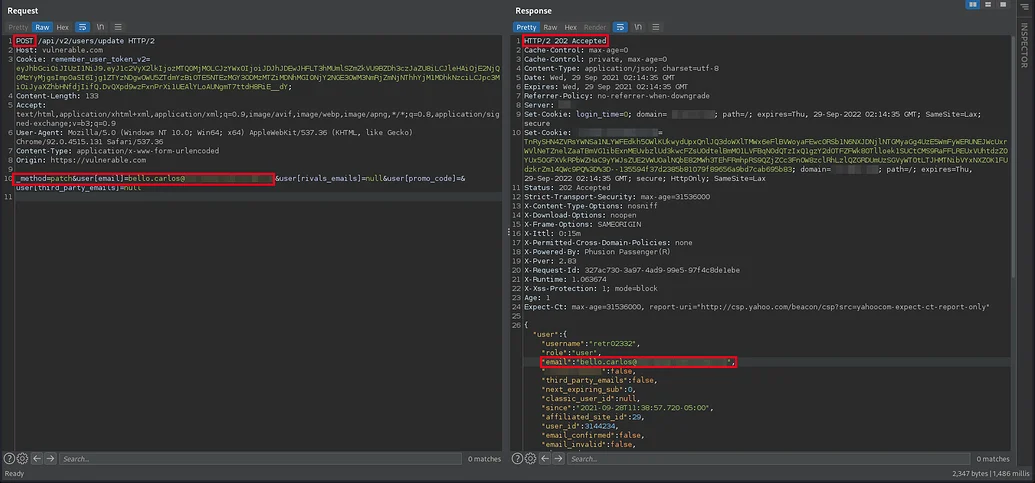
The body was now urlencoded, but the request still had to be delivered with POST, because that is all a form can do, while the backend still wanted PATCH. The researcher used Wappalyzer to identify the backend technology, found Ruby on Rails, and used the framework's HTTP method override support. The researcher used the framework's HTTP method override support.
With the arbitrary origin accepted, the urlencoded body, the POST method and the _method override combined, all the restrictions were bypassed and the CSRF became exploitable in a single click:
Step 5: the email change exploit
The working proof of concept is this page:
<!DOCTYPE html>
<html>
  <body>
    <form action="https://vulnerable.com/api/v2/users/update" method="POST">
      <input type="hidden" name="_method" value="patch" />
      <input type="hidden" name="user[email]" value="[redacted]" />
      <input type="hidden" name="user[something]" value="null" />
      <input type="hidden" name="user[promo_code]" value="" />
      <input type="hidden" name="user[third_party_emails]" value="null" />
    </form>
    <script>
      document.forms[0].submit();
    </script>
  </body>
</html>
The form posts to the update endpoint. The _method field with the value patch is what makes Rails route the request as a PATCH. The user[email] field carries the attacker's address, and the remaining user[...] fields mirror the parameters the application normally sends. The script submits the form automatically, so a victim who loads the page sends the request with their own session and the email on the account is replaced.
Step 6: the password change exploit
After reporting the bug, the researcher realised the same technique could change the account password, because the application did not ask for the current password when setting a new one:
<!DOCTYPE html>
<html>
  <body>
    <form action="https://vulnerable.com/api/v2/users/update" method="POST">
      <input type="hidden" name="_method" value="patch" />
      <input type="hidden" name="password" value="you+have+been+hacked+by+Retr02332" />
    </form>
    <script>
      document.forms[0].submit();
    </script>
  </body>
</html>
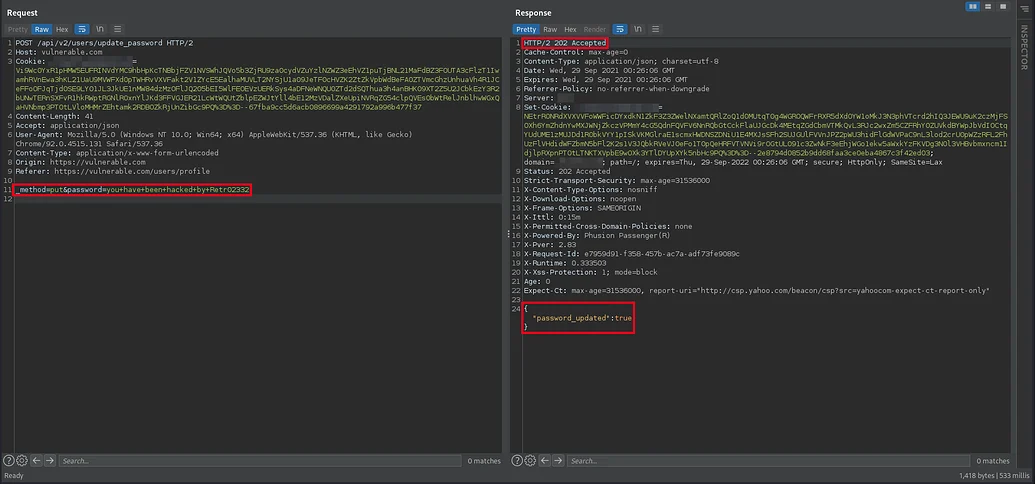
Here the only payload field is password, again with the _method override. Combined with the email change, which also opens the password recovery route, the attacker obtains complete control of any user's account with one click.
Why the session cookie did not stop it
The researcher points out that Yahoo! did not set a specific SameSite attribute on the session cookie used in these requests. In Firefox this is not exploitable, because Firefox defaults such cookies to LAX, which prevents the cookie from being sent on the cross-site request. The researcher speculates that the developers assumed every browser would apply LAX by default and therefore did not add an anti-CSRF token.
Chrome behaved differently at the time: for compatibility reasons it temporarily treated cookies without an explicit SameSite attribute as None for a two-minute window, after which it applied LAX. Chrome called this feature LAX+POST. The researcher links to techniques for extending that two-minute window, and notes uncertainty about whether the trick still works in current Chrome versions.
Root cause
The update endpoint accepted state-changing requests from arbitrary origins, and the session cookie had no explicit SameSite value. Because the cookie had no explicit SameSite value, Chrome's temporary LAX+POST treatment allowed it to be sent on a cross-site POST. The method restriction that would normally block a form-based attack was defeated by Rails' _method override, and the JSON-only body restriction was defeated by accepting a urlencoded body. The password change path additionally lacked a current-password check.
Impact
An attacker who can get a signed-in user to load a page they control can change that user's email address and password, and therefore take over the account completely. The attack requires the victim to be authenticated and to visit the attacker's page, and in practice it depended on the browser sending the session cookie cross-site, which the report says works in Chrome but not in Firefox. The report does not describe any other precondition.
Fix
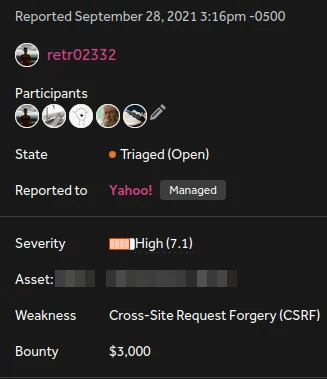
Based on the described weakness, the fixes would be an anti-CSRF token on the update endpoint, explicit SameSite attributes on session cookies, and a current-password check before a password change. The report only states that the issue was accepted within a few days and rewarded after three months:

Variants to test
- Method override on other frameworks. Send a
POSTwith a_methodparameter (or the framework's equivalent, such asX-HTTP-Method-Override) to an endpoint that normally requiresPATCH,PUTorDELETE. A positive result is the server processing the request as the overridden verb and returning a success response. - Content-Type downgrade. Take a JSON-only endpoint and resend the same parameters as
application/x-www-form-urlencoded. A positive result is the server accepting the urlencoded body and performing the action. - Origin reflection. Send a state-changing request with an arbitrary
Originheader. A positive result is the server processing it without rejecting the origin. - Cookie without SameSite. Look for session cookies that do not set
SameSiteexplicitly, then test a cross-sitePOSTfrom a page on another origin. A positive result is the request being processed with the victim's session. - Password change without current password. Submit a password change with only the new password and no current-password field. A positive result is the password being changed.

What happened, in plain words
A security researcher found a way to take over any account on a Yahoo! website with a single click from the victim. The trick is called CSRF, short for cross-site request forgery. The idea is simple: when you are signed in to a website, your browser holds a small piece of proof of who you are, called a session cookie. If an attacker can make your browser send a request to that website while you are signed in, the website will believe the request came from you, because your browser attaches the cookie automatically. The attacker does not need your password; they just need you to open a page they control.
On this particular site, the account settings page let a signed-in user change their email address. The researcher worked out how to make a victim's browser send that change without the victim knowing, replacing their email with one the attacker controls. From there the attacker can reset the password by email and own the account. Later the researcher found the same trick could set a new password directly, because the site never asked for the old one.
The interesting part is the obstacles. The site did not accept the request in the simple shape a web form can produce, so the researcher had to bend the request in two ways: change the format of the data it carries, and use a feature of the server framework that lets a request pretend to be a different kind of request. The report walks through each obstacle and how it was removed.
The target and the feature
The researcher was hunting on Yahoo!'s bug bounty programme, which pays people for reporting security flaws. He listed as many of the company's domains as he could, checked which ones actually ran a web server, and then deliberately picked one whose name did not contain the word Yahoo!. His reasoning was that such a host might be more likely to hide a good flaw. In the write-up he calls it vulnerable.com so as not to name the real host.
A domain is just a name on the internet, like a street address. A subdomain is a name under it, the way a flat number sits under a building address. Companies like Yahoo! own thousands of them, and each one can run a different piece of software.
The feature he looked at is the account settings update: the page where a signed-in user changes their account data, in particular the email address tied to the account. Behind the page, the browser talks to the server through an API. An API is the set of doors a program uses to ask a server to do things, as opposed to the pages a human clicks. Think of a restaurant: the menu and the dining room are the website you see, and the kitchen door where orders are passed through is the API. Here the door is the path /api/v2/users/update.
In normal use the application calls that door with the HTTP method PATCH and a JSON body. Two terms to unpack:
- An HTTP method is the verb at the start of every request.
GETmeans "give me something",POSTmeans "here is some data, take it",PATCHmeans "change part of this thing". The browser and server agree on what each verb means. - JSON is a way of writing data as text, using curly braces and quoted names, like
{"email": "[redacted]"}. It is the common format for APIs.
The goal was a CSRF that would let an attacker change a victim's email address, and from there take over the account.
Setup
The researcher started by enumerating domains and filtering out the ones that did not run a web server, then picked a host whose name did not contain the word Yahoo!. No account roles, browser versions or tool versions are given beyond the use of Wappalyzer, a browser extension that looks at a website and guesses what software it runs on. It identified the backend as Ruby on Rails, a popular framework for building web applications.
The attack relies on the victim's session cookie being sent with the forged request. A session cookie is a small label the server gives your browser after you log in, and your browser shows it on every later request to that site so the server knows it is still you. It is like a wristband at an event: you show it once at the door, and after that staff let you in without asking for your ticket again.
Finding it
The researcher went straight to the account data update functionality and changed the email from [redacted] to [redacted] while watching the request in his browser's developer tools. Those tools, built into every browser, show every request the page makes and every response it gets back.
The original request looked like this:
The important detail is the method: the application sends the update as PATCH with a JSON body, not as a simple form post. That is what makes a naive CSRF form fail, and it is the obstacle the rest of the work is about.
Exploitation
Step 1: check whether arbitrary origins are accepted
Before building anything, the researcher tested whether the server would accept a request carrying an arbitrary Origin. The Origin header is a line the browser adds to a request saying which website the request started from. Servers can look at it and refuse requests that come from somewhere unexpected, a bit like a club checking that a guest was invited by a member. Some servers reject cross-origin requests outright. This one did not: it allowed any domain to send HTTP requests to it.
That removed the first possible blocker. A CSRF is only reachable if the server does not validate where the request came from.
Step 2: try changing the method to POST
HTML forms, the <form> element you see on countless websites, only support a limited set of HTTP methods. In practice a form can send GET or POST, nothing else, so a form cannot issue a PATCH. The obvious workaround was to resend the same request as POST. That did not work:
That did not work. This is the first real wall: an attacker's page can only produce what a form can produce, and the server wanted something a form cannot say.
Step 3: change the Content-Type
The next idea was to provoke different behaviour on the server by changing the Content-type header from application/json to application/x-www-form-urlencoded:
The Content-Type header tells the server what format the body of the request is in. application/json means "the body is JSON". application/x-www-form-urlencoded means "the body is a list of name equals value pairs joined with ampersands", the format a form produces, like email=someone%40example.com&name=Alex. Having seen the result, the researcher rewrote the body from JSON to urlencoded form data to check whether the error persisted. This matters because an HTML form can only send urlencoded (or multipart) bodies, so the body format had to be acceptable to the backend before a form-based attack was possible.
Step 4: override the HTTP method
The body was now urlencoded, but the request still had to be delivered with POST, because that is all a form can do, while the backend still wanted PATCH. The researcher used Wappalyzer to identify the backend technology, found Ruby on Rails, and used the framework's HTTP method override support. The researcher used the framework's HTTP method override support. The parameter is a note tucked inside the request body saying "actually, please treat this as a PATCH". The server reads the note before deciding what to do, so the request arrives as a POST but is handled as a PATCH.
With the arbitrary origin accepted, the urlencoded body, the POST method and the _method override combined, all the restrictions were bypassed and the CSRF became exploitable in a single click:
Step 5: the email change exploit
The working proof of concept is this page:
<!DOCTYPE html>
<html>
  <body>
    <form action="https://vulnerable.com/api/v2/users/update" method="POST">
      <input type="hidden" name="_method" value="patch" />
      <input type="hidden" name="user[email]" value="[redacted]" />
      <input type="hidden" name="user[something]" value="null" />
      <input type="hidden" name="user[promo_code]" value="" />
      <input type="hidden" name="user[third_party_emails]" value="null" />
    </form>
    <script>
      document.forms[0].submit();
    </script>
  </body>
</html>
Line by line:
<!DOCTYPE html>tells the browser this is a modern HTML page.<html>and<body>are the outer containers of the page.<form action="https://vulnerable.com/api/v2/users/update" method="POST">starts a form.actionis the address the form will send its data to, the update endpoint.method="POST"says the form will use thePOSTverb, the only state-changing verb a form can use.<input type="hidden" name="_method" value="patch" />is a field the victim never sees. Its name is_methodand its value ispatch, which is the note Rails reads to treat thisPOSTas aPATCH.<input type="hidden" name="user[email]" value="[redacted]" />carries the attacker's email address. The nameuser[email]is how the application labels the email field; the square brackets are a naming convention that groups fields underuser.- The next three hidden fields,
user[something],user[promo_code]anduser[third_party_emails], mirror the parameters the application normally sends, so the request looks like the real one. </form>closes the form.<script>starts a small piece of JavaScript, the language browsers run inside pages.document.forms[0].submit();finds the first form on the page and submits it immediately, without the victim clicking anything.</script>,</body>and</html>close everything.
The form posts to the update endpoint. The _method field with the value patch is what makes Rails route the request as a PATCH. The user[email] field carries the attacker's address, and the remaining user[...] fields mirror the parameters the application normally sends. The script submits the form automatically, so a victim who loads the page sends the request with their own session and the email on the account is replaced. The attacker can then use the site's password recovery route, which relies on the email on file.
Step 6: the password change exploit
After reporting the bug, the researcher realised the same technique could change the account password, because the application did not ask for the current password when setting a new one:
<!DOCTYPE html>
<html>
  <body>
    <form action="https://vulnerable.com/api/v2/users/update" method="POST">
      <input type="hidden" name="_method" value="patch" />
      <input type="hidden" name="password" value="you+have+been+hacked+by+Retr02332" />
    </form>
    <script>
      document.forms[0].submit();
    </script>
  </body>
</html>
Line by line:
- The page structure and the
_methodfield are the same as before: aPOSTform to the update endpoint, with the note telling Rails to treat it as aPATCH. <input type="hidden" name="password" value="you+have+been+hacked+by+Retr02332" />is the only payload field. It sets the account password to the attacker's chosen value. The plus signs are how a form encodes spaces in a urlencoded body, so the password reads asyou have been hacked by Retr02332.- The script submits the form automatically, exactly as in the email exploit.
Here the only payload field is password, again with the _method override. Combined with the email change, which also opens the password recovery route, the attacker obtains complete control of any user's account with one click.
Why the session cookie did not stop it
The researcher points out that Yahoo! did not set a specific SameSite attribute on the session cookie used in these requests. SameSite is a setting on a cookie that tells the browser when to attach it. SameSite=Strict means only attach it when the request starts from the same site. SameSite=Lax means attach it on ordinary navigation but not on cross-site form posts. SameSite=None means attach it everywhere, including requests started from another site. In Firefox this is not exploitable, because Firefox defaults such cookies to LAX, which prevents the cookie from being sent on the cross-site request. The researcher speculates that the developers assumed every browser would apply LAX by default and therefore did not add an anti-CSRF token. An anti-CSRF token is a random value the server puts in the page and expects back with every state-changing request; an attacker's page cannot read it, so the forged request fails.
Chrome behaved differently at the time: for compatibility reasons it temporarily treated cookies without an explicit SameSite attribute as None for a two-minute window, after which it applied LAX. Chrome called this feature LAX+POST. The researcher links to techniques for extending that two-minute window, and notes uncertainty about whether the trick still works in current Chrome versions.
Root cause
The update endpoint accepted state-changing requests from arbitrary origins, and the session cookie had no explicit SameSite value. Because the cookie had no explicit SameSite value, Chrome's temporary LAX+POST treatment allowed it to be sent on a cross-site POST. The method restriction that would normally block a form-based attack was defeated by Rails' _method override, and the JSON-only body restriction was defeated by accepting a urlencoded body. The password change path additionally lacked a current-password check.
Impact
An attacker who can get a signed-in user to load a page they control can change that user's email address and password, and therefore take over the account completely. The attack requires the victim to be authenticated and to visit the attacker's page, and in practice it depended on the browser sending the session cookie cross-site, which the report says works in Chrome but not in Firefox. The report does not describe any other precondition.
Fix
The report does not say what the vendor changed. Based on the described weakness, the fixes would be an anti-CSRF token on the update endpoint, explicit SameSite attributes on session cookies, and a current-password check before a password change. The report only states that the issue was accepted within a few days and rewarded after three months:
Variants to test
- Method override on other frameworks. Send a
POSTwith a_methodparameter (or the framework's equivalent, such asX-HTTP-Method-Override) to an endpoint that normally requiresPATCH,PUTorDELETE. A positive result is the server processing the request as the overridden verb and returning a success response. - Content-Type downgrade. Take a JSON-only endpoint and resend the same parameters as
application/x-www-form-urlencoded. A positive result is the server accepting the urlencoded body and performing the action. - Origin reflection. Send a state-changing request with an arbitrary
Originheader. A positive result is the server processing it without rejecting the origin. - Cookie without SameSite. Look for session cookies that do not set
SameSiteexplicitly, then test a cross-sitePOSTfrom a page on another origin. A positive result is the request being processed with the victim's session. - Password change without current password. Submit a password change with only the new password and no current-password field. A positive result is the password being changed.
Glossary
- Account takeover: when an attacker gains full control of someone else's account, usually by changing its email or password.
- Anti-CSRF token: a random value the server places in a page and expects back with state-changing requests, so a page on another site cannot forge them.
- API: the set of addresses and rules a program uses to ask a server to do things, separate from the pages a person clicks.
- Backend: the software on the server that receives requests and does the real work, as opposed to the frontend the browser shows.
- Bug bounty programme: a scheme where a company pays researchers for reporting security flaws responsibly.
- Chrome: Google's web browser.
- Content-Type: a header saying what format the body of a request is in, such as JSON or urlencoded form data.
- Cookie: a small piece of data a website stores in your browser and gets back on later requests, often used to remember that you are signed in.
- Cross-origin: a request that starts from one website and targets another.
- CSRF (cross-site request forgery): tricking a signed-in victim's browser into sending a state-changing request to a site the victim trusts.
- Developer tools: the panel built into browsers that shows requests, responses and page code.
- Domain: a name on the internet, such as example.com.
- Endpoint: a specific address on a server that performs a specific action, such as
/api/v2/users/update. - Firefox: Mozilla's web browser.
- Form: the HTML element that collects fields and sends them to a server, using
GETorPOSTonly. - Framework: a collection of ready-made code a developer builds an application on, such as Ruby on Rails.
- GET: the HTTP method for asking for something without changing it.
- Header: an extra line of information attached to a request or response, such as
OriginorContent-Type. - HTML: the language pages are written in.
- HTTP method: the verb at the start of a request, such as
GET,POSTorPATCH, saying what kind of action is wanted. - HTTP method override: a feature that lets a
POSTcarry a parameter such as_methodtelling the server to treat it as another verb. - JSON: a text format for structured data using braces and quoted names.
- LAX: a
SameSitevalue that stops cookies being sent on cross-site form posts. - LAX+POST: Chrome's old temporary treatment of cookies without an explicit
SameSiteasNonefor two minutes. - Multipart: another body format a form can send, used mainly for file uploads.
- None: a
SameSitevalue that lets a cookie be sent on cross-site requests. - Origin: a header saying which website a request started from.
- PATCH: the HTTP method for changing part of an existing thing.
- POST: the HTTP method for sending data to the server, the only state-changing verb a form can use.
- Proof of concept: a working example that demonstrates a vulnerability.
- PUT: the HTTP method for replacing a thing entirely.
- Ruby on Rails: a web application framework written in the Ruby language.
- SameSite: a cookie setting controlling whether the browser sends the cookie on cross-site requests.
- Session cookie: the cookie that proves you are signed in, sent with your requests to that site.
- Strict: a
SameSitevalue that only sends the cookie when the request starts from the same site. - Subdomain: a name under a domain, such as shop.example.com under example.com.
- Urlencoded: a body format of name equals value pairs joined with ampersands, the default for HTML forms.
- Wappalyzer: a browser extension that guesses what software a website runs on.
- X-HTTP-Method-Override: a header some frameworks accept as an alternative way to override the HTTP method.

