Zimbra “zmslapd” Local Root Exploit.
The zimbra user can run the zmslapd script with sudo, which executes slapd with user-supplied arguments. An attacker with code execution as zimbra can use slapd's module loading to run arbitrary code as root.
 Published on darrenmartyn.ie
This exploit was brought to you by “reading the manual”, mostly. It is the second local privilege escalation I found while doing an extremely low effort audit of Zimbra.
The full write-up lives on its author's site
It belongs to its author, so we link to it rather than copy it. The other two tabs are our own rewrites, checked against it.
Context
This is the second local privilege escalation I found during an extremely low effort audit of Zimbra. As the opening line says, the exploit was brought to you mostly by reading the manual. The first post in the series covers a Zimbra nginx local root exploit and is worth reading alongside this one.
The target here is a stock Zimbra install and, specifically, the zmslapd helper script that ships with it. The script raises resource limits, preloads a specific malloc implementation and then executes slapd, the OpenLDAP standalone server daemon. The problem is not what the script does when Zimbra calls it, but who else is allowed to call it, and with which arguments.
Setup
The only precondition for exploitation is code execution as the zimbra user. No other account, role or tooling is required beyond a shell as that user and the sudo rights the account already holds on a stock install.
Finding it
The starting point was the output of sudo -l for the zimbra user. Among the commands the account may run with root permissions is zmslapd:
(root) NOPASSWD: /opt/zimbra/libexec/zmslapd
That line means the zimbra user can run that one path as root without a password. The next question is what the script actually does, and the answer came from cat rather than any reverse engineering tooling. The full script, licence block included, is:
#!/bin/bash
#
# ***** BEGIN LICENSE BLOCK *****
# Zimbra Collaboration Suite Server
# Copyright (C) 2007, 2008, 2009, 2010, 2012, 2013, 2014, 2015, 2016 Synacor, Inc.
#
# This program is free software: you can redistribute it and/or modify it under
# the terms of the GNU General Public License as published by the Free Software Foundation,
# version 2 of the License.
#
# This program is distributed in the hope that it will be useful, but WITHOUT ANY WARRANTY;
# without even the implied warranty of MERCHANTABILITY or FITNESS FOR A PARTICULAR PURPOSE.
# See the GNU General Public License for more details.
# You should have received a copy of the GNU General Public License along with this program.
# If not, see <https://www.gnu.org/licenses/>.
# ***** END LICENSE BLOCK *****
#

ulimit -n 32768
ulimit -c unlimited
ulimit -v unlimited
export LD_PRELOAD=/opt/zimbra/common/lib/libtcmalloc_minimal.so
exec /opt/zimbra/common/libexec/slapd "$@"
The script raises the file descriptor limit, removes core size and virtual memory limits, preloads libtcmalloc_minimal.so, and then execs slapd with "$@", meaning every argument passed to zmslapd is forwarded unchanged to slapd. Because sudo runs the script as root and the script execs slapd in the same process, slapd starts as root and receives attacker-controlled arguments; with -u root and -g root it does not drop privileges. That forwarding of arbitrary arguments into a privileged daemon is what made the sudo entry look wrong.
Exploitation
The route to root runs through the slapd manual. Two options matter. -u root and -g root tell slapd not to drop privileges, so it keeps running as root. -f filename forces it to use a specific configuration file, which the attacker supplies.
Step 1: Prepare a working directory and a malicious shared object
The plan is to make slapd load a shared object of our choosing as a module. The object does not need to be a real slapd backend module: a constructor function runs as soon as the object is loaded, which is easier than writing a proper module and works fine. The source used is:
#include <stdio.h>
#include <sys/types.h>
#include <unistd.h>
__attribute__ ((__constructor__))
void dropshell(void){
    chown("/tmp/slapper/rootslap", 0, 0);
    chmod("/tmp/slapper/rootslap", 04755);
    printf("[+] done!\n");
}
When loaded, the constructor changes the owner of /tmp/slapper/rootslap to uid 0 and gid 0 and sets its mode to 04755, the setuid bit plus read, write and execute for the owner. Since the loading process is running as root, the resulting binary is a root-owned setuid shell.
Step 2: Write a configuration file that loads the module
The slapd configuration Zimbra ships with was copied and tweaked. The relevant part is the dynamic backend module section, which is changed to point at the working directory and load the shared object:
# Load dynamic backend modules:
modulepath      /tmp/slapper
moduleload      hax.so
# moduleload    back_ldap.la
modulepath sets the directory searched for modules and moduleload hax.so names the object to load. The original back_ldap.la line is commented out.
Step 3: Package it and run the privileged command
All of the above is packaged into a shell script. The steps are simple: create a directory to work in, create the shared object, a rootshell binary and the configuration file, then run the zmslapd command through sudo with arguments that make slapd run as root and use the supplied configuration file. The result is root.
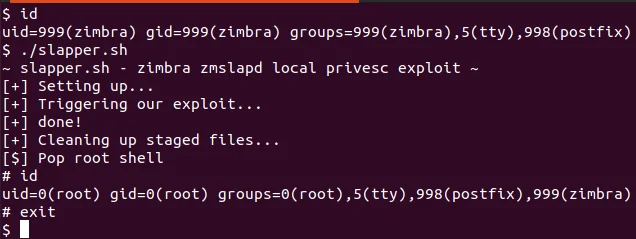
The full exploit code is published at https://github.com/darrenmartyn/zimbra-slapper.
Root cause
The mistake is in the sudo policy, not in slapd itself. A stock Zimbra install grants the zimbra user the right to run /opt/zimbra/libexec/zmslapd as root without a password. That script is a thin wrapper that forwards all of its arguments to slapd and execs it, so the sudo rule effectively grants root execution of slapd with arbitrary command-line options. slapd legitimately supports running without dropping privileges (-u root, -g root), selecting an arbitrary configuration file (-f), and loading shared objects as modules, and the wrapper does nothing to constrain any of these. The ulimit calls and the LD_PRELOAD of libtcmalloc_minimal.so are not part of the escalation path described. The sudo entry authorises the wrapper, and the wrapper's only job is to pass control, and arguments, to a far more capable program.
Impact
An attacker who already has code execution as the zimbra user can escalate to root on the host. The precondition is significant: this is a local privilege escalation, not a remote one, and it requires that initial foothold as zimbra. Once that is held, the escalation needs nothing beyond the sudo rights present on a stock install.
Fix
The report does not describe a fix or a vendor response. The disclosure timeline is given as none: the author says he simply did not bother, and refers to the previous post for why. What the design implies is that the sudo rule should not authorise a wrapper that forwards arbitrary arguments into a privileged daemon, or that the daemon should be constrained so that options such as running as root, choosing an arbitrary configuration file and loading arbitrary modules are not reachable through it.
Variants to test
The same pattern is worth checking wherever a low-privileged account has sudo rights over a wrapper script. Concretely:
- Run
sudo -las the low-privileged account and look forNOPASSWDentries pointing at shell scripts. A positive result is any script that ends inexecor otherwise invokes another program with"$@". - For each such script, read it and identify the program it launches. If that program has options to skip privilege dropping, select a configuration file, or load plugins or modules, the wrapper is a candidate.
- Test whether the program accepts a configuration that loads a shared object from a directory the low-privileged user can write to. A positive result is the constructor running with root privileges, for example a file appearing owned by root with the setuid bit set.
- Look for other Zimbra helpers with the same shape. The author notes there are more privesc opportunities in Zimbra waiting to be exploited, and suggests finding the next one as an exercise for the reader.
What happened, in plain words
Zimbra is a mail and collaboration server: an organisation installs it to give its staff email, calendars and shared folders. Like any server software, it runs as a special user account on the machine, in this case an account literally named zimbra.
On a normal Zimbra install, that zimbra account is allowed to run a small number of helper programs as the all-powerful root account, the account that can do anything on a Linux machine. One of those helpers is a short script called zmslapd. The script's job is to start another program, slapd, which is a directory server. The problem is that the script passes along, unchanged, every instruction it is given to slapd, and slapd has options that let the caller choose which configuration file to use and which extra code to load. So anyone who can run the script as root can make slapd load code of their choosing, and that code runs as root.
This is called a local privilege escalation: "local" because the attacker must already be logged in on the machine as the low-powered zimbra user, and "privilege escalation" because the goal is to climb from that limited account to root. It is not a remote attack; you cannot do it from the internet without first getting a foothold on the box.
The author found it by reading the manual, not by using fancy tools. He looked at what the zimbra account is allowed to run, read the helper script with the ordinary cat command (which just prints a file's contents), read the slapd manual page, and put the pieces together. This is the second such issue he found in Zimbra; the first one involved Zimbra's nginx web server component and is covered in a separate post.
The starting point: what can the zimbra user run as root?
On Linux, sudo is the tool that lets an ordinary user run a command as another user, usually root, if a configuration file says they may. Running sudo -l lists what the current user is permitted to do. The author ran it as the zimbra user and found this entry:
(root) NOPASSWD: /opt/zimbra/libexec/zmslapd
Line by line:
(root)means the command may be run as therootuser.NOPASSWD:means the user is not asked to type their own password first. This matters because it means an attacker who has a shell aszimbracan run the command non-interactively, for example from a script./opt/zimbra/libexec/zmslapdis the exact file path that is authorised. Only that one file may be run this way, not any other program.
So the zimbra account can run that one script as root, without a password. The next question is: what does that script actually do?
Reading the helper script
The author used cat, the simplest possible tool for printing a file, rather than a disassembler or any reverse-engineering software. The full script, licence header included, is:
#!/bin/bash
#
# ***** BEGIN LICENSE BLOCK *****
# Zimbra Collaboration Suite Server
# Copyright (C) 2007, 2008, 2009, 2010, 2012, 2013, 2014, 2015, 2016 Synacor, Inc.
#
# This program is free software: you can redistribute it and/or modify it under
# the terms of the GNU General Public License as published by the Free Software Foundation,
# version 2 of the License.
#
# This program is distributed in the hope that it will be useful, but WITHOUT ANY WARRANTY;
# without even the implied warranty of MERCHANTABILITY or FITNESS FOR A PARTICULAR PURPOSE.
# See the GNU General Public License for more details.
# You should have received a copy of the GNU General Public License along with this program.
# If not, see <https://www.gnu.org/licenses/>.
# ***** END LICENSE BLOCK *****
#

ulimit -n 32768
ulimit -c unlimited
ulimit -v unlimited
export LD_PRELOAD=/opt/zimbra/common/lib/libtcmalloc_minimal.so
exec /opt/zimbra/common/libexec/slapd "$@"
Line by line, ignoring the licence comments:
#!/bin/bashtells the operating system to run this file with the Bash shell. It is a script, not a compiled program.ulimit -n 32768raises the maximum number of files the process may have open at once to 32768. Servers often need many open files because each network connection is a file.ulimit -c unlimitedremoves the cap on the size of core dumps (a snapshot of memory written if the process crashes).export LD_PRELOAD=/opt/zimbra/common/lib/libtcmalloc_minimal.sotells the dynamic linker, the part of the system that loads shared libraries, to load this particular memory-allocation library before anything else. Zimbra ships it because it is faster than the default allocator.exportmakes the setting visible to programs the script starts.exec /opt/zimbra/common/libexec/slapd "$@"is the important line.execreplaces the current shell process with the named program, so the script does not stay around as a parent; the new program inherits the same process, and therefore the same user identity."$@"means "all the arguments that were passed to this script, quoted so they survive intact". So every argument given tozmslapdis handed straight toslapd.
Put together: sudo starts zmslapd as root, zmslapd sets a few limits, preloads a library, and then becomes slapd while still running as root, with whatever arguments the caller supplied. The wrapper adds no checks of its own. That is the flaw: the sudo rule authorises a script whose only real job is to pass control, and arguments, to a much more capable program.
Exploiting it: reading the slapd manual
The author then read the manual page for slapd to see which options could be abused. Two matter here:
-u rootand-g roottellslapdwhich user and group to run as. Normally a daemon started as root drops down to a less privileged account for safety. These options say "do not drop; stay as root".-f filenametellsslapdto use a specific configuration file instead of its default one. The caller chooses the file.
With those two options, the attacker can make slapd run as root and read a configuration file the attacker wrote. The next question is what a configuration file can make slapd do.
Step 1: a shared object that gives us a root shell
slapd supports loading extra modules at startup. A module is just a shared object, a file of compiled code (on Linux, a .so file) that a running program can pull in and execute. The author did not bother writing a proper slapd module; he wrote a tiny shared object whose only job is to run some code the moment it is loaded. In C, a function marked __attribute__ ((__constructor__)) runs automatically when the library is loaded, before anything else. The source is:
#include <stdio.h>
#include <sys/types.h>
#include <unistd.h>
__attribute__ ((__constructor__))
void dropshell(void){
    chown("/tmp/slapper/rootslap", 0, 0);
    chmod("/tmp/slapper/rootslap", 04755);
    printf("[+] done!\n");
}
Line by line:
- The three
#includelines pull in standard C declarations for the functions used below:printf, thechown/chmodfamily, and basic types. __attribute__ ((__constructor__))is a compiler hint meaning "run this function automatically when the library is loaded".void dropshell(void)is the function itself; it takes no arguments and returns nothing.chown("/tmp/slapper/rootslap", 0, 0)changes the owner and group of the file/tmp/slapper/rootslapto user ID 0 and group ID 0. User ID 0 isroot.chmod("/tmp/slapper/rootslap", 04755)sets the file's permissions. The leading0means the number is in octal.4755means: the setuid bit is set, the owner may read, write and execute, and everyone else may read and execute. The setuid bit is the key: when a program with that bit set is run, it runs with the privileges of its owner, not of the person who launched it. Since the owner is now root, running this file gives a root shell.printf("[+] done!\n")just prints a confirmation message.
Because this code runs inside slapd, which is running as root, the chown and chmod succeed even though the attacker is only the zimbra user. The file /tmp/slapper/rootslap is a rootshell binary the attacker placed there beforehand; after this code runs, it is owned by root and setuid, so executing it gives root.
Step 2: a configuration file that loads the module
The author copied the slapd configuration file that Zimbra ships and edited the section that controls module loading:
# Load dynamic backend modules:
modulepath      /tmp/slapper
moduleload      hax.so
# moduleload    back_ldap.la
Line by line:
# Load dynamic backend modules:is a comment; lines starting with#are ignored by the configuration parser.modulepath /tmp/slappersets the directory thatslapdwill search for modules./tmp/slapperis a directory the attacker created and can write to.moduleload hax.sotellsslapdto load the filehax.sofrom that directory at startup.hax.sois the compiled shared object from Step 1.# moduleload back_ldap.lais the original line, commented out so the legitimate module is not loaded.
When slapd starts with this configuration, it loads hax.so, the constructor runs as root, and the shell file becomes a root-owned setuid binary.
Step 3: package it and run the privileged command
All of the above is wrapped in a shell script so it can be run in one go. The steps are: create a working directory, create the shared object, create a rootshell binary, create the configuration file, then run the zmslapd command through sudo with arguments that make slapd stay as root and use the supplied configuration file. The result is root.
The full exploit code is published at https://github.com/darrenmartyn/zimbra-slapper.
Why it works
The mistake is in the sudo policy, not in slapd itself. A stock Zimbra install grants the zimbra user the right to run /opt/zimbra/libexec/zmslapd as root without a password. That script is a thin wrapper that forwards all of its arguments to slapd and execs it, so the sudo rule effectively grants root execution of slapd with arbitrary command-line options. slapd legitimately supports running without dropping privileges (-u root, -g root), selecting an arbitrary configuration file (-f), and loading shared objects as modules, and the wrapper does nothing to constrain any of these. The ulimit calls and the LD_PRELOAD of libtcmalloc_minimal.so are not part of the escalation path described. The sudo entry authorises the wrapper, and the wrapper's only job is to pass control, and arguments, to a far more capable program.
What an attacker gains
An attacker who already has code execution as the zimbra user can escalate to root on the host. The precondition is significant: this is a local privilege escalation, not a remote one, and it requires that initial foothold as zimbra. Once that is held, the escalation needs nothing beyond the sudo rights present on a stock install.
Fix
The report does not describe a fix or a vendor response. The disclosure timeline is given as none: the author says he simply did not bother, and refers to the previous post for why. What the design implies is that the sudo rule should not authorise a wrapper that forwards arbitrary arguments into a privileged daemon, or that the daemon should be constrained so that options such as running as root, choosing an arbitrary configuration file and loading arbitrary modules are not reachable through it.
Variants to test
The same pattern is worth checking wherever a low-privileged account has sudo rights over a wrapper script. Concretely:
- Run
sudo -las the low-privileged account and look forNOPASSWDentries pointing at shell scripts. A positive result is any script that ends inexecor otherwise invokes another program with"$@". - For each such script, read it and identify the program it launches. If that program has options to skip privilege dropping, select a configuration file, or load plugins or modules, the wrapper is a candidate.
- Test whether the program accepts a configuration that loads a shared object from a directory the low-privileged user can write to. A positive result is the constructor running with root privileges, for example a file appearing owned by root with the setuid bit set.
- Look for other Zimbra helpers with the same shape. The author notes there are more privesc opportunities in Zimbra waiting to be exploited, and suggests finding the next one as an exercise for the reader.
Glossary
- Zimbra: a mail and collaboration server product; this report concerns a stock install of it.
- root: the all-powerful administrator account on a Linux system; user ID 0.
- zimbra user: the low-privileged account that Zimbra's own software runs as.
- Local privilege escalation (privesc): climbing from a limited account to a more powerful one on the same machine, after already having some access there.
- sudo: the Linux tool that lets a permitted user run a command as another user, usually root.
- sudo -l: the command that lists what the current user is allowed to run through sudo.
- NOPASSWD: a sudo setting meaning the user is not asked for their own password before running the command.
- Wrapper script: a small script whose job is to set up an environment and then start another program.
- exec: a shell built-in that replaces the current process with another program, keeping the same process and therefore the same user identity.
- "$@": in a shell script, all of the arguments passed to the script, quoted so they are forwarded intact.
- ulimit: a shell command that sets resource limits for the process, such as open files or memory.
- Core dump: a file containing a snapshot of a process's memory, written when it crashes.
- LD_PRELOAD: an environment variable that tells the system to load a particular shared library before any other.
- Shared object (.so): a file of compiled code that a running program can load and use; on Windows the equivalent is a DLL.
- slapd: the OpenLDAP standalone directory server daemon; the program
zmslapdstarts. - zmslapd: the Zimbra helper script that sets up the environment and starts
slapd. - Daemon: a program that runs in the background providing a service, such as a mail or directory server.
- Configuration file: a file of settings that a program reads at startup to decide how to behave.
- Module: an optional piece of code a program can load at runtime to add features; here, a shared object.
- Constructor: a function in a shared object that runs automatically when the object is loaded.
- chown: the system call or command that changes a file's owner and group.
- chmod: the system call or command that changes a file's permissions.
- Setuid bit: a permission bit that makes a program run with the privileges of its owner rather than of the person who launched it.
- Octal: a base-8 number notation; file modes such as
04755are written in it. - cat: a simple command that prints a file's contents to the screen.
- Manual page (man page): the built-in documentation for a command on a Unix-like system.
- nginx: a web server; the subject of the author's previous Zimbra post.