CVE-2022-36413 Unauthorized Reset Password of Zoho ManageEngine ADSelfService Plus

ZOHO ManageEngine ADSelfService Plus是美国卓豪(ZOHO)� �司的针对 Active Directory 和云应用程序的集成式自助密码管理和单点登录解决方案。� �许最终用户执行密码重置,帐户解锁和� �置文件信息更新等任务,而不依赖于帮助台。ADSelfService Plus提供密码自助重置/解锁,密码到期提醒,自助服务目录更新程序,多平台密码同步器以及云应用程序的单点登录。
The full write-up lives on its author's site
It belongs to its author, so we link to it rather than copy it. The other two tabs are our own rewrites, checked against it.
Context
ZOHO ManageEngine ADSelfService Plus is an integrated self-service password management and single sign-on solution for Active Directory and cloud applications. It lets end users reset passwords, unlock accounts and update profile information without involving the help desk, and it also provides password expiry notifications, a self-service directory updater, a multi-platform password synchroniser and single sign-on for cloud applications. The report notes that it is used by small, medium and large enterprises that manage their internal users through a Windows domain.
The write-up covers CVE-2022-36413: an unauthenticated password reset against ADSelfService Plus, reached through the product's REST API. The researcher's keywords for the component are AD, cloud applications and single sign-on.
Setup
- Download any version from the vendor archive and run the exe installer:
https://archives.manageengine.com/self-service-password
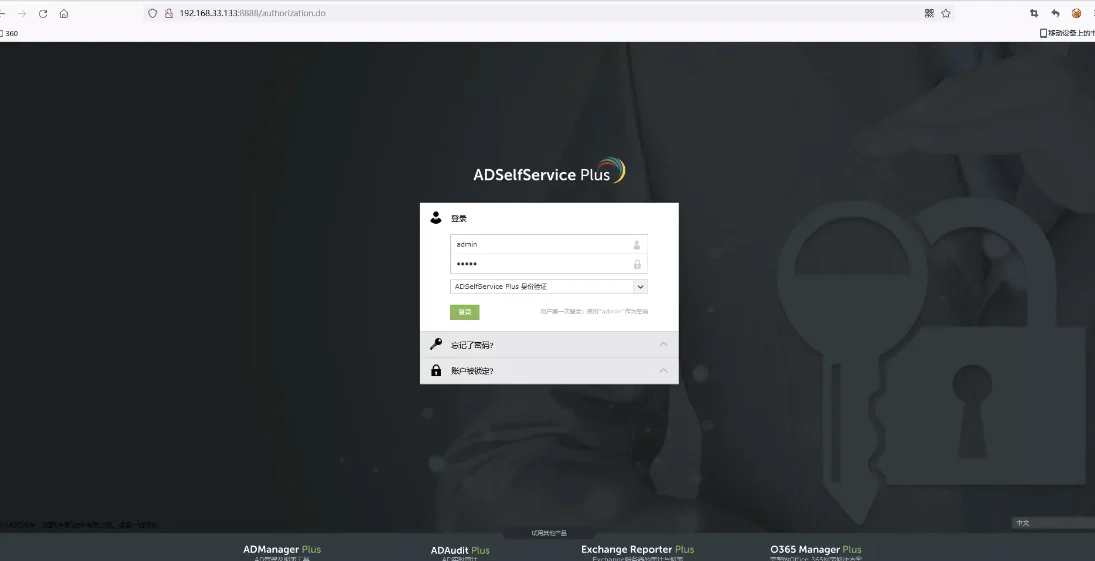
- After installation the default credentials are admin / admin, and the web interface is served on port 8888.
- To debug, edit
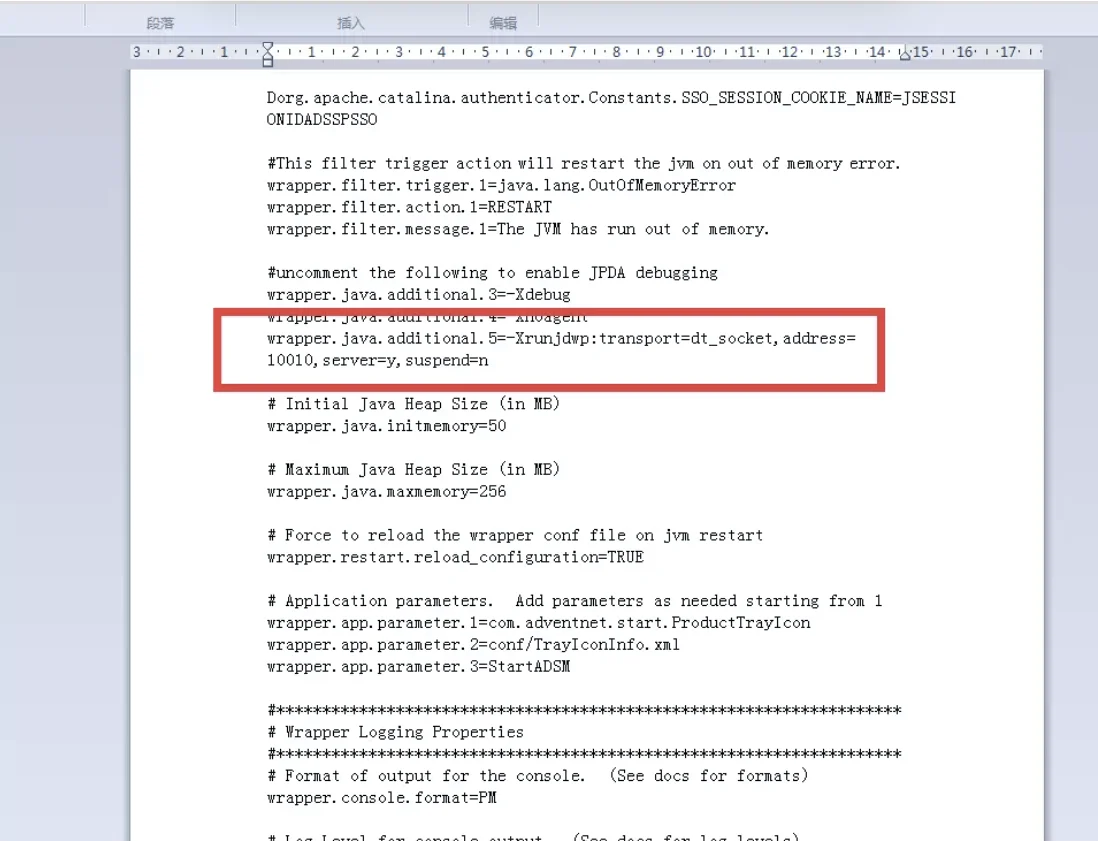
conf/wrapper.confand add JDWP parameters.
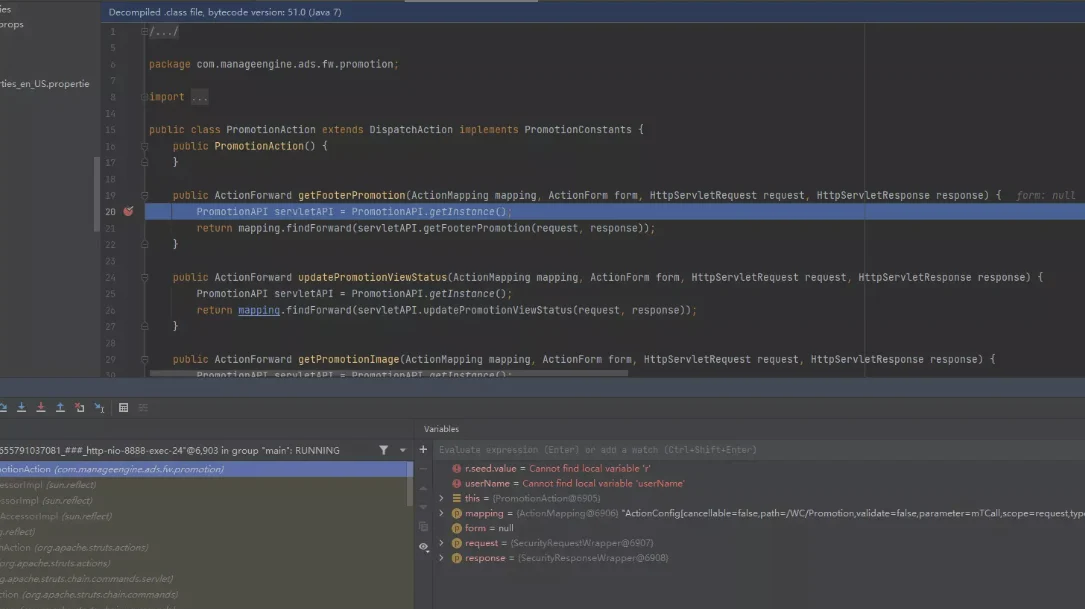
Debugging then attaches successfully.
The web service is started by Tomcat (the report does not give the Tomcat version). The start script is bin/runAsAdmin.bat and the main configuration file is \conf\wrapper.conf, which holds the startup parameters. The full startup command shown in the report is:
The entry point is com.adventnet.start.ProductTrayIcon#main; the report does not expand on the startup process itself.
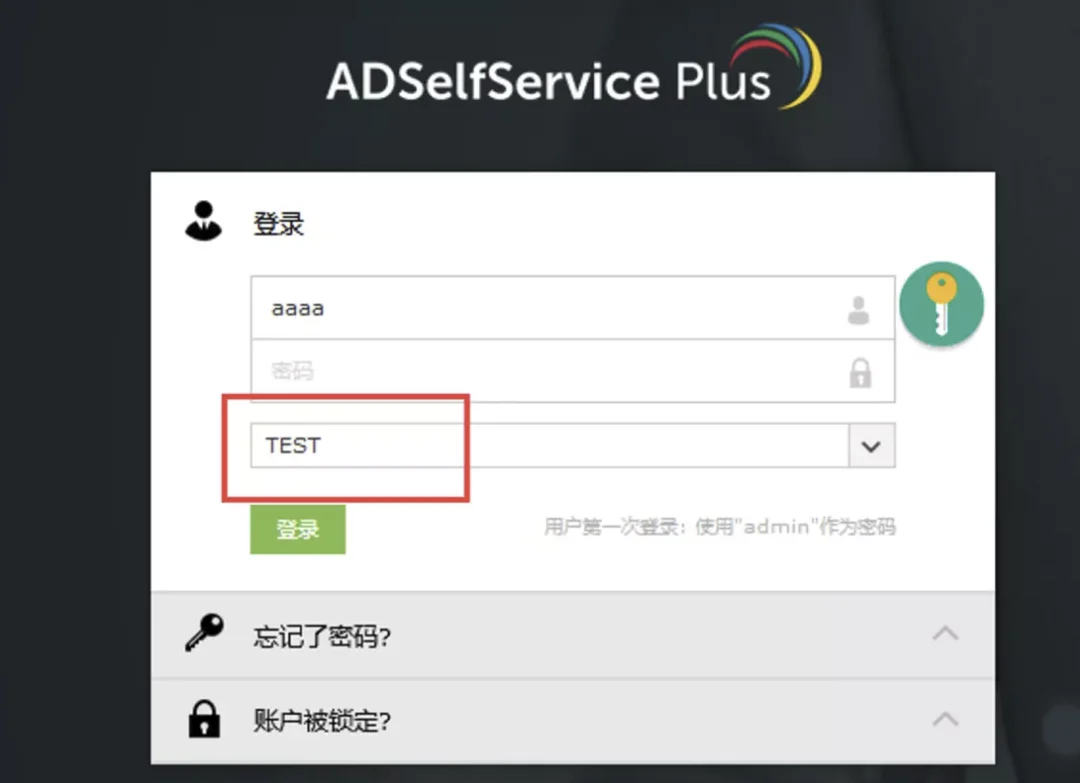
A precondition for the attack described below is that the product is configured to support third-party login, which requires an identity verification database to be configured in the back end.
Finding it
Routing
The starting point is web.xml. The routes fall roughly into these groups:
/RestAPI/ => org.apache.struts.action.ActionServlet

/api/json/ => com.manageengine.ads.fw.api.JSONAPIServlet

/ServletAPI/* /RestAPI/WC/Clustering/* /RestAPI/Clustering/* /m/mLoginAction

/m/mSelfService /m/mMFA => com.manageengine.ads.fw.common.api.ServletAPI
There are also a few servlets configured individually in web.xml.
Authentication checks
The analysis focuses on the RestAPI. In web.xml, an authentication check is configured for the /RestAPI/WC/* route only; other routes have no such configuration.
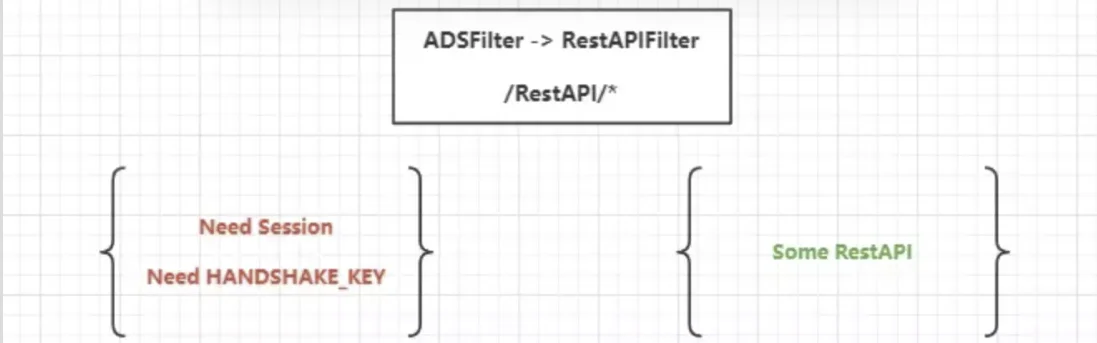
The RestAPI checks are performed in the global ADSFilter, which decides whether a request is a RestAPI call and, if so, hands it to com.manageengine.ads.fw.api.RestAPIFilter#doAction, where the different validation paths live. The important validation logic for the RestAPI sits in RestAPIFilter, while the more specific per-API checks are stored in the database:
select * from ADSProductAPIs
The APIs fall roughly into three categories: those that need a session, those that need a HANDSHAKE_KEY, and those that need no authentication at all.
Other security mechanisms
security.xml lists, for each API, the parameters (type, length, regular expression), the request method and whether CSRF protection is required.
The third-party login feature
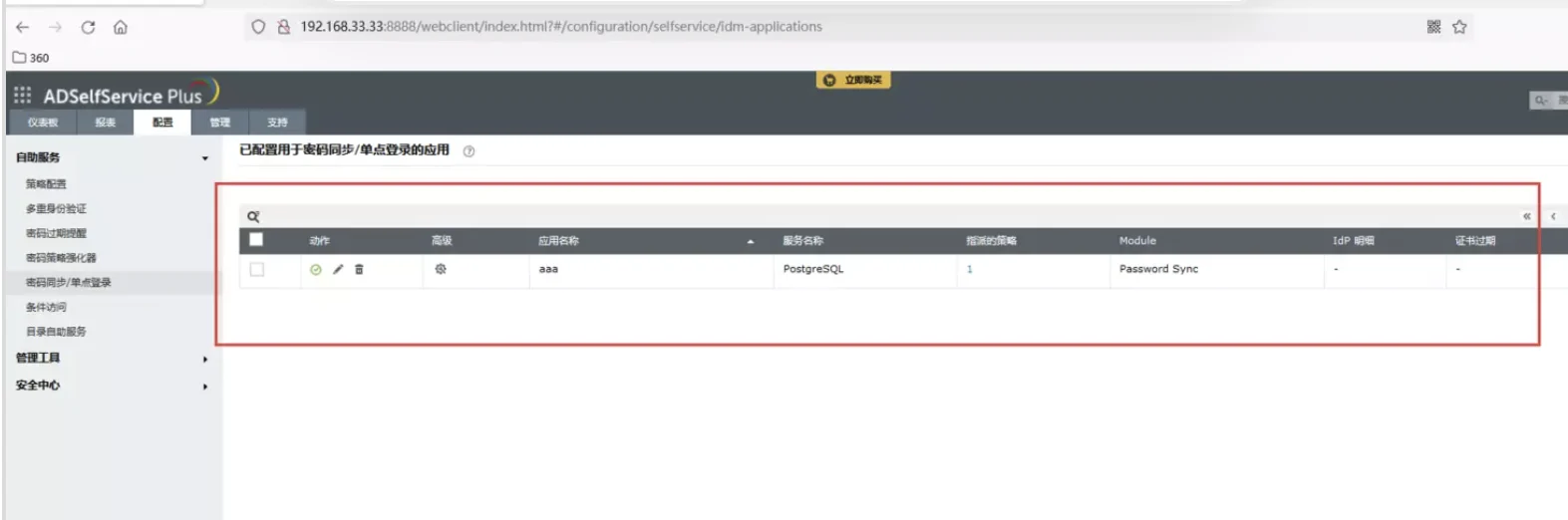
ADSelfService Plus supports third-party login methods, provided an identity verification database has been configured in the back end:
http://[redacted]:8888/webclient/index.html?#/configuration/selfservice/idm-applications
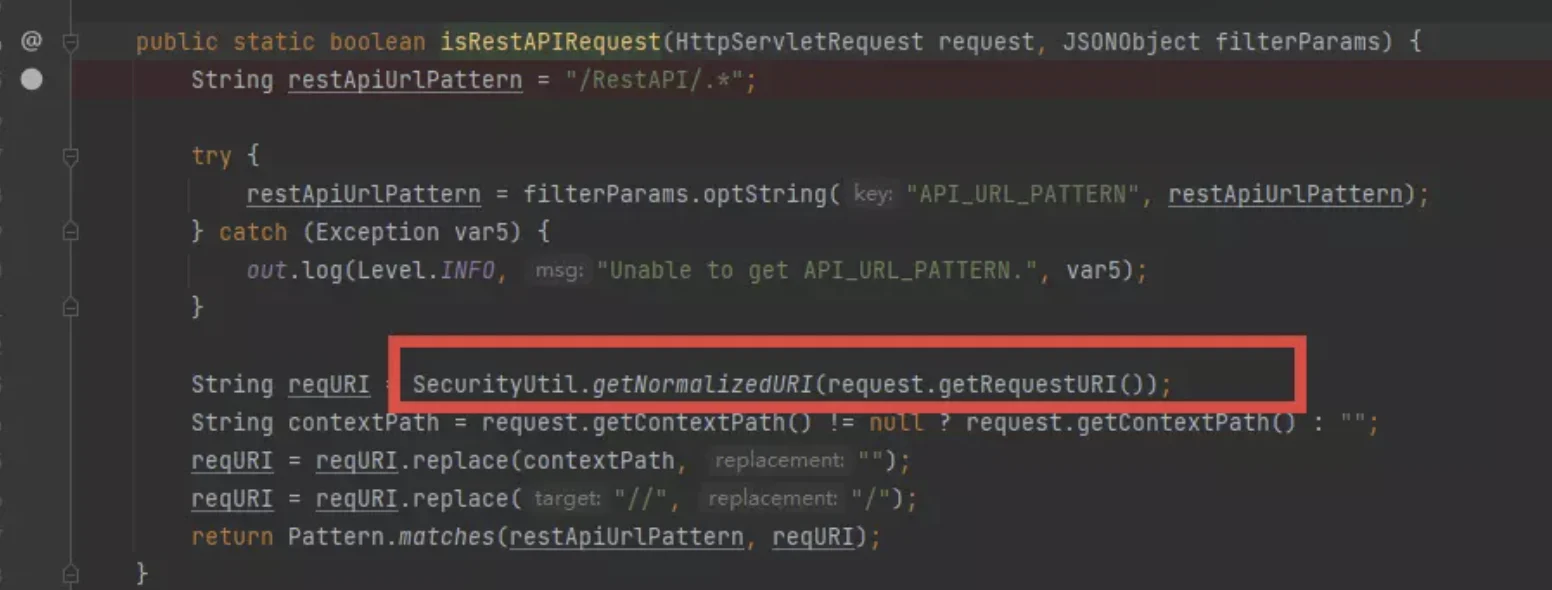
The authentication bypass again uses the RestAPI. The global ADSFilter decides whether a request is a RestAPI call and, if so, passes it to com.manageengine.ads.fw.api.RestAPIFilter#doAction for the actual permission check.
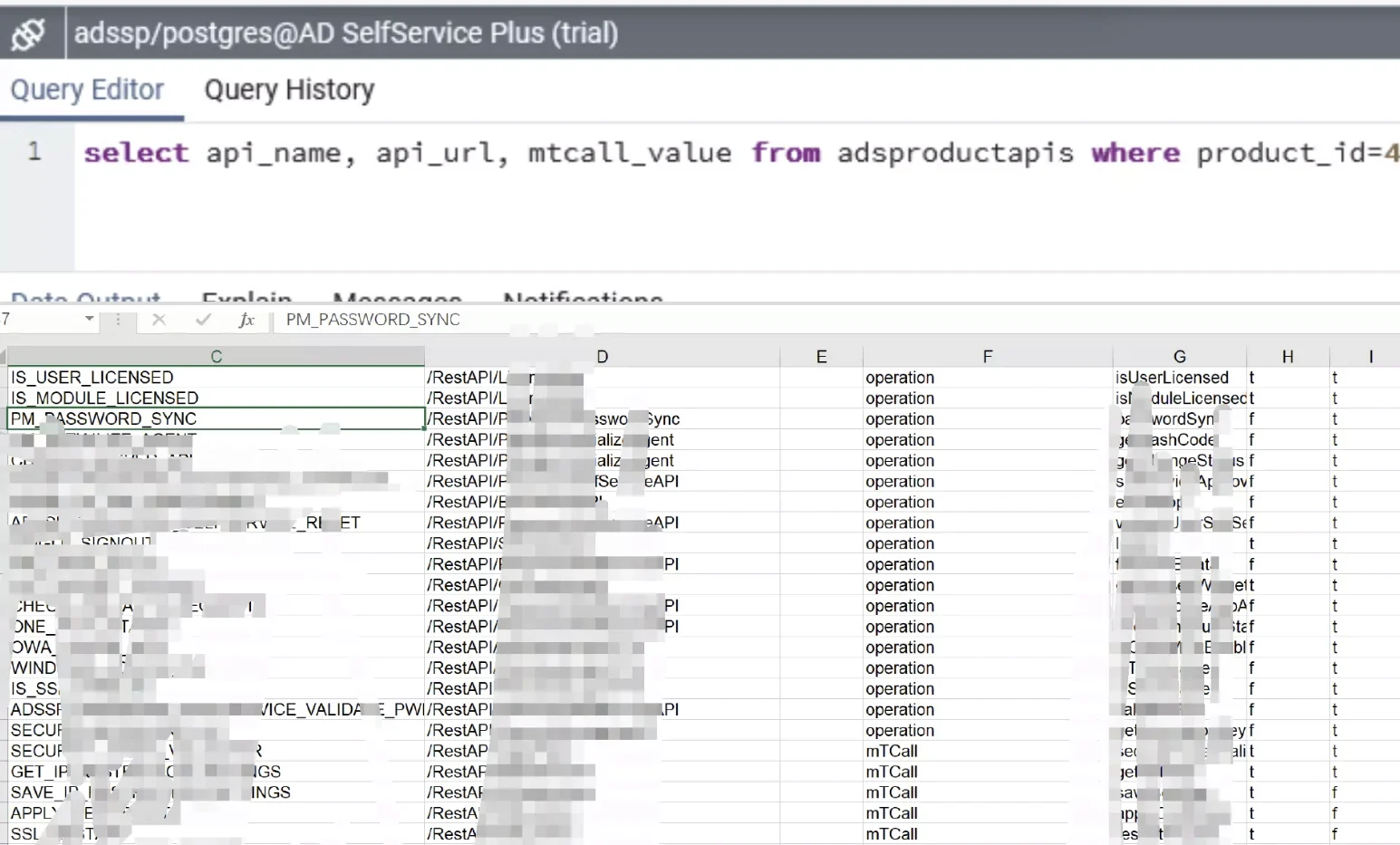
Whether an API requires authentication is stored in PostgreSQL:
select * from ADSProductAPIs
The researcher found three unauthenticated APIs that together allow an arbitrary password reset.
Exploitation
Step 1: PM_INITIAILIZE_AGENT
POST /RestAPI/PMAgent/****** HTTP/1.1
Host: [redacted]:8888
User-Agent: Mozilla/5.0 (Windows NT 10.0; Win64; x64; rv:101.0) Gecko/20100101 Firefox/101.0
Time:1656925239
Accept: text/html,application/xhtml+xml,application/xml;q=0.9,image/avif,image/webp,*/*;q=0.8
Accept-Language: zh-CN,zh;q=0.8,zh-TW;q=0.7,zh-HK;q=0.5,en-US;q=0.3,en;q=0.2
Accept-Encoding: gzip, deflate
Connection: close
Referer: http://[redacted]:8888/webclient/index.html?
Upgrade-Insecure-Requests: 1
Content-Type: application/x-www-form-urlencoded
Content-Length: 195

something
Several parameters have to be constructed specially. The timestamp is easy to solve. The machineName is easy to obtain if you are in the same domain; the report notes that the domain name can be obtained without logging in.
The opt parameter is a six-digit number and is easy to brute force. Its validation logic is in com.manageengine.adssp.server.api.authorization.PasswordSyncAgentAPIAuthorizer#verifyAgent:
if ((new Date()).getTime() / 1000L - requsetTime < 300L && requsetTime - (new Date()).getTime() / 1000L < 300L)
That gives a five-minute window for brute forcing. Brute-force protection is implemented in com.adventnet.iam.security.DoSController#controlDoS: with the timestamp unchanged, each IP address can send 1000 requests, so 100000 / 1000 = 100.
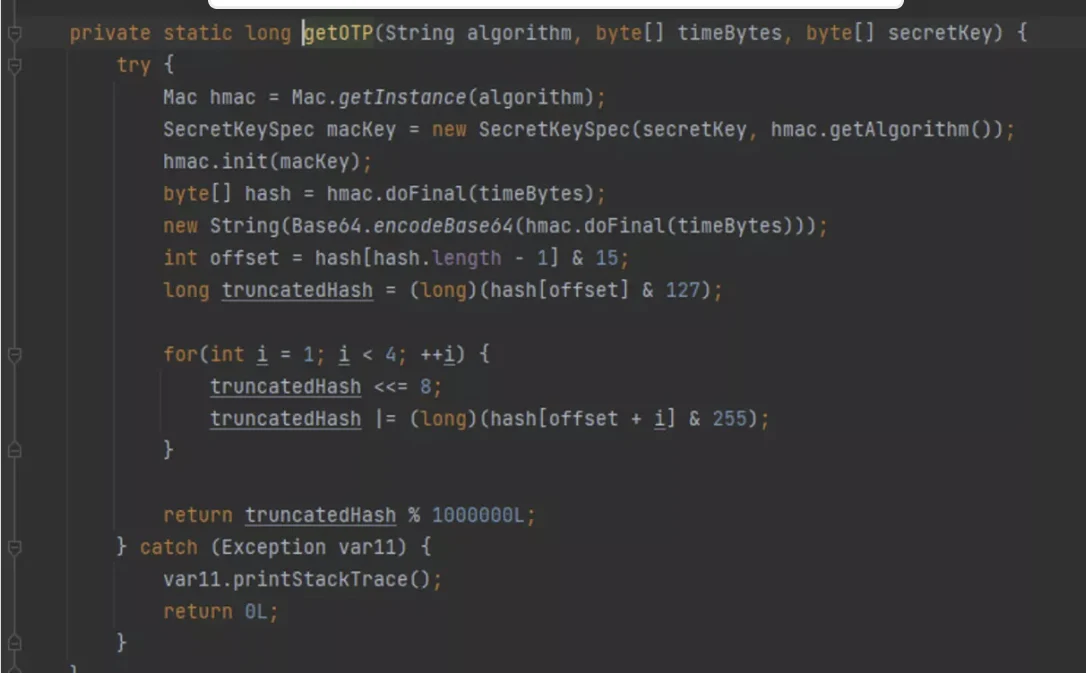
In the researcher's assessment, the OTP can therefore be obtained in an acceptable time, and with a cloud provider such as Amazon or Google it is actually easy: a full attack executing one million codes would cost about 150 dollars. The report points to a real-world attack case at https://thezerohack.com/hack-any-instagram.
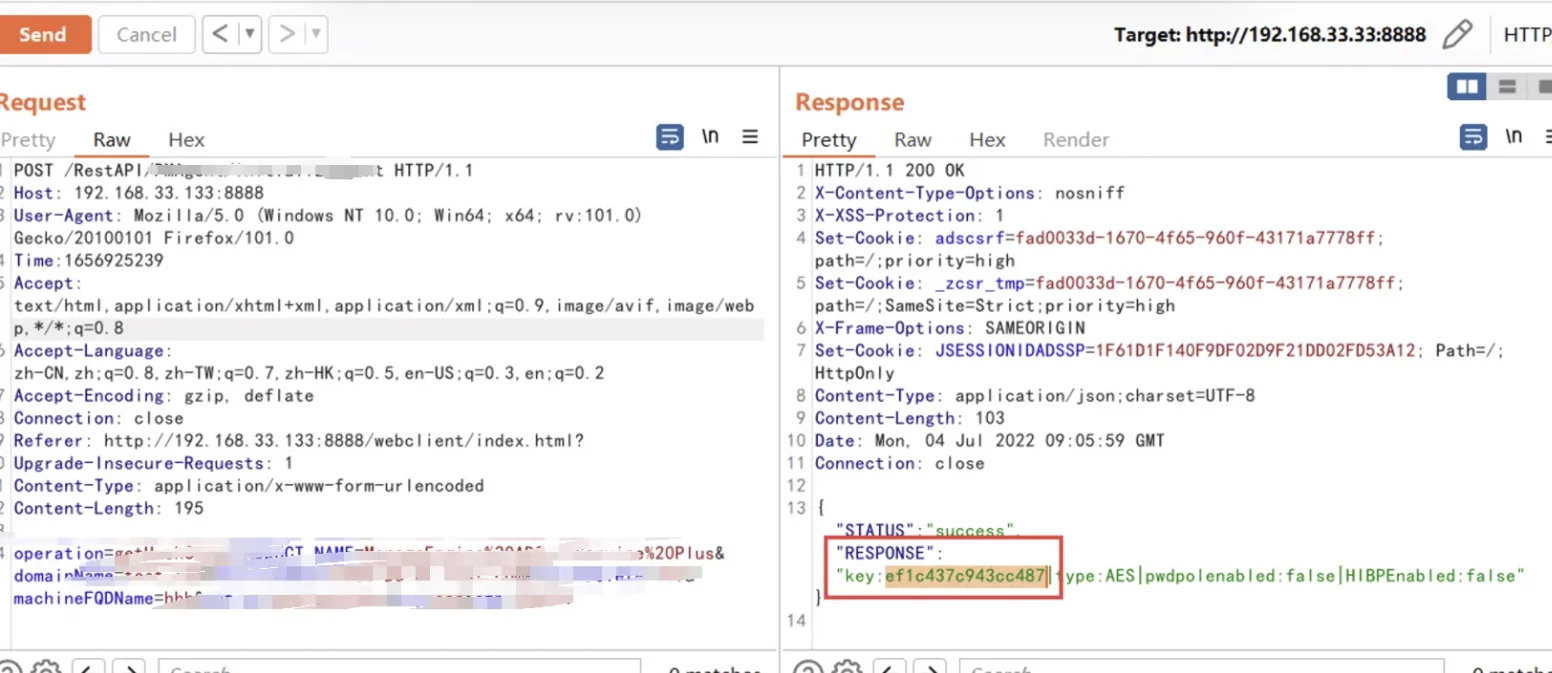
The encryption and decryption key is then obtained successfully.
Step 2: PM_PASSWORD_SYNC
POST /RestAPI/PMAgent/****** HTTP/1.1
Host: [redacted]:8888
Time:1657012207
User-Agent: Mozilla/5.0 (Windows NT 10.0; Win64; x64; rv:101.0) Gecko/2010101 Firefox/101.0
Accept: application/json, text/javascript, */*; q=0.01
REMOTE_USER_IP:[redacted]
ZSEC_PROXY_SERVER_NAME:aaa
Accept-Language: zh-CN,zh;q=0.8,zh-TW;q=0.7,zh-HK;q=0.5,en-US;q=0.3,en;q=0.2
Accept-Encoding: gzip, deflate
X-Requested-With: XMLHttpRequest
Connection: close
X-Forwarded-For:[redacted]
Referer: http://[redacted]:8888/webclient/index.html?
Content-Type: application/x-www-form-urlencoded
Content-Length: 300

otp=294608&operation=passwordSync&username=254,147,58,204,126,202,25,240,150,20,124,148,236,167,85,25,16&machineName=TEST-DC-01.test.com&[redacted]&time=165512621862411&PRODUCT_NAME=nnn&domainName=test.com&machineFQDName=TEST-DC-01.test.com
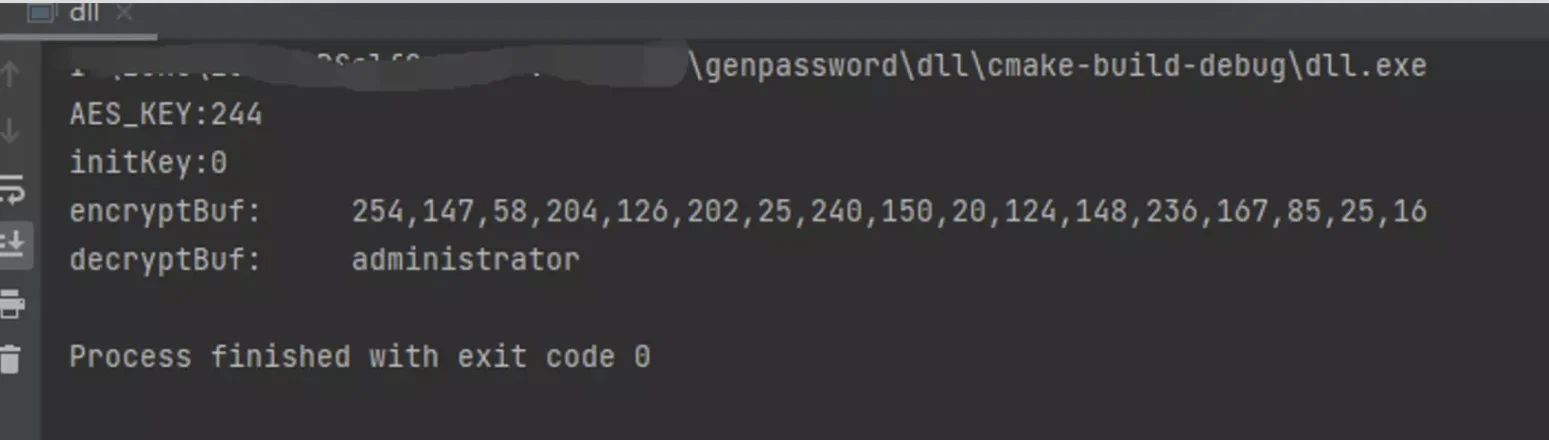
The username and password are reset through the PM_PASSWORD_SYNC operation, but they must be encrypted first. The program performs AES encryption by dynamically loading a dynamic link library, and decryption requires some processing. By analysing ManageEngineADSFramework.dll, the researcher constructed the encrypted username and password locally.
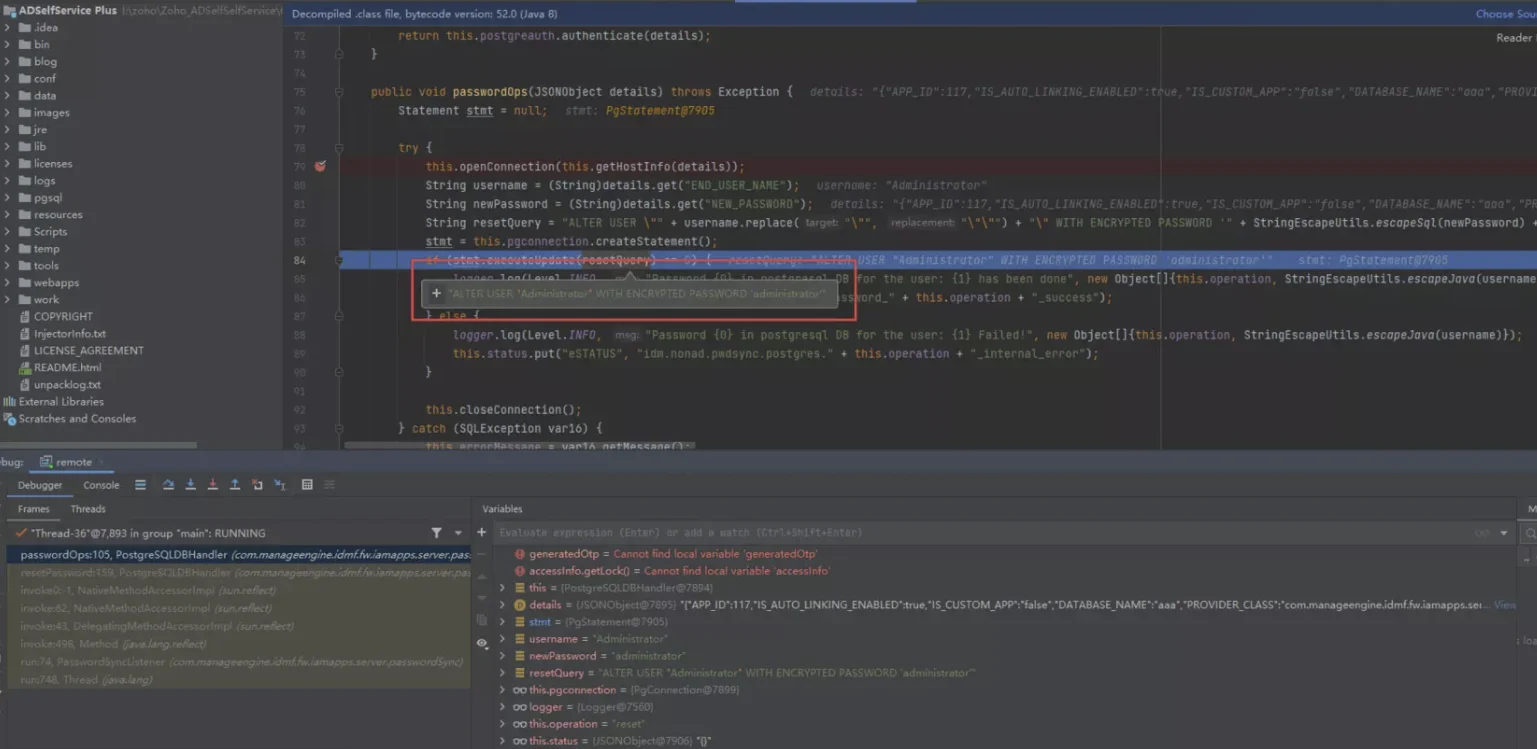
The username and password are then changed successfully.
Root cause
The per-API authentication requirement lives in the ADSProductAPIs table in PostgreSQL, and web.xml configures an authentication check for the /RestAPI/WC/* route. Everything else is delegated to RestAPIFilter#doAction, which consults that table. Three APIs are recorded as requiring no authentication, and together they allow an arbitrary password reset.
The OTP that is supposed to protect the agent flow is a six-digit value validated by PasswordSyncAgentAPIAuthorizer#verifyAgent against a five-minute timestamp window, and the only rate limiting is DoSController#controlDoS, which allows 1000 requests per IP address for an unchanged timestamp. With the timestamp unchanged, each IP address can send 1000 requests.
Impact
An unauthenticated attacker can reset a user's password through the three unauthenticated APIs. The attack requires the third-party login feature to be configured with an identity verification database in the back end. The researcher assesses that the OTP can be obtained in an acceptable time, and that with a cloud provider a full attack of one million codes would cost about 150 dollars.
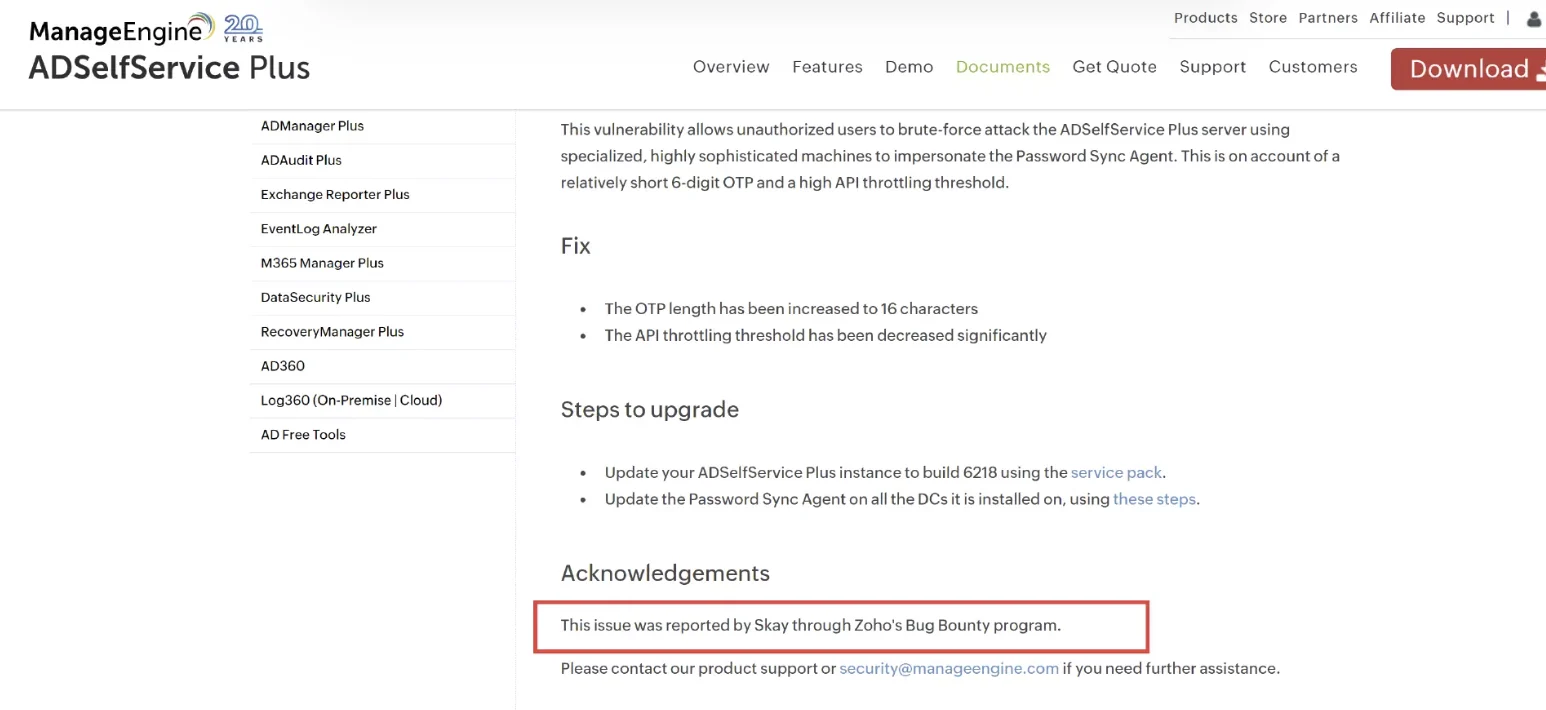
Fix
The report does not describe the vendor's fix. The advisory link it gives is:
https://www.manageengine.com/products/self-service-password/advisory/CVE-2022-36413.html
Variants to test
- Enumerate the APIs listed in
ADSProductAPIsand look for entries marked as requiring no authentication, then call each one without a session or HANDSHAKE_KEY. A positive result is a response that performs an action rather than an authentication error. - Check
web.xmlfor routes that have an authentication check configured and compare them with the routes actually served; any RestAPI path outside the protected prefix is worth probing. - For any OTP-protected agent flow, send repeated requests with a fixed timestamp and observe whether the per-IP limit of 1000 requests can be bypassed by rotating source addresses. A positive result is a valid OTP being accepted within the five-minute window.
- Inspect
security.xmlfor APIs whose parameters are weakly constrained (type, length, regular expression) and whose CSRF requirement is absent, and test whether they can be reached unauthenticated. - Look for agent endpoints that take encrypted credentials and check whether the encryption key can be obtained through the same unauthenticated flow, as happened here.
What happened, in plain words
Zoho ManageEngine ADSelfService Plus is a piece of software that companies install on their own network so that employees can manage their own passwords. Instead of phoning the IT help desk when they forget a password, an employee opens a web page, proves who they are, and sets a new password. The product also handles unlocking locked accounts, updating profile details, warning people that their password is about to expire, keeping passwords in sync across several systems, and letting people log in once and then use many cloud applications (this last idea is called single sign-on). The report notes that it is used by small, medium and large enterprises that manage their internal users through a Windows domain.
The researcher looked at a specific flaw, tracked publicly as CVE-2022-36413. A CVE is a catalogue number that the security industry gives to a publicly disclosed vulnerability so that everyone can refer to the same thing. The flaw lets someone who has not logged in at all reset a user's password through three unauthenticated APIs.
The route in is the product's REST API. An API (Application Programming Interface) is the part of a web application that is meant to be used by other programs rather than by a person clicking buttons. Think of a restaurant: the dining room is the web page you see, and the kitchen door where waiters hand in orders is the API. A REST API is simply a common style of such an interface, where each operation has its own address (a URL) and requests are sent with standard HTTP methods such as POST. The researcher's keywords for the component are AD (Active Directory, Microsoft's directory of users and computers on a Windows network), cloud applications and single sign-on.
Setting up a test environment
To study the product, the researcher installed it locally. This is normal practice: you reproduce the software on a machine you control so you can experiment without touching anyone else's systems.
- Download any version from the vendor archive and run the exe installer:
https://archives.manageengine.com/self-service-password
This is the vendor's public download page. An exe is a Windows installer program: you double-click it and it sets the software up for you.
- After installation the default credentials are admin / admin, and the web interface is served on port 8888.
Default credentials means the username and password the software ships with before anyone changes them. A port is a numbered door on a computer; a web server listens on one so that browsers know where to connect. Port 8888 is simply the door this product chose for its web interface.
The screenshot shows the download page for the various versions, with the note that the exe can be installed in one click and that after installation the default user and password are admin / admin and the service is reached on port 8888.
- To debug, edit
conf/wrapper.confand add JDWP parameters.
Debugging here means attaching a tool that lets you pause the running program and inspect what it is doing, line by line. JDWP is the standard protocol Java programs use to allow such a debugger to connect. conf/wrapper.conf is a configuration file: a plain text file of settings that the program reads when it starts.
The screenshot shows the conf/wrapper.conf file being edited to add the JDWP parameters.
Debugging then attaches successfully.
The screenshot shows the debugger connected to the running product.
The web service is started by Tomcat (the report does not give the Tomcat version). Tomcat is a widely used program that runs Java web applications. The start script is bin/runAsAdmin.bat and the main configuration file is \conf\wrapper.conf, which holds the startup parameters. The full startup command shown in the report is:
This is one long command that launches the Java program. Each -D piece sets a named setting for the program, for example -DHTTP_PORT=8888 tells it which port to listen on for normal web traffic and -DSSL_PORT=9251 which port to use for encrypted (HTTPS) traffic. The -Xdebug and -Xrunjdwp pieces switch on the debugging connection on port 10010. The -Xms50m -Xmx256m pieces set how much memory the program may use. The -classpath piece lists where the program's code lives (the report abbreviates it). The -Dwrapper.key value is a secret used by the wrapper software that supervises the Java process, so it is redacted here. The final part names the Java class that is the entry point of the application.
The entry point is com.adventnet.start.ProductTrayIcon#main; the report does not expand on the startup process itself. An entry point is simply the first piece of code that runs when the program starts.
A precondition for the attack described below is that the product is configured to support third-party login, which requires an identity verification database to be configured in the back end. Third-party login means letting users sign in through some other system rather than only the product's own user list. The identity verification database is a separate store of user records that the product consults to check who someone is.
Finding it
Routing
A web application receives many different URLs, and it has to decide which piece of code should handle each one. That decision is called routing. The starting point is web.xml, a standard configuration file in Java web applications that maps URL patterns to the code that serves them. The routes fall roughly into these groups:
/RestAPI/ => org.apache.struts.action.ActionServlet

/api/json/ => com.manageengine.ads.fw.api.JSONAPIServlet

/ServletAPI/* /RestAPI/WC/Clustering/* /RestAPI/Clustering/* /m/mLoginAction

/m/mSelfService /m/mMFA => com.manageengine.ads.fw.common.api.ServletAPI
Read each line as "URLs starting with this pattern are handed to this class". So anything beginning with /RestAPI/ goes to a class called ActionServlet, anything beginning with /api/json/ goes to JSONAPIServlet, and the third line lists several patterns that share a handler. The * is a wildcard meaning "anything after this point". There are also a few servlets configured individually in web.xml. A servlet is the Java term for a small program that handles web requests.
Authentication checks
Authentication means proving who you are, like showing a passport at a border. The analysis focuses on the RestAPI. In web.xml, an authentication check is configured for the /RestAPI/WC/* route only; other routes have no such configuration. In other words, the front door has a guard for one corridor and nobody for the rest, and the application relies on the code inside to check identity itself.
The RestAPI checks are performed in the global ADSFilter, which decides whether a request is a RestAPI call and, if so, hands it to com.manageengine.ads.fw.api.RestAPIFilter#doAction, where the different validation paths live. A filter is code that every request passes through before reaching its destination, like a security gate at the entrance of a building. The important validation logic for the RestAPI sits in RestAPIFilter, while the more specific per-API checks are stored in the database:
select * from ADSProductAPIs
This is a database query written in SQL, the language used to talk to relational databases. It says: show me every row of the table called ADSProductAPIs. That table is where the product keeps a list of its APIs and, for each one, what kind of identity check it needs. The APIs fall roughly into three categories: those that need a session, those that need a HANDSHAKE_KEY, and those that need no authentication at all.
A session is the server's memory of you after you log in. When you log in, the server gives your browser a small piece of data (a session cookie) and your browser sends it back with every request, so the server knows the requests are yours. A cookie is just a small label your browser stores and shows on request. A HANDSHAKE_KEY is a shared secret that two programs exchange to prove to each other that they are allowed to talk, like two couriers agreeing on a password before handing over a parcel. The third category, no authentication at all, is the interesting one: those APIs will answer anyone.
The screenshot shows the routing and filter analysis, including the ADSProductAPIs query and the three categories of API.
Other security mechanisms
security.xml lists, for each API, the parameters (type, length, regular expression), the request method and whether CSRF protection is required. A parameter is a piece of data sent with a request, such as a username. A regular expression is a pattern used to check that text has the expected shape, for example that something is six digits. The request method is the HTTP verb, such as GET (fetch something) or POST (submit something). CSRF (Cross-Site Request Forgery) is an attack where a malicious website tricks your browser into sending a request to another site where you are already logged in; CSRF protection is a check that the request really came from the application's own pages.
The third-party login feature
ADSelfService Plus supports third-party login methods, provided an identity verification database has been configured in the back end:
http://[redacted]:8888/webclient/index.html?#/configuration/selfservice/idm-applications
This is the address of the configuration page in the product's web interface where that identity database is set up. The # part is handled by the browser and tells the single-page interface which screen to open.
The screenshot shows the configuration page for identity applications, where the third-party login database is configured.
The authentication bypass again uses the RestAPI. The global ADSFilter decides whether a request is a RestAPI call and, if so, passes it to com.manageengine.ads.fw.api.RestAPIFilter#doAction for the actual permission check.
The screenshot shows the ADSFilter and RestAPIFilter code path that decides whether a request is a RestAPI call and then performs the permission check.
Whether an API requires authentication is stored in PostgreSQL:
select * from ADSProductAPIs
PostgreSQL is a popular open-source relational database. The same query as before reads the table that records, per API, whether a login is needed. The researcher found three unauthenticated APIs that together allow an arbitrary password reset. "Arbitrary" here means the attacker can pick any user, not just their own.
The screenshot accompanies the note that three unauthenticated APIs were found.
Exploitation
Step 1: PM_INITIAILIZE_AGENT
POST /RestAPI/PMAgent/****** HTTP/1.1
Host: [redacted]:8888
User-Agent: Mozilla/5.0 (Windows NT 10.0; Win64; x64; rv:101.0) Gecko/20100101 Firefox/101.0
Time:1656925239
Accept: text/html,application/xhtml+xml,application/xml;q=0.9,image/avif,image/webp,*/*;q=0.8
Accept-Language: zh-CN,zh;q=0.8,zh-TW;q=0.7,zh-HK;q=0.5,en-US;q=0.3,en;q=0.2
Accept-Encoding: gzip, deflate
Connection: close
Referer: http://[redacted]:8888/webclient/index.html?
Upgrade-Insecure-Requests: 1
Content-Type: application/x-www-form-urlencoded
Content-Length: 195

something
This is a raw HTTP request, the same kind of message your browser sends when you submit a form, written out by hand. Line by line:
POST /RestAPI/PMAgent/****** HTTP/1.1is the request line: the method is POST (submit data), the path is a PMAgent API under/RestAPI/(the report masks the last part of the path with asterisks), and HTTP/1.1 is the version of the protocol.Host: [redacted]:8888says which server and port the request is for.User-Agentidentifies the browser that supposedly sent it; here it claims to be Firefox 101 on Windows.Time:1656925239is a custom header carrying a Unix timestamp, the number of seconds since 1 January 1970. The server uses it to check that the request is fresh.Accept,Accept-Language,Accept-Encodingtell the server which formats, languages and compression the client can handle.Connection: closeasks the server to close the connection after answering.Referersays which page the request came from.Upgrade-Insecure-Requests: 1is a browser hint that it would prefer an encrypted version of the page.Content-Type: application/x-www-form-urlencodedsays the body is formatted like a web form.Content-Length: 195says the body is 195 bytes long.- After the blank line comes the body, shown here as
something.
Several parameters have to be constructed specially. The timestamp is easy to solve. The machineName is easy to obtain if you are in the same domain; the report notes that the domain name can be obtained without logging in. A domain, in the Windows sense, is the group of computers and accounts managed together by a central server. The machine name is the computer's name on that network, and the product's agent flow expects it.
The screenshot shows the parameters that must be constructed for this step, including the timestamp and the machine name, with the note that the domain name can be obtained without logging in.
The opt parameter is a six-digit number and is easy to brute force. Brute force means trying every possible value until one works; with six digits there are one million possibilities. This parameter is the OTP, a one-time password, a short code that is supposed to prove the requester is the legitimate user. Its validation logic is in com.manageengine.adssp.server.api.authorization.PasswordSyncAgentAPIAuthorizer#verifyAgent:
if ((new Date()).getTime() / 1000L - requsetTime < 300L && requsetTime - (new Date()).getTime() / 1000L < 300L)
This line takes the current time in milliseconds, divides by 1000 to get seconds, and compares it with the timestamp sent in the request. The two comparisons check the difference in both directions, so the request is accepted only if the timestamp is within 300 seconds (five minutes) of the server's clock. That gives a five-minute window for brute forcing. Brute-force protection is implemented in com.adventnet.iam.security.DoSController#controlDoS: with the timestamp unchanged, each IP address can send 1000 requests, so 100000 / 1000 = 100. An IP address is the numeric address of a computer on a network, and the server uses it to count how many requests one source has made. The arithmetic in the report works out how many source addresses would be needed to cover the whole space of codes within the limit.
The screenshot shows the timestamp check and the DoSController rate limit, with the calculation of how many requests each address may send.
In the researcher's assessment, the OTP can therefore be obtained in an acceptable time, and with a cloud provider such as Amazon or Google it is actually easy: a full attack executing one million codes would cost about 150 dollars. Cloud providers let you rent many machines by the hour, so spreading the guesses across many addresses is a matter of money rather than skill. The report points to a real-world attack case at https://thezerohack.com/hack-any-instagram.
The encryption and decryption key is then obtained successfully. Encryption is the scrambling of data so that only someone with the right key can read it; the key is the secret that locks and unlocks it. Getting the key means the attacker can produce data the server will accept as genuine.
The screenshot accompanies the note that the encryption and decryption key was obtained successfully.
Step 2: PM_PASSWORD_SYNC
POST /RestAPI/PMAgent/****** HTTP/1.1
Host: [redacted]:8888
Time:1657012207
User-Agent: Mozilla/5.0 (Windows NT 10.0; Win64; x64; rv:101.0) Gecko/2010101 Firefox/101.0
Accept: application/json, text/javascript, */*; q=0.01
REMOTE_USER_IP:[redacted]
ZSEC_PROXY_SERVER_NAME:aaa
Accept-Language: zh-CN,zh;q=0.8,zh-TW;q=0.7,zh-HK;q=0.5,en-US;q=0.3,en;q=0.2
Accept-Encoding: gzip, deflate
X-Requested-With: XMLHttpRequest
Connection: close
X-Forwarded-For:[redacted]
Referer: http://[redacted]:8888/webclient/index.html?
Content-Type: application/x-www-form-urlencoded
Content-Length: 300

otp=294608&operation=passwordSync&username=254,147,58,204,126,202,25,240,150,20,124,148,236,167,85,25,16&machineName=TEST-DC-01.test.com&[redacted]&time=165512621862411&PRODUCT_NAME=nnn&domainName=test.com&machineFQDName=TEST-DC-01.test.com
Again a hand-written HTTP request. The request line, Host, Time, User-Agent, Accept, Accept-Language, Accept-Encoding, Connection, Referer, Content-Type and Content-Length play the same roles as before. The new headers are:
REMOTE_USER_IP:[redacted]claims the request comes from the local machine. [redacted] is the standard loopback address, meaning "this computer".ZSEC_PROXY_SERVER_NAME:aaanames a proxy server. A proxy is a machine that forwards requests on your behalf.X-Requested-With: XMLHttpRequestmarks the request as having been made by page script rather than by typing a URL.X-Forwarded-For:[redacted]is a header proxies use to record the original client address; servers often trust it, which is why it is interesting to an attacker.
The body is a form-encoded list of name=value pairs joined by &:
otp=294608is the six-digit one-time code, here a valid one.operation=passwordSyncnames the operation to perform: synchronise a password.username=254,147,58,204,...is the target username, but not as readable text: it is a list of numbers, which is what encrypted bytes look like when written out.machineName=TEST-DC-01.test.comis the machine name.- `[redacted] is the new password, encrypted the same way.
time=165512621862411is a timestamp value.PRODUCT_NAME=nnnnames the product.domainName=test.comis the Windows domain.machineFQDName=TEST-DC-01.test.comis the fully qualified domain name of the machine, meaning its complete name including the domain.
The username and password are reset through the PM_PASSWORD_SYNC operation, but they must be encrypted first. The program performs AES encryption by dynamically loading a dynamic link library, and decryption requires some processing. AES is a widely used standard method of encryption. A dynamic link library (DLL) is a file of reusable code that a Windows program loads when it needs it, rather than having everything built in. By analysing ManageEngineADSFramework.dll, the researcher constructed the encrypted username and password locally. In other words, the researcher worked out how the product scrambles the credentials, then produced correctly scrambled values on their own machine so the server would accept them.
The screenshot shows the analysis of ManageEngineADSFramework.dll and the local construction of the encrypted username and password.
The username and password are then changed successfully.
The screenshot shows the password change succeeding.
The screenshot shows the result of the successful password change.
Root cause
The per-API authentication requirement lives in the ADSProductAPIs table in PostgreSQL, and web.xml configures an authentication check for the /RestAPI/WC/* route. Everything else is delegated to RestAPIFilter#doAction, which consults that table. Three APIs are recorded as requiring no authentication, and together they allow an arbitrary password reset.
The OTP that is supposed to protect the agent flow is a six-digit value validated by PasswordSyncAgentAPIAuthorizer#verifyAgent against a five-minute timestamp window, and the only rate limiting is DoSController#controlDoS, which allows 1000 requests per IP address for an unchanged timestamp. With the timestamp unchanged, each IP address can send 1000 requests.
Impact
An unauthenticated attacker can reset a user's password through the three unauthenticated APIs. The attack requires the third-party login feature to be configured with an identity verification database in the back end. The researcher assesses that the OTP can be obtained in an acceptable time, and that with a cloud provider a full attack of one million codes would cost about 150 dollars.
Fix
The report does not describe the vendor's fix. The advisory link it gives is:
https://www.manageengine.com/products/self-service-password/advisory/CVE-2022-36413.html
Variants to test
- Enumerate the APIs listed in
ADSProductAPIsand look for entries marked as requiring no authentication, then call each one without a session or HANDSHAKE_KEY. A positive result is a response that performs an action rather than an authentication error. - Check
web.xmlfor routes that have an authentication check configured and compare them with the routes actually served; any RestAPI path outside the protected prefix is worth probing. - For any OTP-protected agent flow, send repeated requests with a fixed timestamp and observe whether the per-IP limit of 1000 requests can be bypassed by rotating source addresses. A positive result is a valid OTP being accepted within the five-minute window.
- Inspect
security.xmlfor APIs whose parameters are weakly constrained (type, length, regular expression) and whose CSRF requirement is absent, and test whether they can be reached unauthenticated. - Look for agent endpoints that take encrypted credentials and check whether the encryption key can be obtained through the same unauthenticated flow, as happened here.
Glossary
- Account takeover: gaining control of someone else's account, usually by learning or changing their password.
- Active Directory (AD): Microsoft's directory service that stores users, computers and permissions on a Windows network.
- AES: a widely used standard method for encrypting data.
- API: a part of a web application designed to be called by other programs rather than by a person clicking in a browser.
- Authentication: the process of proving who you are.
- Brute force: trying every possible value of a secret until one is accepted.
- Cloud provider: a company that rents computing resources, such as many machines, over the internet.
- Cookie: a small piece of data a website stores in your browser and your browser sends back with later requests.
- CSRF (Cross-Site Request Forgery): an attack that tricks a logged-in browser into sending a request the user did not intend.
- CVE: a public catalogue number assigned to a disclosed vulnerability.
- Debugger / JDWP: a tool that pauses a running program to inspect it, and the standard Java protocol that lets it connect.
- DLL (dynamic link library): a file of reusable code that a Windows program loads when needed.
- Domain (Windows): a group of computers and accounts managed together by a central server.
- Encryption: scrambling data so that only someone with the right key can read it.
- Entry point: the first piece of code that runs when a program starts.
- Filter: code that every request passes through before reaching its destination.
- HANDSHAKE_KEY: a shared secret two programs exchange to prove they may talk to each other.
- HTTP: the protocol browsers and servers use to exchange requests and responses.
- IP address: the numeric address of a computer on a network.
- Machine name: the name of a computer on a network.
- OTP (one-time password): a short code, valid once or for a short time, used to prove identity.
- Parameter: a piece of data sent with a request, such as a username.
- Port: a numbered door on a computer where a service listens for connections.
- PostgreSQL: a popular open-source relational database.
- Proxy: a machine that forwards requests on behalf of another.
- Regular expression: a pattern used to check that text has an expected shape.
- REST API: a common style of API where each operation has its own URL and standard HTTP methods are used.
- Routing: deciding which piece of code handles which URL.
- Session: the server's memory of a logged-in user, kept alive by a cookie.
- Servlet: a small Java program that handles web requests.
- Single sign-on: logging in once and then using many applications without logging in again.
- SQL: the language used to query relational databases.
- Timestamp: a recorded point in time, often as the number of seconds since 1 January 1970.
- Tomcat: a widely used program that runs Java web applications.
- Vulnerability: a weakness in software that an attacker can use to do something the owner did not intend.
- web.xml: the configuration file in a Java web application that maps URLs to the code that serves them.




