[CVE-2023–38743] ManageEngine ADManager Command Injection
An authenticated admin could pass crafted values for the domain, account name or password fields of the HA cluster service-install endpoint, and these were concatenated into a Windows command run through the shell. An attacker with admin rights and a valid AD account could therefore run arbitrary commands on the host.
 Published on petrusviet.medium.com
Vào hồi tháng 4 năm nay, mình rơi vào giai đoạn down mood kha khá vì thế nên mình đi tìm cái gì đó để làm cho nó vui (hoặc để chạy KPI😰). Mình đã chọn các sản phẩm của ManageEngine, đặc điểm của chúng là phần core sẽ được dùng chung cho nhiều product khác nhau vậy nên maybe là khi mình tìm được bug của thằng A thì…
The full write-up lives on its author's site
It belongs to its author, so we link to it rather than copy it. The other two tabs are our own rewrites, checked against it.
Context
ManageEngine ships a family of products that share a common core, so a flaw found in one product can plausibly affect the others. This write-up looks at ADManager Plus, and specifically at the high-availability (HA) cluster feature. The HA feature includes a servlet, mapped in web.xml, that can install the product as a Windows service.
The bug is an authenticated OS command injection: a user with admin privileges can run an arbitrary command on the host machine where ADManager Plus is installed. The researcher notes that the same code was originally found in a different ManageEngine product, and that the write-up was moved to ADManager Plus because exploitation needs an AD account in addition to the admin account.
Setup
To follow the code, the researcher enabled remote debugging on the Java process by editing ./conf/wrapper.conf and uncommenting the JPDA lines:
#uncomment the following to enable JPDA debugging
wrapper.java.additional.17=-Xdebug
wrapper.java.additional.18=-Xnoagent
wrapper.java.additional.19=-Xrunjdwp:transport=dt_socket,address=8787,server=y,suspend=n
This configures a JPDA debug socket on port 8787. Callers were traced backwards with IntelliJ's find-usages (ctrl+f7).
Preconditions for exploitation, as established later in the analysis:
- An admin (TECHNICIAN) account on the ManageEngine product, or the correct
haAuthKey. - A valid AD account, because a native authentication call runs before the vulnerable command is built.
Finding it
Looking at past ManageEngine bugs and skimming the code, the researcher noticed that the product calls system commands in many places, so command injection looked like a productive class of bug to hunt.
There are two ways to run a command ABC through cmd.exe:
1) "cmd.exe" "ABC" "arg1" "arg2"
2) "cmd.exe" "/c" "ABC arg1 arg2"
With form 1, the system executes ABC with arg1 and arg2 as arguments to that process. If an attacker controls arg1 or arg2, the payload is still only treated as an argument to ABC, so it cannot break out and run a different command.
With form 2, the system treats ABC arg1 arg2 as a script, so an attacker who controls arg1 or arg2 can execute arbitrary commands using characters such as &, | or a backtick to escape the context of ABC. The help output of cmd confirms the meaning of the switch:
cmd /?
Starts a new instance of the Windows command interpreter

CMD [/A | /U] [/Q] [/D] [/E:ON | /E:OFF] [/F:ON | /F:OFF] [/V:ON | /V:OFF]
    [[/S] [/C | /K] string]

/C      Carries out the command specified by string and then terminates
/K      Carries out the command specified by string but remains
So instead of searching for cmd.exe or cmd, the researcher searched for cmd /c, cmd.exe /c, and in this bug simply for the string /c.
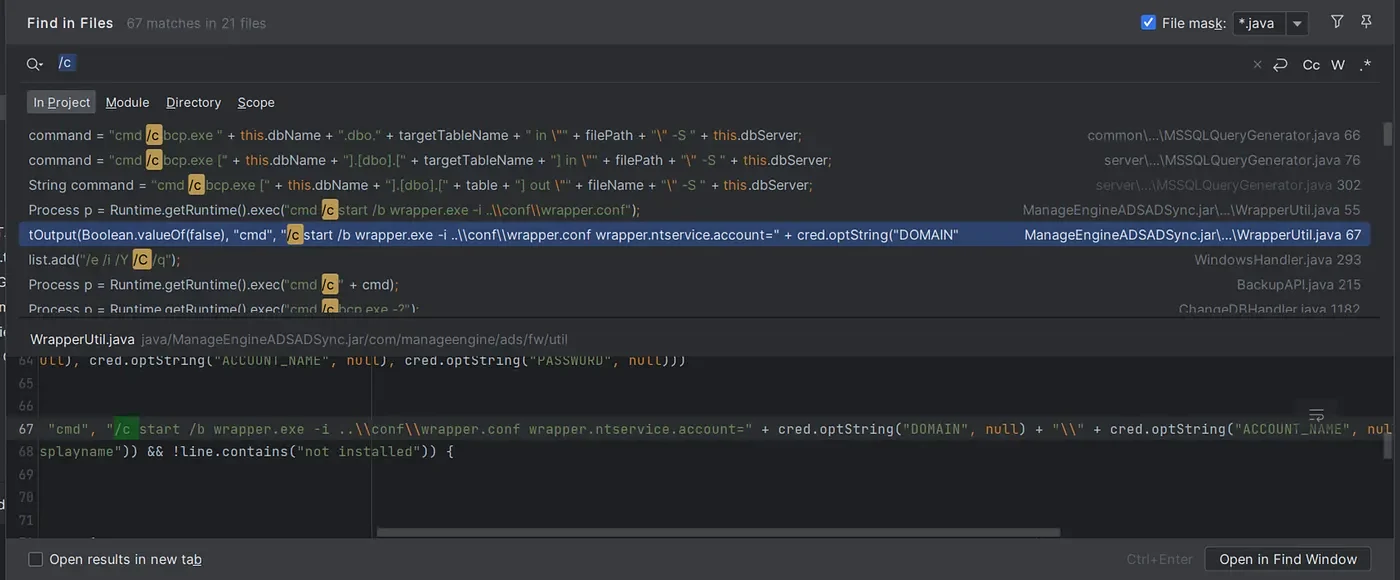
The search turned up this call:
Iterator i$ = ProcessUtil.executeAndGetOutput(false, "cmd", "/c start /b wrapper.exe -i ..\\conf\\wrapper.conf wrapper.ntservice.account=" + cred.optString("DOMAIN", (String)null) + "\\" + cred.optString("ACCOUNT_NAME", (String)null) + " wrapper.ntservice.password=" + cred.optString("PASSWORD", (String)null)).iterator();
Following ProcessUtil.executeAndGetOutput, the input is passed into a ProcessBuilder for execution:
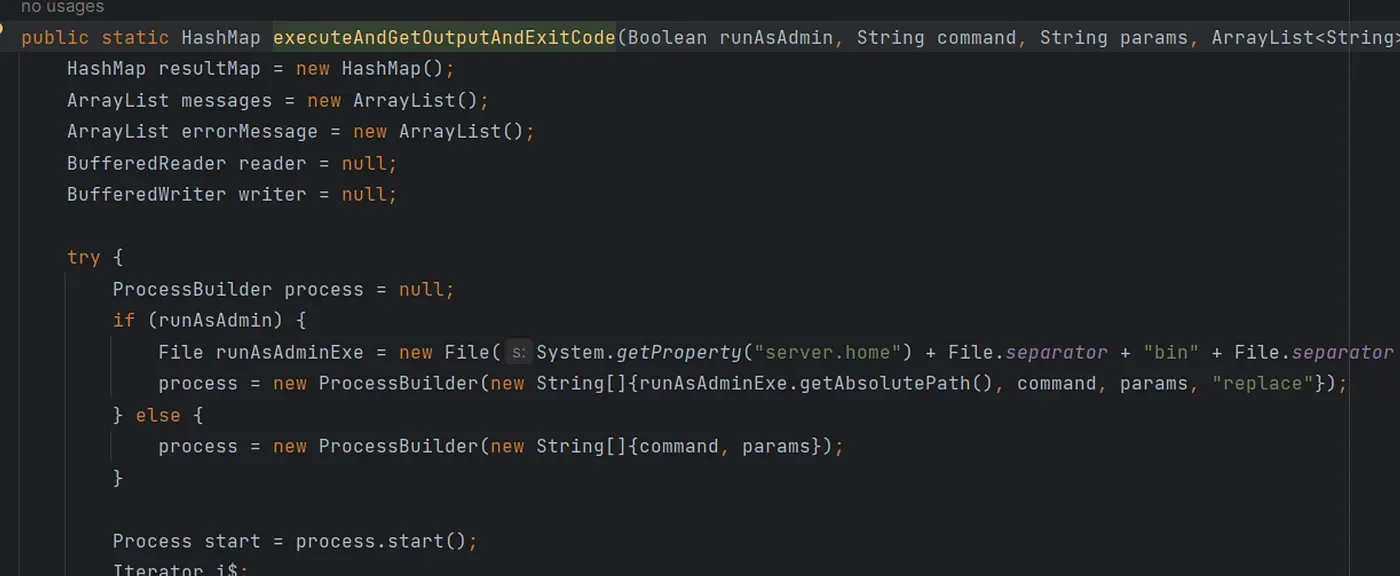
If the values cred["DOMAIN"], cred["ACCOUNT_NAME"] or cred["PASSWORD"] can be controlled, this is very likely a command injection.
Tracing backwards from the sink with find-usages gives a short call chain:
com.manageengine.ads.fw.ha.HAClusterServlet.doPost()
  -> com.manageengine.ads.fw.ha.HAClusterServlet.installService()
  -> com.manageengine.ads.fw.util.WrapperUtil.installServiceWithCredentials()
  -> ProcessUtil.executeAndGetOutput()
Reading web.xml shows which endpoint HAClusterServlet handles:
<servlet>
        <servlet-name>ADSHACluster</servlet-name>
        <servlet-class>com.manageengine.ads.fw.ha.HAClusterServlet</servlet-class>
</servlet>
[...]
<servlet-mapping>
  <servlet-name>ADSHACluster</servlet-name>
  <url-pattern>/servlet/ADSHACluster</url-pattern>
</servlet-mapping>
Exploitation
Step 1: understand the authentication gate in doPost
public void doPost(HttpServletRequest request, HttpServletResponse response) throws ServletException, IOException {
        String server = null;
        JSONObject clusterSettings = null;
        JSONObject status = new JSONObject();
        JSONObject credentialObj = null;
        boolean isAllowed = false; // [0]
        JSONObject authStatus = null;
      try {
            String mTCall = request.getParameter("MTCALL");
            String credential = request.getParameter("credential") != null ? HAClusterUtil.decodeBase64Param(request.getParameter("credential")) : "";
            String haAuthKey = request.getParameter("haAuthKey") != null ? request.getParameter("haAuthKey") : "";
            String productName = request.getParameter("productName") != null ? HAClusterUtil.decodeBase64Param(request.getParameter("productName")) : CommonUtil.getProductName();
            if (credential != null && !credential.equals("") && credential.length() != 0) {
                credentialObj = new JSONObject(credential);
            }
            String password;
            String handshake;
            if (credentialObj != null && credentialObj.length() != 0) { // [1]
                handshake = credentialObj.get("TECHNICIAN_NAME") != null ? (String)credentialObj.get("TECHNICIAN_NAME") : "";
                password = credentialObj.get("TECHNICIAN_PASSWORD") != null ? (String)credentialObj.get("TECHNICIAN_PASSWORD") : "";
                authStatus = this.authenticate(handshake, password);
                isAllowed = ((String)authStatus.get("STATUS")).equals("success");
                authStatus.put("AUTH_ERROR", true);
            } else if (haAuthKey != null && !haAuthKey.equals("")) {  // [2]
                Long productId = CommonUtil.getProductId(productName);
                password = CommonUtil.getProductParamValue(productId, "HA_AUTH_KEY");
                if (password != null && haAuthKey.equals(password)) {
                    isAllowed = true;
                }
            }
            if (isAllowed) {  // [3]
                if (mTCall.equalsIgnoreCase("exists")) {
                    status = this.isClusterExists();
                } else if (mTCall.equalsIgnoreCase([...])) {
[...]
            } else {
                if (authStatus == null) {
                    authStatus = new JSONObject();
                }
                authStatus.put("STATUS", "error");
                status = authStatus;
                if (mTCall.equalsIgnoreCase("getFOSNodeDetails")) {
                    status = new JSONObject();
                }
            }
            response.setContentType("application/json");
            PrintWriter out = response.getWriter();
            out.println(status);
            out.flush();
        } catch (Exception var15) {
            logger.log(Level.INFO, " ", var15);
        }
    }
At [0] the code declares isAllowed with a default value of false. At [1], if the user supplies a credential containing TECHNICIAN_NAME and TECHNICIAN_PASSWORD, the code checks whether it belongs to a TECHNICIAN (admin) user, and if so sets isAllowed = true. At [2], if no credential was supplied at [1] but a correct haAuthKey is provided, isAllowed = true. At [3], when isAllowed is true the code picks a function based on the user-supplied mTCall; otherwise it returns an error.
In other words, to use HAClusterServlet.doPost() at all you need admin rights (or the HA auth key).
Step 2: reach installService
To make the code call HAClusterServlet.installService(), mTCall must be installService:
else if (mTCall.equalsIgnoreCase("installService")) {
     status = this.installService(request);
}
Step 3: control the credential object
private JSONObject installService(HttpServletRequest request) {
        JSONObject status = new JSONObject();
       try {
            status.put("STATUS", "error");
            if (request.getParameter("DOMAIN") != null) {
                JSONObject cred = new JSONObject();
                cred.put("ACCOUNT_NAME", HAClusterUtil.decodeBase64Param(request.getParameter("USER_NAME")));
                cred.put("PASSWORD", HAClusterUtil.decodeBase64Param(request.getParameter("PASSWORD")));
                cred.put("DOMAIN", request.getParameter("DOMAIN"));
                if (WrapperUtil.installServiceWithCredentials(cred)) {
                    status.put("STATUS", "success");
                }
            } else {
                WrapperUtil.installAsService();
                status.put("STATUS", "success");
            }
        } catch (Exception var4) {
            logger.log(Level.SEVERE, "Exception in HAClusterServlet.installService() - > " + var4.getMessage());
        }
        return status;
installService reads the parameters DOMAIN, USER_NAME and PASSWORD, base64-decodes the latter two, and puts all three into the cred object. DOMAIN is taken raw, without decoding.
Step 4: the native authentication check before the sink
public static boolean installServiceWithCredentials(JSONObject cred) {
        try {
      // [4]
            if (!ADSNativeHandler.authenticateADCredentials(cred.optString("DOMAIN", (String)null), cred.optString("ACCOUNT_NAME", (String)null), cred.optString("PASSWORD", (String)null))) {
                return false;
            }
      isServiceInstalled = false;
      // [5]
            Iterator i$ = ProcessUtil.executeAndGetOutput(false, "cmd", "/c start /b wrapper.exe -i ..\\conf\\wrapper.conf wrapper.ntservice.account=" + cred.optString("DOMAIN", (String)null) + "\\" + cred.optString("ACCOUNT_NAME", (String)null) + " wrapper.ntservice.password=" + cred.optString("PASSWORD", (String)null)).iterator();
            while(i$.hasNext()) {
                String line = (String)i$.next();
                if (line.contains(HAClusterUtil.getWrapperProperty("wrapper.ntservice.displayname")) && !line.contains("not installed")) {
                    isServiceInstalled = true;
                    break;
                }
            }
        } catch (Exception var3) {
            var3.printStackTrace();
        }
        return isServiceInstalled;
    }
At [4] the values are passed to ADSNativeHandler.authenticateADCredentials(). This is a native function, so it cannot be debugged further. From the name and from trying inputs, the researcher concluded it authenticates AD credentials, meaning an account in the AD network. Only if the credentials are valid does execution reach ProcessUtil.executeAndGetOutput at [5].
Step 5: assemble the request
The parameters needed are:
- MTCALL=installService
- credential = base64({"TECHNICIAN_NAME":"admin","TECHNICIAN_PASSWORD":"admin"})
- USER_NAME = base64(`AD_USERNAME`)
- PASSWORD = base64(`AD_PASSWORD`)
- DOMAIN = `AD_DOMAIN `
The payload goes into DOMAIN, making it a domain that does not exist. The behaviour of the native check then depends on the deployment:
- If ADManager is deployed on a Domain Controller, a correct
usernameandpasswordare enough forADSNativeHandler.authenticateADCredentialsto returntrue. - If ADManager is deployed on a machine that belongs to an AD network but is not a Domain Controller, and the supplied
DOMAINis wrong, the program checks against local accounts instead.
Conveniently, ADManager lets an administrator manage AD accounts, so with admin rights the attacker can create an AD account whose password is the payload. That satisfies the native check and the command injection then runs, giving RCE.
Root cause
The vulnerable call builds a single string and hands it to cmd with the /c switch, so everything after /c is interpreted as a command line rather than as arguments to a fixed program. The DOMAIN, ACCOUNT_NAME and PASSWORD values are concatenated into that string; the report demonstrates injection through DOMAIN. The DOMAIN parameter is the easiest to use because it is not even base64-decoded, but the decoded USER_NAME and PASSWORD reach the same string.
The only defence in front of the sink is the native AD credential check at [4]. It is a real gate, but it validates credentials rather than sanitising the values, and the product itself lets an admin create the AD account used to pass it. The servlet's own gate at [1]/[2] requires admin rights or the HA auth key, which limits who can reach the code but does not stop an admin from injecting.
Impact
An authenticated user with admin privileges can run an arbitrary command on the host machine where ADManager Plus is installed. Exploitation additionally requires a valid AD account, which the attacker can create through the product's own account management. The researcher rates the impact as not high, and published the write-up mainly as learning material for people starting out with 1-day analysis.
Fix
A public exploit for the issue is linked at the end of the write-up:
https://github.com/PetrusViet/CVE-2023-38743
The report does not describe the vendor's patch.
Variants to test
- Search decompiled or source code for
cmd /c,cmd.exe /cand the bare string/crather than forcmd, then trace each hit back to its request parameters. A positive result is a parameter that reaches the concatenated string without escaping. - A positive result is a branch that reaches a
ProcessBuilderwith request data. - A positive result is a check that validates credentials but passes the same values unsanitised to the command, especially where the product lets an admin create the accounts used for the check.
- A positive result is a value containing
&,|or a backtick that changes the executed command.

What happened, in plain words
ManageEngine makes a family of IT administration products. They all share the same underlying code, which means a mistake found in one product often exists in the others too. This article is about one such mistake in ADManager Plus.
The mistake is called OS command injection. In simple terms: the program takes something a user typed and glues it into a command that the operating system will run. If the user types special characters, they can trick the operating system into running a second, different command of their choosing. It is like a form at a hotel reception that says "Name: ______" and the receptionist reads the whole line out loud to the kitchen; if you write "Bob, and also send a free bottle of wine to room 12", the kitchen may do both things.
The person who can do this here must already be logged in as an administrator of the product (or hold the HA auth key), and must also have a valid AD account. So the impact is limited, but the technique is a good lesson for anyone starting out in security.
Background concepts you need first
Before the technical part, a few words that will come up constantly.
- Servlet: a piece of Java code on a web server that handles one kind of incoming web request. Think of it as a specific counter in a large office: you walk to the counter named
/servlet/ADSHAClusterand that counter's clerk handles you. - Endpoint / URL path: the part of a web address after the domain, such as
/servlet/ADSHACluster. It tells the server which counter you want. - Parameter: a named value you send with a request, like a field on a form. In a URL it looks like
?name=value. The server reads these by name. - Base64: a way of writing any data using only letters, digits and a couple of symbols. It is not encryption; anyone can decode it. It is used here so that values with special characters can travel safely inside a request.
- JSON: a text format for structured data, like
{"key":"value"}. It is how programs pass little bundles of information to each other. - Native function: code compiled into a binary library rather than written in Java. You cannot step through it in a Java debugger, so you have to treat it as a black box and test it by feeding it inputs.
- Debugger: a tool that lets a programmer pause a running program, look at its variables and step through it line by line. Remote debugging means attaching the debugger to a program running on another machine or process.
- ProcessBuilder: a Java class used to start another program (a "process") on the machine. Whatever you give it is what the operating system will actually run.
cmd.exe: the Windows command interpreter. It reads a line of text and runs the commands in it.- Shell metacharacters: characters such as
&,|and the backtick that the command interpreter treats as instructions ("and also run this", "pipe the output there", "run this first") rather than as ordinary text. - RCE (Remote Code Execution): the ability to make a remote server run code or commands of your choosing. It is usually the most serious kind of finding.
- 1-day: a vulnerability that is already publicly known and patched, as opposed to a 0-day which is not yet known to the vendor. Studying 1-days is a common way to learn.
- Domain Controller: the central server in a Windows AD network that holds the user accounts and checks passwords.
- AD account: a username and password that exist in that Active Directory network.
Setting up a debugger
The researcher wanted to watch the Java program while it ran. To do that, they edited a configuration file, ./conf/wrapper.conf, and uncommented (removed the # from) the lines that switch on Java's remote debugging support, called JPDA:
#uncomment the following to enable JPDA debugging
wrapper.java.additional.17=-Xdebug
wrapper.java.additional.18=-Xnoagent
wrapper.java.additional.19=-Xrunjdwp:transport=dt_socket,address=8787,server=y,suspend=n
Line by line:
- The first line is just a comment reminding you what the block is for.
-Xdebugtells the Java runtime to allow debugging.-Xnoagentdisables an older debugging agent that is not needed.-Xrunjdwp:...loads the modern debugging connector.transport=dt_socketmeans it listens on a network socket,address=8787is the port number,server=ymeans this program is the server that the debugger connects to, andsuspend=nmeans the program starts running immediately instead of waiting for the debugger to attach.
In plain words: this opens a debug port, 8787, that a debugger can connect to. Callers were traced backwards using IntelliJ's find-usages shortcut, ctrl+f7, to jump from a function to everywhere it is called.
How the researcher found the bug
Looking at previously published ManageEngine bugs and skimming the code, the researcher noticed the product calls system commands in many places. That made command injection a promising class of bug to hunt for.
There are two ways to run a command ABC through cmd.exe:
1) "cmd.exe" "ABC" "arg1" "arg2"
2) "cmd.exe" "/c" "ABC arg1 arg2"
Line by line:
- In form 1, the operating system starts the program
ABCand hands it two separate arguments,arg1andarg2. If an attacker controlsarg1orarg2, the text is still only an argument toABC. It cannot break out and become a different command. It is like handing someone a sealed envelope labelled "for the accountant" with your note inside; the note never becomes an instruction to anyone else. - In form 2, the
/cswitch tellscmd.exeto treat the whole following string as a command line to interpret. SoABC arg1 arg2is read as a script. If an attacker controlsarg1orarg2, they can use characters such as&,|or a backtick to escape the context ofABCand run their own command. This is the dangerous form.
The help text of cmd confirms what the switch means:
cmd /?
Starts a new instance of the Windows command interpreter

CMD [/A | /U] [/Q] [/D] [/E:ON | /E:OFF] [/F:ON | /F:OFF] [/V:ON | /V:OFF]
    [[/S] [/C | /K] string]

/C      Carries out the command specified by string and then terminates
/K      Carries out the command specified by string but remains
Line by line:
cmd /?asks the command interpreter to print its own help.- The first sentence says it starts a new instance of the Windows command interpreter.
- The bracket line lists the optional switches it accepts.
/Cmeans: carry out the command given in the string, then stop./Kmeans: carry out the command, but keep the interpreter running afterwards.
So instead of searching the code for cmd.exe or cmd, the researcher searched for cmd /c, cmd.exe /c, and in this particular bug simply for the string /c. The reasoning: any place that uses the dangerous form will contain that switch, so searching for it narrows the results to the risky calls.
The image accompanies the search for the /c string.
The search turned up this call:
Iterator i$ = ProcessUtil.executeAndGetOutput(false, "cmd", "/c start /b wrapper.exe -i ..\\conf\\wrapper.conf wrapper.ntservice.account=" + cred.optString("DOMAIN", (String)null) + "\\" + cred.optString("ACCOUNT_NAME", (String)null) + " wrapper.ntservice.password=" + cred.optString("PASSWORD", (String)null)).iterator();
Line by line:
ProcessUtil.executeAndGetOutput(...)is a helper that runs a program and returns its output, line by line.- The first argument,
false, is a flag whose meaning the report does not explain. - The second argument is
"cmd", the program to run. - The third argument is
"/c start /b wrapper.exe -i ..\\conf\\wrapper.conf wrapper.ntservice.account="followed by the value ofcred["DOMAIN"], then a backslash, thencred["ACCOUNT_NAME"], thenwrapper.ntservice.password=, thencred["PASSWORD"]. cred.optString("DOMAIN", (String)null)means: read the field namedDOMAINfrom thecredobject, or usenullif it is missing..iterator()turns the returned output into something the code can loop over.
In plain words: the program builds one long text string by gluing together three values that come from a user, and hands that whole string to cmd with the /c switch. That is exactly the dangerous form 2 from above. If any of those three values can be controlled, this is very likely a command injection.
Following ProcessUtil.executeAndGetOutput, the input is passed into a ProcessBuilder for execution:
The image accompanies the step where the input is passed into a ProcessBuilder.
Tracing backwards from that dangerous call with find-usages gives a short chain of calls:
com.manageengine.ads.fw.ha.HAClusterServlet.doPost()
  -> com.manageengine.ads.fw.ha.HAClusterServlet.installService()
  -> com.manageengine.ads.fw.util.WrapperUtil.installServiceWithCredentials()
  -> ProcessUtil.executeAndGetOutput()
Line by line:
doPost()is the entry point: the method that runs when a web request arrives at the servlet.- It calls
installService(). - That calls
installServiceWithCredentials(). - That finally calls
executeAndGetOutput(), the dangerous line.
Reading web.xml (the file that maps URLs to servlets) shows which endpoint HAClusterServlet handles:
<servlet>
        <servlet-name>ADSHACluster</servlet-name>
        <servlet-class>com.manageengine.ads.fw.ha.HAClusterServlet</servlet-class>
</servlet>
[...]
<servlet-mapping>
  <servlet-name>ADSHACluster</servlet-name>
  <url-pattern>/servlet/ADSHACluster</url-pattern>
</servlet-mapping>
Line by line:
- The
<servlet>block gives the servlet a name,ADSHACluster, and says which Java class implements it,com.manageengine.ads.fw.ha.HAClusterServlet. - The
<servlet-mapping>block connects that name to a URL pattern,/servlet/ADSHACluster. So any request to that path is handled by this class.
In plain words: to reach the vulnerable code, you send your request to /servlet/ADSHACluster.
Exploitation, step by step
Step 1: understand the login gate in doPost
public void doPost(HttpServletRequest request, HttpServletResponse response) throws ServletException, IOException {
        String server = null;
        JSONObject clusterSettings = null;
        JSONObject status = new JSONObject();
        JSONObject credentialObj = null;
        boolean isAllowed = false; // [0]
        JSONObject authStatus = null;
      try {
            String mTCall = request.getParameter("MTCALL");
            String credential = request.getParameter("credential") != null ? HAClusterUtil.decodeBase64Param(request.getParameter("credential")) : "";
            String haAuthKey = request.getParameter("haAuthKey") != null ? request.getParameter("haAuthKey") : "";
            String productName = request.getParameter("productName") != null ? HAClusterUtil.decodeBase64Param(request.getParameter("productName")) : CommonUtil.getProductName();
            if (credential != null && !credential.equals("") && credential.length() != 0) {
                credentialObj = new JSONObject(credential);
            }
            String password;
            String handshake;
            if (credentialObj != null && credentialObj.length() != 0) { // [1]
                handshake = credentialObj.get("TECHNICIAN_NAME") != null ? (String)credentialObj.get("TECHNICIAN_NAME") : "";
                password = credentialObj.get("TECHNICIAN_PASSWORD") != null ? (String)credentialObj.get("TECHNICIAN_PASSWORD") : "";
                authStatus = this.authenticate(handshake, password);
                isAllowed = ((String)authStatus.get("STATUS")).equals("success");
                authStatus.put("AUTH_ERROR", true);
            } else if (haAuthKey != null && !haAuthKey.equals("")) {  // [2]
                Long productId = CommonUtil.getProductId(productName);
                password = CommonUtil.getProductParamValue(productId, "HA_AUTH_KEY");
                if (password != null && haAuthKey.equals(password)) {
                    isAllowed = true;
                }
            }
            if (isAllowed) {  // [3]
                if (mTCall.equalsIgnoreCase("exists")) {
                    status = this.isClusterExists();
                } else if (mTCall.equalsIgnoreCase([...])) {
[...]
            } else {
                if (authStatus == null) {
                    authStatus = new JSONObject();
                }
                authStatus.put("STATUS", "error");
                status = authStatus;
                if (mTCall.equalsIgnoreCase("getFOSNodeDetails")) {
                    status = new JSONObject();
                }
            }
            response.setContentType("application/json");
            PrintWriter out = response.getWriter();
            out.println(status);
            out.flush();
        } catch (Exception var15) {
            logger.log(Level.INFO, " ", var15);
        }
    }
Line by line, focusing on the important parts:
boolean isAllowed = false; // [0]declares a true/false flag calledisAllowedand starts it asfalse. Nothing is allowed until the code proves otherwise.String mTCall = request.getParameter("MTCALL");reads a parameter calledMTCALLfrom the request. This is the name of the action the caller wants to perform.String credential = ... decodeBase64Param(request.getParameter("credential")) ...reads thecredentialparameter and base64-decodes it. If it is missing, it uses an empty string.String haAuthKey = ...reads an optionalhaAuthKeyparameter.String productName = ...reads an optionalproductNameparameter, also base64-decoded, or falls back to the product's own name.if (credential != null && !credential.equals("") ...) { credentialObj = new JSONObject(credential); }turns the decoded credential text into a JSON object, if it is not empty.- At
[1]: if a credential object exists, the code readsTECHNICIAN_NAMEandTECHNICIAN_PASSWORDfrom it, callsthis.authenticate(...)to check them, and setsisAllowed = trueonly if the result'sSTATUSissuccess. A TECHNICIAN here means an administrator of the product. - At
[2]: if no credential was supplied but anhaAuthKeywas, the code looks up the product's ownHA_AUTH_KEYand setsisAllowed = trueif the supplied key matches. - At
[3]: ifisAllowedis true, the code picks a function based on themTCallvalue. Otherwise it builds an error response. - The last lines set the response type to JSON, write the status object out, and flush it to the client.
In plain words: this servlet is protected by a login check. To use it at all you need either an admin (TECHNICIAN) username and password, or the correct HA auth key. This is why the bug is described as authenticated: you must already be someone.
Step 2: reach installService
To make the code call HAClusterServlet.installService(), the mTCall parameter must be installService:
else if (mTCall.equalsIgnoreCase("installService")) {
     status = this.installService(request);
}
Line by line:
mTCall.equalsIgnoreCase("installService")checks whether the action name the caller sent matchesinstallService, ignoring upper and lower case.- If it does,
this.installService(request)is called, passing the whole request along.
In plain words: MTCALL is a menu choice. Sending MTCALL=installService selects the branch that installs the product as a Windows service.
Step 3: control the credential object
private JSONObject installService(HttpServletRequest request) {
        JSONObject status = new JSONObject();
       try {
            status.put("STATUS", "error");
            if (request.getParameter("DOMAIN") != null) {
                JSONObject cred = new JSONObject();
                cred.put("ACCOUNT_NAME", HAClusterUtil.decodeBase64Param(request.getParameter("USER_NAME")));
                cred.put("PASSWORD", HAClusterUtil.decodeBase64Param(request.getParameter("PASSWORD")));
                cred.put("DOMAIN", request.getParameter("DOMAIN"));
                if (WrapperUtil.installServiceWithCredentials(cred)) {
                    status.put("STATUS", "success");
                }
            } else {
                WrapperUtil.installAsService();
                status.put("STATUS", "success");
            }
        } catch (Exception var4) {
            logger.log(Level.SEVERE, "Exception in HAClusterServlet.installService() - > " + var4.getMessage());
        }
        return status;
Line by line:
- The method starts by assuming failure:
status.put("STATUS", "error"). if (request.getParameter("DOMAIN") != null)checks whether aDOMAINparameter was sent. If not, it takes the simpler branch that installs the service without credentials.- If
DOMAINwas sent, a newcredobject is created. cred.put("ACCOUNT_NAME", ... decodeBase64Param(request.getParameter("USER_NAME")))readsUSER_NAME, base64-decodes it, and stores it asACCOUNT_NAME.cred.put("PASSWORD", ... decodeBase64Param(request.getParameter("PASSWORD")))does the same forPASSWORD.cred.put("DOMAIN", request.getParameter("DOMAIN"))storesDOMAINexactly as sent, with no decoding.if (WrapperUtil.installServiceWithCredentials(cred))passes the object on, and reports success if it returns true.
In plain words: three request parameters, DOMAIN, USER_NAME and PASSWORD, end up in the cred object. The first two are base64-decoded; DOMAIN is taken raw. That last detail matters later, because raw text is the easiest to inject into.
Step 4: the native check before the dangerous line
public static boolean installServiceWithCredentials(JSONObject cred) {
        try {
      // [4]
            if (!ADSNativeHandler.authenticateADCredentials(cred.optString("DOMAIN", (String)null), cred.optString("ACCOUNT_NAME", (String)null), cred.optString("PASSWORD", (String)null))) {
                return false;
            }
      isServiceInstalled = false;
      // [5]
            Iterator i$ = ProcessUtil.executeAndGetOutput(false, "cmd", "/c start /b wrapper.exe -i ..\\conf\\wrapper.conf wrapper.ntservice.account=" + cred.optString("DOMAIN", (String)null) + "\\" + cred.optString("ACCOUNT_NAME", (String)null) + " wrapper.ntservice.password=" + cred.optString("PASSWORD", (String)null)).iterator();
            while(i$.hasNext()) {
                String line = (String)i$.next();
                if (line.contains(HAClusterUtil.getWrapperProperty("wrapper.ntservice.displayname")) && !line.contains("not installed")) {
                    isServiceInstalled = true;
                    break;
                }
            }
        } catch (Exception var3) {
            var3.printStackTrace();
        }
        return isServiceInstalled;
    }
Line by line:
- At
[4],ADSNativeHandler.authenticateADCredentials(...)is called with the domain, account name and password. If it returns false, the method returns false immediately and the dangerous line is never reached. isServiceInstalled = false;resets a flag.- At
[5], the dangerous line from earlier runs: the three values are glued into a string and passed tocmdwith/c. - The
whileloop reads the output of the command line by line. - If a line contains the service's display name and does not contain
not installed, the flag is set to true and the loop stops. - The method returns whether the service was installed.
In plain words: before building the command, the program checks the AD credentials with a native function. The researcher could not debug inside that function because it is compiled code, not Java. From its name and from trying different inputs while debugging, they concluded it authenticates AD credentials, meaning an account that exists in the AD network. Only if those credentials are valid does execution reach the dangerous ProcessUtil.executeAndGetOutput call.
Step 5: assemble the request
The parameters needed are:
- MTCALL=installService
- credential = base64({"TECHNICIAN_NAME":"admin","TECHNICIAN_PASSWORD":"admin"})
- USER_NAME = base64(`AD_USERNAME`)
- PASSWORD = base64(`AD_PASSWORD`)
- DOMAIN = `AD_DOMAIN `
Line by line:
MTCALL=installServiceselects the install branch, as in step 2.credentialis the base64 encoding of a small JSON object holding the admin username and password. This passes the login gate at[1].USER_NAMEis the base64 encoding of an AD username.PASSWORDis the base64 encoding of an AD password.DOMAINis the AD domain name, sent raw. This is where the payload goes.
The payload goes into DOMAIN, making it a domain that does not exist. The behaviour of the native check then depends on how the product is deployed:
- If ADManager is deployed on a Domain Controller, a correct
usernameandpasswordare enough forADSNativeHandler.authenticateADCredentialsto returntrue. - If ADManager is deployed on a machine that belongs to an AD network but is not a Domain Controller, and the supplied
DOMAINis wrong, the program checks against local accounts instead.
In plain words: the native check is a real gate, but it can be satisfied. Conveniently, ADManager lets an administrator manage AD accounts, so with admin rights the attacker can create an AD account whose password is the payload. That satisfies the native check, and then the command injection runs, giving RCE.
The researcher notes that the bug was originally found in a different ManageEngine product. It was moved to ADManager Plus in the write-up because exploitation needs an AD account in addition to the admin account.
Why it works (root cause)
The vulnerable call builds a single string and hands it to cmd with the /c switch, so everything after /c is interpreted as a command line rather than as arguments to a fixed program. The DOMAIN, ACCOUNT_NAME and PASSWORD values are concatenated into that string; the report demonstrates injection through DOMAIN. The DOMAIN parameter is the easiest to use because it is not even base64-decoded, but the decoded USER_NAME and PASSWORD reach the same string.
The only defence in front of the dangerous line is the native AD credential check at [4]. It is a real gate, but it validates credentials rather than sanitising the values, and the product itself lets an admin create the AD account used to pass it. The servlet's own gate at [1]/[2] requires admin rights or the HA auth key, which limits who can reach the code but does not stop an admin from injecting.
Impact
An authenticated user with admin privileges can run an arbitrary command on the host machine where ADManager Plus is installed. Exploitation additionally requires a valid AD account, which the attacker can create through the product's own account management. The researcher rates the impact as not high, and published the write-up mainly as learning material for people starting out with 1-day analysis.
Fix
A public exploit for the issue is linked at the end of the write-up:
https://github.com/PetrusViet/CVE-2023-38743
The report does not describe the vendor's patch.
Variants to test
- Search decompiled or source code for
cmd /c,cmd.exe /cand the bare string/crather than forcmd, then trace each hit back to its request parameters. A positive result is a parameter that reaches the concatenated string without escaping. - A positive result is a branch that reaches a
ProcessBuilderwith request data. - A positive result is a check that validates credentials but passes the same values unsanitised to the command, especially where the product lets an admin create the accounts used for the check.
- A positive result is a value containing
&,|or a backtick that changes the executed command.
Closing thoughts
The researcher writes that the impact is not high, but published the blog anyway because they thought some student somewhere might need it. They encourage readers to start doing 1-day analysis, calling it very useful for building the knowledge, experience and practice needed to eventually find a 0-day. It is a long process that needs patience, and a beginner with a mentor or extra material will find it less discouraging. They say they hope more people will contribute to open source in Vietnam rather than show off bugs with huge impact (or perhaps because there are none).
Glossary
- AD (Active Directory): Microsoft's directory service for managing users, computers and permissions in a Windows network.
- AD account: a username and password stored in Active Directory.
- ADManager Plus: a ManageEngine product for managing AD users and accounts.
- Admin / TECHNICIAN: in this product, a privileged user account that can manage the installation and its accounts.
- Authenticated vulnerability: a flaw that can only be triggered after logging in.
- Base64: an encoding that turns any data into letters, digits and a few symbols. Not encryption; anyone can decode it.
- Command injection: a vulnerability where user input is glued into an operating system command, letting the user run extra commands.
cmd.exe: the Windows command interpreter that reads and runs command lines./cswitch: thecmd.exeoption that runs the following string as a command and then stops.- Debugger: a tool that pauses a running program so a programmer can inspect it.
- Decompiled code: readable source reconstructed from a compiled program.
- Domain Controller: the central server in an AD network that checks user credentials.
- Endpoint: the URL path that routes a request to a particular piece of server code.
- Find-usages (
ctrl+f7): an IDE feature that lists every place a function is called. - HA (high availability): a setup where multiple nodes cooperate so the service keeps working if one fails.
- HA auth key: a shared secret the product uses to authenticate cluster nodes.
- JPDA: Java Platform Debugger Architecture, the standard way to attach a debugger to a Java program.
- Native function: compiled binary code that a Java debugger cannot step through.
- OS command injection: see command injection.
- Parameter: a named value sent with a web request, like a form field.
- ProcessBuilder: a Java class that starts another program on the machine.
- RCE (Remote Code Execution): making a remote server run commands or code of your choosing.
- Servlet: a Java class on a web server that handles a particular kind of request.
- Shell metacharacters: characters such as
&,|and the backtick that the command interpreter treats as instructions. web.xml: the configuration file that maps URL patterns to servlets in a Java web application.- 1-day: a publicly known, already patched vulnerability, often studied for practice.
- 0-day: a vulnerability not yet known to the vendor.