Useless path traversals in Zyxel admin interface (CVE-2022-2030)
 Published on security.humanativaspa.it
During our analysis of Zyxel’s device management web interface, we identified three path traversal vulnerabilities in some CGIs that grant an attacker read access to all files on the filesystem (CVE-2022-2030). These vulnerabilities are aggravated by the fact that the web server’s privileges are high, so it can, for…
The full write-up lives on its author's site
It belongs to its author, so we link to it rather than copy it. The other two tabs are our own rewrites, checked against it.
During our analysis of Zyxel's device management web interface, we identified three path traversal vulnerabilities in some CGIs that grant an attacker read access to all files on the filesystem (CVE-2022-2030). These vulnerabilities are aggravated by the fact that the web server's privileges are high, so it can, for example, access particularly sensitive files such as the shadow file.
However, the actual impact of these bugs is quite limited because the authentication system guarantees that the vulnerable code paths can only be reached by admin or limited-admin users. In short, they are almost useless.
The interesting thing about these bugs is that they have been discovered using three different techniques.
Context
The target is the device management web interface of Zyxel firewalls. Two CGIs are involved: webauth_example_preview.cgi, which previews customisation files for the web authentication portal, and export-cgi, which manages file downloads across all sections of the administration interface. The web server runs with high privileges, so a traversal that reaches the filesystem can read files that would normally be out of reach of a web process, including the shadow file.
All three bugs are authenticated: the vulnerable code paths can only be reached by admin or limited-admin users. That constraint is what keeps the practical impact low, and it is worth keeping in mind throughout.
Setup
- Access to the device management interface with an admin or limited-admin account.
- For the first and second bug, the ability to upload a custom web portal file under Configuration -> Web Authentication -> Custom Web Portal File.
- For the second bug, a sample archive obtained with Download External Web Portal Example, plus
unzip,lnandzipon the attacker's machine. - For the third bug, the firmware binary and Ghidra for static analysis. The
download_dev_infoweakness was observed at least in firmware version 5.10.
Finding it
The three issues were found with three different techniques: black box web application testing, logic, and static analysis with Ghidra. Each one lands in a different code path, which is the part worth reading closely.
Exploitation
Step 1: standard path traversal in webauth_example_preview.cgi
This one came out of simple black box web application testing: a standard path traversal in the webauth_example_preview.cgi CGI, which is used to preview some customisation files.
First of all, to trigger the bug a new Internal Web Portal Customize File must be uploaded into the right section, Configuration -> Web Authentication -> Custom Web Portal File.
At this point the path traversal is exploitable via the parameter hname of the page webauth_example_preview.cgi:
https://[redacted]/webauth_example_preview.cgi?zname=wp.zip&hname=../../../../../db/etc/zyxel/ftp/conf/startup-config.conf
This downloads the startup configuration. The zname parameter names the uploaded archive, while hname is the file inside it to preview; the ../ sequences in hname climb out of the extraction directory and reach the configuration file.
https://[redacted]/webauth_example_preview.cgi?zname=wp.zip&hname=../../../../../etc/shadow
With the same trick, the shadow file is downloaded.
Step 2: the same CGI, abused through a ZIP file
This variant was found using logic. The problem is again in webauth_example_preview.cgi, in a feature that parses a ZIP file containing a template of the customised web pages. ZIP files can contain symbolic links.
To reproduce the bug, access Configuration -> Web Authentication -> Custom Web Portal File and use Download External Web Portal Example to get a sample ZIP archive. Then modify the archive as follows to make it malicious:
$ unzip /tmp/external_web_portal_example.zip
$ ln -s /etc/shadow exp.htm
$ zip --symlinks -r ../wp2.zip *
The archive is unpacked, a symbolic link named exp.htm pointing at /etc/shadow is created, and the directory is re-zipped with --symlinks so the link is stored as a link rather than followed and stored as a copy of its target.
Upload the file in the Internal Web Portal Customize File section and access the preview. The system will automatically unzip the file into the directory /var/zyxel/.multi-portal/customize/ to allow Apache to access its contents.
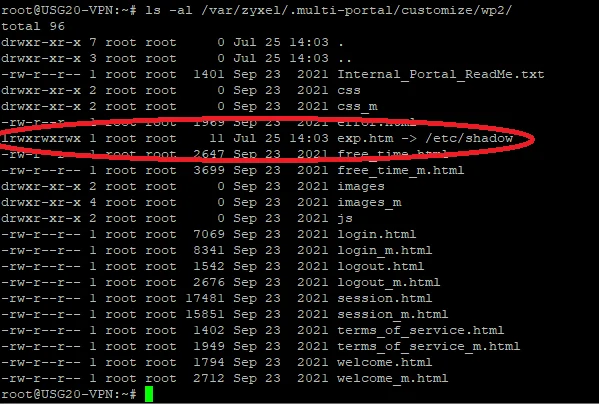
The shadow file can then be accessed via the preview CGI at:
https://[redacted]/webauth_example_preview.cgi?zname=wp2.zip&hname=exp.htm
Alternatively, if you enable the web portal customisation file, you can access it directly via the Web Portal. The extraction step preserved the symlink, so the file Apache serves under the name exp.htm is whatever the link points at.
The author notes that this bug may also be present in other application sections that process ZIP archives to create customised areas, for example User Agreement pages, but did not check.
Step 3: path traversal in export-cgi
This one was identified via static analysis executed with Ghidra on some interesting CGIs. The file export-cgi manages file downloads in all sections of the administration interface. Generally, it takes the category parameter from the HTTP request and switches between multiple download_XXXXX functions. The pseudocode (generated by Ghidra) of the download_av_signature function is:
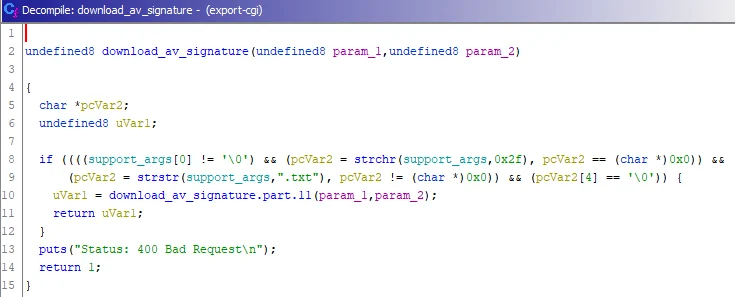
The decompiled download_av_signature function shows the input validation performed before the file is served.
As you can see, the function has a security check at the beginning which will return a 400 Bad request error in case of unusual input. In particular the checking of 0x2F inside the string will prevent path traversals, because 0x2F is the / character.
The weird thing is that about 30 download features have all been implemented with these security checks except for the download_dev_info feature, at least in firmware version 5.10.
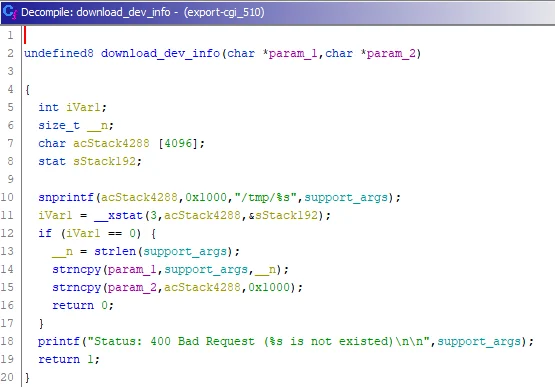
Once identified, the path traversal is quite simple to exploit:
https://[redacted]/cgi-bin/export-cgi?category=dev_info&arg0=../etc/passwd
This downloads the passwd file. The category parameter selects the download_dev_info handler, and arg0 carries the traversal, which that handler passes through without the 0x2F check.
Root cause
There are two distinct mistakes.
In webauth_example_preview.cgi, user-controlled input reaches file access without being confined to the extraction directory. The hname parameter is used to pick a file to preview, and ../ sequences are not neutralised. The ZIP variant is a second face of the same weakness: the extraction routine preserves symbolic links contained in the archive, so a link inside the archive becomes a link inside the directory Apache serves, and the preview then follows it to an arbitrary path.
In export-cgi, the design is sound: each download_XXXXX function validates its input and rejects strings containing 0x2F, returning 400 Bad request. The download_dev_info handler simply lacks that check, so the arg0 parameter reaches the file open with traversal sequences intact. The defence existed and worked everywhere except in one of roughly 30 handlers.
Impact
An attacker who holds an admin or limited-admin account can read all files on the filesystem, including the shadow file and the startup configuration, because the web server runs with high privileges. The authentication requirement is what limits the real-world impact: the vulnerable code paths cannot be reached by unauthenticated users or by ordinary accounts. The author's own summary is that the bugs are almost useless for that reason.
Fix
The export-cgi traversal was fixed in version 5.20 of the firmware, which was released months ago, although the release notes do not mention it. The new code is as follows:
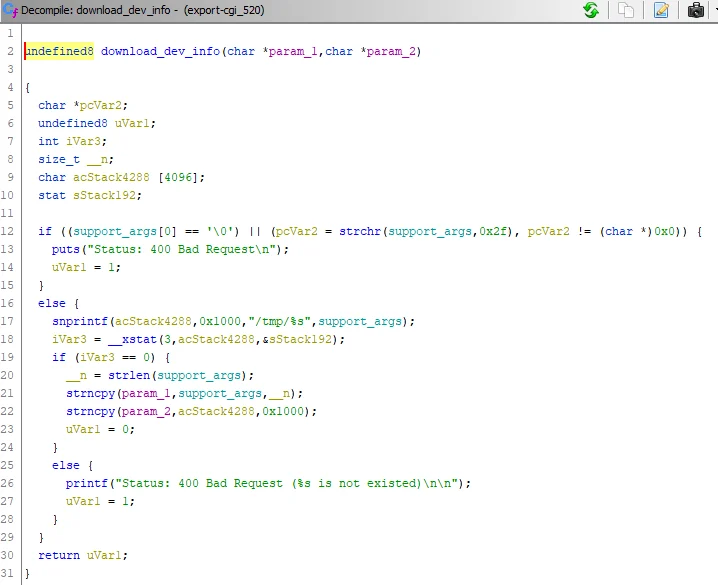
For information on patches, refer to Zyxel's official security advisory.
Variants to test
- Preview or download endpoints that take a filename parameter. Send
hname=../../../../etc/passwd(adjusting the depth) to any CGI that previews or serves a file from an uploaded archive. A positive result is the contents of a file outside the intended directory coming back in the response. - Archive upload features. Build a ZIP containing a symlink to a sensitive file, as in the
ln -s /etc/shadow exp.htmstep, upload it through any customisation or template feature, and request the linked name. A positive result is the target file's contents served under the link's name. - Sibling handlers in a dispatch CGI. Where one CGI switches on a
category-style parameter between many download functions, test each category with a traversal in the file argument. A positive result is one category returning a file outside its directory while the others return400 Bad request. - Other archive-processing sections. The author suggests User Agreement pages as a candidate. Upload a symlink-bearing archive there and request the extracted name; a positive result is the same out-of-directory read.
What happened, in plain words
A group of security researchers looked at the web interface of Zyxel firewalls. A firewall is a device that sits between a network and the internet and decides which traffic is allowed through. Like most network devices, it has a small website built into it, called the device management web interface, where an administrator logs in with a browser to change settings. The researchers found three bugs in that website. All three belong to a family called path traversal: a way of making a program read a file it was never meant to read, by giving it a file name that climbs out of the folder it was supposed to stay in.
In this case the bugs let someone read any file on the device's filesystem, including very sensitive ones such as the shadow file, which stores the hashed passwords of the device's users. The bugs are made worse by the fact that the web server runs with high privileges, meaning it is allowed to touch almost everything on the device.
There is a big catch, though. The vulnerable parts of the website can only be reached after logging in as an admin or limited-admin user. So an outsider with no account cannot use them. The author's own conclusion is that the bugs are almost useless, and the interesting part of the write-up is that the three bugs were found with three different techniques.
Context
The target is the device management web interface of Zyxel firewalls. Two CGIs are involved. A CGI is a small program that a web server runs when a particular URL is requested; think of it as a script behind a web page. The first is webauth_example_preview.cgi, which previews customisation files for the web authentication portal. The web authentication portal is the login page that guests see when they connect to a network through the firewall, and administrators can customise how it looks. The second is export-cgi, which manages file downloads across all sections of the administration interface.
The web server runs with high privileges, so a traversal that reaches the filesystem can read files that would normally be out of reach of a web process, including the shadow file.
All three bugs are authenticated: the vulnerable code paths can only be reached by admin or limited-admin users. That constraint is what keeps the practical impact low, and it is worth keeping in mind throughout.
Setup
To follow along you would need:
- Access to the device management interface with an admin or limited-admin account.
- For the first and second bug, the ability to upload a custom web portal file under Configuration -> Web Authentication -> Custom Web Portal File.
- For the second bug, a sample archive obtained with Download External Web Portal Example, plus
unzip,lnandzipon the attacker's machine. These are ordinary command-line tools for handling compressed archives and links. - For the third bug, the firmware binary and Ghidra for static analysis. Firmware is the software built into the device. Ghidra is a free tool that takes a compiled program and tries to show readable code, a process called decompilation. The
download_dev_infoweakness was observed at least in firmware version 5.10.
Finding it
The three issues were found with three different techniques: black box web application testing, logic, and static analysis with Ghidra. Black box testing means poking at the website from the outside with a browser or a tool, without seeing its code, the way a visitor would. Logic means reasoning about how a feature must work and spotting a gap in the reasoning. Static analysis means reading the program's code without running it. Each technique lands in a different code path, which is the part worth reading closely.
Exploitation
Step 1: standard path traversal in webauth_example_preview.cgi
This one came out of simple black box web application testing: a standard path traversal in the webauth_example_preview.cgi CGI, which is used to preview some customisation files.
First of all, to trigger the bug a new Internal Web Portal Customize File must be uploaded into the right section, Configuration -> Web Authentication -> Custom Web Portal File.
At this point the path traversal is exploitable via the parameter hname of the page webauth_example_preview.cgi. A parameter is a named value attached to the end of a URL after a question mark, like the fields of a form but written into the address. Here the URL carries two of them, zname and hname.
https://[redacted]/webauth_example_preview.cgi?zname=wp.zip&hname=../../../../../db/etc/zyxel/ftp/conf/startup-config.conf
Line by line:
https://[redacted]/is the address of the device. The address shown is a placeholder for the firewall's own address.webauth_example_preview.cgiis the program being called, the preview feature.?starts the list of parameters.zname=wp.ziptells the program which uploaded archive to look inside.wp.zipis the name of the archive the administrator uploaded.&separates one parameter from the next.hname=../../../../../db/etc/zyxel/ftp/conf/startup-config.confis the file to preview. The../sequences are the key: in a filesystem,..means "the folder above the current one". Repeating it five times climbs five folders up from wherever the program is looking, and then the rest of the path walks down to the startup configuration file.
This downloads the startup configuration. The zname parameter names the uploaded archive, while hname is the file inside it to preview; the ../ sequences in hname climb out of the extraction directory and reach the configuration file. The startup configuration is the file that holds the device's saved settings, which is exactly the kind of thing an attacker would want.
https://[redacted]/webauth_example_preview.cgi?zname=wp.zip&hname=../../../../../etc/shadow
Line by line:
- The first parts are the same as before: same device, same CGI, same archive
wp.zip. hname=../../../../../etc/shadowclimbs out of the extraction directory again, this time landing on/etc/shadow, the file that stores the hashed passwords of the device's users.
With the same trick, the shadow file is downloaded.
Step 2: the same CGI, abused through a ZIP file
This variant was found using logic. The problem is again in webauth_example_preview.cgi, in a feature that parses a ZIP file containing a template of the customised web pages. A ZIP file is a single file that packs many files together, like a box. ZIP files can contain symbolic links. A symbolic link, or symlink, is a file that is really just a signpost: it holds a path and, when you open it, the system opens whatever it points at. Think of a shortcut on a desktop.
To reproduce the bug, access Configuration -> Web Authentication -> Custom Web Portal File and use Download External Web Portal Example to get a sample ZIP archive. Then modify the archive as follows to make it malicious:
$ unzip /tmp/external_web_portal_example.zip
$ ln -s /etc/shadow exp.htm
$ zip --symlinks -r ../wp2.zip *
Line by line:
$ unzip /tmp/external_web_portal_example.zipunpacks the sample archive into the current folder. The$is just the shell prompt, not part of the command.$ ln -s /etc/shadow exp.htmcreates a symbolic link namedexp.htmthat points at/etc/shadow. The-smeans "symbolic". Soexp.htmis a signpost to the shadow file.$ zip --symlinks -r ../wp2.zip *packs everything in the current folder back into a new archive calledwp2.zip, placed one folder up. The-rmeans "recurse into subfolders". The--symlinksoption is the important one: it tells zip to store the link as a link, rather than following it and storing a copy of the file it points at.
Upload the file in the Internal Web Portal Customize File section and access the preview. The system will automatically unzip the file into the directory /var/zyxel/.multi-portal/customize/ to allow Apache to access its contents. Apache is the web server software that serves the pages; it needs the files unpacked on disk so it can hand them to the browser.
The shadow file can then be accessed via the preview CGI at:
https://[redacted]/webauth_example_preview.cgi?zname=wp2.zip&hname=exp.htm
Line by line:
- Same device and same CGI as before.
zname=wp2.zipselects the malicious archive that was just uploaded.hname=exp.htmasks for the file namedexp.htminside it. Because that name is a symlink to/etc/shadow, the preview ends up reading the shadow file.
Alternatively, if you enable the web portal customisation file, you can access it directly via the Web Portal. The extraction step preserved the symlink, so the file Apache serves under the name exp.htm is whatever the link points at.
The author notes that this bug may also be present in other application sections that process ZIP archives to create customised areas, for example User Agreement pages, but did not check.
Step 3: path traversal in export-cgi
This one was identified via static analysis executed with Ghidra on some interesting CGIs. The file export-cgi manages file downloads in all sections of the administration interface. Generally, it takes the category parameter from the HTTP request and switches between multiple download_XXXXX functions. Think of it as a receptionist: you say which department you want with category, and you are sent to the matching desk. The pseudocode (generated by Ghidra) of the download_av_signature function is:
The decompiled download_av_signature function shows the input validation performed before the file is served. Input validation is the practice of checking what a user sent before acting on it, like a bouncer checking IDs.
As you can see, the function has a security check at the beginning which will return a 400 Bad request error in case of unusual input. 400 Bad request is the standard HTTP status code meaning "I did not understand or accept this request". In particular the checking of 0x2F inside the string will prevent path traversals, because 0x2F is the / character. 0x2F is how computers write the number 47 in hexadecimal, and 47 is the character code for a forward slash. Since every path traversal needs a slash to climb folders, refusing any input containing a slash blocks the attack.
The weird thing is that about 30 download features have all been implemented with these security checks except for the download_dev_info feature, at least in firmware version 5.10.
Once identified, the path traversal is quite simple to exploit:
https://[redacted]/cgi-bin/export-cgi?category=dev_info&arg0=../etc/passwd
Line by line:
https://[redacted]/cgi-bin/export-cgiis the download program, this time under thecgi-binfolder.category=dev_infoselects the one handler that lacks the slash check.arg0=../etc/passwdis the file argument...climbs one folder up, and/etc/passwdis the file that lists the device's user accounts.
This downloads the passwd file. The category parameter selects the download_dev_info handler, and arg0 carries the traversal, which that handler passes through without the 0x2F check.
Root cause
There are two distinct mistakes.
In webauth_example_preview.cgi, user-controlled input reaches file access without being confined to the extraction directory. The hname parameter is used to pick a file to preview, and ../ sequences are not neutralised. The ZIP variant is a second face of the same weakness: the extraction routine preserves symbolic links contained in the archive, so a link inside the archive becomes a link inside the directory Apache serves, and the preview then follows it to an arbitrary path.
In export-cgi, the design is sound: each download_XXXXX function validates its input and rejects strings containing 0x2F, returning 400 Bad request. The download_dev_info handler simply lacks that check, so the arg0 parameter reaches the file open with traversal sequences intact. The defence existed and worked everywhere except in one of roughly 30 handlers.
Impact
An attacker who holds an admin or limited-admin account can read all files on the filesystem, including the shadow file and the startup configuration, because the web server runs with high privileges. The authentication requirement is what limits the real-world impact: the vulnerable code paths cannot be reached by unauthenticated users or by ordinary accounts. The author's own summary is that the bugs are almost useless for that reason.
Fix
The export-cgi traversal was fixed in version 5.20 of the firmware, which was released months ago, although the release notes do not mention it. The new code is as follows:
For information on patches, refer to Zyxel's official security advisory.
Variants to test
- Preview or download endpoints that take a filename parameter. Send
hname=../../../../etc/passwd(adjusting the depth) to any CGI that previews or serves a file from an uploaded archive. A positive result is the contents of a file outside the intended directory coming back in the response. - Archive upload features. Build a ZIP containing a symlink to a sensitive file, as in the
ln -s /etc/shadow exp.htmstep, upload it through any customisation or template feature, and request the linked name. A positive result is the target file's contents served under the link's name. - Sibling handlers in a dispatch CGI. Where one CGI switches on a
category-style parameter between many download functions, test each category with a traversal in the file argument. A positive result is one category returning a file outside its directory while the others return400 Bad request. - Other archive-processing sections. The author suggests User Agreement pages as a candidate. Upload a symlink-bearing archive there and request the extracted name; a positive result is the same out-of-directory read.
Glossary
- Admin / limited-admin: the two account types that can reach the vulnerable pages.
- Apache: the web server software that serves the device's pages and files.
- Authenticated: reachable only after logging in with a valid account.
- Black box testing: testing a website from the outside without seeing its code.
- CGI: a small program the web server runs when a particular URL is requested.
- CVE-2022-2030: the public identifier assigned to this set of vulnerabilities.
- Firmware: the software built into a device such as a firewall.
- Ghidra: a tool that decompiles compiled programs into readable pseudocode.
- HTTP status code: a number a server returns to say how a request went, such as
400 Bad request. - Input validation: checking what a user sent before acting on it.
- Parameter: a named value attached to a URL after a question mark.
- Path traversal: making a program read a file outside its intended folder by using
../sequences or links. - Privileges: the permissions a program or user has; high privileges mean it can touch many files.
- Pseudocode: readable, approximate code produced by decompiling a program.
- Shadow file: the file that stores hashed user passwords.
- Static analysis: reading a program's code without running it.
- Symbolic link (symlink): a file that is a signpost to another path.
- Web authentication portal: the login page guests see when connecting through the firewall, which administrators can customise.
- ZIP file: a single file that packs many files together.



