Arbitrary file creation via symlink attack on syncagentsrv (Acronis Sync Agent Service)
The Acronis Sync Agent service writes its log file without protecting the log directory, so a low-privileged user can replace the empty logs folder with a symlink pointing to a protected system path. The service then follows the link and creates an attacker-named file there, which can be swapped for a malicious DLL and loaded by a privileged Windows component to gain Local System rights.

- Triaged in 3 days
- Fixed in 7 months
- Paid in 17 days
- Disclosed after 8 months
Issue class description
Arbitrary file creation is a vulnerability that allows attacker to create file in arbitrary location within filesystem. This includes protected directories, such as C:\Windows, C:\windows\system32 and "C:\Program Files". If in addition, attacker has control over the file content, it is possible to create DLL file which will be loaded by known operating system components and will result in Privilege Elevation to Local System (the highest level of privileges on local Windows system).
There are many known paths for this attacks, e.g. every desktop version of Windows will periodically run "schedule" service. The service will try to load non-existing library named WptsExtensions.dll. If attacker manages to plant custom version of this library, the code will be executed with highest privileges and can be used to add new administrative user or start reverse shell. The issue can be force by triggering system reboot as well. More details can be found here: https://itm4n.github.io/windows-dll-hijacking-clarified/
To perform this attack, typically we need privileged process that blindly follows symlinks (reparse points), without verifying destination. NTFS symlinks require extra privileges, but attacker can use other kind of symlinks: directory junctions mixed with object directory symlinks. The ready to use solution is hosted on Google's Project Zero's github: https://github.com/googleprojectzero/symboliclink-testing-tools
CreateSymlink.exe binary used in this attack originates from this source and can be downloaded to reproduce the attack.
Affected software
Following True Image installer was used:
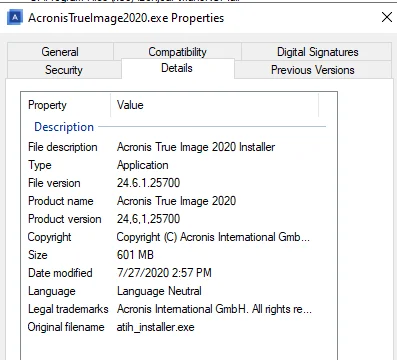
The vulnerable service is syncagentsrv ("C:\Program Files (x86)\Common Files\Acronis\SyncAgent\syncagentsrv.exe")
When service is running, it logs information into C:\ProgramData\Acronis\SyncAgent\logs\syncagent.log file. The file is not exclusively opened, nor protected, and can be deleted at any time. The C:\ProgramData\Acronis\SyncAgent\logs\ directory remains empty, thus can be transformed into directoy junction and symlink.
Once new entry is added to the log, the write operation will follow the symlink and write into arbitrary location. Attacker also controls the name of resulting file. The resulting file grants full control to EVERYONE, hence it is trivial to replace its content with custom code.
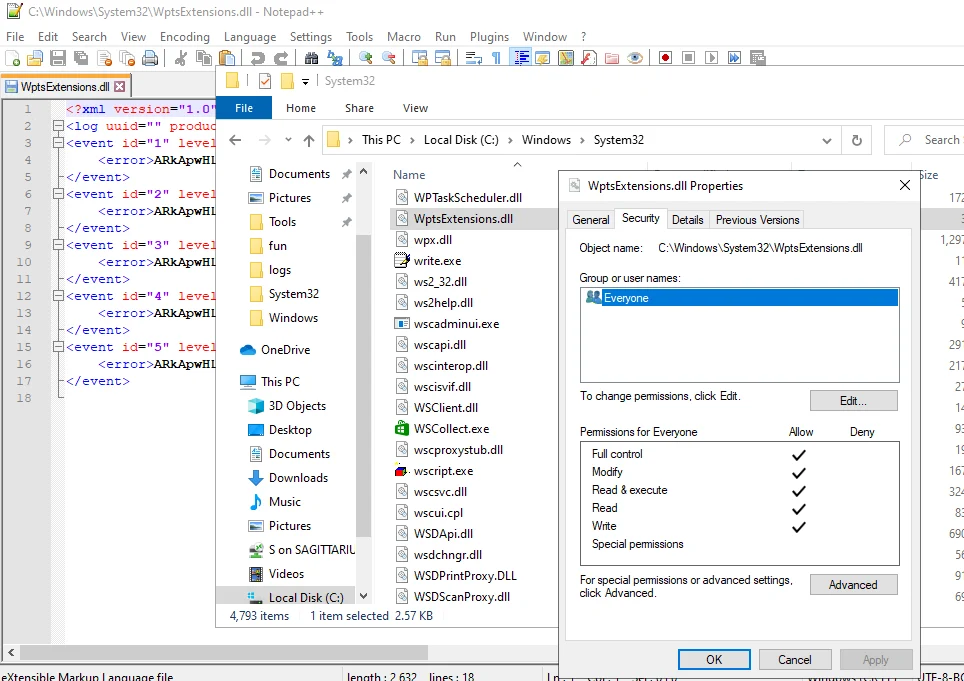
The attack has been confirmed on my local system (when proper libraries were targeted) and I was able to elevate privileges.
Steps to reproduce
- Delete C:\ProgramData\Acronis\SyncAgent\logs\syncagent.log file. Make sure that directory is now empty.
- Use following command to create symlink:
CreateSymlink.exe C:\ProgramData\Acronis\SyncAgent\logs\syncagent.log C:\Windows\system32\WptsExtensions.dll - Wait for data to be written into the log or force it by triggering system reboot. After the reboot verify successful file creation.
- Replace new file content (C:\Windows\system32\WptsExtensions.dll) with custom DLL functionality - e.g. adding administrative user or spawning remote shell connection.
- Reboot again to trigger Windows Scheduler loading new dll.
Impact
Low privileged user can overwrite any file in the system (this could lead to DoS) or create arbitrary files anywhere on the system. By creating arbitrary DLL, then replacing its content with custom code, user can elevate privileges up to Local System (the highest Windows privilege).
Not written yet. The AI write-up for this report has not been written yet. The Original tab links to the source.
How it worked
Root cause
Likely the service opens its log path without checking that the directory and file are not reparse points, and the log directory is writable and left empty by ordinary users.
Impact
A low-privileged user could overwrite or create files anywhere, causing denial of service, and by planting a DLL could elevate to Local System; the author confirmed this on their own system.
What the attacker needed
Local low-privileged account; ability to delete the log file; symlink creation tool
How it was found
- Delete the existing log file so the log directory is empty.
- Create a symlink at the log file path that points to a protected system DLL path.
- Wait for the service to write a log entry, or reboot to force it, then confirm the file was created.
- Replace the created file's content with custom DLL code.
- Reboot so the Windows scheduler loads the planted DLL.
Explained by bugbounty.wiki with AI from the original and checked against quotes from it; it can still be wrong. Read the original before relying on a detail.
Not written yet. The AI write-up for this report has not been written yet. The Original tab links to the source.
A background service keeps a log file in a folder that any user can change. If you swap that folder for a shortcut that points somewhere sensitive, the service still writes through it, letting you place a file where you normally could not. Because that file can be a library Windows later loads with high rights, you can end up running code as the most powerful local account.
What is File upload?
An upload feature accepts a file that the server or other users' browsers then treat as code or as something trusted.





