Stored XSS in Acronis Cyber Protect Console
A stored cross-site scripting vulnerability existed in the Acronis Cyber Protect Console because a protection plan's name was not properly sanitised. An attacker could execute arbitrary JavaScript in the context of the console when a victim viewed or interacted with the malicious plan.

- Triaged in 7 hours
- Fixed in 6 months
- Paid in 37 hours
- Disclosed after 6 months
Dear Acronis Security Team,
Summary
There is a possibility of storing an XSS on the https://mc-beta-cloud.acronis.com/ui/ console.
Steps To Reproduce
[add details for how we can reproduce the issue]
- Login to the console with the given account
- Go to "Protection" under "PLANS"
- Click on "Create Plan"
- Click on "Add devices" and select the device to add (in my case I selected my PC where the agent is installed)
- Name the new created protection plan with this payload <video><source onerror="javascript:alert(document.domain)">
- Click on "Create" button and wait till the plan is created
- Once the plan is created go back to the "Protection" under "Plans" and select the created plan by selecting the checkbox
- On the "Actions" pane at the right side, click on the "Stop" button
- A confirmation box will appear to stop the plan
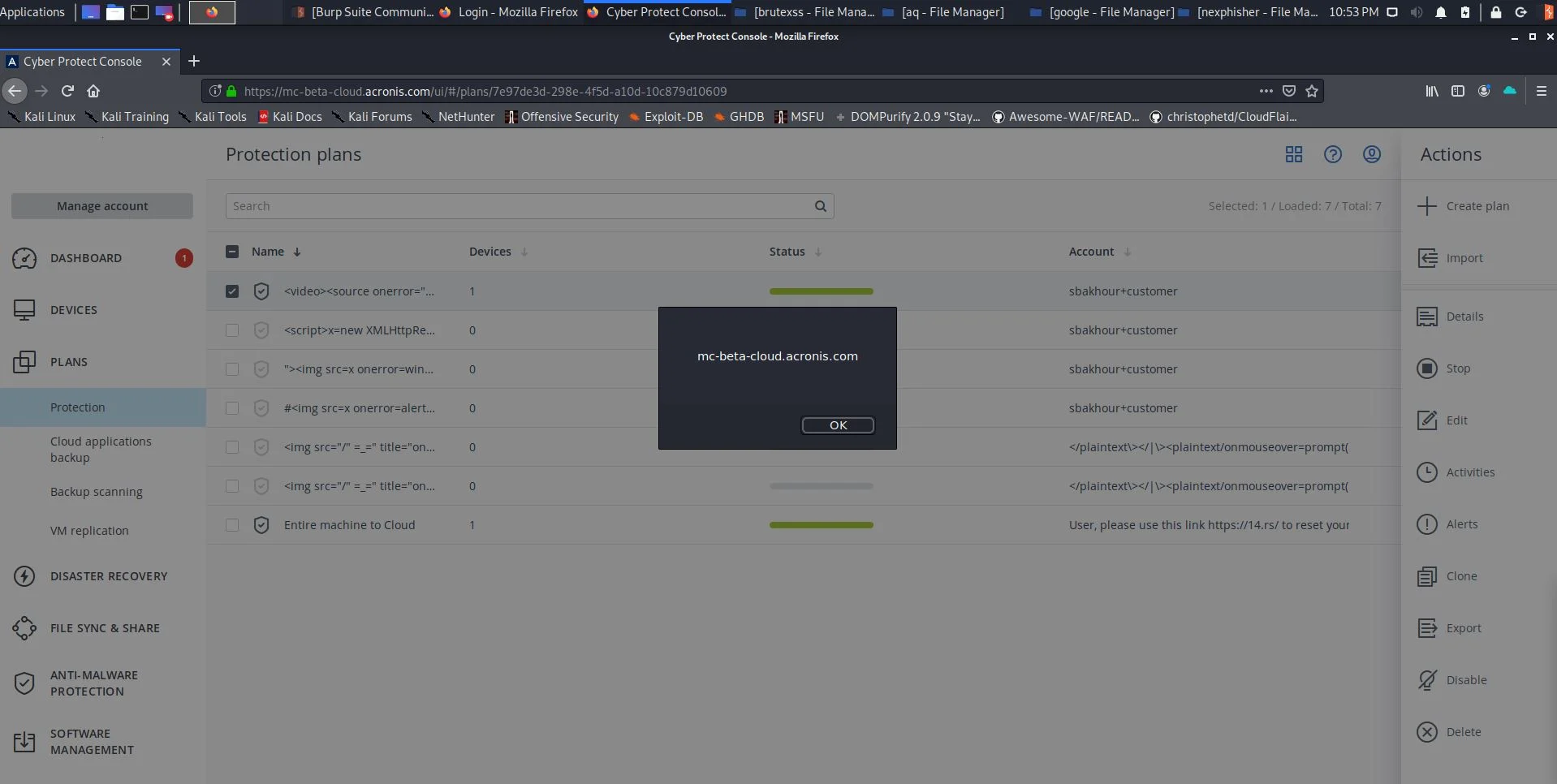
- Click on the red "Confirm" button and the XSS will fire up
- Reload the pages by re-visiting https://mc-beta-cloud.acronis.com/ui/
- Click again on "Protection" under "Plans"
- Select the plan created with this payload name <video><source onerror="javascript:alert(document.domain)">
- Repeat steps 8,9,10 and the XSS will fire up again confirming that it is a stored XSS.
Recommendations
You can prevent XSS by escaping, validating inputs in fields and sanitizing. Plan names are not supposed to contain special characters or payloads.
##Supporting Material/References:: Please refer to the attached screenshot & video for reference.
##Browser Tested: Mozilla Firefox 68.9.0esr (64-bit)
##Operating System Tested: Windows 10 Professional 64-bit Kali Linux 2020 32-bit
Impact
An XSS attack allows an attacker to execute arbitrary JavaScript in the context of the attacked website and the attacked user. This can be abused to steal session cookies, perform requests in the name of the victim or for phishing attacks.
Attachments
Context
Acronis Cyber Protect is a backup and cyber protection product with a web console. The report concerns the beta console at https://mc-beta-cloud.acronis.com/ui/, where an authenticated user manages protection plans. A protection plan is a named configuration that binds devices to a backup or protection policy: the user creates it, adds devices to it, and later starts or stops it from the Plans view.
The researcher found that the name given to a protection plan is stored and later rendered back into the console without adequate escaping, so a name containing HTML and JavaScript executes when another part of the interface displays it. The weakness is classified as stored cross-site scripting and the report was rated medium severity, with a 500.00 USD bounty.
Setup
The only precondition is an authenticated session in the console: the researcher logged in "with the given account", meaning an account was provided for testing. The device added to the plan was the researcher's own PC with the agent installed.
The browser used was Mozilla Firefox 68.9.0esr (64-bit). Testing was done from Windows 10 Professional 64-bit and Kali Linux 2020 32-bit.
No proxy tooling, interception or request rewriting is described; the whole flow is performed through the normal user interface.
Finding it
The researcher's summary states the conclusion directly: there is a possibility of storing an XSS on the https://mc-beta-cloud.acronis.com/ui/ console. The plan name is user-controlled text that the console stores and later renders. Because the name is stored server-side and re-rendered on subsequent visits, the payload persists across page reloads, which is what makes it stored rather than reflected.
Exploitation
Step 1: log in
Log in to the console with the provided account. Every later step happens inside this authenticated session.
Step 2: open the Plans view
Go to "Protection" under "PLANS". This is the section that lists protection plans and offers the create and stop actions used below.
Step 3: start creating a plan
Click on "Create Plan".
Step 4: add a device
Click on "Add devices" and select the device to add. In the researcher's case this was the PC where the agent is installed.
Step 5: set the malicious name
Name the new protection plan with this payload:
<video><source onerror="javascript:alert(document.domain)">
The payload relies on a <video> element containing a <source> child. The source element fails to load, which fires its onerror handler, and the handler body is javascript:alert(document.domain). The javascript: scheme in the handler is redundant in practice, but the effect is that alert(document.domain) runs in the origin of the console page that renders the name. Using document.domain rather than a fixed string proves which origin the script is executing in.
Step 6: create the plan
Click on the "Create" button and wait until the plan is created. The name, payload included, is now stored server-side.
Step 7: select the plan
Go back to "Protection" under "Plans" and select the created plan by ticking its checkbox.
Step 8: open the stop action
On the "Actions" pane at the right side, click on the "Stop" button.
Step 9: reach the confirmation dialogue
A confirmation box appears asking to stop the plan. The XSS fires when the confirmation is clicked.
Step 10: trigger the payload
Click on the red "Confirm" button and the XSS fires. The onerror handler runs and the alert shows the document domain of the console.
Step 11: reload the console
Re-visit https://mc-beta-cloud.acronis.com/ui/ to reload the pages.
Step 12: return to Plans
Click again on "Protection" under "Plans".
Step 13: select the same plan
Select the plan created with the payload name:
<video><source onerror="javascript:alert(document.domain)">
Step 14: repeat the stop flow
Repeat steps 8, 9 and 10, and the XSS fires again. This second execution after a full reload is the proof that the payload is stored and not merely reflected from the creation request.
Root cause
The researcher's recommendation implies the name should be escaped, validated and sanitised, but the report does not establish the exact cause. The researcher's recommendation frames it as an input handling problem: plan names are not supposed to contain special characters or payloads, so the field should have been constrained at input time and escaped at output time.
The report does not identify the specific rendering code or the exact sink, so the precise mechanism (for example, whether the name is written into the DOM as HTML by a client-side template) is not established here. What the report does establish is that the value survives storage and executes on a later page load, which rules out a purely client-side reflection.
Impact
As the researcher puts it, an XSS attack allows an attacker to execute arbitrary JavaScript in the context of the attacked website and the attacked user. That can be abused to steal session cookies, perform requests in the name of the victim, or for phishing attacks.
The conditions matter: the payload has to be planted in a plan name, which requires an authenticated user able to create plans, and it fires when a user views the plan and goes through the stop confirmation flow. The report does not describe any cross-user scenario, such as an administrator viewing another user's plan.
Fix
The report recommends preventing XSS by escaping and validating inputs and sanitising output, noting that plan names are not supposed to contain special characters or payloads. The report does not state which of these changes was actually made.
Variants to test
- Other free-text fields that are echoed into confirmation dialogues, lists or tooltips: plan descriptions, device names, group names, policy names. A positive result is the payload executing after a full page reload, not only immediately after submission.
- Alternative element and handler combinations where
<video>/<source>might be filtered, for example other media or image elements with error handlers. A positive result is the samealert(document.domain)firing from the stored value. - The same name rendered in different views (list, detail page, action confirmation, notification). A positive result is execution in any view that a different user or role would open, which would extend the impact beyond the creating account.
Hunting notes
This bug class hides in user-controlled names and labels that are stored once and rendered in many places: object names, plan and policy titles, device labels, saved filter names. The signal during recon is a product where the same string appears in lists, dialogues and notifications, since each of those is a separate rendering path and one of them is likely to skip escaping.
The researcher showed enough impact by demonstrating persistence: the payload fired once during the stop confirmation and again after reloading the console and repeating the flow. That repeat is what distinguishes stored XSS from a reflected issue and is the cheapest evidence to collect. The report also names the exact browser and operating systems used, which removes ambiguity about whether the behaviour is environment-specific.
Attachments
The report includes a screenshot and a video as supporting material.
What happened, in plain words
Acronis Cyber Protect is a product that backs up and protects computers, and it comes with a web console: a website you log into to manage everything. The report is about the beta (test) version of that console at https://mc-beta-cloud.acronis.com/ui/. Inside it, a logged-in user manages "protection plans". A protection plan is simply a named set of settings that ties one or more devices to a backup or protection policy. You create it, you add devices to it, and later you start or stop it from a list called Plans.
The researcher found that the name you give a protection plan is saved by the server and later shown back to you in the console without being made safe first. If the name contains HTML and JavaScript, that code runs when another part of the interface displays the name. This kind of bug is called stored cross-site scripting, or stored XSS. The report was rated medium severity and paid a 500.00 USD bounty.
A quick comparison: imagine a guestbook where you write your name, and the hotel later prints it on a welcome sign exactly as written. If you write your name in a way that looks like an instruction ("put a fire alarm here"), the hotel follows the instruction instead of just showing the text. A web page that inserts a saved name into its HTML without checking it behaves the same way: the browser treats part of the name as code.
The setup
The only thing you need before starting is to be logged in to the console. The researcher logged in "with the given account", meaning a test account was provided. The device added to the plan was the researcher's own PC, the one with the backup agent installed.
The browser used was Mozilla Firefox 68.9.0esr (64-bit). Testing was done from Windows 10 Professional 64-bit and Kali Linux 2020 32-bit.
No proxy tools, traffic interception or request editing are described. Everything is done through the normal screens of the website, by clicking, exactly as a regular user would.
Finding it
The researcher's summary states the conclusion straight away: there is a possibility of storing an XSS on the https://mc-beta-cloud.acronis.com/ui/ console. The plan name is a free-text field, so the user can type anything into it. The console later displays that name again when the plan is stopped. Because the name is saved on the server and shown again on later visits, the payload survives page reloads. That is what makes it stored rather than reflected: a reflected bug only appears in the immediate response to one request and disappears afterwards.
Exploitation
Step 1: log in
Log in to the console with the provided account. Every later step happens inside this logged-in session. A session is how the website remembers who you are between page loads; it is usually kept in a cookie, a small piece of data the browser stores and sends back with each request.
Step 2: open the Plans view
Go to "Protection" under "PLANS". This is the section that lists protection plans and offers the create and stop actions used below.
Step 3: start creating a plan
Click on "Create Plan".
Step 4: add a device
Click on "Add devices" and select the device to add. In the researcher's case this was the PC where the agent is installed.
Step 5: set the malicious name
Name the new protection plan with this payload:
<video><source onerror="javascript:alert(document.domain)">
Line by line, in plain words:
<video>starts a video element. A video element is the part of a web page that plays a movie. On its own it does nothing here.<source ...>tells the video where to get its content from. Normally it has asrcattribute pointing at a video file. Here there is no file, so the browser tries to load the source and fails.onerror="..."is an event handler: an instruction the browser keeps and runs only when something goes wrong. When the source fails to load, the browser runs whatever is inside the quotes.javascript:alert(document.domain)is the instruction that runs.alert(...)opens a small pop-up box with a message.document.domainis the address of the page that is currently running the code. So the pop-up shows which website the code is executing on.
The javascript: prefix inside the handler is redundant in practice, but the effect is that alert(document.domain) runs in the origin of the console page that renders the name. An origin is the combination of protocol, host and port that the browser uses to decide which site a piece of code belongs to. Using document.domain rather than a fixed text proves which origin the script is executing in.
Step 6: create the plan
Click on the "Create" button and wait until the plan is created. The name, payload included, is now stored on the server. Nothing has run yet: saving text is not the same as displaying it.
Step 7: select the plan
Go back to "Protection" under "Plans" and select the created plan by ticking its checkbox. Selecting it is what makes the action buttons apply to that plan.
Step 8: open the stop action
On the "Actions" pane at the right side, click on the "Stop" button. Stopping a plan is a normal management action; the researcher uses it because it opens a confirmation dialogue, and that dialogue is one of the places where the saved name is displayed.
Step 9: reach the confirmation dialogue
A confirmation box appears asking to stop the plan. The XSS fires when the confirmation is clicked. "Rendered" means turned into what you see on screen: the browser reads the HTML and builds the page from it. If the name is inserted as raw HTML rather than as plain text, the browser treats the <video> and <source> tags as real page elements.
Step 10: trigger the payload
Click on the red "Confirm" button and the XSS fires. The onerror handler runs and the alert shows the document domain of the console. In other words, the code that was typed into a name field is now running as if it were part of the Acronis website itself.
Step 11: reload the console
Re-visit https://mc-beta-cloud.acronis.com/ui/ to reload the pages. Reloading throws away everything the browser held in memory for the current page and fetches it fresh from the server. If the payload still works after that, it must have been saved on the server, not just sitting in the page.
Step 12: return to Plans
Click again on "Protection" under "Plans".
Step 13: select the same plan
Select the plan created with the payload name:
<video><source onerror="javascript:alert(document.domain)">
This is the same string as in step 5. It is shown again here because the researcher is selecting the existing plan, whose name was saved earlier, rather than typing a new one.
Step 14: repeat the stop flow
Repeat steps 8, 9 and 10, and the XSS fires again. This second execution after a full reload is the proof that the payload is stored and not merely reflected from the creation request. A reflected bug would have vanished after the reload, because nothing would have been saved.
Root cause
The researcher's recommendation implies the name should be escaped, validated and sanitised, but the report does not establish the exact cause. Three terms worth separating:
- Escaping means converting characters that have special meaning in HTML (like
<and>) into harmless text, so the browser shows them instead of acting on them. - Validation means checking input against rules and rejecting what does not fit, for example refusing names that contain angle brackets.
- Sanitisation means cleaning input so that only safe parts remain.
The researcher's recommendation frames it as an input handling problem: plan names are not supposed to contain special characters or payloads, so the field should have been constrained at input time and escaped at output time. "Input time" is when the user types and submits; "output time" is when the saved value is put back on a page.
The report does not identify the specific rendering code or the exact sink, so the precise mechanism (for example, whether the name is written into the DOM as HTML by a client-side template) is not established here. The DOM is the browser's in-memory model of the page. What the report does establish is that the value survives storage and executes on a later page load, which rules out a purely client-side reflection.
Impact
As the researcher puts it, an XSS attack allows an attacker to execute arbitrary JavaScript in the context of the attacked website and the attacked user. JavaScript is the programming language that web pages run in your browser; "arbitrary" means any code the attacker chooses. "In the context of" means the code runs with the same permissions as the site itself, so the browser cannot tell it apart from the site's own code. That can be abused to steal session cookies, perform requests in the name of the victim, or for phishing attacks. Phishing here means showing fake content inside the real site to trick the user into handing something over.
The conditions matter: the payload has to be planted in a plan name, which requires a logged-in user who is able to create plans, and it fires when a user views the plan and goes through the stop confirmation flow. The report does not describe any cross-user scenario, such as an administrator viewing another user's plan.
Fix
The report recommends preventing XSS by escaping and validating inputs and sanitising output, noting that plan names are not supposed to contain special characters or payloads. The report does not state which of these changes was actually made.
Variants to test
- Other free-text fields that are echoed into confirmation dialogues, lists or tooltips: plan descriptions, device names, group names, policy names. A positive result is the payload executing after a full page reload, not only immediately after submission.
- Alternative element and handler combinations where
<video>/<source>might be filtered, for example other media or image elements with error handlers. A positive result is the samealert(document.domain)firing from the stored value. - The same name rendered in different views (list, detail page, action confirmation, notification). A positive result is execution in any view that a different user or role would open, which would extend the impact beyond the creating account.
Hunting notes
This bug class hides in user-controlled names and labels that are stored once and rendered in many places: object names, plan and policy titles, device labels, saved filter names. The signal during recon is a product where the same string appears in lists, dialogues and notifications, since each of those is a separate rendering path and one of them is likely to skip escaping. Recon here means the early exploration of a target to see how it is built and where its features live.
The researcher showed enough impact by demonstrating persistence: the payload fired once during the stop confirmation and again after reloading the console and repeating the flow. That repeat is what distinguishes stored XSS from a reflected issue and is the cheapest evidence to collect. The report also names the exact browser and operating systems used, which removes ambiguity about whether the behaviour is environment-specific.
Attachments
The report includes a screenshot and a video as supporting material.
Glossary
- Stored XSS: XSS where the malicious text is saved on the server and runs again on later visits, not just once in the immediate response.
- Reflected XSS: XSS that appears only in the immediate response to one request and disappears afterwards.
- Payload: the piece of text or code an attacker submits to trigger a bug.
- HTML: the language that describes the structure of a web page, using tags such as
<video>. - Tag / element: a building block of an HTML page, written with angle brackets; an element is a tag plus its content and attributes.
- Attribute: extra information inside a tag, such as
onerror="...". - Event handler: an instruction the browser stores and runs when a particular thing happens, such as an error.
onerror: the event that fires when something fails to load, for example a media source.alert(): a browser function that opens a small pop-up box with a message.document.domain: the address of the page currently running the code, used here to show which site the code runs on.- Origin: the combination of protocol, host and port that the browser uses to decide which site a piece of code belongs to.
- JavaScript: the programming language web pages run in the browser.
- DOM: the browser's in-memory model of the page, built from the HTML.
- Rendering: turning HTML into what you see on screen.
- Sink: the place in the code where a value is inserted into the page.
- Escaping: converting characters with special meaning into harmless text so they are displayed rather than acted on.
- Validation: checking input against rules and rejecting what does not fit.
- Sanitisation: cleaning input so only safe parts remain.
- Session: how a website remembers who you are between page loads.
- Cookie: a small piece of data the browser stores for a site and sends back with requests; often used to hold a session.
- Protection plan: a named configuration in Acronis Cyber Protect that ties devices to a backup or protection policy.
- Agent: the small program installed on a device so it can be backed up and managed.
- Console: the website where a user manages the product.
- Beta: a test version of a product, released before the final one.
- Severity: a rating of how serious a bug is.
- Bounty: a reward paid to a researcher for reporting a valid bug.
- Recon: early exploration of a target to understand how it is built and where its features live.
- Phishing: tricking a user into handing over information or clicking something harmful, often by imitating a trusted site.