[GitHub Extension] Unsanitised HTML leading to XSS on GitHub.com
The Awesome Autocomplete browser extension inserted search results into GitHub pages without sanitising the HTML, so a crafted repository name could inject markup and script into the github.com page. An attacker could get a JavaScript alert to run in the context of GitHub.com when a victim searched for a specific string.

- Fixed in 12 days
- Paid in 12 days
- Disclosed after 12 days
Summary by the researcher
In certain cases, HTML elements were unsanitised by the Awesome Autocomplete extension when presented in DOM, leading to XSS on the GitHub website. Thanks to the Algolia team for the swift resolution and fix.
The report
Hi,
I noticed that certain HTML is unsanitised by the Awesome Autocomplete for GitHub extension, leading to a case of XSS on the GitHub website.
Please note that I do not have ownership nor affiliation with the repository and user names in this report, nor the final JavaScript alert dialog.
Proof of Concept
I have tested the following Proof of Concept demonstrations with the following conditions:
Extension
- Latest version of the Awesome Autocomplete extension
Operating Systems
- macOS Sierra 10.12.4
- Windows 7 x64
Browsers
- Google Chrome 57.0.2987.133 (latest)
- Safari 10.1 (latest)
Unsanitised HTML
Please follow the below steps to demonstrate the presence of an unsanitised HTML issue.
- Search for
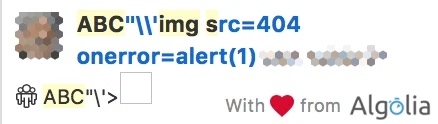
'"><img src=x onerror=on GitHub.com - Note the broken
<img>element and requests to "x" on GitHub.com
The following images demonstrate that a broken <img> element was created in the context of GitHub.com by the Algolia extension:

XSS on GitHub
Please follow the below steps to demonstrate the presence of a full XSS issue.
- Search for
a'"><h1on GitHub.com - Because of a specific repository name being loaded, a JavaScript alert dialog will appear:
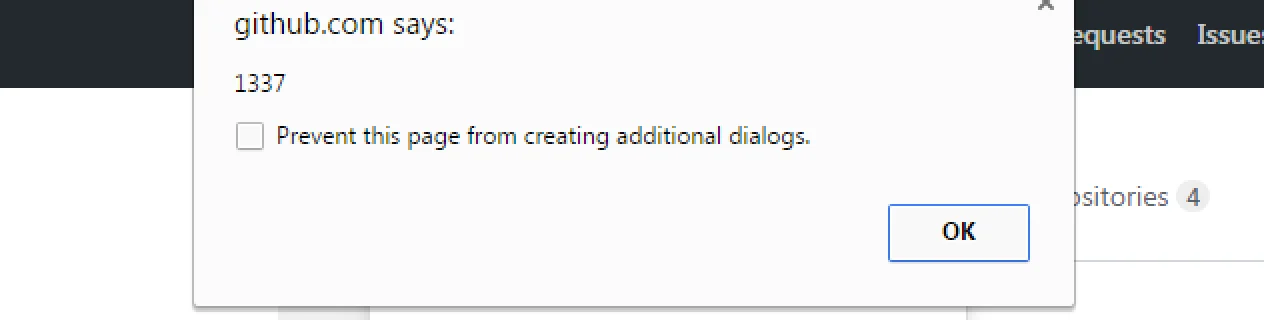
As noted above, I am currently attempting to reproduce this vulnerability using my own repositories and JavaScript code (e.g. document.domain rather than "1337").
Please let me know if you require any additional information regarding these vulnerabilities.
Thanks!
Not written yet. The AI write-up for this report has not been written yet. The Original tab links to the source.
How it worked
Root cause
Likely the extension rendered search-result data as raw HTML in the page's DOM without escaping or sanitising it.
Impact
An attacker could run script in the context of GitHub.com for users who have the extension installed and perform the crafted search, though the reporter was still working on a self-owned reproduction.
What the attacker needed
Victim has the extension installed; victim searches a crafted string; attacker controls a repository name
The fix
The issue was fixed after the vendor was notified.
How it was found
- Search GitHub.com for a string containing an image tag with an error handler.
- Observe a broken image element and requests to a non-existent host on GitHub.com.
- Search GitHub.com for a string containing a heading tag.
- Observe a JavaScript alert dialog appear because of a specific repository name being loaded.
Explained by bugbounty.wiki with AI from the original and checked against quotes from it; it can still be wrong. Read the original before relying on a detail.
Not written yet. The AI write-up for this report has not been written yet. The Original tab links to the source.
A browser extension called Awesome Autocomplete adds search suggestions to GitHub. It took text from repository names and put it straight into the page as HTML instead of plain text, so a name containing markup became real page elements. That let a crafted name run JavaScript on github.com, which is cross-site scripting (XSS): injecting code into a site so it runs as that site.
What is XSS?
Script an attacker supplies runs in another user's browser, on the target's origin, with that user's session.








