[mercantile.wordpress.org] Reflected XSS via AngularJS Template Injection
The search endpoint on the WordPress Swag Store reflected an AngularJS template expression, allowing an attacker to execute JavaScript in the victim's browser. The researcher confirmed reflected XSS in Firefox and Safari.

- Triaged in 3 hours
- Fixed in 25 days
- Paid in 5 months
- Disclosed after 25 days
Summary by the researcher
In a follow-up to resolved report #221893, it was possible to achieve reflected XSS on mercantile.wordpress.org with an AngularJS injection payload. This was confirmed in the latest stable Firefox and Safari builds.
The report
Hi,
By injecting a crafted AngularJS payload into the search endpoint on the WordPress Swag Store, it was possible to achieve reflected XSS further to resolved report #221893.
I came across a potential exploitation vector after noticing that a search query for {{2*2}} returned 4 in the site title response.
Conditions Verified In
- Firefox 52.0.3 – stable
- Safari 10.1 – stable
Proof of Concept URL
https://mercantile.wordpress.org/search/{{constructor.constructor('alert(document.domain)')()}}
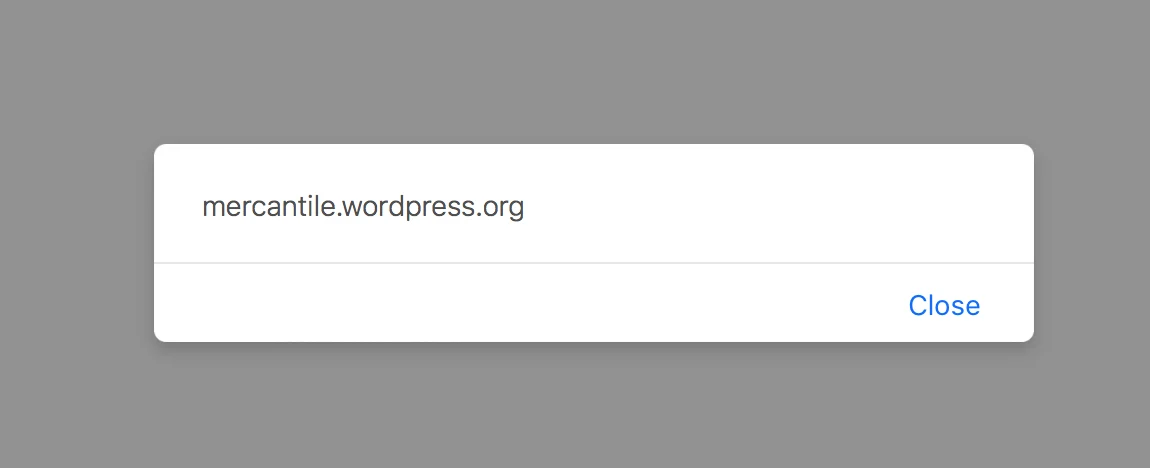
Screenshot
Thanks!
What the report shows
The target is the WordPress Swag Store at mercantile.wordpress.org, and the feature involved is its search endpoint. The researcher describes the finding as a follow-up to an earlier, already resolved report, #221893, and states that reflected XSS was still reachable on the same host through an AngularJS injection payload.
The starting observation was simple: a search query for {{2*2}} came back as 4 in the site title response. That is the signature of an AngularJS expression being evaluated by the client rather than treated as plain text, so the researcher moved from arithmetic to a payload that would execute script.
The proof of concept URL given in the report is:
https://mercantile.wordpress.org/search/{{constructor.constructor('alert(document.domain)')()}}
Visiting that URL triggers alert(document.domain). The researcher confirmed the behaviour in the latest stable builds of Firefox and Safari at the time:
- Firefox 52.0.3, stable
- Safari 10.1, stable
The screenshot below shows the resulting alert firing on the store page.
It does not state a bounty amount, and it does not describe a fix.
Root cause
The search term appears to be reflected into the page, including the document title, and evaluated by AngularJS rather than shown as text. AngularJS treats text inside double curly braces as an expression to evaluate. When user input containing such an expression lands in a part of the DOM that Angular compiles, the expression runs as JavaScript in the page's origin. The constructor.constructor chain is a standard way to escape the expression sandbox and reach the Function constructor, which turns a string into executable code.
Impact
The report demonstrates script execution in the origin of the store, with document.domain as the value shown. In practice that means an attacker who can get a victim to open a crafted link can run JavaScript in the context of mercantile.wordpress.org. The report itself only shows the alert; it does not demonstrate theft of data, sessions or credentials.
How this kind of bug works
Client-side template injection happens when a framework that evaluates expressions in the browser is given data that was meant to be inert. AngularJS (version 1.x) scans the DOM for text nodes and attribute values containing {{ }} and compiles them. If a server reflects a query parameter into the HTML without encoding, and the framework compiles that region, the attacker's expression becomes part of the application's own template.
The expression language is powerful. It can reach constructors and, through them, the global Function constructor, which evaluates arbitrary strings. That is why a harmless-looking {{2*2}} is a serious signal: it proves evaluation, and in this case evaluation escalated to full script execution.
How to test for it
- Identify parameters whose values are reflected into the response body, especially into the page title, headings, search result summaries or attributes. Use a unique marker string and search the response for it.
- Check whether the application loads AngularJS. Look for
angular.js,angular.min.js,ng-app,ng-controllerorng-bindin the HTML and in loaded scripts. Other frameworks with client-side expression syntax have their own markers. - Send a harmless arithmetic expression in double curly braces, such as a multiplication, and inspect the rendered page in a browser, not just the raw response. If the result of the calculation appears where the expression was, the template is being evaluated.
- Escalate carefully to a proof that shows script execution, for example an expression that reaches the
Functionconstructor and calls an alert with the document domain. Keep the payload minimal and non-destructive. - Repeat in more than one browser, because compilation and DOM handling can differ between engines.
A positive result is the browser evaluating the expression and running the resulting code. Common false positives are: the marker appearing only in the raw HTML source but never evaluated; the expression being evaluated in a sandboxed iframe or a different origin; the reflection being HTML-encoded so the braces arrive as entities; and Angular being present on the page but not compiling the region where the input lands. Always confirm in a real browser with the developer console open.
How this kind of bug is fixed
- HTML-encode all reflected output, including the document title and attribute contexts, so that braces and angle brackets arrive as text.
- Avoid running client-side template compilation over DOM regions that contain user input. Where possible, bind data through the framework's own escaping mechanisms rather than injecting raw HTML.
- Apply a strict Content Security Policy that blocks inline script and
eval, which limits the damage of expression-based execution. - Keep the framework patched, and remove AngularJS from pages that do not need it.
Hunting notes
This class of bug tends to hide in search pages, error pages, 404 handlers, redirect notices and any feature that echoes a parameter into a title or heading. Sites that mix server-rendered templates with a client-side framework are the best candidates, because the two escaping models can disagree. Recon signals worth watching: AngularJS or similar frameworks in the JavaScript bundle, reflected parameters that appear inside {{ }}-friendly contexts, and any endpoint that returns user input in the page title.
Explain the origin in which the code runs and what an attacker could do with it, without overstating what you demonstrated.
What happened, in plain words
The WordPress Swag Store lives at mercantile.wordpress.org. It has a search feature: you type a word and the site responds. The researcher was looking at this search feature and noticed something odd. When he searched for the text {{2*2}}, the page title came back showing 4 instead of the literal text {{2*2}}.
That is a big clue. Something on the page was not just displaying his text, it was doing maths with it. The page appears to use a framework such as AngularJS, which runs inside your browser and can read special instructions written between double curly braces. When the researcher typed {{2*2}}, AngularJS saw an instruction, calculated 2 times 2, and put the answer on the page.
If the browser will do arithmetic for you, it will also run other instructions. The researcher built a URL that carries a more powerful instruction in the same place, and visiting it made the browser pop up an alert box showing the site's domain name. That is reflected cross-site scripting: the attacker's input is bounced back (reflected) by the site and executed as code in the visitor's browser.
This was a follow-up to an earlier report, #221893, which had already been resolved. The point of the new report was that the same kind of problem was still reachable on the same host through a different route.
The proof of concept URL from the report is:
https://mercantile.wordpress.org/search/{{constructor.constructor('alert(document.domain)')()}}
Line by line, this is what it contains:
https://mercantile.wordpress.org/search/is the address of the store's search page. Everything after the final slash is the search term, carried in the URL itself.{{and}}are the markers AngularJS looks for. Anything between them is treated as an instruction, not as text to display.constructor.constructoris a way of climbing from an ordinary object in the page to the built-in JavaScript machinery that can turn a piece of text into runnable code. Beginners can think of it as finding the back door to the engine room.('alert(document.domain)')is the text handed to that machinery.alert(...)opens a pop-up box, anddocument.domainis the site's own address, so the box proves which site the code is running on.- The final
()tells the machinery to actually run the text it was given.
The researcher confirmed the behaviour in the latest stable builds of Firefox and Safari at the time:
- Firefox 52.0.3, stable
- Safari 10.1, stable
Checking more than one browser matters because each browser handles page content slightly differently, and a bug that only works in one of them is a weaker finding.
The screenshot shows the alert box appearing on the store page, which is the visible proof that the browser ran the researcher's instruction.
It does not state a bounty amount and does not describe a fix.
In general, how this kind of bug works
A web page is just text that your browser reads and turns into what you see. When you search on a site, your search term usually travels to the server, and the server sends back a page with your term written into it. If the server writes your term in as raw text without escaping special characters, your term becomes part of the page's instructions rather than part of its content. Escaping means replacing characters that have a special meaning, such as angle brackets, with safe equivalents so the browser shows them as plain text.
Client-side template injection is a specific version of this. A template is a page with blanks that get filled in. AngularJS fills blanks in the browser, and it recognises {{ }} as a blank to calculate. If a site drops your input into a region AngularJS is watching, your input becomes part of the template. The harmless {{2*2}} test is valuable precisely because it is harmless: it proves the site is calculating your input, and calculation can almost always be pushed further to full code execution.
In general, how to test for it
- Find places where what you type comes back on the page, especially the page title, headings, search summaries and link attributes. Type a unique nonsense word and look for it in the returned page.
- Check whether the site loads AngularJS. Signs include
angular.js,angular.min.js,ng-app,ng-controllerorng-bindin the page source or its scripts. Other frameworks have their own markers. - Send a harmless sum inside double curly braces, such as a multiplication, and look at the rendered page in a browser rather than only the raw response. If the answer appears where your expression was, the template is being evaluated.
- Escalate carefully to a minimal proof of code execution, for example an expression that reaches the
Functionconstructor and shows an alert with the document domain. Keep it small and do nothing destructive. - Repeat in more than one browser, because engines differ in how they compile and handle page content.
A positive result is the browser calculating your expression and running the resulting code. Common false positives are: your marker appearing only in the raw page source but never evaluated; the expression running inside a sandboxed frame or a different site's context; the braces arriving escaped so they show as literal text; and AngularJS being present but not watching the region where your input lands. Always confirm in a real browser with the developer console open.
In general, how this kind of bug is fixed
- Escape all reflected output, including the page title and attribute values, so braces and angle brackets arrive as text.
- Avoid running client-side template compilation over regions containing user input. Bind data through the framework's own escaping rather than injecting raw HTML.
- Apply a strict Content Security Policy that blocks inline script and
eval, which limits the damage of expression-based execution. - Keep the framework patched, and remove AngularJS from pages that do not need it.
In general, where to look
This class of bug tends to hide in search pages, error pages, 404 handlers, redirect notices and any feature that echoes a parameter into a title or heading. Sites that mix server-rendered templates with a browser-side framework are the best candidates, because the two escaping models can disagree. Useful signals: AngularJS or similar frameworks in the JavaScript bundle, reflected parameters that land in places where {{ }} would be evaluated, and any endpoint that returns your input in the page title.
Explain which site's context the code runs in and what an attacker could do with it, without overstating what you demonstrated.
Glossary
- AngularJS: a JavaScript framework that runs in the browser and can evaluate expressions written between
{{ }}. - Browser: the program you use to view web pages, such as Firefox or Safari.
- Client-side: happening in the visitor's browser rather than on the server.
- Content Security Policy: a set of rules a site sends to the browser saying which scripts are allowed to run.
- Cross-site scripting (XSS): a bug where an attacker's input is executed as code in a victim's browser on a site's page.
- DOM: the browser's internal model of the page, which scripts read and change.
- Endpoint: a specific address on a site that performs a particular function, such as search.
- Escaping (encoding): converting characters with special meaning into safe text so they are displayed rather than interpreted.
- eval: a JavaScript function that runs a piece of text as code.
- Expression: a short instruction that produces a value, such as a calculation.
- Function constructor: built-in JavaScript machinery that turns a string into runnable code.
- HTML: the language web pages are written in.
- Origin: the combination of scheme, host and port that defines which site a piece of code belongs to.
- Parameter: a value passed to a site, often in the URL, such as a search term.
- Proof of concept: a minimal demonstration that a bug is real.
- Reflected: input that a site sends straight back in its response.
- Request: the message your browser sends to a server asking for a page.
- Response: the page or data the server sends back.
- Sandbox: a restricted environment that limits what code can do.
- Severity: a rating of how serious a bug is.
- Template: a page with blanks that get filled in with values.
- Template injection: a bug where user input is treated as part of a template and evaluated.
- URL: the address of a page or resource on the web.









