[growth.grab.com] Reflected XSS via Base64-encoded "q" param on "my.html" Valentine's microsite
A reflected XSS vulnerability existed in the 'q' parameter of a Valentine's microsite, where Base64-encoded JSON data included a 'promo_code' field that accepted a JavaScript URL. When a victim clicked the 'Copy' button, the JavaScript executed in the context of the growth.grab.com domain.

- Triaged in under an hour
- Fixed in 28 hours
- Paid in 43 hours
- Disclosed after 2 days
Summary by the researcher
A microsite on growth.grab.com presents shareable "Grab Valentine" cards for drivers, carrying profile data encoded in Base64.
By injecting a JavaScript URL into the promo_code key, which is intended to hold a referral URL, it was possible to achieve reflected XSS when the victim selected the bottommost "copy" button. This endpoint was discovered by manual Twitter recon: searching for recent Tweets containing grab.com.
The report
Hi,
An encoded injection in the q parameter on my.html can be used to reflect JavaScript in the growth.grab.com context. This microsite creates a "Grab's Valentine" card for a driver over the past year, and carries its data in Base64 format.
Proof of concept
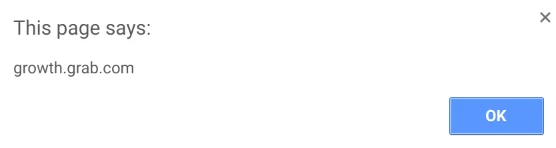
Please visit the following URL, scroll down and select the Copy button. To demonstrate JavaScript execution, the growth.grab.com context will be displayed in a standard alert box.
https://growth.grab.com/valentine/active/my.html?q=eyJuYW1lIjogIlRlc3QgSGFja2VyT25lIiwgInN0YXJ0X2RhdGUiOiAiMDEuMDEuMjAxOCIsICJsZWFucGx1bV9pZCI6ICJ0ZXN0IiwgInJpZGVzIjogIjIwMCIsICJwbGFjZXMiOiAiMjAiLCAiZGlzdGFuY2UiOiA1MDAsICJjYW5jZWxfdGltZXMiOiAiMCIsICJkYXlzIjogIjEwMCIsICJwcm9tb19jb2RlIjogImphdmFzY3JpcHQ6Ly9yLmdyYWIuY29tL3Rlc3QlMGFhbGVydChkb2N1bWVudC5kb21haW4pIiwgInByZl9yZXdhcmQiOiAiMTAifQ==
The above proof of concept targets the promo_code JSON key to inject an unfiltered JavaScript URL which an adversary could craft to be convincingly like a referral address:
{"name": "Test HackerOne", "start_date": "01.01.2018", "leanplum_id": "test", "rides": "200", "places": "20", "distance": 500, "cancel_times": "0", "days": "100", "promo_code": "javascript://r.grab.com/test%0aalert(document.domain)", "prf_reward": "10"}
Supporting evidence
Verified conditions
At the time of testing, I have successfully confirmed exploitability in the following environment:
- Chrome OS 63.0.3239.140 (Official Build) (64-bit)
- Firefox 59.0b7 stable (32-bit) on Windows 10 x64
Thanks,
Yasin
Impact
An adversary can leverage this vulnerability in a crafted GET request that, if issued by another Growth user, will cause arbitrary JavaScript code to execute within the target's browser in the context of their web session.
Context
Grab runs a microsite at growth.grab.com that generates a shareable "Grab Valentine" card for a driver, summarising their activity over the past year. The card is served from my.html under the /valentine/active/ path, and the profile data that fills it in is carried in a single Base64-encoded parameter, q. The driver opens it, sees their stats, and uses a Copy button to share a referral-style link.
One of the JSON keys inside that encoded blob is promo_code, which is intended to hold a referral URL. That key is the interesting one, because a value that is treated as a URL and later handed to the browser as a navigation target is exactly where a javascript: scheme can do damage.
Setup
The researcher found the endpoint through manual Twitter recon: searching for recent tweets that contained grab.com surfaced the Valentine microsite. No accounts, roles or special tooling are described beyond a browser.
Exploitability was confirmed in two environments:
- Chrome OS 63.0.3239.140 (Official Build) (64-bit)
- Firefox 59.0b7 stable (32-bit) on Windows 10 x64
Finding it
The page carries its data in Base64, which means the whole payload is one opaque-looking string in q. Decoding it reveals a JSON object with keys such as name, start_date, leanplum_id, rides, places, distance, cancel_times, days, promo_code and prf_reward. The promo_code key is described as intended to hold a referral URL, so the natural question is what happens when that URL is not http or https but javascript:.
Exploitation
Step 1: craft the JSON with a JavaScript URL in promo_code
The researcher built a JSON object whose promo_code value is a javascript: URL. The %0a inside it is a newline:
{"name": "Test HackerOne", "start_date": "01.01.2018", "leanplum_id": "test", "rides": "200", "places": "20", "distance": 500, "cancel_times": "0", "days": "100", "promo_code": "javascript://r.grab.com/test%0aalert(document.domain)", "prf_reward": "10"}
The promo_code value can be crafted to look convincingly like a referral address. alert(document.domain) is used purely as a demonstration that code runs in the growth.grab.com context.
Step 2: Base64-encode it and put it in q
The JSON is Base64-encoded and passed as the q parameter on my.html:
https://growth.grab.com/valentine/active/my.html?q=[redacted]==
Step 3: trigger the copy button
Visiting that URL, scrolling down and selecting the Copy button causes the injected JavaScript to execute. The growth.grab.com context is displayed in a standard alert box, which is the proof that the code ran in the site's origin rather than being neutralised as a string.
The screenshot shows the resulting alert on the Valentine microsite, confirming execution in the growth.grab.com context.
Root cause
The promo_code value, intended to hold a referral URL, accepts a javascript: scheme. Because javascript: is accepted, selecting the copy button executes script in the page's origin. The Base64 encoding is not a defence: it is an encoding, not a filter, and the decoded value flows straight into the URL sink. The report does not describe any validation of the scheme.
Impact
An adversary can craft a GET request that, if issued by another Growth user, causes arbitrary JavaScript to execute in that user's browser within the context of their web session. The promo_code value can be made to look convincingly like a referral address, which helps with delivery. The proof of concept required scrolling down and selecting the copy button.
Fix
The report does not state what was changed.
Variants to test
- Other URL-bearing JSON keys in the same blob: try
javascript:in each field that ends up in anhref,srcorlocationassignment. A positive result is script execution when the corresponding UI element is used. - Other schemes:
data:text/html,...andvbscript:where the browser still honours them. A positive result is the same execution in the site's origin. - Encoding tricks: double Base64, URL-encoded characters inside the decoded JSON, and mixed case in the scheme. A positive result is that the value survives decoding and still reaches the sink as a live
javascript:URL. - Different trigger points: any button or link that consumes the decoded value, not just the copy button. A positive result is execution from a different interaction than the one reported here.
Hunting notes
The signal here came from public social media: searching for recent tweets mentioning the target domain surfaced the Valentine page. Once you have such a page, decode the parameter, map every key to where it is used in the DOM, and look for keys that end up as URLs.
What happened, in plain words
Grab built a small seasonal web page (a "microsite") that lets a driver see a personalised "Grab Valentine" card summarising their year of driving, and share it with others. The page is called my.html, and the card's data is carried in a Base64-encoded q parameter. That string is Base64, a way of writing data using only letters, digits and a few symbols so it can travel safely inside a URL.
One of the pieces of data inside that packed string is called promo_code, and it is meant to hold a referral link, the kind of address a driver would share so a friend could sign up. When the visitor presses a Copy button, the injected JavaScript executes. The researcher realised that if the value is not a normal web address but a javascript: address, the browser will run it as code instead of opening a page. That is the bug: a value that should only ever be a link is allowed to be a piece of script.
The report classifies the issue as reflected cross-site scripting (XSS). "Reflected" means the bad value is not stored on the server; it arrives with the request, is echoed back into the page, and takes effect in the visitor's browser. The researcher proved it by making the page show an alert box containing the site's own domain name, which is a harmless way of showing that code really ran as if it belonged to growth.grab.com.
Background you need first
A few ideas come up again and again below, so here they are from scratch.
A URL and its query string. A web address like https://example.com/page?name=value has two parts that matter here. Everything before the ? says which page to load. Everything after it is the query string, a list of name=value pairs that the page can read. When you fill in a search box and press enter, the site often puts your words in the query string so the resulting page can be bookmarked or shared.
Base64. Think of it like writing a sentence in a different alphabet so it can be sent through a system that only accepts those letters. It only hides the content from a casual glance.
JSON. A simple text format for structured data, made of names (keys) and their values, wrapped in curly braces. It looks like {"name": "Alex", "rides": "200"}. Websites use it to pass bundles of information around.
A parameter. One of those name=value pairs in the query string. In this report the parameter is called q.
The browser's origin. The origin is the combination of protocol, domain and port, for example https://growth.grab.com. Browsers use it as a security boundary: code running on one origin should not be able to read data belonging to another. When script runs "in the context of" a site, it means the browser treats it as part of that site and grants it the same access, including any cookies or session data the site has set.
A cookie or session token. When you log in, the site gives your browser a small piece of data that acts like a wristband at an event: you show it on every later request and the site knows who you are without asking for your password again. If an attacker can run code on the site's own origin, that code can act with your wristband, which is why XSS matters.
Cross-site scripting (XSS). A class of bug where an attacker gets their own code to run inside someone else's web page. Reflected XSS is the variant where the code arrives in the request (usually the URL) and is sent straight back in the response.
A javascript: URL. Normally a link starts with http:// or https:// and the browser fetches a page. If a link starts with javascript:, the browser runs whatever follows as code instead. It is a legitimate feature of the web, and it is exactly why any place that accepts a user-supplied link must check which scheme it uses.
An alert box. The small pop-up a browser shows when a page calls alert(...). Researchers use it as a safe demonstration: if the box appears, code ran. document.domain is simply the current site's domain name, so alert(document.domain) proves which site the code is running on.
The setup
The researcher did not start with a scanner or a list of known paths. The report says the endpoint was found by manual Twitter recon: searching for recent tweets that mentioned grab.com. People share links on social media, and a freshly launched seasonal microsite is exactly the sort of thing that gets tweeted. That search surfaced the Valentine page.
No accounts, roles or special tools are described beyond a browser. Exploitability was confirmed in two environments:
- Chrome OS 63.0.3239.140 (Official Build) (64-bit)
- Firefox 59.0b7 stable (32-bit) on Windows 10 x64
Finding it
The page lives at growth.grab.com, under the path /valentine/active/my.html. It generates a shareable "Grab Valentine" card for a driver, summarising their activity over the past year. The driver opens it, sees their stats, and uses a Copy button to share a referral-style link.
All of the data that fills in the card is carried in one Base64-encoded parameter, q. If you decode that string, you get a JSON object with keys such as name, start_date, leanplum_id, rides, places, distance, cancel_times, days, promo_code and prf_reward.
The interesting key is promo_code, which is intended to hold a referral URL. The natural question follows: what happens if that value is not an http or https address but a javascript: one? A value that is treated as a URL and later handed to the browser as a navigation target is precisely where a javascript: scheme can do damage.
Exploitation
Step 1: craft the JSON with a JavaScript URL in promo_code
The researcher built a JSON object whose promo_code value is a javascript: URL:
{"name": "Test HackerOne", "start_date": "01.01.2018", "leanplum_id": "test", "rides": "200", "places": "20", "distance": 500, "cancel_times": "0", "days": "100", "promo_code": "javascript://r.grab.com/test%0aalert(document.domain)", "prf_reward": "10"}
Line by line, in plain words:
- The outer curly braces hold one object, a bundle of named values.
"name": "Test HackerOne"is the driver name shown on the card. It is a made-up name, so the card looks like a real one."start_date": "01.01.2018"is the date the card covers from."leanplum_id": "test"is filled with a placeholder."rides": "200","places": "20","distance": 500,"cancel_times": "0"and"days": "100"are the statistics displayed on the card. They are ordinary-looking numbers so nothing about the card seems odd."promo_code": "javascript://r.grab.com/test%0aalert(document.domain)"is the payload. This is the value that is supposed to be a referral link."prf_reward": "10"is another value in the object.
Now the payload itself, piece by piece:
javascript:tells the browser that what follows is code, not an address to fetch.//r.grab.com/testis there to look like a plausible referral address to a casual reader.%0ais a newline character, written in the percent-encoded form used inside URLs.alert(document.domain)is the actual code. It opens a pop-up showing the current domain, which demonstrates that code is running in thegrowth.grab.comcontext.
The promo_code value can be crafted to look convincingly like a referral address.
Step 2: Base64-encode it and put it in q
The JSON is Base64-encoded and passed as the q parameter on my.html:
https://growth.grab.com/valentine/active/my.html?q=[redacted]==
Reading it in plain words:
https://growth.grab.com/valentine/active/my.htmlis the page itself, the Valentine card generator.?marks the start of the query string.q=is the parameter name the page expects. Everything after the equals sign is the Base64 version of the JSON above.- The long string starting
eyJuYW1l...is that JSON, encoded. It begins witheyJbecause that is what the characters{"turn into in Base64. The==at the end is padding that Base64 uses to keep the length tidy.
This is also the key lesson about the root cause: Base64 is an encoding, not a filter. It changes how the data looks, not what it means, and the decoded value flows straight into the place where it is used as a URL.
Step 3: trigger the copy button
Visiting that URL, scrolling down and selecting the Copy button causes the injected JavaScript to execute. The growth.grab.com context is displayed in a standard alert box, which is the proof that the code ran in the site's origin rather than being neutralised as a harmless string.
The screenshot shows the resulting alert on the Valentine microsite, confirming execution in the growth.grab.com context.
Root cause
The promo_code value, intended to hold a referral URL, accepts a javascript: scheme. Because javascript: is accepted, selecting the copy button executes script in the page's origin. The Base64 encoding is not a defence: it is an encoding, not a filter, and the decoded value flows straight into the URL sink. The report does not describe any validation of the scheme.
Impact
An adversary can craft a GET request that, if issued by another Growth user, causes arbitrary JavaScript to execute in that user's browser within the context of their web session. A GET request is simply the ordinary kind of request your browser makes when you open a link, so the attack can be delivered as a link. The promo_code value can be made to look convincingly like a referral address, which helps with delivery. The proof of concept required scrolling down and selecting the copy button.
Because the code runs as if it were part of growth.grab.com, it inherits whatever access the site has in that browser, which is why XSS is treated as more than a cosmetic pop-up.
Fix
The report does not state what was changed.
Variants to test
- Other URL-bearing JSON keys in the same blob: try
javascript:in each field that ends up in anhref,srcorlocationassignment. A positive result is script execution when the corresponding UI element is used. - Other schemes:
data:text/html,...andvbscript:where the browser still honours them. A positive result is the same execution in the site's origin. - Encoding tricks: double Base64, URL-encoded characters inside the decoded JSON, and mixed case in the scheme. A positive result is that the value survives decoding and still reaches the sink as a live
javascript:URL. - Different trigger points: any button or link that consumes the decoded value, not just the copy button. A positive result is execution from a different interaction than the one reported here.
Hunting notes
The signal here came from public social media: searching for recent tweets mentioning the target domain surfaced the Valentine page. Once you have such a page, decode the parameter, map every key to where it is used in the page, and look for keys that end up as URLs.
Glossary
-
Base64: a way of writing data using only letters, digits and a few symbols so it can travel inside a URL or text field. It is encoding, not encryption, and anyone can reverse it.
-
Chrome OS: Google's operating system, used here to describe one of the test environments.
-
Cookie: a small piece of data a site stores in your browser, often used to remember that you are logged in.
-
Cross-site scripting (XSS): a bug where an attacker gets their own code to run inside someone else's web page.
-
data:URL: a URL that carries the content itself rather than pointing to a file, and which can contain HTML. -
document.domain: a property in the browser that holds the current site's domain name. -
GET request: the ordinary kind of request a browser makes when you open a link or load a page.
-
href: the attribute of a link that says where it points. -
http/https: the normal schemes for web addresses, meaning "fetch this page". -
JSON: a text format for structured data made of named values in curly braces.
-
javascript:URL: a link that makes the browser run the text after the colon as code instead of loading a page. -
location: the browser object that represents the current address and can be used to navigate. -
Microsite: a small, often temporary website built for one campaign or event.
-
Origin: the combination of protocol, domain and port, used by browsers as a security boundary.
-
Parameter: a
name=valuepair in a URL's query string. -
Payload: the part of an attack that actually does the work.
-
Percent-encoding: writing special characters in a URL as
%followed by a code, such as%0afor a newline. -
Query string: the part of a URL after the
?, holding parameters. -
Reflected XSS: XSS where the malicious value arrives in the request and is echoed straight back into the page.
-
Scheme: the first part of a URL before the colon, such as
http,httpsorjavascript. -
Session: the period during which a site recognises you as logged in, usually via a cookie or token.
-
Sink: the place in a program where a value is finally used, such as a navigation target.
-
src: the attribute that says where an embedded resource such as a script or image comes from. -
Token: a piece of data that stands in for your identity, similar to a cookie.
-
vbscript:: an old URL scheme that ran VBScript in some browsers. -
%0a: the percent-encoded form of a newline character.








