Bypass Apple’s redirection process with the dot (“.”) character
A redirect parameter on an Apple subdomain accepted a value beginning with a dot, so the browser treated the resulting host as a subdomain of an attacker-controlled domain rather than a path on the Apple site. An attacker could craft a link that sends a logged-in user to their own site while appearing to stay on Apple.

Hi guys, I have been gone for a while but now I’m back and here is a new write-up post. Today, I’m gonna show you the Open Redirection vulnerability I found at Apple’s subdomain using the dot character.
The full write-up lives on its author's site
It belongs to its author, so we link to it rather than copy it. The other two tabs are our own rewrites, checked against it.
Context
The target was a subdomain of apple.com that the researcher describes as a forum area where users are active. The subdomain itself is not published in the write-up, so it is referred to throughout as redacted.apple.com.
Visiting the subdomain presents a login screen. After logging in, users who are signing in for the first time go through a flow for choosing a nickname and uploading an avatar. That flow uses a ?path= parameter to decide which page to send the user to once the prerequisites are completed. The researcher expected this to land on /welcome?login=true for first-time users.
The weakness class is open redirect: a parameter that controls a navigation target and accepts a value that points at another origin.
Setup
No special tooling, accounts or versions are described. The researcher logged in to the subdomain through the normal login screen and then walked the first-login flow (nickname, avatar) while watching the ?path= parameter. The only precondition visible in the report is an authenticated session on the subdomain, since the redirect happens after the nickname and avatar steps.
Finding it
On the first-login page, the ?path= parameter is set to redirect to another page in the same subdomain. The researcher notes that this process will probably redirect to /welcome?login=true for first-time users once all prerequisites have been completed correctly.
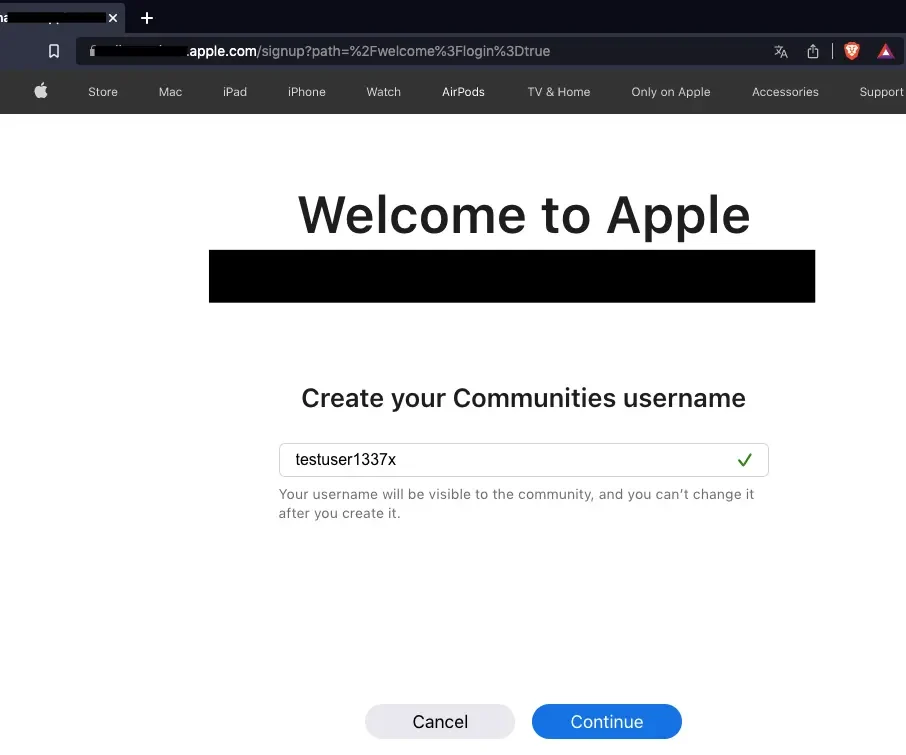
The screenshot shows the login screen of the subdomain.
After choosing a username and uploading an avatar, the redirect did go to the page named in the parameter, confirming that the value was being used as a navigation target. That made it worth testing whether the parameter would accept a target outside the subdomain.
Exploitation
Step 1: standard open redirect payloads
The first attempts were the usual candidates:
https://evil.com
//evil.com

Step 2: watching what happens to the slashes
With //evil.com, the response was not what a naive open redirect would produce. The researcher lays out the expectation and the observation:
?path=//evil.com
Expected result:
redacted.apple.com//evil.com
Actual result:
redacted.apple.com/evil.com

In other words, the double slash was collapsed to a single /. The researcher initially read this as the single / being appended by the application rather than coming from the payload.
Step 3: dropping the slashes entirely
Following that reasoning, the next attempt was to supply the host on its own:
?path=evil.com
The behaviour the researcher expected was a redirect to a non-existent redacted.apple.comevil.com domain. Instead the flow returned to /welcome?login=true. The researcher notes that for most parameters it would be fine to simply navigate to evil.com within the subdomain, illustrated as:
?path=evil.com > x.apple.com/evil.com
So a bare hostname was treated as a relative path, not as an authority.
Step 4: prefixing the payload with a dot
The idea that worked came next, and the researcher says it had not been seen anywhere before. The payload was the hostname prefixed with a single dot:
?path=.evil.com
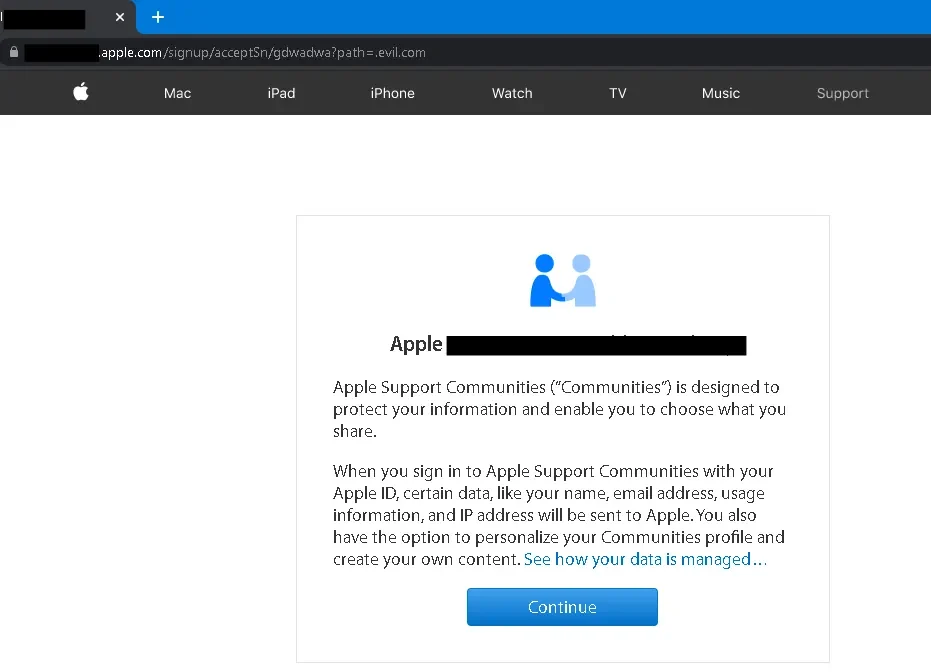
With this value, the . character is appended to the end of redacted.apple.com, which turns the result into a subdomain of evil.com.
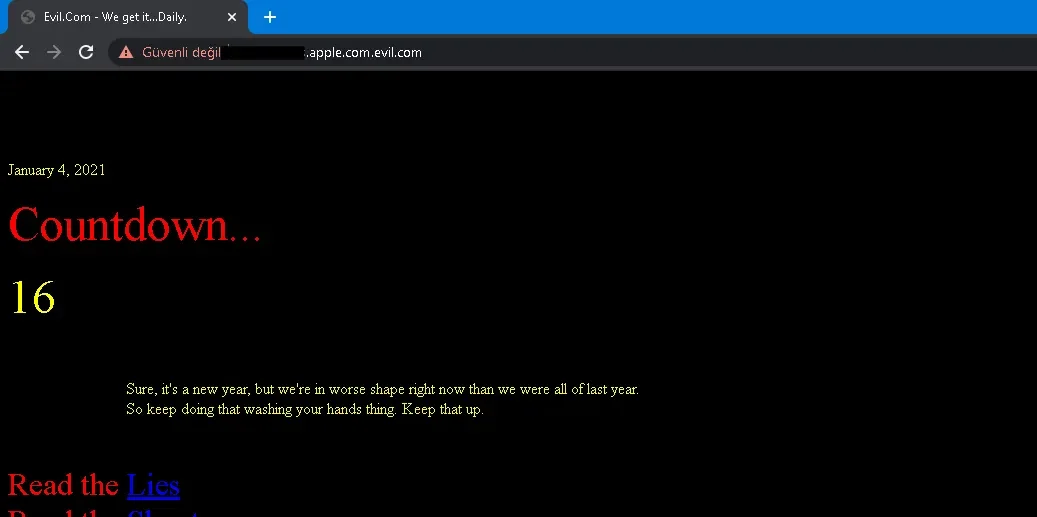
Step 5: the resulting URL
Adding the dot in front of the payload means the / character is missing in some cases, and the resulting host reads as redacted.apple.com as a subdomain of evil.com:
redacted.apple.com.evil.com
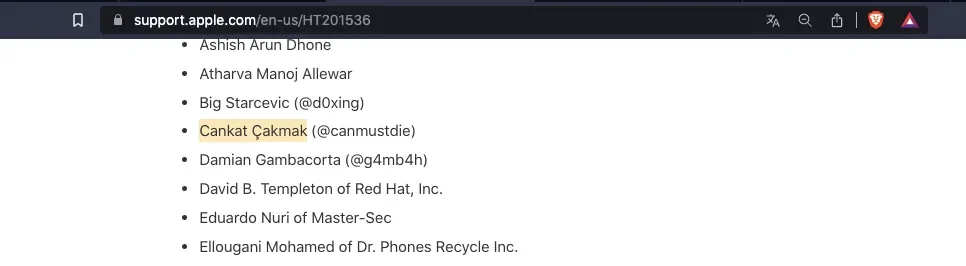
The researcher also links to Apple's support article at https://support.apple.com/en-us/HT201536 alongside the result.
Root cause
The report does not include any source code or server-side detail, so the mechanism can only be inferred. What the behaviour shows is that the ?path= value is concatenated onto the subdomain rather than parsed as a full URL and validated against an allowlist of hosts. Two observations support this:
//evil.comcame back as/evil.com, so the leading slashes were normalised or stripped rather than being treated as a protocol-relative authority.evil.comon its own was treated as a relative path and the flow fell back to/welcome?login=true, so a bare hostname was not accepted as an authority either.
A value beginning with . sidesteps both of those checks: it is not a scheme, not a protocol-relative URL and not a bare hostname, so it passes whatever filtering was in place, and when concatenated after the subdomain it produces a hostname whose registrable domain is evil.com. The existing defences, whatever they were, evidently did not account for a leading dot. That is likely the gap.
Impact
The result is an open redirect on an apple.com subdomain: a crafted link on the trusted domain sends the user to a host under the attacker's control.
The report does not describe any attempt to escalate beyond the redirect, and the conditions are those of the first-login flow: the victim has to be logged in and go through the nickname and avatar steps for the redirect to fire.
Fix
The report states only that the vulnerability was fixed by the team and that the researcher was added to the Apple Hall of Fame. It does not describe the change that was made.
A robust fix, in general terms, is to stop concatenating user input onto the host and instead parse the ?path= value as a URL, then allow only relative paths or hosts on an explicit allowlist. Rejecting values that contain a dot before the first slash, or that would change the registrable domain once resolved, closes this specific case.
Variants to test
When a redirect parameter is concatenated onto a host rather than parsed, the following are worth trying. In each case a positive result is a redirect whose final host is not the intended one.
- Leading dot:
?path=.evil.com. Positive result: the browser lands ontarget.example.com.evil.com, i.e.target.example.combecomes a subdomain of the attacker's domain. - Double slash:
?path=//evil.com. Positive result: the response preserves the//and the browser treatsevil.comas the authority. If the slashes are collapsed to one, as here, move on to the dot variant. - Bare hostname:
?path=evil.com. Positive result: a redirect toevil.comrather than a relative path under the original host. - Backslash and encoded separators: try
\evil.com,%2f%2fevil.com,%5cevil.comand mixed forms. Positive result: the value is decoded or normalised into an authority the browser follows off-site. - Userinfo trick:
?path=[redacted]. Positive result: the browser treats everything before@as credentials and navigates toevil.com. - Trailing dot and case variants:
?path=.evil.com.and?path=.EVIL.COM. Positive result: the same off-site navigation survives the normalisation. - Whitespace and control characters: leading spaces, tabs or newlines before the dot or slashes. Positive result: the filter strips them and the concatenated host still resolves to the attacker's domain.
For each, check the final URL in the address bar and the Location header, not just the parameter value, since the bug here only became visible once the concatenated result was inspected.
What happened, in plain words
A security researcher found a way to make a link on an Apple website send visitors to a completely different website, one controlled by whoever made the link. The trick was a single dot character. The website had a feature that let it send a user to another page after they finished setting up their account, and the page to go to was chosen by a value in the web address. The researcher worked out that by putting a dot in front of a website name, the site would build a new address where the Apple subdomain became a subdomain of the attacker's domain. Apple fixed the problem and added the researcher to its Hall of Fame.
This kind of bug is called an open redirect. A redirect is simply a website telling your browser "go to this other address instead". A redirect is open when the address it sends you to can be chosen by anyone, including an attacker, rather than being limited to pages on the same site. Open redirects are dangerous because the link you click starts on a trusted domain, so it looks safe, and only afterwards does your browser end up somewhere else. That is very useful for phishing, where an attacker wants you to trust a link enough to click it.
A few terms you will meet throughout, explained from zero:
- A subdomain is a name that sits in front of a main domain. In
redacted.apple.com, the main domain isapple.comandredactedis the subdomain. Think ofapple.comas a building andredacted.apple.comas one office inside it. - A URL (or web address) has parts. In
https://redacted.apple.com/welcome?login=true,httpsis the scheme (the protocol, how to talk to the server),redacted.apple.comis the host (which server),/welcomeis the path (which page on that server), and?login=trueis the query string (extra information passed to the page). - A parameter is one of those extra pieces of information in the query string. In
?path=something, the parameter name ispathand its value issomething. - A payload is the value an attacker deliberately supplies to a parameter to try to make the site do something it should not.
- The registrable domain is the part of a hostname that someone actually owns, such as
evil.com. Everything to the left of it is a subdomain. So inredacted.apple.com.evil.com, the registrable domain isevil.com, andredacted.apple.comis just a subdomain of it.
The target
The target was a subdomain of apple.com that the researcher describes as a forum area where users are active. The exact subdomain is not published in the write-up, so it is referred to throughout as redacted.apple.com.
When you visit the subdomain you get a login screen. After logging in, users who are signing in for the first time go through a short setup flow: they choose a nickname and upload an avatar (a profile picture). That setup flow uses a ?path= parameter to decide which page to send the user to once the setup steps are done. The researcher expected this to land on /welcome?login=true for first-time users.
The weakness class is open redirect: a parameter that controls where the browser navigates next, and that accepts a value pointing at another origin. An origin is the combination of scheme, host and port, for example https://redacted.apple.com. Two pages on different origins are treated by browsers as different sites for security purposes.
Setup
No special tooling, accounts or versions are described. The researcher logged in to the subdomain through the normal login screen and then walked the first-login flow (nickname, avatar) while watching the ?path= parameter. The only precondition visible in the report is an authenticated session on the subdomain, since the redirect happens after the nickname and avatar steps.
An authenticated session means the site knows who you are because you logged in. After you log in, the site usually gives your browser a small piece of data called a cookie (or a token) that it checks on every later request, so you do not have to type your password again for each page. Think of it as a wristband you get at an event: showing it at the door proves you already checked in.
Finding it
On the first-login page, the ?path= parameter is set to redirect to another page in the same subdomain. The researcher notes that this process will probably redirect to /welcome?login=true for first-time users once all prerequisites have been completed correctly.
The screenshot shows the login screen of the subdomain.
After choosing a username and uploading an avatar, the redirect did go to the page named in the parameter. That confirmed the value was being used as a navigation target, which made it worth testing whether the parameter would accept a target outside the subdomain.
Exploitation
Step 1: standard open redirect payloads
The first attempts were the usual candidates:
https://evil.com
//evil.com
Line by line:
https://evil.comis a full web address. If the site simply took this value and sent the browser there, the redirect would be open. This is the most obvious thing to try.//evil.comis a special shorthand. A URL that starts with two slashes but no scheme is called protocol-relative: the browser keeps the current scheme (herehttps) and treats what follows as the host. So on anhttpspage,//evil.commeanshttps://evil.com. Attackers try it because some filters only look for the literal texthttpand miss it.
Step 2: watching what happens to the slashes
With //evil.com, the response was not what a naive open redirect would produce. The researcher lays out the expectation and the observation:
?path=//evil.com
Expected result:
redacted.apple.com//evil.com
Actual result:
redacted.apple.com/evil.com
In other words, the double slash was collapsed to a single /. The researcher initially read this as the single / being appended by the application rather than coming from the payload. In plain terms: the site seemed to be sticking the value onto the end of its own hostname, and something in that process was tidying up the slashes.
Step 3: dropping the slashes entirely
Following that reasoning, the next attempt was to supply the host on its own:
?path=evil.com
The behaviour the researcher expected was a redirect to a non-existent redacted.apple.comevil.com domain. Instead the flow returned to /welcome?login=true. The researcher notes that for most parameters it would be fine to simply navigate to evil.com within the subdomain, illustrated as:
?path=evil.com > x.apple.com/evil.com
So a bare hostname was treated as a relative path, not as an authority. A relative path is a page location that is understood relative to the current host, like /evil.com meaning "the page called evil.com on this same server". An authority is the host part of a URL that tells the browser which server to contact. The site was treating the value as the former, not the latter.
Step 4: prefixing the payload with a dot
The idea that worked came next, and the researcher says it had not been seen anywhere before. The payload was the hostname prefixed with a single dot:
?path=.evil.com
With this value, the . character is appended to the end of redacted.apple.com, which turns the result into a subdomain of evil.com. In other words, the site was building the final address by gluing the value onto its own hostname, and a leading dot made the glue produce a valid hostname whose owner is evil.com.
Step 5: the resulting URL
Adding the dot in front of the payload means the / character is missing in some cases, and the resulting host reads as redacted.apple.com as a subdomain of evil.com:
redacted.apple.com.evil.com
The researcher also links to Apple's support article at https://support.apple.com/en-us/HT201536 alongside the result.
Root cause
The report does not include any source code or server-side detail, so the mechanism can only be inferred. What the behaviour shows is that the ?path= value is concatenated onto the subdomain rather than parsed as a full URL and validated against an allowlist of hosts. Concatenated means simply joined end to end as text, like gluing two strings together. An allowlist is a list of things that are explicitly permitted; anything not on the list is refused.
Two observations support this:
//evil.comcame back as/evil.com, so the leading slashes were normalised or stripped rather than being treated as a protocol-relative authority.evil.comon its own was treated as a relative path and the flow fell back to/welcome?login=true, so a bare hostname was not accepted as an authority either.
A value beginning with . sidesteps both of those checks: it is not a scheme, not a protocol-relative URL and not a bare hostname, so it passes whatever filtering was in place, and when concatenated after the subdomain it produces a hostname whose registrable domain is evil.com. The existing defences, whatever they were, evidently did not account for a leading dot. That is likely the gap.
Impact
The result is an open redirect on an apple.com subdomain: a crafted link on the trusted domain sends the user to a host under the attacker's control. Link reputation checks are the systems that email providers and browsers use to decide whether a link looks trustworthy; a link that starts with a well-known domain is more likely to pass.
The report does not describe any attempt to escalate beyond the redirect, and the conditions are those of the first-login flow: the victim has to be logged in and go through the nickname and avatar steps for the redirect to fire.
Fix
The report states only that the vulnerability was fixed by the team and that the researcher was added to the Apple Hall of Fame. It does not describe the change that was made.
A robust fix, in general terms, is to stop concatenating user input onto the host and instead parse the ?path= value as a URL, then allow only relative paths or hosts on an explicit allowlist. Parsing means reading the value according to the rules of URLs, so the browser and server agree on which part is the host and which is the path. Rejecting values that contain a dot before the first slash, or that would change the registrable domain once resolved, closes this specific case.
Variants to test
When a redirect parameter is concatenated onto a host rather than parsed, the following are worth trying. In each case a positive result is a redirect whose final host is not the intended one.
- Leading dot:
?path=.evil.com. Positive result: the browser lands ontarget.example.com.evil.com, i.e.target.example.combecomes a subdomain of the attacker's domain. - Double slash:
?path=//evil.com. Positive result: the response preserves the//and the browser treatsevil.comas the authority. If the slashes are collapsed to one, as here, move on to the dot variant. - Bare hostname:
?path=evil.com. Positive result: a redirect toevil.comrather than a relative path under the original host. - Backslash and encoded separators: try
\evil.com,%2f%2fevil.com,%5cevil.comand mixed forms. Positive result: the value is decoded or normalised into an authority the browser follows off-site. Encoded means written using percent-encoding, where special characters are replaced by a%followed by two hex digits;%2fis an encoded/and%5cis an encoded backslash. - Userinfo trick:
?path=[redacted]. Positive result: the browser treats everything before@as credentials and navigates toevil.com. The part before@in a URL is called the userinfo and is meant for a username, but browsers ignore it for navigation. - Trailing dot and case variants:
?path=.evil.com.and?path=.EVIL.COM. Positive result: the same off-site navigation survives the normalisation. Hostnames are case-insensitive, and a trailing dot is a valid way to write the same name. - Whitespace and control characters: leading spaces, tabs or newlines before the dot or slashes. Positive result: the filter strips them and the concatenated host still resolves to the attacker's domain.
For each, check the final URL in the address bar and the Location header, not just the parameter value, since the bug here only became visible once the concatenated result was inspected. The Location header is the part of the server's reply that tells the browser where to go next when a redirect happens.
Glossary
- Allowlist: a list of things that are explicitly permitted; anything not on the list is refused.
- Authenticated session: a period during which the site knows who you are because you have logged in, usually tracked with a cookie or token.
- Authority: the host part of a URL that tells the browser which server to contact.
- Concatenation: joining two pieces of text end to end, like gluing strings together.
- Cookie: a small piece of data a site stores in your browser so it can recognise you on later requests.
- Encoded (percent-encoding): a way of writing special characters in a URL using
%followed by two hex digits, such as%2ffor/. - Host: the part of a URL that names the server, such as
redacted.apple.com. - Location header: the part of a server's reply that tells the browser where to go next during a redirect.
- Open redirect: a redirect whose destination can be chosen by anyone, including an attacker, rather than being limited to the same site.
- Origin: the combination of scheme, host and port, such as
https://redacted.apple.com. - Parameter: a named piece of extra information in a URL's query string, such as
pathin?path=something. - Parsing: reading a value according to the rules of URLs so its parts are understood correctly.
- Payload: a value an attacker deliberately supplies to a parameter to try to make the site misbehave.
- Phishing: tricking someone into trusting a link or page so they hand over information or follow it somewhere harmful.
- Protocol-relative URL: a URL starting with
//that keeps the current scheme and treats what follows as the host. - Query string: the part of a URL after
?that carries extra information to the page. - Redirect: a website telling your browser to go to a different address instead.
- Registrable domain: the part of a hostname that someone actually owns, such as
evil.com. - Relative path: a page location understood relative to the current host, such as
/welcome. - Scheme: the protocol part of a URL, such as
https, that says how to talk to the server. - Subdomain: a name in front of a main domain, such as
redactedinredacted.apple.com. - Token: a piece of data, similar to a cookie, used to prove who you are on later requests.
- URL: a web address, made up of scheme, host, path and query string.
- Userinfo: the part of a URL before
@, meant for a username but ignored by browsers for navigation.