Break the Logic: Insecure Parameters (€300)
The application accepted client-supplied parameters to mark an extra email as activated and to make custom study information visible without management approval. An attacker could bypass email verification and study verification to change their primary email or publish unapproved profile information.

Hello everyone. Today, I’m going to talk about two minor vulnerabilities based on insecure parameters that I discovered in the same program.
The full write-up lives on its author's site
It belongs to its author, so we link to it rather than copy it. The other two tabs are our own rewrites, checked against it.
Context
redacted.com is a private bug bounty program, so the company is not named. The application has two features that matter here.
The first is mail management. Every user has a primary mail, and a user with a primary mail can add an extra mail. To promote the extra mail to primary, the application is supposed to send a verification code to that extra mail. Without confirmation, the extra mail cannot become the primary mail.
The second is a profile field for study information. Users can add custom study information, but it has to be verified and approved by redacted.com management before it counts as approved. Verification is done directly by the company's staff.
Both bugs are logic flaws caused by parameters the client can set. The researcher describes them as two minor vulnerabilities in the same program, fixed after the report, with a total reward of €300.
Setup
The write-up does not describe the account creation process, the user's role, or any software versions. The only tool named is Burp Suite, used to intercept and resubmit requests. The precondition for the first bug is an account with a primary mail and the ability to add an extra mail. The precondition for the second is the ability to edit the study field on the profile.
Finding it
The researcher started from the normal behaviour of each feature and then looked at what the client sends when that behaviour is triggered.
For the mail feature, the normal flow is: add an extra mail, receive a confirmation mail, and see two options next to the field, "resend" or "delete". The extra mail stays unverified until the code is confirmed. When the request that adds the mail was inspected, it carried two parameters, described in the write-up as "activated" and "for student verification", both of which would return false. The write-up describes these two parameters as returning false; it does not explain what the server does with them.
For the study feature, the normal flow is: type custom study information, submit it, and wait for management approval. When the submission request was inspected, nothing looked interesting in the request itself, but the response contained a parameter, isVisible:, set to false. The response contained a parameter isVisible: set to false, and the researcher added it to the request.
Exploitation
Step 1: add an extra mail and observe the normal flow
The researcher entered a mail address in the extra mail section. The application required verification for that mail.
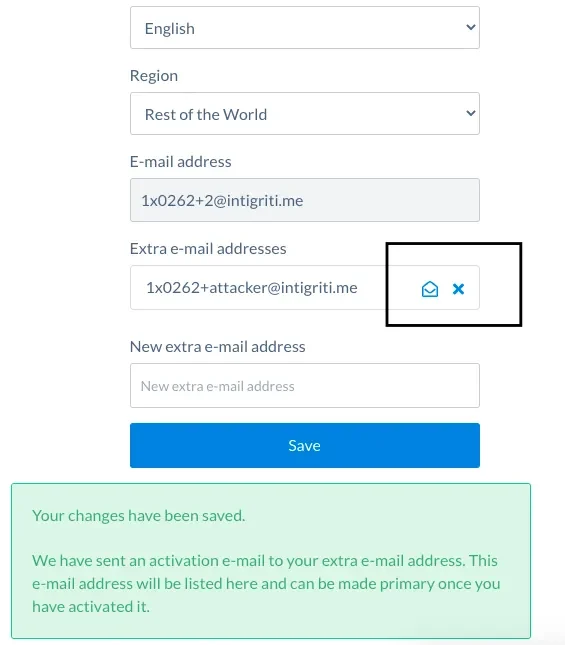
The screenshot shows the confirmation mail being sent, with the two options next to the field, "resend" or "delete". At this point the extra mail is present but not verified, and cannot be promoted.
Step 2: capture the request that adds the mail
The researcher ran Burp Suite, went back to the page, entered an email again and captured the request.
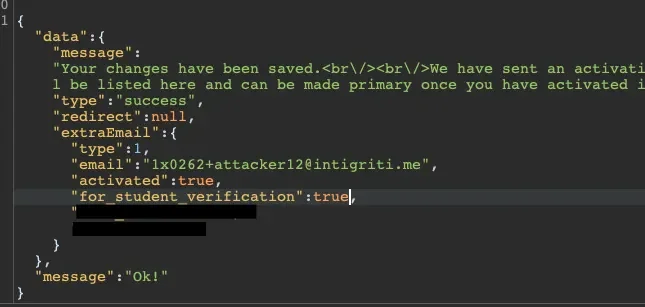
The captured request is the one that creates the extra mail entry. It contains the two flags mentioned above, both false.
Step 3: flip the flags to true
The two parameters, "activated" and "for student verification", would return false. The researcher changed both to true and submitted the request.
This is a direct parameter manipulation: the client tells the server that the mail is already activated and already verified, instead of leaving that decision to the server after the confirmation code is checked.
Step 4: promote the mail
Back on redacted.com, a tick button appeared next to the email field. The researcher clicked the tick button and refreshed the page.
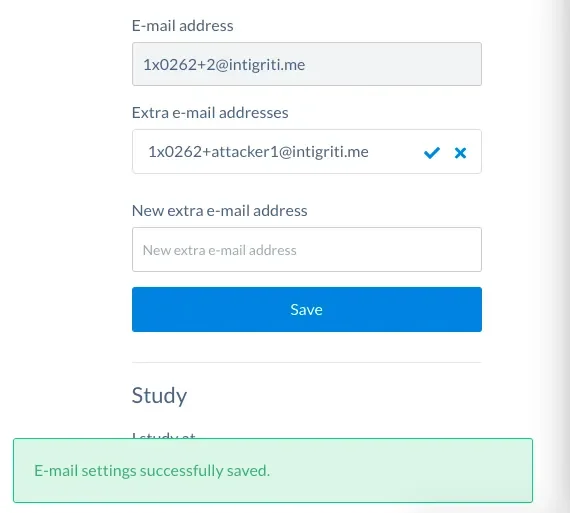
The extra mail moved to the primary mail section, and the old primary mail became an extra mail. The verification step was skipped entirely.
Step 5: submit custom study information
The second bug starts in the "I study" field, where a user can add their own special study information. The researcher typed admin and sent the request.
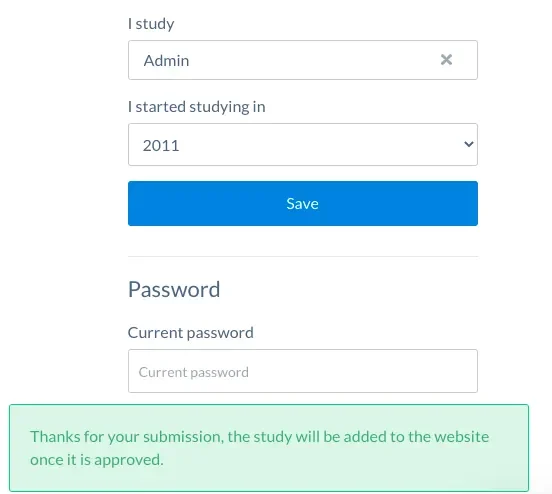
At this point the information is submitted but not approved, and management verification is still pending.
Step 6: capture the submission request
The researcher ran Burp Suite and sent the request again with admin in the field.
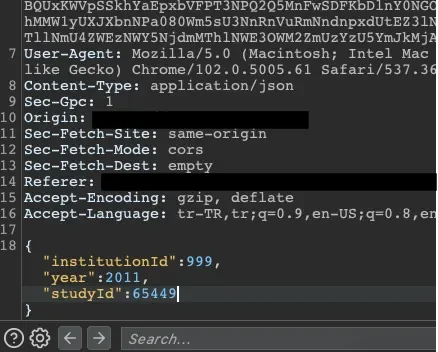
The request itself showed nothing of interest, so it was submitted and the response was reviewed.
Step 7: read the response
In the response, a parameter isVisible: was set to false.
That parameter is the flag that decides whether the submitted study information is displayed on the profile. It was not part of the visible form, and the researcher added it to the request.
Step 8: add the parameter to the request
The researcher resubmitted the request and added isVisible:true to the end of the request.
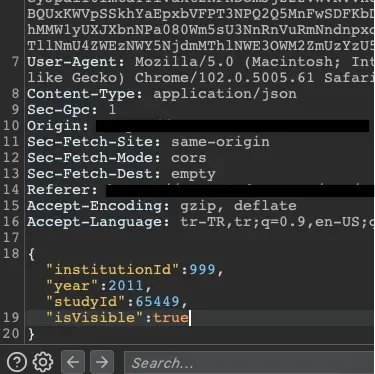
After refreshing the page, the information added appeared directly on the profile.
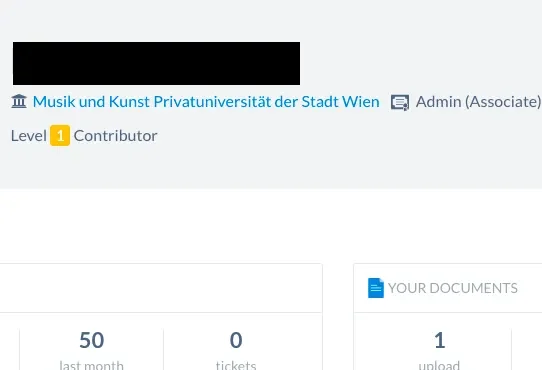
In this way, an attacker could add any information they wanted, bypassing the verification. The write-up says the information would look as if it had already been approved, and eventually actually get approved.
Root cause
The two bugs share one design mistake: security-relevant state is accepted from the client instead of being derived on the server.
In the mail flow, the verification status of an extra mail is represented by client-supplied parameters, "activated" and "for student verification". The server trusts the values in the request rather than setting them itself after the confirmation code is validated. Because the parameters are part of the request body, anyone who can edit the request can set them to true.
In the study flow, the visibility or approval state of submitted information is represented by isVisible, which the server accepts even though it is not part of the normal form. Adding it to the request makes the submission appear approved.
Likely the handlers bind request parameters directly to the stored object, which is the mass assignment pattern: any field the client names is written, including fields the UI never exposes. The confirmation step for the mail and the management review for the study information were both bypassed by asserting the final state.
Impact
For the mail bug, an attacker with an account can promote an extra mail to primary without access to that mailbox. The old primary mail becomes an extra mail. The extra mail became primary and the old primary mail became an extra mail, without the confirmation step.
For the study bug, an attacker can put arbitrary text into the study field and have it displayed on the profile as if it had been approved by management, bypassing the review. The content is attacker-chosen, which matters wherever profile information is trusted by other users or by staff.
The researcher classifies both as minor bugs, and the program paid €300 for the pair.
Fix
The write-up states that the bugs were fixed but does not describe the change. The fix that addresses the root cause is to stop accepting these fields from the client: the server should set the verification flags for the extra mail only after the confirmation code is validated, and should set the visibility or approval state of study information only through the management review. Any parameter that controls approval or verification should be ignored if it arrives in a user request.
Variants to test
- Add an extra mail and inspect the request for boolean fields that describe verification or activation. A positive result is a field such as
activatedor a verification flag that you can set to true and that changes the state of the mail without a confirmation code. - Submit a profile field that requires review and read the response for state fields such as
isVisible,approvedorverified. A positive result is one of those fields appearing in the response and, when added to the request with a true value, making the content visible without review. - Try adding hidden fields to other forms that create or update objects, for example profile, contact or organisation fields. A positive result is the server storing a value for a field the UI never sends.
- Look for the same pattern in flows where one record replaces another, such as changing a primary address, phone number or login identifier. A positive result is the swap happening without the confirmation step that the UI requires.
- Check whether the flags can be set on someone else's record by including an object identifier in the request. A positive result is a change to another user's verification or visibility state.
What happened, in plain words
A security researcher found two small bugs in the same website. The website belongs to a company that runs a private bug bounty program, which means the company invites selected researchers to test it and pays for real problems they find, but does not want its name published. So the researcher calls the site "redacted.com" throughout.
Both bugs are the same kind of mistake, made in two different places. The website asks the user's browser to send along some information, and then the website believes whatever that information says. Normally a website should decide important things itself, on its own computers, and never trust the visitor's browser to tell it the truth. Here, the browser sent parameters such as "activated" and "isVisible", and changing them changed what the site did.
The researcher used a tool called Burp Suite to look at and change the messages the browser sends to the website. With two small edits, one in each feature, the researcher skipped a verification step and an approval step. The company fixed both bugs and paid €300 in total for the pair.
To follow the rest of this article you only need to know how to use a browser. Every technical idea is explained as it comes up.
The two features involved
redacted.com has two features that matter here.
Mail management. Every account has a primary mail: the main email address attached to the account. A user who already has a primary mail can add a second one, called an extra mail. The website is supposed to let you promote the extra mail to primary, but only after it sends a verification code to that extra mail and you type the code back. Without that confirmation, the extra mail cannot become the primary mail. This is the same idea as when a shop sends a code to your phone before letting you change your password: it proves the address or number really belongs to you.
Study information. The profile has a field where users can add custom information about their studies. But that text has to be checked and approved by redacted.com's staff first. Until a person at the company approves it, it is not supposed to count as approved.
Both bugs are logic flaws caused by parameters that the visitor's browser can set. A parameter is a named piece of information sent along with a request, like a labelled box on a form: one box is called name, another is called age, and each has a value. A logic flaw means the website's rules can be bent without breaking anything technical: the site keeps working, but it does the wrong thing because the steps of its own procedure can be skipped.
The tool: Burp Suite
The only tool named in the write-up is Burp Suite. To understand why it matters, you need to know what a request is.
When you click a button or submit a form, your browser sends a message to the website's computer (the server). That message is the request. The server reads it, does something, and sends back a response, which the browser draws as a page. Normally you never see these messages; the browser handles them silently.
Burp Suite sits between your browser and the server, like a postal worker who opens every letter, shows it to you, lets you rewrite it, and then delivers it. That is called intercepting a request. With it, the researcher could see exactly what the browser was sending, change a value, and send the modified request on. The write-up does not describe how the account was created, what role the user had, or any software versions, so those details are not covered here.
Bug 1: skipping email verification
Step 1: add an extra mail and watch the normal flow
The researcher entered an email address in the extra mail section. The website said the address needed verification.
The screenshot shows the confirmation mail being sent, and next to the field two options: "resend" or "delete" the mail. At this point the extra mail exists on the account but is not verified, so it cannot be promoted to primary. This step matters because you have to know what normal looks like before you can spot what is abnormal.
Step 2: capture the request that adds the mail
The researcher started Burp Suite, went back to the page, entered an email again, and captured the request.
The captured request is the one that creates the extra mail entry. Inside it are two parameters, described in the write-up as "activated" and "for student verification", and both were set to false. Think of these as two switches the browser was sending to the server: "this mail is not activated" and "this mail is not verified for the student feature". The important observation is that these parameters were in the request the browser sent.
Step 3: flip the switches to true
The two parameters, "activated" and "for student verification", would return false. The researcher changed both to true and submitted the request.
This is parameter manipulation: editing the value of a parameter before the request reaches the server. Instead of waiting for the server to check the confirmation code and then mark the mail as verified, the researcher simply told the server "it is already activated and already verified". After the change, the mail could be promoted without the confirmation code.
Step 4: promote the mail
Back on redacted.com, a tick button appeared next to the email field. The researcher clicked the tick button and refreshed the page.
The extra mail moved into the primary mail section, and the old primary mail became an extra mail. The verification step was skipped entirely. In other words, the account swapped its main address without anyone proving they could read mail at the new address.
Bug 2: skipping study approval
Step 5: submit custom study information
The second bug lives in the "I study" field, where a user can add their own special study information. The researcher typed admin and sent the request.
At this point the text is submitted but not approved. Management review is still pending, exactly as the normal flow requires.
Step 6: capture the submission request
The researcher ran Burp Suite and sent the request again with admin in the field.
The request itself showed nothing interesting, so it was submitted and the response was examined instead. This is a useful habit: sometimes the clue is not in what you send but in what comes back.
Step 7: read the response
In the response, a parameter isVisible: was set to false.
That parameter is the switch that decides whether the submitted study information is shown on the profile. It was not part of the visible form, and the researcher added it to the request. A hidden switch that the browser is allowed to set is a classic opening for this kind of bug.
Step 8: add the parameter to the request
The researcher resubmitted the request and added isVisible:true to the end of the request.
After refreshing the page, the information added appeared directly on the profile.
So an attacker could put any text they liked into the study field and have it displayed as if management had approved it, skipping the review. The write-up says the information would look as if it had already been approved, and eventually actually get approved.
Why both bugs happened
Both bugs come from one design mistake: information that should be decided by the server is instead accepted from the browser.
In the mail flow, the verification status of an extra mail is represented by parameters supplied by the browser, "activated" and "for student verification". The server trusts the values in the request instead of setting them itself after checking the confirmation code. Because those parameters travel in the request, anyone who can edit the request can set them to true.
In the study flow, the visibility or approval state is represented by isVisible, which the server accepts even though the normal form never sends it. Adding it to the request makes the submission appear approved.
The write-up does not show the server-side code, so the exact implementation is not known. A likely explanation is that the server copies request parameters straight into the stored record, which is the mass assignment pattern: any field the browser names gets written, including fields the page never shows. Both the confirmation step and the management review were bypassed by asserting the final state.
What an attacker could do with this
For the mail bug, an attacker with an account can promote an extra mail to primary without access to that mailbox. The old primary mail becomes an extra mail. The extra mail became primary and the old primary mail became an extra mail, without the confirmation step.
For the study bug, an attacker can put arbitrary text into the study field and have it displayed on the profile as if management had approved it, bypassing the review. The content is chosen by the attacker, which matters wherever profile information is trusted by other users or by staff.
The researcher classifies both as minor bugs, and the program paid €300 for the pair.
How to fix it
The write-up states that the bugs were fixed but does not describe the change. The fix that addresses the root cause is to stop accepting these fields from the browser: the server should set the verification flags for the extra mail only after the confirmation code is validated, and should set the visibility or approval state of study information only through the management review. Any parameter that controls approval or verification should be ignored if it arrives in a user request.
Similar things to try
- Add an extra mail and inspect the request for true/false fields that describe verification or activation. A positive result is a field such as
activatedor a verification flag that you can set to true and that changes the state of the mail without a confirmation code. - Submit a profile field that requires review and read the response for state fields such as
isVisible,approvedorverified. A positive result is one of those fields appearing in the response and, when added to the request with a true value, making the content visible without review. - Try adding hidden fields to other forms that create or update objects, for example profile, contact or organisation fields. A positive result is the server storing a value for a field the page never sends.
- Look for the same pattern in flows where one record replaces another, such as changing a primary address, phone number or login identifier. A positive result is the swap happening without the confirmation step that the page requires.
- Check whether the flags can be set on someone else's record by including an object identifier in the request. A positive result is a change to another user's verification or visibility state.
Glossary
- Bug bounty program: an arrangement where a company pays researchers for reporting security problems in its systems.
- Private program: a bug bounty program open only to invited researchers, often with the company name kept secret.
- Primary mail: the main email address attached to an account.
- Extra mail: a second email address a user can add to an account, which must be verified before it can become primary.
- Verification code: a short code sent to an email address or phone to prove the person controls it.
- Logic flaw: a bug where the website's rules can be bent or skipped even though nothing technical breaks.
- Parameter: a named piece of information sent with a request, like a labelled box on a form, with a name and a value.
- Request: the message a browser sends to a server when you click, submit or load something.
- Response: the message a server sends back, which the browser turns into a page.
- Server: the computer that runs the website and answers requests.
- Client: the browser (or app) on the user's side that sends requests.
- Burp Suite: a tool that sits between browser and server so you can view, pause and edit requests and responses.
- Intercept: to catch a request in Burp Suite before it reaches the server, so you can read or change it.
- Parameter manipulation: editing the value of a parameter in a request to change what the server does.
- Mass assignment: a pattern where the server copies request parameters directly into a stored record, including fields the page never shows.
- Boolean: a value that is either true or false.
- Flag: a true/false value that records a state, such as whether something is verified or visible.
- Hidden field: a parameter the page does not display but the server still accepts.
- Object identifier: a value in a request that names which record (for example which user or which mail) is being changed.
- Impact: the real-world harm a bug could cause.
- Root cause: the underlying design mistake that produces a bug.
- Minor bug: a low-severity issue, as classified by the researcher in this write-up.