Break the Logic: 5 Different Perspectives in Single Page (€1500)
A parent user could bypass frontend restrictions to modify student profile fields they were not permitted to edit, including main address, contact details, and address types, and could also delete an official address via an IDOR. The application only enforced access control on the client side, allowing unauthorised changes through direct requests.

Hello everyone. Today I’m going to talk about five different vulnerabilities that I found on a single page.
The full write-up lives on its author's site
It belongs to its author, so we link to it rather than copy it. The other two tabs are our own rewrites, checked against it.
Context
The target is a school and student management application, run by a company that operates a private bug bounty programme, so the author refers to it only as "redacted". The application has three user models: teachers, students and parents. Parents have limited authority: on a student's profile they can only edit their own information. All five findings described here come from that perspective, on a single contact page.
The findings involve a student's main address section, contact information, and addresses split into residential and official types. The application presents edit and delete controls for these, and the author's work was to check whether the restrictions those controls imply are enforced anywhere other than the browser.
Setup
- A parent account, used against a student's profile.
- Burp Suite, to capture and replay the requests the page sends.
- Browser developer tools, to modify the DOM of the page.
No versions, endpoints or hostnames are given in the report. The only parameter names that appear are postalTitle, household and learnerPersonalid.
Finding it
The starting observation is simple: on the student's profile, the address section is one the parent has no permission to edit. The edit button is active, but clicking it shows every field disabled. The save button, however, is still active. That mismatch between a disabled form and a live submit control is the thread that runs through all five findings.
Exploitation
Step 1: changing the student's main address without access
Opening the address section as a parent shows the fields disabled.
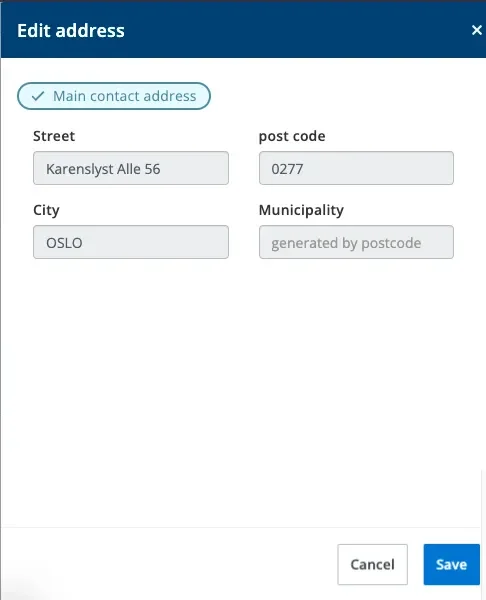
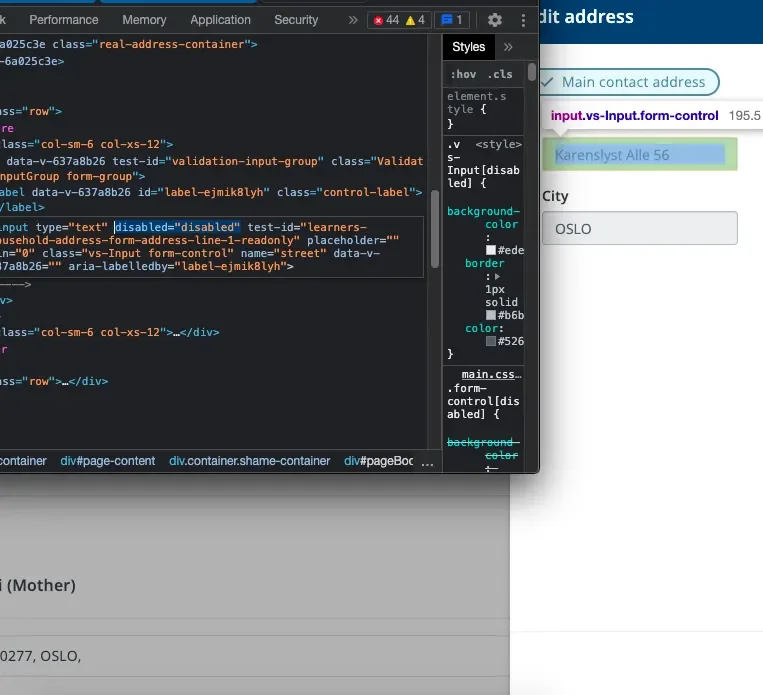
The save button remains active, so the author removed the disabled attribute from the fields in the browser.
The fields were then filled in with the author's own information, and because the save button was still active the request could be sent normally.

The request went through and the target information really changed. The protection existed only on the frontend of the application. The same change could equally be made by replaying the request through Burp Suite.
Step 2: editing all fields of the contact section without access
Parent users see some contact information on the student's profile but cannot edit all of it; they only have the right to edit some fields.
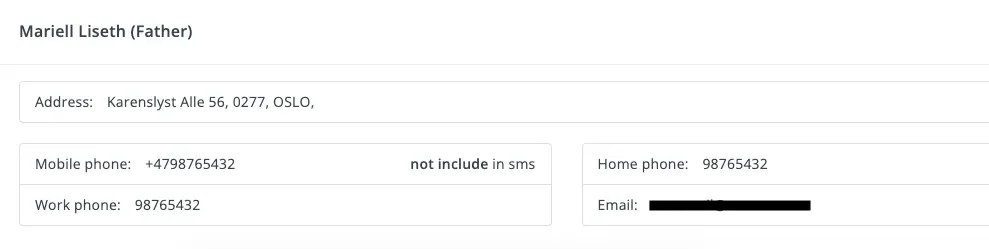
Information such as name and address is also present, but when the edit button is clicked only the contact fields can be changed.
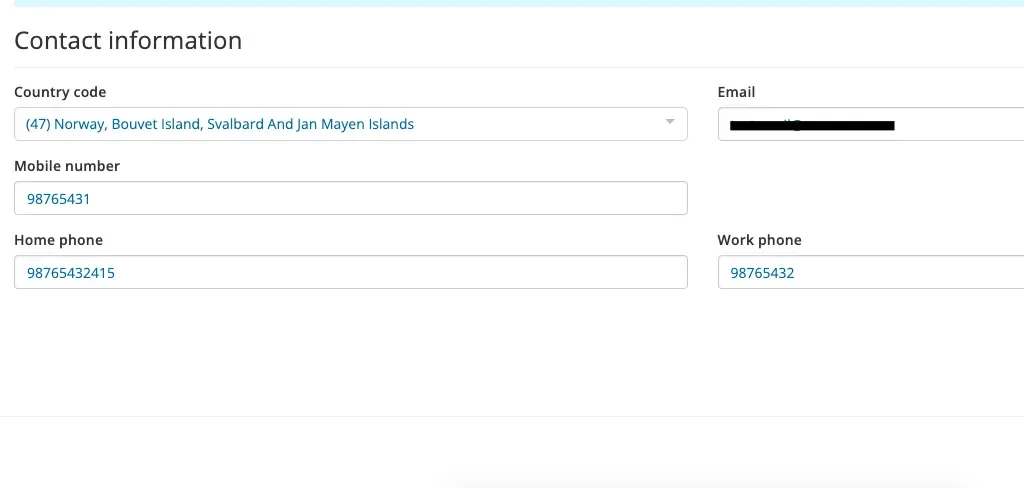
Sending the request this way produces a PUT request. It carries other fields that could not be changed in the interface, such as name and address.
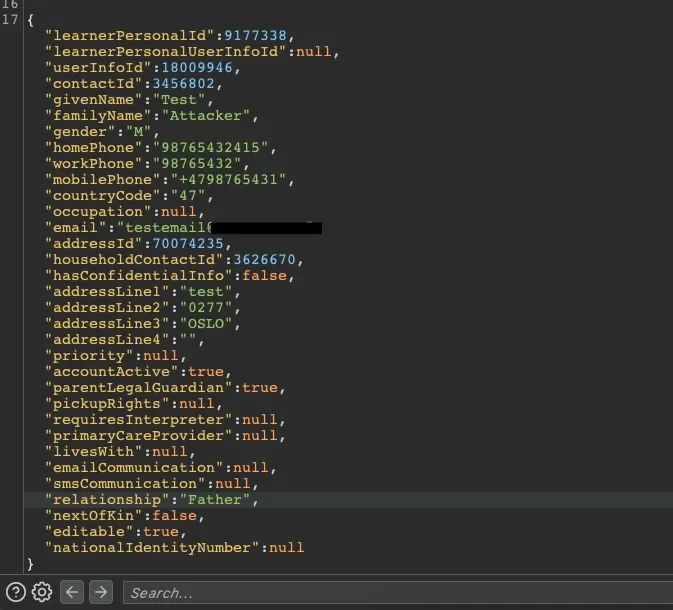
The author changed information such as name, address and relationship and sent the request.
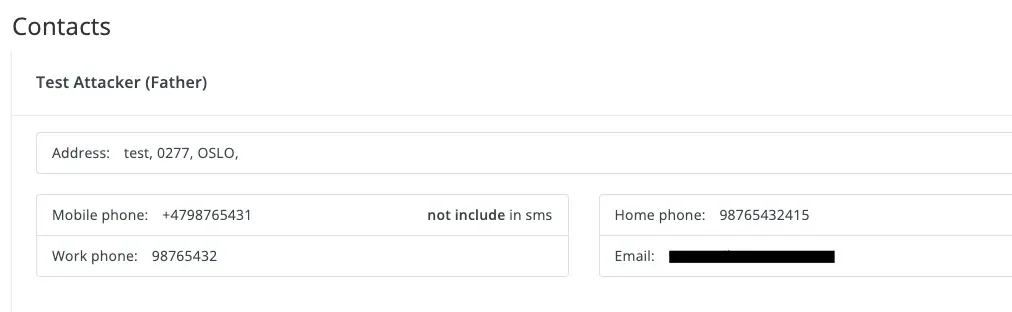
The information was successfully changed and displayed on the page.
Step 3: creating a new parent contact field without access
Parent users can only edit their own information and cannot add a new parent contact field.
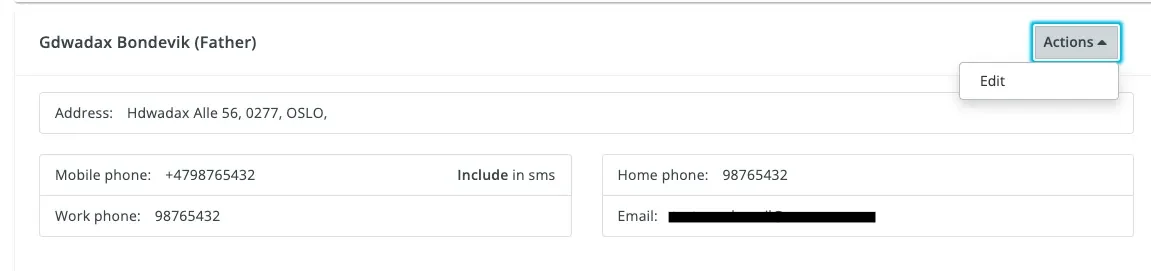
The request used to edit the contact table was the same PUT request as in the second finding. It contains many different ID values. The author replaced the last digits of all of them with random values, except learnerPersonalid, because that value sat at the beginning of every request and was not page specific.
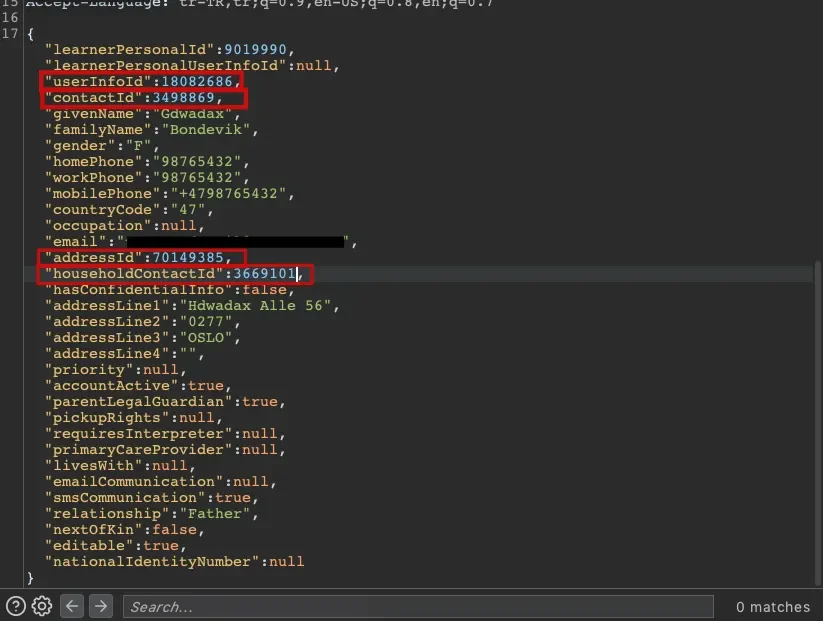
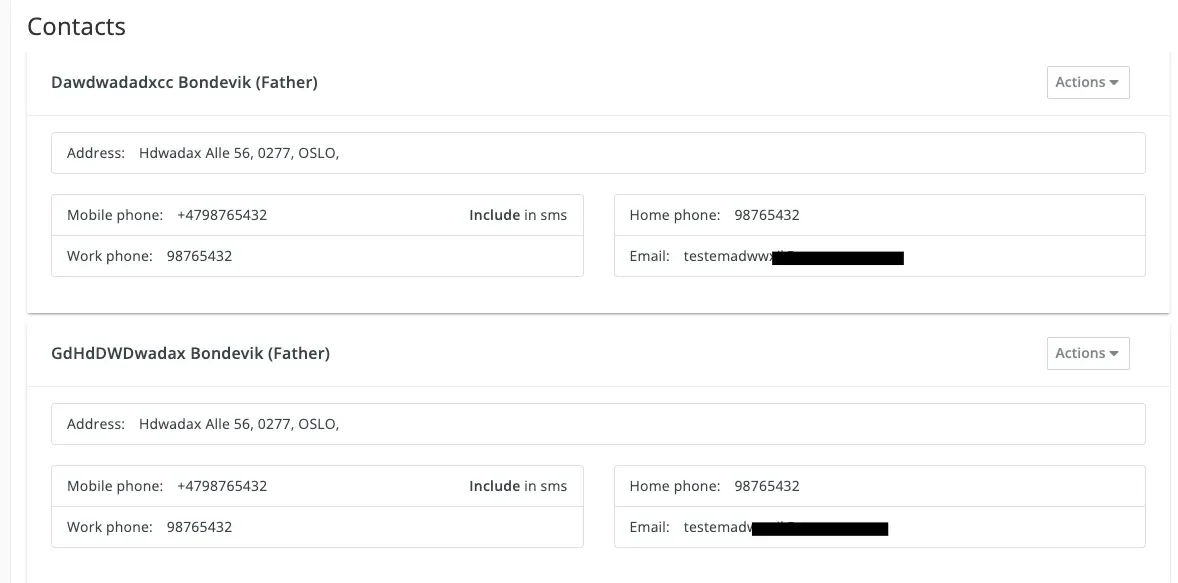
The expectation was a 500 or a 403. Instead the application created a new contact field.
Step 4: changing address types without access
Users cannot change the defined address types of students. In the example there are two defined addresses for the student, and parent users cannot change their types.
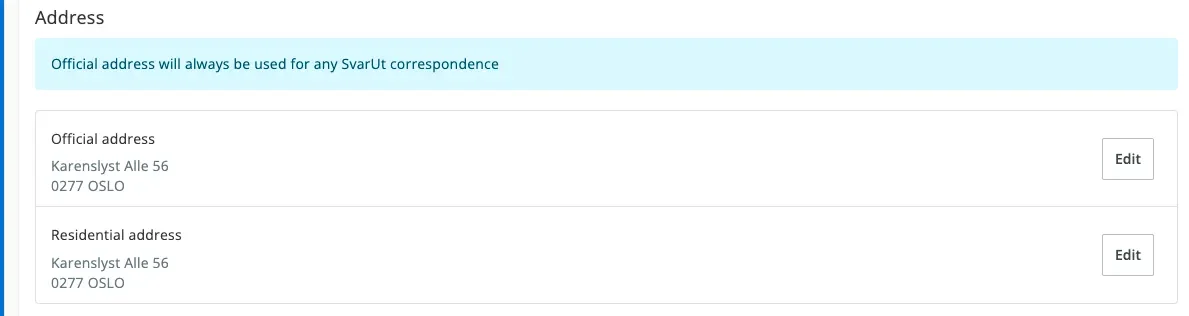
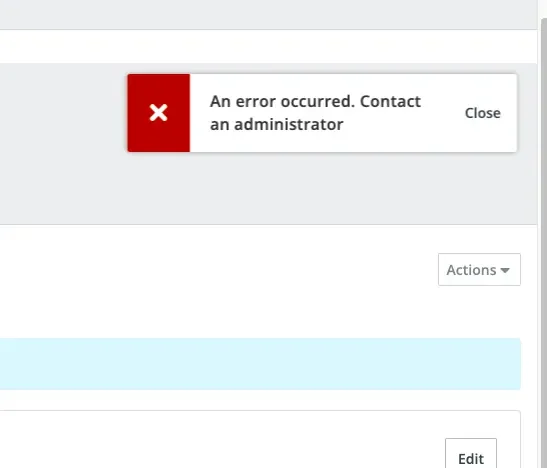
Trying to change a residential address to an official one through the application throws an error and the request is not carried out.
The save button from the first finding is still active for addresses, so the author edited a residential address, sent it, and captured the resulting request.
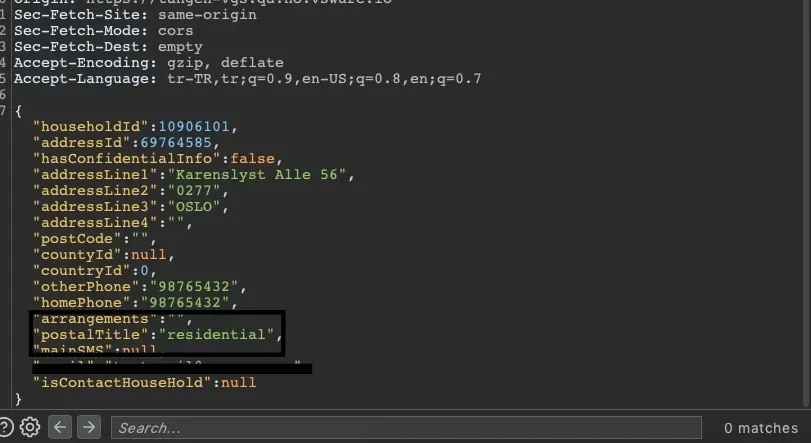
The postalTitle parameter was changed to official. The same trick works in the other direction, changing an official address to residential.

In the application only one address can be an official address, yet after this change both addresses had become main addresses.
Step 5: deleting the student's official address without access (basic IDOR)
While examining address types, the author noticed a difference: a delete button is active for residential addresses, but there is no delete button for official addresses.
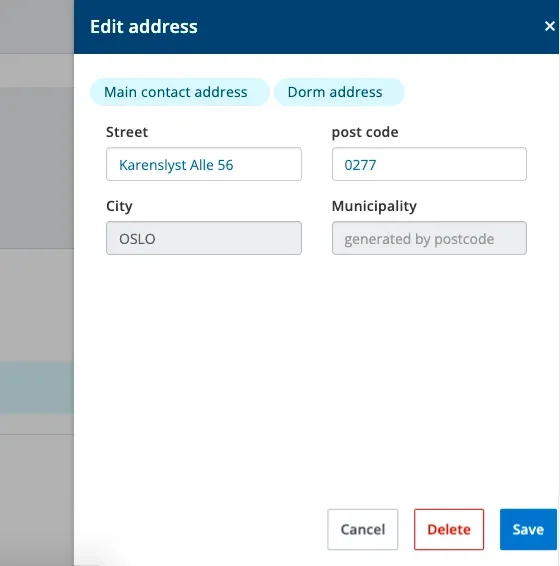
Example for residential address
Example for official address
The student's official address edit button was clicked, Burp Suite was running, and the save button was pressed. The same request appeared again, and the household value was copied from it.
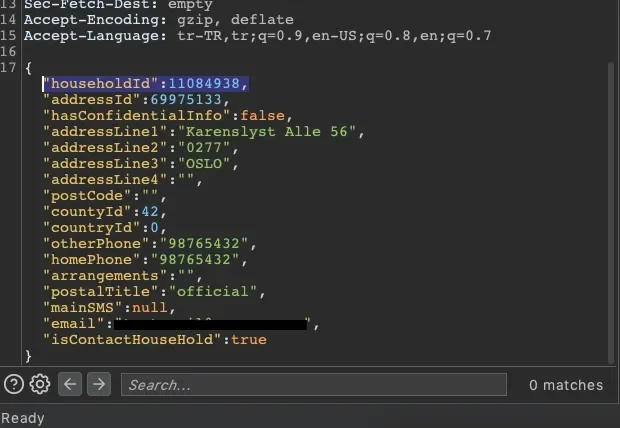
Back on the residential addresses, the delete button was clicked, the delete request captured, and the household: value replaced with the official address ID.
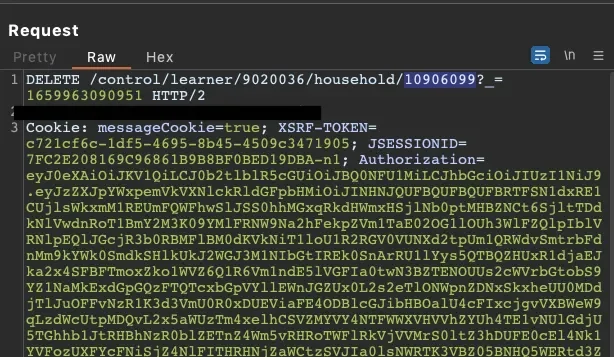
The official address was deleted even though the parent had no access to it.
Root cause
In every case the restriction is enforced only in the browser. The interface disables fields, hides buttons and limits which inputs are editable, but the server accepts whatever the client sends. Removing disabled attributes, editing hidden fields in a captured PUT request, changing ID values, or swapping the household identifier in a delete request all succeed because the backend does not check that the authenticated parent is authorised to modify that particular student's data or that particular address type. The address-type rule (only one official address) was also broken by the change. The report does not describe the server-side code, so the exact missing check is likely an authorisation check on the object being written, rather than anything more subtle.
Impact
A parent account, which should only be able to edit its own information, can change a student's main address, rewrite name, address and relationship fields in the contact section, create new contact records, change the type of an address, and delete an official address. All of this is done against a student the parent has no edit rights over. The report does not state how the five submissions were triaged beyond noting that three were accepted and two were closed as duplicate, and that the total reward was €1500.
Fix
The fix implied by the findings is to enforce every one of these rules on the server: check that the authenticated user is allowed to modify the specific student record and the specific fields being written, validate that the address type change is permitted and that only one official address exists, and verify ownership of the object referenced by household before deleting it. Client-side disabling of fields and hiding of buttons should be treated as presentation only.
Variants to test
- Disabled fields with a live submit button. Look for forms where the edit control is disabled but save is not. A positive result is a successful write after removing the
disabledattribute. - Extra fields in a PUT body. Capture an update request and add fields that the interface does not expose, such as name, address or relationship. A positive result is those values changing on the page.
- ID substitution in create requests. Replace the trailing digits of every ID in an update request, keeping any global identifier such as
learnerPersonalidintact. A positive result is a new record being created instead of a 403 or 500. - Enum-like parameters. Change values such as
postalTitleto a type the interface does not offer. A positive result is the record changing type, especially where the application claims only one record of that type may exist. - Hidden delete actions. Where a delete button exists for one record type but not another, capture the delete request and swap the identifier for the protected record. A positive result is the protected record being removed.
What happened, in plain words
A security researcher spent some time on a school and student management website. The site is run by a company that pays people to find its bugs, but only through a private arrangement, so the researcher never names the company and calls it "redacted" throughout.
The site has three kinds of user: teachers, students and parents. The researcher used a parent account. A parent is supposed to have very little power: on a student's profile, a parent can only edit their own information. Everything in this article happens from that parent's point of view, on a single contact page of the site.
On that page the researcher found five separate problems. Three were accepted as real bugs and two were closed as duplicates (meaning the company had already received the same report from someone else). The total reward was €1500.
The common thread in all five is the same: the website's browser page pretended to stop the parent from doing things, but the server behind it never actually checked. Think of a hotel where the door to a room is locked, but the lock is only a picture of a lock painted on the door. Anyone who pushes it opens it. In web terms, the restriction lived only in the browser (the "frontend"), not on the computer that stores the data (the "backend" or "server").
To understand the rest, you need a few ideas from zero.
What a server and a browser are. When you visit a website, your browser (Chrome, Firefox, Safari) asks a computer somewhere else for a page. That computer is the server. The server sends back the page, and your browser draws it on screen. The browser is on your side; the server is on the company's side. Anything the browser does can be changed by the person using it, because the browser runs on their own machine. Anything the server does is under the company's control. A safe website repeats every important check on the server, because the browser cannot be trusted.
What an API is. A website is not only pretty pages. Behind the page, the browser and the server exchange short messages in a fixed format, usually carrying data rather than pictures. That conversation is the API. When you click Save, the browser does not magically change the database; it sends a request to the server saying "please save this", and the server decides whether to obey. A useful comparison: the page is the menu in a restaurant, and the API is the waiter carrying your order to the kitchen. You can scribble anything you like on the menu, but the kitchen only cooks what the waiter actually brings.
What a request is. A request is one of those messages. It has a method (a verb saying what you want), a URL (where it goes), sometimes a body (the data you are sending), and headers (small labels with extra information). The methods you will see here are:
- GET: "give me this".
- PUT: "replace this with what I am sending".
- POST: "create something new".
- DELETE: "remove this".
What a cookie or token is. A website needs to know who you are on every request, because each request arrives separately. After you log in, the server gives your browser a small piece of text, usually stored as a cookie or a token, and the browser sends it back with every request. It works like a wristband at a festival: you show it once at the gate, and after that the staff glance at your wrist instead of asking for your ID again. If someone else gets your wristband, they can pretend to be you, which is why these values are secret and are redacted in this article.
What an ID is. Most systems give every record a unique number or code, called an ID, so they can tell one student from another, or one address from another. When you edit your address, the request usually says "change address number 1234". If the server does not check that address 1234 belongs to you, you can simply write a different number and edit someone else's.
What an IDOR is. IDOR stands for Insecure Direct Object Reference. It is the bug you get when the server accepts whatever ID the client sends without checking that the client is allowed to touch that object. In everyday terms: a cloakroom that hands out any coat to anyone who says a ticket number, without checking the ticket is theirs.
What broken authorisation means. Authorisation is the question "are you allowed to do this?". Authentication is "who are you?". A site can know perfectly well that you are a parent and still fail to check whether this particular parent may edit this particular student. That failure is broken authorisation.
What client-side enforcement means. The browser page can grey out a field, hide a button, or refuse to submit a form. All of that is client-side, meaning it happens on your computer. It is a convenience, not a security control, because you can always change it. Server-side enforcement is the real lock.
What Burp Suite is. Burp Suite is a tool that sits between your browser and the server and lets you read every request and response, and change a request before it is sent. It is like opening the envelope the waiter carries, reading the order, rewriting it, and sealing it again. The researcher uses it to see what the page really sends and to send modified versions.
What browser developer tools are. Every modern browser has a built-in panel (usually opened with F12) that shows the page's structure, called the DOM. The DOM is the live model of the page in memory. You can edit it there and the page changes on your screen, without the server knowing anything about it. That is exactly how the first finding works.
What a parameter is. A parameter is one named piece of data inside a request, for example postalTitle with the value official. It is a labelled box: the label says what it is, the value says what goes in it.
What an HTTP status code is. The server answers every request with a three-digit number. 200 means fine, 403 means "you are not allowed", 500 means "the server broke". The researcher expected 403 or 500 at one point and got something else, which is a clue.
What a duplicate is. Bug bounty programmes receive many reports. If two people report the same underlying bug, the second is usually closed as a duplicate. It is still a real bug; it just does not earn a second reward.
Now, the five findings, in the order the researcher found them.
The setup
The researcher used:
- A parent account, pointed at a student's profile.
- Burp Suite, to capture and replay the requests the page sends.
- The browser's developer tools, to modify the page itself.
The report does not give any version numbers, endpoint paths or hostnames. The only parameter names that appear anywhere are postalTitle, household and learnerPersonalid.
Finding it
The starting point is a small observation. On the student's profile, the address section is one the parent has no permission to edit. The edit button is active, but clicking it shows every field greyed out and disabled. The save button, however, is still active. That mismatch, a disabled form with a live submit button, is the thread that runs through all five findings. It is the painted lock on the door.
Step 1: changing the student's main address without access
Opening the address section as a parent shows the fields disabled.
The save button remains active, so the researcher removed the disabled attribute from the fields in the browser.
In the page's structure, each input field can carry an attribute called disabled. When it is present, the browser refuses to let the user type in that field and will not include it in a submitted form. Removing the attribute in developer tools is a single edit in the page's live model. The server is not told; it only sees the next request. The researcher did this because the save button was still live, so the form could still be submitted, and the only thing standing in the way was a browser-side attribute.
The fields were then filled in with the researcher's own information, and because the save button was still active the request could be sent normally.
The request went through and the target information really changed. The protection existed only on the frontend of the application. The same change could equally be made by replaying the request through Burp Suite. In other words, the server received a perfectly ordinary save request and did what it was told, without asking whether this parent was allowed to change this student's main address.
Step 2: editing all fields of the contact section without access
Parent users see some contact information on the student's profile but cannot edit all of it; they only have the right to edit some fields.
Information such as name and address is also present, but when the edit button is clicked only the contact fields can be changed.
This is a different flavour of the same problem. Here the page does not disable fields; it simply does not show them as editable. The researcher's question was whether the server would accept values for fields the page never offered.
Sending the request this way produces a PUT request. It carries other fields that could not be changed in the interface, such as name and address.
A PUT request means "replace this record with what I am sending". The important detail is that the request body contains more fields than the page let the parent edit. The page hid them; the request still carried them. That is like a form at a doctor's office where the receptionist only lets you fill in your phone number, but the paper underneath already has boxes for your name and address, and the clerk files whatever is written in them.
The researcher changed information such as name, address and relationship and sent the request.
The information was successfully changed and displayed on the page. The server accepted the extra fields without checking that a parent is allowed to write them. The page then showed the new values, which confirms the change was stored, not just displayed.
Step 3: creating a new parent contact field without access
Parent users can only edit their own information and cannot add a new parent contact field.
The request used to edit the contact table was the same PUT request as in the second finding. It contains many different ID values. The researcher replaced the last digits of all of them with random values, except learnerPersonalid, because that value sat at the beginning of every request and was not page specific.
This is the IDOR idea in action. The request says which records to touch by their IDs. If you change an ID, you are pointing the request at a different record. The researcher changed the trailing digits of every ID to random values, deliberately aiming at records that should not exist or should not belong to this parent. The one exception was learnerPersonalid, which stayed the same because it identified the student at the start of every request and was not specific to the page; changing it would have pointed the request at a different student entirely, which was not the experiment.
The expectation was a 500 or a 403. A 403 would mean "you are not allowed"; a 500 would mean "the server choked on this nonsense". Instead the application created a new contact field.
Step 4: changing address types without access
Users cannot change the defined address types of students. In the example there are two defined addresses for the student, and parent users cannot change their types.
An address type is a label such as residential or official. The application treats them differently: an official address is presumably the one used for formal correspondence, and the interface does not let a parent switch an address from one type to the other.
Trying to change a residential address to an official one through the application throws an error and the request is not carried out.
So the page does block this, at least when you use the page normally. The application throws an error and the request is not carried out.
The save button from the first finding is still active for addresses, so the researcher edited a residential address, sent it, and captured the resulting request.
This is the same trick as step 1, applied to a different rule. Because the save button was live, the request could be sent, and Burp Suite could capture it.
The postalTitle parameter was changed to official. The same trick works in the other direction, changing an official address to residential.
postalTitle is the parameter that carries the address type. The page would not let a parent set it to official, but the request is just text, and Burp Suite lets you edit that text before sending.
In the application only one address can be an official address, yet after this change both addresses had become main addresses. That is a second broken rule in the same step: even the "only one official address" constraint was not enforced on the server. It is like a rule that says only one person may hold the key to the safe, and the system happily hands out two.
Step 5: deleting the student's official address without access (basic IDOR)
While examining address types, the researcher noticed a difference: a delete button is active for residential addresses, but there is no delete button for official addresses.
Example for residential address
Example for official address
A missing button is not a security control. It only means the page does not offer the action. The question is whether the server would still perform the action if asked directly. This is the classic IDOR setup: the interface hides the door, but the corridor is still there.
The student's official address edit button was clicked, Burp Suite was running, and the save button was pressed. The same request appeared again, and the household value was copied from it.
household is the parameter that identifies which address record is being handled. By editing the official address and saving, the researcher could see the official address's household value in the captured request. That value is the ID of the protected record.
Back on the residential addresses, the delete button was clicked, the delete request captured, and the household: value replaced with the official address ID.
The delete request for a residential address is a normal, allowed action. The researcher took that allowed request and swapped in the ID of the official address. If the server checked ownership, it would refuse, because this parent has no right to delete the official address. It did not check, and the official address was deleted even though the parent had no access to it.
Why it works
In every case the restriction is enforced only in the browser. The interface disables fields, hides buttons and limits which inputs are editable, but the server accepts whatever the client sends. Removing disabled attributes, editing hidden fields in a captured PUT request, changing ID values, or swapping the household identifier in a delete request all succeed because the backend does not check that the authenticated parent is authorised to modify that particular student's data or that particular address type. The address-type rule, that only one official address may exist, is likewise not validated on the server. The report does not describe the server-side code, so the exact missing check is most likely an authorisation check on the object being written, rather than anything more subtle.
A useful way to hold all five in your head: the page is a polite receptionist who says "you may not go in there", and the server is the door itself, which was never locked.
What it means in practice
A parent account, which should only be able to edit its own information, can change a student's main address, rewrite name, address and relationship fields in the contact section, create new contact records, change the type of an address, and delete an official address. All of this is done against a student the parent has no edit rights over. In a school system, addresses and contact details matter, and a parent can rewrite another student's details.
How to fix it
The fix implied by the findings is to enforce every one of these rules on the server: check that the authenticated user is allowed to modify the specific student record and the specific fields being written, validate that the address type change is permitted and that only one official address exists, and verify ownership of the object referenced by household before deleting it. Client-side disabling of fields and hiding of buttons should be treated as presentation only, never as a security control.
Things worth trying on other sites
These are the same five patterns, written so you can look for them elsewhere. Each one is a question you can ask of any site you are allowed to test.
- Disabled fields with a live submit button. Look for forms where the edit control is disabled but save is not. A positive result is a successful write after removing the
disabledattribute. Ask yourself: if the page is telling me I cannot edit this, why is the save button still there? - Extra fields in a PUT body. Capture an update request and add fields that the interface does not expose, such as name, address or relationship. A positive result is those values changing on the page. The page is a menu; the request is the order; check whether the kitchen cooks things that were never on the menu.
- ID substitution in create requests. Replace the trailing digits of every ID in an update request, keeping any global identifier such as
learnerPersonalidintact. A positive result is a new record being created instead of a 403 or 500. Random IDs are a good probe because a correct server should reject them outright. - Enum-like parameters. Change values such as
postalTitleto a type the interface does not offer. A positive result is the record changing type, especially where the application claims only one record of that type may exist. Rules that the page states but the server does not check are the easiest kind to break. - Hidden delete actions. Where a delete button exists for one record type but not another, capture the delete request and swap the identifier for the protected record. A positive result is the protected record being removed. A missing button is not a lock; it is a missing button.
Glossary
- API: the set of messages a browser and a server exchange behind the page, carrying data rather than pictures.
- Attribute: a named setting on an element of a web page, such as
disabledon an input field. - Authentication: proving who you are, usually by logging in.
- Authorisation: deciding whether the person you have identified is allowed to do a particular thing.
- Backend: the server-side part of an application, where data is stored and rules should be enforced.
- Broken authorisation: a bug where the server does not check whether the user is allowed to perform the action they are attempting.
- Browser: the program on your computer that displays web pages and sends requests to servers.
- Burp Suite: a tool that sits between browser and server, letting you read and modify requests and responses.
- Client-side: happening in the browser, on the user's own computer, and therefore changeable by the user.
- Cookie: a small piece of text a site stores in your browser and receives back on each request, often used to identify you.
- DELETE: an HTTP method meaning "remove this".
- Developer tools: the built-in panel in a browser that shows and lets you edit the page's structure.
- Disabled attribute: a setting on a form field that makes the browser refuse input and leave the field out of a submission.
- DOM: the live in-memory model of a web page that the browser draws and that developer tools can edit.
- Duplicate: a bug report closed because the same underlying bug was already reported.
- Endpoint: the specific address on a server that a request is sent to.
- Enum-like parameter: a parameter whose value must be one of a fixed set, such as an address type.
- Frontend: the part of an application that runs in the browser.
- GET: an HTTP method meaning "give me this".
- Header: a small labelled piece of extra information attached to a request or response.
- HTTP status code: the three-digit number a server returns with every response, such as 200, 403 or 500.
- ID: a unique number or code identifying a record.
- IDOR: Insecure Direct Object Reference, a bug where the server accepts any ID the client sends without checking the client may access that object.
- Parameter: a named piece of data inside a request, such as
postalTitlewith the valueofficial. - POST: an HTTP method meaning "create something new".
- PUT: an HTTP method meaning "replace this record with what I am sending".
- Request: a message from browser to server asking for something or asking the server to do something.
- Response: the server's reply to a request.
- Server: the computer on the company's side that stores data and answers requests.
- Server-side: happening on the server, under the company's control, and therefore not changeable by the user.
- Token: a piece of text proving your identity on a request, similar in purpose to a cookie.
- URL: the address of a resource on the web.