Multiple bugs in one program leads to 1500€
The application exposed client access levels and user PII through manipulable request parameters, and allowed access to missions of unauthorised clients via an IDOR in the missions API. An attacker could view sensitive user data and missions of clients they should not access, and could also add missions to those clients.

Hi, today I‘m going to talk about three basic vulnerabilities that I discovered in the same program and were rewarded with 1500€.
The full write-up lives on its author's site
It belongs to its author, so we link to it rather than copy it. The other two tabs are our own rewrites, checked against it.
Context
The target is a private bug bounty program, so the application and the client names are redacted throughout. The product is a multi-tenant application in which a user is granted access to individual Clients. Each Client has an "Access" panel, reached through an "Access" button, that lists the users of that Client and shows which of them are authorised and with what role. The same application has a Missions section: clicking a Client you hold full or read-only privileges on takes you to that Client's Missions, where missions can be viewed and created.
Access to a Client is not all-or-nothing. A Client you can reach shows the "properties" option and the action buttons; a Client you cannot reach shows only the "properties" option, which cannot be clicked, and no buttons at all.

A Client with full access, by contrast, exposes the full set of controls.

The author found three issues in this program and was rewarded 1500€ for them. They are similar in nature, which is why they chain together easily: a parameter-tampering and response-manipulation flaw that exposes the Access panel of a Client you do not own, an IDOR on the missions endpoint that leaks another Client's missions, and a second IDOR that lets you create missions on a Client you have no access to.
Setup
The write-up does not describe the accounts, roles or tooling used beyond a browser with DevTools and an intercepting proxy with a Repeater (the screenshots show Burp-style request and response panes). The precondition for all three findings is an authenticated user who holds access to at least one Client, so that the Clients list, the Missions section and the "Copy from Engagement" feature are reachable. The target of each attack is a Client the same user has no access to.
Finding it
The starting observation is a difference in the UI between Clients the user can and cannot reach. The "Access" button is the entry point to the list of a Client's users and their authorisations, and it is simply not available for a Client without access. That makes the button's backing request the interesting object: if the server decides whether to serve the user list purely from data the client already holds, the decision can be influenced.
Exploitation
Step 1: read the Clients list request
The researcher went to the Clients list and typed a random letter into the search box, then intercepted the resulting request. The response for the search contained the information for all the Clients to be listed.

Looking at the first Client in that response, two fields stood out:
"CurrentLogOnAccesType": None,
"CanControlClientAcces": false
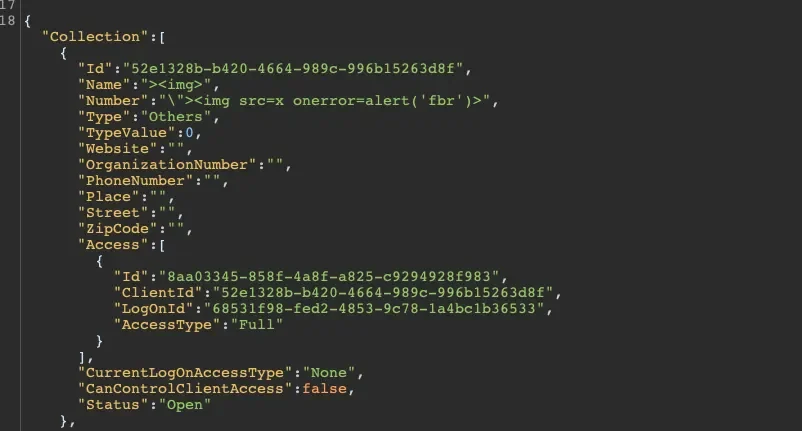
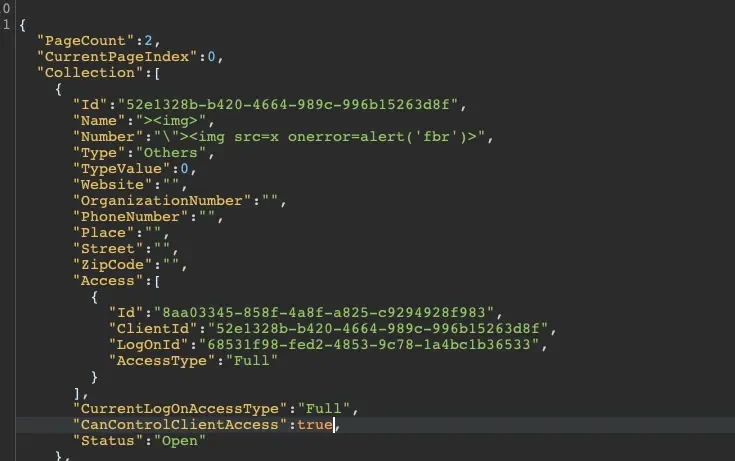
These are the fields that describe the caller's relationship to that Client: the access type, and whether the caller can control access to it. In the examples of Clients the user did have access to, the same fields carried the full-access values, which is what suggested editing them.
Step 2: change the parameters and replay
The researcher changed the two values to "full" and "true" respectively, kept the rest of the response body identical, and sent the request. The same information was available in the response to the request, and the researcher sent it.
Step 3: use the Access button
Back on the page, the target Client now showed as "Full Access". The Access button was active, and clicking it displayed the privileges of all users of that Client.
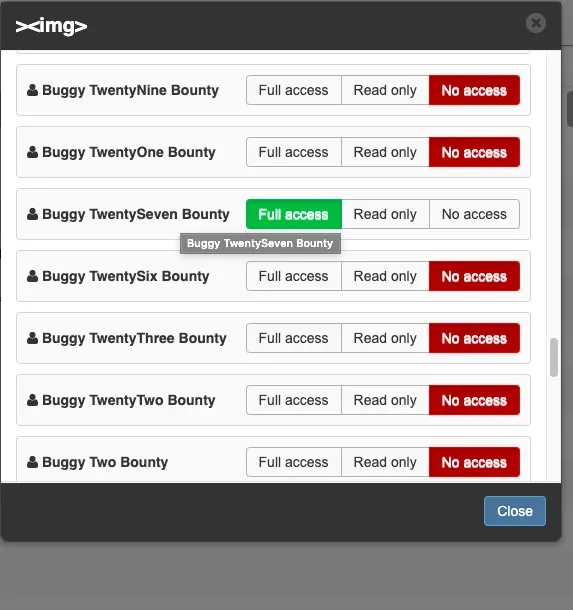
Because the user information is returned in the Access section, the researcher intercepted the request fired by the Access button and read its response directly.
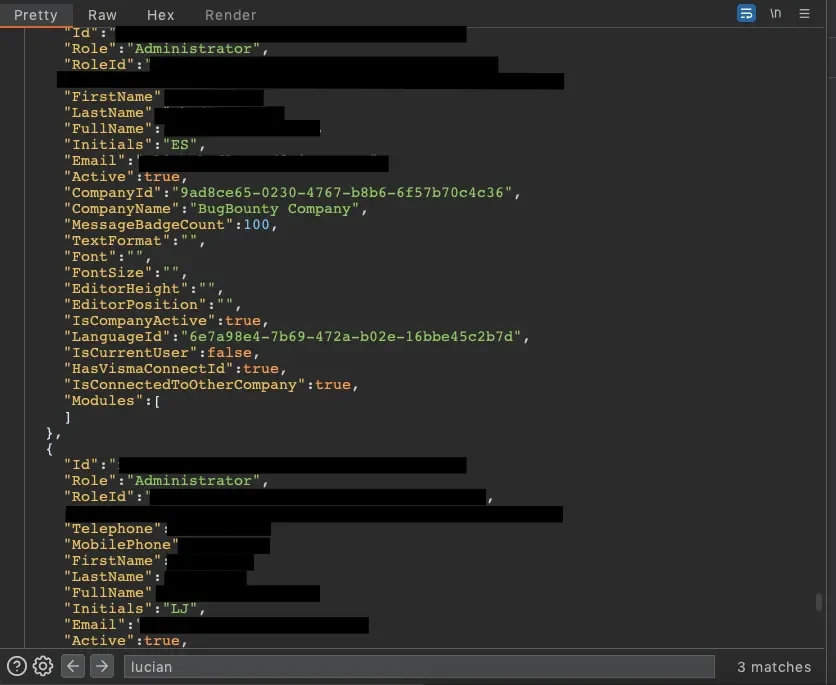
That response discloses the users of the Client, their authorisations, and PII such as email, companies and roles, including those of admins and other authorised users. The condition is that the attacker can reach the Clients list and intercept and modify their own traffic; no access to the target Client is required.
Step 4: find a request that reaches a Client's missions
No Access Clients cannot be clicked in the Clients list, so their Missions and other information are not reachable through the UI. While viewing the missions of a full-access Client, the researcher went through the settings options one by one and found the "Copy from Engagement" feature. Clicking it and intercepting the request revealed a ClientID parameter.
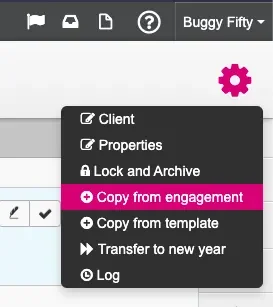
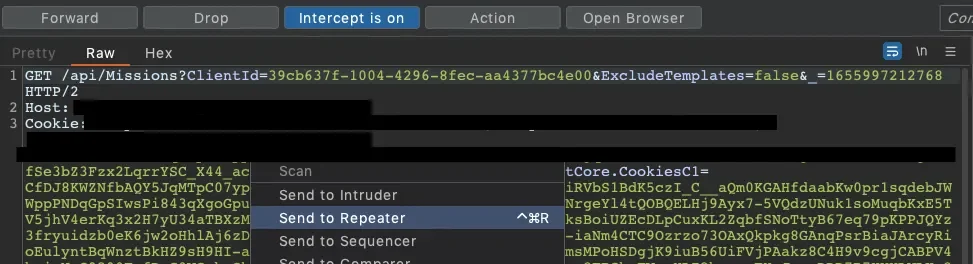
The request involved is /api/Missions?ClientId=. The researcher sent the request to Repeater and started looking for the IDs of No Access Clients.
Step 5: harvest a target Client ID and swap it in
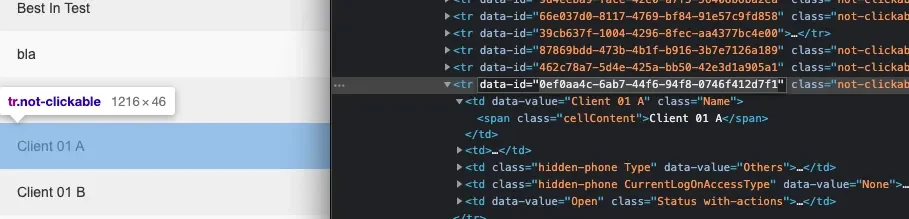
The IDs were available in the Clients list from the first finding: opening DevTools on that page showed the IDs of the Clients there.
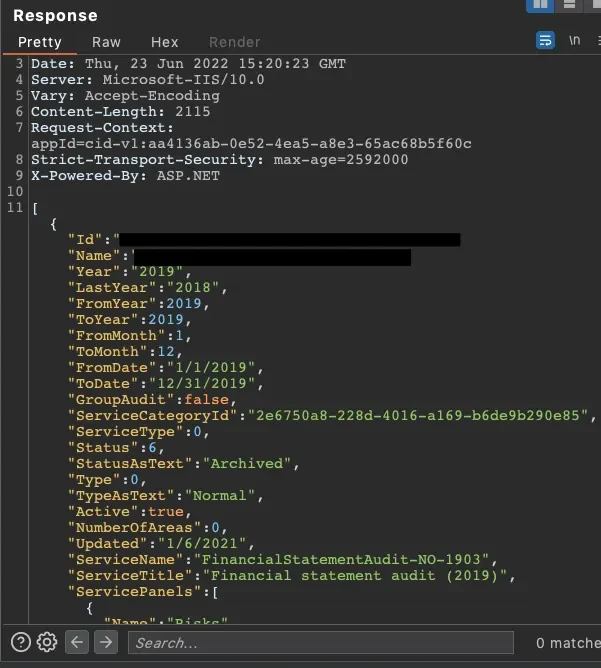
The researcher copied the GUID of a No Access Client, returned to Repeater and replaced the original GUID in the request with it. The response contained the Mission name and information and the Client dates, data that is not available for a Client without access. In effect, the attacker can read a No Access Client as read-only.
Step 6: create a mission on a No Access Client
Normally, when creating a new mission in the Missions section, only Clients the user has full access to can be selected.
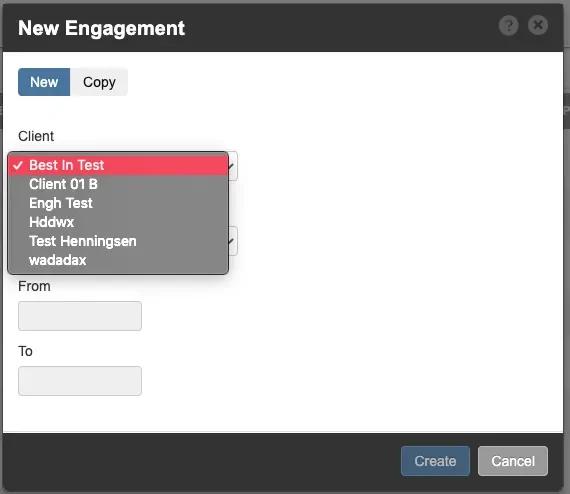
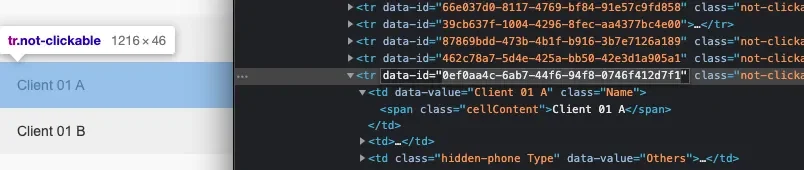
The researcher repeated the ID copy process from the previous finding and took the GUID of a No Access Client.
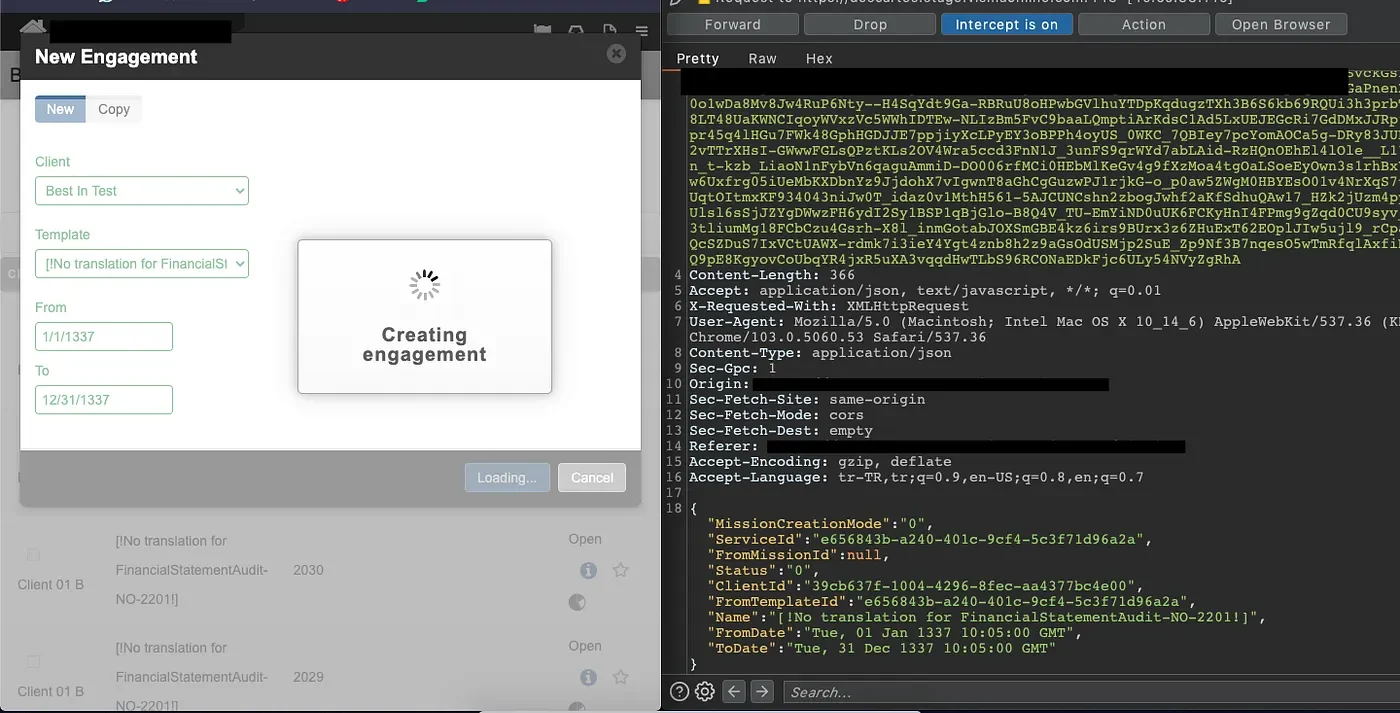
Then, in the mission creation flow, the researcher created a new mission and held the request, and replaced the ClientId parameter with the copied GUID. The Name parameter can also be changed even though the attacker does not hold it, so arbitrary mission names can be set as well.
Since the target Client's missions are not visible in the UI, the researcher confirmed success with the request from the previous finding, /api/Missions?ClientId=, which returned the inserted mission. The result is that an attacker can insert missions, with names of their choosing, into targeted Clients they have no access to, and can then read them back through the same missions endpoint.
Root cause
The first issue involves editing the CurrentLogOnAccesType and CanControlClientAcces parameters in the request. The authorisation decision is therefore made from data the attacker controls rather than from the server-side relationship between the user and the Client. The UI hid the button, but the server did not independently enforce the same rule.
The second and third issues are object-level authorisation failures. /api/Missions?ClientId= accepts any Client identifier and returns that Client's missions without checking that the caller has access to it, and the mission creation request accepts any ClientId (and Name) without the same check. The UI only offered full-access Clients in the selector, but the endpoint did not enforce that restriction. In both cases the identifier is a GUID, and the IDs were visible in DevTools on the Clients list page.
Impact
With the first issue, an attacker can activate the Access feature of any Client they choose and see the authorisations of all its users, plus PII including email, companies and roles, including admins and authorised users. With the second, they can read the missions and Client dates of a No Access Client, effectively read-only access to data they should not see. With the third, they can insert missions with arbitrary names into targeted Clients they have no access to, and read them back through the missions endpoint. All three require an authenticated account with access to at least one Client and the ability to intercept and modify their own requests; the report does not describe any further precondition.
Fix
The fixes implied by the findings are: derive the access type and control flag on the server from the authenticated user's actual relationship to the Client, and ignore client-supplied values for them; enforce object-level authorisation on /api/Missions?ClientId= so that the caller must hold access to the referenced Client; and apply the same check to mission creation, rejecting a ClientId the caller cannot access and constraining the Name accordingly.
Variants to test
- Client-supplied authorisation flags. Look for responses that carry fields describing your own access (access type, role, control flags) and try flipping them to the privileged values before replaying. A positive result is the UI or a follow-up endpoint granting the privileged view.
- Access-panel endpoints. For any "members", "users" or "permissions" panel, replay its request against a resource you do not own. A positive result is a user list with roles and PII for that resource.
- GUID-based object endpoints. Take identifiers disclosed in list responses and substitute them into endpoints such as
/api/Missions?ClientId=. A positive result is data belonging to the other object. - Create/update with a foreign identifier. In creation flows, replace the parent identifier (and any name field) with one belonging to an object you cannot access, then verify through a read endpoint. A positive result is the new object appearing under the foreign parent.
- Hidden UI, live API. Whenever a control is disabled or absent in the UI, call the underlying request directly. A positive result is a successful response where the UI implied refusal.
What happened, in plain words
A security researcher spent some time inside a web application that a company runs, and found three separate security holes in it. The company runs a private bug bounty program, which means it invites selected researchers to test its systems and pays them for problems they find. The researcher was paid 1500€ for these three findings. The application and the client names are hidden in the write-up because the program is private, so the product is called "Redacted" throughout.
The application is what people in the industry call multi-tenant: one installation serves many different customer organisations, and each organisation's data is kept apart from the others. In this product, each of those customer organisations is called a Client. A user of the application does not automatically get to see every Client. Some Clients a user can open fully, some only in read-only mode, and some not at all. The application is supposed to enforce that separation.
The three holes are similar in approach and can be connected together. Think of a hotel where the receptionist asks you "which room are you staying in?" and then hands you a key to whatever number you say, without checking the guest list. The door lock works, the key looks official, but nobody verified that the room is yours.
Here is what the researcher could do with the three holes:
- See the user list of a Client they had no access to. Every Client has an "Access" panel that lists its users and their roles. The button that opens it is hidden for Clients you cannot reach, but by changing two values in a request the researcher made the application believe they had full access, and the panel opened. That exposed personal information (PII, short for personally identifiable information) such as email addresses, companies and roles, including those of the Client's administrators.
- Read the missions of a Client they had no access to. Missions are pieces of work recorded inside a Client. A request used by the "Copy from Engagement" feature accepted any Client identifier and returned that Client's missions, even when the caller had no access to that Client. This kind of flaw is called IDOR, short for Insecure Direct Object Reference: the application takes an identifier from the user and fetches the object it points to without checking that the user is allowed to see that object.
- Create missions inside a Client they had no access to. The form for creating a mission only offered Clients the user had full access to, but the request behind the form accepted any Client identifier, so the researcher could insert missions, with names of their choosing, into a Client they could not otherwise touch.
All three require a normal account on the application that has access to at least one Client, plus the ability to look at and change the requests the browser sends. That last part sounds exotic but is routine: a browser's built-in developer tools (DevTools) show every request, and a small program called an intercepting proxy lets you pause a request, edit it and send it on. The screenshots in the write-up show a tool of that kind, with a request pane and a response pane.
Before going further, a few words on the vocabulary that will come up constantly.
An API (Application Programming Interface) is the set of addresses a web page talks to behind the scenes. When you click a button, the page does not usually reload; it sends a request to an address such as /api/Missions and draws the answer on screen. You can think of the API as the kitchen of a restaurant and the web page as the dining room: you order through the waiter, but the actual work happens in the kitchen, and the kitchen has its own rules about what it will cook.
A request is the message the browser sends: a method (GET to read something, POST to create something), an address, sometimes a body carrying data, and headers carrying metadata. A response is the message that comes back, usually containing data in JSON, a text format that looks like {"name": "value"}. A parameter is a named value inside a request, either in the address (after a ?) or in the body.
A cookie or token is how the application knows who you are on each request. After you log in, the server gives your browser a small piece of data, and the browser sends it back with every subsequent request, like a wristband at an event: the staff check the wristband instead of asking for your ID every time. Anything you send, including that wristband, is under your control, which is exactly why servers must not trust the rest of what you send either.
A GUID (Globally Unique Identifier) is a long random-looking identifier such as 3f2b8c1e-.... Because it is long and random, it is hard to guess, but as you will see, hard to guess is not the same as secret.
Finally, authorisation is the question "is this user allowed to do this?", as opposed to authentication, which is "who is this user?". All three findings are authorisation failures: the application knew perfectly well who the researcher was, it just did not check what that person was allowed to reach.
The application and its two features
The product has two areas that matter here.
The first is the Clients area. It lists the Clients the user can see, and each Client has an "Access" button that opens a panel showing the users of that Client and which of them are authorised, and with what role. Access is not all-or-nothing: a Client you can reach shows the "properties" option and the action buttons, while a Client you cannot reach shows only the "properties" option, which cannot be clicked, and no buttons at all.
The image above shows a Client the researcher has no access to: only the "properties" option appears, it cannot be clicked, and there are no buttons.
The second image shows a Client with full access, where the full set of controls is available. Comparing the two screens is the starting point of the whole investigation: the difference between them is the thing the researcher set out to defeat.
The second area is Missions. Clicking a Client you hold full or read-only privileges on takes you to that Client's Missions, where missions can be viewed and created. For a Client you cannot click, the Missions area is simply out of reach through the interface.
Finding 1: opening the Access panel of a Client you do not own
Step 1: read the request behind the Clients list
The researcher went to the Clients list and typed a random letter into the search box, then intercepted the request that the search produced. The researcher typed a random letter into the search box and intercepted the request.
The response to that search contained the information for all the Clients to be listed.
Looking at the first Client in that response, two fields stood out:
"CurrentLogOnAccesType": None,
"CanControlClientAcces": false
Line by line, this is what those two fields say:
"CurrentLogOnAccesType": Noneis a field describing the type of access the current logged-on user has to this Client. The valueNonemeans no access. In the examples of Clients the user did have access to, the same field carried the full-access value instead."CanControlClientAcces": falseis a flag saying whether the current user can control access to this Client, that is, manage who is allowed in.falsemeans no.
These two fields describe the caller's relationship to that Client. The researcher's reasoning was simple: if the server decides what to show based on these values, and these values arrive in a message the browser controls, then changing them before the message is sent might change what the server does. This is the hotel-receptionist situation: the field is the guest saying which room they are in.
Step 2: change the values and replay the request
The researcher changed the two values to "full" and "true" respectively, kept the rest of the response body identical, and sent the request. The same information was available in the response to the request, and the researcher sent it.
Why this step matters: the researcher did not need to guess a password, find a hidden address or break any encryption. They took a message their own browser was already sending, changed two words in it, and sent it again. If the server had been checking the real relationship between this user and this Client in its own database, the changed values would have made no difference.
Step 3: use the Access button
Back on the page, the target Client now showed as "Full Access". The Access button was active, and clicking it displayed the privileges of all users of that Client.
Because the user information is returned in the Access section, the researcher intercepted the request fired by the Access button and read its response directly.
That response discloses the users of the Client, their authorisations, and PII such as email, companies and roles, including those of admins and other authorised users. In plain terms: the researcher could now see who works with that Client, what each person is allowed to do, and contact details that should never have left the Client's own administrators. The only conditions are that the attacker can reach the Clients list and can intercept and modify their own traffic; no access to the target Client is required.
Finding 2: reading the missions of a Client you do not own
Step 4: find a request that reaches a Client's missions
No Access Clients cannot be clicked in the Clients list, so their Missions and other information are not reachable through the interface. The researcher needed a request that carries a Client identifier and returns something about that Client, and went looking for one in an unexpected place.
While viewing the missions of a full-access Client, the researcher went through the settings options one by one and found the "Copy from Engagement" feature. Clicking it and intercepting the request revealed a ClientID parameter.
The request involved is /api/Missions?ClientId=. An endpoint is simply an address on the server that does a particular job; this one's job is "give me the missions of this Client". The researcher sent the request to Repeater, a feature of the intercepting proxy that lets you send the same request over and over with small changes, and started looking for the IDs of No Access Clients.
Why look at "Copy from Engagement"? Because it is a feature that has to name a Client in order to copy something from it, and any request that names a Client is a candidate for the question "does the server check that I am allowed to name this one?". Features that take an identifier from the user are exactly where IDOR lives.
Step 5: take a target Client ID and swap it in
The IDs were available in the Clients list from the first finding: opening DevTools on that page showed the IDs of the Clients there.
The researcher copied the GUID of a No Access Client, returned to Repeater and replaced the original GUID in the request with it. The response contained the Mission name and information and the Client dates, data that is not available for a Client without access. In effect, the attacker can read a No Access Client as read-only.
This is the IDOR in its purest form. The identifier is a GUID, and the IDs were visible in DevTools on the Clients list page. The server received a Client identifier, looked up that Client's missions and returned them, without asking whether the caller had any right to that Client. The interface never offered the No Access Client, but the endpoint did not enforce what the interface merely hid.
Finding 3: creating missions inside a Client you do not own
Step 6: create a mission on a No Access Client
Normally, when creating a new mission in the Missions section, only Clients the user has full access to can be selected.
The two images show the selector offering only Full Access Clients. The researcher repeated the ID copy process from the previous finding and took the GUID of a No Access Client.
Then, in the mission creation flow, the researcher created a new mission and held the request, and replaced the ClientId parameter with the copied GUID. The Name parameter can also be changed even though the attacker does not hold it, so arbitrary mission names can be set as well.
Since the target Client's missions are not visible in the interface, the researcher confirmed success with the request from the previous finding, /api/Missions?ClientId=, which returned the inserted mission. The result is that an attacker can insert missions, with names of their choosing, into targeted Clients they have no access to, and can then read them back through the same missions endpoint.
Notice the pattern across findings 2 and 3: the interface restricts what you can pick from a list, but the request behind the interface accepts any identifier. The list is a convenience, not a security control. The security control has to be on the server, and here it was missing in both the read and the write direction.
Why it worked
The first issue involves editing the CurrentLogOnAccesType and CanControlClientAcces parameters in the request. The authorisation decision is therefore made from data the attacker controls rather than from the server-side relationship between the user and the Client. The interface hid the button, but the server did not independently enforce the same rule. Hiding a button is like putting a curtain in front of a door: it stops honest people from walking through, and stops nobody else.
The second and third issues are object-level authorisation failures. /api/Missions?ClientId= accepts any Client identifier and returns that Client's missions without checking that the caller has access to it, and the mission creation request accepts any ClientId (and Name) without the same check. The interface only offered full-access Clients in the selector, but the endpoint did not enforce that restriction. In both cases the identifier is a GUID, and the IDs were visible in DevTools on the Clients list page.
What an attacker could do with this
With the first issue, an attacker can activate the Access feature of any Client they choose and see the authorisations of all its users, plus PII including email, companies and roles, including admins and authorised users. With the second, they can read the missions and Client dates of a No Access Client, effectively read-only access to data they should not see. With the third, they can insert missions with arbitrary names into targeted Clients they have no access to, and read them back through the missions endpoint. All three require an authenticated account with access to at least one Client and the ability to intercept and modify their own requests; the report does not describe any further precondition.
How it should have been fixed
The report does not state what the program changed. The fixes implied by the findings are: derive the access type and control flag on the server from the authenticated user's actual relationship to the Client, and ignore client-supplied values for them; enforce object-level authorisation on /api/Missions?ClientId= so that the caller must hold access to the referenced Client; and apply the same check to mission creation, rejecting a ClientId the caller cannot access and constraining the Name accordingly.
In everyday terms: the server should look up the guest list itself, every time, instead of asking the visitor which room they are in.
Things worth trying on other applications
These are the same ideas generalised, so you can look for them elsewhere.
- Client-supplied authorisation flags. Look for responses that carry fields describing your own access (access type, role, control flags) and try flipping them to the privileged values before replaying. A positive result is the interface or a follow-up endpoint granting the privileged view.
- Access-panel endpoints. For any "members", "users" or "permissions" panel, replay its request against a resource you do not own. A positive result is a user list with roles and PII for that resource.
- GUID-based object endpoints. Take identifiers disclosed in list responses and substitute them into endpoints such as
/api/Missions?ClientId=. A positive result is data belonging to the other object. - Create/update with a foreign identifier. In creation flows, replace the parent identifier (and any name field) with one belonging to an object you cannot access, then verify through a read endpoint. A positive result is the new object appearing under the foreign parent.
- Hidden interface, live API. Whenever a control is disabled or absent in the interface, call the underlying request directly. A positive result is a successful response where the interface implied refusal.
Glossary
- API: the set of addresses a web page talks to behind the scenes to read and change data; the kitchen behind the dining room.
- Authentication: the process of proving who you are, usually by logging in.
- Authorisation: the process of deciding what an authenticated user is allowed to do or see.
- Bug bounty program: an arrangement in which an organisation invites researchers to test its systems and pays them for reporting security problems.
- Client: in this product, a customer organisation whose data is kept separate from other organisations' data.
- Cookie: a small piece of data the server gives the browser after login, which the browser sends back with later requests so the server knows who you are.
- DevTools: the developer tools built into browsers, which show the requests a page makes and the responses it receives.
- Endpoint: a specific address on a server that performs a particular job, such as returning a Client's missions.
- GUID: a long, random-looking identifier, hard to guess but not secret if it is shown to users.
- Header: metadata sent alongside a request or response, such as the type of content or the identity of the caller.
- IDOR (Insecure Direct Object Reference): a flaw where the application takes an identifier from the user and returns the object it points to without checking that the user may see that object.
- Intercepting proxy: a tool that sits between the browser and the server, letting you pause, read, edit and resend requests.
- JSON: a text format for structured data, made of names and values in braces.
- Mission: in this product, a piece of work recorded inside a Client.
- Multi-tenant: an application that serves many customer organisations from one installation while keeping their data apart.
- Parameter: a named value in a request, either in the address or in the body.
- PII (personally identifiable information): data that identifies a person, such as an email address, a company or a role.
- Repeater: a feature of an intercepting proxy that lets you resend the same request repeatedly with small changes.
- Request: the message the browser sends to the server, with a method, an address, headers and sometimes a body.
- Response: the message the server sends back, usually containing data.
- Token: a piece of data, similar in role to a cookie, that proves your identity on a request.
- Trust boundary: the line between data the application controls and data the user controls; security decisions must be made on the application's side of it.