How Did I Leak 5.2k Customer Data From a Large Company? (via Broken Access Control)
An employee panel exposed a dashboard route that could be accessed without logging in, and further endpoints allowed downloading CSV files containing customer and supplier PII. An attacker could obtain personal data such as names, addresses, and phone numbers without authentication.

Today we’re going to talk about the vulnerability I found a few months ago. The vulnerability targeted customers and suppliers directly in the company, also was a subdomain of a large skincare company.
The full write-up lives on its author's site
It belongs to its author, so we link to it rather than copy it. The other two tabs are our own rewrites, checked against it.
Context
The target was a subdomain of a large skincare company, an employee panel whose only visible feature was a login form. The subdomain hosted an employee panel whose only feature was a login form. The researcher notes that the report was resolved but that the company cannot be named because the work ran through a private programme.
The write-up is about broken access control: the dashboard route could be reached without authenticating, and endpoints found in the application's JavaScript returned customer and supplier data.
Setup
The researcher does not describe any account, role or credential. The whole point of the finding is that no login was needed, so there was no setup beyond reconnaissance tooling. The tools named in the report are:
- crt.sh, used to enumerate subdomains through certificate transparency.
- LinkFinder, used to extract endpoints and paths from JavaScript files.
No versions are given.
Finding it
The starting point was crt.sh. After several unsuccessful attempts against other subdomains, the researcher found one that hosted an employee panel with no other features; it only covered the login panel.
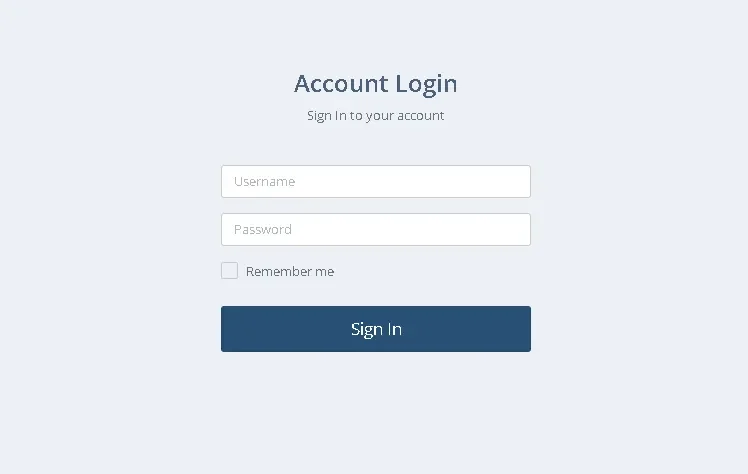
The login panel, which the researcher describes as looking pretty straight.
LinkFinder was run against that panel and returned a few JavaScript files belonging to the application. One of them drew attention because its filename contained the word "login".
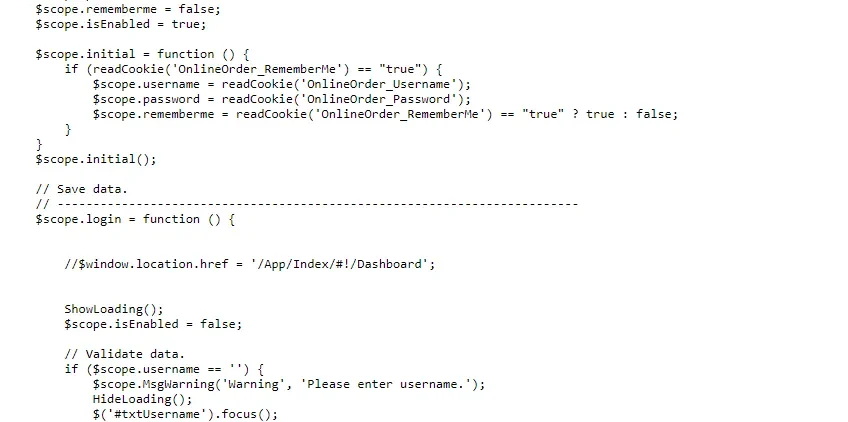
Inside that file, the interesting part was an href. A successful login would redirect the user to 'App/Index/#!/Dashboard'. The researcher's question was whether the application actually enforced control over that route, which is the point at which broken access control becomes worth testing.
Exploitation
Step 1: Reach the dashboard without logging in
The researcher navigated directly to the href address without logging in and reached the application's dashboard. No authentication was required to load it.
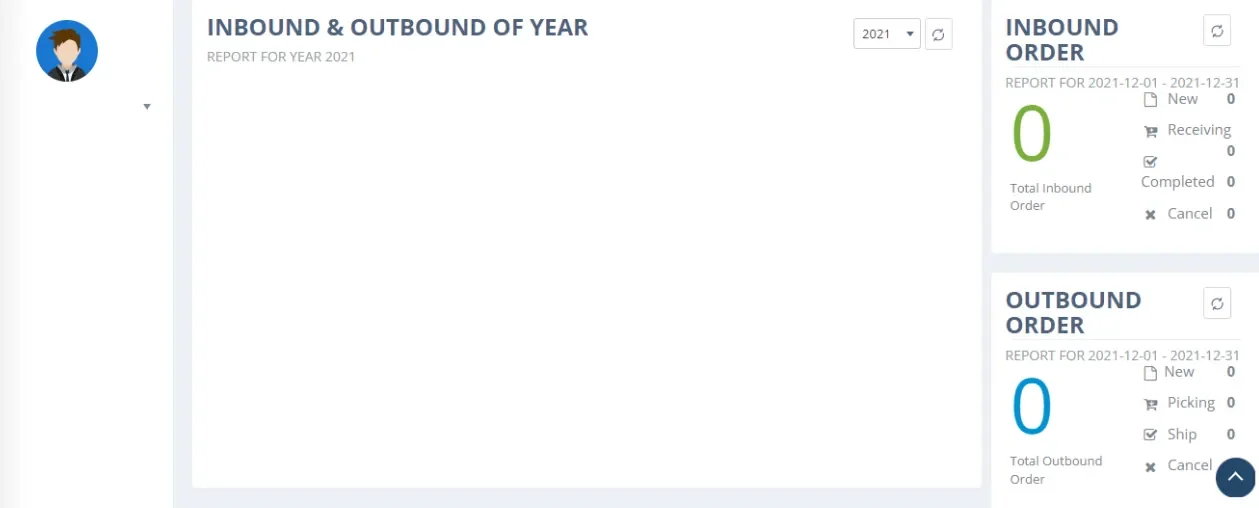
This confirmed the access control gap on the route itself, but the dashboard returned no data: only the interface was visible, with every value at zero. The route was reachable, but the data behind it was not yet exposed through this path.
Step 2: Harvest more endpoints from the JavaScript
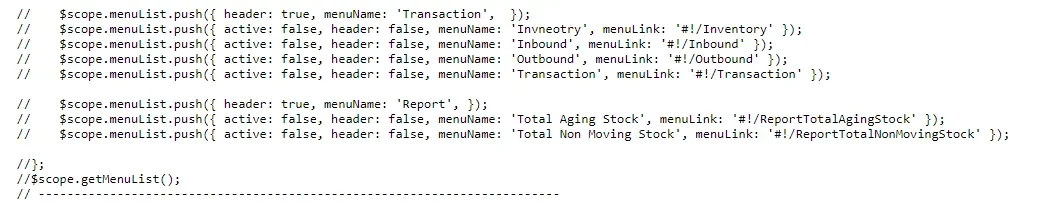
The login JS file contained no other endpoints, so the researcher went back to LinkFinder and inspected all the JavaScript files that had been found. That produced a further set of endpoints.
Step 3: Probe the endpoints
A few of the endpoints were tried, and some returned results labelled "Inbound" and "Outbound", which in this application meant customers and suppliers respectively.
Step 4: Use the template download function
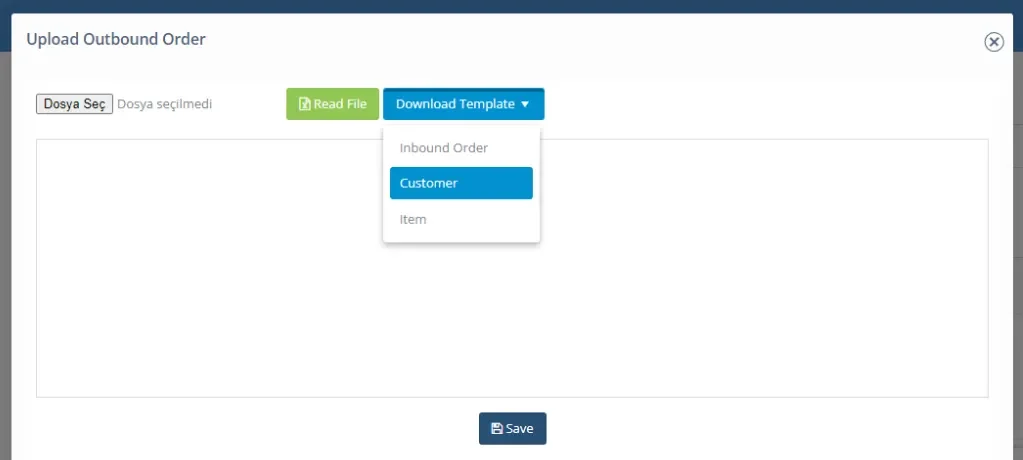
The researcher came across a tab whose file upload function did not work. In the 'Download Templates' tab, however, the 'Customer' button did work, and the same was true of the 'Suppliers' button in Inbound. Those buttons returned the data.
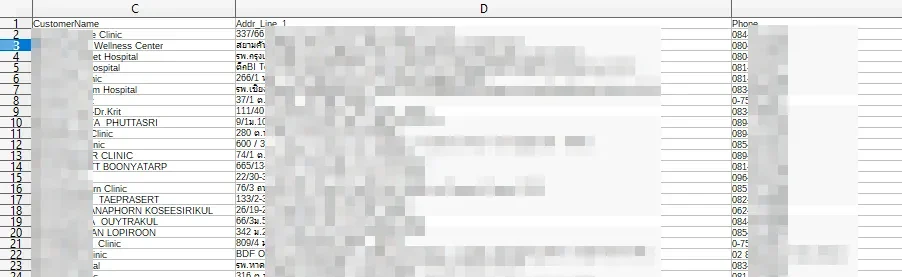
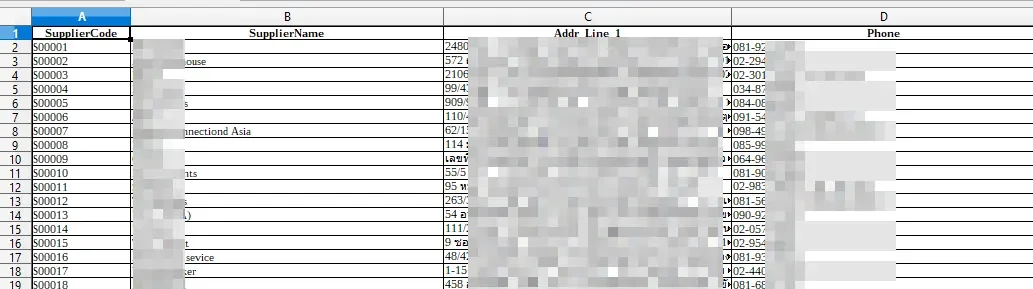
The result was all of the customers' and suppliers' PII in the application, roughly 5,200 records. Both CSV files contained customer_code, name, address, phone.
Step 5: Verify and stop
The researcher downloaded and searched the data to check that it was genuine, and did not go beyond that step.
Root cause
The dashboard route was served to anyone who requested it, and the endpoints behind the Inbound and Outbound data, including the template download actions, returned records without checking who was asking. Loading the interface and calling the endpoints directly was enough to reach the dashboard and the data.
The report does not show the server-side code, so the exact placement of the missing check is not stated.
Impact
An unauthenticated attacker could read the personal data of the company's customers and suppliers: customer code, name, address and phone number, for around 5,200 records across the two CSV exports. The researcher verified that the data was genuine and stopped there. The report was rated high severity and was fixed several months ago.
Fix
Variants to test
- Direct navigation to hash routes. Take any route the front end redirects to after login, such as a dashboard, and request it without a session. A positive result is the interface rendering with real data, not just an empty shell.
- Endpoint extraction from JavaScript. Run LinkFinder or a similar tool over every JS file the application serves and request each path without credentials. A positive result is a JSON or CSV response instead of a redirect or an error.
- Export and template actions. Look for download buttons in the UI and call the underlying request directly while logged out. A positive result is a file containing records rather than an authorisation error.
- Role confusion. Where accounts exist, repeat the same requests with a low-privileged account against endpoints meant for other roles. A positive result is data the role should not see.
- Method and parameter tampering. Change the HTTP method or identifiers on the same endpoints. A positive result is a different dataset being returned without a matching permission check.
What happened, in plain words
A security researcher was looking at a website belonging to a large skincare company. The website was not the shop the public sees. It was a small internal page for employees, and the only thing on it was a login form: a box for a username and a box for a password.
The researcher found that the dashboard route could be opened without logging in at all. The dashboard, the screen an employee would see after signing in, appeared for anyone who typed its address into a browser. At first the dashboard was empty, every number showing zero, so this alone did not give away any information.
The real problem came next. The researcher read the small programs (JavaScript files) that the website sends to every visitor's browser, and found in them a list of addresses the website uses to fetch data. Those addresses, called endpoints, are the behind-the-scenes doors a web page knocks on to get information. When the researcher opened those doors directly, without logging in, the website handed over files listing the company's customers and suppliers: their customer code, name, address and phone number, around 5,200 records in total.
This kind of mistake is called broken access control. Access control is the set of rules that decides who is allowed to see what. When it is broken, visitors can reach screens or data they should not be able to reach. Think of a hotel where the reception desk asks for your room number, but the corridor doors have no locks: anyone who walks past reception can open any room.
The researcher reported the problem through a private bug bounty programme, a scheme where companies pay people to find and report flaws before criminals do. The report was rated high severity and was fixed several months ago. The company cannot be named because the programme is private.
The starting point: finding the hidden page
Everything began with reconnaissance, usually shortened to recon. Recon means gathering information about a target before trying anything: which parts of a company's website exist, what they are called, what software they run. The researcher's own summary of this stage is short:
Recon is not dead!
The first tool used was crt.sh. To explain it, you need to know about HTTPS certificates. When a website wants the padlock in your browser, it obtains a certificate from an authority. Those certificates are recorded in public logs, called certificate transparency logs, so anyone can check them. crt.sh is a website that searches those logs. Because a certificate often lists the names of the subdomains it covers, searching crt.sh can reveal subdomains a company never advertises.
A subdomain is a named section of a main domain. If the main site is example.com, then shop.example.com or staff.example.com are subdomains. Companies often have many, and the interesting ones are frequently the internal or forgotten ones.
After several unsuccessful attempts against other subdomains, the researcher found one that hosted an employee panel. A panel here means a small web application for staff. This one had no other features: it only covered the login panel.
The screenshot shows that login panel, which the researcher describes as looking pretty straight, meaning ordinary and unremarkable. That is the point: nothing on the surface suggested a problem.
Reading the JavaScript
The next tool was LinkFinder. To understand why, you need to know what JavaScript is. Modern websites send small programs to your browser, and those programs make the page interactive: they react to clicks, load new content, and fetch data from the server. These programs are JavaScript files. Because the browser must be able to run them, anyone can download and read them, including people with bad intentions.
LinkFinder is a tool that scans JavaScript files and pulls out the addresses written inside them: paths, endpoints, links. It is like reading a restaurant's internal order list to learn which dishes exist even though the menu on the wall only shows a few.
The researcher ran LinkFinder on the panel and found a few JavaScript files belonging to the application. One of them stood out because its filename contained the word "login".
The reasoning is simple: the file that handles logging in is likely to contain the address the site sends you to after a successful login. That address is exactly what an attacker wants to know, because it points at the private area.
The interesting line: an href
Inside that file, the interesting part was an href. An href is simply a link target: the address a link or a redirect points to. In this application, a successful login would redirect the user to:
App/Index/#!/Dashboard
This address has a part worth explaining. The #! in the middle is a fragment, the piece of a web address after the #. Browsers traditionally use the fragment to jump to a section of a page, and they do not send it to the server. Many modern web applications, called single-page applications, abuse this: they put the whole navigation inside the fragment and change it as you click around, without ever reloading the page. The application reads the fragment and decides which screen to show. The screen named here is the Dashboard.
The researcher's question was whether the application actually enforced control over that route. In other words: does the server check that you logged in before it lets you see the dashboard, or does it merely assume your browser will only go there after a login? That question is the moment broken access control becomes worth testing.
Step 1: Opening the dashboard without logging in
The researcher navigated directly to the href address without logging in. In practice this means typing the address into the browser's address bar, or pasting it, and pressing Enter, with no session and no credentials.
A session is how a website remembers you between page loads. After you log in, the server gives your browser a small piece of data, usually stored in a cookie (a tiny file the site keeps in your browser) or a token (a string the page sends with each request). Your browser presents it on every following request, and the server uses it to recognise you. No cookie, no token, no recognised user.
The result: the dashboard loaded anyway. No authentication was required to reach it.
Authentication is the act of proving who you are, normally with a username and password. Authorisation is the separate question of what you are allowed to do once identified. This finding is about authorisation, or rather the lack of it: the application never asked who the visitor was before showing a screen meant for staff.
But that was not all, and there was something wrong. The dashboard returned no data. The researcher could only see the interface, and everything was zero. This is an important detail for anyone learning to test: an empty screen proves the door opens, but not that anything valuable is behind it. The route was reachable, but the data was not yet exposed through this path.
Step 2: Collecting more endpoints
Here the researcher calls it the exciting part. The login JavaScript file contained no other endpoints, so more were needed. The researcher went back to LinkFinder and started inspecting all the JavaScript files that had been found.
An endpoint is a specific address on a server that accepts a request and returns something: data, a file, a confirmation. If a website is a building, endpoints are the individual service windows. The page you see is only the lobby; the windows behind it are where the actual work happens. Finding them is valuable because each one is a possible way in.
Before long, the researcher reached a further set of endpoints.
Why inspect every file and not just the login one? Because different parts of an application are built by different teams at different times, and each file tends to mention the addresses its own screens use. The login file only knew about login. The rest of the application's addresses were written in the other files.
Step 3: Trying the endpoints
A few of the endpoints were tried, and some returned results labelled "Inbound" and "Outbound". In this application those words meant customers and suppliers respectively: goods coming in from suppliers, goods going out to customers.
Trying an endpoint means sending a request to its address, for example by opening it in the browser or with a tool, and looking at what comes back. A normal, healthy application would answer an unauthenticated request with a redirect to the login page or an error such as "not authorised". Here, the endpoints answered with data. That is the signal the researcher was following.
Step 4: The template download buttons
The researcher came across a tab whose file upload function did not work. Uploading a file is the action of sending a document from your computer to the website; here it was ineffective, so it led nowhere.
In the 'Download Templates' tab, however, the 'Customer' button did work, and the same was true of the 'Suppliers' button in Inbound. Those buttons returned the data.
A template in this context is a ready-made file, often a spreadsheet, that a user downloads, fills in and uploads back. The download button is a convenience for staff. Under the button sits an endpoint, and that endpoint is what the researcher called directly, without logging in.
The result was all of the customers' and suppliers' personal data in the application, roughly 5,200 records. The researcher writes it as 5200-odd. Both CSV files contained:
customer_code, name, address, phone
A CSV file is a plain text file where each line is a row of a table and commas separate the columns. The line above is the header row: it names the four columns in the exported files. PII, personal identifiable information, is any data that can identify a person: here a customer code, a name, a postal address and a phone number. The researcher's reaction, BINGO, marks the moment the empty dashboard turned into real, downloadable records.
Step 5: Checking and stopping
The researcher downloaded and searched the data to check that it was genuine, and did not go beyond that step. This is the responsible way to handle a finding: confirm enough to prove the problem is real, then stop. Downloading more, sharing it, or contacting the people in it would turn a security test into a data breach.
Why it worked
The dashboard route was served to anyone who requested it, and the endpoints behind the Inbound and Outbound data, including the template download actions, returned records without checking who was asking.
Loading the interface and calling the endpoints directly was enough to reach the dashboard and the data. A gate that only exists in the visitor's browser is no gate at all, because the visitor controls the browser: they can type any address, run any tool, and skip any screen the application would normally show them.
The report does not show the server-side code, so the exact placement of the missing check is not stated.
Impact
An unauthenticated attacker, someone with no account at all, could read the personal data of the company's customers and suppliers: customer code, name, address and phone number, for around 5,200 records across the two CSV exports. The researcher verified that the data was genuine and stopped there.
Fix
The report does not describe the fix that was applied. In plain terms: the server must ask "who are you, and are you allowed?" every single time, and answer no when the answer is not proven.
Variants to test
If you want to look for the same class of mistake on sites you are allowed to test, these are the variations worth trying. Each one follows the same idea: skip the front end and talk to the server directly.
- Direct navigation to hash routes. Take any route the front end redirects to after login, such as a dashboard, and request it without a session. A positive result is the interface rendering with real data, not just an empty shell.
- Endpoint extraction from JavaScript. Run LinkFinder or a similar tool over every JS file the application serves and request each path without credentials. A positive result is a JSON or CSV response instead of a redirect or an error.
- Export and template actions. Look for download buttons in the UI and call the underlying request directly while logged out. A positive result is a file containing records rather than an authorisation error.
- Role confusion. Where accounts exist, repeat the same requests with a low-privileged account against endpoints meant for other roles. A positive result is data the role should not see.
- Method and parameter tampering. Change the HTTP method or identifiers on the same endpoints. A positive result is a different dataset being returned without a matching permission check.
Glossary
- Access control: the rules that decide who may see or do what on a website.
- Authentication: proving who you are, usually with a username and password.
- Authorisation: deciding what an identified user is allowed to do.
- Broken access control: a flaw where those rules are missing or can be bypassed, so people reach things they should not.
- Bug bounty programme: a scheme where a company invites researchers to report flaws, often for a reward, sometimes privately.
- Certificate: a digital document that lets a website prove its identity and show the padlock in your browser.
- Certificate transparency logs: public records of issued certificates, searchable by anyone.
- Client: your browser and the code running in it, as opposed to the server.
- Cookie: a small piece of data a website stores in your browser, often used to remember your session.
- crt.sh: a website that searches certificate transparency logs to reveal subdomains.
- CSV: a plain text file of rows and columns separated by commas.
- Dashboard: the main screen of an application, usually showing an overview of data.
- Endpoint: a specific address on a server that accepts requests and returns data or files.
- Fragment: the part of a web address after the
#, handled by the browser and not sent to the server. - href: a link target, the address a link or redirect points to.
- HTTPS: the encrypted version of the web protocol, shown by the padlock.
- JavaScript: the programming language browsers run to make pages interactive; the files are downloadable by anyone.
- LinkFinder: a tool that extracts addresses and paths from JavaScript files.
- Panel: a small web application used by staff.
- PII: personal identifiable information, data that can identify a person.
- Reconnaissance (recon): gathering information about a target before testing it.
- Session: how a website remembers you across requests, usually via a cookie or token.
- Single-page application: a website that loads once and swaps screens in the browser without full page reloads.
- Subdomain: a named section of a main domain, such as
staff.example.com. - Template: a ready-made file, often a spreadsheet, that a user downloads, fills in and uploads back.
- Token: a string a page sends with requests to identify a session or user.
- Unauthenticated: without having logged in or proven an identity.



