SONY Hunting I: Discovering Hidden Parameters (5x SWAG)
Several Sony websites had hidden URL parameters that controlled redirects and did not validate the destination, allowing an attacker to craft links that sent users to an arbitrary external site. The author found five such open redirects across different login and logout pages.

It’s been a long time. Hope everyone is well.
The full write-up lives on its author's site
It belongs to its author, so we link to it rather than copy it. The other two tabs are our own rewrites, checked against it.
Context
Sony runs a broad bug bounty scope, and this write-up covers a series of open redirect findings made across Sony subdomains a few months before publication. The author notes that there was no financial reward involved, only swag, and that the programme's wide scope made it worth concentrating on a single vulnerability class rather than spreading effort thin. Open redirect is often forgotten or overlooked, which is exactly why it was chosen as the theme. The write-up is the first in a planned series on other vulnerability types.
The affected features are login and logout areas on SonyPictures subdomains, plus a final target whose login flow passed a redirect parameter through the URL. In each case the feature normally takes the user to a page after authenticating or logging out, using a parameter that names the destination.

Setup
The work was done entirely from the outside, with no accounts or special roles described. The tooling used was:
- crt.sh for certificate transparency searches
- GAU, FFUF and sometimes waybackurls for reviewing subdomains and collecting URLs
- LinkFinder for pulling parameters out of JavaScript files
- Paramspider or Arjun for discovering hidden parameters
- Burp Suite for examining and manipulating requests
No versions are given. The precondition for every case is a page that accepts user input and then redirects the user, with a parameter that controls the destination.
Finding it
Reconnaissance on crt.sh
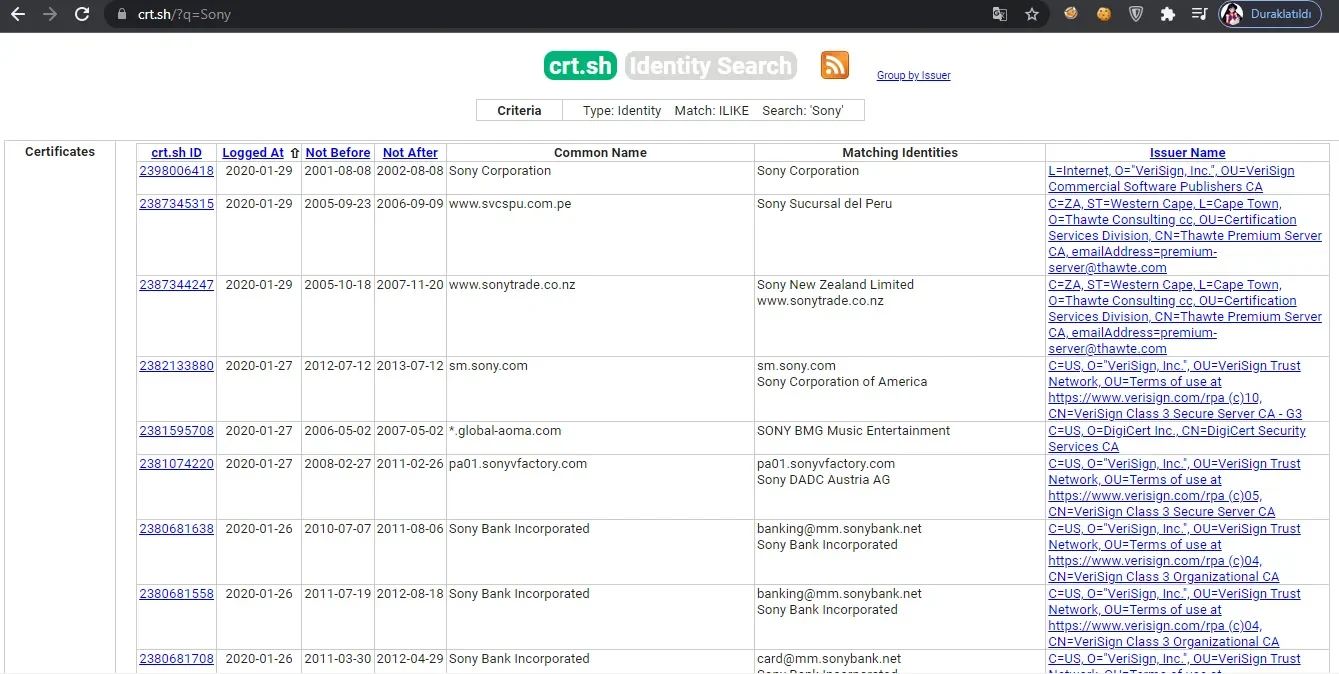
Instead of entering the target's domain names directly, the author found it more productive to search certificate transparency with keywords. On a wide scope, trying keywords such as "Sony" and "Sonypictures" rather than "sony.com" or "sony.net" can produce more output. Dorks such as %.%.%.target.% and %.target.net are also described as creative options on crt.sh.
Hunting for hidden parameters
Subdomains were reviewed with GAU and FFUF, with waybackurls used sometimes, focusing on domains that had a login or register section. The general method is to find pages that take input from the user, then try to redirect the user and see whether the parameters behave correctly. JavaScript files matter for discovering new parameters: when a JS file turns up in the output, the author inspects its parameters with LinkFinder. Paramspider or Arjun help with hidden parameter discovery.
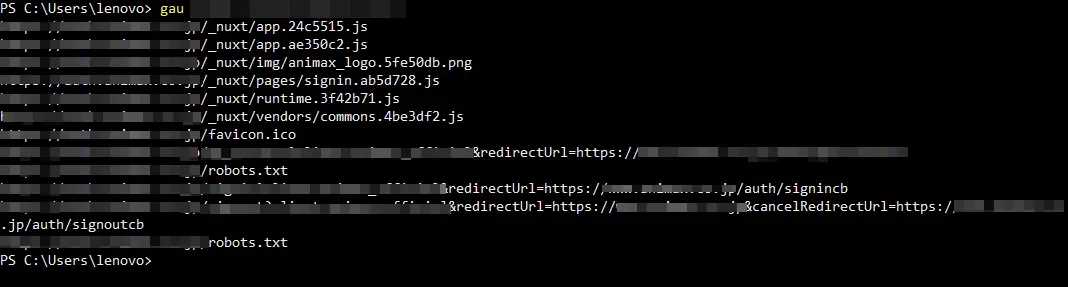
The image shows a redirectUrl parameter identified as a potential open redirect.
Exploitation
Case I: basic open redirect using a hidden parameter
While browsing SonyPictures subdomains, most of them did not receive input from the user, but a few exceptions existed. The author opens the source code of a page and searches for hidden parameters and keywords such as "redirect" or "return". A parameter of that kind turned up.
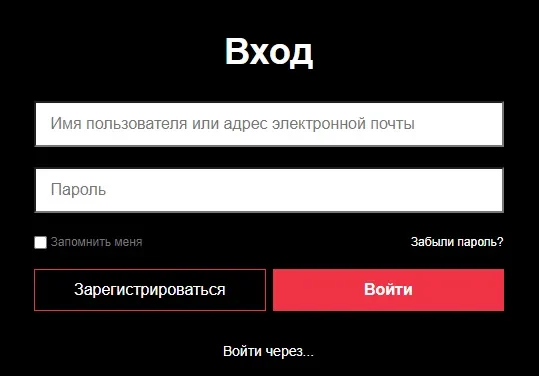
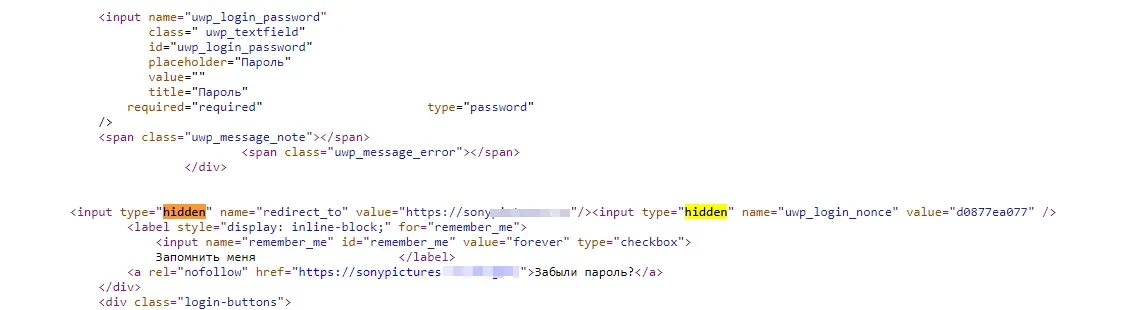
Because hidden parameters are not visible in the URL, the parameter has to be added manually. The structure used to interfere with it was:
sonypicturessite.tld/login/?redirect_to=targetsite.com

When testing a redirect parameter, the first thing the author does is append .evil.com to the end of the domain. This makes the target site a subdomain and redirects to evil.com. It is a shortcut that shows whether the end of the parameter is filtered. The shortcut shows whether the end of the parameter is filtered.
Case II: duplicating hidden parameters
A hidden parameter was found in a different login panel, similar to the first case, but this time it did not allow an open redirect. Many approaches were tried without managing to bypass it.
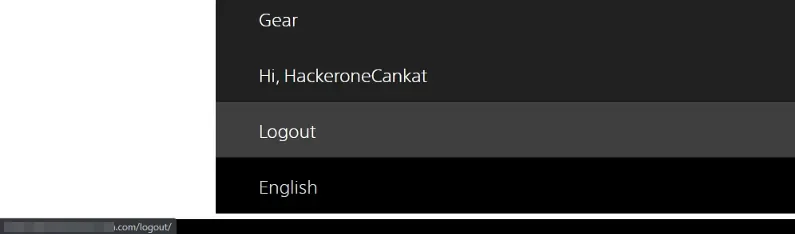
The next idea was to try the same parameter in other areas that could plausibly redirect. The logout screen is one of them, alongside login. The author reasoned that the parameter discovered on the login screen is a common parameter used to log out or redirect on the same site.
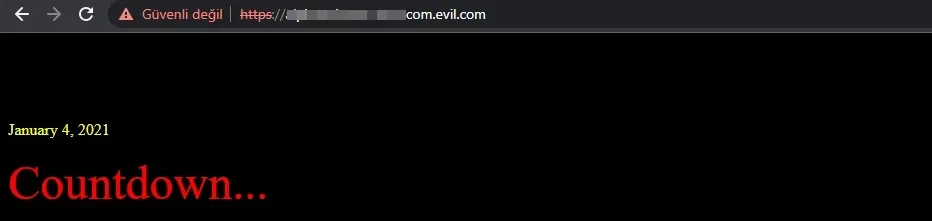
Adding the parameter found on the login screen to the end of the logout URL produced another successful redirect.
Case III: interfering with redirects
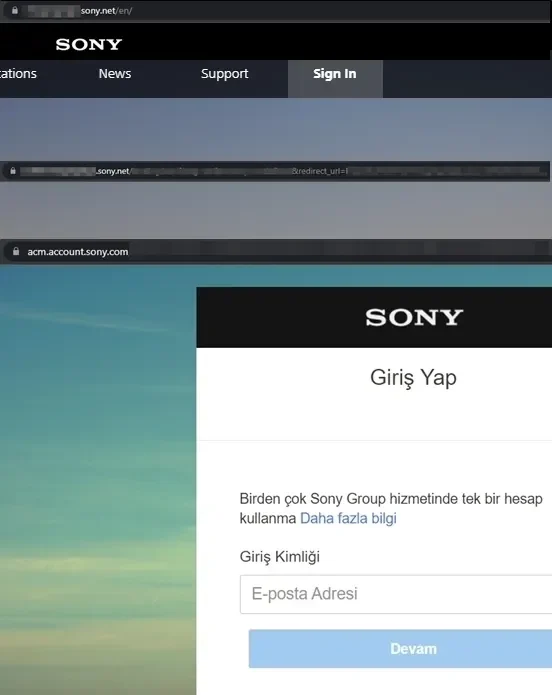
The last case concerns redirects made with mirrored parameters on the URL. On the final target, clicking login redirected to login via sony.com, but the redirect parameter in between did not escape attention. The URL looked messy, so it was examined with Burp Suite.
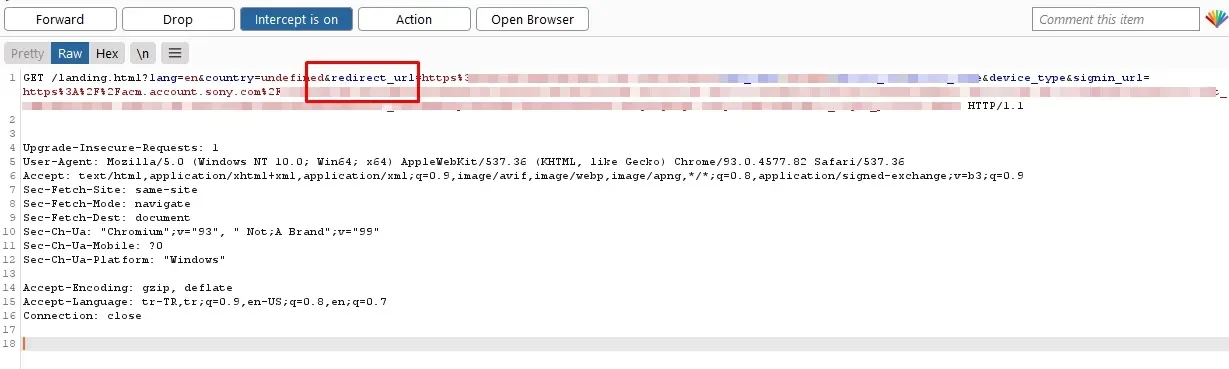
On the first try, the redirect_url parameter was redirected to the target site.
At the time of writing the author had five SWAGs from Sony, and the other redirects found were similar to these.
Root cause
The report does not show the server-side code, so the cause is inferred from behaviour. In each case a parameter that names a post-login or post-logout destination was accepted and used without adequately restricting the destination to the intended site. In Case I the check, if any, did not cover the end of the value, since appending .evil.com to the domain was enough to redirect elsewhere. In Case II the login panel resisted the attempts, but the same parameter name was honoured on the logout screen, which suggests the validation was applied inconsistently across the areas that consume the parameter. In Case III the redirect parameter carried in the login URL could be pointed at another site. Whether any allow-list or relative-path check existed is not stated.
Impact
An attacker can craft a link on a trusted Sony domain that sends the victim to a site of the attacker's choosing after login or logout. Because the link starts on the legitimate domain, it is more convincing in phishing and can be used to lend credibility to a malicious destination. The report does not describe any further consequences such as credential theft, and the rewards were swag only. The findings depend on the victim following a crafted URL that includes the parameter, since the parameters are hidden and not present in normal links.
Fix
The appropriate fix is to validate the redirect destination against an allow-list of permitted hosts or to accept only relative paths, and to apply the same validation on every screen that consumes the parameter, including logout, not just login.
Variants to test
- Search certificate transparency by keyword rather than by domain, and try dorks such as
%.%.%.target.%and%.target.net, to surface hosts that a domain-only search misses. - Collect URLs with GAU, FFUF or waybackurls, filter for login and register pages, and inspect JavaScript with LinkFinder for parameter names containing "redirect" or "return". A positive result is a parameter name in the source that is not present in the visible URL.
- Add a discovered hidden parameter to the URL with a value ending in
.evil.com. A redirect to evil.com shows the end of the value is not filtered. - When a parameter is rejected on the login panel, try the same parameter on the logout screen and other redirect areas. A redirect there shows the validation is applied inconsistently.
- Examine messy login URLs in Burp Suite for mirrored redirect parameters, and try pointing them at another site. A redirect to the chosen site on the first attempt shows the parameter can be abused.
What happened, in plain words
A security researcher spent some time looking for one specific kind of bug on Sony's websites: the open redirect. An open redirect is a flaw where a website will happily send a visitor on to any other website, if the visitor arrives through a specially crafted link. The site is trusted, so the link looks trustworthy, but the destination is chosen by whoever made the link, not by Sony.
The researcher found several of these across Sony subdomains, in login and logout pages. Sony did not pay money for these reports; the researcher received five items of company merchandise (the write-up calls them "SWAGs"). The write-up is the first in a planned series about different kinds of bugs.
This article walks through the same steps the researcher took, in the same order, explaining each idea from scratch. You only need a browser and a computer to follow along.
The idea behind the bug
When you log in to a website, the site often wants to send you somewhere afterwards: back to the page you were trying to reach, or to your account dashboard. To remember where to send you, the site puts the destination in the web address itself, as a parameter. A parameter is the part of a URL after a question mark, written as name=value. For example, in example.com/login?next=/account, the parameter is called next and its value is /account.
If the site trusts whatever value is in that parameter and redirects you there without checking, an attacker can put their own website in the value. The victim clicks a link that starts with the real Sony domain, logs in, and is then sent to the attacker's site. That is an open redirect.
Why does it matter? Because people trust links that start with a familiar domain. A phishing page reached through a Sony link is far more convincing than a link to a strange domain. The write-up does not describe any further harm beyond the redirect itself.
The tools used
The researcher worked entirely from the outside, with no special access. The tools named in the write-up are:
- crt.sh: a public website that lists certificates issued for domains. Because every HTTPS site needs a certificate, this list reveals subdomains that may not be linked anywhere else.
- GAU (Get All URLs): a command-line tool that collects known URLs for a domain from public sources such as the Wayback Machine.
- FFUF: a command-line tool that sends many requests quickly, usually to guess file and folder names.
- waybackurls: a command-line tool that fetches old URLs for a domain from the Wayback Machine, sometimes used instead of GAU.
- LinkFinder: a tool that scans JavaScript files and pulls out URLs and parameter names written inside them.
- Paramspider and Arjun: tools that help discover parameter names a page accepts but does not advertise.
- Burp Suite: a tool that sits between your browser and a website so you can see and edit every request before it is sent.
No versions are given. The one condition every case shares is a page that takes input from the user and then redirects them somewhere, with a parameter that decides where.
Step 1: Finding Sony's subdomains
A subdomain is a name in front of the main domain, such as login.sony.com or shop.sony.com. Large companies have many of them, and some are forgotten or run by different teams.
The researcher's first move was to search crt.sh by keyword rather than by exact domain. On a programme with a wide scope, searching for "Sony" or "Sonypictures" instead of "sony.com" or "sony.net" can turn up more hosts, because the certificate list contains names that do not literally contain the main domain.
The image shows a crt.sh search for Sony, the starting point for collecting subdomains.
The write-up also mentions dorks: search patterns with wildcards that match many names at once. The two given are:
%.%.%.target.%
%.target.net
In these patterns, % stands for "anything". The first matches names with several levels of subdomain, the second matches anything ending in target.net. The researcher describes them as creative options on crt.sh.
Step 2: Looking for hidden parameters
With a list of subdomains, the researcher reviewed them using GAU and FFUF, and sometimes waybackurls, focusing on domains that had a login or register section. The reasoning is simple: a login page is a place where the site has to decide where to send you next, so it is a likely place for a redirect parameter.
The general method is to find pages that take input from the user, then try to redirect the user and watch whether the parameter behaves as expected.
JavaScript files deserve special attention. A web page is built from HTML (the structure), CSS (the styling) and JavaScript (the behaviour). JavaScript often contains the names of parameters the page will accept, even when those parameters never appear in a normal link. When a JavaScript file turns up in the collected output, the researcher inspects it with LinkFinder. Paramspider or Arjun help find parameter names that are accepted but not advertised.
The image shows a redirectUrl parameter identified as a potential open redirect.
Case I: a basic open redirect through a hidden parameter
While browsing SonyPictures subdomains, the researcher noticed that most of them did not take input from the user at all. A few did.
The next step was to open the source code of the page. In a browser you can do this by right-clicking and choosing to view the page source. The researcher searched it for hidden parameters and for keywords such as "redirect" or "return", because those words hint at where the page sends you afterwards. A parameter of that kind turned up.
A hidden parameter is one the page accepts but does not put in the URL itself. Since it is not visible in the address bar, you have to add it yourself. The researcher built a URL like this:
sonypicturessite.tld/login/?redirect_to=targetsite.com
Line by line:
sonypicturessite.tldstands for the Sony Pictures site;.tldmeans "top-level domain", the ending such as.com./login/is the login page.?starts the list of parameters.redirect_to=targetsite.comis the parameter the researcher found in the source, with a test destination as its value.
When testing a redirect parameter, the researcher's first trick is to append .evil.com to the end of the domain in the value. If the site checks only the beginning of the value, or does not check at all, then targetsite.com.evil.com passes a check for targetsite.com, but the browser actually goes to evil.com. It is a quick way to see whether the end of the value is filtered.
The technique is a quick way to see whether the end of the value is filtered.
Case II: trying the same parameter somewhere else
A hidden parameter turned up in a different login panel, similar to the first case. This time, though, the site did not allow the open redirect. The researcher tried many approaches without managing to get past the check.
The next idea was to try the same parameter name in other places that might redirect. The logout screen is one of them, alongside login. The researcher reasoned that the parameter found on the login screen is probably a common parameter used to log out or to redirect within the same site, so other screens might read it too.
Adding the parameter found on the login screen to the end of the logout URL produced another successful redirect. The lesson is that a check applied on one screen is not necessarily applied on another, even when both read the same parameter.
Case III: interfering with redirects
The last case is about redirects made with mirrored parameters on the URL. On the final target, clicking login sent the researcher to a login page via sony.com, but the redirect parameter in the middle of the URL caught their attention. The URL looked messy, so it was examined with Burp Suite.
Burp Suite lets you pause a request, change any part of it, and send it on. On the first try, the redirect_url parameter was pointed at the target site and the redirect worked.
At the time of writing, the researcher had five SWAGs from Sony, and the other redirects found were similar to these.
Why the sites were vulnerable
The write-up does not show the server-side code, so the cause is inferred from behaviour. In each case, a parameter naming a post-login or post-logout destination was accepted and used without properly restricting the destination to the intended site.
- In Case I, whatever check existed did not cover the end of the value, since appending
.evil.comto the domain was enough to redirect elsewhere. - In Case II, the login panel resisted the attempts, but the same parameter name was honoured on the logout screen. That suggests the validation was applied inconsistently across the screens that read the parameter.
- In Case III, the redirect parameter carried in the login URL could be pointed at another site.
Whether any allow-list or relative-path check existed is not stated.
What an attacker could do with it
An attacker can craft a link on a trusted Sony domain that sends the victim to a site of the attacker's choosing after login or logout. Because the link starts on the legitimate domain, it is more convincing in phishing and lends credibility to a malicious destination. The findings depend on the victim following a crafted URL that includes the parameter, since the parameters are hidden and not present in normal links.
How to fix it
The appropriate fix is to validate the redirect destination against an allow-list of permitted hosts, or to accept only relative paths, and to apply the same validation on every screen that reads the parameter, including logout, not just login.
Things to try yourself
- Search certificate transparency by keyword rather than by domain, and try dorks such as
%.%.%.target.%and%.target.net, to surface hosts that a domain-only search misses. - Collect URLs with GAU, FFUF or waybackurls, filter for login and register pages, and inspect JavaScript with LinkFinder for parameter names containing "redirect" or "return". A positive result is a parameter name in the source that is not present in the visible URL.
- Add a discovered hidden parameter to the URL with a value ending in
.evil.com. A redirect to evil.com shows the end of the value is not filtered. - When a parameter is rejected on the login panel, try the same parameter on the logout screen and other redirect areas. A redirect there shows the validation is applied inconsistently.
- Examine messy login URLs in Burp Suite for mirrored redirect parameters, and try pointing them at another site. A redirect to the chosen site on the first attempt shows the parameter can be abused.
Glossary
- Open redirect: a flaw where a site sends a visitor to any destination supplied in a link, instead of only to its own pages.
- Parameter: a named value in a URL after the question mark, written as
name=value. - Hidden parameter: a parameter a page accepts but does not include in its normal links, so it has to be added by hand.
- Subdomain: a name in front of the main domain, such as
login.sony.com. - TLD (top-level domain): the ending of a domain, such as
.comor.net. - URL: the full web address of a page.
- Redirect: an instruction from a server telling the browser to load a different address.
- Source code: the HTML, CSS and JavaScript text a browser receives to build a page; viewable in the browser.
- JavaScript: the programming language that runs in the browser and makes pages interactive.
- Certificate transparency: a public log of HTTPS certificates, which reveals subdomains.
- crt.sh: a website that searches certificate transparency logs.
- GAU: a tool that collects known URLs for a domain from public sources.
- FFUF: a tool that sends many requests quickly, usually to guess file and folder names.
- waybackurls: a tool that fetches old URLs for a domain from the Wayback Machine.
- LinkFinder: a tool that extracts URLs and parameter names from JavaScript files.
- Paramspider: a tool that helps discover hidden parameters.
- Arjun: a tool that helps discover hidden parameters.
- Burp Suite: a tool that intercepts and edits requests between browser and website.
- Dork: a search pattern with wildcards, used to match many names at once.
- Wildcard (
%): a symbol meaning "anything" in a search pattern. - Allow-list: a list of values that are explicitly permitted; anything not on it is rejected.
- Relative path: a destination on the same site, such as
/account, rather than a full address on another site. - Phishing: tricking someone into visiting a fake page or handing over information by making a link look trustworthy.
- SWAG: promotional merchandise given as a reward, rather than money.
- Bug bounty: a programme where companies reward people for reporting security flaws in their systems.