Initial ‘recon’
Four endpoints on over 30 Apple subdomains reflected POST data without proper encoding, allowing cross-site scripting when the form used text/plain encoding. Combined with a permissive CORS policy that allowed any .apple.com origin, an attacker could steal PII such as full name, address, and Apple ID from authenticated users.

Back in February of this year I hacked with members of BugBountyHunter.com on a public bug bounty program and we chose Apple as our target. This post will detail how we discovered some XSS and built a PoC to leak PII information across multiple .apple.com subdomains.
The full write-up lives on its author's site
It belongs to its author, so we link to it rather than copy it. The other two tabs are our own rewrites, checked against it.
Context
In February of that year I hacked alongside members of BugBountyHunter.com on a public bug bounty program, and we chose Apple as the target. The work described here covers how we found XSS on several .apple.com subdomains and built a proof of concept that leaked PII information across multiple Apple subdomains.
The entry point was not a web application in the usual sense. It was the traffic generated by Apple apps on an iPhone. One file that stood out in that traffic was bag.xml, requested when opening various apps on the phone:
https://apps.apple.com/bag.xml
That file appeared to contain endpoints as well as the headers and parameters required to interact with them. The report notes that the URL above does not show the headers needed, and that there is a way to get the file to respond differently with various information, which the author chose not to describe.
Setup
The work was done as a team event on a public program. The tools and preconditions that mattered were:
- A proxy (Burp) capturing traffic from an iPhone while using Apple apps, an approach taken from Sam Curry's post on hacking Apple.
- The
bag.xmlfile, which supplied endpoints, headers and parameters without any guessing or fuzzing for paths. - Burp Intruder, used to query the endpoints gathered from
bag.xmlwith a simple cURL request and custom headers. - Open source research: Google, GitHub and the Wayback Machine, to look for extra information on the endpoints.
- A team of over 20 hackers, some running tools to discover more subdomains, others hunting through apps manually.
A precondition worth stating up front: some .apple.com domains and endpoints only respond when certain user-agents and headers are set. The advice in the report is to check the user-agent when testing on an iPhone and not to scan blindly with default user agents.
Finding it
After reading Sam Curry's post, one detail stood out: he ran Burp while playing with various features on his iPhone. I replicated some of the bugs Sam described, such as the Find My Friends IDOR, saw the requests and confirmed that issue was fixed, and then started hunting.
The bag.xml file was the pivot. Because it listed endpoints together with the headers and parameters needed to talk to them, there was no fuzzing involved: the information was already there. That is the kind of recon I prefer, because it means the endpoints are known to execute some code, and code that executes is where I want to look.
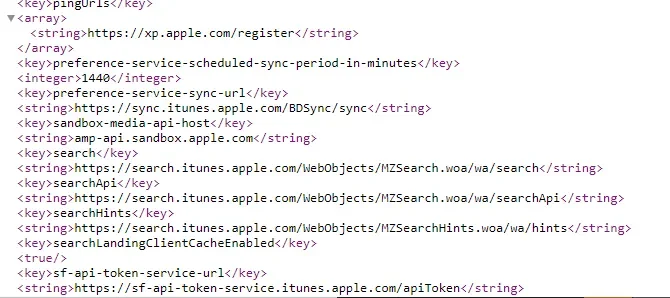
The image shows part of the bag.xml content being read in detail. The caption points out that Sam Curry's post shows "WebObjects" used in a lot of requests, and encourages being proactive to find interesting things in unexpected places.
I gathered all of the endpoints listed in bag.xml and ran them through Intruder with a simple cURL request querying each endpoint with custom headers. I browsed the responses to the different requests, and in parallel checked Google, GitHub and the Wayback Machine for extra information on the endpoints. Other members started their tools, and others hunted on newly disclosed subdomains.

The image accompanies the tip that some .apple.com domains and endpoints only respond with certain user-agents and headers set, and that you should check the user-agent when testing on your iPhone rather than scanning with default user agents.
As the Intruder run progressed, some endpoints responded with various interesting errors. I fuzzed GET and POST requests and various different content types. On four endpoints we found that we could control the POST data, but our input was getting URL encoded in the response, which defeated the injection.
One member, YouGina, then pointed out that our FORM post should have enctype=text/plain set, and that it should then work. I had overlooked this when testing, and he was correct: I had overlooked this when testing, and he was correct: we had a working XSS.
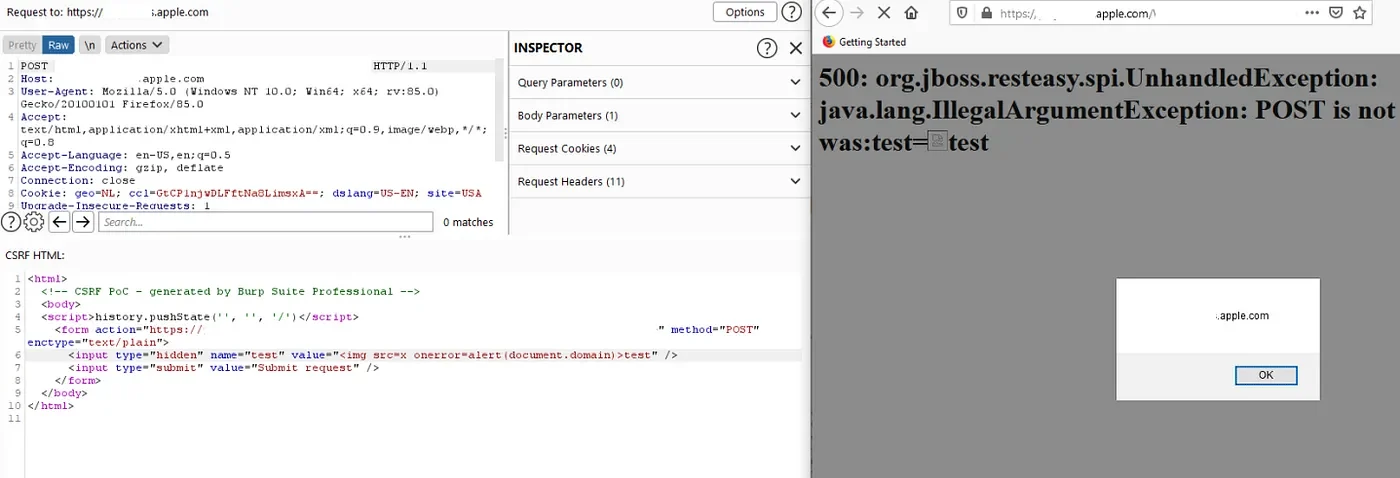
The image shows the point in the discussion where the enctype=text/plain suggestion was made and the working XSS was confirmed.
Exploitation
Step 1: Harvest endpoints from bag.xml
Open the Apple apps on an iPhone with Burp proxying the traffic, and pull bag.xml from the requests. The file lists endpoints plus the headers and parameters each one expects. Collect every endpoint from it.
Step 2: Query each endpoint with its expected headers
Run the collected endpoints through Intruder using a simple cURL request with the custom headers taken from bag.xml. Watch the responses for interesting errors. Endpoints that only answer to particular user-agents and headers need those set, otherwise the responses are misleading.
Step 3: Fuzz methods and content types
Fuzz GET and POST requests and various content types against the endpoints that looked interesting. On four endpoints the POST data was under our control, but the input came back URL encoded, so the injection did not execute.
Step 4: Switch the form encoding
Set enctype=text/plain on the FORM post, as suggested by YouGina. With that encoding the payload survived and the XSS executed.
Step 5: Find the same endpoints on other subdomains
After the valid XSS was found and celebrated in chat, other researchers reported that the four endpoints were present on a lot of Apple subdomains, not just one example host. In total the issue affected 30+ subdomains.
Step 6: Look for something worth leaking
Apple will not pay for alert(0), so the goal was set on using the XSS to leak something useful: token or session information leading to account takeover, or PII. The first focus was a CORS misconfiguration on an Apple endpoint that returned something an attacker would care about, PII for example. The tip given to the team was that when an endpoint queries your information, the request usually returns JSON, so test Origin: on those endpoints. In parallel, note any interesting tokens seen when logging into the various apps and services, for possible use later.
Step 7: Find an endpoint that trusts any .apple.com origin
Many Apple endpoints respond when Origin: is set, but most are locked down to specific Apple subdomains, which the report credits as a good approach. Some were semi-relaxed and allowed multiple .apple.com subdomains rather than a single one. The reasoning was that somewhere on Apple there would be an endpoint that whitelists any .apple.com domain in Origin:. Persistence paid off: endpoints were found that contained PII information and also allowed *.apple.com in the Origin header, which covered every domain where XSS had been found.
Step 8: Build the PoC
Because all of the subdomains with XSS were whitelisted by the Origin: header (*.apple.com was allowed), the final step was a simple PoC that sends a request and retrieves PII information. The demonstration used alert, but as the report notes, it would not be hard to send the data to an attacker's domain instead, referencing the MDN documentation on using XMLHttpRequest.
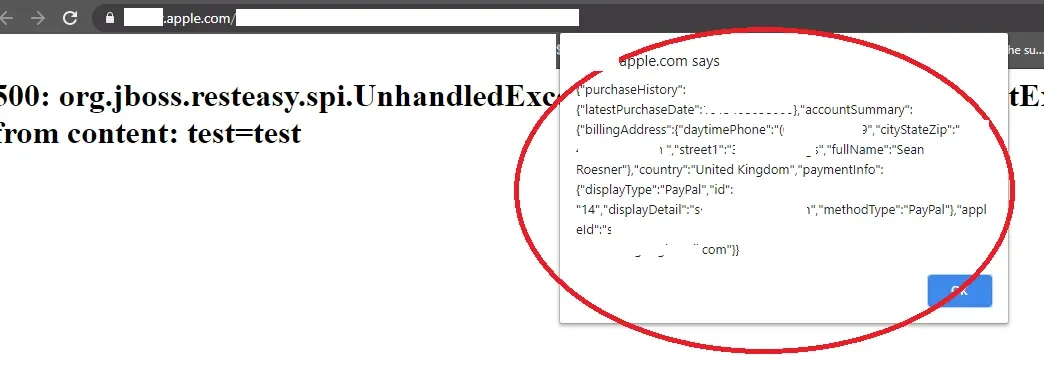
The image shows the PoC output: full name, address and Apple ID.
The PoC required almost no user interaction beyond visiting the attacker's site (totallynotevil.com), after which the XSS on .apple.com would execute, and the FORM post could be automated.
Root cause
The XSS came from POST data that was reflected into the response. With the default form encoding the input was URL encoded and did not execute; with enctype=text/plain the payload passed through unencoded and executed. The report does not describe the server-side code, so the exact reason the plain-text encoding bypassed the encoding step is not stated; The report does not describe the server-side code, so the exact reason the plain-text encoding bypassed the encoding step is not stated.
The impact came from a second mistake: an Access-Control-Allow-Origin configuration that trusted *.apple.com rather than a specific subdomain. Any XSS on the subdomains where it was found therefore became a position from which the PII endpoint could be read. Most Apple endpoints were locked to specific subdomains, which limited the issue; the semi-relaxed ones and the one allowing any .apple.com origin did not.
Impact
Four separate XSS, on unique endpoints, existed across multiple domains, and could be used to retrieve PII information from multiple Apple services. The affected endpoints were present on 30+ subdomains. An attacker who could get a victim to visit a page they control could run the XSS on .apple.com, issue a cross-origin request to the PII endpoint that trusted *.apple.com, and read the response, which contained full name, address and Apple ID. The report notes that many users were affected based on the subdomains where PII could be leaked.
The report was submitted and, after a few months, was answered as not novel enough, with no bounty. All of the XSS were confirmed fixed for over 90 days, and the Origin: header on the discovered endpoints is now locked down to only allow certain subdomains. After the blog post was sent to Apple for review, they said they would re-adjudicate.
Fix
Apple fixed the XSS on the affected endpoints and locked down the Origin: header on the discovered endpoints so that only certain subdomains are allowed. The report does not describe the code change behind the XSS fix.
Variants to test
- Mobile app traffic as a source of endpoint lists. Proxy an iPhone and open every app in the target's ecosystem. A positive result is a file like
bag.xmlthat lists endpoints together with the headers and parameters they need, which removes the need to fuzz for paths. - Content-type and encoding permutations on reflected POST data. For each endpoint that reflects POST data, try the same payload with different form encodings, including
enctype=text/plain. A positive result is the payload appearing unencoded in the response and executing. - User-agent and header gating. Replay endpoints with the user-agent and headers observed from the mobile app rather than defaults. A positive result is a different response, an error or a body that the default request never returns.
Origin:reflection on JSON endpoints. On endpoints that return your own account data as JSON, send anOrigin:header set to an arbitrary subdomain of the target. A positive result isAccess-Control-Allow-Originechoing that origin, especially when it accepts any subdomain rather than one specific host.- Combine XSS with a permissive CORS endpoint. Take any XSS on a subdomain and use it to request a JSON endpoint that trusts
*.domain.com. A positive result is the JSON body being readable from the attacker page, as in the PoC here. - Check how the program fixes things. After a report, watch whether only the XSS is fixed while the permissive
Access-Control-Allow-Originremains, which tells you how the program treats the class of issue and whether further XSS can still leak data.
What happened, in plain words
A group of security researchers spent a few days testing Apple's websites and apps, looking for mistakes that could let an attacker do something harmful. They found a type of bug called XSS (cross-site scripting) on several Apple web addresses, and then found a second, related mistake that let them use that bug to read private information about a user: their full name, address and Apple ID.
This article walks through the whole story from the beginning, assuming you have never done security testing before. You only need to know how to use a browser and a computer. Every technical word is explained the first time it appears, and there is a glossary at the end.
Context
In February of that year I hacked alongside members of BugBountyHunter.com on a public bug bounty program, and we chose Apple as the target. The work described here covers how we found XSS on several .apple.com subdomains and built a proof of concept that leaked PII information across multiple Apple subdomains.
A few terms before we start:
- A bug bounty program is a deal a company offers: if you find a security mistake in their systems and report it privately, they may pay you a reward (a "bounty") and fix the problem. It is legal, authorised testing, unlike breaking in without permission.
- A subdomain is a named section of a company's main web address. If
apple.comis the main building, thenapps.apple.comandwww.apple.comare different rooms inside it. Each can be built and run slightly differently. - XSS (cross-site scripting) is a bug where a website takes something a visitor typed or sent and puts it back into the page without cleaning it up first. If the thing sent is not plain text but a small piece of code, the browser runs that code as if the website itself had written it. Think of a noticeboard where visitors can pin notes: if someone pins a note that says "ignore the manager, pay me instead", and staff follow it, that is the same idea.
- PII (personally identifiable information) is data that identifies a specific person: name, address, email, account ID and so on.
- A proof of concept (PoC) is a small demonstration that shows a bug is real and what harm it could cause, without actually harming anyone.
The entry point was not a web application in the usual sense. It was the traffic generated by Apple apps on an iPhone. One file that stood out in that traffic was bag.xml, requested when opening various apps on the phone:
https://apps.apple.com/bag.xml
What this line means: it is a web address. https:// is the secure version of the protocol browsers use to fetch pages. apps.apple.com is the server. /bag.xml is the name of a file on that server. The .xml ending tells you the file is written in XML, a text format for structured data, a bit like a very strict shopping list where every item is wrapped in labels.
That file appeared to contain endpoints as well as the headers and parameters required to interact with them. Three more terms:
- An endpoint is a specific address on a server that does a specific job, like a counter in a large office. One counter handles passport renewals, another handles address changes. In web terms, an endpoint is a URL that accepts a request and returns a response.
- Headers are small labelled lines sent along with every web request and response, carrying extra instructions. Think of the envelope around a letter: the letter is the content, the envelope says who it is from, what language it is in and how it should be handled.
- Parameters are the individual pieces of information sent with a request, such as a name or an ID number. On a paper form they would be the boxes you fill in.
The report notes that the URL above does not show the headers needed, and that there is a way to get the file to respond differently with various information, which the author chose not to describe.
Setup
Before any testing, you need a way to see and change what your phone sends to the internet. That is what the setup was about.
The work was done as a team event on a public program. The tools and preconditions that mattered were:
- A proxy (Burp) capturing traffic from an iPhone while using Apple apps, an approach taken from Sam Curry's post on hacking Apple.
- The
bag.xmlfile, which supplied endpoints, headers and parameters without any guessing or fuzzing for paths. - Burp Intruder, used to query the endpoints gathered from
bag.xmlwith a simple cURL request and custom headers. - Open source research: Google, GitHub and the Wayback Machine, to look for extra information on the endpoints.
- A team of over 20 hackers, some running tools to discover more subdomains, others hunting through apps manually.
Explaining the tools in that list:
- A proxy is a program that sits between your device and the internet. Everything your phone sends passes through it, and the proxy can show it to you, pause it, or change it before passing it on. Imagine a postal worker who opens every letter, reads it, and can rewrite it before delivery. Burp (Burp Suite) is a popular proxy used by security testers.
- Fuzzing means sending lots of slightly different requests automatically, hoping one of them produces an interesting response. It is like trying every key on a big keyring on a door, rather than reading the sign that says which key fits.
- Burp Intruder is the part of Burp that automates sending many requests, one per item on a list.
- cURL is a command-line tool for sending a single web request and printing the response. It is the text-only equivalent of typing an address into a browser.
- The Wayback Machine is an archive of old versions of websites. It can show pages and files that no longer exist on the live site, which sometimes reveals forgotten endpoints.
- A user-agent is a header in which your browser or app introduces itself, for example "I am Safari on an iPhone". Servers can read it and respond differently depending on what it says.
A precondition worth stating up front: some .apple.com domains and endpoints only respond when certain user-agents and headers are set. The advice in the report is to check the user-agent when testing on an iPhone and not to scan blindly with default user agents.
Why this matters: if you send a request that looks like it came from a desktop browser, the server may answer with an error or a generic page, and you will wrongly conclude there is nothing there. Matching the app's own headers makes the server behave as it does for a real user.
Finding it
After reading Sam Curry's post, one detail stood out: he ran Burp while playing with various features on his iPhone. I replicated some of the bugs Sam described, such as the Find My Friends IDOR, saw the requests and confirmed that issue was fixed, and then started hunting.
Two terms from that paragraph:
- IDOR (insecure direct object reference) is a bug where a website lets you change an identifier in a request, such as a user number, and see someone else's data. If your account page is at
/account?id=123and you change it toid=124and see another person's details, that is an IDOR. It is like a hotel where room keys are numbered and any key opens any door. - Replicating a bug means repeating the steps someone else described to see whether the same thing still works. Here it did not, because Apple had already fixed it.
The bag.xml file was the pivot. Because it listed endpoints together with the headers and parameters needed to talk to them, there was no fuzzing involved: the information was already there. That is the kind of recon I prefer, because it means the endpoints are known to execute some code, and code that executes is where I want to look.
Recon (reconnaissance) is the information-gathering phase before testing: finding out what addresses, files and features exist. It is the difference between wandering a building trying doors at random and first finding the floor plan.
The image shows part of the bag.xml content being read in detail. The caption points out that Sam Curry's post shows "WebObjects" used in a lot of requests, and encourages being proactive to find interesting things in unexpected places.
I gathered all of the endpoints listed in bag.xml and ran them through Intruder with a simple cURL request querying each endpoint with custom headers. I browsed the responses to the different requests, and in parallel checked Google, GitHub and the Wayback Machine for extra information on the endpoints. Other members started their tools, and others hunted on newly disclosed subdomains.
Why run every endpoint through Intruder? Because a list of endpoints is only useful if you know which ones answer, and how. Sending one request per endpoint with the right headers turns a static file into a map of live services. Reading the responses by hand then tells you which ones behave in an unusual way, and unusual behaviour is where bugs hide.
The image accompanies the tip that some .apple.com domains and endpoints only respond with certain user-agents and headers set, and that you should check the user-agent when testing on your iPhone rather than scanning with default user agents.
As the Intruder run progressed, some endpoints responded with various interesting errors. I fuzzed GET and POST requests and various different content types. On four endpoints we found that we could control the POST data, but our input was getting URL encoded in the response, which defeated the injection.
This paragraph introduces several core ideas:
- GET and POST are two kinds of web request. GET asks for something, like "show me this page". POST sends something to the server, like submitting a form. A search box usually uses GET; a login form usually uses POST.
- Content type is a header that says what format the body of a request is in, for example a form, JSON (a text format for data that looks like
{"name": "value"}) or plain text. It is the label on the envelope saying "this is a form" or "this is a letter". - URL encoding is a way of writing characters that are not allowed in a web address by replacing them with codes. A space becomes
%20, for example. It is a safety measure: it turns special characters into harmless text so they cannot be mistaken for instructions.
So the situation was: we could put text into a request, and the server sent it back to us in the response, but by the time it came back our special characters had been converted into harmless codes. The injection did not run. This is like writing a rude word on a form and having the office return it with the letters replaced by numbers.
One member, YouGina, then pointed out that our FORM post should have enctype=text/plain set, and that it should then work. I had overlooked this when testing, and he was correct: with that encoding the input was no longer URL encoded on the way through, and we had a working XSS.
enctype is an attribute on an HTML form that tells the browser how to package the form's contents before sending. The default is application/x-www-form-urlencoded, which is the encoding that was turning our characters into codes. Setting enctype=text/plain tells the browser to send the contents as plain text instead, with no such conversion. I had overlooked this when testing, and he was correct: we had a working XSS.
The image shows the point in the discussion where the enctype=text/plain suggestion was made and the working XSS was confirmed.
Exploitation
Exploitation means turning a confirmed bug into a demonstration of real impact. Finding that a page runs your code is step one; showing what that code can reach is step two.
Step 1: Harvest endpoints from bag.xml
Open the Apple apps on an iPhone with Burp proxying the traffic, and pull bag.xml from the requests. The file lists endpoints plus the headers and parameters each one expects. Collect every endpoint from it.
Why start here rather than guessing addresses? Because guessing means sending thousands of requests to paths that may not exist, which is slow and noisy. The app already knows which endpoints it uses, and bag.xml hands you that list. It is the difference between reading the office directory and knocking on every door in the building.
Step 2: Query each endpoint with its expected headers
Run the collected endpoints through Intruder using a simple cURL request with the custom headers taken from bag.xml. Watch the responses for interesting errors. Endpoints that only answer to particular user-agents and headers need those set, otherwise the responses are misleading.
Why watch for errors? An error message often reveals more than a normal page: it may name the software, show part of the input echoed back, or reveal that the server tried to process something it did not expect. Each of those is a clue about where to push next.
Step 3: Fuzz methods and content types
Fuzz GET and POST requests and various content types against the endpoints that looked interesting. On four endpoints the POST data was under our control, but the input came back URL encoded, so the injection did not execute.
Why try several content types? Because a server may handle each one with different code. A form sent as application/x-www-form-urlencoded may be cleaned up, while the same data sent as plain text may pass through untouched. Trying the variations is how you find the one path that skips the cleaning.
Step 4: Switch the form encoding
Set enctype=text/plain on the FORM post, as suggested by YouGina. With that encoding the payload survived and the XSS executed.
A payload here means the piece of text you send that is designed to be interpreted as code by the browser. It is the note pinned to the noticeboard.
Step 5: Find the same endpoints on other subdomains
After the valid XSS was found and celebrated in chat, other researchers reported that the four endpoints were present on a lot of Apple subdomains, not just one example host. In total the issue affected 30+ subdomains.
Why does this matter so much? Because each subdomain is a separate front door, and a bug that exists on thirty of them is thirty times harder to close and thirty times more likely to reach a real user. It also matters for the next step: if the private-data endpoint trusts any Apple subdomain, then any of those thirty can be used to reach it.
Step 6: Look for something worth leaking
Apple will not pay for alert(0), so the goal was set on using the XSS to leak something useful: token or session information leading to account takeover, or PII. The first focus was a CORS misconfiguration on an Apple endpoint that returned something an attacker would care about, PII for example. The tip given to the team was that when an endpoint queries your information, the request usually returns JSON, so test Origin: on those endpoints. In parallel, note any interesting tokens seen when logging into the various apps and services, for possible use later.
This paragraph is dense, so here is each idea in turn:
alert(0)is the simplest possible demonstration of XSS: a pop-up box showing the number zero. It proves code ran, but it steals nothing and harms no one. Bug bounty programs often treat it as too small to reward, which is why the team set a bigger goal.- A token or session is a short string a website gives your browser after you log in, so it can recognise you on the next request without asking for your password again. It works like a wristband at an event: show it at the door and you get in. If an attacker steals it, they can act as you, which is called account takeover.
- CORS (cross-origin resource sharing) is a set of rules that decides whether a page on one website is allowed to read data from another website. By default, browsers block this, because otherwise any site you visit could quietly read your data from every other site. A site can relax the rule by replying with a header called
Access-Control-Allow-Origin, which names the sites it trusts. A CORS misconfiguration is when that trust is set too widely, for example trusting every subdomain of a company rather than one specific one. - The
Origin:header is the part of a request in which the browser says which site the request is coming from. The server reads it and decides whether to allow the request.
Why test Origin: on endpoints that return your own data? Because those endpoints are exactly the ones where a too-wide trust setting turns into a data leak. If an endpoint returns your name and address as JSON, and it accepts any Apple subdomain as a trusted origin, then an attacker who controls code on any Apple subdomain can read that JSON.
Step 7: Find an endpoint that trusts any .apple.com origin
Many Apple endpoints respond when Origin: is set, but most are locked down to specific Apple subdomains, which the report credits as a good approach. Some were semi-relaxed and allowed multiple .apple.com subdomains rather than a single one. The reasoning was that somewhere on Apple there would be an endpoint that whitelists any .apple.com domain in Origin:. Persistence paid off: endpoints were found that contained PII information and also allowed *.apple.com in the Origin header, which covered every domain where XSS had been found.
Whitelisting means keeping an explicit list of what is allowed and refusing everything else. *.apple.com is a pattern meaning "any subdomain of apple.com", the star standing in for any name. A whitelist of one exact host is like a bouncer with a photo of one guest; a whitelist of *.apple.com is a bouncer who lets in anyone wearing the company badge, including a badge someone else borrowed.
Why did the team keep looking after finding that most endpoints were properly locked down? Because the goal was not to find a bug in one endpoint but to find the one endpoint whose trust setting was wide enough to combine with the XSS. One permissive endpoint is enough to turn a harmless pop-up into a data leak.
Step 8: Build the PoC
Because all of the subdomains with XSS were whitelisted by the Origin: header (*.apple.com was allowed), the final step was a simple PoC that sends a request and retrieves PII information. The demonstration used alert, but as the report notes, it would not be hard to send the data to an attacker's domain instead, referencing the MDN documentation on using XMLHttpRequest.
XMLHttpRequest is the browser feature that lets code on a page send a request to a server and read the reply without reloading the page. It is the mechanism behind the PoC: the injected code uses it to ask the PII endpoint for data, and because the endpoint trusts *.apple.com, the browser allows the reply to be read.
The image shows the PoC output: full name, address and Apple ID.
The PoC required almost no user interaction beyond visiting the attacker's site (totallynotevil.com), after which the XSS on .apple.com would execute, and the FORM post could be automated.
Why does "almost no user interaction" matter? Because the fewer steps a victim has to take, the more realistic the attack. A victim who only has to open a link is far easier to reach than one who must copy, paste and click through several screens.
Root cause
The XSS came from POST data that was reflected into the response. With the default form encoding the input was URL encoded and did not execute; with enctype=text/plain the payload passed through unencoded and executed. The report does not describe the server-side code, so the exact reason the plain-text encoding bypassed the encoding step is not stated; The report does not describe the server-side code, so the exact reason the plain-text encoding bypassed the encoding step is not stated.
Reflected means the server takes what you sent and puts it straight back into the page it returns. It is an echo. If the echo repeats your words as text, it is harmless; if it repeats them as instructions the browser obeys, it is XSS.
The impact came from a second mistake: an Access-Control-Allow-Origin configuration that trusted *.apple.com rather than a specific subdomain. Any XSS on the subdomains where it was found therefore became a position from which the PII endpoint could be read. Most Apple endpoints were locked to specific subdomains, which limited the issue; the semi-relaxed ones and the one allowing any .apple.com origin did not.
Same-origin means the browser treats the code as belonging to that website, with all the access that implies. The XSS gave the attacker code running as if Apple had written it, and the loose CORS setting then let that code read data from another Apple service.
Impact
Four separate XSS, on unique endpoints, existed across multiple domains, and could be used to retrieve PII information from multiple Apple services. The affected endpoints were present on 30+ subdomains. An attacker who could get a victim to visit a page they control could run the XSS on .apple.com, issue a cross-origin request to the PII endpoint that trusted *.apple.com, and read the response, which contained full name, address and Apple ID. The report notes that many users were affected based on the subdomains where PII could be leaked.
The report was submitted and, after a few months, was answered as not novel enough, with no bounty. All of the XSS were confirmed fixed for over 90 days, and the Origin: header on the discovered endpoints is now locked down to only allow certain subdomains. After the blog post was sent to Apple for review, they said they would re-adjudicate.
Novel in this context means new or different from bugs the program has already seen and paid for. Re-adjudicate means review the report again and decide the reward afresh.
Fix
Apple fixed the XSS on the affected endpoints and locked down the Origin: header on the discovered endpoints so that only certain subdomains are allowed. The report does not describe the code change behind the XSS fix.
Why two fixes rather than one? Because the two bugs worked together. Closing the XSS removes the ability to run code on Apple's pages; tightening the Origin: header removes the ability to read the private data even if code runs somewhere else. Fixing only one would leave the other half of the chain in place.
Variants to test
These are the same techniques, written as things you could try on a target you are authorised to test.
- Mobile app traffic as a source of endpoint lists. Proxy an iPhone and open every app in the target's ecosystem. A positive result is a file like
bag.xmlthat lists endpoints together with the headers and parameters they need, which removes the need to fuzz for paths. - Content-type and encoding permutations on reflected POST data. For each endpoint that reflects POST data, try the same payload with different form encodings, including
enctype=text/plain. A positive result is the payload appearing unencoded in the response and executing. - User-agent and header gating. Replay endpoints with the user-agent and headers observed from the mobile app rather than defaults. A positive result is a different response, an error or a body that the default request never returns.
Origin:reflection on JSON endpoints. On endpoints that return your own account data as JSON, send anOrigin:header set to an arbitrary subdomain of the target. A positive result isAccess-Control-Allow-Originechoing that origin, especially when it accepts any subdomain rather than one specific host.- Combine XSS with a permissive CORS endpoint. Take any XSS on a subdomain and use it to request a JSON endpoint that trusts
*.domain.com. A positive result is the JSON body being readable from the attacker page, as in the PoC here. - Check how the program fixes things. After a report, watch whether only the XSS is fixed while the permissive
Access-Control-Allow-Originremains, which tells you how the program treats the class of issue and whether further XSS can still leak data.
Glossary
- Access-Control-Allow-Origin: a response header in which a server names the websites it allows to read its data.
- Account takeover: an attack in which someone else gains control of your account, usually by stealing your session.
- alert(0): the simplest XSS demonstration, a pop-up showing zero; it proves code ran but steals nothing.
- API: a defined set of addresses and rules a program uses to talk to a service, like a service counter with specific forms to fill in.
- bag.xml: the Apple file found in iPhone app traffic that listed endpoints with the headers and parameters they need.
- Bug bounty program: a scheme where a company pays researchers who report security bugs privately and responsibly.
- Burp / Burp Suite: a tool that sits between your device and the internet so you can see and change web traffic.
- Burp Intruder: the part of Burp that sends many requests automatically, one per item in a list.
- Content type: a header saying what format the body of a request or response is in, such as a form, JSON or plain text.
- CORS (cross-origin resource sharing): the browser rules that decide whether a page on one site may read data from another site.
- CORS misconfiguration: a CORS setting that trusts more sites than it should, allowing data to be read by parties that should not have access.
- cURL: a command-line tool for sending a single web request and printing the response.
- Endpoint: a specific address on a server that performs a specific job and returns a response.
- enctype: an HTML form attribute that says how the browser packages the form's contents before sending, for example as URL-encoded data or as plain text.
- Exploitation: turning a confirmed bug into a demonstration of real impact.
- Fuzzing: automatically sending many slightly different requests to see whether one produces an interesting response.
- GET: a web request that asks for something, such as a page.
- Headers: small labelled lines sent with a request or response carrying extra instructions, like the envelope around a letter.
- IDOR (insecure direct object reference): a bug where changing an identifier in a request lets you see someone else's data.
- JSON: a text format for structured data, made of names and values in braces.
- Origin: the header in which a browser says which site a request comes from.
- Parameters: the individual pieces of information sent with a request, like the boxes on a form.
- Payload: the piece of text you send that is designed to be interpreted as code.
- PII (personally identifiable information): data that identifies a specific person, such as name, address or account ID.
- POST: a web request that sends data to the server, such as a submitted form.
- Proof of concept (PoC): a small demonstration showing a bug is real and what harm it could cause.
- Proxy: a program that sits between your device and the internet, letting you see and change the traffic.
- Recon (reconnaissance): the information-gathering phase before testing, finding out what exists.
- Reflected: describing input that the server sends straight back in its response, like an echo.
- Replicating: repeating someone else's documented steps to see whether the same bug still works.
- Same-origin: describing code the browser treats as belonging to a website, with the access that implies.
- Session: the state of being logged in, usually represented by a token the site gives your browser.
- Subdomain: a named section of a company's main web address, such as
apps.apple.comunderapple.com. - Token: a short string a site gives your browser after login so it can recognise you on later requests.
- URL encoding: writing characters that are not allowed in a web address as codes, such as
%20for a space. - User-agent: a header in which a browser or app introduces itself, which servers may use to respond differently.
- Wayback Machine: an archive of old versions of websites, useful for finding pages and files that no longer exist.
- WebObjects: a web application framework mentioned in Sam Curry's post as appearing in many Apple requests.
- Whitelisting: keeping an explicit list of what is allowed and refusing everything else.
- XSS (cross-site scripting): a bug where a site puts input back into a page without cleaning it, so that input can run as code in the visitor's browser.
- XML: a text format for structured data in which items are wrapped in labels.
- XMLHttpRequest: the browser feature that lets code on a page send a request and read the reply without reloading.




