It took me only 5 minutes to find an RCE on Bentley
An SSH server belonging to Bentley was exposed to the internet and accepted weak default credentials (admin/password), allowing the author to log in and read the /etc/passwd file. The author claims this constitutes remote code execution, though the text only demonstrates file read access.
 Published on medium.com
Divyansh Sharma
The full write-up lives on its author's site
It belongs to its author, so we link to it rather than copy it. The other two tabs are our own rewrites, checked against it.
Context
Bentley runs an external bug bounty programme with a responsible disclosure policy. The researcher found it while searching for external bug bounty programmes on Google using dorks. The programme page listed all subdomains as in scope, with the infrastructure out of scope and a maximum bounty of $500.

The target in this write-up is not a web application feature but an internet-facing SSH service on an IP address that belongs to Bentley. The report does not name the hostname or the IP address.
Setup
The researcher had been doing bug bounty work for eight months. The tools used were:
- Google dorks, to find the programme.
- Censys, to search for Bentley-owned hosts.
- PuTTY, to connect to the SSH service.
The report describes Censys as a search engine for information about devices connected to the internet, covering servers and domain names, geographic and technical details for ports 80 and 443, HTTP/S body content and GET responses, Chrome TLS handshake data, the full SSL certificate chain and WHOIS information.
Finding it
The researcher opened Censys and searched for bentley.com. The results were not interesting, so the SSH filter was enabled. Among the results was an IP address whose certificate contained CN=*bentley.com, which the researcher took as confirmation that the IP belonged to Bentley.
The next step was to connect to that IP's SSH protocol with PuTTY.exe. The report describes PuTTY as a free and open-source terminal emulator, serial console and network file transfer application supporting SCP, SSH, Telnet, rlogin and raw socket connections, and also able to connect to a serial port.

Exploitation
Step 1: try the default credential pair
The first attempt was the credential pair admin:admin. The server uses keyboard-interactive authentication, and this attempt returned "access denied".
Step 2: try a weak password
The second attempt was admin:password. The server accepted these credentials and gave the researcher a session on the server.
Step 3: read a local file
With a shell on the server, the researcher asked whether the etc/passwd file could be retrieved, and it could.
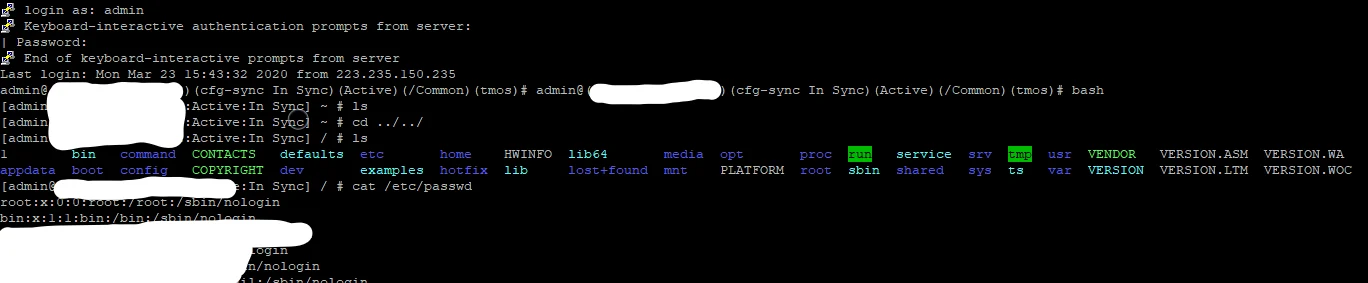
etc/passwd File
The report does not show the command used to read the file, only the resulting output.
Step 4: report and reward
A report was sent to Bentley's security team. A reply came after a month, and the outcome was a bounty.
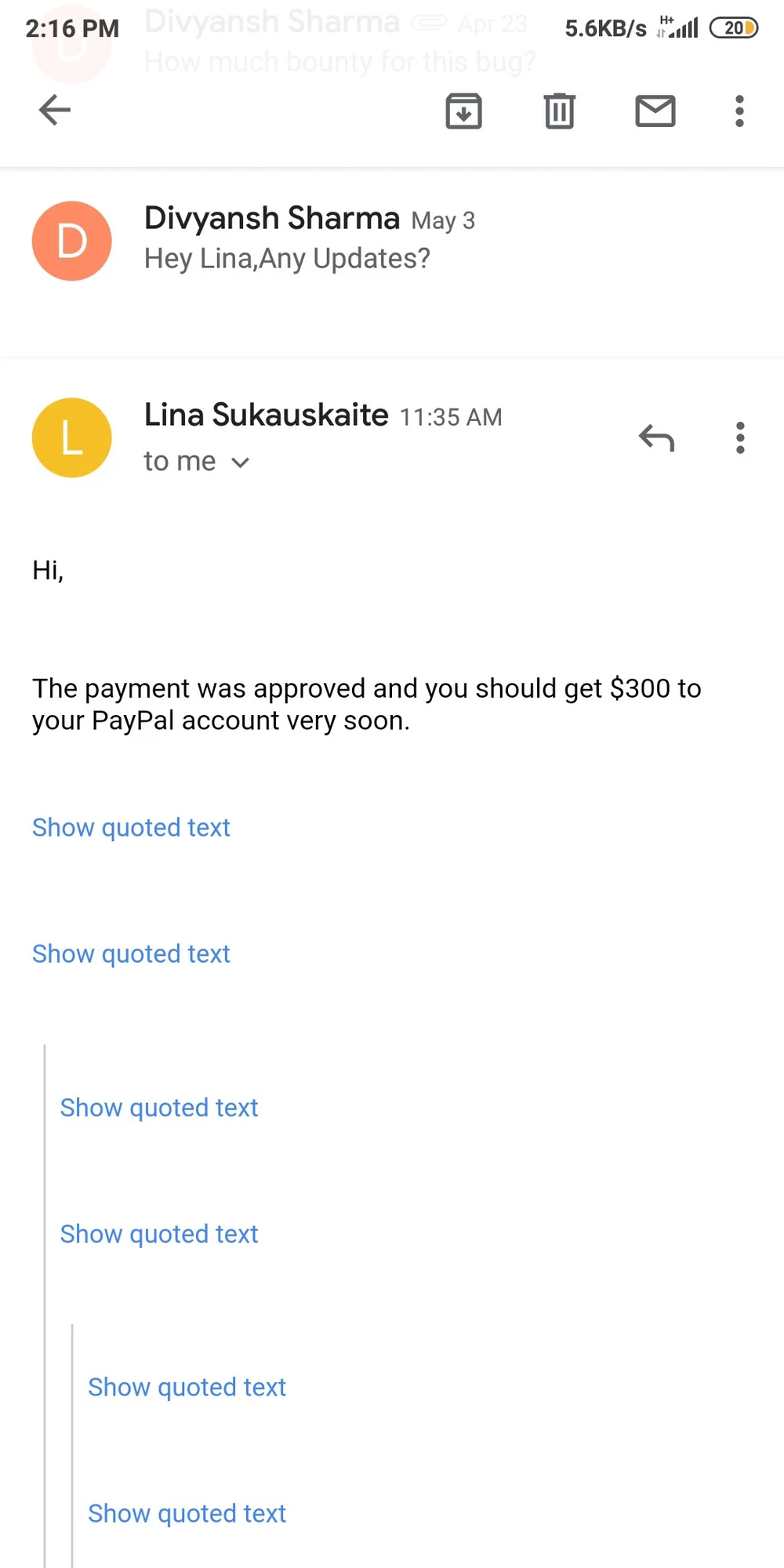
BOUNTY
The bounty amount recorded for this report is 300.00 USD, below the programme's stated maximum of $500.
Root cause
What it shows is an internet-facing SSH service that accepts a trivially guessable credential pair, admin with the password password. The first guess, admin:admin, was rejected, so the account was not protected by a default password alone; the accepted password was simply weak.
Impact
An unauthenticated attacker who can reach the SSH service can log in with the guessed credentials and obtain a shell on the server. From that shell the attacker can read local files such as etc/passwd, and by extension anything else the account is permitted to read. The programme scoped subdomains in and infrastructure out, and the report does not discuss how that scoping applied to this host.
Fix
The measures that would address the issue are to replace the weak password with a strong one or, better, disable password authentication for the account in favour of key-based authentication, restrict SSH access to known source addresses, and monitor or rate-limit authentication attempts.
Variants to test
- Search Censys or Shodan for a target's domain with the SSH filter enabled, and check certificate subjects for the target's name. A positive result is an IP whose certificate names the target.
- Try common administrative usernames with weak passwords against SSH services in scope, starting with pairs like
admin:adminandadmin:password. A positive result is a successful keyboard-interactive login rather than "access denied". - After any successful login, check whether local files such as
etc/passwdare readable. A positive result is file content returned by the shell.
What happened, in plain words
A security researcher found a computer belonging to Bentley (the car software company) that was connected to the public internet and allowed remote logins. The login used a very common username, admin, and an extremely weak password, password. Once logged in, the researcher could read files on that computer, including a standard system file called etc/passwd. The researcher reported the problem and received a $300 bounty. This article walks through exactly how that happened, step by step, explaining every term for someone who has never done security testing before.
Background: what is bug bounty and why does it matter?
A bug bounty programme is a deal offered by a company: if you find a security weakness in our systems and tell us privately, we will pay you a reward (the bounty). This encourages people to report problems instead of exploiting them. The company publishes rules about which systems you are allowed to test (the scope) and how much they will pay.
A responsible disclosure policy is the company's published rules for how researchers should report problems to it.
Subdomains are the parts of a web address before the main domain. For example, in mail.example.com, mail is a subdomain of example.com. Companies often have many subdomains for different services.
Infrastructure here means the underlying servers and network equipment, as opposed to the websites themselves. The programme said subdomains were in scope (fair game to test) but infrastructure was out of scope (not allowed to test).
A dork is a special search query that uses advanced operators to find specific things on the web. For example, you can search for pages that contain certain words in their title or URL. Researchers use dorks to discover bug bounty programmes.
Finding the programme
The researcher had been doing bug bounty work for eight months. While searching Google with dorks for external bug bounty programmes, Bentley's responsible disclosure page caught their attention.
The page showed that all subdomains were in scope, but infrastructure was out of scope, and the maximum bounty was $500.
What is Censys and why use it?
Censys is a search engine for internet-connected devices. Instead of indexing web pages, it scans the internet and records information about servers: what ports they have open, what software they run, what security certificates they use, and where they are located. Security researchers use it to find systems that might be vulnerable.
The report describes Censys as a search engine that gives the latest and most accurate information about any device connected to the internet, including servers and domain names. It can show geographic and technical details for ports 80 and 443 (the standard web ports), HTTP/S body content and GET responses, Chrome TLS handshake data, the full SSL certificate chain, and WHOIS information.
Ports are like numbered doors on a computer. Different services listen on different ports: web servers usually use port 80 (HTTP) or 443 (HTTPS), and SSH (secure remote login) uses port 22. When you connect to a server, you specify which port to knock on.
SSH stands for Secure Shell. It is a protocol that lets you log in to a remote computer and run commands on it, as if you were sitting in front of it. It is encrypted, so eavesdroppers cannot see what you type.
SSL certificates are digital ID cards for servers. They contain information about who owns the server, including the domain name. Browsers use them to verify they are talking to the real website and to encrypt the connection.
CN stands for Common Name. In a certificate, it is the domain name that the certificate is issued for. For example, CN=*bentley.com means the certificate is valid for any subdomain of bentley.com (the * is a wildcard).
Step 1: Search Censys for Bentley
The researcher opened Censys and searched for bentley.com. The results were not interesting, so they enabled the SSH filter to show only devices with SSH open.
Among the results was an IP address whose certificate contained CN=*bentley.com. The researcher took this as confirmation that the IP belonged to Bentley.
IP address is a numeric label assigned to every device on the internet, like a postal address. It looks like [redacted] (but the actual IP is not given in the report).
Step 2: Connect with PuTTY
The next step was to connect to that IP's SSH service using PuTTY.exe. PuTTY is a free, open-source terminal emulator, serial console, and network file transfer application. It supports several network protocols, including SCP, SSH, Telnet, rlogin, and raw socket connections, and can also connect to a serial port. The name "PuTTY" has no official meaning.
A terminal emulator is a program that lets you type commands and see text output, like a window into another computer.
When the researcher entered the IP into PuTTY, they saw this:
Step 3: Try default credentials
The first attempt was the username admin and password admin. The server uses keyboard-interactive authentication, which means it prompts for credentials interactively (like a login prompt). This attempt returned "access denied".
Default credentials are the factory-set username and password that come with many devices and applications. Common examples are admin:admin or admin:password.
Step 4: Try a weak password
The second attempt was the username admin and password password. The server accepted these credentials and gave the researcher a session on the server.
A session here means an active connection where the researcher can run commands on the remote computer.
Step 5: Read a local file
With a shell on the server, the researcher asked whether the etc/passwd file could be retrieved, and it could.
etc/passwd File
etc/passwd is a standard file on Unix-like systems (such as Linux) that lists user accounts. It does not contain passwords in modern systems, but it shows usernames and other details. Being able to read it is a sign that the attacker has access to the system's files.
The report does not show the command used to read the file, only the resulting output.
Step 6: Report and reward
A report was sent to Bentley's security team. A reply came after a month, and the outcome was a bounty.
BOUNTY
The bounty amount recorded for this report is 300.00 USD, below the programme's stated maximum of $500.
Why did this happen?
The report does not describe the server configuration or the code behind the login. What it shows is an internet-facing SSH service that accepts a trivially guessable credential pair: admin with the password password. The first guess, admin:admin, was rejected, so the account was not protected by a default password alone; the accepted password was simply weak.
Key-only authentication means logging in with a cryptographic key instead of a password. It is much harder to guess.
Source IP restriction means only allowing connections from certain IP addresses (for example, the company's office).
Rate limiting means limiting how many login attempts can be made in a certain time, to slow down guessing.
What is the impact?
An unauthenticated attacker who can reach the SSH service can log in with the guessed credentials and obtain a shell on the server. From that shell, the attacker can read local files such as etc/passwd, and by extension anything else the account is permitted to read. The programme scoped subdomains in and infrastructure out, and the report does not discuss how that scoping applied to this host.
Privilege escalation means gaining higher-level access (like administrator rights) from a lower-level account.
Lateral movement means moving from one compromised system to other systems on the same network.
How to fix it
The measures that would address the issue are to replace the weak password with a strong one or, better, disable password authentication for the account in favour of key-based authentication, restrict SSH access to known source addresses, and monitor or rate-limit authentication attempts.
Variants to test
If you want to look for similar issues (only on systems you are authorised to test), here are steps you can try:
- Search Censys or Shodan for a target's domain with the SSH filter enabled, and check certificate subjects for the target's name. A positive result is an IP whose certificate names the target.
- Try common administrative usernames with weak passwords against SSH services in scope, starting with pairs like
admin:adminandadmin:password. A positive result is a successful keyboard-interactive login rather than "access denied". - After any successful login, check whether local files such as
etc/passwdare readable. A positive result is file content returned by the shell.
Shodan is another search engine for internet-connected devices, similar to Censys.
Glossary
- Bug bounty programme: A scheme where companies pay rewards for finding and reporting security vulnerabilities.
- Bounty: The reward paid for a valid vulnerability report.
- Responsible disclosure policy: A company's rules for how researchers should report vulnerabilities and how the company will handle them.
- Scope: The specific systems or domains that are allowed to be tested.
- Subdomain: A subdivision of a domain, like
mail.example.com. - Infrastructure: The underlying servers and network equipment, as opposed to websites.
- Dork: A special search query using advanced operators to find specific information.
- Censys: A search engine that indexes internet-connected devices and their properties.
- Port: A numbered communication endpoint on a computer; different services use different ports.
- SSH: Secure Shell, a protocol for secure remote login and command execution.
- SSL certificate: A digital certificate that proves a server's identity and enables encryption.
- CN (Common Name): The domain name listed in a certificate as its owner.
- IP address: A numeric address that identifies a device on a network.
- PuTTY: A free terminal emulator that supports SSH, Telnet, and other protocols.
- Terminal emulator: A program that provides a text-based interface to another computer.
- Keyboard-interactive authentication: A method where the server prompts for credentials interactively.
- Default credentials: Factory-set username and password that are often left unchanged.
- Session: An active connection allowing commands to be run on a remote system.
- etc/passwd: A file on Unix-like systems that lists user accounts.
- Key-only authentication: Logging in with a cryptographic key instead of a password.
- Source IP restriction: Allowing connections only from specific IP addresses.
- Rate limiting: Limiting the number of attempts or requests over time.
- Privilege escalation: Gaining higher-level access than initially obtained.
- Lateral movement: Moving from one compromised system to others on the same network.
- Shodan: A search engine for internet-connected devices, similar to Censys.