Bypassing WAF for $2222
 Published on divyanshsharma2401.medium.com
I know it’s been a very long time since I last published my article on how I was able to find RCE on Bentley systems. For the last 1–1.5 years, I was doing internships in various companies and that’s why I don’t have time for doing bug bounties.
The full write-up lives on its author's site
It belongs to its author, so we link to it rather than copy it. The other two tabs are our own rewrites, checked against it.
Context
This write-up covers a private Bugcrowd programme that the researcher had accepted an invitation to but had not previously tested. The report does not name the company or the product. The feature involved is a resources page with an "EBOOK central" section: books about how to use the company's product, each with a download button. Filling in the required information and pressing download produces a request that carries a parameter called book_pdf, which the server uses to locate and return the book file.
The researcher notes that 81 bugs had already been reported on the programme, which shaped the decision to look at less popular endpoints rather than run heavy reconnaissance.
Setup
The only tooling described is Burp Suite, running in the background while the researcher browsed the site, plus Censys for later origin discovery. No versions, accounts or roles are given. The precondition for the finding is simply access to the resources page and the ability to submit the download form with the required information filled in.
Finding it
The researcher does not describe a reconnaissance phase. The approach was to browse the site casually with Burp capturing traffic, then deliberately target underrated endpoints:
- Careers page
- KnowledgeBase/Docs page
- Contact Us
On the contact-us page the researcher found a self XSS and chained it with CSRF to make it exploitable, then reported it. Still looking for a P1, the researcher moved to the resources page and noticed the ebook download feature.
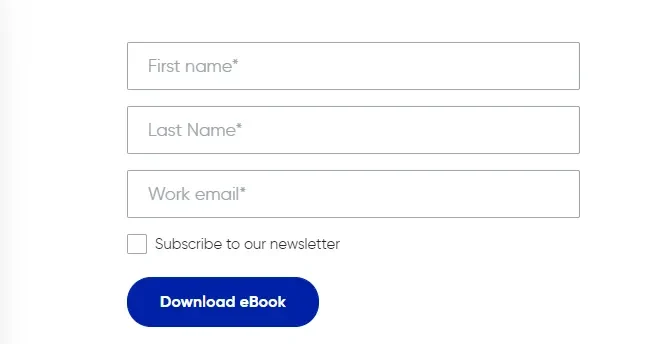
The download button is what submits the form that produces the request of interest.
Exploitation
Step 1: capture the download request
After filling in all the required information, the request was captured in Burp Suite:
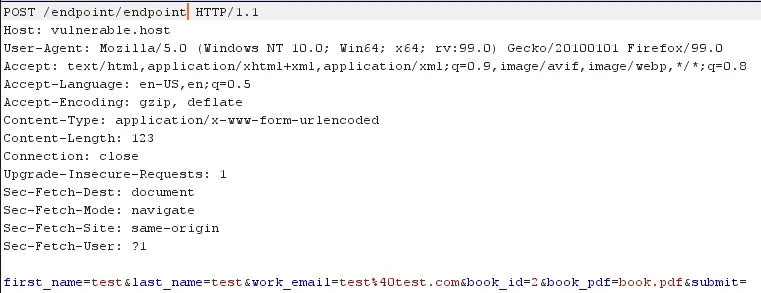
The vulnerable parameter in that request is book_pdf. The report does not reproduce the request as text, so the exact method, path, headers and other parameters are not available here; the image is the only record of them.
Step 2: try path traversal
The first payload set the value of book_pdf to:
../../../../etc/passwd
The response was 403 forbidden. The researcher attributes this to the WAF in front of the site, identified as CloudFront.
Step 3: attempt WAF bypasses
At this stage the researcher tried all the possible ways to bypass the CloudFront WAF. None of them worked. The report does not list which techniques were attempted.
Step 4: find the origin behind CloudFront
The reasoning then shifted: if the origin IP behind CloudFront could be found, requests could be sent to it directly and the WAF bypassed. Using Censys dorking, the researcher found the actual origin IP.
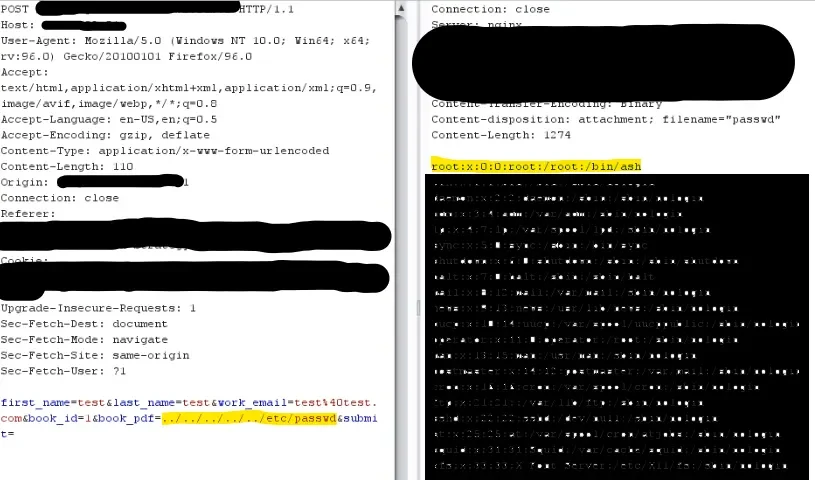
The image is captioned LFI in the report.
Step 5: report
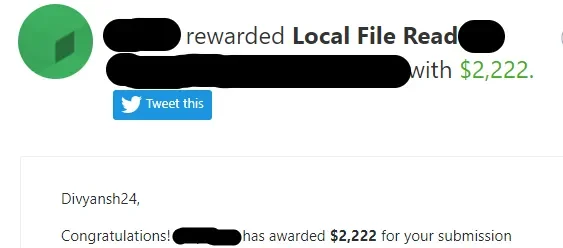
The finding was reported to the company, which rewarded it with $2222.
Root cause
The vulnerable parameter in the download request is book_pdf. The defence that did exist, the CloudFront WAF, blocked the obvious payload with a 403, but it only protected the fronted hostname. The researcher found the origin IP behind CloudFront with Censys, and the report captions the result as LFI.
Impact
An attacker who can reach the origin directly can read files on the server through the book_pdf parameter, outside the WAF's reach. The report does not enumerate what was readable. so the wider impact on credentials, configuration or source is not established here. The condition for exploitation is knowledge of the origin IP, which the researcher obtained from Censys.
Fix
What should be done is to validate book_pdf server-side against an allow-list of known book identifiers or filenames, resolve the path and confirm it stays inside the intended directory, and avoid passing user input into filesystem paths at all where possible. Separately, the origin should not be directly reachable from the internet: restrict it to CloudFront's address ranges or protect it with a shared secret header, so that finding the IP does not grant a WAF-free path.
Variants to test
- On any download or document-viewing parameter, submit a traversal sequence such as
../../../../etc/passwdand look for file contents rather than a generic error. A positive result is the contents of a known file in the response. - When a WAF returns 403 for a traversal payload, resolve the hostname and check whether the origin is exposed. A positive result is an IP that answers the same request without the WAF block.
- Search Censys or similar datasets for certificates and banners belonging to the target, then request the same endpoint by IP with the original
Hostheader. A positive result is the application responding identically, confirming the origin is directly reachable. - Test the same parameter with encoded and doubled traversal sequences against the origin, since the WAF is no longer in the path. A positive result is file contents returned where the fronted hostname still returns 403.
What happened, in plain words
A security researcher was invited to test a private bug bounty programme on Bugcrowd. Bug bounty programmes are schemes where companies invite people to look for security weaknesses in their systems and pay for the ones that are found and reported responsibly. This particular programme had already received 81 reports, so the obvious, popular parts of the site had been picked over. Instead of running heavy automated scanning, the researcher browsed the site by hand while a tool called Burp Suite quietly recorded every request and response in the background.
On a resources page there was a section called "EBOOK central": books explaining how to use the company's product, each with a download button. When the researcher filled in the form and pressed download, the browser sent a request containing a parameter called book_pdf, which tells the server which book file to send back. The researcher changed that value to a sequence of ../ characters, which in a file path means "go up one folder". If the server blindly pastes that value into a file path, the request can walk out of the folder that holds the books and read other files on the machine, such as the system's list of user accounts. This class of bug is called path traversal, and when the file that gets read is a sensitive one it is also called local file inclusion, or LFI.
The first attempt was blocked: the server answered 403 forbidden, meaning "you are not allowed". A web application firewall, or WAF, sitting in front of the site had recognised the attack pattern and refused it. The researcher then tried various tricks to get past the WAF, and none worked. The turning point was realising that the WAF only guards the public hostname. Behind it sits the real server, called the origin, and if you can find the origin's IP address you can talk to it directly, skipping the WAF entirely. Using a search engine for internet-connected devices called Censys, the researcher found that origin IP, sent the same kind of request straight to it, and the file read succeeded. The company paid a bounty of $2222.
Background you need first
A few ideas come up again and again below, so here they are from zero.
Request and response. When you use a website, your browser sends a request to a server and the server sends back a response. A request has a method (such as GET, meaning "give me this", or POST, meaning "here is some data, act on it"), a path (which page or feature you want), headers (extra labels and information), and sometimes a body (the data itself, for example what you typed into a form).
Parameters. Many requests carry parameters: named values that tell the server what you want. In a web address they appear after a ?, like ?book=12. In a form submission they can travel in the body of the request instead. The server reads the parameter and uses it, for example to look up which book to send. If the server trusts that value too much, the person sending the request can influence things the developer never intended.
Burp Suite. A tool that sits between your browser and the website, like a recording machine on a phone line. Every request your browser makes passes through it and is written down, and you can pause a request, edit it, and send it on. That is how the researcher captured the download request and changed the book_pdf value.
Path traversal. Files on a server live in folders inside folders, like rooms inside rooms in a building. A file path names a location, for example /var/books/guide.pdf. The two dots .. mean "the folder above this one". So ../../ from inside /var/books/ climbs up to /var/ and then to /. If a program takes a value from the user and glues it onto a folder path without checking it, a user can supply ../ sequences and climb out of the intended room into any other room in the building. That is path traversal.
/etc/passwd. On Linux and similar systems this is a well-known file listing the user accounts on the machine. It is the classic test target for path traversal because it exists on almost every such system and reading it proves you have escaped the intended folder. It does not usually contain passwords in modern systems, but it is still a sensitive file and a reliable proof of the bug.
WAF (web application firewall). A filter placed in front of a website that inspects incoming requests and blocks ones that look like attacks. Think of a security guard at the entrance who checks bags. It is useful, but it is only at the entrance: if there is another door into the building, the guard never sees who comes through it.
CloudFront. Amazon's content delivery network. A content delivery network is a worldwide set of proxy servers that sit in front of your real server, cache content close to users and filter traffic. The address users connect to belongs to CloudFront, not to the real server. The real server behind it is called the origin. CloudFront can host a WAF, which is what blocked the first payload here.
Origin IP. The numeric address of the actual server behind the content delivery network. If you know it and it is reachable from the internet, you can send requests straight to it, and the WAF in front of the public hostname is never involved. Finding the origin IP is therefore a common way to bypass a WAF.
Censys. A search engine for devices and services connected to the internet. It continuously scans the internet and records what it finds, including certificates and service banners, which can reveal a server that is supposed to be hidden behind a content delivery network.
XSS and CSRF. Cross-site scripting (XSS) is a bug where an attacker gets their own code to run in another user's browser. A "self XSS" only affects the person who enters it, so on its own it is low impact. Cross-site request forgery (CSRF) is a bug where another site can make a logged-in user's browser send a request the user did not intend. Chaining a self XSS with CSRF means using the second bug to make the first one affect other people. The researcher found this on the contact-us page and reported it separately; it is not the main finding here.
P1. Bug bounty programmes rank findings by severity, often from P1 (most serious) down to P5 (least). The researcher's stated goal was to find a P1.
The finding
The researcher had accepted many private invitations on Bugcrowd but had not started hunting on them. In mid-February the decision was made to try one random private target that had been accepted.
Reconnaissance, the phase of mapping a target's systems and subdomains before attacking, is not the researcher's strength, so the approach was simply to surf the website casually with Burp running in the background. Nothing special came up. Because 81 bugs had already been reported on the programme, the plan shifted to less popular, underrated endpoints:
- Careers page
- KnowledgeBase/Docs page
- Contact Us
On the contact-us page the researcher managed to find a self XSS and chained it with CSRF to make it exploitable, then reported it. But the goal was a P1. So next the researcher went to the resources page and saw the EBOOK central section, books about how to use the company's product, with a download book feature.
The image shows the download button. That button is what submits the form producing the request of interest: pressing it is what sends the book_pdf value to the server.
After filling in all the required information, the request was captured in Burp Suite and looked like this:
The image is the only record of the request. The report does not reproduce it as text, so the exact method, path, headers and other parameters are not available here. What the report does state is that the vulnerable parameter in that request is book_pdf. That parameter is the value the researcher is about to tamper with. and it is the value the researcher is about to tamper with.
Trying the attack
Step 1: the first payload
The value of book_pdf was first set to:
../../../../etc/passwd
Read it piece by piece. Each ../ means "go up one folder". Four of them climb four levels up from wherever the server started, aiming for the top of the filesystem. Then etc/passwd names the system's user account file. The whole string is the value the researcher wants the server to use as the book file location. If the server simply joins this onto its books folder and opens the result, it ends up opening the account file instead of a book. The reason for trying this first is that it is the simplest, most direct test of whether the parameter is used unsafely: no clever encoding, just the plain traversal.
Sadly it returned 403 forbidden. A 403 is the server saying "I understood your request and I refuse it". The researcher attributes this to the WAF in front of the site, identified as CloudFront. So the bug may well be there, but the guard at the entrance is catching the obvious attack.
Step 2: trying to get past the WAF
At this stage the researcher tried all possible ways to bypass the CloudFront WAF. None of them worked. The report does not list which techniques were attempted, so there is nothing more to say about this step. The lesson is that when a filter blocks the obvious form of an attack, changing the payload is one route; changing the route the request takes is another.
Step 3: find the server behind CloudFront
The reasoning then shifted. CloudFront is only the front door. If the origin IP behind CloudFront could be found, requests could be sent to it directly and the WAF bypassed, because the WAF only inspects traffic that arrives at the CloudFront address. Think of it as finding the staff entrance at the back of a building: the guard at the front never sees you.
Using Censys dorking, the researcher found the actual origin IP. "Dorking" means crafting search queries in such a search engine to find a specific thing, here a server belonging to the target that should have been hidden behind the content delivery network. The result is shown below:
The image is captioned LFI in the report. The report does not give the exact request that was sent to the origin IP, nor the contents returned beyond characterising the outcome as LFI.
Step 4: report
The finding was reported to the company, which rewarded it with $2222.
The image shows the bounty being rewarded.
Why it worked
The vulnerable parameter in the download request is book_pdf. The server takes the value the user supplied and uses it to locate a file, so a traversal sequence in the value escapes the intended directory. The defence that did exist, the CloudFront WAF, blocked the obvious payload with a 403, but it only protected the fronted hostname. The researcher found the origin IP behind CloudFront with Censys, and the report captions the result as LFI. The report does not describe the server-side code, so the exact validation failure is likely a missing canonicalisation or allow-list check on the parameter. Canonicalisation means turning a path into its final, unambiguous form before checking it; an allow-list means accepting only values on a known-good list.
What it means for the company
An attacker who can reach the origin directly can read files on the server through the book_pdf parameter, outside the WAF's reach. The report does not enumerate what was readable. so the wider impact on credentials, configuration or source is not established here. The condition for exploitation is knowledge of the origin IP, which the researcher obtained from Censys.
How to fix it
What should be done is to validate book_pdf server-side against an allow-list of known book identifiers or filenames, resolve the path and confirm it stays inside the intended directory, and avoid passing user input into filesystem paths at all where possible. Separately, the origin should not be directly reachable from the internet: restrict it to CloudFront's address ranges or protect it with a shared secret header, so that finding the IP does not grant a WAF-free path.
Things to try on other targets
- On any download or document-viewing parameter, submit a traversal sequence such as
../../../../etc/passwdand look for file contents rather than a generic error. A positive result is the contents of a known file in the response. - When a WAF returns 403 for a traversal payload, resolve the hostname and check whether the origin is exposed. A positive result is an IP that answers the same request without the WAF block.
- Search Censys or similar datasets for certificates and banners belonging to the target, then request the same endpoint by IP with the original
Hostheader. A positive result is the application responding identically, confirming the origin is directly reachable. - Test the same parameter with encoded and doubled traversal sequences against the origin, since the WAF is no longer in the path. A positive result is file contents returned where the fronted hostname still returns 403.
Glossary
- Allow-list: a list of values that are explicitly permitted; anything not on the list is rejected.
- Banner: the identifying text a service sends when you connect to it, which can reveal what software and version it runs.
- Bug bounty programme: a scheme where a company invites researchers to find security weaknesses and pays for valid reports.
- Burp Suite: a tool that sits between your browser and a website, recording requests and responses and letting you edit and resend them.
- Canonicalisation: converting a path or value into its final, unambiguous form before checking it.
- Censys: a search engine that indexes devices and services connected to the internet.
- CloudFront: Amazon's content delivery network, a set of proxy servers placed in front of a real server.
- Content delivery network (CDN): a worldwide set of proxy servers that sit in front of a real server to cache content and filter traffic.
- CSRF (cross-site request forgery): a bug where another site can make a logged-in user's browser send a request the user did not intend.
- Dorking: crafting search queries in a search engine such as Censys to find specific exposed systems.
- Endpoint: a specific address or feature on a website that accepts requests, such as a page or a form handler.
- GET / POST: HTTP methods; GET asks for something, POST sends data for the server to act on.
- Header: extra information attached to a request or response, such as the
Hostheader naming the site you want. - Host header: the header that tells the server which website name the request is for.
- LFI (local file inclusion): a bug where user input causes the server to read a local file it should not expose.
- Origin: the real server behind a content delivery network.
- Origin IP: the numeric address of that real server.
- P1: the most serious severity ranking on many bug bounty programmes.
- Parameter: a named value sent with a request, such as
book_pdf. - Path traversal: a bug where
../sequences in user input let an attacker climb out of the intended folder and reach other files. - Payload: the specific value an attacker sends to trigger a bug.
- Reconnaissance: the phase of mapping a target's systems and subdomains before attacking.
- Request / response: what your browser sends to a server, and what the server sends back.
- Self XSS: cross-site scripting that only affects the person who enters it, so on its own it is low impact.
- WAF (web application firewall): a filter in front of a website that inspects requests and blocks ones that look like attacks.
- XSS (cross-site scripting): a bug where an attacker gets their own code to run in another user's browser.
- 403 forbidden: an HTTP status meaning the server understood the request and refuses to allow it.



