[iOS/Android] Address Bar Spoofing Vulnerability
The Brave browser on iOS and Android could be made to show a legitimate-looking address bar (including a green lock) while displaying attacker-controlled page content. An attacker could use this to trick a victim into entering credentials on a fake login page that appears to belong to a trusted site.
 Originally disclosed on HackerOne
- Triaged in 6 days
- Fixed in 27 days
- Paid in 9 days
- Disclosed after 3 months
Hello,
I am Aaditya Purani, I would like to Report Address Bar spoofing vulnerability in Brave Browser on the IOS as well as Android Platform. All the Test have been carried out against Latest Brave Browser whose versions i have mentioned in Products affected section.
Summary:
Brave Browser Suffers from Address Bar Spoofing Vulnerability. Address Bar spoofing is a critical vulnerability in which any attacker can spoof the address bar to a legit looking website but the content of the web-page remains different from the Address-Bar display of the site. In Simple words, the victim sees a familiar looking URL but the content is not from the same URL but the attacker controlled content. Some companies say "We recognize that the address bar is the only reliable security indicator in modern browsers" .
Products affected:
- In IOS - Affected is the Latest Version 1.2.16 (16.09.30.10)
- In Android - Affected in Brave Latest version 1.9.56
Steps To Reproduce
I created a HTML Code which would spoof address bar of Brave Browser ( bravespoof.html) in the Attachments. As we can understand, the code contains a form which i have created just to demonstrate a look-a-like impact where it asks for username and password of any user. But the real trick is done, by the function f() whose location is equal to https://facebook.com . Additionally, to complete the exploit i used setInterval function to execute the function f continuously after every 10 milliseconds. Hence, ideally after 10 ms the Location would divert the URL as well as the page to display https://facebook.com content or it some cases, it keeps hold the of URL without changing the URL nor the page (which is again a safe case) . But in Brave Browser both fails, In brave when you host the below given HTML code to a web server and visit from either Android or IOS Brave Browser, The URL would get spoofed to https://facebook.com (Even it shows Green lock so victim would believe) but the content remains the one which attackers have placed.
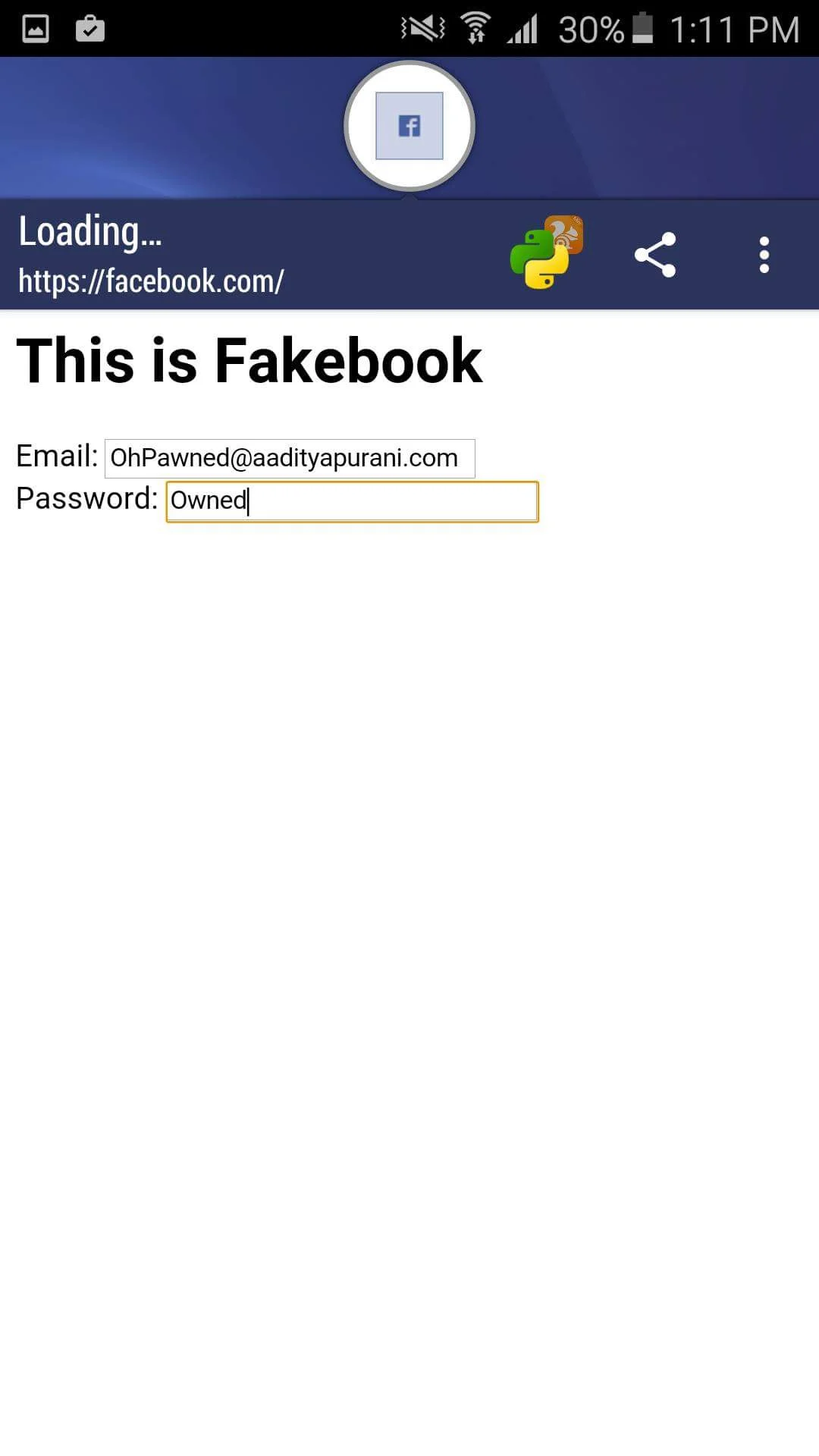
Look at the Screenshot addressbarbrave.jpg POC where i showed how in Android Brave Browser the URL changed to https://facebook.com but the Content remains attacker controlled (i.e fakebook login page) . Moreover, the image of the bubble shows facebook logo (any victim would believe it )
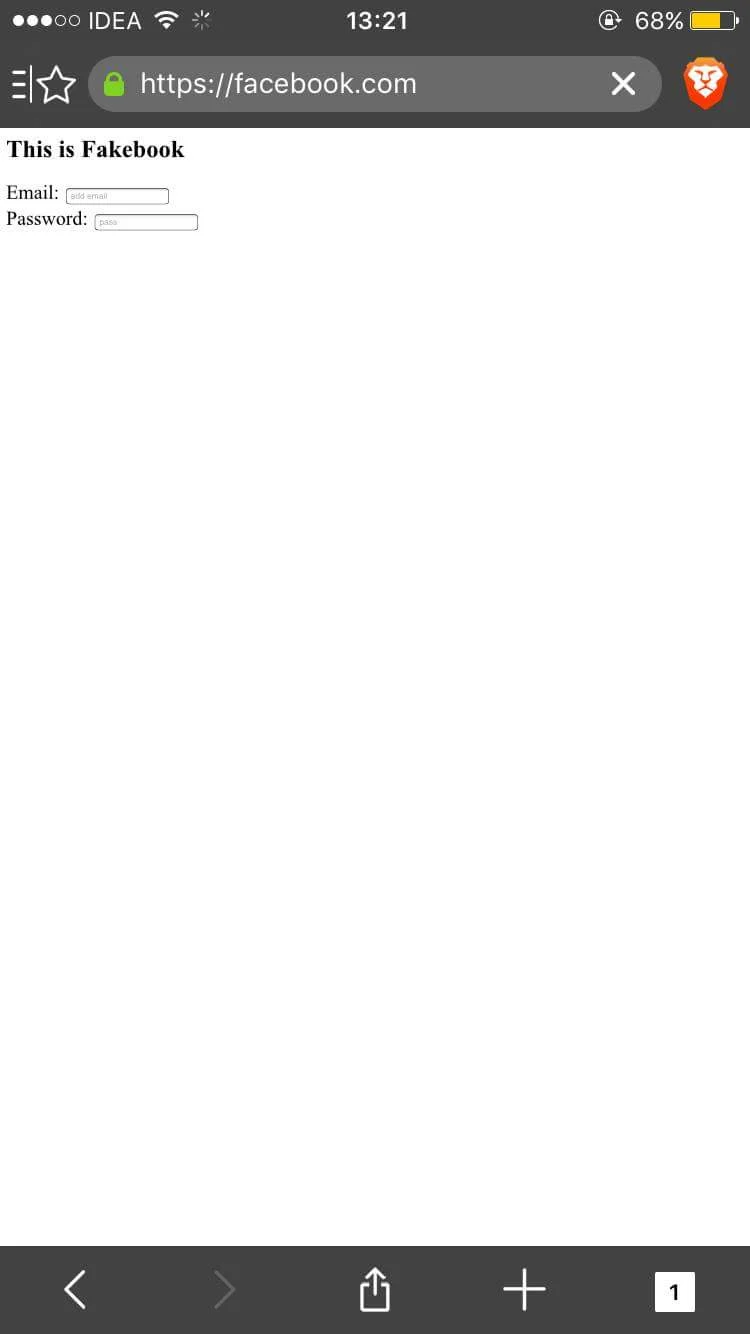
Another screenshot i attached is braveiospoofing.jpg which is the POC of affected IOS Brave browser as we can see it shows https://facebook.com with green lock but the body of page is attacker controlled
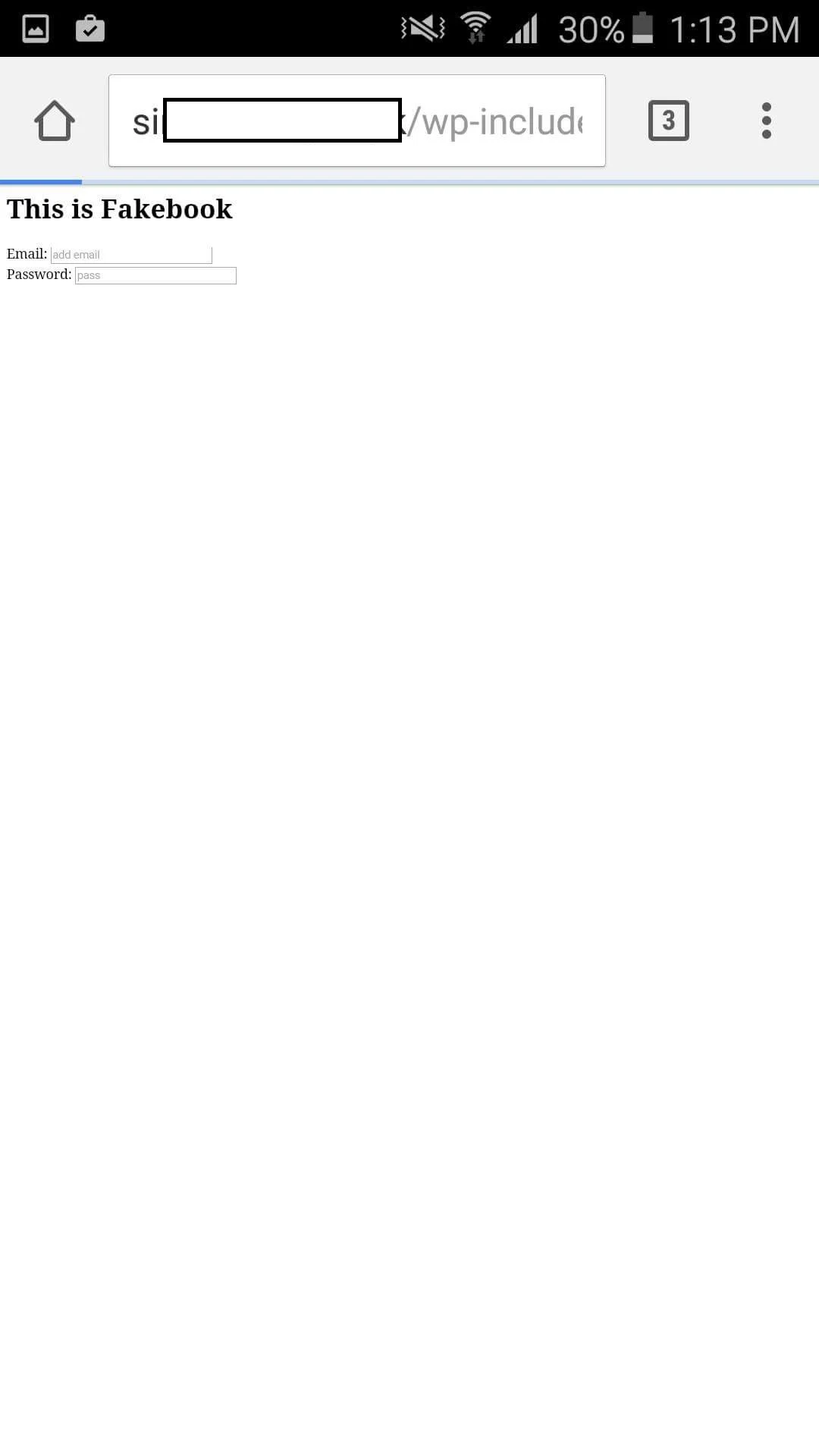
I carried out same test in Chrome Browser too, But chrome is smart; It doesn't changes the url to https://facebook.com but the URL remain same of the URL of Hosted HTML ( I showed the same in chromeaddress.jpg screenshot). The same happens in Mozilla , it is also not affected. But the best one is UC Mini (on android) where it redirects to complete https://facebook.com to mitigate this fully. Even Safari Mobile (IOS) is also not affected. I tested the same on many browsers and Brave turned out to be affected.
I sincerely hope this gets Patched ASAP . Cheers !
Attachments
Context
Brave Browser ships on both iOS and Android, and like every browser it presents the address bar as the primary signal of where the current page came from. The report examines whether that signal can be made to disagree with the page content, a class of issue known as address bar spoofing. In the researcher's framing, the victim sees a familiar URL while the body of the page is controlled by the attacker, and the address bar is described as "the only reliable security indicator in modern browsers".
The target is the Brave Browser client itself on both mobile platforms, not a web application. The researcher, Aaditya Purani, tested the latest builds available at the time and reported the behaviour to the Brave Software programme on HackerOne. The weakness was classified as a violation of secure design principles.
Setup
The researcher hosted the page on a web server and visited it from the mobile browsers under test. The versions named as affected are:
| Platform | Affected version |
|---|---|
| iOS | 1.2.16 ([redacted]) |
| Android | 1.9.56 |
Both are described as the latest versions at the time of testing. The researcher also ran the same page in Chrome, Mozilla, UC Mini on Android and Safari Mobile on iOS as controls.
Finding it
The researcher wrote a small HTML file, bravespoof.html, containing a login form that asks for a username and password. The form exists only to give the page a convincing look. The behaviour under test comes from a function named f() that assigns https://facebook.com to location, and from a setInterval call that invokes f every 10 milliseconds.
The reasoning behind the interval is that repeated navigation attempts should either move the browser to the real https://facebook.com (URL and page both change) or leave the original URL and page untouched. Both of those outcomes are safe. Instead, on Brave the URL was replaced with https://facebook.com while the rendered content stayed the attacker's page.
Exploitation
Step 1: Host the spoofing page
The HTML file is hosted on a web server. The report does not reproduce the file's source, so the exact markup of the form and of f() is not available here; what is documented is that f() sets location to https://facebook.com and that setInterval calls it every 10 milliseconds.
Step 2: Visit the page from the mobile browser
The victim opens the hosted page in Brave on Android or iOS. The page renders the fake login form.
Step 3: Observe the address bar
On Android Brave the URL shown in the address bar changes to https://facebook.com, including the green lock indicator, while the body of the page remains the attacker's fake login form. The researcher notes that the bubble in the interface shows the Facebook logo, which reinforces the deception.
The screenshot addressbarbrave.jpg shows the Android case: the address bar reads https://facebook.com while the content is the attacker-controlled fake login page.
Step 4: Repeat on iOS
The same result appears on iOS Brave: the address bar shows https://facebook.com with the green lock, and the page body is still attacker controlled.
The screenshot braveiospoofing.jpg is the iOS proof of concept.
Step 5: Compare with other browsers
The same page was loaded in Chrome. Chrome does not change the URL to https://facebook.com; the address bar keeps showing the URL of the hosted HTML file, so the spoof fails.
The screenshot chromeaddress.jpg records that Chrome behaviour. Mozilla behaved the same way and is described as not affected. UC Mini on Android was the strongest of the controls: it redirects fully to https://facebook.com, which removes the mismatch entirely. Safari Mobile on iOS was also not affected. The researcher tested several browsers and found only Brave affected.
Root cause
The report does not analyse the browser's internals, so the precise defect is not stated. The address bar and the rendered page were therefore allowed to diverge, and the security indicators (the URL text and the green lock) were painted for the new origin while the old document stayed on screen. Why the repeated setInterval calls produced this state rather than a completed navigation or no change at all is not explained in the report; .
Impact
An attacker who can get a victim to open a hosted page in an affected Brave build can present a login form for any site while the address bar shows that site's URL with a valid HTTPS indicator. The form is a look-alike login page that could deceive a victim. The deception depends on the victim visiting the attacker's page in Brave on iOS or Android; the same page does not work in the other browsers tested. No bounty or severity rating is recorded.
Fix
The report asks for a patch but does not state what change was made.
Variants to test
- Assign
locationfrom a timer at different intervals and check whether the address bar ever updates without the document changing. A positive result is a URL in the bar that does not match the rendered page. - Trigger navigation from a user gesture handler and interrupt it with a second navigation. A positive result is a stale document under a new origin indicator.
- Attempt the same assignment from a page served over plain HTTP and observe whether the lock indicator is drawn for the HTTPS target. A positive result is an HTTPS indicator on a page that was never loaded over HTTPS.
- Repeat the test on other mobile browsers and embedded webviews that share the same engine. A positive result is the same URL and content mismatch seen in Brave.
What happened, in plain words
A security researcher found that in the Brave web browser on iPhone (iOS) and Android, a malicious page could make the address bar show one website (like https://facebook.com) while the page itself showed something completely different (like a fake login form). This is called address bar spoofing. The danger is that people trust the address bar to tell them which site they are on. If the address bar says https://facebook.com and shows a green padlock, a victim would believe they are really on Facebook. But in this case, the content was controlled by the attacker, not by Facebook.
The researcher tested the latest versions of Brave at the time and reported the issue to Brave Software through the HackerOne bug bounty platform. The weakness was classified as a violation of secure design principles. No severity rating or bounty amount is mentioned in the report.
Background: what is a browser and an address bar?
A web browser is the program you use to visit websites (like Chrome, Firefox, Safari, or Brave). The address bar is the field at the top of the browser where you type a web address (like https://facebook.com) and where the browser shows the address of the page you are currently viewing. It is considered one of the most important security indicators because it tells you which site you are actually on. When a website uses HTTPS (a secure, encrypted connection), the browser often shows a padlock icon (sometimes green) next to the address to indicate that the connection is secure and the site is who it claims to be.
Address bar spoofing is when an attacker can make the address bar display a different web address than the one the page actually comes from. The page content is still under the attacker's control, but the address bar lies to the user.
The affected products
The researcher tested the latest versions of Brave available at the time:
| Platform | Affected version |
|---|---|
| iOS | 1.2.16 ([redacted]) |
| Android | 1.9.56 |
Both are described as the latest versions at the time of testing. The researcher also tested the same page in other browsers as controls: Chrome, Mozilla (Firefox), UC Mini on Android, and Safari Mobile on iOS.
How the researcher found it
The researcher created a small HTML file called bravespoof.html. HTML is the language used to build web pages. This file contained a login form that asked for a username and password. The form was only there to make the page look convincing, like a real login page. The actual trick was done by a JavaScript function named f() that set the browser's location to https://facebook.com. JavaScript is a programming language that runs in the browser and can change what the page does. The location object in JavaScript controls the address bar and navigation: setting it tells the browser to go to a new URL.
Additionally, the researcher used a JavaScript function called setInterval to run the function f every 10 milliseconds. setInterval is a built-in JavaScript function that repeatedly calls another function at a specified interval (in milliseconds; 1000 milliseconds = 1 second). So every 10 ms, the browser would try to navigate to https://facebook.com.
The idea was that repeatedly trying to navigate should either:
- successfully change both the URL and the page to
https://facebook.com(safe), or - leave both the URL and the page unchanged (also safe).
But in Brave, something else happened: the URL in the address bar changed to https://facebook.com (even showing a green padlock), but the page content stayed the same, still showing the attacker's fake login form. That is the vulnerability.
Steps to reproduce
Step 1: Host the spoofing page
The researcher placed the HTML file on a web server. The report does not include the full source code of the file, so we do not have the exact markup of the form or the function f(). What we know is that f() sets location to https://facebook.com and that setInterval calls it every 10 milliseconds.
Step 2: Visit the page from the mobile browser
The victim opens the hosted page in Brave on Android or iOS. The page displays the fake login form.
Step 3: Observe the address bar on Android
On Android Brave, the URL shown in the address bar changes to https://facebook.com, including the green lock indicator, while the body of the page remains the attacker's fake login form. The researcher notes that the bubble in the interface shows the Facebook logo, which reinforces the deception.
The screenshot addressbarbrave.jpg shows the Android case: the address bar reads https://facebook.com while the content is the attacker-controlled fake login page.
Step 4: Repeat on iOS
The same result appears on iOS Brave: the address bar shows https://facebook.com with the green lock, and the page body is still attacker controlled.
The screenshot braveiospoofing.jpg is the iOS proof of concept.
Step 5: Compare with other browsers
The same page was loaded in Chrome. Chrome does not change the URL to https://facebook.com; the address bar keeps showing the URL of the hosted HTML file, so the spoof fails.
The screenshot chromeaddress.jpg records that Chrome behaviour. Mozilla behaved the same way and is described as not affected. UC Mini on Android was the strongest of the controls: it redirects fully to https://facebook.com, which removes the mismatch entirely. Safari Mobile on iOS was also not affected. The researcher tested several browsers and found only Brave affected.
Why it happens (root cause)
The report does not analyse the browser's internals, so the precise defect is not stated. The address bar and the rendered page were therefore allowed to diverge, and the security indicators (the URL text and the green lock) were painted for the new origin while the old document stayed on screen. Why the repeated setInterval calls produced this state rather than a completed navigation or no change at all is not explained in the report; .
Impact
An attacker who can get a victim to open a hosted page in an affected Brave build can present a login form for any site while the address bar shows that site's URL with a valid HTTPS indicator. The form is a look-alike login page that could deceive a victim. The deception depends on the victim visiting the attacker's page in Brave on iOS or Android; the same page does not work in the other browsers tested. No bounty or severity rating is recorded.
Fix
The report asks for a patch but does not state what change was made.
Variants to test
- Assign
locationfrom a timer at different intervals and check whether the address bar ever updates without the document changing. A positive result is a URL in the bar that does not match the rendered page. - Trigger navigation from a user gesture handler and interrupt it with a second navigation. A positive result is a stale document under a new origin indicator.
- Attempt the same assignment from a page served over plain HTTP and observe whether the lock indicator is drawn for the HTTPS target. A positive result is an HTTPS indicator on a page that was never loaded over HTTPS.
- Repeat the test on other mobile browsers and embedded webviews that share the same engine. A positive result is the same URL and content mismatch seen in Brave.
Glossary
- Address bar: The field in a web browser that shows the URL of the current page and where you type web addresses.
- Address bar spoofing: A vulnerability where the address bar displays a different URL than the one the page actually comes from, misleading the user.
- API: Application Programming Interface; a set of rules and tools that lets different software components communicate. (Not used in this report, but mentioned in the instructions.)
- Bounty: A reward, often money, given by an organisation for reporting a security vulnerability.
- Brave Browser: A web browser available on iOS and Android.
- Chrome: Google's web browser.
- Cookie: A small piece of data stored by the browser on behalf of a website, often used to remember you or keep you logged in.
- CVSS: Common Vulnerability Scoring System; a standard way to rate the severity of security vulnerabilities. (Not used in this report.)
- Document: In web terms, the HTML page currently loaded in the browser.
- Exploit: A piece of code or a technique that takes advantage of a vulnerability.
- f(): The name of the JavaScript function in the researcher's code that sets
locationtohttps://facebook.com. - HackerOne: A platform where security researchers report vulnerabilities to organisations and may receive bounties.
- HTML: HyperText Markup Language; the standard language for creating web pages.
- HTTPS: HyperText Transfer Protocol Secure; the secure, encrypted version of HTTP, indicated by a padlock in the address bar.
- iOS: Apple's mobile operating system for iPhone and iPad.
- JavaScript: A programming language that runs in web browsers to make pages interactive.
- location: A JavaScript object that represents the current URL of the browser; assigning to it navigates to a new page.
- Millisecond (ms): One thousandth of a second.
- Mozilla: Mozilla Firefox, a web browser.
- Origin: The combination of protocol, domain, and port that identifies a website (e.g.
https://facebook.com). - Padlock (green lock): A browser icon indicating that the connection to the website is encrypted with HTTPS and the certificate is valid.
- Payload: The part of an attack that actually does the malicious action (here, the JavaScript code).
- Proof of concept (POC): A demonstration that a vulnerability exists, often with screenshots or code.
- Safari Mobile: Apple's web browser on iOS.
- setInterval: A JavaScript function that repeatedly calls another function at a fixed time interval.
- Spoofing: Faking something to make it appear legitimate.
- UC Mini: A lightweight mobile web browser.
- URL: Uniform Resource Locator; the address of a web page (e.g.
https://facebook.com). - Vulnerability: A weakness in software that can be exploited to cause harm.
- Web server: A computer that stores web pages and delivers them to browsers over the internet.
- Webview: A component that allows apps to display web content inside them.
- XSS: Cross-Site Scripting; a type of vulnerability where an attacker injects malicious scripts into web pages.



