links the user may download can be a malicious files
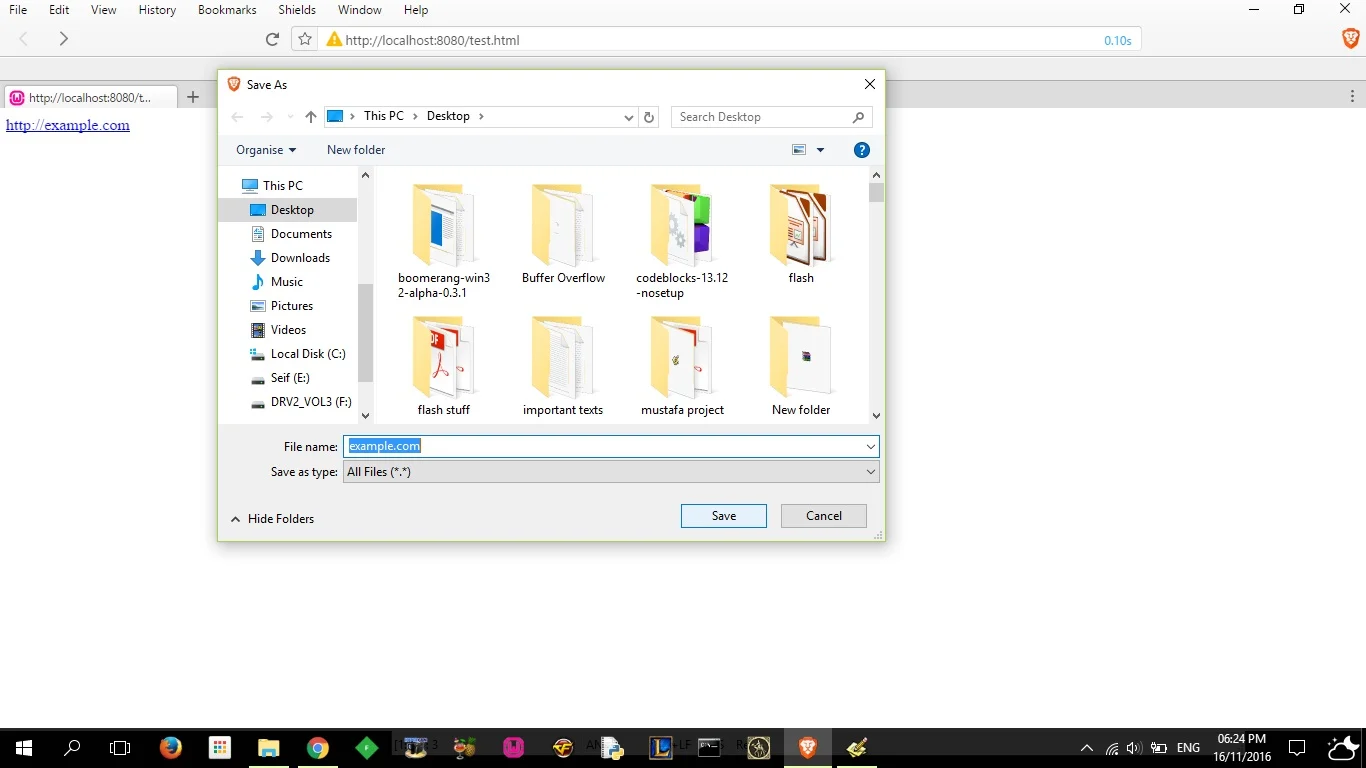
The browser sets the file extension of a downloaded file based on the URL path or domain name, so a link to a domain like example.com can be saved as a .com executable file. An attacker could use social engineering to trick a user into downloading and running a malicious .com file.
 Originally disclosed on HackerOne
- Disclosed after 9 months
Hi,
Summary:
This vulnerability is pretty simple and pretty dangerous at the same time
Almost any link the user tries to download it's extension is set according to the file extension in the path
if the path is / then it download's it according to the domain name
Eg:
[1] http://example.com/example.php
if the user downloaded the link the file type would be .php
that's not very dangerous though
[2] http://example.com/example.exe
if the user downloaded the link the file type would be .exe
Okey that's dangerous but it requires a lot of social engineering
[3] http://example.com/
if the user downloaded the link the file type would be .com
this requires less social engineering and it's pretty dangerous
why?
because .com files are executable files which may can do what .exe can do
here's links about .com files
https://en.wikipedia.org/wiki/COM_file
and the difference between .exe and .com
https://blogs.msdn.microsoft.com/oldnewthing/20080324-00/?p=23033
there's a new many domain names which may can create malicious extensions like .com
as example
.com.py
which can create a python file
any website can make his favorable extension in the domain path and when the user downloads it it will be downloaded by the extension as example http://example.com/example.exe
Products affected:
windows 10 x64 brave latest version
Steps To Reproduce:
there is 3 ways to reproduce
[1]
execute this html
<a href="http://example.com" download>http://example.com</a>
right click on the link > Save Link as... > Save
[2]
go to http://example.com
right click > Save Page as... > Save
[3]
execute this html and directly click the link it will download directly
<a href="http://example.com" download>http://example.com</a>
####Note : The none exist pages can't be downloaded
Any link the users tries to download must be .htm or .html
Supporting Material/References:
F135079
Thanks!
Attachments
Not written yet. The AI write-up for this report has not been written yet. The Original tab links to the source.
How it worked
Root cause
Likely the browser derives the file extension from the URL's path or domain name without sanitising it, allowing executable extensions like .com to be used.
Impact
An attacker could trick a user into downloading a .com executable file, which may run malicious code if opened, though it requires social engineering.
What the attacker needed
Victim uses Brave on Windows; victim downloads a link; victim opens the downloaded file
The fix
The report suggests downloaded links should be restricted to .htm or .html files.
How it was found
- Create an HTML link with a download attribute pointing to a domain such as example.com.
- Right-click the link and choose 'Save Link as...' then save.
- Alternatively, visit the domain and use 'Save Page as...' to save it.
- Alternatively, click the link directly to download it.
Explained by bugbounty.wiki with AI from the original and checked against quotes from it; it can still be wrong. Read the original before relying on a detail.
Not written yet. The AI write-up for this report has not been written yet. The Original tab links to the source.
When you download a file from a website, your browser decides what type of file it is. This report says the browser can be tricked into saving a web page as a .com file, which is a type of program that can run on Windows. If a user opens that file, it could run malicious code.
What is RCE?
Running the attacker's code on the target's servers: through command or code injection, unsafe deserialisation or template injection.




