Stored XSS on chaturbate.com (wish list)
The wish list field in a user's bio allowed CSS properties, and on some browsers like Opera or Internet Explorer, the style attribute could execute JavaScript. An attacker could inject code that runs in a victim's browser when they view the profile.

- Triaged in 6 hours
- Fixed in 33 hours
- Paid in 6 hours
- Disclosed after 20 days
Hi,
I found a stored XSS on chaturbate.com
Description
The input wish_list in the bio of a user allows him/her to enter CSS properties, however some browsers like Opera or Internet Explorer are vulnerable to XSS through the attribute style.
request
POST /accounts/editbio/ HTTP/1.1
Host: chaturbate.com
User-Agent: Mozilla/5.0 (X11; Linux x86_64; rv:56.0) Gecko/20100101 Firefox/56.0
Accept: application/json, text/javascript, */*; q=0.01
Accept-Language: en-US,en;q=0.5
Accept-Encoding: gzip, deflate
Content-Type: application/x-www-form-urlencoded
X-CSRFToken: tC7J5FySgWbyelHAfbjULIHHjcBSoaLt
X-Requested-With: XMLHttpRequest
Referer: https://chaturbate.com/p/gwen129347565/?tab=bio
Content-Length: 738
Cookie: __cfduid=d2934f3470865ee3896a47085641d896a1538487853; affkey="eJyrViopylayUlBKzU1KTVHSUVBKTEsD8dPLU/MMjSyNTcxNzUxB4gUgUSMQqwjEAjFKQAy/Co80ECc5F6wizSwlKF+pFgDhORXE"; sbr="sec:sbr13ad4f24-5041-4a4c-8750-5f9347349bdf:1gCPeH:kCQ7ZlepO2sJe-PC9TDEjeEJPdY"; csrftoken=tC7J5FySgWbyelHAfbjULIHHjcBSoaLt; xaduuid=a2ff3d56-7ff3-49bd-a599-b2518d5bac1d; __utma=242100432.1318159749.1538487857.1539770646.1539786223.23; __utmz=242100432.1538487857.1.1.utmcsr=(direct)|utmccn=(direct)|utmcmd=(none); agreeterms=1; cbv_vol=6; cbv_mute=0; cbv_scale=0; cbv_maxq=8925658; _ga=GA1.2.1318159749.1538487857; latest_linked_timestamp=1539787885610; latest_linked_username=gwen129347565; jtr=n; __utmc=242100432; sessionid=g94j5x81uh623dx5vklse77ghukz6mdm; itu=0; last_username=gwen129347565; broadcast_terms=1; __utmb=242100432.28.10.1539786223; __utmt=1
Connection: close

csrfmiddlewaretoken=tC7J5FySgWbyelHAfbjULIHHjcBSoaLt&next=%2Faccounts%2Fshowbio%2F&real_name=aaaa&birthday_month=2&birthday_day=3&birthday_year=1963&gender=f&interested_in=f&location=France&spoken_languages=English&body_type=&smoke_drink=&body_decorations=&about_me=&wish_list=bbbbbb{{media:1}}aaa
code rendered
<dd>
  <p>
    bbbbbb{{media:2}}aaa
  </p>
</dd>
PoC
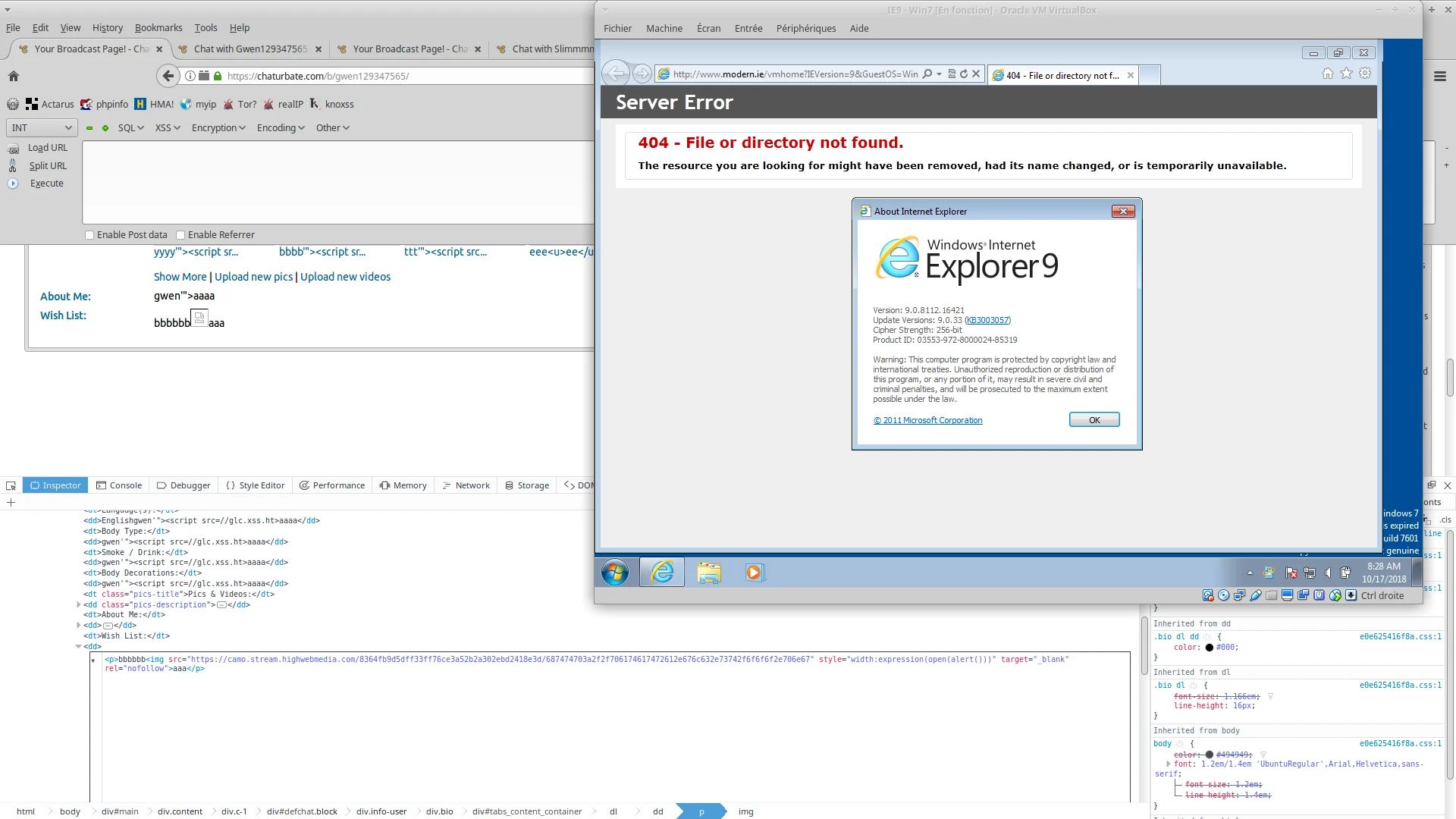
tested with Internet Explorer 9.0
Visit this link: https://chaturbate.com/p/gwen129347565/?tab=bio
Impact
- hostile code insertion
- session hijacking
- user browser corruption
Remediation
Encode special characters like ' " < >
Do not allow CSS properties
Remove keywords like expression
See also
https://www.owasp.org/index.php/Top_10_2013-A3-Cross-Site_Scripting_(XSS) https://www.owasp.org/index.php/Testing_for_CSS_Injection_(OTG-CLIENT-005)
Best regards,
Gwen
Context
Chaturbate is a live streaming site with user profiles. Each profile has a bio, and the bio editor includes a wish_list field, a free text area where a user can describe what they would like to receive. The report is about that field: it accepts input that is later rendered inside a <p> element within a <dd> block on the public bio page, and the researcher found that the input is not sanitised in a way that survives every browser.
The finding is a stored cross-site scripting issue, rated low severity, disclosed on 6 November 2018, with a bounty of 100.00 USD. The weakness class recorded for it is stored XSS.
Setup
No special tooling is described. The bio edit was made against the profile gwen129347565 through the site's own editor. The proof of concept was tested with Internet Explorer 9.0, which matters: the payload relies on a browser that executes script from a CSS style attribute. The report names Opera and Internet Explorer as the browsers vulnerable to XSS through the style attribute.
The request carries a CSRF token in both the X-CSRFToken header and the csrfmiddlewaretoken form field, plus the account's session cookie, so the edit is performed as an authenticated user against their own profile.
Finding it
The researcher noticed that the wish_list input in the bio allows the user to enter CSS properties. That alone is a styling injection, but the interesting part is that some browsers, Opera and Internet Explorer among them, are vulnerable to XSS through the style attribute. If the value of wish_list ends up inside a style attribute in the rendered page, then CSS syntax that those browsers interpret as script becomes script execution.
Exploitation
Step 1: save the payload in the bio
The bio is submitted with a POST to the edit endpoint. The request below is reproduced as it was sent, with the session material redacted.
POST /accounts/editbio/ HTTP/1.1
Host: chaturbate.com
User-Agent: Mozilla/5.0 (X11; Linux x86_64; rv:56.0) Gecko/20100101 Firefox/56.0
Accept: application/json, text/javascript, */*; q=0.01
Accept-Language: en-US,en;q=0.5
Accept-Encoding: gzip, deflate
Content-Type: application/x-www-form-urlencoded
X-CSRFToken: [redacted]
X-Requested-With: XMLHttpRequest
Referer: https://chaturbate.com/p/gwen129347565/?tab=bio
Content-Length: 738
Cookie: [redacted]
Connection: close

csrfmiddlewaretoken=[redacted]&next=%2Faccounts%2Fshowbio%2F&real_name=aaaa&birthday_month=2&birthday_day=3&birthday_year=1963&gender=f&interested_in=f&location=France&spoken_languages=English&body_type=&smoke_drink=&body_decorations=&about_me=&wish_list=bbbbbb{{media:1}}aaa
The important part is the last parameter: wish_list=bbbbbbaaa. The payload is placed between harmless text so that it is easy to spot in the rendered page. The rest of the body is ordinary profile data (name, birthday, gender, location, languages) and the next parameter points back to the bio display page. The response is not shown in the report.
Step 2: load the public bio page
The stored value is rendered on the profile's bio tab. The researcher gives the URL to visit:
https://chaturbate.com/p/gwen129347565/?tab=bio
Step 3: observe the rendered markup
The report shows the output around the injected value:
<dd>
  <p>
    bbbbbb{{media:2}}aaa
  </p>
</dd>
This is the rendered result of the payload. The surrounding text bbbbbb and aaa is intact, and the payload sits between them inside the paragraph. The report does not include the full page source, so the exact attribute the payload lands in is not shown; the description states that the input allows CSS properties and that the style attribute is the vector.
Step 4: confirm execution in a vulnerable browser
The proof of concept was tested with Internet Explorer 9.0. The proof of concept was tested with Internet Explorer 9.0, and the screenshot shows the test. The screenshot below shows the result of the test.
Root cause
The wish_list field is stored and later rendered into the bio page without encoding the characters that let the value escape its context. The researcher's remediation advice points at the two layers involved: encode special characters such as ', ", < and >, and do not allow CSS properties in the field at all. The second point is the core of the issue: the field is treated as a place where CSS is acceptable, and CSS in a style attribute is executable in some browsers. Removing keywords such as expression is the third suggestion, which targets the specific CSS construct those browsers evaluate as script.
Why the existing defences did not stop it is not described in the report.
Impact
The report lists three consequences:
- hostile code insertion
- session hijacking
- user browser corruption
The conditions are narrow. The payload executes only in browsers vulnerable to XSS through the style attribute, and the report names Opera and Internet Explorer; the proof of concept used Internet Explorer 9.0. The stored value is rendered on the profile's bio tab, so a visitor has to open that page for the script to run in their browser. Under those conditions an attacker could run code in the visitor's session, which is what makes session hijacking possible.
Fix
The report recommends three changes:
- Encode special characters such as
',",<and>. - Do not allow CSS properties in the field.
- Remove keywords such as
expression.
The report does not say which of these was implemented.
Variants to test
- Put CSS syntax into any profile field that is rendered inside a
styleattribute, and open the profile in Internet Explorer or Opera. A positive result is script execution from the stored value. - Try the same payload in fields that are rendered in other attribute contexts, such as
hrefor event handler attributes, and check whether the encoding differs per context. A positive result is a value that breaks out of the attribute and executes. - Submit the payload with harmless text on both sides, as the researcher did, to see whether the value is stored verbatim or transformed. A positive result is the payload appearing unchanged in the rendered page.
- Test whether the field filters
expressionor other CSS script constructs. A positive result is a payload containing those keywords being accepted and rendered.
Hunting notes
This kind of bug hides in free text profile fields that are later rendered into styled markup: bios, wish lists, descriptions and any field the site lets a user style. During recon, look for fields whose output appears inside a style attribute or a <style> block, and check whether the site encodes for that context or only for HTML. The signal is a field that accepts CSS-like input and reflects it back unchanged.
The researcher stored a payload in a bio, gave the URL where it renders, showed the rendered markup, and tested it with Internet Explorer 9.0 with a screenshot. That combination ties the stored value to a concrete execution path, which is what a program needs to accept a browser-specific XSS.
What happened, in plain words
Chaturbate is a live streaming site where each user has a profile page. One part of that profile is the bio, and the bio editor contains a field called wish_list, a free text box where a user can write down what they would like to receive. The researcher found that this box accepts CSS, the language used to describe how a web page looks (colours, fonts, sizes). In some browsers, notably Opera and Internet Explorer, CSS placed in a style attribute can be made to run JavaScript, the language that makes web pages interactive. So a value saved in wish_list that ends up inside a style attribute can become executable code in those browsers.
That is a stored cross-site scripting issue, usually shortened to stored XSS. "Stored" means the bad value is saved on the server and shown to anyone who later opens the page, rather than being reflected back only to the person who sent it. The report was rated low severity, disclosed on 6 November 2018, and paid a bounty of 100.00 USD.
Setting up
The report describes no special tools. The bio edit was made against the profile gwen129347565 through the site's own editor. The proof of concept was tested with Internet Explorer 9.0. That detail matters: the trick only works in a browser that treats certain CSS as script, and the report names Opera and Internet Explorer as the browsers vulnerable to XSS through the style attribute.
The request that saves the bio carries two things that prove the person sending it is logged in and is allowed to make the change. The first is a CSRF token, a short random value the site gives the browser so it can tell a genuine form submission from a forged one (CSRF stands for cross-site request forgery, where another site tries to make your browser submit a form on your behalf). The token appears twice, once in an X-CSRFToken header and once in a csrfmiddlewaretoken form field. The second is the account's session cookie, the small piece of data the browser sends with every request so the server knows which logged-in user it is talking to. Together they mean the edit is made as an authenticated user against their own profile.
Finding it
The researcher noticed that the wish_list input in the bio lets the user enter CSS properties. On its own that is only a styling injection: you can change how something looks. The interesting part is that some browsers, Opera and Internet Explorer among them, are vulnerable to XSS through the style attribute. If the value of wish_list is placed inside a style attribute in the page that is finally shown, then CSS syntax that those browsers interpret as script becomes script execution.
Exploitation
Step 1: save the payload in the bio
The bio is submitted with a POST request to the edit endpoint. A POST is the HTTP method a browser uses when it sends data to the server to be saved, as opposed to a GET, which asks for a page to be shown. The request below is reproduced as it was sent, with the session material redacted.
POST /accounts/editbio/ HTTP/1.1
Host: chaturbate.com
User-Agent: Mozilla/5.0 (X11; Linux x86_64; rv:56.0) Gecko/20100101 Firefox/56.0
Accept: application/json, text/javascript, */*; q=0.01
Accept-Language: en-US,en;q=0.5
Accept-Encoding: gzip, deflate
Content-Type: application/x-www-form-urlencoded
X-CSRFToken: [redacted]
X-Requested-With: XMLHttpRequest
Referer: https://chaturbate.com/p/gwen129347565/?tab=bio
Content-Length: 738
Cookie: [redacted]
Connection: close

csrfmiddlewaretoken=[redacted]&next=%2Faccounts%2Fshowbio%2F&real_name=aaaa&birthday_month=2&birthday_day=3&birthday_year=1963&gender=f&interested_in=f&location=France&spoken_languages=English&body_type=&smoke_drink=&body_decorations=&about_me=&wish_list=bbbbbb{{media:1}}aaa
Line by line:
POST /accounts/editbio/ HTTP/1.1is the request line: the method is POST, the path is the bio editing endpoint, and the protocol version is HTTP/1.1.Host: chaturbate.comtells the server which site the request is for, since one server can host several sites.User-Agent: ...identifies the browser and operating system that sent the request.Accept,Accept-LanguageandAccept-Encodingsay which response formats, languages and compression the browser can handle.Content-Type: application/x-www-form-urlencodedsays the body is a list ofname=valuepairs joined with&, the classic format for HTML forms.X-CSRFToken: [redacted]is the anti-forgery token in a custom header.X-Requested-With: XMLHttpRequestmarks the request as one made by page script rather than a full page load.Referersays which page the request came from, here the bio tab of the profile.Content-Length: 738is the size of the body in bytes.Cookie: [redacted]carries the session cookie and other stored values the site set earlier.Connection: closeasks the server to close the connection after the response.- The blank line separates the headers from the body.
- The body is the form data. The important part is the last parameter,
wish_list=bbbbbbaaa. The payload is placed between harmless text,bbbbbbbefore it andaaaafter it, so it is easy to spot in the rendered page. The rest is ordinary profile data: name, birthday, gender, location and languages. Thenextparameter,%2Faccounts%2Fshowbio%2F, is the URL-encoded form of/accounts/showbio/, the page to go to after saving.
The report does not show the response.
Step 2: load the public bio page
The stored value is shown on the profile's bio tab. The researcher gives the URL to visit:
https://chaturbate.com/p/gwen129347565/?tab=bio
This is the page any visitor would open to read that profile's bio. Because the value is stored, it is shown to anyone who later opens the bio page.
Step 3: observe the rendered markup
The report shows the output around the injected value:
<dd>
  <p>
    bbbbbb{{media:2}}aaa
  </p>
</dd>
Line by line:
<dd>is an HTML element used inside a description list to hold the description of a term.<p>is a paragraph.bbbbbbaaais the stored value as it appears in the page: the harmless text on both sides is intact and the payload sits between them.- The closing
</p>and</dd>end the paragraph and the description item.
This is the rendered result of the payload. The report does not include the full page source, so the exact attribute the payload lands in is not shown. The description states that the input allows CSS properties and that the style attribute is the vector.
Step 4: confirm execution in a vulnerable browser
The proof of concept was tested with Internet Explorer 9.0, and the screenshot shows the test. The screenshot below shows the result of the test.
Root cause
The wish_list field is stored and later placed into the bio page without encoding the characters that would let the value escape the place it is put. Encoding here means turning a character into a safe stand-in, for example writing < as <, so the browser shows it as text instead of treating it as markup. The researcher's remediation advice points at two layers: encode special characters such as ', ", < and >, and do not allow CSS properties in the field at all. The second point is the core of the issue: the field is treated as a place where CSS is acceptable, and CSS in a style attribute is executable in some browsers. Removing keywords such as expression is the third suggestion, aimed at the specific CSS construct those browsers evaluate as script.
The report does not describe why the existing defences did not stop it.
Impact
The report lists three consequences:
- hostile code insertion
- session hijacking
- user browser corruption
Session hijacking means taking over someone's logged-in session, for example by stealing their session cookie, so the attacker can act as that user. The conditions are narrow. The payload runs only in browsers vulnerable to XSS through the style attribute, and the report names Opera and Internet Explorer; the proof of concept used Internet Explorer 9.0. The stored value is shown on the profile's bio tab, so a visitor has to open that page for the script to run in their browser. Under those conditions an attacker could run code in the visitor's session, which is what makes session hijacking possible.
Fix
The report recommends three changes:
- Encode special characters such as
',",<and>. - Do not allow CSS properties in the field.
- Remove keywords such as
expression.
Variants to test
- Put CSS syntax into any profile field that is rendered inside a
styleattribute, and open the profile in Internet Explorer or Opera. A positive result is script execution from the stored value. - Try the same payload in fields rendered in other attribute contexts, such as
hrefor event handler attributes, and check whether the encoding differs per context. A positive result is a value that breaks out of the attribute and executes. - Submit the payload with harmless text on both sides, as the researcher did, to see whether the value is stored verbatim or transformed. A positive result is the payload appearing unchanged in the rendered page.
- Test whether the field filters
expressionor other CSS script constructs. A positive result is a payload containing those keywords being accepted and rendered.
Hunting notes
This kind of bug hides in free text profile fields that are later rendered into styled markup: bios, wish lists, descriptions and any field the site lets a user style. During recon, look for fields whose output appears inside a style attribute or a <style> block, and check whether the site encodes for that context or only for HTML. The signal is a field that accepts CSS-like input and reflects it back unchanged.
The researcher stored a payload in a bio, gave the URL where it renders, showed the rendered markup, and tested it with Internet Explorer 9.0 with a screenshot. That combination ties the stored value to a concrete execution path, which is what a program needs to accept a browser-specific XSS.
Glossary
- API: a defined way for one piece of software to talk to another, like a service counter where you make a request and get a defined answer.
- Attribute: a setting written inside an HTML tag, such as
styleorhref, that changes how the element behaves or looks. - Bio: the free text description on a user's profile page.
- Bounty: a payment a company makes to someone who reports a valid security bug.
- Browser: the program you use to open web pages, such as Firefox, Opera or Internet Explorer.
- Cookie: a small piece of data a site stores in your browser and receives back on each request, often used to remember that you are logged in.
- CSRF token: a random value added to a form or request so the server can tell a genuine submission from one forged by another site.
- CSS: the language that describes how a web page looks, such as colours, fonts and sizes.
- CVSS: a standard scoring system for the severity of a security bug.
- DOM: the tree of elements a browser builds from an HTML page and that scripts can read and change.
- Encoding: turning characters into safe stand-ins, for example
<into<, so they are shown as text and not treated as markup. - Endpoint: a specific URL on a server that accepts a particular kind of request.
expression: a CSS construct that some older browsers evaluate as script.- GET: the HTTP method used to ask for a page or resource to be shown.
- Header: a line of extra information sent with an HTTP request or response, such as
CookieorContent-Type. - HTML: the language that describes the structure of a web page, such as paragraphs and lists.
- HTTP: the protocol browsers and servers use to exchange requests and responses.
- JavaScript: the programming language that makes web pages interactive and that runs in the browser.
- Payload: the piece of input an attacker sends to try to trigger a bug.
- POST: the HTTP method used to send data to the server to be saved or processed.
- Recon: the information-gathering phase before attacking, where you look at how a site is built.
- Reflected XSS: XSS where the bad value is sent back only in the response to the person who sent it, not stored.
- Rendered: turned from source code into what the browser actually displays.
- Sanitise: clean input so that dangerous characters or constructs cannot do harm.
- Session: the period during which a site remembers you as logged in, usually tracked by a cookie.
- Session hijacking: taking over someone's logged-in session, for example by stealing their session cookie.
- Severity: how serious a bug is judged to be, often low, medium, high or critical.
- Stored XSS: cross-site scripting where the bad value is saved on the server and shown to later visitors.
- URL-encoded: a way of writing characters in a URL so they are safe to send, for example
%2Ffor/. - User-Agent: a header that identifies the browser and operating system making a request.
- XSS (cross-site scripting): a bug where an attacker gets their own code to run in another person's browser through a website.
wish_list: the bio field where a user describes what they would like to receive.