Multiple Vulnerabilities In Concrete CMS – Part2 (PrivEsc/SSRF/etc)
A limited-privilege user could move their group under the Administrators group via an endpoint that lacked permission checks, gaining full admin access. The file-download feature allowed SSRF, which was bypassed to reach internal hosts and, via DNS rebinding, the cloud metadata service to steal IAM credentials; password reset emails could also be poisoned via the Host header.
 Published on fortbridge.co.uk
We have previously wrote about Concrete CMS here. In that post we described how we managed to exploit a double race condition vulnerability in the file upload functionality in order to obtain remote command execution.
The full write-up lives on its author's site
It belongs to its author, so we link to it rather than copy it. The other two tabs are our own rewrites, checked against it.
Context
Concrete CMS is a content management system whose control panel gives editors a set of file and content management features. Two of those features matter here. The first is group management: user groups form a hierarchy and inherit permissions from one another, so a group placed beneath another group is meant to pick up that parent's privileges. The second is a file download feature that lets an editor fetch a file from a remote server and save it locally. That second feature is, as the author puts it, an SSRF by design: the server makes an outbound request to a URL the user supplies.
The research described here was carried out at the end of the previous year during a penetration test for a customer. It follows an earlier post that covered a double race condition in the file upload functionality leading to remote command execution. This part covers a privilege escalation, the SSRF and its bypasses, and password reset poisoning.
Setup
The testing started from a user with limited privileges, in the "Editor" role. The tools used were Burp Suite, including its Collaborator feature for out-of-band callbacks, and a DNS rebinding service provided by emil_lerner. The SSRF work assumed that the target instance had already been hardened: the report notes that it was obvious the SSRF had been exploited previously and that mitigations were now in place. The cloud-specific steps involve an AWS instance metadata service and IAM role.
Finding it
The privilege escalation idea came directly from the group hierarchy. If groups inherit permissions from one another, what happens if the low-privileged "Editors" group is moved underneath "Administrators"? If the move is permitted, the Editors should inherit the administrators' privileges.
The control panel contains a feature that downloads a file from a remote server and saves it locally, and the first thing actually exploited was this SSRF rather than the upload race condition. The question in this post was how far the existing mitigations could be pushed.
Exploitation
Step 1: try to move Editors under Administrators
The first attempt was to move the "Editors" group under the "Administrators" group.
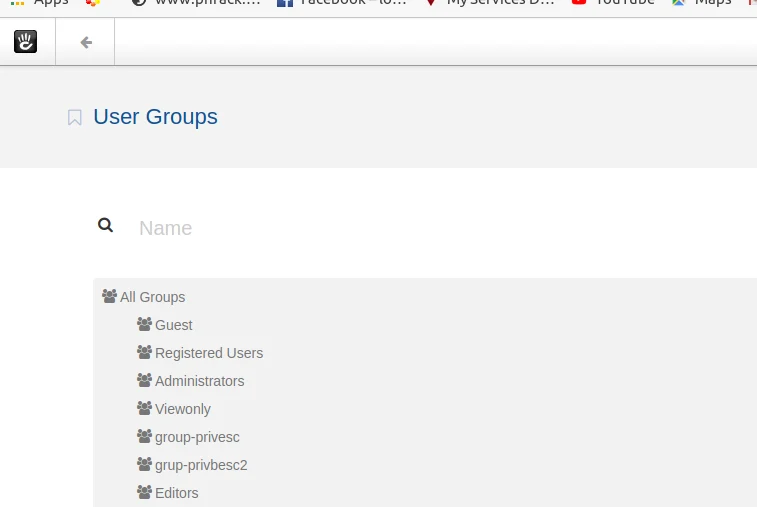
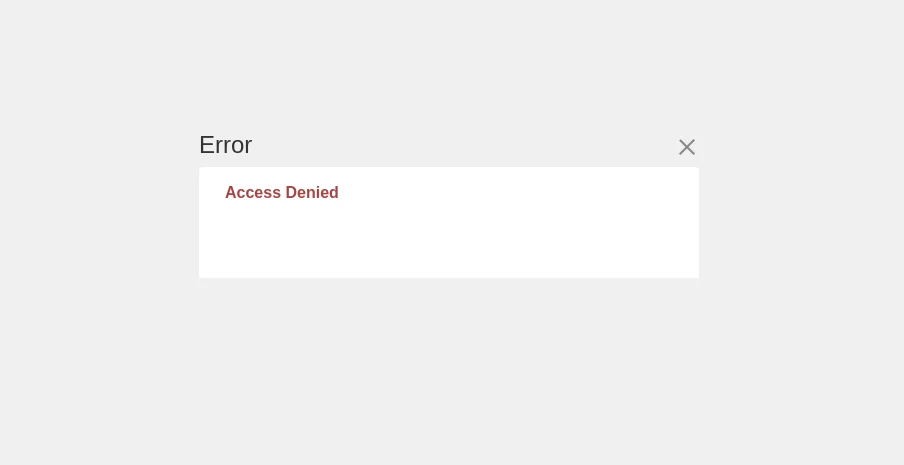
The attempt failed. The backend checked the user's permissions for this operation, so a limited user could not perform the move through this path.
Step 2: repeat the move against a second endpoint
A second endpoint was found that performed the same operation. The reasoning was simple: are permission checks consistent on all endpoints?
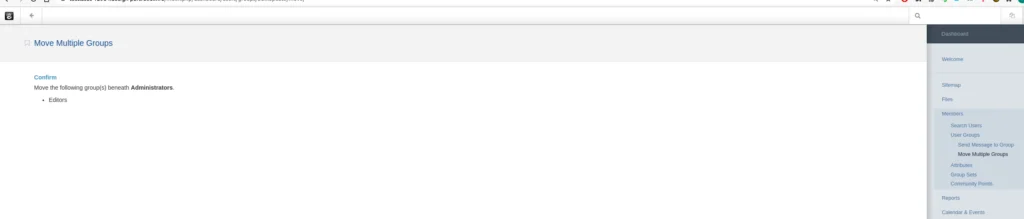
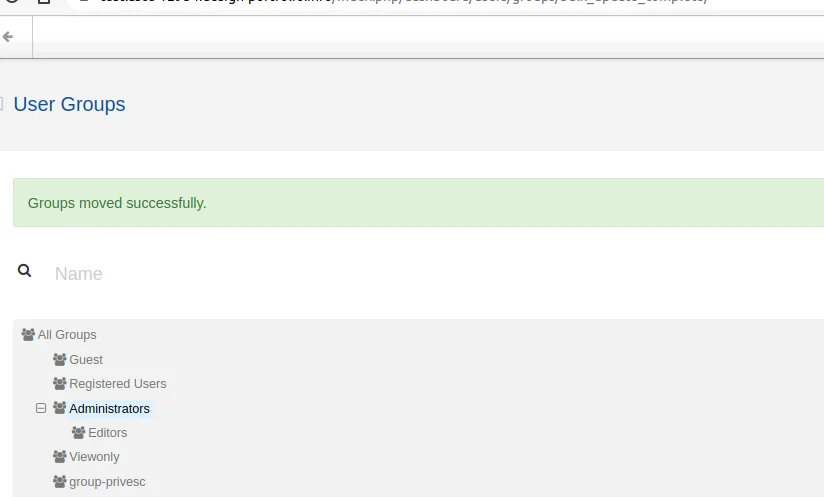
This endpoint did not implement the permission checks. Using the low-privileged "Editor" account, the "Editors" group was moved under "Administrators" and inherited their privileges.
Step 3: refresh the session and confirm administrator access
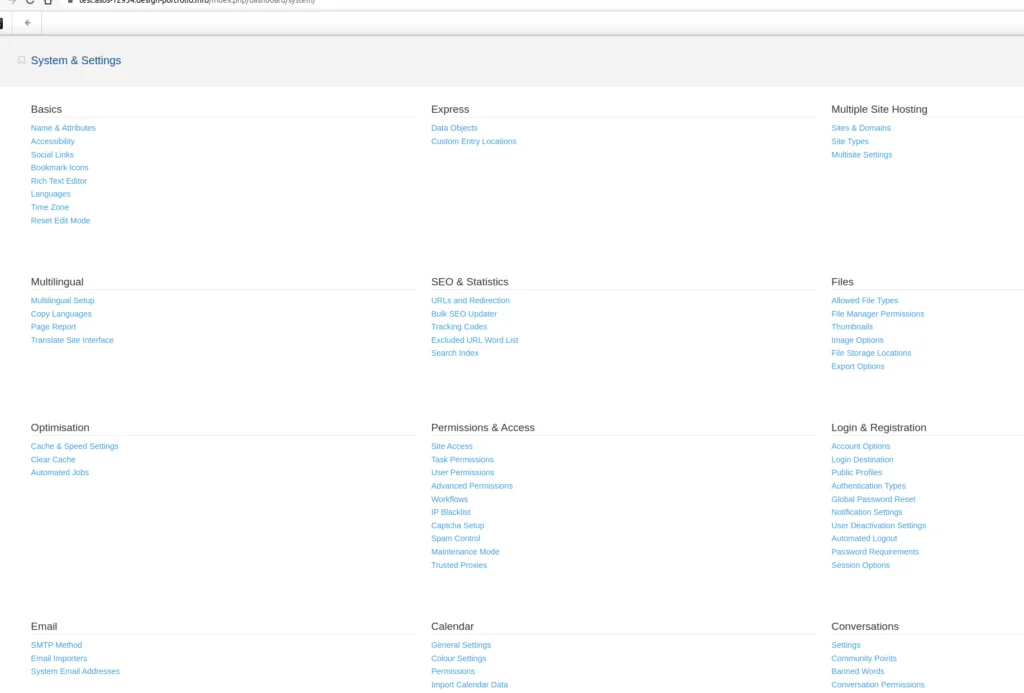
The new permissions did not apply to the existing session. Logging out and back in refreshed the session and the permissions, and the account was then an "Administrator" with access to the entire control panel.
Step 4: confirm the SSRF with an out-of-band callback
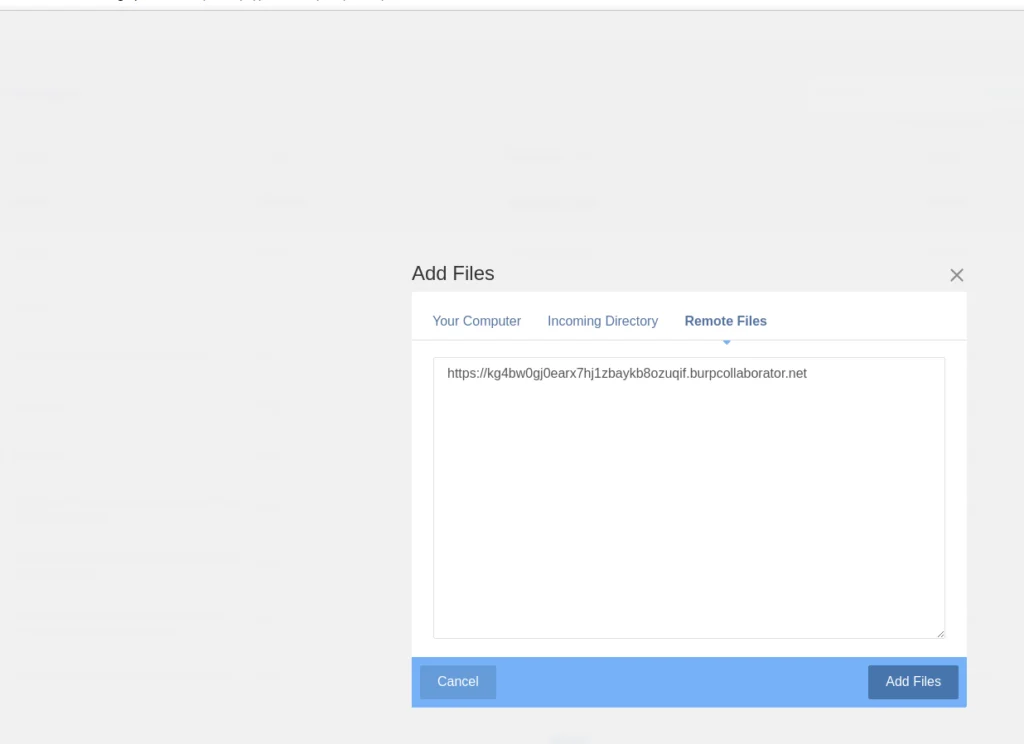
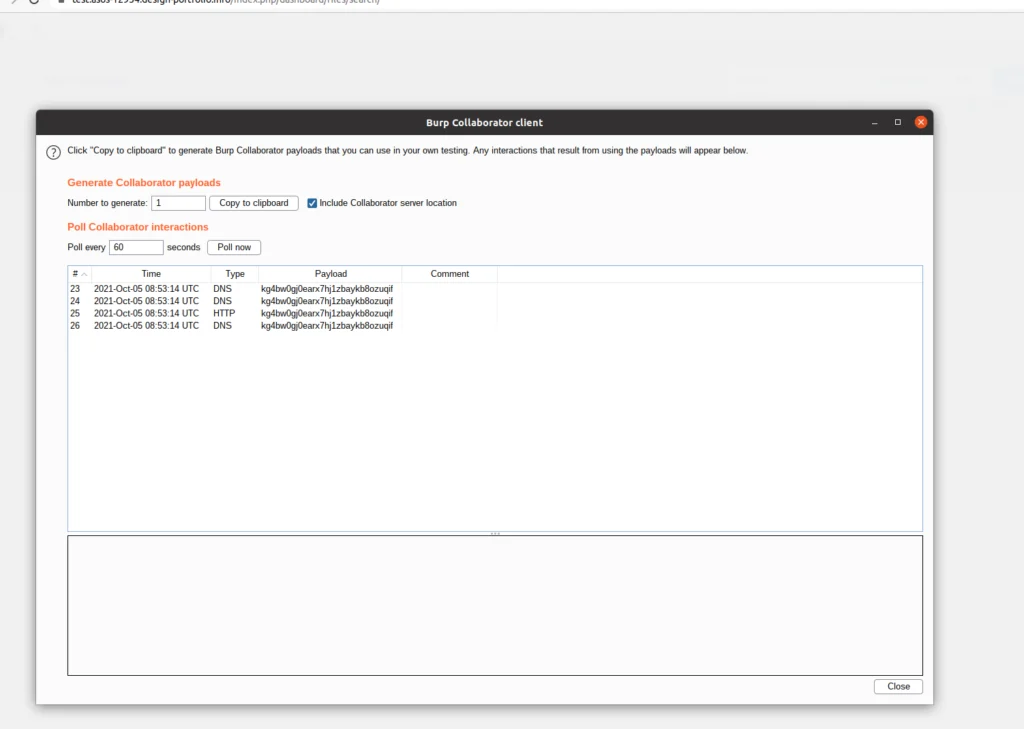
The download feature was exercised with a Collaborator payload from Burp Suite. A callback arrived immediately, confirming that the server made the outbound request.
Step 5: probe the mitigations
The first obstacle was that the AWS instance metadata address was blocked.
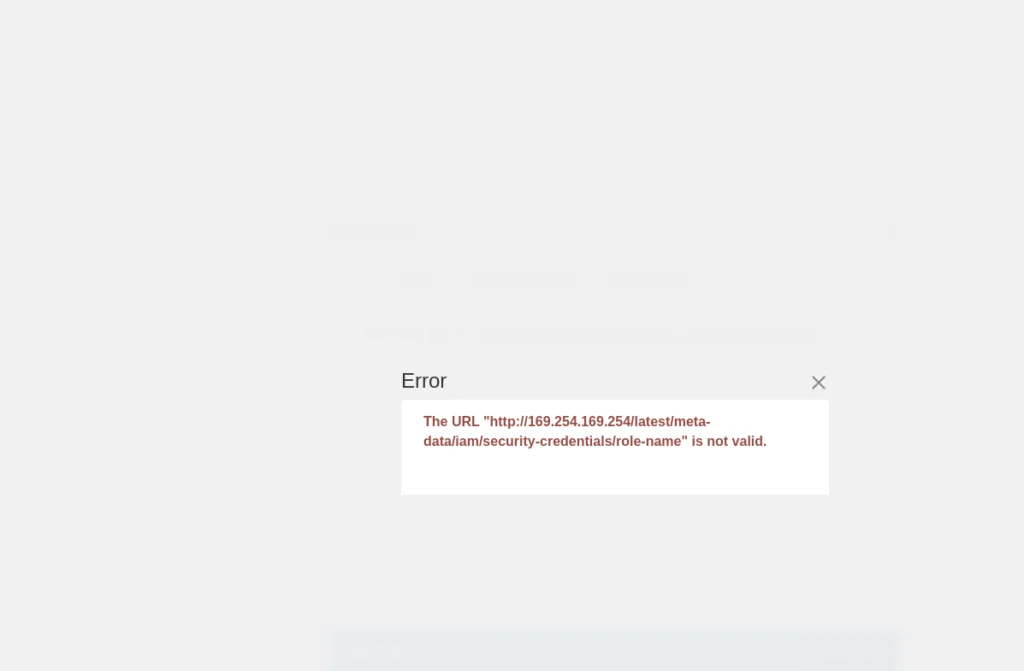
Two further restrictions applied: certain file extensions, including .php and others, were checked against a blacklist, and redirects could not be used.
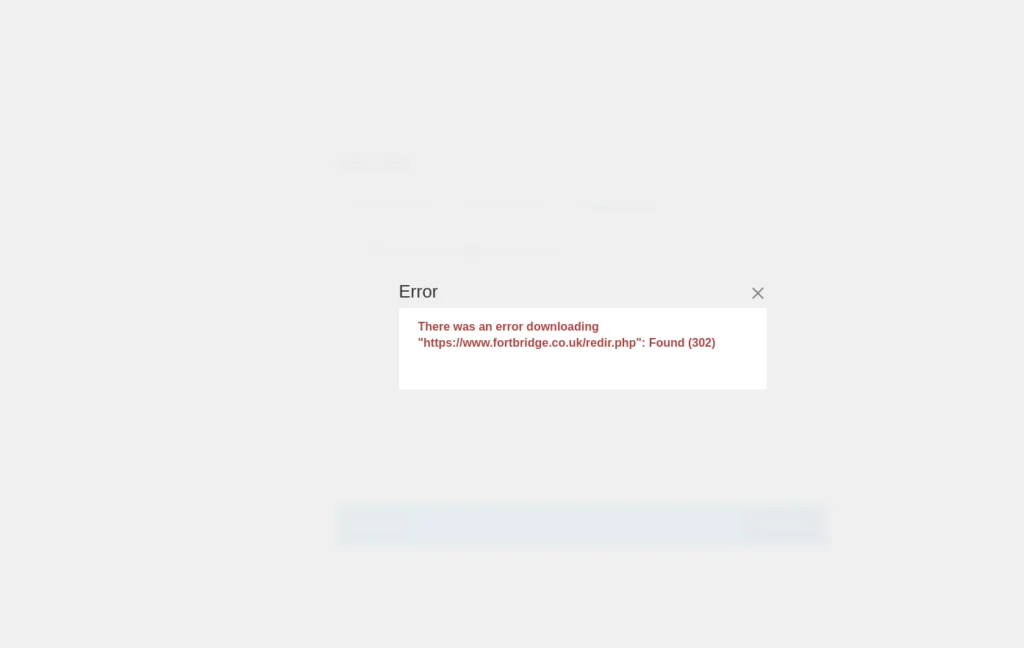
Step 6: bypass the extension blacklist and pivot into the LAN
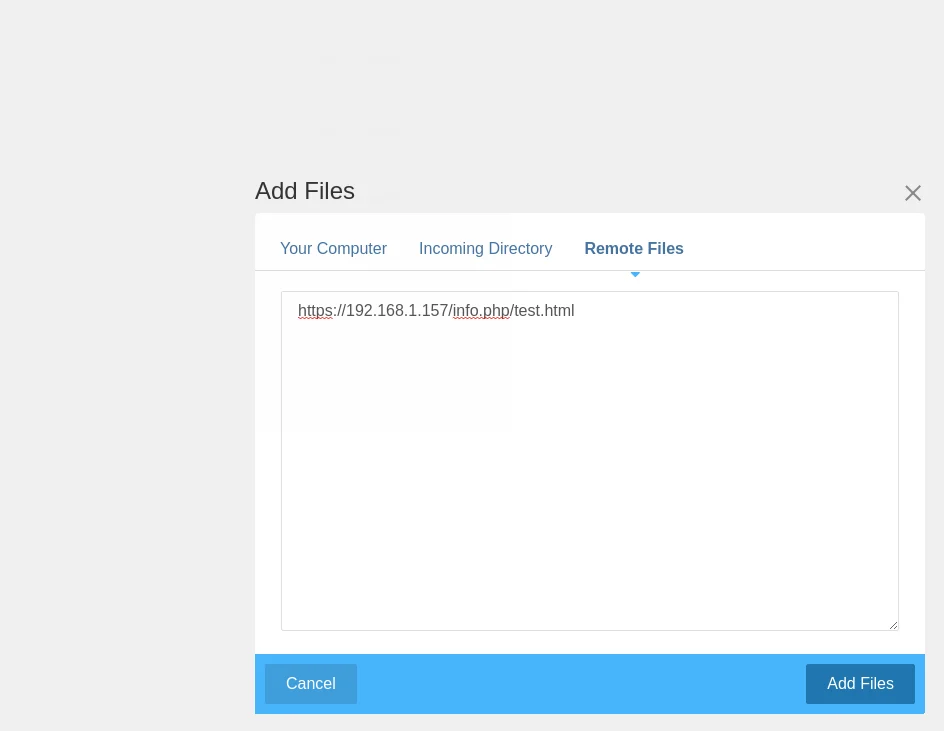
The extension blacklist was bypassed with a well-known PHP trick: a path such as /info.php/test.html still requests info.php, but the CMS considers .html to be the requested extension, which is whitelisted, while the server actually executes the .php file. With that, the SSRF could reach internal web servers.
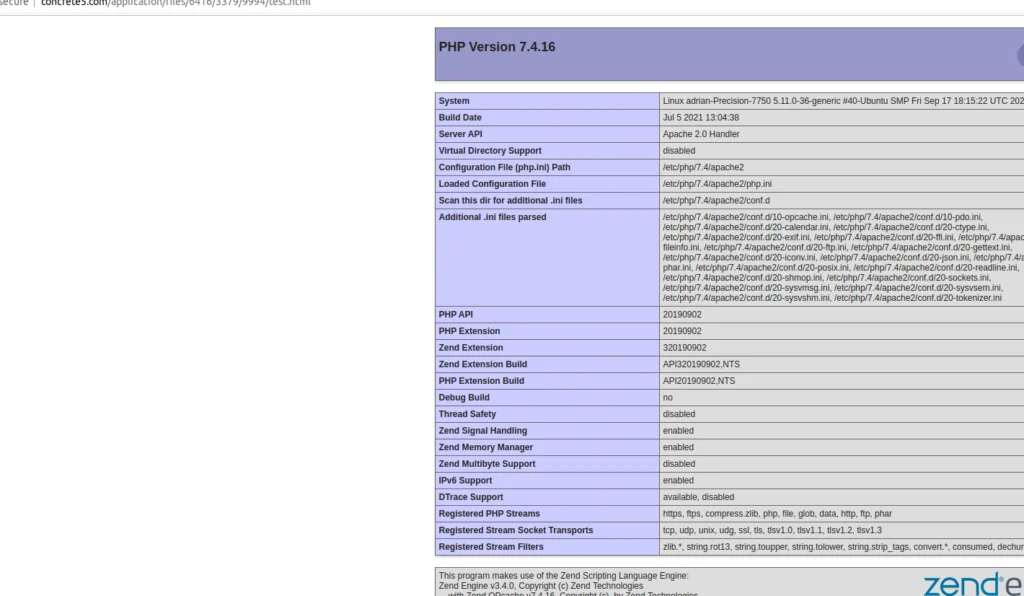
This is enough to enumerate and fingerprint internal web applications. In the example, the output of a typical phpinfo file stored on an internal web server is read through the SSRF.
Step 7: reach the instance metadata with DNS rebinding
The next goal was the instance metadata server and the IAM credentials behind it. The metadata address was blocked, so DNS rebinding was used instead, via the service provided by emil_lerner. Because the CMS performs multiple validations, this is effectively a race condition between the time of check and the time of use, and two or three requests may be needed before one succeeds.
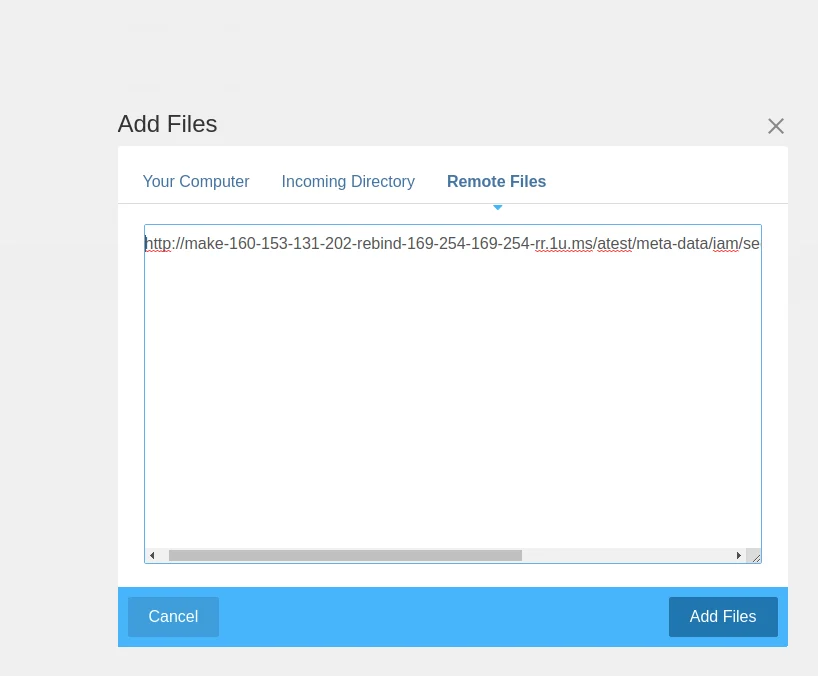
The AWS IAM role used by the instance was retrieved:
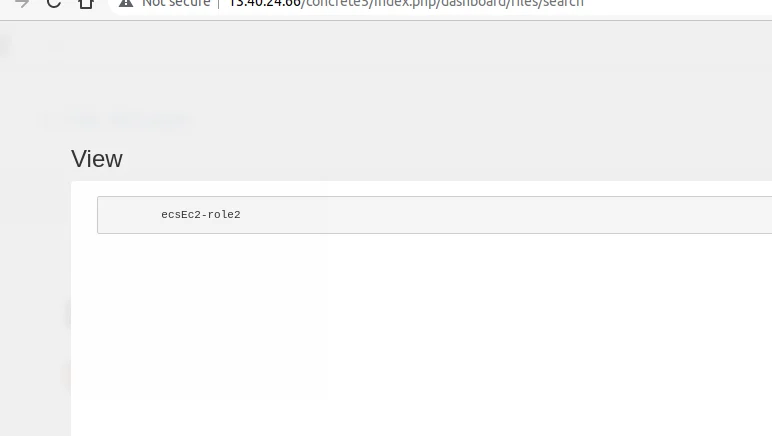
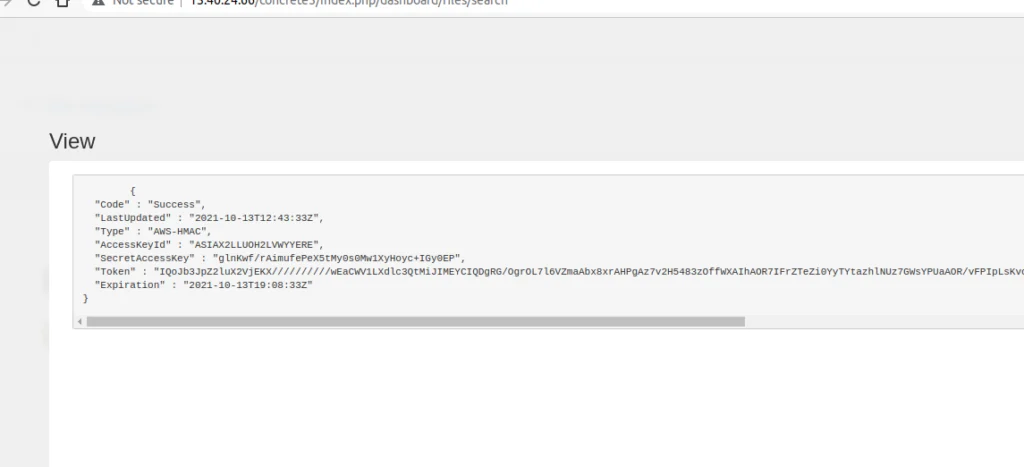
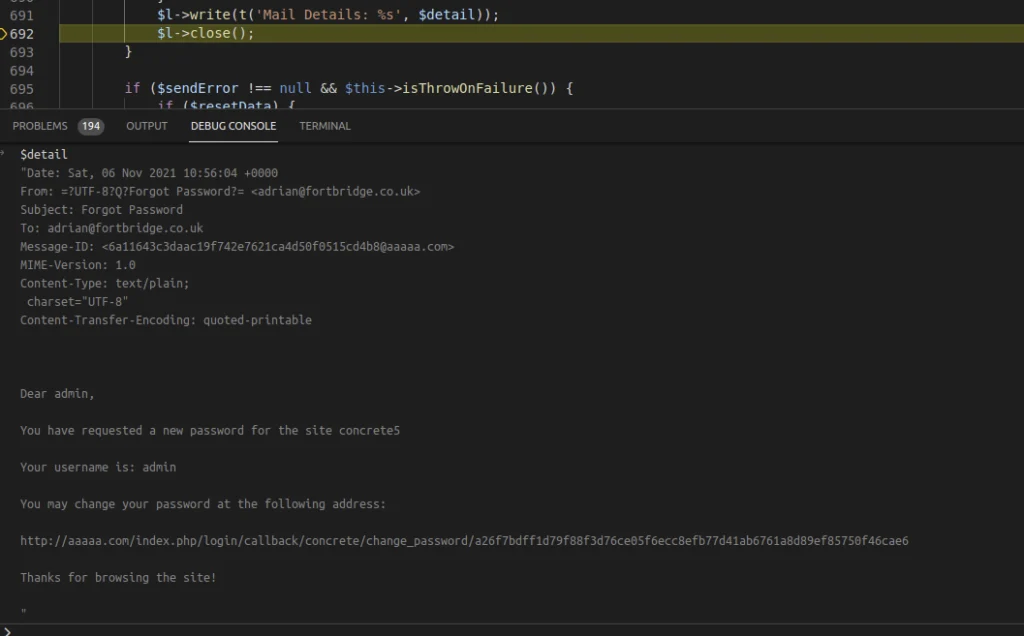
Step 8: poison the password reset host header
The same class of attack had been written about previously against Drupal and Joomla, and it worked here too. Poisoning the host header on the password reset request:
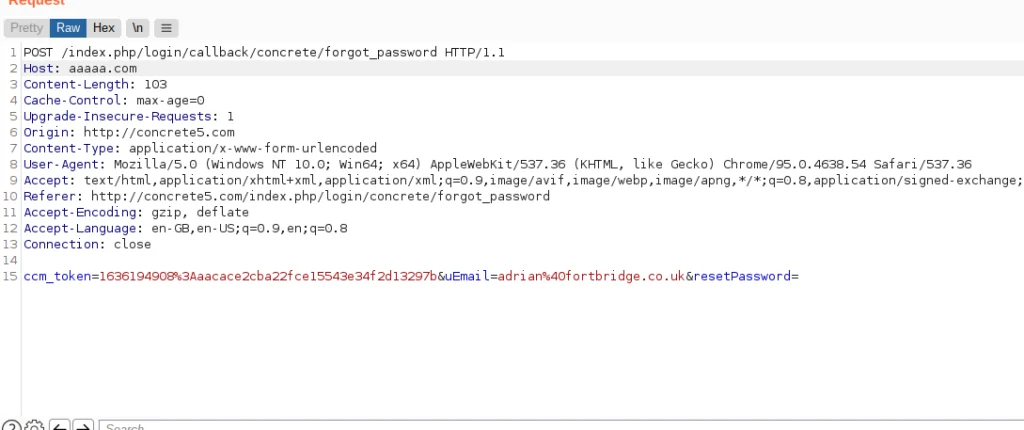
results in a poisoned password reset link:
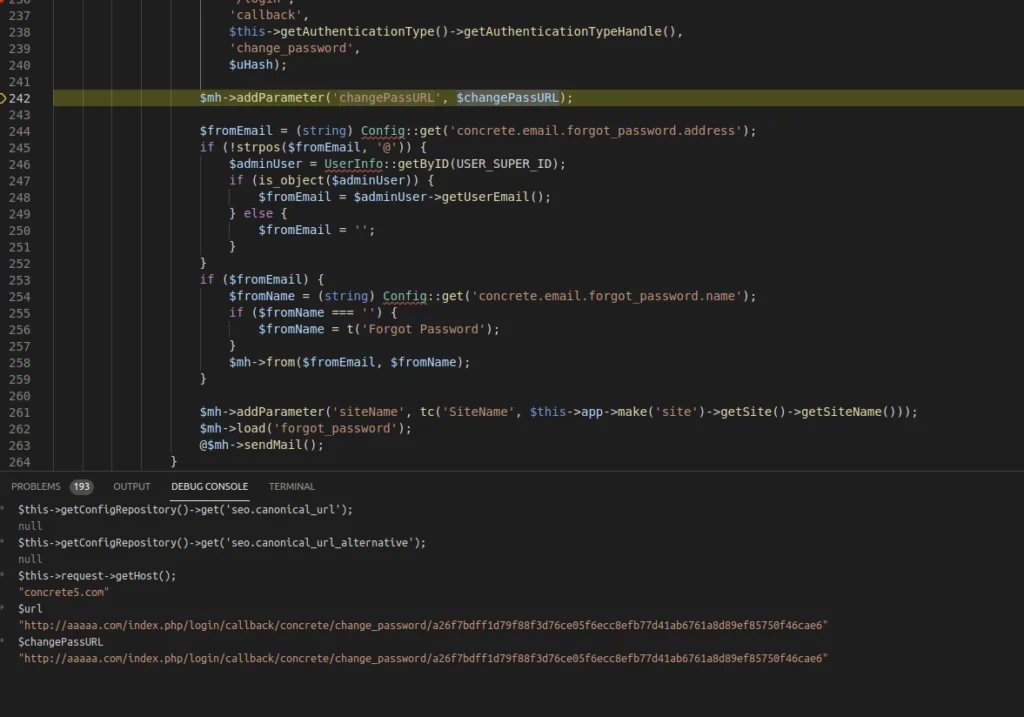
and the email delivered to the victim contains the poisoned link:
Root cause
The privilege escalation is an inconsistency between endpoints: one endpoint that moves a group in the hierarchy enforces permission checks, and a second endpoint performing the same operation does not. The hierarchy itself is not the flaw; inheritance is intended behaviour, and the first endpoint shows the developers anticipated the risk. The second endpoint simply lacked the same check, so a user with very limited permissions could grant their own group administrator privileges.
The SSRF is by design in the download feature, and the mitigations were layered: a block on the instance metadata address, a blacklist of dangerous file extensions, and a ban on redirects. Each of these is a check on the URL or on the response rather than a restriction on where the server may connect. The extension blacklist is defeated by path handling in PHP, where a trailing path segment determines the extension the CMS sees while the server still executes the earlier .php component. The metadata block is defeated by DNS rebinding, which makes the hostname resolve to an allowed address at check time and to the metadata address at request time; the multiple validations make this a race, hence the need for repeated requests. The password reset poisoning works because the application builds the reset link from the incoming host header, so a modified header produces a poisoned link.
Impact
A user holding only the "Editor" role could move their own group beneath "Administrators" and, after re-authenticating, obtain full administrator access to the control panel. The precondition is that such a low-privileged account exists and that the vulnerable endpoint is reachable by it.
Through the SSRF, an editor could make the server issue requests to arbitrary destinations, subject to the mitigations in place. With the extension bypass, internal web servers could be reached, enumerated and fingerprinted, and a phpinfo page read. With DNS rebinding, the AWS instance metadata could be reached and the instance's IAM role and keys retrieved. The report describes the metadata server and IAM credentials as the holy grail in cloud environments.
Password reset poisoning lets an attacker cause a victim's reset email to carry a link pointing at a host the attacker controls. The report does not describe the follow-on steps beyond the poisoned email.
Fix
The Concrete CMS team fixed the SSRF and privilege escalation vulnerabilities; versions 8.5.7 and 9.0.1 or later should be used. For the password reset poisoning, the recommendation is to set the canonical URL in the Concrete CMS admin panel, so that reset links are built from a configured value rather than from the request's host header. The report also points to the project's configuration best practices page for further hardening guidance.
Variants to test
- Duplicate endpoints for privileged operations. Enumerate every endpoint that changes group membership, roles or hierarchy, and replay the same operation from a low-privileged account against each one. A positive result is a successful change that the primary endpoint rejects, followed by inherited privileges after re-authentication.
- Extension blacklists with path tricks. Against any download or fetch feature, try paths where a whitelisted extension follows a slash after an executable one, such as
/info.php/test.html. A positive result is the CMS accepting the URL while the server executes the PHP file. - Metadata blocks with DNS rebinding. Where the metadata address is blocked, point a rebinding hostname at it and send the request several times. A positive result is a response containing the IAM role name or credentials.
- Host header in reset flows. Send a password reset request with a modified host header and inspect the resulting email. A positive result is a reset link pointing at the attacker-supplied host.
- SSRF for internal enumeration. Use the fetch feature against internal addresses and read responses to fingerprint services. A positive result is content from an internal web server, such as a phpinfo page.
What happened, in plain words
Concrete CMS is a piece of software that lets people build and run websites. It has a control panel, a private area where people with accounts manage pages, files and users. Different people get different levels of access, called roles. An "Editor" can do some things; an "Administrator" can do everything.
The researchers were hired to test a customer's Concrete CMS installation. They started with a low-privileged Editor account and found three separate problems:
- Privilege escalation: they found a way to give their own low-privileged group the same powers as the Administrators, so a normal editor became a full administrator.
- SSRF (server-side request forgery): a feature that downloads files from other servers could be tricked into making the CMS server contact machines it should not reach, including internal servers and the cloud provider's secret metadata service.
- Password reset poisoning: by changing one line in a password reset request, they could make the reset email contain a link pointing at a server they controlled, so the victim's reset token would be sent to them.
The report walks through each one in the order they were found. Below, every step is explained from scratch, including the tools and the small pieces of code.
Background: what Concrete CMS is and what the features do
A content management system (CMS) is software that lets non-programmers publish and edit a website through a web browser. Concrete CMS is one such product. Its control panel is the private admin area, reached by logging in.
Two features of the control panel matter here:
- User groups. Accounts are placed into groups such as "Editors" or "Administrators". Groups are arranged in a hierarchy, like folders inside folders. A group placed underneath another group inherits that parent's permissions. Think of a company: if the whole "Marketing" department is given access to a building, every person moved into Marketing gets that access automatically. Inheritance is a convenience, not a bug.
- File download from a remote server. An editor can tell the CMS "go and fetch this file from that web address and save it here". The CMS server then makes an outgoing request to the address the user supplied. This is useful, but it also means the server can be told to visit places the user cannot reach directly.
That second feature is what security people call SSRF by design: the server is supposed to make requests on the user's behalf, so the risk is built into the feature itself. The job is to limit where those requests can go.
The setup
The testing started from a user account with limited privileges, in the "Editor" role. The tools used were:
- Burp Suite, a program that sits between a browser and a website so a tester can read and modify every request and response. Think of it as a transparent proxy: the browser talks to Burp, Burp talks to the website, and the tester can edit anything in between.
- Burp Collaborator, a feature of Burp that gives the tester a unique, throwaway domain name and records any request that arrives at it. If the target server can be made to contact that domain, the Collaborator records the visit. This is how you prove that a server, not your browser, made a request.
- A DNS rebinding service provided by emil_lerner. DNS is the internet's phone book: it turns a name like
example.cominto a numeric address. DNS rebinding is a technique where a name resolves to one address the first time it is looked up and to a different address later. It is used to slip past checks that look at the name once and then trust it.
The report notes it was obvious the SSRF had been exploited previously and that mitigations were now in place. The cloud-specific steps assume the CMS runs on AWS (Amazon Web Services) and that the server can reach the instance metadata service, a special internal address that cloud servers use to learn about themselves and to obtain temporary credentials.
Finding it
The privilege escalation idea
The idea came straight from how groups work. If groups inherit permissions from their parents, what happens if the low-privileged "Editors" group is moved underneath "Administrators"? If the move is allowed, the Editors should inherit the administrators' powers. That is the whole hypothesis: no code reading, just a question about intended behaviour.
The SSRF idea
The control panel lets an editor fetch a file from a remote server and save it locally, and the first thing actually exploited was this SSRF, not the upload race condition covered in part 1. The question in this post was how far the existing mitigations could be pushed.
Exploitation
Step 1: try to move Editors under Administrators
The first attempt was to move the "Editors" group under the "Administrators" group.
The attempt failed. The backend checked the user's permissions for this operation, so a limited user could not perform the move through this path. In plain terms: the developers had thought about this exact trick and put a guard on the door.
Step 2: repeat the move against a second endpoint
A second endpoint was found that performed the same operation. An endpoint is one specific address on a website that does one specific job, like a counter in a bank: different counters, same kind of transaction. The reasoning was simple: are permission checks consistent on all endpoints? If one counter checks your ID and another does not, the second one is the way in.
This endpoint did not implement the permission checks. Using the low-privileged "Editor" account, the "Editors" group was moved under "Administrators" and inherited their privileges.
Step 3: refresh the session and confirm administrator access
The new permissions did not apply to the existing session. A session is the server's memory of who you are after you log in; it is usually carried in a cookie, a small piece of data the browser stores and sends back with every request. Think of a session like a wristband at an event: you get it at the door, and staff check it rather than your ID. The wristband you were given as an Editor still said "Editor", so logging out and back in issued a new one that said "Administrator". The account then had access to the entire control panel.
Step 4: confirm the SSRF with an out-of-band callback
The download feature was exercised with a Collaborator payload from Burp Suite. A payload here just means the value placed into the request, in this case the Collaborator domain. An out-of-band callback means the proof of the request arrives through a different channel than the normal response: the target server contacts the Collaborator, and the Collaborator tells the tester. A callback arrived immediately, confirming that the server made the outbound request.
Step 5: probe the mitigations
The first obstacle was that the AWS instance metadata address was blocked. The instance metadata service is an internal address that a cloud server can query to learn its own configuration and to obtain temporary credentials. Blocking it is a sensible mitigation, because reaching it is often the goal of an SSRF.
Two further restrictions applied: certain file extensions, including .php and others, were checked against a blacklist (a list of things that are forbidden), and redirects could not be used. A redirect is when a web server answers "not here, go to this other address instead"; allowing redirects would let an attacker point at an allowed address that then bounces the request to a forbidden one.
Step 6: bypass the extension blacklist and pivot into the LAN
The extension blacklist was bypassed with a well-known PHP trick: a path such as /info.php/test.html still requests info.php, but the CMS considers .html to be the requested extension, which is whitelisted, while the server actually executes the .php file. In plain words: the CMS reads the end of the address and sees a harmless .html; the web server reads the middle and runs the .php. Two programs, two readings of the same string.
With that, the SSRF could reach internal web servers. A LAN (local area network) is the private network inside an organisation. "Pivoting" means using one compromised position to reach another, like using a receptionist's phone to call an internal extension you could not dial from outside.
This is enough to enumerate and fingerprint internal web applications. Enumerating means listing what is there; fingerprinting means working out what software and version each thing is, from its responses. In the example, the output of a typical phpinfo file stored on an internal web server is read through the SSRF. A phpinfo page is a diagnostic page that PHP (a programming language used by many websites) can produce; it lists configuration details and is a gift to an attacker.
Step 7: reach the instance metadata with DNS rebinding
The next goal was the instance metadata server and the IAM credentials behind it. IAM (Identity and Access Management) is AWS's system for permissions; an IAM role is a set of permissions attached to a server, and the credentials behind it are what the server uses to act in the cloud. Stealing them can mean acting as that server.
The metadata address was blocked, so DNS rebinding was used instead, via the service provided by emil_lerner. Because the CMS performs multiple validations, this is effectively a race condition between the time of check and the time of use: the name is checked once and used a moment later, and the attacker tries to make the answer change in between. That is why two or three requests may be needed before one succeeds.
The AWS IAM role used by the instance was retrieved:
Step 8: poison the password reset host header
The same class of attack had been written about previously against Drupal and Joomla, and it worked here too. The Host header is a line in every HTTP request that says which website the browser is asking for; it exists because one server can host many sites. If an application builds links from that header instead of from a configured value, an attacker who can change the header can change the links.
Poisoning the host header on the password reset request:
results in a poisoned password reset link:
and the email delivered to the victim contains the poisoned link:
Root cause
The privilege escalation is an inconsistency between endpoints: one endpoint that moves a group in the hierarchy enforces permission checks, and a second endpoint performing the same operation does not. The hierarchy itself is not the flaw; inheritance is intended behaviour, and the first endpoint shows the developers anticipated the risk. The second endpoint simply lacked the same check, so a user with very limited permissions could grant their own group administrator privileges.
The SSRF is by design in the download feature, and the mitigations were layered: a block on the instance metadata address, a blacklist of dangerous file extensions, and a ban on redirects. Each of these is a check on the URL or on the response rather than a restriction on where the server may connect. The extension blacklist is defeated by path handling in PHP, where a trailing path segment determines the extension the CMS sees while the server still executes the earlier .php component. The metadata block is defeated by DNS rebinding, which makes the hostname resolve to an allowed address at check time and to the metadata address at request time; the multiple validations make this a race, hence the need for repeated requests. The password reset poisoning works because the application builds the reset link from the incoming host header, so a modified header produces a poisoned link.
Impact
A user holding only the "Editor" role could move their own group beneath "Administrators" and, after re-authenticating, obtain full administrator access to the control panel. The precondition is that such a low-privileged account exists and that the vulnerable endpoint is reachable by it.
Through the SSRF, an editor could make the server issue requests to arbitrary destinations, subject to the mitigations in place. With the extension bypass, internal web servers could be reached, enumerated and fingerprinted, and their content read, including a phpinfo page. With DNS rebinding, the AWS instance metadata could be reached and the instance's IAM role and keys retrieved. The report describes the metadata server and IAM credentials as the holy grail in cloud environments.
Password reset poisoning lets an attacker cause a victim's reset email to carry a link pointing at a host the attacker controls. The report does not describe the follow-on steps beyond the poisoned email.
Fix
The Concrete CMS team fixed the SSRF and privilege escalation vulnerabilities; versions 8.5.7 and 9.0.1 or later should be used. For the password reset poisoning, the recommendation is to set the canonical URL in the Concrete CMS admin panel. A canonical URL is the one official address of the site, configured by the owner; reset links are then built from that value rather than from the request's host header. The report also points to the project's configuration best practices page for further hardening guidance.
Variants to test
- Duplicate endpoints for privileged operations. Enumerate every endpoint that changes group membership, roles or hierarchy, and replay the same operation from a low-privileged account against each one. A positive result is a successful change that the primary endpoint rejects, followed by inherited privileges after re-authentication.
- Extension blacklists with path tricks. Against any download or fetch feature, try paths where a whitelisted extension follows a slash after an executable one, such as
/info.php/test.html. A positive result is the CMS accepting the URL while the server executes the PHP file. - Metadata blocks with DNS rebinding. Where the metadata address is blocked, point a rebinding hostname at it and send the request several times. A positive result is a response containing the IAM role name or credentials.
- Host header in reset flows. Send a password reset request with a modified host header and inspect the resulting email. A positive result is a reset link pointing at the attacker-supplied host.
- SSRF for internal enumeration. Use the fetch feature against internal addresses and read responses to fingerprint services. A positive result is content from an internal web server, such as a phpinfo page.
Glossary
- API: a defined way for one piece of software to ask another to do something, like a service counter with fixed forms.
- AWS: Amazon Web Services, a cloud provider that rents out servers and services.
- Blacklist: a list of things that are forbidden; anything not on the list is allowed.
- Burp Suite: a tool that sits between a browser and a website so requests and responses can be read and modified.
- Burp Collaborator: a Burp feature that gives a unique domain and records any request that reaches it, used to prove a server made an outbound request.
- Callback: an incoming request that proves something contacted a destination you control.
- Canonical URL: the one official address of a site, configured by its owner.
- CMS: content management system, software for building and editing a website through a browser.
- Control panel: the private admin area of a CMS, reached by logging in.
- Cookie: a small piece of data a browser stores and sends back with requests, often used to carry a session.
- Credentials: the keys or passwords that prove an identity and grant access.
- DNS: the internet's phone book, turning names into numeric addresses.
- DNS rebinding: a technique where a name resolves to one address at check time and another at request time.
- Endpoint: one specific address on a website that performs one specific job.
- Enumerate: to list what exists, for example the services on a network.
- Fingerprint: to work out what software and version something is running from its responses.
- Host header: the line in an HTTP request that says which website is being asked for.
- IAM: AWS's system for identities and permissions.
- IAM role: a set of permissions attached to a server, with credentials behind it.
- Inheritance: when a group placed under another group automatically receives the parent's permissions.
- Instance metadata service: an internal address a cloud server can query to learn about itself and obtain temporary credentials.
- LAN: local area network, the private network inside an organisation.
- Out-of-band: proof that arrives through a different channel than the normal response.
- Payload: the value placed into a request to achieve an effect.
- PHP: a programming language commonly used to build websites.
- phpinfo: a diagnostic page PHP can produce that lists configuration details.
- Pivot: to use one compromised position to reach another that was not directly reachable.
- Privilege escalation: gaining more access or power than you were given.
- Race condition: a flaw where the result depends on timing between two steps.
- Redirect: a web server answer that says "go to this other address instead".
- Role: a named set of permissions given to an account, such as Editor or Administrator.
- Session: the server's memory of who you are after logging in, usually carried in a cookie.
- SSRF: server-side request forgery, tricking a server into making requests to places the attacker cannot reach directly.
- Time of check, time of use: a flaw where something is checked at one moment and used at another, and the two can differ.
- Token: a value that stands in for an identity or permission, such as a password reset token.
- Whitelist: a list of things that are allowed; anything not on the list is refused.