discord.exe – Improper Input Validation
The Discord desktop app reads an environment variable to set the web app endpoint without validating its value, so if an attacker can control that variable, the app will load a domain of their choice. The researchers demonstrated this by setting the variable to a custom URL, which allowed them to load a phishing page and trigger a calculator URI, but they could not achieve remote code execution because Electron's security settings blocked it.
 Published on letshack.xyz
I and isira adithya decided to look at Discord for some bugs/vulnerabilities.
The full write-up lives on its author's site
It belongs to its author, so we link to it rather than copy it. The other two tabs are our own rewrites, checked against it.
Context
Discord ships its desktop client as an Electron application. The Windows build installs into a versioned directory under the user's local AppData, and the JavaScript that drives the client is packaged inside an Electron archive (.asar) rather than shipped as loose files. The feature under review here is the client's webapp endpoint resolution: the code that decides which base URL the main window loads. Normally that is a Discord-controlled domain chosen from the release channel, but the code also honours an environment variable override, and that override is what this research examines.
The work was done by RiotSecTeam (@RiotSecTeam) and Isira Adithya (@isira_adithya) and published on 28 November 2022. It was reported to Discord and closed as N/A because of the bug bounty programme scope, and the report was written partly to request disclosure.
Setup
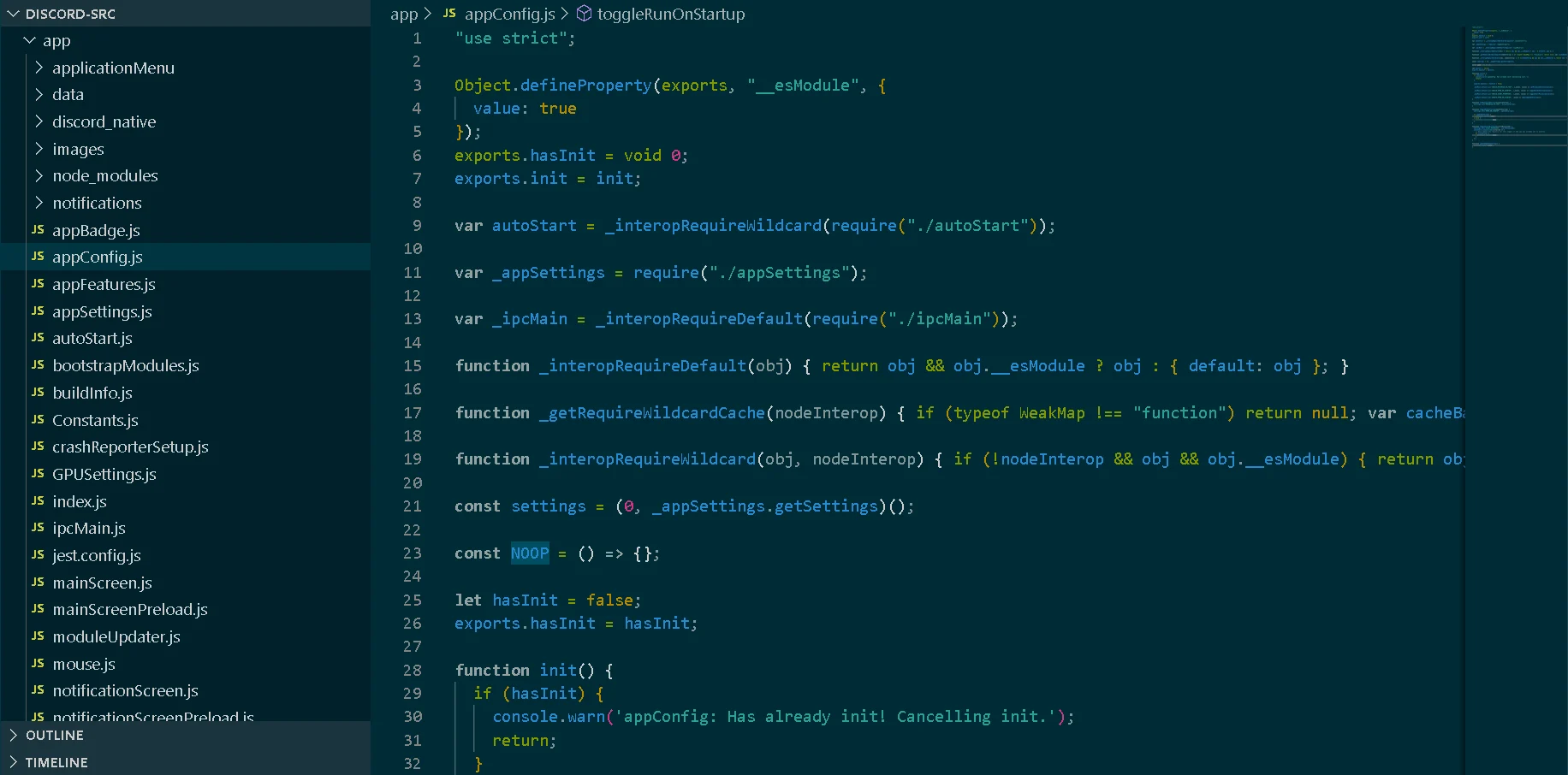
The only precondition was a local Windows install of Discord. The researchers located the application files at:
C:\Users\user\AppData\Local\Discord\app-1.0.9007\modules\discord_desktop_core-1
Inside that directory sits core.asar, an Electron archive. To get readable source they extracted it with the asar CLI:
npx asar extract core.asar src

Finding it
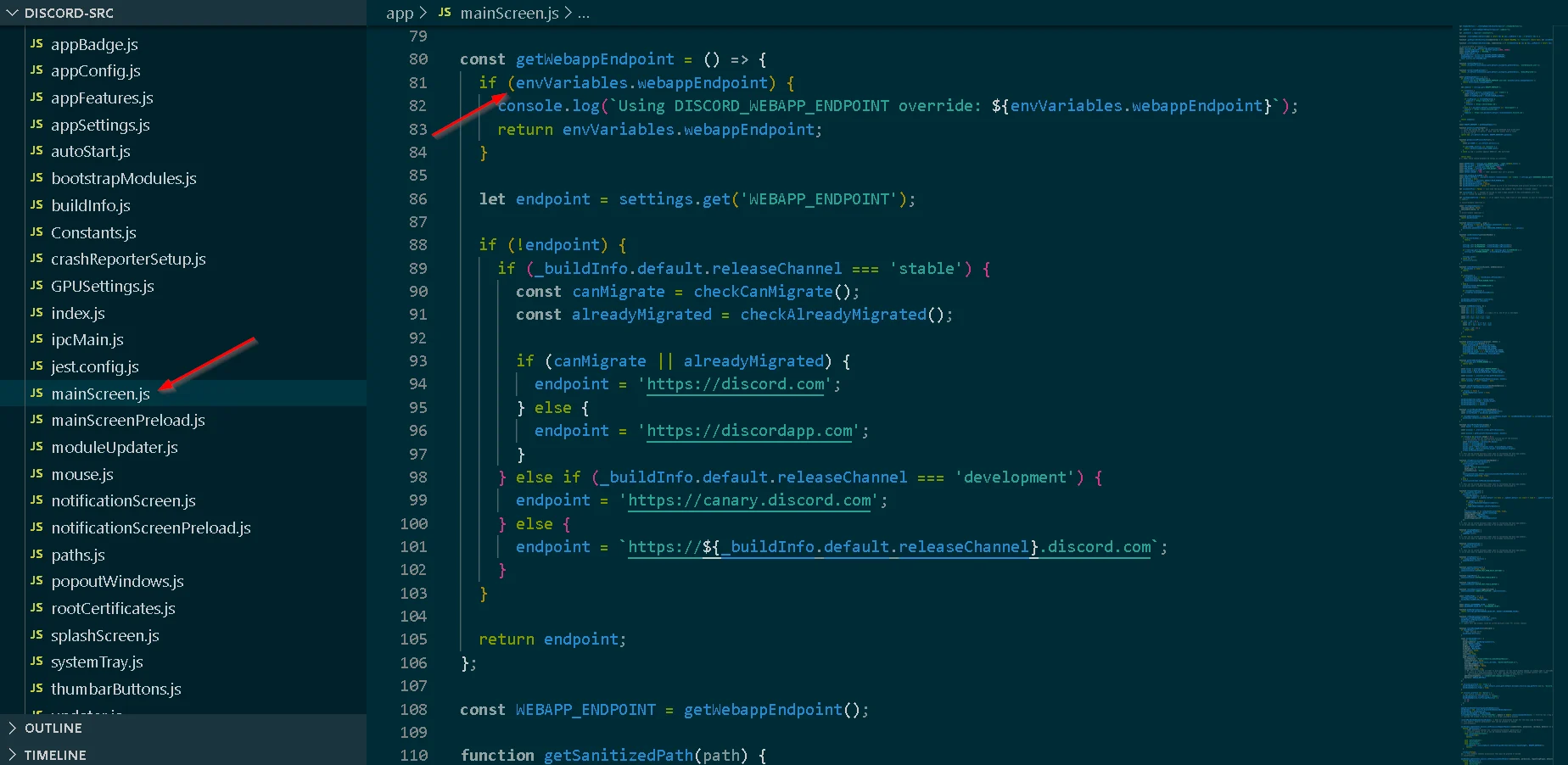
While reading through the extracted JavaScript, the researchers came across mainScreen.js, which defines a set of environment variables. An environment variable is a name and value pair; during application initialisation such variables may be loaded into process.env and read by suffixing the variable name.
const envVariables = {
  disableRestart: process.env.DISCORD_DISABLE_RESTART,
  webappEndpoint: process.env.DISCORD_WEBAPP_ENDPOINT,
  test: process.env.DISCORD_TEST
};
The interesting entry was webappEndpoint. The function that consumes it looks like this:
const getWebappEndpoint = () => {
  if (envVariables.webappEndpoint) {
    console.log(`Using DISCORD_WEBAPP_ENDPOINT override: ${envVariables.webappEndpoint}`);
    return envVariables.webappEndpoint;
  }

# let is a keyboard used to declare variables in JS that are blocked scope.
  let endpoint = settings.get('WEBAPP_ENDPOINT');

  if (!endpoint) {
    if (_buildInfo.default.releaseChannel === 'stable') {
      const canMigrate = checkCanMigrate();
      const alreadyMigrated = checkAlreadyMigrated();

      if (canMigrate || alreadyMigrated) {
        endpoint = 'https://discord.com';
      } else {
        endpoint = 'https://discordapp.com';
      }
    } else if (_buildInfo.default.releaseChannel === 'development') {
      endpoint = 'https://canary.discord.com';
    } else {
      endpoint = `https://${_buildInfo.default.releaseChannel}.discord.com`;
    }
  }

  return endpoint;
};
When the environment variable is set, its value is returned directly, with no validation at all. The researchers' view was that Discord should check whether the value matches one of a defined set of Discord domains, for example by testing membership in an array, so that only Discord-controlled hosts can be loaded.
The endpoint is then combined with a path:
const WEBAPP_PATH = settings.get('WEBAPP_PATH', `/app?_=${Date.now()}`);
const URL_TO_LOAD = `${WEBAPP_ENDPOINT}${WEBAPP_PATH}`;
Because an /app path is appended automatically, an attacker-controlled host only needs to serve something at a directory called app for the resulting URL to resolve to a valid endpoint.
The obvious limitation is control of the environment variable itself. The researchers state plainly that there is no practical way to set it remotely, and that every chain they considered would require pre-existing RCE on the machine. They still considered it a worthwhile find.
Exploitation
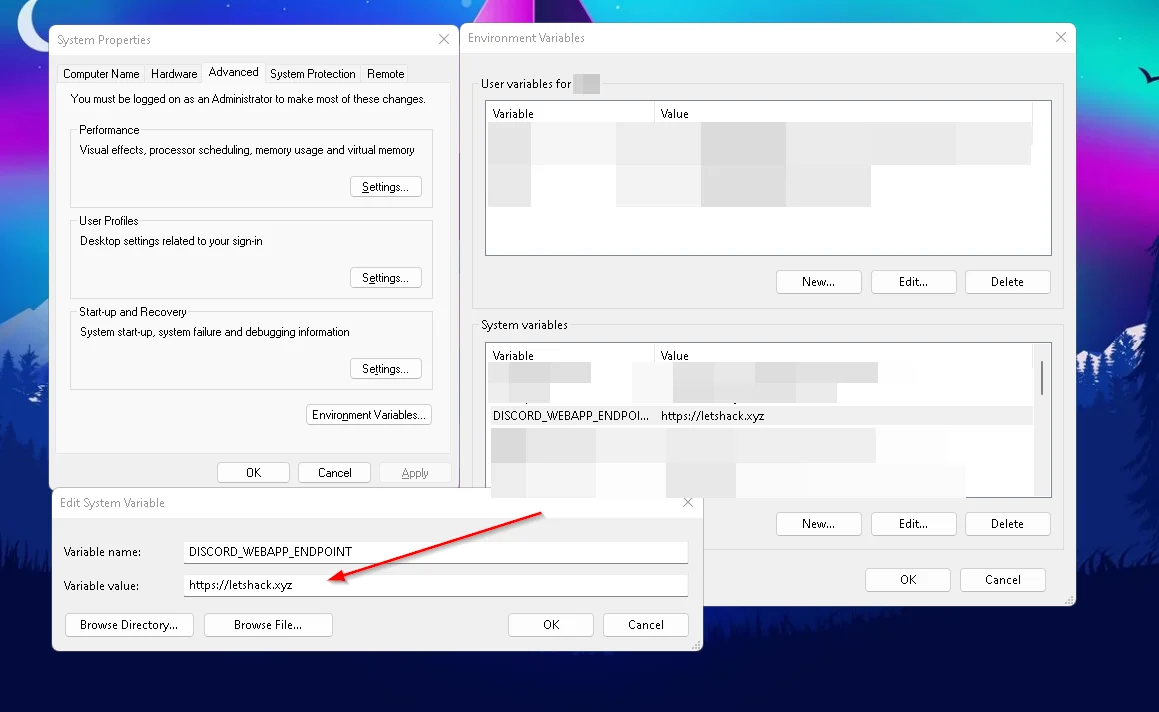
Step 1: set the override
To demonstrate the behaviour, they added DISCORD_WEBAPP_ENDPOINT to the Windows environment variables with a value they controlled, for example a URL beginning https://.
Step 2: restart the client
After saving the change they restarted Discord.
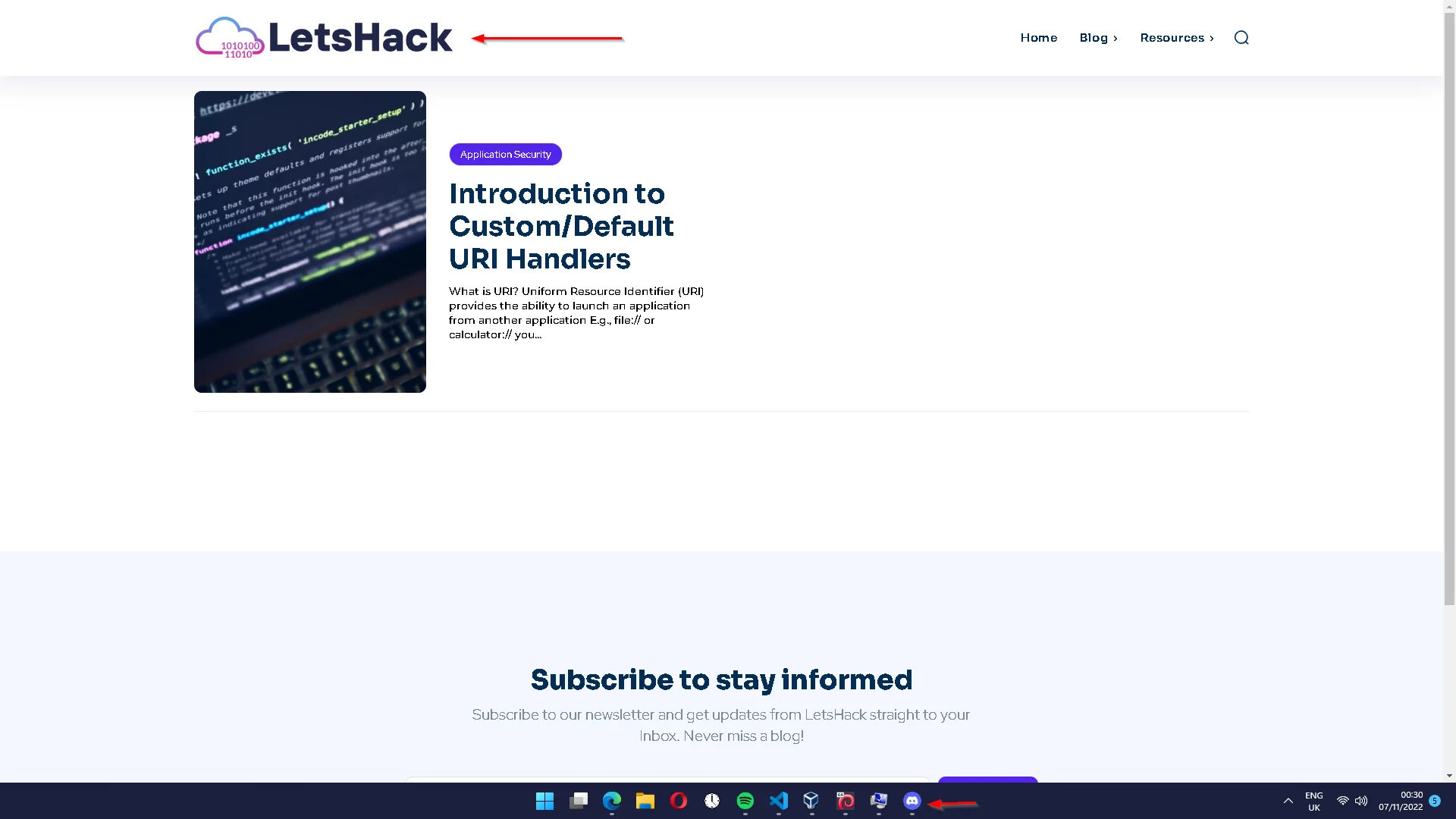
The override took effect after the restart. Attempting to load a custom URI from the variable value failed, which they had expected but wanted to test in case something had been missed.
Step 3: attempt RCE through injected markup
They tried to escalate the endpoint control into code execution with a payload of this shape:
<img src=x onerror="alert(require('child_process').execSync('calc').toString());">
This uses child_process to call .exec(), which runs commands at system level, analogous to shell_exec() or system() in PHP. It did not work. Whether an Electron application is exposed to this class of attack depends on its configuration, specifically whether a secure configuration is passed.
Discord's window configuration:
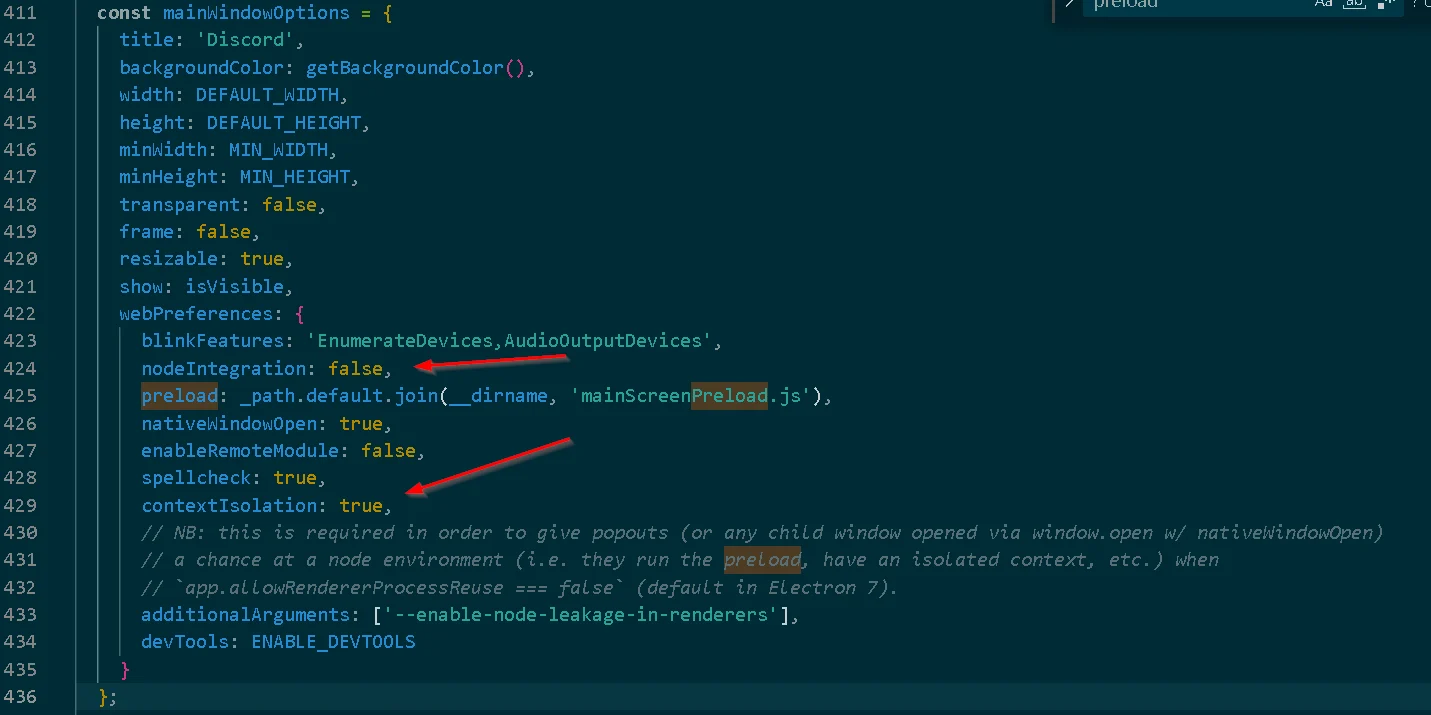
  const mainWindowOptions = {
    title: 'Discord',
    backgroundColor: getBackgroundColor(),
    width: DEFAULT_WIDTH,
    height: DEFAULT_HEIGHT,
    minWidth: MIN_WIDTH,
    minHeight: MIN_HEIGHT,
    transparent: false,
    frame: false,
    resizable: true,
    show: isVisible,
    webPreferences: {
      blinkFeatures: 'EnumerateDevices,AudioOutputDevices',
      nodeIntegration: false,
      preload: _path.default.join(__dirname, 'mainScreenPreload.js'),
      nativeWindowOpen: true,
      enableRemoteModule: false,
      spellcheck: true,
      contextIsolation: true,
      // NB: this is required in order to give popouts (or any child window opened via window.open w/ nativeWindowOpen)
      // a chance at a node environment (i.e. they run the preload, have an isolated context, etc.) when
      // `app.allowRendererProcessReuse === false` (default in Electron 7).
      additionalArguments: ['--enable-node-leakage-in-renderers'],
      devTools: ENABLE_DEVTOOLS
    }
With nodeIntegration set to false, the renderer cannot reach Node features. Had it been true, code such as the following would have been possible from the render process:
const {BrowserWindow} = require('electron');
let win = new BrowserWindow();

win.loadURL(`file://some-path`);
The researchers say two security implementations working together prevented RCE, and note that nodeIntegration is set to false.
Step 4: prove impact with a URI and a phishing page
Some impact had to be shown. Modifying the environment variables makes Discord unusable, so they aimed for something more meaningful: loading a URI, and phishing.
The first proof of concept popped the calculator through the calculator:// URI, using the open() method of the window object. The method's signatures are:
open()
open(url)
open(url, target)
open(url, target, windowFeatures)
The payload:
<h1>Proof of concept by @isira_adithya and @RiotSecTeam</h1>
<script>
window.open("calculator://")
</script>
This demonstrates that arbitrary URIs can be invoked from the loaded page. If a RCE existed in a URI handler, the same primitive could be used to try to trigger it and potentially leverage it towards local privilege escalation.
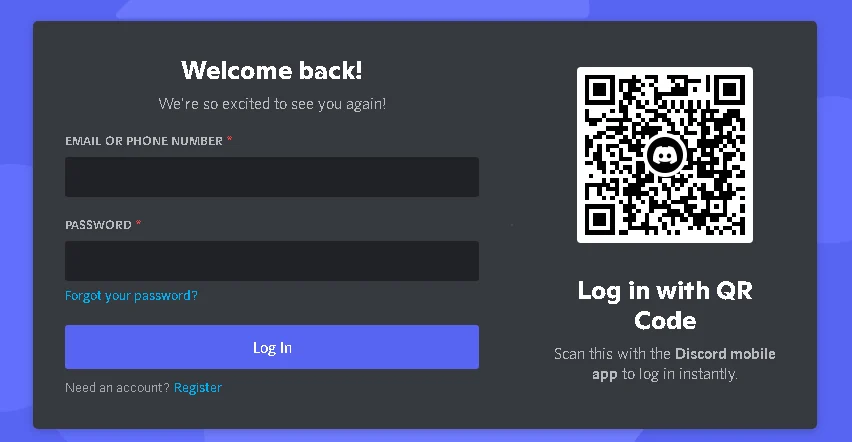
For the phishing proof of concept they cloned Discord's login page and added some CSS.
Real Discord login, cropped:
Their clone, cropped:
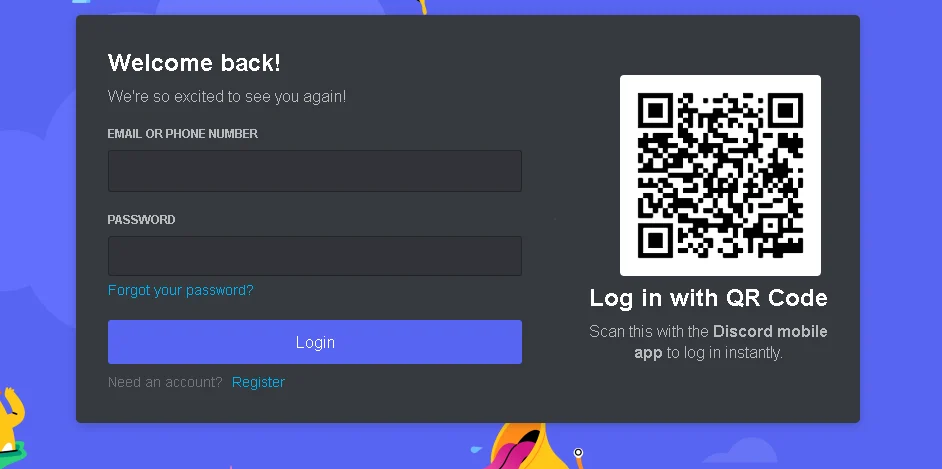
The two are very similar; the researchers note that the screenshot takes away from the quality of the text.
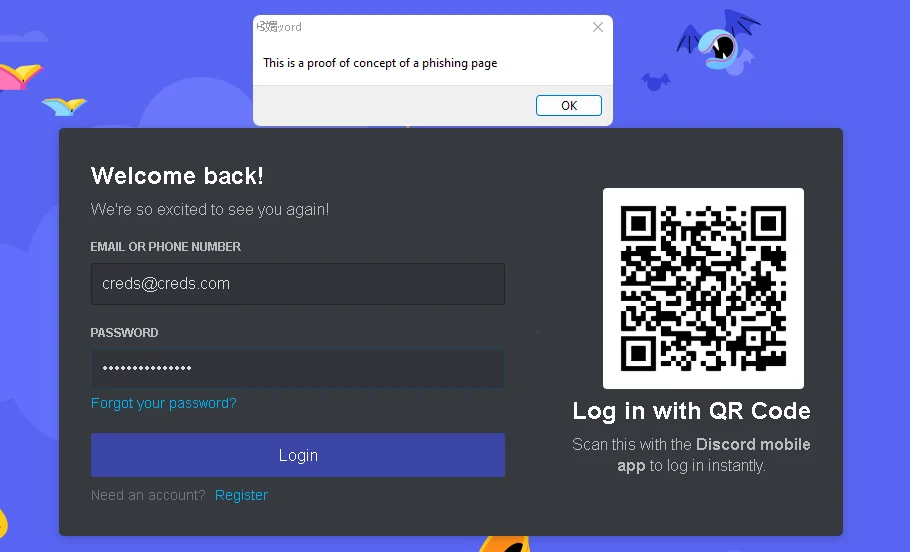
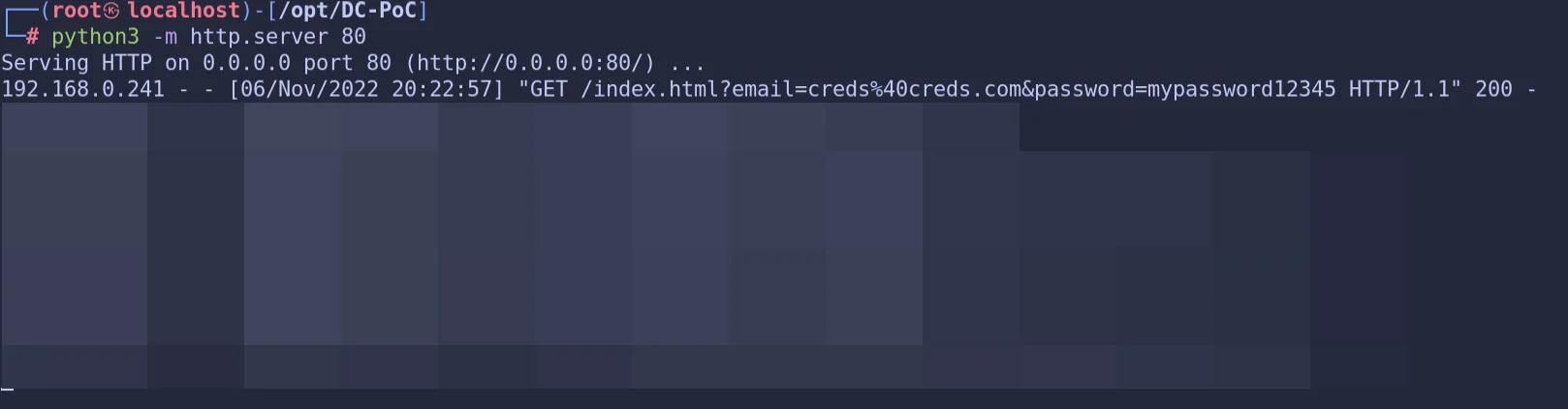
They acknowledge that much more could be done, but that they did not dedicate much time to this line of research.
Root cause
The flaw is missing input validation on the DISCORD_WEBAPP_ENDPOINT environment variable. When the variable is present, getWebappEndpoint() returns its value verbatim and the client builds URL_TO_LOAD from it, so the client loads a domain named by the value. The existing fallback logic, which selects discord.com, discordapp.com, canary.discord.com or a channel-specific subdomain, is bypassed entirely by the override.
The practical barrier is that the attacker must already be able to set an environment variable on the victim's machine, which the researchers say requires pre-existing code execution. The RCE attempt through injected markup failed; the researchers attribute this to Electron configuration settings, so the override alone yields page control and URI invocation, not code execution.
Impact
Under the condition that an attacker can set the environment variable, they can make the Discord client load a page of their choosing. That page can invoke arbitrary URI schemes through window.open, and it can present a convincing clone of the Discord login to harvest credentials. The researchers frame the URI primitive as a stepping stone: if a RCE were found in a URI handler, it could be tried for code execution and potentially local privilege escalation. They do not claim that such a RCE exists.
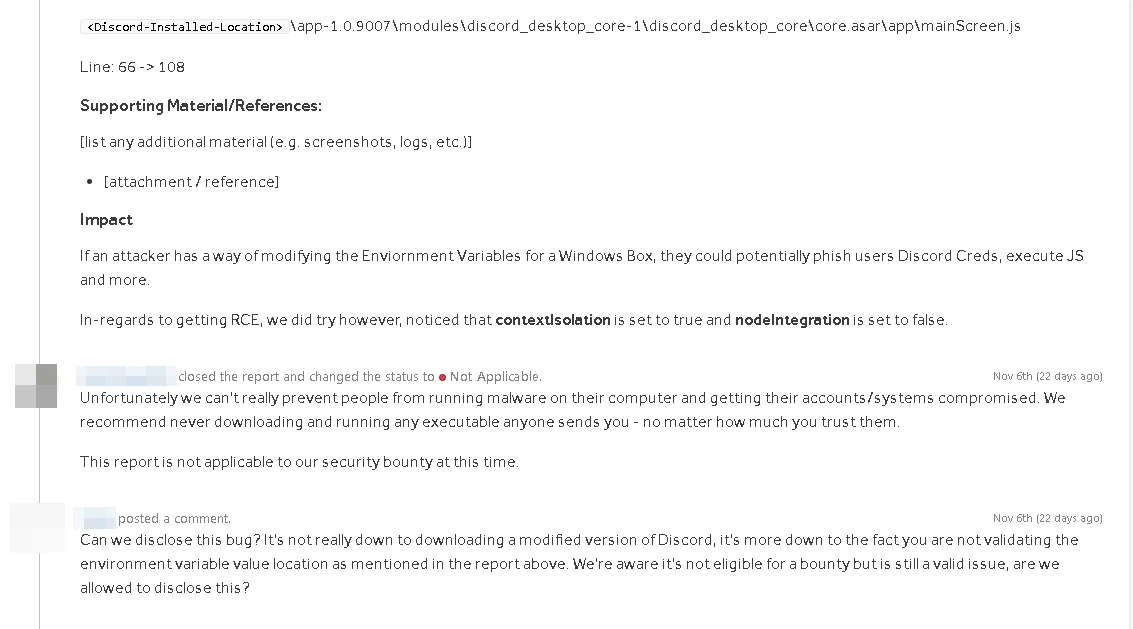
Because setting the variable requires local access or prior compromise, the report was closed as N/A under the Discord bug bounty programme scope, which the researchers say they expected.
Fix
The researchers describe the patch as easy and supply code that validates the override against an allowlist of Discord domains, falling back to https://discord.com if the check fails. They note the code has some holes, but that exploiting them would require a bug on one of the allowed domains.
const getWebappEndpoint = () => {
    const discordDomains = [
        "discord.com",
        "discord.gg",
        "discord.media",
        "discordapp.com",
        "discordapp.net",
        "discordstatus.com",
    ]
    if (envVariables.webappEndpoint) {
      console.log(`Using DISCORD_WEBAPP_ENDPOINT override: ${envVariables.webappEndpoint}`);
      discordDomains.forEach(_domain => {
        if (envVariables.webappEndpoint.indexOf(`https://${_domain}/`) != -1){
            return envVariables.webappEndpoint;
        }
      })

      return 'https://discord.com';
    }

    let endpoint = settings.get('WEBAPP_ENDPOINT');

    if (!endpoint) {
      if (_buildInfo.default.releaseChannel === 'stable') {
        const canMigrate = checkCanMigrate();
        const alreadyMigrated = checkAlreadyMigrated();

        if (canMigrate || alreadyMigrated) {
          endpoint = 'https://discord.com';
        } else {
          endpoint = 'https://discordapp.com';
        }
      } else if (_buildInfo.default.releaseChannel === 'development') {
        endpoint = 'https://canary.discord.com';
      } else {
        endpoint = `https://${_buildInfo.default.releaseChannel}.discord.com`;
      }
    }

    return endpoint;
  };
The allowlist used:
discordDomains = [
        "discord.com",
        "discord.gg",
        "discord.media",
        "discordapp.com",
        "discordapp.net",
        "discordstatus.com",
    ]
The validation block:
    if (envVariables.webappEndpoint) {
      console.log(`Using DISCORD_WEBAPP_ENDPOINT override: ${envVariables.webappEndpoint}`);
      discordDomains.forEach(_domain => {
        if (envVariables.webappEndpoint.indexOf(`https://${_domain}/`) != -1){
            return envVariables.webappEndpoint;
        }
      })
In JavaScript, != is the not-equal comparison operator. The report does not say whether Discord adopted this patch.
Variants to test
- Look for other environment variable overrides in Electron applications that feed into URL construction, such as endpoint, API base or update server variables. A positive result is a variable whose value is returned without an allowlist check and then concatenated into a loaded URL.
- Check whether the application appends a fixed path to the overridden base, as Discord does with
/app. A positive result is a host you control serving content at that path and the client rendering it. - Test whether the loaded page can call
window.openwith custom URI schemes. A positive result is an external handler launching, which shows the page has URI invocation primitives. - Review
webPreferencesfornodeIntegration,contextIsolationandenableRemoteModule. A positive result for exploitation isnodeIntegration: trueorcontextIsolation: false, which would make renderer-side Node access plausible. - Compare the real login page with a clone rendered inside the application window. A positive result is a clone that looks very similar to the real login page, which supports a credential phishing scenario.
Report (expected N/A)
What happened, in plain words
Discord is a chat application. Besides the website you open in a browser, Discord also offers a program you install on your computer, called the desktop client. That program is built with a toolkit called Electron, which lets a company write a desktop program using the same ingredients as a website: HTML, CSS and JavaScript. In practice, the Discord window you see on your desktop is a small, dedicated browser window showing Discord's web pages, wrapped in a program that can also do desktop things.
This article is about a small piece of that program's code that decides which web address (URL) the Discord window should load when it starts. Normally that address is one of Discord's own domains. The code also contains a shortcut: if a certain setting exists on the computer, called an environment variable, the program uses the value of that setting instead, without checking it. The researchers who wrote this report found that shortcut, showed what happens when the value points somewhere else, and explained how Discord could fix it.
Two things are worth saying up front, because they shape the whole story. First, to abuse this, someone has to be able to change that setting on the victim's computer, which in practice means they already have some level of access to the machine. Second, the researchers tried to turn the trick into running their own programs on the computer and could not, because of other protections Discord had enabled. They reported it to Discord, and it was closed as N/A, meaning not applicable to the bug bounty programme, which the researchers say they expected. They published the write-up partly to ask Discord for permission to disclose it.
The research was done by RiotSecTeam (@RiotSecTeam) and Isira Adithya (@isira_adithya) and published on 28 November 2022.
Getting hold of the code
A program installed on Windows usually lives in a folder somewhere on the disk. Discord's desktop client installs itself into a folder inside the user's local application data, and the folder name includes the version number. The researchers found the application files at this path:
C:\Users\user\AppData\Local\Discord\app-1.0.9007\modules\discord_desktop_core-1
In plain words: C:\Users\user is the home folder of the Windows user called user; AppData\Local is a hidden folder where programs keep data that belongs to that user on that machine; then comes the Discord folder, a versioned application folder, a modules folder, and finally discord_desktop_core-1, which holds the core part of the client.
Inside that folder sits a file called core.asar. An ASAR file is an archive, a single file that packs many files together, a bit like a ZIP file. Electron applications use it so that the program's JavaScript files ship as one bundle instead of hundreds of loose files. To read the code, you have to unpack it. The researchers did that with the asar command-line tool:
npx asar extract core.asar src
Line by line:
npxis a helper that comes with Node.js, a runtime that lets JavaScript run outside a browser.npxruns a tool without you having to install it globally first.asaris the name of the tool being run.extracttells the tool what to do: unpack the archive.core.asaris the archive being unpacked.srcis the folder the unpacked files are written into.
The whole exercise is reading code on your own machine and then changing one setting on your own machine.
Finding the interesting line
With the files unpacked, the researchers read through the JavaScript. JavaScript is the programming language of web pages, and in an Electron application it is also the language that drives the desktop program itself. They came across a file called mainScreen.js, which defines some environment variables.
An environment variable is a named setting that lives in the operating system, outside any single program. It has a name and a value, for example a name like HOME and a value like a folder path. Programs read them at startup. In Node.js and Electron, environment variables are collected in an object called process.env, and you read one by writing process.env. followed by its name. Think of it as a sticky note on the computer that any program can read.
const envVariables = {
  disableRestart: process.env.DISCORD_DISABLE_RESTART,
  webappEndpoint: process.env.DISCORD_WEBAPP_ENDPOINT,
  test: process.env.DISCORD_TEST
};
Line by line:
const envVariables = {starts a constant calledenvVariables, which will hold a group of related values. A constant is a name whose value is not meant to be reassigned.disableRestart: process.env.DISCORD_DISABLE_RESTART,creates an entry nameddisableRestartwhose value is whatever the environment variableDISCORD_DISABLE_RESTARTcontains, if it exists.webappEndpoint: process.env.DISCORD_WEBAPP_ENDPOINT,does the same forDISCORD_WEBAPP_ENDPOINT. This is the one that matters here.test: process.env.DISCORD_TESTdoes the same forDISCORD_TEST.};closes the group.
The interesting entry was webappEndpoint. The function that uses it looks like this:
const getWebappEndpoint = () => {
  if (envVariables.webappEndpoint) {
    console.log(`Using DISCORD_WEBAPP_ENDPOINT override: ${envVariables.webappEndpoint}`);
    return envVariables.webappEndpoint;
  }

# let is a keyboard used to declare variables in JS that are blocked scope.
  let endpoint = settings.get('WEBAPP_ENDPOINT');

  if (!endpoint) {
    if (_buildInfo.default.releaseChannel === 'stable') {
      const canMigrate = checkCanMigrate();
      const alreadyMigrated = checkAlreadyMigrated();

      if (canMigrate || alreadyMigrated) {
        endpoint = 'https://discord.com';
      } else {
        endpoint = 'https://discordapp.com';
      }
    } else if (_buildInfo.default.releaseChannel === 'development') {
      endpoint = 'https://canary.discord.com';
    } else {
      endpoint = `https://${_buildInfo.default.releaseChannel}.discord.com`;
    }
  }

  return endpoint;
};
Line by line:
const getWebappEndpoint = () => {defines a function, a named block of code that can be called later. This one works out which web address to use.if (envVariables.webappEndpoint) {asks: does the environment variable have a value? In JavaScript, a non-empty piece of text counts as true.console.log(...)writes a message to the program's log, here saying that the override is being used and printing its value.return envVariables.webappEndpoint;hands back the value of the environment variable straight away. There is no check on what that value is. This is the heart of the finding.- The line starting with
#is a comment in the report's code. It explains thatletdeclares a variable whose visibility is limited to the block it is written in. (In JavaScript itself, comments start with//, not#.) let endpoint = settings.get('WEBAPP_ENDPOINT');reads a saved setting calledWEBAPP_ENDPOINTfrom Discord's own settings storage. This is the normal, non-override path.if (!endpoint) {means: if no such setting was found, work out a default.if (_buildInfo.default.releaseChannel === 'stable') {checks whether this is the stable release of Discord, the normal public version.const canMigrate = checkCanMigrate();andconst alreadyMigrated = checkAlreadyMigrated();call two helper functions that record whether the user can move to the newer domain and whether they already have.if (canMigrate || alreadyMigrated) { endpoint = 'https://discord.com'; } else { endpoint = 'https://discordapp.com'; }picksdiscord.comfor users who can or already did migrate, and the olderdiscordapp.comotherwise.} else if (_buildInfo.default.releaseChannel === 'development') { endpoint = 'https://canary.discord.com'; }handles the development channel, which usescanary.discord.com.} else { endpoint =https://${_buildInfo.default.releaseChannel}.discord.com; }handles any other channel by building a subdomain from the channel name.return endpoint;hands back whichever address was chosen.
So the function has two paths. The normal path picks a Discord domain based on the release channel. The override path returns whatever the environment variable says, with no validation at all. The researchers' view was that Discord should check whether the value matches one of a defined set of Discord domains, for example by testing whether it is in a list (an array), so that only Discord-controlled hosts can be loaded.
The chosen address is then combined with a path:
const WEBAPP_PATH = settings.get('WEBAPP_PATH', `/app?_=${Date.now()}`);
const URL_TO_LOAD = `${WEBAPP_ENDPOINT}${WEBAPP_PATH}`;
Line by line:
const WEBAPP_PATH = settings.get('WEBAPP_PATH',/app?_=${Date.now()});reads a saved path setting, and if there is none, uses a default of/app?_=followed by the current time in milliseconds.Date.now()returns the current time as a number, and the backtick syntax lets you insert values into a piece of text.const URL_TO_LOAD =${WEBAPP_ENDPOINT}${WEBAPP_PATH};glues the base address and the path together into the final address to load.
Because an /app path is appended automatically, someone who controls the base address only needs to serve something at a folder called app for the resulting address to point at a real page. In everyday terms: if the program always adds /app to whatever address you give it, you just need a folder named app on your own web server.
The obvious limitation is control of the environment variable itself. The researchers state plainly that there is no practical way to set it remotely, and that every chain they considered would require pre-existing RCE on the machine. RCE stands for remote code execution: the ability to make a computer run code of your choosing. They still considered it a worthwhile find.
Showing it works
Step 1: set the override
To demonstrate the behaviour, they added DISCORD_WEBAPP_ENDPOINT to the Windows environment variables with a value they controlled, for example an address beginning https://.
On Windows, environment variables can be edited through the system settings dialog. Adding one there means every program started afterwards, including Discord, can read it. The value here is one the researchers control, which is the whole point: the program will use it instead of a Discord domain.
Step 2: restart the client
After saving the change they restarted Discord.
A restart is needed because environment variables are read when a program starts. A program that is already running keeps the values it saw at startup.
The override took effect after the restart. Attempting to load a custom URI from the variable value failed, which they had expected but wanted to test in case something had been missed. A URI is a way of naming a resource, and a custom URI scheme is one that belongs to a particular program rather than to the web, for example calculator:// to open the calculator. The researchers wanted to know whether the override could be pointed straight at such a scheme.
Step 3: try to run code through injected markup
They tried to escalate the address control into code execution with a payload of this shape:
<img src=x onerror="alert(require('child_process').execSync('calc').toString());">
Line by line:
<img src=x ...>asks the page to show an image whose address isx. There is no such image, so loading it fails.onerror="..."is an attribute that tells the browser what to run when the image fails to load. This is a classic trick for getting code to run on a page that displays content you supplied.alert(...)would show a pop-up box with whatever is inside the brackets.require('child_process')asks Node.js for its module that can start other programs.requireis Node's way of loading a module..execSync('calc')runs the Windows calculator program and waits for it to finish..toString()turns the result into text so it can be shown in the pop-up.
In short, the payload tries to make the page start the calculator program. It did not work. Whether an Electron application is exposed to this class of attack depends on its configuration, specifically whether a secure configuration is passed.
Discord's window configuration:
  const mainWindowOptions = {
    title: 'Discord',
    backgroundColor: getBackgroundColor(),
    width: DEFAULT_WIDTH,
    height: DEFAULT_HEIGHT,
    minWidth: MIN_WIDTH,
    minHeight: MIN_HEIGHT,
    transparent: false,
    frame: false,
    resizable: true,
    show: isVisible,
    webPreferences: {
      blinkFeatures: 'EnumerateDevices,AudioOutputDevices',
      nodeIntegration: false,
      preload: _path.default.join(__dirname, 'mainScreenPreload.js'),
      nativeWindowOpen: true,
      enableRemoteModule: false,
      spellcheck: true,
      contextIsolation: true,
      // NB: this is required in order to give popouts (or any child window opened via window.open w/ nativeWindowOpen)
      // a chance at a node environment (i.e. they run the preload, have an isolated context, etc.) when
      // `app.allowRendererProcessReuse === false` (default in Electron 7).
      additionalArguments: ['--enable-node-leakage-in-renderers'],
      devTools: ENABLE_DEVTOOLS
    }
Line by line, focusing on what matters:
const mainWindowOptions = {starts the settings for the main Discord window.title,backgroundColor,width,height,minWidth,minHeight,transparent,frame,resizable,showare ordinary window appearance settings: the title, the background colour, the size limits, whether the window has a border, whether it can be resized, and whether it is shown.webPreferences: {starts the settings that control what the web content inside the window is allowed to do. This is the security-relevant part.blinkFeatures: 'EnumerateDevices,AudioOutputDevices'turns on two browser features related to listing devices and audio output.nodeIntegration: falseis the key line. It says the web page inside the window may not use Node.js features. Without Node, a page cannot loadchild_processand cannot start programs.preload: _path.default.join(__dirname, 'mainScreenPreload.js')names a script that runs before the page loads, used to expose a small, controlled set of features to the page.nativeWindowOpen: truelets the page open new windows using the operating system's own window handling.enableRemoteModule: falseturns off an older Electron feature that let web content reach into the main program.spellcheck: trueturns on spell checking.contextIsolation: truekeeps the page's JavaScript in a separate world from the preload script's JavaScript, so the page cannot reach the preload's privileges.- The comment lines starting with
//explain that an extra argument is needed so that pop-out windows opened withwindow.openstill get a Node environment when Electron reuses renderer processes. additionalArguments: ['--enable-node-leakage-in-renderers']passes that extra argument.devTools: ENABLE_DEVTOOLSdecides whether the browser developer tools are available.
With nodeIntegration set to false, the page inside the window cannot reach Node features. Had it been true, code such as the following would have been possible from the page:
const {BrowserWindow} = require('electron');
let win = new BrowserWindow();

win.loadURL(`file://some-path`);
Line by line:
const {BrowserWindow} = require('electron');loads Electron's module for creating windows and takes itsBrowserWindowpart.let win = new BrowserWindow();creates a new window.win.loadURL(file://some-path);tells that window to load a local file. Afile://address points at a file on the computer's disk rather than at a website.
Being able to do that from a page would mean the page can open local files and, in the wrong hands, much more. The researchers say two security implementations working together prevented RCE, and note that nodeIntegration is set to false.
Step 4: show impact with a URI and a fake login page
Some impact had to be shown. Modifying the environment variables makes Discord unusable, so they aimed for something more meaningful: loading a URI, and phishing. Phishing means building a fake copy of a login page so that a person types their username and password into it, believing it is the real thing.
The first proof of concept popped the calculator through the calculator:// URI, using the open() method of the window object. A method is a function that belongs to an object; window is the browser's global object for the current window. The method's signatures, meaning the ways it can be called, are:
open()
open(url)
open(url, target)
open(url, target, windowFeatures)
Line by line:
open()opens a blank window.open(url)opens a window at the given address.open(url, target)also says where to open it, for example in a new tab or the same window.open(url, target, windowFeatures)also describes the window's appearance and behaviour.
The payload:
<h1>Proof of concept by @isira_adithya and @RiotSecTeam</h1>
<script>
window.open("calculator://")
</script>
Line by line:
<h1>...</h1>shows a large heading crediting the researchers.<script>starts a block of JavaScript that the page will run.window.open("calculator://")asks the operating system to open the addresscalculator://, which on Windows launches the calculator.</script>ends the script block.
This demonstrates that arbitrary URIs can be invoked from the loaded page. If a RCE existed in a URI handler, meaning a program registered to handle a particular scheme, the same primitive could be used to try to trigger it and potentially leverage it towards local privilege escalation. Local privilege escalation means going from a limited account on a machine to a more powerful one.
For the phishing proof of concept they cloned Discord's login page and added some CSS. CSS is the language that controls how a web page looks: colours, spacing, fonts and layout.
Real Discord login, cropped:
Their clone, cropped:
The two are very similar; the researchers note that the screenshot takes away from the quality of the text.
They acknowledge that much more could be done, but that they did not dedicate much time to this line of research.
Why it happens
The flaw is missing input validation on the DISCORD_WEBAPP_ENDPOINT environment variable. Input validation means checking that a value you receive is one you are willing to accept before you use it. When the variable is present, getWebappEndpoint() returns its value verbatim and the client builds URL_TO_LOAD from it, so the client loads a domain named by the value. The origin is the combination of scheme, host and port that a browser treats as the identity of a page, and it decides what that page is allowed to talk to.
The existing fallback logic, which selects discord.com, discordapp.com, canary.discord.com or a channel-specific subdomain, is bypassed entirely by the override.
The practical barrier is that the attacker must already be able to set an environment variable on the victim's machine, which the researchers say requires pre-existing code execution. The RCE attempt through injected markup failed; the researchers attribute this to Electron configuration settings, so the override alone yields page control and URI invocation, not code execution.
What someone could do with it
Under the condition that an attacker can set the environment variable, they can make the Discord client load a page of their choosing. That page can invoke arbitrary URI schemes through window.open, and it can present a convincing clone of the Discord login to harvest credentials. Credentials here means the username and password someone types in.
The researchers frame the URI primitive as a stepping stone: if a RCE were found in a URI handler, it could be tried for code execution and potentially local privilege escalation. They do not claim that such a RCE exists.
Because setting the variable requires local access or prior compromise, the report was closed as N/A under the Discord bug bounty programme scope, which the researchers say they expected. A bug bounty programme is a scheme where a company pays people for reporting security problems, usually with rules about which systems and issues count.
The suggested fix
The researchers describe the patch as easy and supply code that validates the override against an allowlist of Discord domains, falling back to https://discord.com if the check fails. An allowlist is the opposite of a blocklist: instead of listing what is forbidden, you list what is allowed and reject everything else. They note the code has some holes, but that exploiting them would require a bug on one of the allowed domains.
const getWebappEndpoint = () => {
    const discordDomains = [
        "discord.com",
        "discord.gg",
        "discord.media",
        "discordapp.com",
        "discordapp.net",
        "discordstatus.com",
    ]
    if (envVariables.webappEndpoint) {
      console.log(`Using DISCORD_WEBAPP_ENDPOINT override: ${envVariables.webappEndpoint}`);
      discordDomains.forEach(_domain => {
        if (envVariables.webappEndpoint.indexOf(`https://${_domain}/`) != -1){
            return envVariables.webappEndpoint;
        }
      })

      return 'https://discord.com';
    }

    let endpoint = settings.get('WEBAPP_ENDPOINT');

    if (!endpoint) {
      if (_buildInfo.default.releaseChannel === 'stable') {
        const canMigrate = checkCanMigrate();
        const alreadyMigrated = checkAlreadyMigrated();

        if (canMigrate || alreadyMigrated) {
          endpoint = 'https://discord.com';
        } else {
          endpoint = 'https://discordapp.com';
        }
      } else if (_buildInfo.default.releaseChannel === 'development') {
        endpoint = 'https://canary.discord.com';
      } else {
        endpoint = `https://${_buildInfo.default.releaseChannel}.discord.com`;
      }
    }

    return endpoint;
  };
Line by line, focusing on what changed:
const discordDomains = [starts a list of allowed domains.- The six lines
"discord.com",through"discordstatus.com",are the entries in that list. ]closes the list.if (envVariables.webappEndpoint) {is the same check as before: is the override set?console.log(...)still logs that the override is being used.discordDomains.forEach(_domain => {goes through the list one entry at a time, calling the entry_domain.if (envVariables.webappEndpoint.indexOf(https://${_domain}/) != -1){checks whether the override value containshttps://followed by that domain and a slash.indexOfreturns the position where a piece of text is found, or-1if it is not found at all, so!= -1means "it was found".return envVariables.webappEndpoint;returns the override value if it matched an allowed domain.})closes the loop.return 'https://discord.com';is the fallback: if no allowed domain matched, use Discord's own address.- The rest of the function is unchanged from the original.
The allowlist used:
discordDomains = [
        "discord.com",
        "discord.gg",
        "discord.media",
        "discordapp.com",
        "discordapp.net",
        "discordstatus.com",
    ]
This is the same list as above, shown on its own: the domains the client is willing to load from.
The validation block:
    if (envVariables.webappEndpoint) {
      console.log(`Using DISCORD_WEBAPP_ENDPOINT override: ${envVariables.webappEndpoint}`);
      discordDomains.forEach(_domain => {
        if (envVariables.webappEndpoint.indexOf(`https://${_domain}/`) != -1){
            return envVariables.webappEndpoint;
        }
      })
This is the checking part on its own: if the override is set, walk the allowlist and accept the value only when it contains one of the allowed domains.
In JavaScript, != is the not-equal comparison operator. The report does not say whether Discord adopted this patch.
Things to try on other programs
- Look for other environment variable overrides in Electron applications that feed into URL construction, such as endpoint, API base or update server variables. An API is the set of addresses a program uses to talk to a service behind the scenes. A positive result is a variable whose value is returned without an allowlist check and then concatenated into a loaded URL.
- Check whether the application appends a fixed path to the overridden base, as Discord does with
/app. A positive result is a host you control serving content at that path and the client rendering it. - Test whether the loaded page can call
window.openwith custom URI schemes. A positive result is an external handler launching, which shows the page has URI invocation primitives. - Review
webPreferencesfornodeIntegration,contextIsolationandenableRemoteModule. A positive result for exploitation isnodeIntegration: trueorcontextIsolation: false, which would make renderer-side Node access plausible. The renderer is the part of an Electron application that draws the page. - Compare the real login page with a clone rendered inside the application window. A positive result is a clone that looks very similar to the real login page, which supports a credential phishing scenario. Chrome here means the window frame and surrounding interface drawn by the program, not the browser of the same name.
Report (expected N/A)
Glossary
- API: the set of addresses and rules a program uses to talk to a service behind the scenes.
- Allowlist: a list of things that are permitted, with everything else rejected.
- Array: an ordered list of values in JavaScript, written between square brackets.
- ASAR: an archive format used by Electron to pack an application's files into one bundle.
- Bug bounty programme: a scheme where a company pays people for reporting security problems, usually with rules about which systems and issues count.
- Chrome (window chrome): the frame and surrounding interface a program draws around a page.
- Constant: a named value in JavaScript that is not meant to be reassigned.
- Credentials: the username and password someone uses to sign in.
- CSS: the language that controls how a web page looks.
- Custom URI scheme: an address scheme that belongs to a particular program rather than to the web, such as
calculator://. - Electron: a toolkit for building desktop programs with web technology (HTML, CSS, JavaScript).
- Environment variable: a named setting stored by the operating system, with a name and a value, readable by programs at startup.
- Function: a named block of code that can be called to do something.
- HTML: the language that describes the structure and content of a web page.
- Input validation: checking that a value you receive is one you are willing to accept before using it.
- JavaScript: the programming language of web pages, also used by Electron programs.
- Local privilege escalation: going from a limited account on a machine to a more powerful one.
- Method: a function that belongs to an object.
- N/A: not applicable; here, a report closed as outside the scope of a bug bounty programme.
- Node.js: a runtime that lets JavaScript run outside a browser.
- Origin: the combination of scheme, host and port that a browser treats as the identity of a page.
- Phishing: building a fake copy of a login page so people type their credentials into it.
- Preload script: a script Electron runs before a page loads, used to expose a small, controlled set of features to the page.
- Primitive: a basic capability that can be built on, such as the ability to open a URI.
- RCE (remote code execution): the ability to make a computer run code of your choosing.
- Renderer: the part of an Electron application that draws the page.
- Subdomain: a prefix on a domain name, such as
canaryincanary.discord.com. - URI: a way of naming a resource, such as a web address or a program-specific address.
- URL: a web address.
windowobject: the browser's global object for the current window, which includes methods such asopen.webPreferences: the Electron settings that control what web content inside a window is allowed to do.



