Drupal Insecure Default Leads To Password Reset Poisoning
Drupal's default configuration trusts the Host header when generating password reset links, so an attacker who can modify the Host header can make the reset link point to their own domain and steal the reset token. If the victim clicks the link, the attacker can reset the victim's password, potentially an administrator's, and then upload a custom module to achieve remote code execution.
 Published on fortbridge.co.uk
Drupal is a free and open-source web content management framework written in PHP. It provides a back-end framework for at least 13% of the top 10,000 websites worldwide – ranging from personal blogs to corporate, political, and government sites according to Wikipedia.
The full write-up lives on its author's site
It belongs to its author, so we link to it rather than copy it. The other two tabs are our own rewrites, checked against it.
Context
Drupal is a free and open-source web content management framework written in PHP. It provides a back-end framework for at least 13% of the top 10,000 websites worldwide, ranging from personal blogs to corporate, political and government sites, according to Wikipedia. The research described here was carried out against the latest version of Drupal with the default configuration, as an internal research pentest project. The target feature is the standard password reset flow: a user enters their email address on the 'Reset your password' page, Drupal generates a one-time reset token, and it emails the user a link containing that token so they can set a new password.
The issue found is a host header vulnerability that allows an attacker to reset an administrator's password. The researcher reached out to the Drupal team to disclose it and allow time to fix. The team was cooperative and allowed publication of the findings. It appears they already knew about the issue and have documentation covering it, which is discussed below.
Setup
The work combined a black-box approach with source code review and dynamic analysis to determine the root cause. No specific tooling, accounts or roles beyond the default Drupal installation are described.
Finding it
The password reset link sent by email is built from the Host value held in the RequestContext, which fromRequest() fills from the request's Host header. Because the Host header is attacker-controlled in a normal HTTP request, the link in the victim's email can be pointed at a domain the attacker owns. The behaviour looked wrong because the link is meant to be a security-sensitive URL: whoever receives the token in it can reset the account's password.
Exploitation
Step 1: submit the victim's email
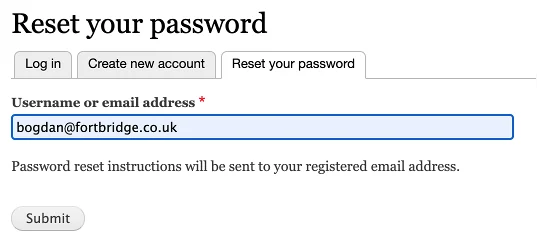
On the 'Reset your password' page, enter the victim's email and click submit.
Step 2: modify the Host header
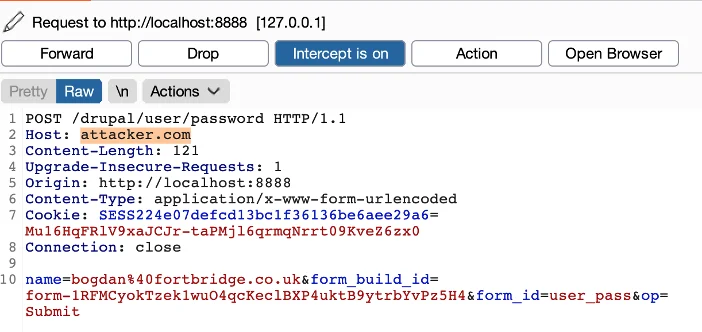
Intercept the request, modify the Host header and send the request:
Step 3: observe the redirect
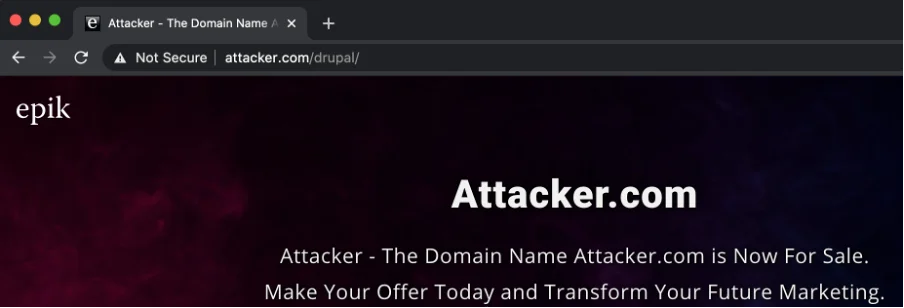
Right afterwards, the app will redirect the user to the attacker's domain as seen below:

Step 4: receive the poisoned email
In addition, you will receive an email with the poisoned 'reset password' link:
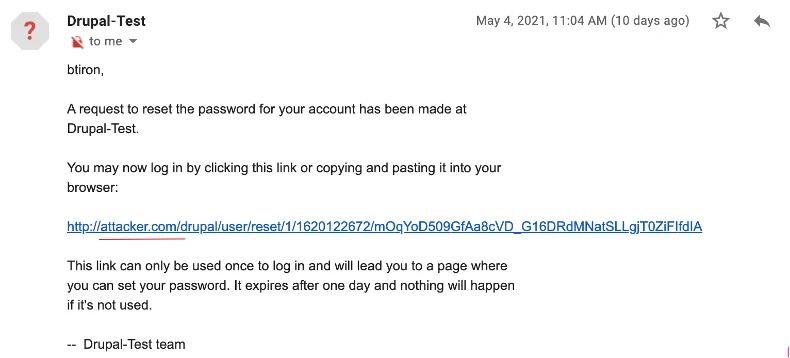
If the victim clicks the above link, the 'attacker.com' domain will collect the token and thus the attacker can reset the victim's password, which can be an admin.
Root cause
The password reset process starts inside the _user_email_notify() function:
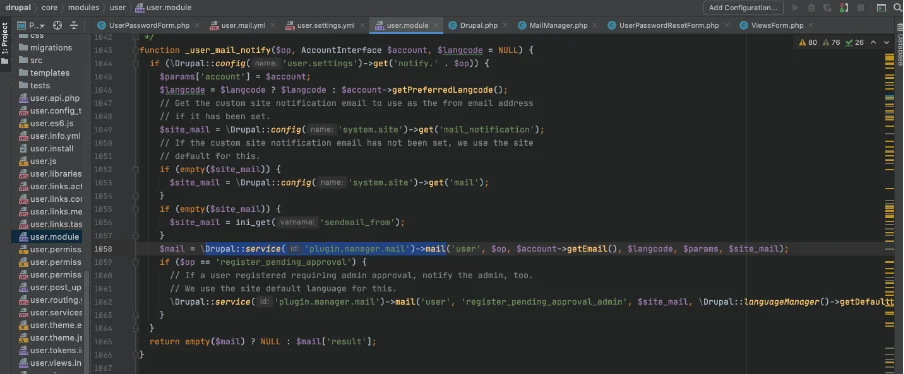
The reset token is generated inside user_mail_tokens():
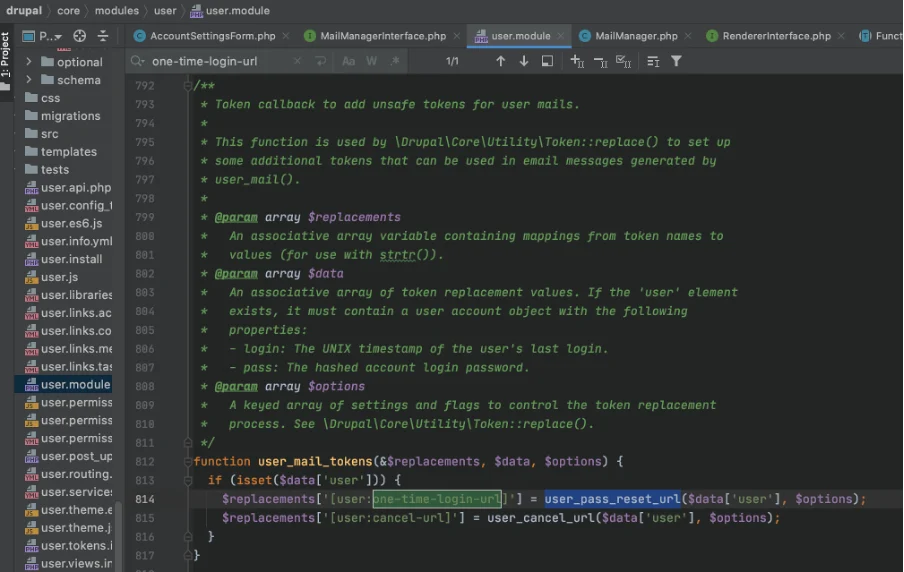
The URL for password reset that gets sent in the notification email is created in the user_pass_reset_url() function, by the Url::fromRoute()->toString() function as can be seen below:
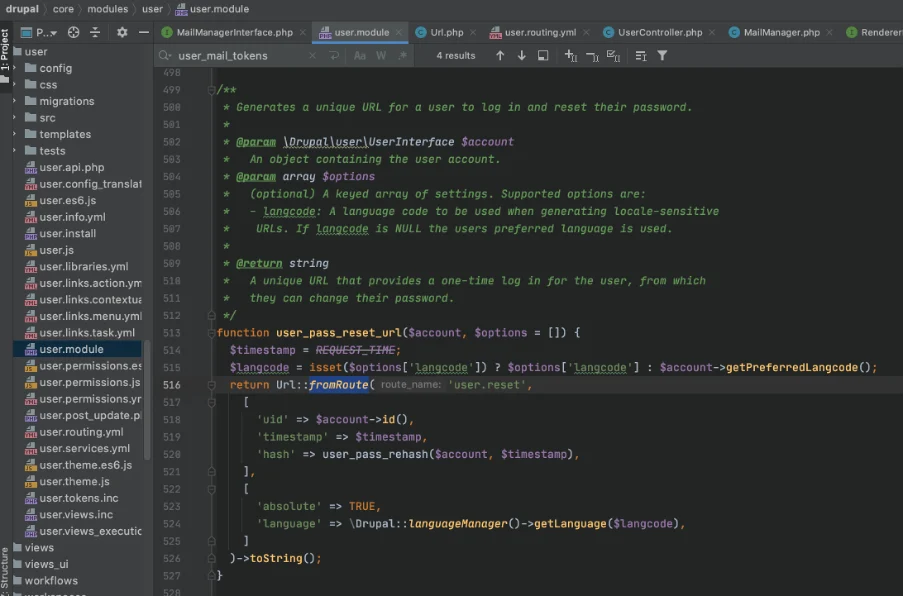
The Url->toString() method will call urlGenerator()->generateFromRoute():
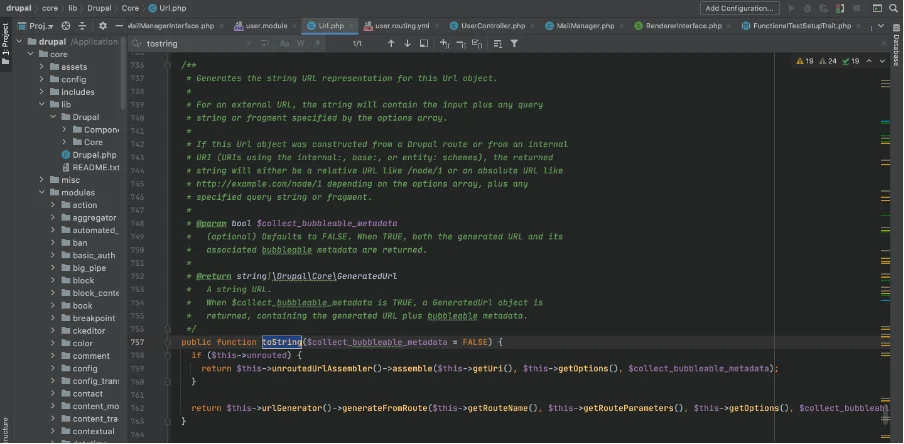
And generateFromRoute() does the interesting part where it gets the Host from $this->context->getHost():
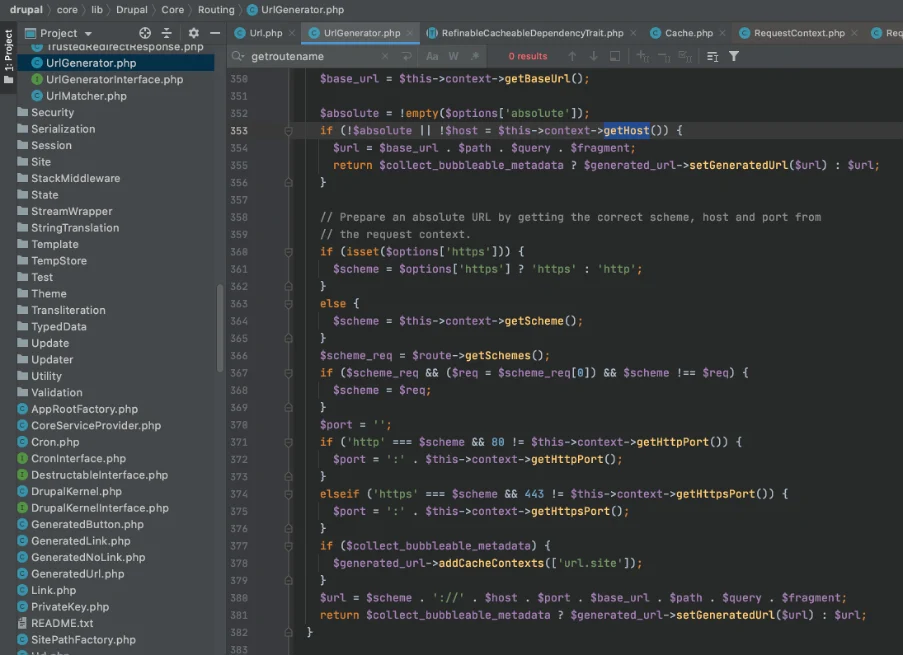
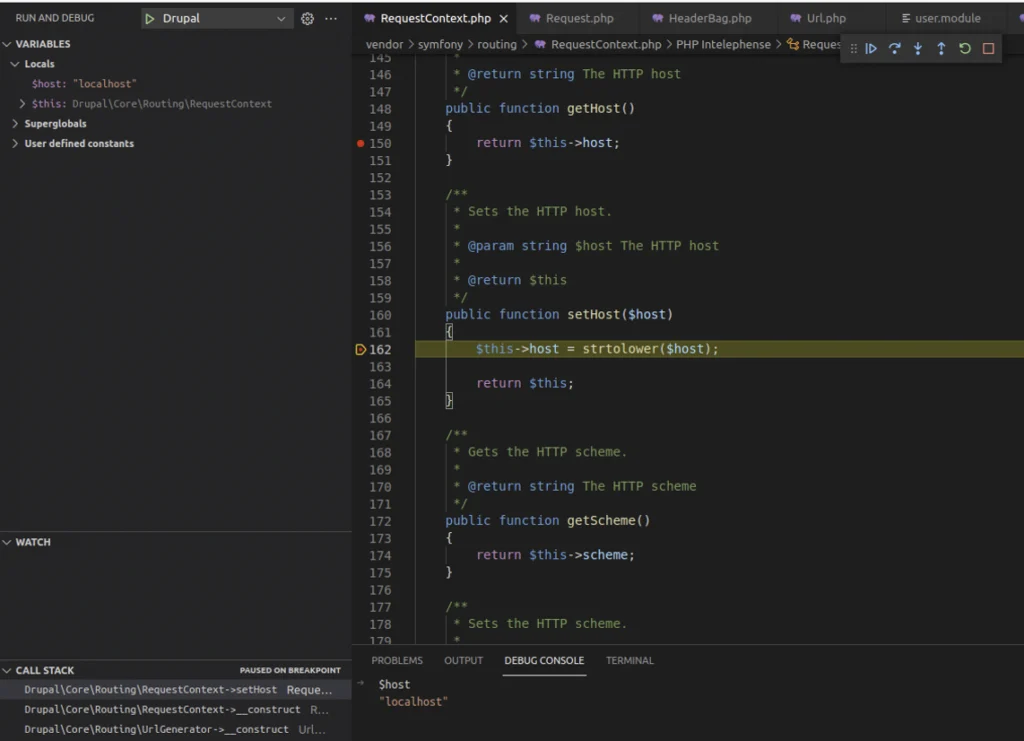
Source code review alone did not reveal how the Host is set for the $context (the RequestContext class), so the researcher set up a debugger and performed dynamic analysis. Drupal sets the Host property of the RequestContext class in the RequestContext constructor and also in the fromRequest() method of the same class. What is really interesting is that they call the constructor first with a safe value ('localhost' in this case) and then they call fromRequest(), which overrides the safe value with the poisoned host header:
After the constructor runs, they override the hostname with a malicious header controlled by the attacker, thus transforming it from a secure link to an insecure one:
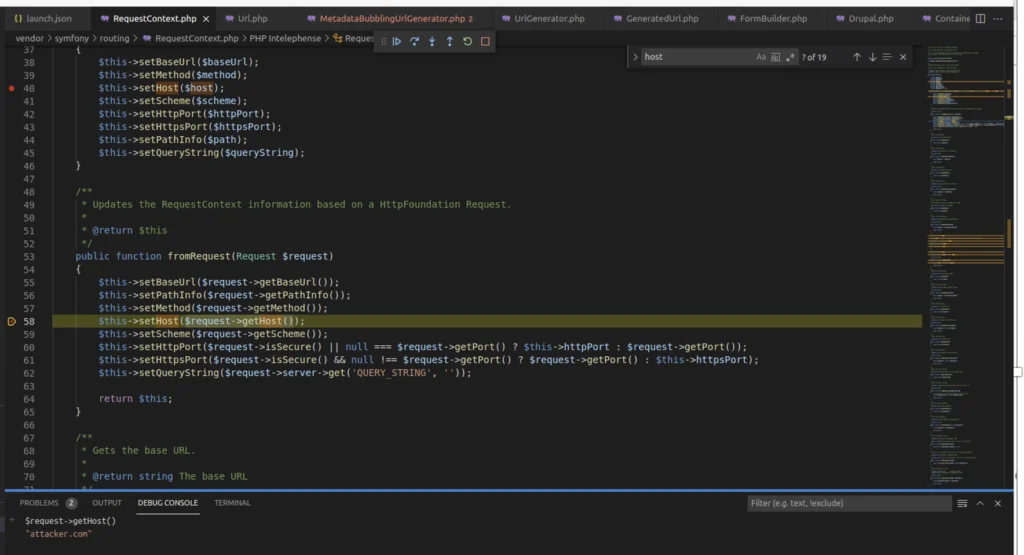
So the design flaw is that the reset URL is derived from request data (the Host header) at all, and that the safe value set in the constructor is deliberately overwritten by fromRequest() with the value supplied by the client. The documented fix is the Trusted Host Settings configuration, which the researcher argues has serious limitations:
- it is not secure by default
- there were no warnings during the setup process
- it puts the onus on Drupal admins, who might be non-technical people; moreover, they expect you to know how to write secure regexps
- as explained in the source code analysis, the link is initially secure and then they decide to override this and use the host header
- this can result in RCE on the server, because the admin can upload custom Drupal modules
Impact
Through this host header vulnerability, an attacker can control the host header of the password reset link and capture the token in order to reset an administrator's password. Once an admin, the attacker can upload a custom Drupal module, which will give them RCE on the server. The attack requires the victim to click the poisoned link in the email for the token to be collected.
Fix
There is still no patch. The researcher notes that Drupal has documented the issue in its Trusted Host Settings documentation, that they have known about it since 2014, and that there is still no patch. The documented approach is the Trusted Host Settings configuration, with the limitations listed above.
Variants to test
- A positive result is a link whose scheme and host match the value you supplied.
- A positive result is any generated URL that reflects the request Host.
- A positive result is a reset link built from a host outside the intended allowlist.
- A positive result is a debugger trace showing the safe value replaced by the request value before the URL is generated.
References
- Joomla password reset poisoning vulnerability leads to full compromise
- Concrete CMS Part2 - Password reset poisoning vulnerability.
- Drupal Trusted Host Settings
- Drupal issue 2221699

What happened, in plain words
Drupal is a free, open-source system for building websites. It is written in PHP, a programming language commonly used on web servers, and it powers the back end of at least 13% of the top 10,000 websites in the world, according to Wikipedia. Those sites range from personal blogs to corporate, political and government sites. This research was done against the latest version of Drupal with its default configuration, as an internal research pentest project. A pentest (penetration test) is an authorised attempt to break into a system to find weaknesses before criminals do.
The feature under the microscope is the ordinary password reset flow. When you forget your password, you go to a page called 'Reset your password', type your email address and click submit. Drupal then creates a one-time code called a token, and emails you a link that contains that token. Clicking the link proves you received the email, and lets you choose a new password. The token is like a temporary key: whoever holds it can open the account's door once.
The weakness found is called a host header vulnerability, and it lets an attacker reset an administrator's password. The researcher contacted the Drupal team to report it and give them time to fix it. The team was cooperative and allowed the findings to be published. It seems they already knew about the issue and have documentation covering it, which is discussed below.
The pieces you need to know first
Before walking through the attack, a few everyday ideas make everything else easier to follow.
- A request and a response. Your browser asks a website for something (a request) and the website answers (a response). Think of it as posting a letter with a question and getting a reply.
- Headers. Every request carries small labelled notes alongside the actual question. They are called headers. One of them is the
Hostheader, which tells the server which website name the browser was trying to reach, for examplewww.example.com. It is like writing the recipient's address on the envelope. The important part: the browser writes this note, so a user with the right tools can rewrite it before the letter is sent. - Intercepting a request. A proxy tool sits between your browser and the website. It lets you pause a request, edit it, and then send it on. This is how the attacker changes the
Hostheader. - A token. A long random string that acts as a one-time password. In this flow it is embedded in the reset link.
- Password reset poisoning. The name for this class of attack. The attacker does not steal the victim's password directly. Instead, the attacker makes the website send the victim a reset link that points somewhere the attacker controls, so the victim hands over the token by clicking it.
The vulnerability
It is possible to construct the password reset poisoning attack as follows.
- On the 'Reset your password' page, enter the victim's email and click submit.
The screenshot shows the reset form with the victim's email address filled in.
- Intercept the request, modify the Host header and send the request:
The screenshot shows the captured request with the Host header changed. This is the heart of the attack. The server will later build the reset link using whatever value it finds in this header, so by changing it the attacker decides where the link points.
- Right afterwards, the app will redirect the user to the attacker's domain as seen below:
The screenshots show the app redirecting the user to the attacker's domain. A redirect is the server telling the browser 'the page you want is over there, go to this address instead'. Because the server trusted the modified Host header, it treats the attacker's domain as the correct place to send the user.
- In addition, you will receive an email with the poisoned 'reset password' link:
The screenshot shows the email arriving with a reset link that points at the attacker's domain. The word 'poisoned' means the link has been tampered with: it looks like a normal Drupal reset link, but its address belongs to the attacker.
If the victim clicks the above link, the 'attacker.com' domain will collect the token and thus the attacker can reset the victim's password, which can be an admin. An admin (administrator) is a user with the highest level of control over the website.
Source code analysis
Now let's analyse the source code for this password reset poisoning vulnerability. Source code is the human-written instructions that make up the program. Reading it shows exactly where the mistake lives.
The password reset process starts inside the _user_email_notify() function:
A function is a named block of instructions. This one is responsible for notifying the user by email. The screenshot shows the code that begins the reset email process.
The reset token is generated inside the user_mail_tokens():
This function creates the token that will be placed in the email. The screenshot shows where that random value is produced.
The URL for password reset that gets sent in the notification email is created in the user_pass_reset_url() function, by the Url::fromRoute()->toString() function as can be seen below:
A URL is a web address, the thing you type in the browser's address bar. This function builds the address that will appear in the email. The screenshot shows the call that turns an internal route into a full web address.
The Url->toString() method will call urlGenerator()->generateFromRoute():
A method is a function that belongs to an object, a bundle of code and data. Here, one method hands the work to another. The screenshot shows that chain of calls.
And generateFromRoute() does the interesting part where it gets the Host from $this->context->getHost():
This is the moment the address is assembled, and the host part (the domain name) is taken from a stored context object rather than from a fixed setting. The screenshot shows that lookup. The question that follows is: who put that host value into the context, and where did it come from?
Dynamic analysis
Source code review alone did not reveal how the Host is set for the $context (the RequestContext class), so the researcher set up a debugger and performed dynamic analysis. A debugger is a tool that lets you pause a running program and inspect its variables step by step, like freezing a film to look at a single frame. Dynamic analysis means studying the program while it runs, as opposed to only reading its code.
Drupal sets the Host property of the RequestContext class in the RequestContext constructor and also in the fromRequest() method of the same class. A constructor is the setup routine that runs when an object is first created. What is really interesting is that they call the constructor first with a safe value ('localhost' in this case) and then they call fromRequest(), which overrides the safe value with the poisoned host header:
The screenshot shows the debugger at this point: the safe value is set first, and then replaced. 'localhost' is the standard name a computer uses for itself, so it is a harmless default.
After the constructor runs, they override the hostname with a malicious header controlled by the attacker, thus transforming it from a secure link to an insecure one:
The screenshot shows the second step, where the value from the request wins. This is the design flaw: the reset URL is derived from request data (the Host header) at all, and the safe value set in the constructor is deliberately overwritten by fromRequest() with the value supplied by the client.
The documented fix is the Trusted Host Settings configuration, which the researcher argues has serious limitations:
- it is not secure by default
- there were no warnings during the setup process
- it puts the onus on Drupal admins, who might be non-technical people; moreover, they expect you to know how to write secure regexps
- as explained in the source code analysis, the link is initially secure and then they decide to override this and use the host header
- this can result in RCE on the server, because the admin can upload custom Drupal modules
A regexp (regular expression) is a compact pattern used to describe which text is allowed, for example a list of acceptable domain names. Writing one that is both correct and safe is a specialist skill, which is why the researcher calls it a burden on admins. RCE stands for remote code execution: the ability to make the server run code of the attacker's choosing. A module is an add-on that extends Drupal, and installing one is a normal admin task.
Disclosure
The researcher disclosed the host header vulnerability to the Drupal team. It seems they know about the issue and they documented it in their Trusted Host Settings documentation. What is even more amazing to the researcher is that they know about this issue since 2014 and there's still no patch. A patch is an official update that fixes a flaw in the product itself.
As demonstrated above this approach is vulnerable and the documented fix has some serious limitations:
- it's not secure by default
- it puts the onus on Drupal Admins which might be non technical people. Moreover, they expect you to know how to write secure regexps
- as explained in the Source Code Analysis section the link is initially secure and then they decide to override this and use the host header
Impact
Through this host header vulnerability, an attacker can control the host header of the password reset link and capture the token in order to reset an administrator's password. Once an admin, the attacker can upload a custom Drupal module, which will give them RCE on the server. The attack requires the victim to click the poisoned link in the email for the token to be collected. In plain terms: one click on a convincing email can hand over the keys to the whole site.
Fix
There is still no patch. Drupal has documented the issue in its Trusted Host Settings documentation, has known about it since 2014, and there is still no patch. The documented approach is the Trusted Host Settings configuration, with the limitations listed above. A workaround is something you configure around a flaw, not a change to the flawed code itself.
Variants to test
- A positive result is a link whose scheme and host match the value you supplied. A CMS is a content management system, software for building and running a website.
- A positive result is any generated URL that reflects the request Host. An absolute link is a full web address including the domain, as opposed to a relative one that only names a page.
- A positive result is a reset link built from a host outside the intended allowlist. An allowlist is a list of things that are explicitly permitted.
- A positive result is a debugger trace showing the safe value replaced by the request value before the URL is generated.
References
- Joomla password reset poisoning vulnerability leads to full compromise
- Concrete CMS Part2 - Password reset poisoning vulnerability.
- Drupal Trusted Host Settings
- Drupal issue 2221699
Glossary
- Admin (administrator): a user with the highest level of control over a website.
- Allowlist: a list of things that are explicitly permitted.
- Absolute link: a full web address including the domain name, as opposed to a relative one that only names a page.
- Black-box approach: testing a system only through its outside behaviour, without reading its code.
- CMS (content management system): software for building and running a website, such as Drupal.
- Constructor: the setup routine that runs when an object is first created.
- Debugger: a tool that lets you pause a running program and inspect its variables step by step.
- Default configuration: the settings a product uses when installed without changes.
- Disclosure: reporting a vulnerability to the people who can fix it, often with time allowed before publication.
- Dynamic analysis: studying a program while it runs, as opposed to only reading its code.
- Function: a named block of instructions in a program.
- Header: a small labelled note sent alongside a request or response, such as
Host. - Host header: the header that tells the server which website name the browser was trying to reach.
- Host header vulnerability: a flaw where the server trusts the
Hostheader supplied by the client and uses it to build links or make decisions. - Intercept: to pause a request between browser and server so it can be inspected or edited.
- Method: a function that belongs to an object.
- Module: an add-on that extends Drupal's features.
- Patch: an official update that fixes a flaw in the product itself.
- Pentest (penetration test): an authorised attempt to break into a system to find weaknesses before criminals do.
- PHP: a programming language commonly used on web servers.
- Proxy: a tool that sits between your browser and a website and can pause, edit and forward requests.
- RCE (remote code execution): the ability to make a server run code of the attacker's choosing.
- Redirect: the server telling the browser to go to a different address instead.
- Regexp (regular expression): a compact pattern used to describe which text is allowed.
- Request: the message a browser sends to ask a website for something.
- Response: the message a website sends back.
- Source code: the human-written instructions that make up a program.
- Token: a long random string that acts as a one-time password.
- Trusted Host Settings: Drupal's documented configuration for restricting which host names the site will accept.
- URL: a web address.
- Workaround: something you configure around a flaw, not a change to the flawed code itself.