Don’t Trust the Host Header for Sending Password Reset Emails
The password reset email link was built from the client-supplied Host header, so an attacker could change the host to their own domain and have the victim's reset token sent to them. The author found this in four bug bounty programs, including Mavenlink where a question mark in the header bypassed the subdomain restriction.
 Published on lightningsecurity.io
Let's say you're building password reset functionality into your website. Since your website url might change in the future, you want to dynamically generate the link in the password reset email to match your server's url.
The full write-up lives on its author's site
It belongs to its author, so we link to it rather than copy it. The other two tabs are our own rewrites, checked against it.
Context
Password reset emails usually contain a link back to the application. If the application builds that link dynamically from the incoming request, it needs a hostname to put in the URL. A common shortcut in PHP is to read $_SERVER['HTTP_HOST'], a value that comes straight from the client's Host header. The report opens with exactly that pattern: a developer searches for how to get the server URL in PHP, lands on a StackOverflow answer, adds $_SERVER['HTTP_HOST'] and moves on.
The problem is that the Host header is attacker-controlled. If it is reflected into a password reset email, the attacker can make the victim's reset link point at a domain the attacker owns. The victim clicks what looks like a legitimate email, the reset token is delivered to the attacker, and the attacker uses it to set a new password.
The write-up describes this pattern generally and then walks through one concrete instance found on Mavenlink, which runs a public HackerOne program. Mavenlink lets companies register a subdomain of mavenlink.com to host their content, so the application has a genuine reason to determine the company subdomain dynamically. That is the feature whose URL generation was abused.
Setup
No special tooling is described. The researcher tested against Mavenlink's public HackerOne program, changing the Host header sent with the password reset request. The precondition is simply that the target has a password reset feature that builds the reset link from the request host, and that the attacker knows the victim's email address.
Finding it
The general attack scenario is laid out in five steps:
-
The attacker identifies a target user's email address.
-
The attacker modifies the host header of the request to reset the target's password to their own domain.
-
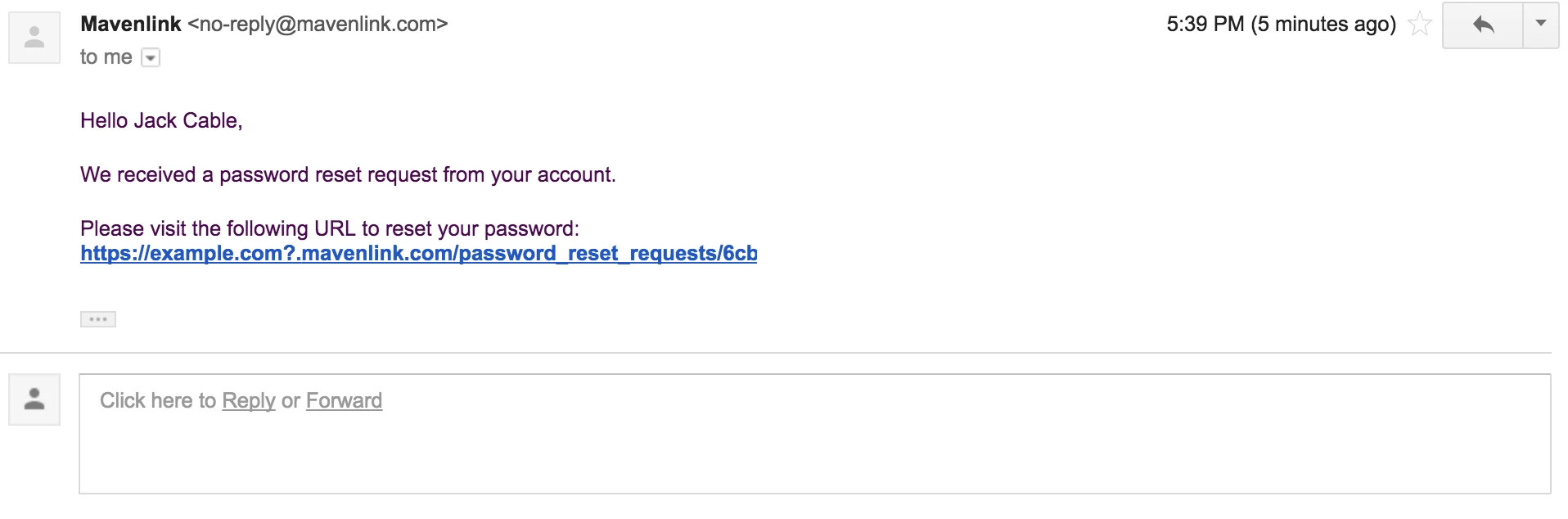
The target receives the email shown below.

From the original on lightningsecurity.io -
Trusting the company, the target clicks the reset link. Because the link is formed from the host header, it points to the attacker's website instead. When the target visits that site, their password reset token is sent to the attacker.
-
The attacker resets the target's password using the stolen token.
On Mavenlink, the researcher first confirmed that the host header was reflected in the email at all. Setting the header to any subdomain of mavenlink.com produced a matching link in the email. Changing the domain away from mavenlink.com, however, returned an error and no email was sent. That looked reasonably secure: an attacker could add an arbitrary subdomain of mavenlink.com, but every such subdomain redirected to the proper page, so there was no obvious way to get a link under attacker control.
The next step was testing special characters in the header value. After a few attempts, the server accepted a question mark, which was enough to break the validation.
Exploitation
Step 1: confirm reflection
Send the password reset request for the victim's address with a Host header set to a subdomain of mavenlink.com. The email that arrives contains a reset link built from that value. This establishes that the header is used to construct the URL.
Step 2: confirm the domain restriction
Change the Host header to a domain outside mavenlink.com. The server returns an error and does not send the email. At this point the application appears to be validating the host against the expected domain.
Step 3: bypass the validation with a question mark
The server accepted a question mark in the header, so the researcher could append one after their own domain and still keep the value ending in .mavenlink.com:
Host: example.com?.mavenlink.com
In a URL, the question mark starts the query string. Everything after it is treated as the query, so the base URL the browser resolves is example.com, while the string still satisfies whatever check was looking for the mavenlink.com suffix. The reset link in the email therefore points at the attacker's domain.
Step 4: capture the token
The victim receives the email and clicks the link. Because the base URL is the attacker's domain, the request, including the password reset token, goes to the attacker. The researcher demonstrated that this allowed stealing any user's password reset token from the email:
Step 5: reset the password
With the token in hand, the attacker can reset the victim's password, as in the general scenario.
Root cause
The reset link is generated from the client-supplied Host header rather than from a trusted, server-side value. The application did attempt a defence: changing the domain away from mavenlink.com returned an error and no email was sent. A question mark starts the query string, so example.com?.mavenlink.com passes a suffix check while resolving to example.com. The validation and the URL parser disagreed about what the host was, and the parser's interpretation is the one the victim's browser follows.
Impact
An attacker who knows a victim's email address can take over that account: the victim receives a genuine password reset email from the company, clicks the link, and the token is sent to the attacker, who then resets the password. The attack requires the victim to click the link, and it requires the reset flow to build the link from the request host. The researcher notes having found the same issue in four bug bounty programs over the preceding months, so it is not purely theoretical.
Fix
Do not use the Host header to build password reset emails, or for anything else that needs a trusted hostname. If the URL has to be dynamic, store the host as a server-side variable and use that when constructing links.
Variants to test
- Plain host reflection. Set
Hostto an attacker-controlled domain and request a reset. A positive result is an email whose link points at your domain. - Suffix validation bypass with
?. If hosts outside the expected domain are rejected, tryHost: example.com?.expected.com. A positive result is an email whose link resolves toexample.com. - Other URL delimiters. The report only demonstrates the question mark; other characters that alter how a URL is parsed are worth trying against the same suffix check, looking for the same outcome: a link that resolves to your domain while passing validation.
- Subdomain reflection. Even when only subdomains of the real domain are accepted, check whether any of them can be influenced or whether the reflected value can be combined with the delimiters above.
What happened, in plain words
Many websites have a "forgot my password" button. You type your email address, the site sends you an email containing a special link, and clicking that link lets you choose a new password. The link has to point back at the website, so the site has to know its own address when it writes the email.
A common shortcut is to ask the visitor's own browser for that address. Every time your browser asks a web server for a page, it sends a small set of labels along with the request. One of those labels is called the Host header, and it simply says which website name the browser thinks it is talking to. The server can read it and copy it into the email link.
The trouble is that this label comes from the visitor, not from the server. Anyone can change it before the request leaves their computer. If the site copies that changed value into a password reset email, the email can end up containing a link to a completely different website, one chosen by an attacker. The person who receives the email sees a genuine message from the real company, clicks the link, and the secret code inside the link (the password reset token) is handed to the attacker. The attacker then uses that code to set a new password and take over the account.
This article walks through one real example of that mistake, found on a service called Mavenlink. The same flaw was found in four bug bounty programs over a few months, so it is not a theoretical curiosity.
The setup: how the mistake gets made
Imagine you are building a website and you add a password reset feature. Your site's address might change in the future, so instead of writing the address into the code by hand, you want the code to work it out each time. You search the web for how to get the server's URL in PHP (PHP is a popular programming language for building websites), and you land on a StackOverflow question, a well-known question-and-answer site for programmers. The answer tells you to use a value called $_SERVER['HTTP_HOST'].
$_SERVER is a bundle of information PHP makes available about the current request, and HTTP_HOST is the entry that holds the Host header the browser sent. So the code is effectively saying: "use whatever website name the visitor's browser told me". You add it and move on, without realising that the visitor controls that value.
That is the whole root of the problem. The Host header is provided by the client, meaning the person making the request can put anything they like in it. If the server trusts it when building a link in an email, an attacker can put their own website into a password reset email that the real company sends.
The attack, step by step
The general attack looks like this:
-
The attacker identifies a target user's email address.
-
The attacker modifies the host header of the request to reset the target's password to their own domain.
-
The target receives the following email:
From the original on lightningsecurity.io The image shows the password reset email as the victim would see it: a message that appears to come from the company, containing a reset link. Because the link was built from the host header the attacker supplied, it points at the attacker's domain rather than the company's.
-
Trusting the company, the target clicks the reset link. Because the link is formed from the host header, it points to the attacker's website instead. When the target visits that site, their password reset token is sent to the attacker.
-
The attacker now resets the target's password using their password reset token.
A password reset token is a secret the site generates when you ask to reset your password; whoever holds it can choose a new password. If someone else gets hold of it before you use it, they can use it in your place.
The Mavenlink example
Mavenlink runs a public bug bounty program on HackerOne, a platform where companies invite security researchers to test their systems and pay for valid findings. The researcher decided on a whim to test for this vulnerability there.
Mavenlink lets companies register a subdomain of mavenlink.com to host their content. A subdomain is the part in front of the main name: in shop.example.com, shop is the subdomain and example.com is the main domain. Because each company gets its own subdomain, Mavenlink genuinely needs a way to work out which company's subdomain is being used at any moment. That is the feature whose link generation was abused.
Step 1: confirm the header is used at all
The researcher first checked whether the host header showed up in the email. Setting the header to any subdomain of mavenlink.com produced a matching link in the email. In other words, the value the browser sent was copied into the reset link. This is the basic confirmation that the site builds the link from the request rather than from a fixed address stored on the server.
Step 2: confirm the restriction
Next, the researcher changed the domain away from mavenlink.com. The server returned an error and did not send an email. So the application was doing some checking: it would only accept host values that belonged to mavenlink.com.
At first this looked reasonably secure. An attacker could add a random subdomain of mavenlink.com, but every such subdomain redirected to the proper page, so there was no obvious way to get a link under the attacker's control.
Step 3: try special characters
The next step was testing special characters in the header value. After a few tries, the researcher hit gold: the server accepted a question mark. That was enough to get around the check.
The trick was to put the attacker's own domain first, then a question mark, then something ending in .mavenlink.com so the check would still be satisfied:
Host: example.com?.mavenlink.com
Line by line: Host: is the name of the header the browser sends with every request. example.com is the attacker's own domain, the place they want the victim to end up. ? is the question mark the server failed to reject. .mavenlink.com is the suffix the validation was looking for, so the value still looks like it belongs to Mavenlink.
Why does that work? In a web address, the question mark marks the start of the query string, the part of a URL that carries extra information after the main address. Everything after the question mark is treated as query data, not as part of the site name. So when a browser reads example.com?.mavenlink.com, it treats example.com as the website to visit and ?.mavenlink.com as trailing data. The validation, however, was a simple text check looking for the mavenlink.com ending, and the string still ends that way. The check and the browser disagree about what the host is, and the browser's interpretation is the one the victim follows.
Step 4: capture the token
The victim receives the email and clicks the link. Because the base address is the attacker's domain, the request, including the password reset token, goes to the attacker. The researcher demonstrated that this allowed stealing any user's password reset token from the email:
The image shows the password reset token being stolen from the email.
Step 5: reset the password
With the token in hand, the attacker can reset the victim's password, as in the general scenario.
Why it worked
The reset link was generated from the client-supplied Host header rather than from a trusted value stored on the server. The application did try to defend itself: changing the domain away from mavenlink.com returned an error and no email was sent. A question mark starts the query string, so example.com?.mavenlink.com passes a check for the mavenlink.com ending while resolving to example.com. The validation and the URL parser disagreed about what the host was, and the parser's interpretation is the one the victim's browser follows.
What the impact is
An attacker who knows a victim's email address can take over that account. The victim receives a genuine password reset email from the company, clicks the link, and the token is sent to the attacker, who then resets the password. The attack requires the victim to click the link, and it requires the reset flow to build the link from the request host. The researcher notes having found the same issue in four bug bounty programs over the preceding months, so it is not purely theoretical.
How to fix it
Do not use the Host header to build password reset emails, or for anything else that needs a trusted hostname. If the URL has to be dynamic, store the host as a server-side variable and use that when constructing links. In plain terms: keep the site's own address in a setting on the server, where visitors cannot reach it, and read it from there whenever you need to write a link.
Other things worth testing
If you are checking a site for this problem, these are variations worth trying:
- Plain host reflection. Set
Hostto an attacker-controlled domain and request a reset. A positive result is an email whose link points at your domain. - Suffix validation bypass with
?. If hosts outside the expected domain are rejected, tryHost: example.com?.expected.com. A positive result is an email whose link resolves toexample.com. - Other URL delimiters. The report only demonstrates the question mark; other characters that end or alter the site-name part of a URL are worth trying against the same suffix check, looking for the same outcome: a link that resolves to your domain while passing validation.
- Subdomain reflection. Even when only subdomains of the real domain are accepted, check whether any of them can be influenced, or whether the reflected value can be combined with the delimiters above.
Glossary
- Host header: a label your browser sends with every web request saying which website name it is asking for; the server can read it, and the visitor can change it.
- Header: a small piece of information sent alongside a web request or response, such as the site name or the type of content.
- HTTP_HOST: the PHP entry that holds the value of the incoming
Hostheader. - PHP: a programming language commonly used to build websites.
- StackOverflow: a question-and-answer website where programmers ask for and share solutions.
- Password reset token: a long random secret generated when you ask to reset your password; clicking the emailed link proves you hold it, and whoever holds it can set a new password.
- Account takeover: when an attacker gains control of someone else's account, for example by setting a new password.
- Domain: the main name of a website, such as
example.com. - Subdomain: a name placed in front of a domain, such as
shopinshop.example.com. - URL: a web address, such as
https://example.com/page. - Query string: the part of a URL after a question mark, carrying extra information rather than naming the site.
- URL parser: the part of a browser or server that reads a URL and works out which site it points to and what data it carries.
- Bug bounty program: a scheme where a company invites researchers to test its systems and pays for valid security findings.
- HackerOne: a platform that hosts bug bounty programs.
- Validation: a check a program performs on input to decide whether to accept it.
- Reflection: when a value supplied in a request is copied back into a response, such as an email, without being treated as untrusted.
- Server-side variable: a value stored in the server's own configuration or code, which visitors cannot change.
- Client: the browser or program making a request, as opposed to the server answering it.





