$1,250 worth of Host Header Injection
The password reset functionality was vulnerable to host header injection, allowing an attacker to manipulate the reset link sent to a victim. By inserting a full stop in the Host header and later using a Burp Collaborator domain, the attacker could steal the victim's reset token and take over their account.
 Published on medium.com
Host header injection is a web security vulnerability that occurs when an attacker manipulates the “Host” header in an HTTP request to a web server. This header is part of the HTTP protocol and is used to specify the target domain or host to which the request should be sent.
The full write-up lives on its author's site
It belongs to its author, so we link to it rather than copy it. The other two tabs are our own rewrites, checked against it.
Context
The target is a web application whose password reset flow lives under /account/forgotpassword. The reset request carries a returnUrl parameter pointing at an OpenID Connect callback (/connect/authorize/callback). The application builds the reset link it emails to the user from the incoming request. The researcher, Salman Khan (@salman_ashlor), used that behaviour to turn a Host header injection into an account takeover and was paid $1,250.
The write-up opens with a definition: host header injection is a web security vulnerability in which an attacker manipulates the Host header of an HTTP request. The header tells the server which domain or virtual host the request is for, and sites that rely on it to decide which host to serve, or which host to put into generated links, are the ones affected. The researcher notes that on its own this is usually treated as informational or P5 severity, and only becomes worth a bounty when a real impact is demonstrated, such as account takeover through the forgot password function or a chain into web cache poisoning.
Setup
The only tool discussed is Burp Suite. The researcher first used a current version, hit a 400 Bad Request while crafting the request, and then switched to an older release, Burp Suite 1.7.34, which produced the working result. A Burp Collaborator link is used in the final demonstration to receive the victim's reset token. The report does not describe how the victim account was set up or how the victim was induced to click the link.
Finding it
The researcher starts from the forgot password functionality: request a reset, receive a link containing a reset token, and look at how the link is constructed. The suspicion is that the host portion of the emailed link is taken from the request rather than from a fixed configuration. To test it, a full stop (.) is appended to the Host header value in the reset request, and the request is sent. If the resulting email contains the modified host, the application is building the link from attacker-influenced input.
The general shape of the bug is illustrated with a simple pair of requests. A normal request names the real host:
GET /page HTTP/1.1Host: www.example.com
and an attacker-controlled value replaces it:
GET /page HTTP/1.1Host: malicious.com
The report also shows a generic request and response pair for the injection, where an X-Forwarded-Host header carries the attacker value and the response body reflects it into a script tag:
GET /account/forgotpassword HTTP/2Host: target.comX-Forwarded-Host: evil.comCookie: asd=1234;Accept: text/html,application/xhtml+xml,application/xml;Accept-Language: en-US,en;q=0.5Accept-Encoding: gzip, deflate, br
HTTP/1.1 200 Ok...Response Headers...<html><head><title>Web Page</title><script src="https://evil.com/index.php"><html>
Exploitation
Step 1: request a reset and inspect the link
The researcher opens the Forgot Password functionality and initiates a password reset, then receives an email containing a link with a reset password token. This establishes the baseline: the link points at the real host.
Step 2: append a full stop to the Host header
To test whether the host in the link is attacker-controlled, a full stop is added at the end of the Host header in the reset request and the request is sent. The altered header is Host: target.com. and the full request is:
POST /account/forgotpassword?returnUrl=%2Fconnect%2Fauthorize%2Fcallback HTTP/2Host: target.com.Cookie: csrf=123;Accept: text/html,application/xhtml+xml,application/xml;q=0.9,image/avif,image/webp,*/*;q=0.8Accept-Language: en-US,en;q=0.5Accept-Encoding: gzip, deflate, brContent-Type: application/x-www-form-urlencodedContent-Length: 207Origin: https://target.comReferer: https://target.com/account/forgotpassword?returnUrl=%2Fconnect%2FSec-Fetch-Dest: documentSec-Fetch-Mode: navigateSec-Fetch-Site: same-originSec-Fetch-User: ?1Te: trailersUserEmail=gdfcg%40gg.jjh&__RequestVerificationToken=[redacted]-[redacted]
The body carries an email address in UserEmail and an antiforgery token in __RequestVerificationToken; the returnUrl points at the OIDC callback. The important part is the trailing dot in Host.
Step 3: confirm the injected host in the email
The email that arrives this time contains a reset link whose host includes the full stop that was inserted. That confirms the site is vulnerable to host header injection. The link received is:
https://target.com./forgetpassword?userid=123&code=2wwdsb3wehsuwhswgbsuwgqeu
Step 4: hit the limitation
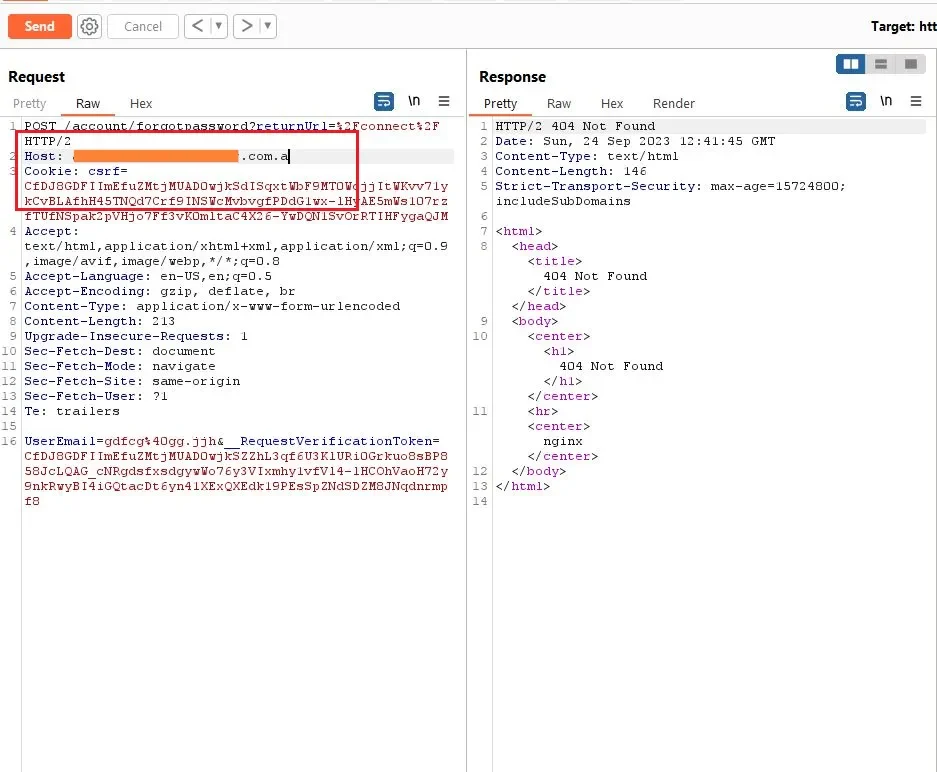
Adding anything after the full stop produces a 404 error, so the injected value cannot simply be extended into an arbitrary domain. The researcher treats this as a restriction that has to be bypassed before the bug can be exploited further.
Step 5: put the full URL in the request line
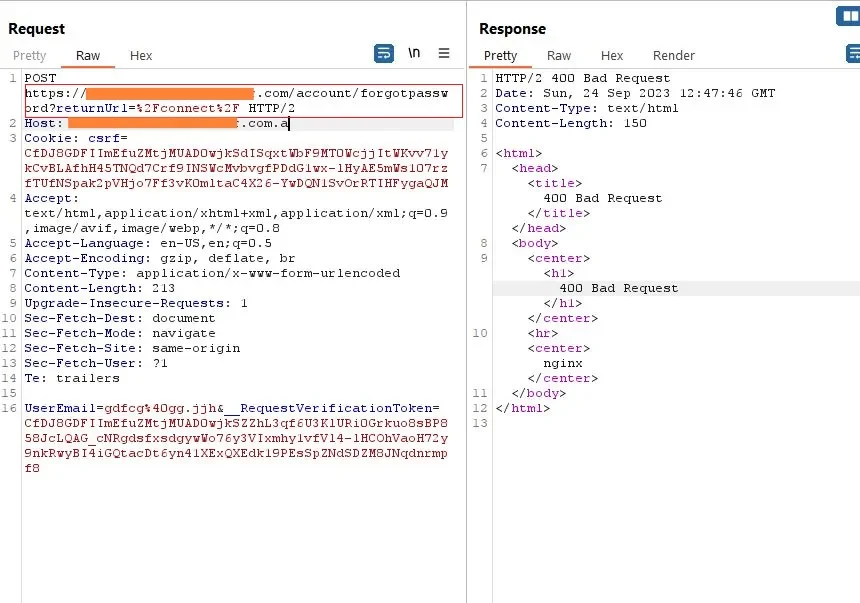
To get a 200 OK again, the reset request is crafted with the full URL in the request line rather than a path, while the Host header carries target.com.a:
POST https://target.com/account/forgotpassword?returnUrl=%2Fconnect%2F HTTP/2Host: target.com.aCookie: csrf=[redacted]-[redacted]-YwDQN1SvOrRTIHFygaQJMAccept: text/html,application/xhtml+xml,application/xml;q=0.9,image/avif,image/webp,*/*;q=0.8Accept-Language: en-US,en;q=0.5Accept-Encoding: gzip, deflate, brContent-Type: application/x-www-form-urlencodedContent-Length: 213Upgrade-Insecure-Requests: 1Sec-Fetch-Dest: documentSec-Fetch-Mode: navigateSec-Fetch-Site: same-originSec-Fetch-User: ?1Te: trailersUserEmail=gdfcg%40gg.jjh&__RequestVerificationToken=[redacted]-[redacted]
Step 6: the 400 Bad Request
With this request the response is 400 Bad Request instead of the expected 200 OK.
Step 7: switch to an older Burp Suite
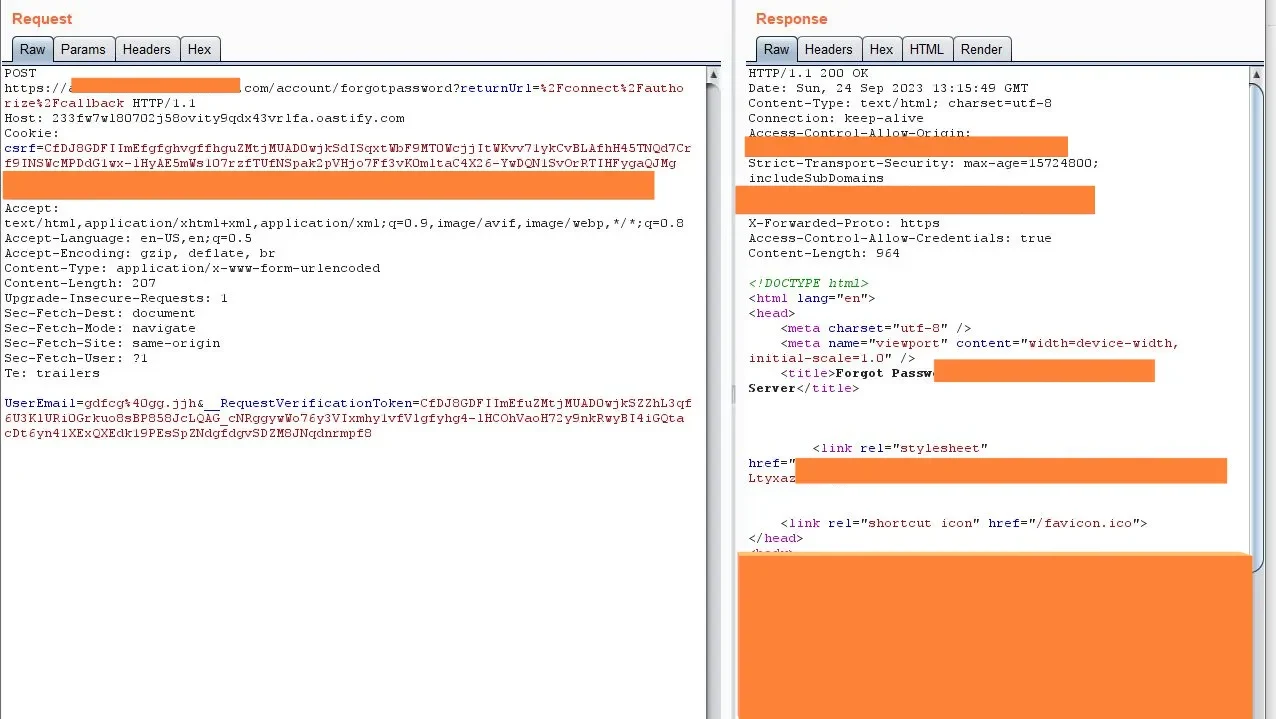
After some thought and research, the researcher concludes that the current version of Burp Suite may be responsible for the 400 Bad Request, and decides to use an older version, Burp Suite 1.7.34. With that version the request succeeds.

Step 8: point the Host header at Burp Collaborator
To demonstrate the full exploit, the Burp Collaborator link is placed in the Host header and the request is sent.
Step 9: capture the token when the victim clicks
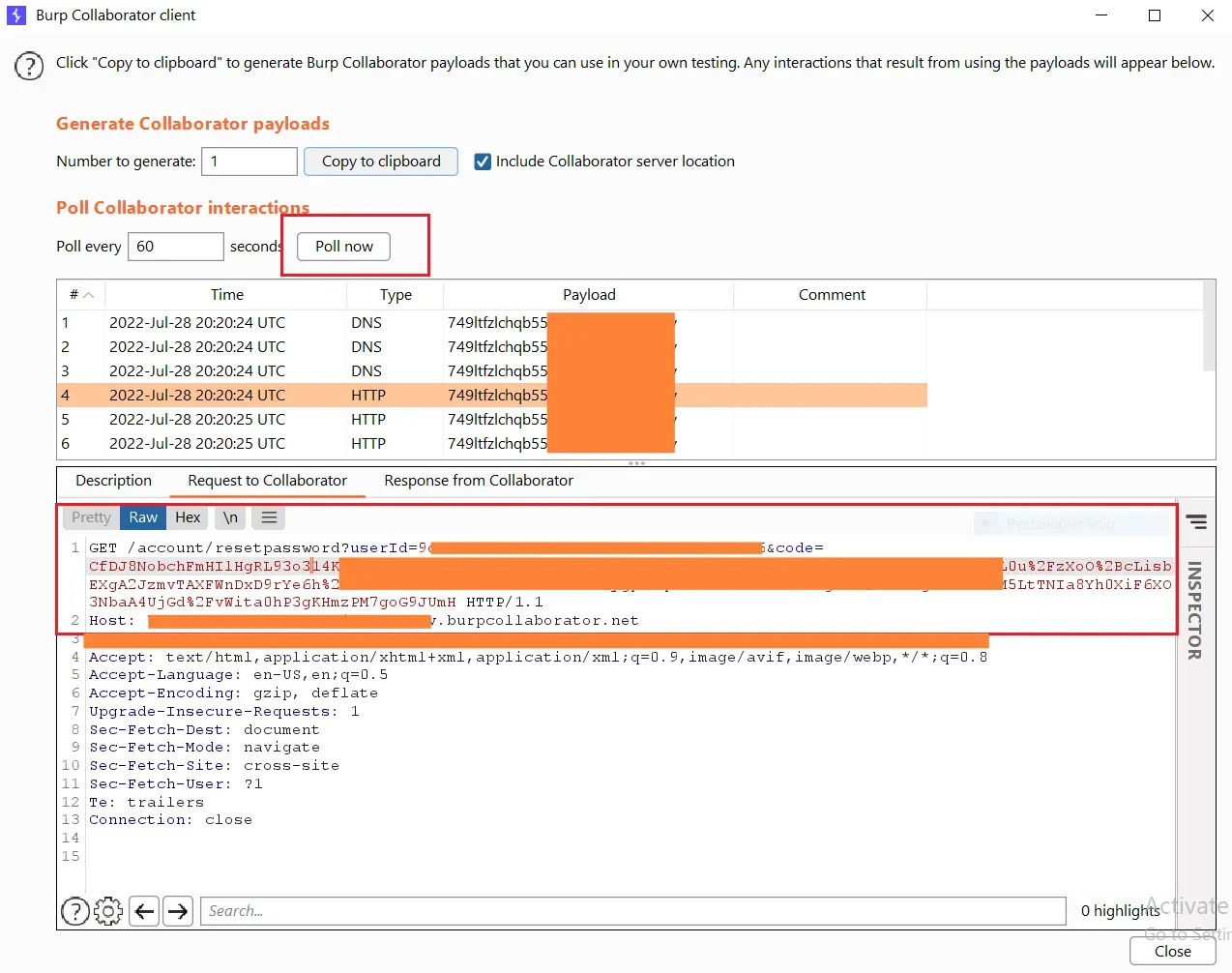
The victim receives the crafted reset password link. When the victim clicks it, the reset password token is delivered to the researcher's Burp Collaborator.
Step 10: take over the account
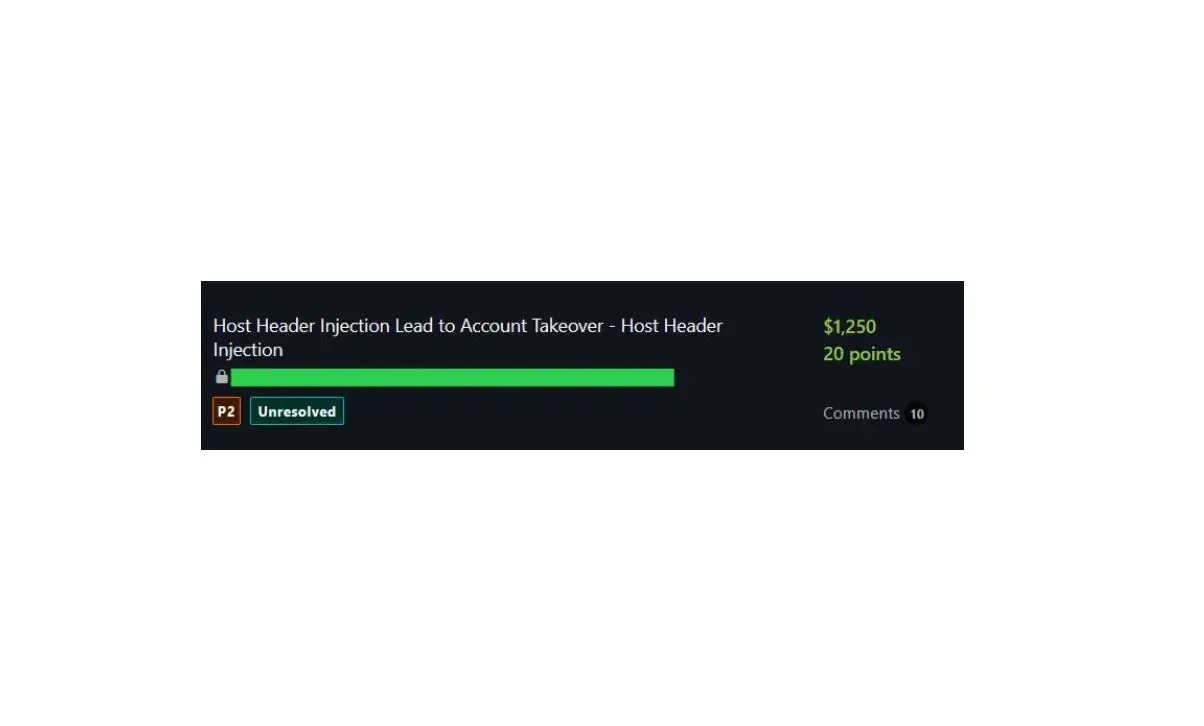
The captured token is used to take over the victim's account. The researcher received a bounty of $1,250 for the report.
Root cause
The application builds the password reset link from the host supplied in the incoming request instead of from a fixed, configured value. Because the Host header is attacker-controlled, the link in the email points wherever the attacker chooses. The trailing-dot test is what proves the link is generated from the header: the dot appears in the emailed URL.
The report does not describe any server-side validation of the Host header, and it does not say which framework or component generates the link.
Impact
An attacker who can submit a reset request for a victim's email address can influence the host in the emailed reset link, as the dot test and the Collaborator demonstration show. When the victim clicks it, the reset token is sent to the attacker, who can then use it to take over the account. The attack requires the victim to click the crafted link, and it requires the attacker to know the victim's email address, since the reset request is submitted with UserEmail. The report does not discuss other preconditions, such as whether the victim must be unauthenticated or whether the token expires.
Fix
The general fix for this class of bug is to build reset links from a fixed, configured host rather than from the request, and to reject requests whose Host header does not match an allowlist of expected values. Neither measure is described as having been applied in this case.
Variants to test
- Append a dot to the
Hostheader on any password reset, invitation or email verification endpoint. A positive result is an email whose link contains the modified host. - Send the request with the full URL in the request line and a modified
Hostheader. A positive result is a200 OKwhere a path-only request returned404. - Add an
X-Forwarded-Hostheader with an attacker-controlled value. A positive result is that value appearing in a generated link or in the response body. - Point the
Hostheader at a Burp Collaborator domain and trigger the email. A positive result is a DNS or HTTP interaction arriving at Collaborator when the link is opened. - Try the same injection on other features that generate absolute links, such as password reset, account activation and OIDC redirects, and check whether the generated URL uses the injected host.
What happened, in plain words
A security researcher found a way to take over other people's accounts on a website, using nothing more than the website's own "forgot my password" feature. When you forget your password, a site usually emails you a link that lets you set a new one. That link has to point at the site, so it looks something like https://target.com/reset?code=.... The site builds that link itself, and the researcher found that the host in it came from the request. The researcher found that the host in the emailed link came from one particular piece of that request, the Host header, which is supposed to say which website you want to talk to. By changing that value, the researcher could make the site send an email whose link pointed at a server the researcher controlled. When the victim clicked the link, the secret code inside it (the reset token) went to the researcher instead of to the real site, and the researcher used it to take over the account. The researcher was paid $1,250 for the report.
This article walks through the whole thing slowly, assuming you have never done security work before. Every term is explained the first time it appears, and every request is shown exactly as it was sent, followed by a plain-words explanation of each line.
The vulnerability, explained from zero
What a request and a header are
When you type an address into your browser and press Enter, the browser sends a small text message to a computer somewhere on the internet. That message is called an HTTP request. It has a few parts:
- A request line, which says what you want: for example
GET /page HTTP/1.1.GETmeans "give me this page",/pageis the thing you want, andHTTP/1.1is the version of the language being spoken. - A set of headers, which are lines of the form
Name: value. They are extra information about the request, like the label on a parcel. - Sometimes a body, which is data you are sending, such as the contents of a form.
The server answers with an HTTP response, which has a status code (like 200 OK for success, 404 for "not found", 400 for "your request was malformed") and usually a body, which is the page itself.
One header appears in almost every request: the Host header. It tells the server which website you are asking for. This matters because one physical server can host many websites at once, a setup called virtual hosting. Think of an apartment building: the street address gets the postman to the building, and the Host header is the apartment number that gets the letter to the right door. Without it, the server would not know which of its many sites you want.
What host header injection is
Host header injection is a security weakness that appears when a website takes the value of the Host header and uses it for something it should not, such as building links, without checking it. The header is written by the person making the request, so an attacker can put anything there. If the site then copies that value into a page or into an email, the attacker has influenced the site's output.
The report opens with exactly this definition: host header injection is a web security vulnerability that occurs when an attacker manipulates the Host header in an HTTP request to a web server. The header specifies the target domain or host to which the request should be sent, and the attacks typically target websites that rely on the Host header to determine the virtual host or website to serve.
A normal request names the real host:
GET /page HTTP/1.1Host: www.example.com
Line by line:
GET /page HTTP/1.1asks for the page at/pageusing version 1.1 of HTTP.Host: www.example.comsays "I am asking for the website www.example.com".
An attacker who can change that value sends something else:
GET /page HTTP/1.1Host: malicious.com
- The request line is identical.
- The
Hostheader now claims the request is formalicious.com, a domain the attacker controls.
If the server ignores the header and serves its own site anyway, nothing happens. If the server trusts the header, for example by putting it into a link it generates, the attacker's domain ends up in that link.
Why it is usually not worth much on its own
The researcher is candid about this: host header injection is normally considered an informational or P5 severity issue. Severity is a rough scale of how damaging a bug is; P5 is the lowest rung, meaning "interesting but not dangerous by itself". Bug bounty programmes, which are schemes where companies pay people for reporting security bugs, often pay nothing for a P5. To earn money, you have to show a real consequence. The report names two: account takeover through the forgot password function, and chaining the bug into web cache poisoning (where an attacker gets a harmful response stored in a shared cache and served to other users). This article follows the account takeover path.
The generic example
The report also shows a generic request and response pair for the injection, where a second header, X-Forwarded-Host, carries the attacker value and the response reflects it into a script tag:
GET /account/forgotpassword HTTP/2Host: target.comX-Forwarded-Host: evil.comCookie: asd=1234;Accept: text/html,application/xhtml+xml,application/xml;Accept-Language: en-US,en;q=0.5Accept-Encoding: gzip, deflate, br
Line by line:
GET /account/forgotpassword HTTP/2asks for the forgot password page, using version 2 of HTTP.Host: target.comnames the real site.X-Forwarded-Host: evil.comis an extra header.X-Forwarded-Hostis a convention used by proxies and load balancers (machines that sit in front of a website) to pass along the original host name. Some applications read it in preference toHost. Here the attacker has set it toevil.com.Cookie: asd=1234;sends a cookie. A cookie is a small piece of text that a website asks your browser to store and send back with every request, so the site can recognise you between page loads. Here it is a placeholder value.Accept: ...tells the server which content types the browser can handle.Accept-Language: en-US,en;q=0.5says the browser prefers US English.Accept-Encoding: gzip, deflate, brsays the browser can accept compressed responses.
The response:
HTTP/1.1 200 Ok...Response Headers...<html><head><title>Web Page</title><script src="https://evil.com/index.php"><html>
HTTP/1.1 200 Okmeans the request succeeded....Response Headers...stands in for the headers the server sent back.- The body is an HTML page. The important part is
<script src="https://evil.com/index.php">: the page tells the browser to load a script from the attacker's domain. That is the injected value showing up in the output. If a real page did this, the attacker's code would run in the victim's browser.
The target and the feature
The target is a web application whose password reset flow lives under /account/forgotpassword. A path like that is the part of a URL after the domain, telling the server which feature you want. The reset request accepts a parameter called returnUrl that points at an OpenID Connect callback, /connect/authorize/callback. OpenID Connect is a standard way for one website to let another website confirm who you are, a bit like a passport that several offices accept. The returnUrl is where the user is sent after the reset finishes. The reset link the application emails to the user reflected the host value from the incoming request, and that is the behaviour the researcher exploited.
The researcher, Salman Khan (@salman_ashlor), turned this into an account takeover and was paid $1,250.
The tool
The only tool discussed is Burp Suite. Burp Suite is a program that sits between your browser and a website, letting you see every request and response and edit requests before they are sent. Think of it as a transparent envelope you can open, rewrite and reseal before the postman takes it. The researcher first used a current version, hit a 400 Bad Request while crafting the request, and then switched to an older release, Burp Suite 1.7.34, which produced the working result. A Burp Collaborator link is used in the final demonstration. Collaborator is a service that gives you a unique domain name and records any request that arrives at it, so you can tell when something you planted has been triggered. It is like a PO box you set up to see whether anyone posts to it.
The report does not describe how the victim account was set up or how the victim was induced to click the link.
Finding it
The researcher starts from the forgot password functionality: request a reset, receive a link containing a reset token, and look at how the link is constructed. A reset token is a long random string that the site generates and emails to you. It acts as proof that whoever holds it controls the email address, so it is effectively a temporary password. If someone else gets it, they can set a new password and lock you out.
The suspicion is that the host portion of the emailed link is taken from the request rather than from a fixed configuration. To test it, a full stop (.) is appended to the Host header value in the reset request, and the request is sent. If the resulting email contains the modified host, the application is building the link from attacker-influenced input. The dot is a tiny change, and it is visible in the resulting link, so it shows where the link's host came from.
Exploitation, step by step
Step 1: request a reset and inspect the link
The researcher opens the Forgot Password functionality and initiates a password reset, then receives an email containing a link with a reset password token. This establishes the baseline: the link points at the real host. You need a baseline so you can tell what changed when you tamper with the request.
Step 2: append a full stop to the Host header
To test whether the host in the link is attacker-controlled, a full stop is added at the end of the Host header in the reset request and the request is sent. The altered header is Host: target.com. and the full request is:
POST /account/forgotpassword?returnUrl=%2Fconnect%2Fauthorize%2Fcallback HTTP/2Host: target.com.Cookie: csrf=123;Accept: text/html,application/xhtml+xml,application/xml;q=0.9,image/avif,image/webp,*/*;q=0.8Accept-Language: en-US,en;q=0.5Accept-Encoding: gzip, deflate, brContent-Type: application/x-www-form-urlencodedContent-Length: 207Origin: https://target.comReferer: https://target.com/account/forgotpassword?returnUrl=%2Fconnect%2FSec-Fetch-Dest: documentSec-Fetch-Mode: navigateSec-Fetch-Site: same-originSec-Fetch-User: ?1Te: trailersUserEmail=gdfcg%40gg.jjh&__RequestVerificationToken=[redacted]-[redacted]
Line by line:
POST /account/forgotpassword?returnUrl=%2Fconnect%2Fauthorize%2Fcallback HTTP/2sends data to the forgot password feature.POSTmeans "here is some data for you to process", unlikeGETwhich just asks for a page. The part after?is the query string, extra values attached to the URL.returnUrl=%2Fconnect%2Fauthorize%2Fcallbackis a parameter namedreturnUrlwhose value is URL-encoded:%2Fis the encoding of a slash/, so the value is/connect/authorize/callback, the OpenID Connect callback path.HTTP/2is the protocol version.Host: target.com.is the tampered header. The trailing dot is the whole test.Cookie: csrf=123;sends a cookie namedcsrf. CSRF stands for Cross-Site Request Forgery, an attack where another site tricks your browser into submitting a request you did not intend. A CSRF cookie or token is a value the site gives your browser so it can tell a genuine form submission from a forged one. Here it is a placeholder.Accept: ...lists the content types the browser will accept.Accept-Language: en-US,en;q=0.5states the language preference.Accept-Encoding: gzip, deflate, brstates which compression formats the browser understands.Content-Type: application/x-www-form-urlencodedsays the body is a standard web form, encoded asname=value&name=value.Content-Length: 207says the body is 207 bytes long, so the server knows where it ends.Origin: https://target.comtells the server which site the request came from. Browsers add this automatically; servers use it for security checks.Referer: https://target.com/account/forgotpassword?returnUrl=%2Fconnect%2Fsays which page the request was made from. (The header name is a historical misspelling of "referrer".)Sec-Fetch-Dest: document,Sec-Fetch-Mode: navigate,Sec-Fetch-Site: same-origin,Sec-Fetch-User: ?1are headers modern browsers add to describe the context of the request: a top-level page navigation, initiated by the user, from the same site.Te: trailerssays the client can accept trailing headers after the body.- The body is
UserEmail=gdfcg%40gg.jjh&__RequestVerificationToken=CfDJ8GDF....UserEmailis the address the reset is for;%40is the encoding of@.__RequestVerificationTokenis an antiforgery token, a secret value embedded in the form so the server can verify the form really came from its own page and not from an attacker's site. The long string after it is that token.
The important part is the trailing dot in Host.
Step 3: confirm the injected host in the email
The email that arrives this time contains a reset link whose host includes the full stop that was inserted. That confirms the site is vulnerable to host header injection. The link received is:
https://target.com./forgetpassword?userid=123&code=2wwdsb3wehsuwhswgbsuwgqeu
https://is the scheme, meaning the connection is encrypted.target.com.is the host, and it ends in the dot that was injected. The site copied the header value straight into the link./forgetpasswordis the path of the reset page.?userid=123&code=2wwdsb3wehsuwhswgbsuwgqeuis the query string carrying the user identifier and the reset token incode.
Seeing the dot in the email is the proof: the link's host came from the request, not from a fixed setting.
Step 4: hit the limitation
Adding anything after the full stop produces a 404 error, so the injected value cannot simply be extended into an arbitrary domain. A 404 means "not found": the server did not recognise the address it was asked for. The researcher treats this as a restriction that has to be bypassed before the bug can be exploited further.
The image shows the 404 response the researcher received after trying to add more characters after the full stop.
Step 5: put the full URL in the request line
To get a 200 OK again, the reset request is crafted with the full URL in the request line rather than a path, while the Host header carries target.com.a:
POST https://target.com/account/forgotpassword?returnUrl=%2Fconnect%2F HTTP/2Host: target.com.aCookie: csrf=[redacted]-[redacted]-YwDQN1SvOrRTIHFygaQJMAccept: text/html,application/xhtml+xml,application/xml;q=0.9,image/avif,image/webp,*/*;q=0.8Accept-Language: en-US,en;q=0.5Accept-Encoding: gzip, deflate, brContent-Type: application/x-www-form-urlencodedContent-Length: 213Upgrade-Insecure-Requests: 1Sec-Fetch-Dest: documentSec-Fetch-Mode: navigateSec-Fetch-Site: same-originSec-Fetch-User: ?1Te: trailersUserEmail=gdfcg%40gg.jjh&__RequestVerificationToken=[redacted]-[redacted]
Line by line, focusing on what changed:
POST https://target.com/account/forgotpassword?returnUrl=%2Fconnect%2F HTTP/2now contains the full URL, scheme and host included, in the request line. Normally a request line carries only the path, because theHostheader already says which site is meant. Putting the full URL here is unusual, and it is what the researcher changed to get past the404.Host: target.com.ais the new tampered value: the real host, a dot, and the lettera. This is the attempt to extend the injected value beyond the single dot.Cookie: csrf=CfDJ8GDF...is a longer CSRF cookie value than before.Accept,Accept-Language,Accept-Encodingare the same as before.Content-Type: application/x-www-form-urlencodedandContent-Length: 213describe the form body, now 213 bytes.Upgrade-Insecure-Requests: 1asks the server to redirect to an encrypted version of the page if one exists.Sec-Fetch-*andTeheaders are the same as before.- The body again carries
UserEmailand__RequestVerificationToken, with a different token value.
Step 6: the 400 Bad Request
With this request the response is 400 Bad Request instead of the expected 200 OK. A 400 means the server could not understand the request at all, as if a letter arrived with the address written in a way the sorting office cannot parse.
The image shows the 400 Bad Request response that came back from this crafted request.
Step 7: switch to an older Burp Suite
After some thought and research, the researcher concludes that the current version of Burp Suite may be responsible for the 400 Bad Request, and decides to use an older version, Burp Suite 1.7.34. With that version the request succeeds. The reasoning is that the Burp Suite version itself may have been responsible for the 400 Bad Request.
The image shows the successful result after switching to Burp Suite 1.7.34.
Step 8: point the Host header at Burp Collaborator
To demonstrate the full exploit, the Burp Collaborator link is placed in the Host header and the request is sent. This is the moment the test becomes an attack: instead of a harmless dot, the host now points at a server the researcher can watch.
The image shows the request with the Burp Collaborator domain in the Host header.
Step 9: capture the token when the victim clicks
The victim receives the crafted reset password link. When the victim clicks it, the reset password token is delivered to the researcher's Burp Collaborator. The victim receives the crafted link, clicks it, and the token is delivered to the researcher's Burp Collaborator.
The image shows the reset token arriving at the researcher's Burp Collaborator.
Step 10: take over the account
The captured token is used to take over the victim's account. The researcher received a bounty of $1,250 for the report.
The image shows the bounty of $1,250 awarded for the report.
Why it worked
The application builds the password reset link from the host supplied in the incoming request instead of from a fixed, configured value. Because the Host header is attacker-controlled, the link in the email points wherever the attacker chooses. The trailing-dot test is what proves the link is generated from the header: the dot appears in the emailed URL.
The report does not describe any server-side validation of the Host header, and it does not say which framework or component generates the link.
What an attacker gains
An attacker who can submit a reset request for a victim's email address can influence the host in the emailed reset link, as the dot test and the Collaborator demonstration show. When the victim clicks it, the reset token is sent to the attacker, who can then use it to take over the account. The attack requires the victim to click the crafted link, and it requires the attacker to know the victim's email address, since the reset request is submitted with UserEmail. The report does not discuss other preconditions, such as whether the victim must be unauthenticated or whether the token expires.
How to fix it
The general fix for this class of bug is to build reset links from a fixed, configured host rather than from the request, and to reject requests whose Host header does not match an allowlist of expected values. An allowlist is a list of the only values that are permitted; anything not on the list is refused. Neither measure is described as having been applied in this case.
Things to try on other sites
- Append a dot to the
Hostheader on any password reset, invitation or email verification endpoint. A positive result is an email whose link contains the modified host. - Send the request with the full URL in the request line and a modified
Hostheader. A positive result is a200 OKwhere a path-only request returned404. - Add an
X-Forwarded-Hostheader with an attacker-controlled value. A positive result is that value appearing in a generated link or in the response body. - Point the
Hostheader at a Burp Collaborator domain and trigger the email. A positive result is a DNS or HTTP interaction arriving at Collaborator when the link is opened. DNS is the system that turns names likeexample.cominto the numeric addresses computers use, so a DNS interaction means something looked up your domain. - Try the same injection on other features that generate absolute links, such as password reset, account activation and OIDC redirects, and check whether the generated URL uses the injected host. An absolute link is a full URL including the scheme and host, as opposed to a relative one that only has a path.
Glossary
- HTTP request: the message a browser sends to a server asking for something, made of a request line, headers and sometimes a body.
- HTTP response: the server's reply, containing a status code and usually a body.
- Status code: a number in a response saying how it went, such as
200 OK,400 Bad Requestor404 Not Found. - Header: a
Name: valueline in a request or response carrying extra information. - Host header: the header that says which website the request is for.
- Virtual hosting: one server hosting many websites, told apart by the
Hostheader. - Host header injection: a weakness where a site trusts the attacker-controlled
Hostheader, for example by building links from it. - X-Forwarded-Host: a header used by proxies to pass along the original host name; some applications read it instead of
Host. - Proxy / load balancer: a machine in front of a website that forwards requests to it.
- Cookie: a small piece of text a site asks the browser to store and send back on each request, used to recognise the user.
- CSRF (Cross-Site Request Forgery): an attack where another site tricks the browser into sending a request the user did not intend; sites use CSRF cookies and tokens to prevent it.
- Antiforgery token: a secret value in a form that proves the form came from the site's own page.
- Reset token: a long random string emailed to a user that proves control of the email address and allows setting a new password.
- Account takeover: an attacker gaining control of another person's account.
- Severity / P5 / informational: a rough scale of how damaging a bug is; P5 and informational are the lowest levels.
- Bug bounty programme: a scheme where companies pay people for reporting security bugs.
- Web cache poisoning: getting a harmful response stored in a shared cache and served to other users.
- OpenID Connect: a standard for one website to confirm a user's identity through another.
- returnUrl: a parameter telling the site where to send the user after an action.
- Path: the part of a URL after the domain, naming the feature you want.
- Query string: the
name=value&name=valuepart of a URL after the?. - URL encoding: writing special characters as
%codes, such as%2Ffor/and%40for@. - POST / GET: HTTP methods;
POSTsends data for processing,GETasks for a page. - Burp Suite: a tool that sits between browser and website so you can inspect and edit requests.
- Burp Collaborator: a service giving you a unique domain that records any request arriving at it.
- DNS: the system that turns domain names into numeric addresses.
- Absolute link: a full URL including scheme and host.
- Allowlist: a list of the only permitted values; anything else is refused.