How I was able to take over any users account with host header injection
The password reset and email verification links were built using the HTTP Host header, so an attacker could change the host to their own domain and receive the victim's reset token when the victim clicked the link. This allowed account takeover.
 Published on medium.com
This article is about a vulnerability I was able to find in the BugCrowd private program.
The full write-up lives on its author's site
It belongs to its author, so we link to it rather than copy it. The other two tabs are our own rewrites, checked against it.
Context
This write-up covers a vulnerability I found in a private Bugcrowd program. The target was a web application with a password reset flow that generates a token and delivers it to the user as a link. The link's host changed when the Host header was changed, which is the part that turned out to be exploitable.
The bug class is Host header injection: a remote attacker sends a fake Host header instead of the original one, and the application uses that attacker-controlled value when constructing URLs in links. As Tenable puts it, quoted in the report: "When creating URI for links in web applications, developers often resort to the HTTP Host header available in HTTP request sent by client-side. A remote attacker can exploit this by sending a fake header with a domain name under his control allowing him to poison web-cache or password reset emails for example."
Setup
The work happened in a private Bugcrowd program I had been invited to pentest. Since I was already familiar with the web application working methodology, I tested for IDORs. To demonstrate the issue for this article I rebuilt the same behaviour on my own local machine, where the application was reachable at [redacted]. I rebuilt the same behaviour on my own local machine for this article.
Finding it
I began with IDOR testing but did not have much luck. Even if an IDOR had turned up, the application used MongoDB default encrypted IDs, which are hard to decrypt, so the severity would not necessarily have been high. I still looked for places where a userId might have leaked.
I then found a few stored XSS issues. I was fairly sure they would come back as duplicates, and I reported them anyway; as expected, they were closed as duplicates.
Further into the pentest I reached the password reset functionality. There was a form that helps in resetting passwords:
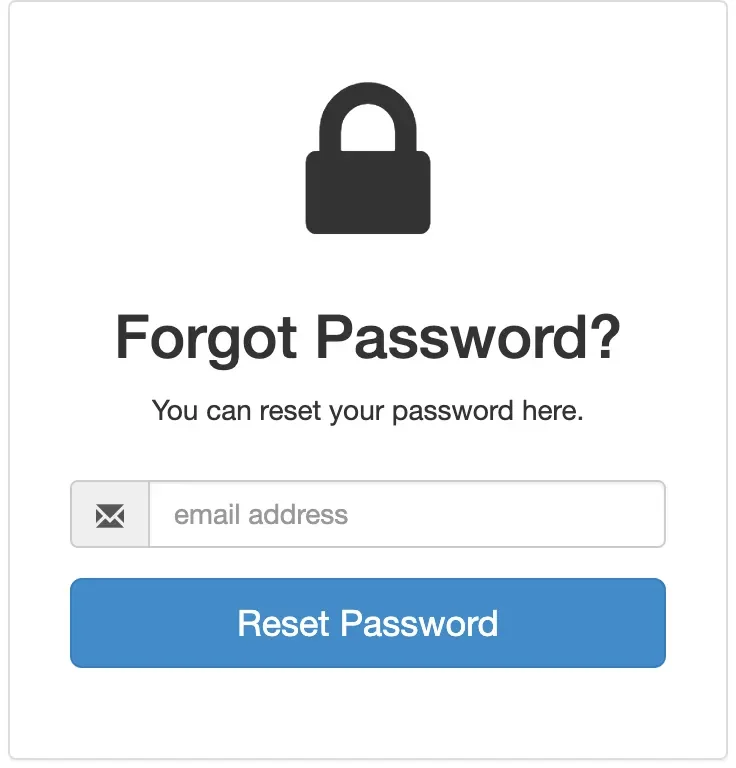
When the URL is typed, the application sends a password reset token to the email address that has been entered. The email verification token is delivered in the same shape:

Email Verification Token
What made this interesting was the URL inside the message. On my local instance the link pointed at `Http://[redacted]/?[redacted]
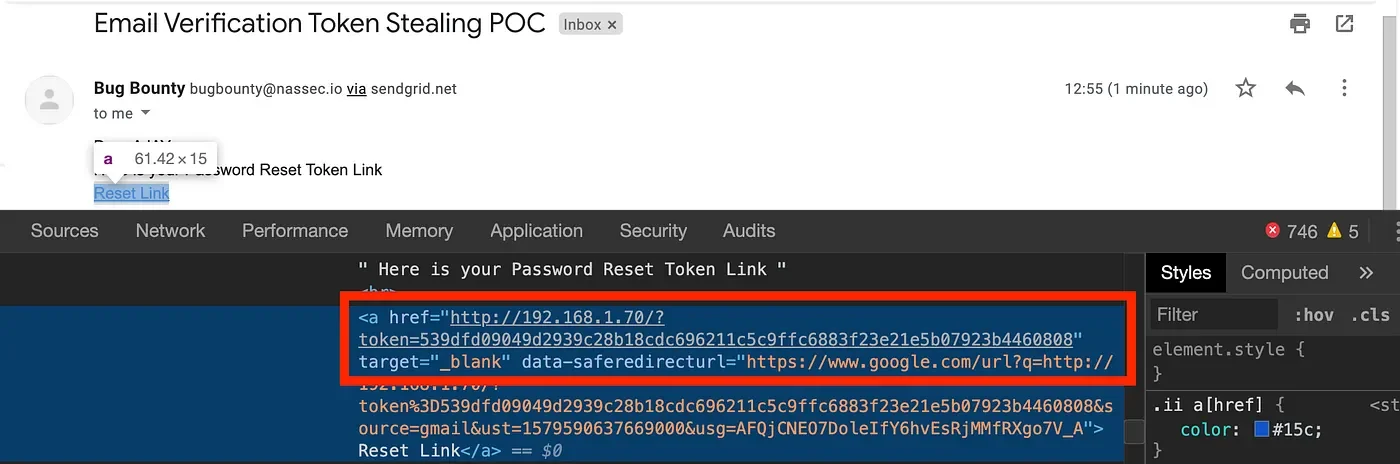
That host value is not a constant in the message template. It comes from the request, which is what I set out to confirm.
Exploitation
Step 1: Observe the normal reset link
With the local instance running at [redacted], requesting a password reset produced a token URL of the form:
Http://[redacted]/?[redacted]
The host portion of that URL matches the host the request was sent to. Nothing in the flow pins it to a configured domain.
Step 2: Change the Host header
When the HOST name is changed from the password reset, there appears a request like this:
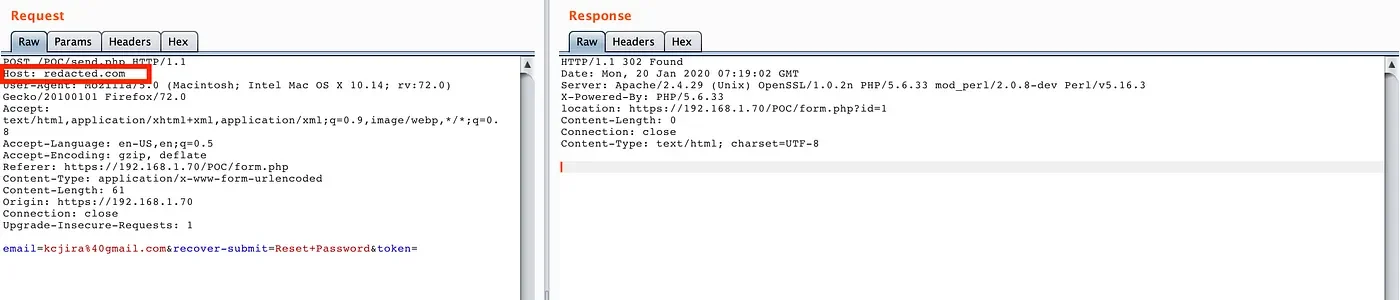
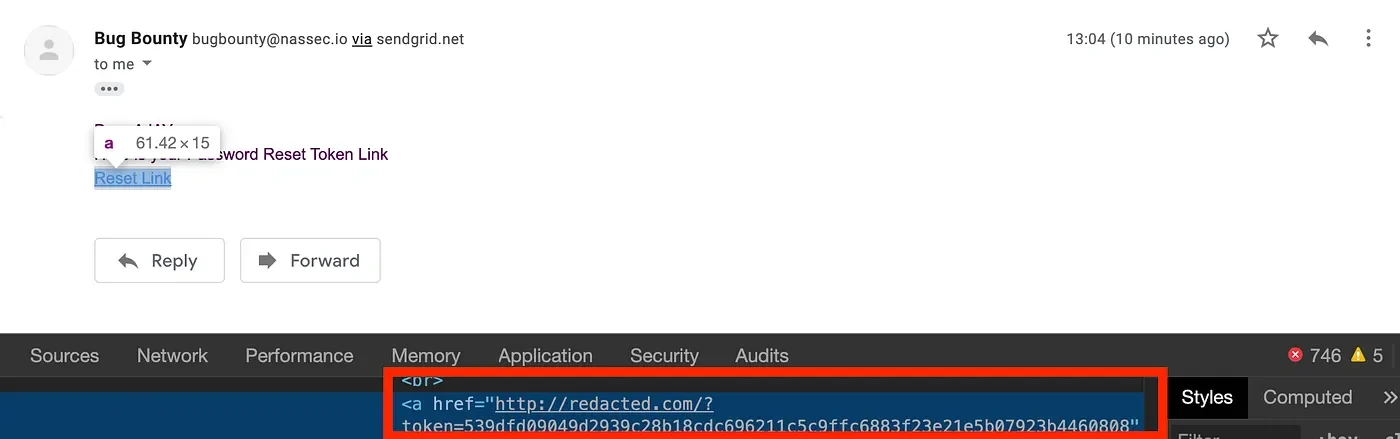
Since the host was changed to redacted.com from [redacted], the password reset token URL in the generated message changes accordingly:
Step 3: Compare the two URLs
The reset password URL changed, and the URL looks like this:
redacted.com/?[redacted]
instead of:
[redacted]/?[redacted]
The host can be manipulated. If I add my own malicious host in the request and send it, the application will build the reset link around that host, and the token will be delivered to it.
Step 4: Wait for the victim to click
For this attack to succeed, the victim needs to click the password reset link sent to their inbox. When the victim clicks the link, the attacker gets the victim's password reset token, because the victim is clicking the malicious server link instead of the original one.

Token Leakage
As shown, the token has been leaked as soon as the victim clicks the link.
Root cause
The application builds the password reset and email verification URLs from the Host header of the incoming request rather than from a fixed, configured domain. The Host header is client-controlled, so any value the attacker supplies ends up in the link that is emailed to the victim. The report does not describe any validation of the header or any allow-list of permitted hosts, so the likely explanation is that no such check existed on this path.
Impact
An attacker who can send a request with a forged Host header can cause the application to email a reset or verification link pointing at a domain the attacker controls. If the victim clicks that link, the token is delivered to the attacker. The attack depends on the victim clicking the link; it does not work passively.
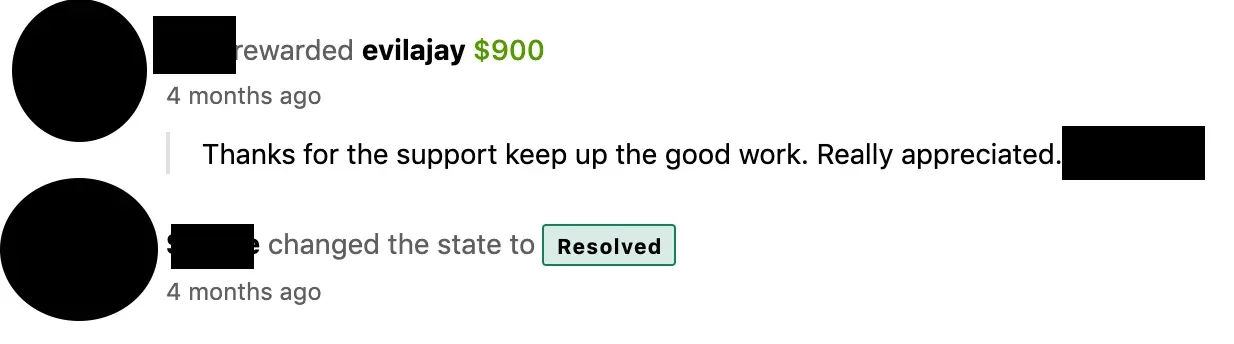
I submitted the vulnerability with a full proof of concept, and it earned 900 USD in the Bugcrowd private program.
Fix
The report does not describe what the program changed. The fix for this class of issue is to stop deriving link hosts from the request: build reset and verification URLs from a fixed, configured base URL, or validate the Host header against an allow-list of expected domains and reject anything else before generating the message.
Variants to test
- Password reset on other applications. Send a reset request with a Host header pointing at a domain you control. A positive result is a reset email whose link uses your domain.
- Email verification and invitation flows. These often reuse the same URL-building helper. A positive result is a verification or invitation link pointing at your host.
- Absolute URL parameters. Some frameworks accept an override such as
X-Forwarded-Hostor a forwarded-host style header. A positive result is the same host substitution in the generated link. - Cached pages. If the application caches responses that embed absolute URLs, a forged Host can poison the cache for other users. A positive result is another client receiving a page containing your host.
- Redirects after login or reset. If the redirect target is built from the Host header, a forged value can send users elsewhere. A positive result is a redirect to your domain after a legitimate action.
What happened, in plain words
A security researcher was invited to test a private bug bounty program on Bugcrowd. A bug bounty program is a scheme where a company pays people to find security problems in its website before criminals do. While testing, he found a way to steal a user's password reset token. A token is a short secret code that proves you are allowed to do something, a bit like the code on a cloakroom ticket: whoever holds the ticket can collect the coat. If an attacker gets your reset token, they can use it to set a new password on your account.
The trick relied on a single value that every web request carries: the Host header. The Host header is the part of a request that tells the server which website name the visitor typed, for example example.com. The application was building the links inside its emails from that value instead of from a fixed, trusted domain. So if an attacker sent the request with a Host header pointing at a server they control, the application would email the victim a link pointing at the attacker's server. When the victim clicked it, the secret token travelled to the attacker.
The researcher rebuilt the same behaviour on his own computer to explain the bug, and submitted the vulnerability with a full proof of concept. A proof of concept is a working demonstration that the problem is real, not theoretical. The report earned him 900 USD.
Background: the pieces you need to know
Before walking through the steps, here are the basic ideas the report uses, explained from zero.
A web request and a response. When you open a website, your browser sends a request to a server and the server sends back a response, usually a page. The request is made of lines of text: a method (such as GET or POST), a path, and a set of headers. Headers are small labels with values, like the address label on an envelope. They tell the server things such as what browser you use and which site name you asked for.
The Host header. One of those headers is Host. It carries the domain name the browser was trying to reach. When you type example.com into the address bar, your browser sends a request whose Host header is example.com. Servers often host many websites on one machine, so the Host header is how the server knows which site you want. Crucially, the value is supplied by the client, meaning the browser, or any tool pretending to be a browser. A server should never blindly trust it.
A password reset flow. Most sites have a "forgot password" feature. You type your email address, the site creates a one-time secret token, stores it against your account, and emails you a link containing that token. When you click the link, the site sees the token, checks it is valid, and lets you set a new password. The security of the whole flow rests on the token reaching only you.
An email verification flow. When you sign up, many sites email you a link to prove the address is really yours. That link also contains a token. It works the same way: click the link, the site checks the token, and your address is marked as verified.
Host header injection. This is the vulnerability class in the report. It happens when an application takes the Host header from the incoming request and uses it to build URLs, for example the links inside emails. An attacker can send a request with a fake Host header, and the application will happily put the attacker's domain into the link. As Tenable puts it, quoted in the report: "When creating URI for links in web applications, developers often resort to the HTTP Host header available in HTTP request sent by client-side. A remote attacker can exploit this by sending a fake header with a domain name under his control allowing him to poison web-cache or password reset emails for example." In everyday terms, it is like a hotel receptionist who writes the return address on your letter using whatever address the last person told them, instead of the hotel's real address.
IDOR. An Insecure Direct Object Reference is when a site lets you reach someone else's data just by changing an identifier in a URL or request, for example changing ?id=100 to ?id=101. It is like a cloakroom that hands out coats to anyone who guesses a ticket number.
Stored XSS. Cross-site scripting is when an attacker gets their own code into a page that other users later load. "Stored" means the malicious content is saved on the server and shown to every visitor. It is like writing graffiti on a sign that the whole town reads.
Duplicate report. Bug bounty platforms let many researchers test the same program. If two people report the same issue, the second report is marked as a duplicate and usually earns nothing.
MongoDB and encrypted IDs. MongoDB is a type of database. The report says the application used MongoDB's default encrypted IDs, which are hard to decrypt, so even a successful IDOR would not necessarily have been a high-severity finding. Severity is how serious a bug is judged to be.
A local machine. To explain the bug safely, the researcher rebuilt the same behaviour on his own computer, reachable at the address [redacted]. That is a private address used inside home and office networks, not on the public internet. The screenshots in the report come from that local copy.
How the researcher got there
The work happened in a private Bugcrowd program he had been invited to test. Since he was already familiar with the web application working methodology, he tested for IDORs.
He began with IDOR testing but did not have much luck. Even if an IDOR had turned up, the application used MongoDB default encrypted IDs, which are hard to decrypt, so the severity would not necessarily have been high. He still looked for places where a userId might have leaked.
He then found a few stored XSS issues. He was fairly sure they would come back as duplicates, and he reported them anyway; as expected, they were closed as duplicates.
Further into the pentest he reached the password reset functionality. There was a form that helps in resetting passwords:
When the URL is typed, the application sends a password reset token to the email address that has been entered. The email verification token is delivered in the same shape:
Email Verification Token
What made this interesting was the URL inside the message. On his local instance the link pointed at `Http://[redacted]/?[redacted]
That host value is not a constant in the message template. It comes from the request, which is what he set out to confirm. A message template is the fixed text of the email with blanks filled in at send time; if the host is one of those blanks, whoever controls the request controls the link.
Exploitation, step by step
Step 1: Observe the normal reset link
With the local instance running at [redacted], requesting a password reset produced a token URL of the form:
Http://[redacted]/?[redacted]
Line by line: Http:// is the scheme, the part that says how to talk to the server. [redacted] is the host, the machine the link points at. `/?[redacted] is the path and query string; the query string is the part after the question mark that carries extra values, here a placeholder for the secret token. The host portion of that URL matches the host the request was sent to. Nothing in the flow pins it to a configured domain, which is the first hint that the value might be coming from the request itself.
Step 2: Change the Host header
When the HOST name is changed from the password reset, there appears a request like this:
Since the host was changed to redacted.com from [redacted], the password reset token URL in the generated message changes accordingly:
In plain words: the researcher took the same reset request and edited only the Host header, replacing the local address with a domain name. The application used the changed host when building the link, which is the moment the bug is confirmed.
Step 3: Compare the two URLs
The reset password URL changed, and the URL looks like this:
redacted.com/?[redacted]
instead of:
[redacted]/?[redacted]
The only difference is the host part, and that is exactly the point. The host can be manipulated. If an attacker adds their own malicious host in the request and sends it, the application will build the reset link around that host, and the token will be delivered to it. The attacker does not need to break any encryption or guess anything: the application does the work of sending the secret to the wrong place.
Step 4: Wait for the victim to click
For this attack to succeed, the victim needs to click the password reset link sent to their inbox. When the victim clicks the link, the attacker gets the victim's password reset token, because the victim is clicking the malicious server link instead of the original one.
Token Leakage
As shown, the token has been leaked as soon as the victim clicks the link. Think of it as a forged letter: the victim receives an official-looking email, clicks the link, and the secret code inside the link is handed straight to the attacker.
Why it worked
The application builds the password reset and email verification URLs from the Host header of the incoming request rather than from a fixed, configured domain. The Host header is client-controlled, so any value the attacker supplies ends up in the link that is emailed to the victim. The report does not describe any validation of the header or any allow-list of permitted hosts, so the likely explanation is that no such check existed on this path. An allow-list is a list of values a system will accept and everything else is refused; here, apparently, nothing was refused.
What the impact was
An attacker who can send a request with a forged Host header can cause the application to email a reset or verification link pointing at a domain the attacker controls. If the victim clicks that link, the token is delivered to the attacker. The attack depends on the victim clicking the link; it does not work passively.
The researcher submitted the vulnerability with a full proof of concept, and it earned 900 USD in the Bugcrowd private program.
How to fix it
The report does not describe what the program changed. The fix for this class of issue is to stop deriving link hosts from the request: build reset and verification URLs from a fixed, configured base URL, or validate the Host header against an allow-list of expected domains and reject anything else before generating the message. In everyday terms, the receptionist should always write the hotel's own return address, and ignore whatever address the visitor claims.
Other places to look for the same bug
- Password reset on other applications. Send a reset request with a Host header pointing at a domain you control. A positive result is a reset email whose link uses your domain.
- Email verification and invitation flows. These often reuse the same URL-building helper. A positive result is a verification or invitation link pointing at your host.
- Absolute URL parameters. Some frameworks accept an override such as
X-Forwarded-Hostor a forwarded-host style header. A positive result is the same host substitution in the generated link. - Cached pages. If the application caches responses that embed absolute URLs, a forged Host can poison the cache for other users. A positive result is another client receiving a page containing your host.
- Redirects after login or reset. If the redirect target is built from the Host header, a forged value can send users elsewhere. A positive result is a redirect to your domain after a legitimate action.
Glossary
- Bug bounty program: a scheme where a company pays researchers for reporting security problems in its systems.
- Bugcrowd: a platform that hosts bug bounty programs and handles submissions and rewards.
- Private program: a program open only to invited researchers, not to the public.
- Host header: the part of a web request that names the domain the client wants to reach; it is supplied by the client.
- Host header injection: a vulnerability where an application uses the client-supplied Host header to build URLs, letting an attacker substitute their own domain.
- Header: a labelled value sent with a web request or response, such as
Host. - Request and response: the message your browser sends to a server and the message the server sends back.
- Token: a short secret code that grants a specific action, such as resetting a password.
- Password reset flow: the feature that emails a token link so a user can set a new password.
- Email verification flow: the feature that emails a token link to confirm an address belongs to the user.
- Query string: the part of a URL after the question mark that carries extra values, such as
?token=.... - URL: the address of a resource on the web, made of scheme, host, path and optional query string.
- Scheme: the first part of a URL, such as
http, that says how to communicate. - Domain: a human-readable name for a server, such as
example.com. - Proof of concept: a working demonstration that a vulnerability is real.
- Severity: a rating of how serious a vulnerability is.
- Duplicate report: a submission for an issue that has already been reported, usually not rewarded.
- IDOR: Insecure Direct Object Reference, where changing an identifier in a request gives access to another user's data.
- Stored XSS: cross-site scripting where malicious content is saved on the server and shown to other visitors.
- MongoDB: a type of database; the report notes its default encrypted IDs are hard to decrypt.
- userId: an identifier for a user account.
- Allow-list: a list of accepted values, with everything else rejected.
- Cache: a store of previously generated responses, reused to serve later visitors faster.
- Redirect: a response that tells the browser to go to a different URL.
- Local machine: the researcher's own computer, used here to rebuild the application safely at
[redacted].