XSS on Videos IA
A user created on a video site with a tag containing an image element with an error handler, and that tag was later rendered unescaped in DuckDuckGo's video search results page. An attacker could run script in the browser of anyone who searched for that video or tag.

- Triaged in 18 hours
- Fixed in 3 days
- Disclosed after 33 days
Failure found in the videos tab.
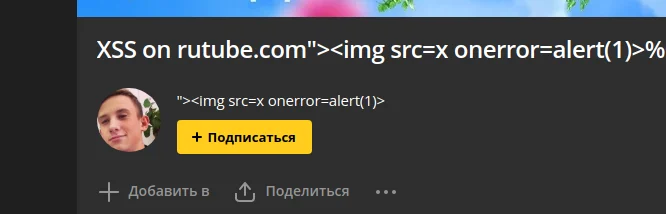
A user was created on a [website] (https://rutube.ru/video/83a4775f020b3fd68efd3dc9a73031e8/) one with the tag "> <img src = x onerror = alert (1)> .
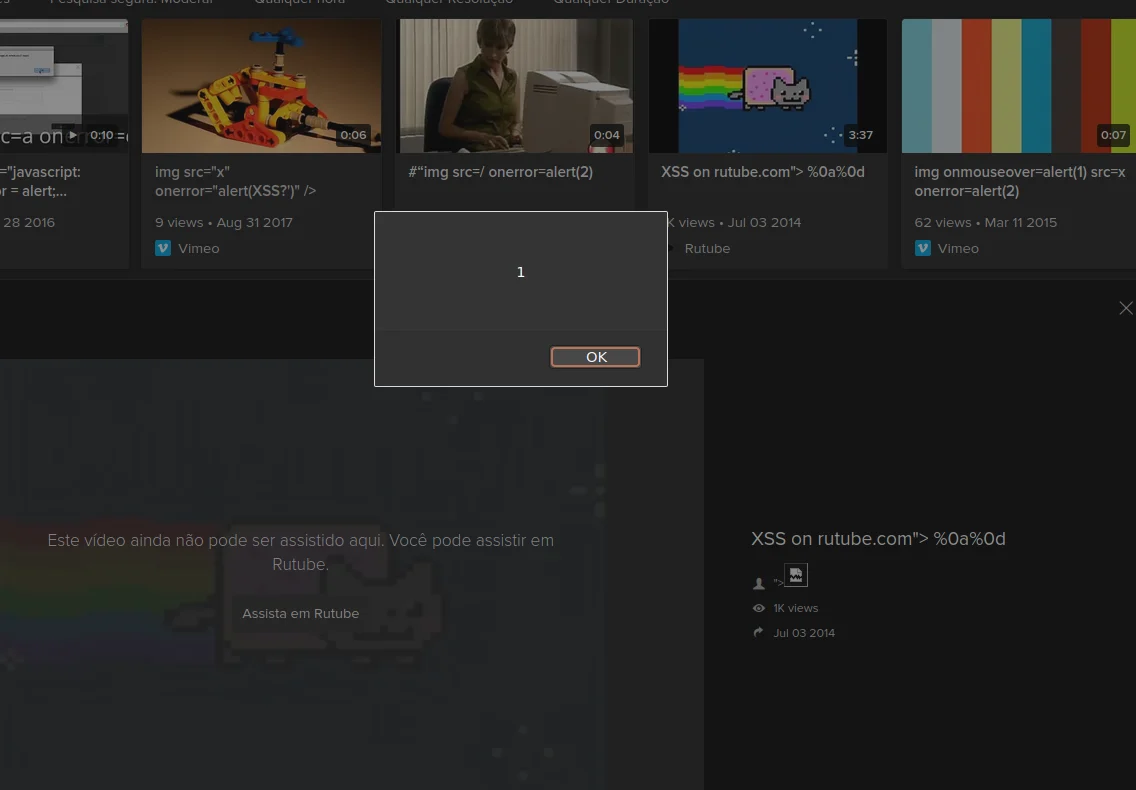
When we search DuckDuckGo for the video or user tag, we find a xss flaw in [page] (https://duckduckgo.com/?q=%22%2F%3E%22%2F%3E%3Cimg+src%3Dxss+onerror%3Dalert(2)%3E&t=hk&iar=videos&iax=videos&ia=videos&iai=https%3A%2F%2Frutube.ru%2Fvideo%2F83a4775f020b3fd68efd3dc9a73031e8%2F) detail, in the class tag with the name c-detail__user
Impact
Stored XSS, also known as persistent XSS, is the more damaging than non-persistent XSS. It occurs when a malicious script is injected directly into a vulnerable web application.
What the report shows
The target is DuckDuckGo's video search, on the *.duckduckgo.com asset, and specifically the videos tab. The researcher created a user on an external video site, RuTube, and gave that user a tag containing an image element with an onerror handler:
"> <img src = x onerror = alert (1)>
With that tag in place, searching DuckDuckGo for the video or the user tag surfaced the stored payload. The report gives the resulting search URL:
https://duckduckgo.com/?q=%22%2F%3E%22%2F%3E%3Cimg+src%3Dxss+onerror%3Dalert(2)%3E&t=hk&iar=videos&iax=videos&ia=videos&iai=https%3A%2F%2Frutube.ru%2Fvideo%[redacted]%2F
The flaw appeared in the video detail view, in the element carrying the class c-detail__user. The report includes two screenshots alongside the description of the flaw.
The report classifies the issue as stored cross-site scripting and rates it medium, with a CVSS score of 6.4. It does not describe a fix, and no bounty is recorded.
Root cause
The c-detail__user element is where the tag is displayed, so whatever string the upstream site returns for that field ends up in the page markup.
Impact
Setting a tag on a video at the upstream site led to script running in the DuckDuckGo page when the video was searched for. The report labels the issue stored XSS and includes a general note that stored XSS is more damaging than non-persistent XSS. The report does not demonstrate any action beyond the alert, so the practical reach of the issue is not shown.
How this kind of bug works
Stored XSS happens when untrusted data is saved somewhere and later rendered into an HTML document without context-appropriate encoding. The browser cannot tell data from markup, so a string containing a tag or an event handler attribute becomes live DOM. The classic trigger is breaking out of an attribute: a value placed inside src="..." or a similar attribute can be closed with a quote, after which a new element with an onerror handler executes when the resource fails to load.
The interesting variant here is second-order data: the value is not stored by the vulnerable application at all, but by a third party whose content the application aggregates. Any pipeline that copies titles, tags, usernames or descriptions from external feeds into its own pages inherits the encoding obligations of the final page.
Defences are the usual ones: HTML-encode on output in the correct context (element text, attribute value, URL, JavaScript), avoid inserting untrusted strings with innerHTML and prefer textContent, apply a strict Content Security Policy so inline handlers cannot run, and sanitise aggregated feed data on ingest as a second layer.
How to test for it
- Identify features that display data the application does not own: video and image search, news aggregation, social embeds, user profiles mirrored from other platforms, comment imports.
- Find a field you control at the source. Tags, display names, playlist titles and descriptions are common candidates.
- Set the field to a benign marker first, for example a unique alphanumeric string, and confirm it appears verbatim in the aggregator's page.
- Then send breakout characters. Try closing quotes and angle brackets, and a handler that fires without user interaction, such as an image with a failing
srcand anonerror. Test both element context and attribute context, since the same field may land in different places on different pages. - Reload and revisit the page from a fresh session to confirm the value is stored rather than reflected.
- Check the response body, not just the rendered page, to see whether your characters were encoded or passed through raw.
A positive result is your markup present unencoded in the HTML and the handler executing in the target origin. Common false positives: the payload appears encoded in the source but the browser's inspector shows a decoded view; the value is rendered inside a sandboxed iframe on a different origin; a CSP blocks the inline handler so nothing executes; or the reflection only occurs in the immediate response to your own request, which is reflected XSS rather than stored.
How it is fixed
Encode all output according to context, treating every field sourced from a third party as hostile. Where markup is genuinely needed, sanitise with a well-maintained HTML sanitiser and an allowlist of elements and attributes. Set a Content Security Policy that forbids inline event handlers and restricts script sources. Validate and normalise imported metadata on ingest, and re-encode at render time as well, since the upstream format can change.
Hunting notes
Aggregation features are fertile ground because developers assume the upstream platform has already sanitised its data. Look at any page that merges content from multiple providers: media search, shopping results, knowledge panels, embedded social posts. Recon signals include parameters that carry a third-party URL or identifier, templates with class names suggesting a detail or card component, and any place where a title or username is displayed next to a link to the source.
To make a report land, show the full path from the field you control at the source to execution in the target origin, include the exact URL a reviewer can open, and demonstrate the stored nature by reloading. Keep the proof payload minimal and explain which element and context the value lands in, as this report does with the c-detail__user class.
What happened, in plain words
DuckDuckGo is a search engine. Besides ordinary web results it has a videos tab, which shows videos gathered from other sites. To display a video, DuckDuckGo copies details about it from the site that hosts it, including the user tag. Those details are then placed into DuckDuckGo's own page.
The researcher used this copying to get code to run inside DuckDuckGo's page. First they created a user on an external video site, RuTube, and gave that user a tag containing an image element with an onerror handler:
"> <img src = x onerror = alert (1)>
A tag is a short label attached to content, here to a video or a user, so that it can be found by searching. The string above is not a normal tag. It is built to look like HTML, the language web pages are written in. The leading "> closes whatever attribute the tag is placed inside, then <img src = x onerror = alert (1)> asks the browser to load an image from a source called x. That source does not exist, so the image fails to load, and the onerror part tells the browser to run alert (1) when that failure happens. alert is a built-in browser function that pops up a small dialogue box; it is the standard harmless way to prove that code ran.
With that tag in place, searching DuckDuckGo for the video or the user tag brought the stored payload back. The report gives the resulting search URL:
https://duckduckgo.com/?q=%22%2F%3E%22%2F%3E%3Cimg+src%3Dxss+onerror%3Dalert(2)%3E&t=hk&iar=videos&iax=videos&ia=videos&iai=https%3A%2F%2Frutube.ru%2Fvideo%[redacted]%2F
A URL is the address of a page. Everything after the ? is the query string, a list of name and value pairs separated by &. The q value is the search text, and it is percent-encoded: characters that are not allowed in a URL are written as % followed by two hexadecimal digits, so %22 is a double quote, %3C is < and %3E is >. The iar, iax and ia values select the videos tab, and iai carries the address of the RuTube video. The payload in the search URL uses alert(2) rather than alert(1).
The flaw appeared in the video detail view, in the element carrying the class c-detail__user. A class is a label on an HTML element used for styling and scripting; this one marks the place where the uploader's name is shown. The report includes two screenshots alongside the description of the flaw.
The report classifies the issue as stored cross-site scripting and rates it medium, with a CVSS score of 6.4. CVSS is a standard scoring system for the severity of a security flaw, where a higher number means more risk. The report does not describe a fix, and no bounty is recorded.
Why does this matter? A script running in DuckDuckGo's page runs in that page's context, but the report only shows an alert box. The report only shows an alert box, so it does not demonstrate any further action, but the report labels it stored XSS, which it describes as more damaging than non-persistent XSS.
In general, how this kind of bug works
Stored cross-site scripting, also called persistent XSS, happens when untrusted data is saved somewhere and later placed into a web page without being properly encoded. Encoding means converting characters that have a special meaning in HTML, such as <, > and ", into harmless equivalents so the browser treats them as text rather than as instructions. If that conversion is missing, the browser cannot tell data from markup, and a string containing a tag or an event handler becomes live code.
The classic trigger is breaking out of an attribute. If a value is placed inside src="...", a quote in the value can close the attribute early, and whatever follows is read as new markup. An image with a failing source and an onerror handler is a favourite because it fires without the victim clicking anything.
The interesting variant here is second-order data: the value is not stored by the vulnerable application at all, but by a third party whose content the application aggregates. Any pipeline that copies titles, tags, usernames or descriptions from external feeds into its own pages inherits the encoding obligations of the final page. A useful comparison is a receptionist who retypes a visitor's name onto a badge without checking it: if the name contains instructions, the badge carries them too.
Defences are the usual ones: encode on output in the correct context (element text, attribute value, URL, JavaScript), avoid inserting untrusted strings with innerHTML and prefer textContent, apply a strict Content Security Policy so inline handlers cannot run, and sanitise aggregated feed data on ingest as a second layer. A Content Security Policy is a set of rules a site sends to the browser saying which scripts are allowed to run.
In general, how to test for it
- Identify features that display data the application does not own: video and image search, news aggregation, social embeds, user profiles mirrored from other platforms, comment imports.
- Find a field you control at the source. Tags, display names, playlist titles and descriptions are common candidates.
- Set the field to a benign marker first, for example a unique alphanumeric string, and confirm it appears verbatim in the aggregator's page. This proves the data flows through without being changed.
- Then send breakout characters. Try closing quotes and angle brackets, and a handler that fires without user interaction, such as an image with a failing
srcand anonerror. Test both element context and attribute context, since the same field may land in different places on different pages. - Reload and revisit the page from a fresh session to confirm the value is stored rather than reflected. Reflected means the value only comes back in the immediate response to your own request and is not saved.
- Check the response body, not just the rendered page, to see whether your characters were encoded or passed through raw.
A positive result is your markup present unencoded in the HTML and the handler executing in the target origin. Common false positives: the payload appears encoded in the source but the browser's inspector shows a decoded view; the value is rendered inside a sandboxed iframe on a different origin; a CSP blocks the inline handler so nothing executes; or the reflection only occurs in the immediate response to your own request, which is reflected XSS rather than stored.
In general, how it is fixed
Encode all output according to context, treating every field sourced from a third party as hostile. Where markup is genuinely needed, sanitise with a well-maintained HTML sanitiser and an allowlist of elements and attributes. Set a Content Security Policy that forbids inline event handlers and restricts script sources. Validate and normalise imported metadata on ingest, and re-encode at render time as well, since the upstream format can change.
In general, where to look
Aggregation features are fertile ground because developers assume the upstream platform has already sanitised its data. Look at any page that merges content from multiple providers: media search, shopping results, knowledge panels, embedded social posts. Signals worth noticing include parameters that carry a third-party URL or identifier, templates with class names suggesting a detail or card component, and any place where a title or username is displayed next to a link to the source.
To make a report land, show the full path from the field you control at the source to execution in the target origin, include the exact URL a reviewer can open, and demonstrate the stored nature by reloading. Keep the proof payload minimal and explain which element and context the value lands in, as this report does with the c-detail__user class.
Glossary
- XSS (cross-site scripting): a flaw where an attacker gets their own code to run inside another site's page in a victim's browser.
- Stored (persistent) XSS: XSS where the malicious value is saved and served again to later visitors, rather than only echoed back once.
- Reflected XSS: XSS where the value comes back only in the immediate response to the attacker's own request and is not saved.
- Second-order data: data that the vulnerable application did not store itself but copied from a third party.
- HTML: the language web pages are written in, made of elements and attributes.
- Element: a building block of an HTML page, such as an image or a paragraph.
- Attribute: a setting on an element, such as the source of an image.
- Class: a label on an HTML element used for styling and scripting.
- Tag (content label): a short keyword attached to content so it can be found by searching.
onerror: an attribute that tells the browser to run code when loading a resource fails.alert: a built-in browser function that shows a dialogue box, used to prove code ran.- Payload: the string an attacker supplies to trigger the flaw.
- Encoding (HTML): converting special characters into harmless equivalents so they are shown as text.
- Percent-encoding: writing characters in a URL as
%plus two hexadecimal digits. - URL: the address of a page or resource.
- Query string: the part of a URL after
?, holding name and value pairs. - DOM: the browser's live model of the page, which scripts can read and change.
innerHTML/textContent: ways to set an element's content; the first interprets markup, the second treats it as plain text.- Content Security Policy (CSP): rules a site sends to the browser saying which scripts may run.
- Sanitiser: a tool that strips dangerous markup from input while keeping safe parts.
- Allowlist: a list of things that are permitted, with everything else rejected.
- CVSS: a standard scoring system for the severity of a security flaw.
- Origin: the combination of scheme, host and port that a browser uses to separate one site's permissions from another's.
- iframe: an embedded page inside another page, which can be sandboxed to limit what it can do.
- False positive: a result that looks like a flaw but is not one.



