The vulnerability
 Published on sanyamchawla1999.medium.com
Hope you’re doing well, today I am sharing my first write-up about my best finding. It’s an SSRF — Server Side Request Forgery vulnerability that I discovered in Dutch Government Bug Bounty Program.
The full write-up lives on its author's site
It belongs to its author, so we link to it rather than copy it. The other two tabs are our own rewrites, checked against it.
Context
The target was the Dutch Government bug bounty program, which the author describes as having more than 1000 domains in scope. The feature that turned out to be vulnerable was an image proxy on one of those domains. In normal use it takes a path of the form /imageproxy/220,fit/<url> and fetches the image at <url>, resizing it to the given dimensions, so that pages can display images hosted elsewhere through the government domain.
The finding is a Server Side Request Forgery (SSRF): the proxy fetched whatever URL was placed in the path, including internal addresses, and returned the response body to the requester.
Setup
The author started by picking a domain at random from the scope list. Earlier reports on the same program, a No Rate Limit and an HTML Injection, had been closed as N/A, so before this attempt they contacted hunters who had received the program's swag, asked what kind of vulnerabilities they had reported, and collected write-ups of the Dutch government program by other hunters. Reading Remonsec's write-up led them to study recon and follow the recon posts it recommends.
The tools used were a browser, Burp Collaborator client, ffuf for fuzzing, and a search engine for researching the metadata service. No versions are given. The only precondition was a reachable image proxy endpoint on an in-scope domain.
Finding it
A second random domain was chosen and subdomain enumeration was run, but it produced only one subdomain, effectively the main domain itself. The author concentrated on the main domain and gathered parameters with several tools. One parameter looked suspicious because of its shape:
https://example.nl/imageproxy/220,fit/https://abc.redacted.nl/images/0737.jpg
The proxy was displaying images from another domain, which means the URL after the size parameters is supplied by the client and fetched server side. Visiting that other domain directly returned forbidden, so the author replaced it with www.evil.com:
The author was redirected to evil.com. That is an open redirect, which the author judged to have little severity, but it showed the server was following the URL the client supplied.
Exploitation
Step 1: confirm server-side fetching with Collaborator
The author replaced www.evil.com with a Burp Collaborator URL in the same parameter and received an HTTP hit on the Collaborator. A hit from the server, rather than from the browser, confirmed SSRF.
Step 2: reach localhost
With the Collaborator URL replaced by the loopback address:
https://example.nl/imageproxy/220,fit/http://[redacted]/
the response body came back through the proxy and read:
Welcome to nginx!
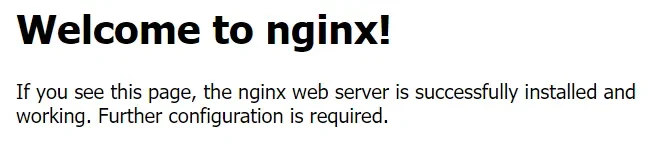
The screenshot relates to the nginx page returned through the image proxy.
Step 3: port scan the internal host with ffuf
The author fuzzed the port in the same URL with ffuf to find internal services. Several ports returned data, and port 3030 stood out because of its high response size. Visiting it through the proxy:
https://example.nl/imageproxy/220,fit/http://[redacted]:3030/
returned a response from the service on that port.
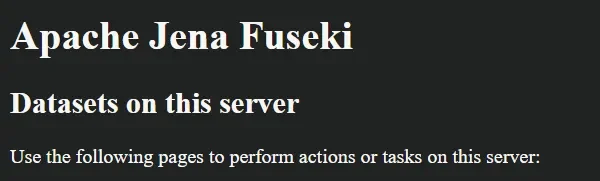
The screenshot shows the response from port 3030 retrieved through the proxy.
Further endpoints on that page and on other ports returned more sensitive data, including password hashes, a cluster name and a cluster ID. The author notes that this raised the impact but decided to keep looking for more, to avoid another rejection.
Step 4: query the cloud metadata service
The next step was the metadata service, reached at the link-local address [redacted]:
https://www.example.nl/imageproxy/220,fit/http://[redacted]/
This returned a response from the metadata endpoint.
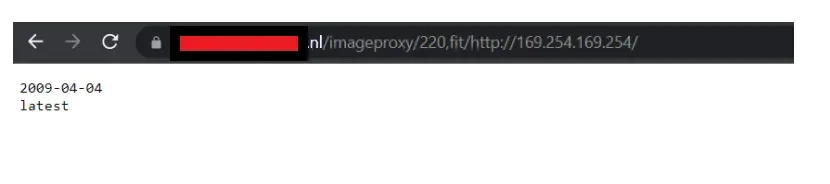
The screenshot shows the response from the metadata address retrieved through the proxy.
Researching the response, the author learned that the metadata service supports two sets of APIs, an OpenStack metadata API and an EC2-compatible API, both versioned by date, and links to the OpenStack documentation at https://docs.openstack.org/nova/rocky/user/metadata-service.html.
Step 5: enumerate metadata with the dated API
Using the dated path:
https://www.example.nl/imageproxy/220,fit/http://[redacted]/2009-04-04/meta-data/
returned more sensitive data, including vendor data, the instance ID and public keys, among other items.
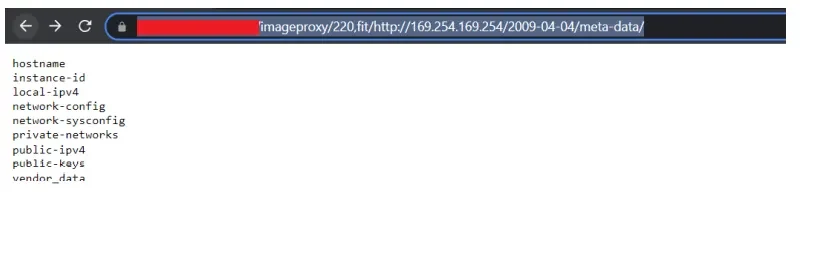
The screenshot shows the response retrieved through the proxy.
Root cause
The proxy takes the URL from the request path and fetches it without restricting the destination. Because the fetch happens on the server, the client can point it at loopback, at internal ports and at the link-local metadata address, and the proxy returns the fetched body to the client. The open redirect to www.evil.com shows the same missing validation at an earlier stage. The report does not describe any allowlist, egress filtering or metadata protection that would have stopped the requests, so the absence of destination validation is the likely cause.
Impact
An unauthenticated attacker who can reach the proxy can make the server issue requests to arbitrary hosts and read the responses. In this case that exposed the nginx default page on loopback, a service on port 3030 with password hashes, a cluster name and cluster ID, and cloud metadata containing vendor data, the instance ID and public keys. The author does not state which systems the credentials and cluster details belonged to or whether they were used for further access. The report was accepted after a few days.
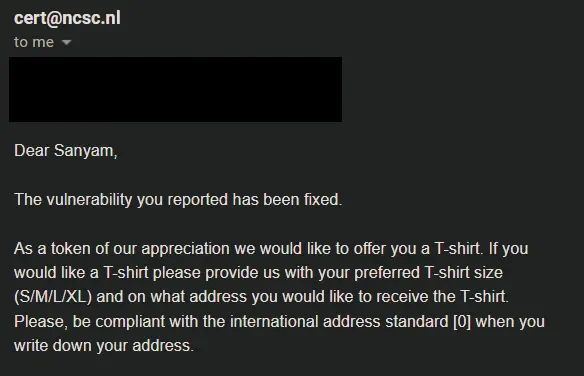
The screenshot relates to the mail received after the report was submitted.
Fix
The report does not say what the program changed. The measure that addresses this class of bug is to validate the destination of every proxied URL against an allowlist of expected image hosts, resolve the hostname and reject private, loopback and link-local addresses, and block redirects to such addresses. On the infrastructure side, restricting outbound traffic from the proxy and requiring authentication or a hop limit on the metadata service reduce what a successful SSRF can reach.
Variants to test
- Other URL-taking parameters. Look for parameters that accept a full URL, such as image resizers, PDF generators, webhooks and link previews. A positive result is a response body from a host you control, or a Collaborator hit from the server.
- Redirect chains. Point the parameter at a URL on your own host that redirects to
http://[redacted]/. A positive result is the loopback page returned through the proxy, which shows redirects are followed without revalidation. - Internal port discovery. Fuzz the port in the proxied URL with ffuf and compare response sizes. A positive result is a port with a distinctly larger or different response than closed ports.
- Cloud metadata. Request
http://[redacted]/and then the dated metadata paths. A positive result is metadata content such as instance IDs, keys or vendor data returned through the proxy. - Alternate loopback notations. Try
http://localhost/,http://[::1]/and decimal or octal forms of[redacted]. A positive result is the same internal response when the plain form is blocked.
Tip
The author hunted on this program for four to five months and collected many duplicates and N/A results. The advice is to keep going, to ask hunters who received swag about the vulnerabilities they reported, and to watch zseano videos when motivation drops.
What happened, in plain words
A security researcher spent a few months hunting for bugs in the Dutch Government bug bounty program. That program is a scheme where an organisation invites people from outside to look for security weaknesses in its websites and report them, usually with a reward. In this case the reward was not money but "swag", which is the informal word for branded merchandise such as a T-shirt or a mug. The program covered more than 1000 domains, which is a lot of ground to cover.
After some early reports that were closed as N/A ("not applicable", meaning the program did not consider them real vulnerabilities), the researcher found a feature on one of the government websites that takes an image address from the visitor and fetches that image on the server. Because the server did the fetching, the researcher could make it fetch things it was never meant to fetch: pages on the server itself, services running on internal ports, and a special cloud address that hands out information about the machine. This class of bug is called SSRF, Server Side Request Forgery. The report was accepted.
This article walks through the same steps in the same order, explaining each idea from scratch.
Background you need first
Before the steps make sense, here are the ideas that come up. Each one is explained where it is first used as well, but a short overview helps.
- Domain: the name you type in a browser, such as
example.nl. A program with "more than 1000 domains in scope" means all of those names are fair game to test. - Subdomain: a name in front of a domain, such as
shop.example.nl. Finding subdomains is called subdomain enumeration. - Parameter: a piece of a web address that carries a value, usually after a
?or inside the path. Inhttps://example.nl/imageproxy/220,fit/https://abc.redacted.nl/images/0737.jpg, the part after/imageproxy/is the value the site acts on. - Server side versus client side: your browser is the client. The machine that runs the website is the server. "Server side" means the server does the work, not your browser.
- SSRF (Server Side Request Forgery): tricking a server into making a request to an address of your choosing. The everyday comparison is a concierge at a hotel who will fetch anything you ask for, including things from staff-only rooms, and bring it back to you.
- Open redirect: a feature that sends your browser to any address you supply. It is a mild issue on its own, but it shows the site trusts addresses from visitors.
- Loopback address:
[redacted], the address a machine uses to talk to itself. It is never reachable from the internet directly, which is why it is interesting to an attacker. - Port: a numbered door on a machine. A single server can run many services, each on its own port. Port 80 is the usual web port; other numbers host other services.
- Fuzzing: trying many variations automatically and looking at which ones give a different answer.
- Cloud metadata service: a special address,
[redacted], that cloud providers make available inside their machines. It hands out information about the machine, such as its identity and keys, to anything that asks from inside. - Burp Collaborator: a service that gives you a unique address and tells you when something on the internet contacts it. If the contact comes from the target's server rather than from your browser, you know the server made the request.
The setup
The target was the Dutch Government bug bounty program. The feature that turned out to be vulnerable was an image proxy on one of the domains in scope.
An image proxy is a service that fetches an image from somewhere else and passes it on to the visitor, often resizing it on the way. Websites use them so that pages can show images hosted on other sites without the visitor's browser contacting those other sites directly. In normal use the proxy takes a path of the form /imageproxy/220,fit/<url> and fetches the image at <url>, resizing it to the given dimensions. The 220,fit part is the size instruction; the rest is the address of the image.
The finding is a Server Side Request Forgery: the proxy fetched whatever URL was placed in the path, including internal addresses, and returned the response body to the requester. "Response body" means the actual content the server sent back, such as the HTML of a page or the text of a file.
How the researcher got started
The author started by picking a domain at random from the scope list. Earlier reports on the same program, a No Rate Limit and an HTML Injection, had been closed as N/A. A No Rate Limit report says a site lets you send unlimited requests without slowing you down; an HTML Injection report says you can get your own HTML into a page. Neither was accepted here.
So before this attempt the author contacted hunters who had received the program's swag, asked what kind of vulnerabilities they had reported, and collected write-ups of the Dutch government program by other hunters. Reading Remonsec's write-up led them to study recon and follow the recon posts it recommends. Recon (reconnaissance) means gathering information about a target before attacking it: which domains exist, which services run, which parameters a page accepts.
The tools used were a browser, Burp Collaborator client, ffuf for fuzzing, and a search engine for researching the metadata service. No versions are given. The only precondition was a reachable image proxy endpoint on an in-scope domain.
Finding the suspicious parameter
A second random domain was chosen and subdomain enumeration was run, but it produced only one subdomain, effectively the main domain itself. So the author concentrated on the main domain and gathered parameters with several tools. One parameter looked suspicious because of its shape:
https://example.nl/imageproxy/220,fit/https://abc.redacted.nl/images/0737.jpg
Line by line:
https://example.nlis the government site being tested./imageproxy/is the feature that fetches images for you.220,fittells the proxy the size to produce.https://abc.redacted.nl/images/0737.jpgis the address of the image to fetch. Notice that it is a full address, includinghttps://, sitting inside the path of another address.
That last point is what made the parameter suspicious. A normal image proxy would take a filename or an ID, not a complete web address. If the site accepts a complete address, the question is whether it checks where that address points.
The proxy was displaying images from another domain, which means the URL after the size parameters is supplied by the client and fetched server side. Visiting that other domain directly returned forbidden, so the author replaced it with www.evil.com:
Line by line:
- The first part is unchanged: the government site and its image proxy.
220,fitis still the size instruction.http://www.evil.com/is now a domain the author controls instead of the original image host.
The author was redirected to evil.com. That is an open redirect, which the author judged to have little severity, but it showed the server was following the URL the client supplied. In other words, the site did not have a fixed list of allowed image hosts; it would go wherever it was told.
Exploitation, step by step
Step 1: confirm the server is doing the fetching
An open redirect could still be the browser being sent somewhere. To prove the server itself makes the request, the author replaced www.evil.com with a Burp Collaborator URL in the same parameter and received an HTTP hit on the Collaborator.
A Burp Collaborator URL is a unique address that a service watches for you. When anything on the internet contacts it, the service records the contact and shows it to you. If the hit comes from the target's server rather than from your browser, you know the server made the request. That is exactly what happened here, and it confirmed SSRF.
Step 2: reach the machine itself
With the Collaborator URL replaced by the loopback address:
https://example.nl/imageproxy/220,fit/http://[redacted]/
Line by line:
https://example.nl/imageproxy/220,fit/is the same proxy with the same size instruction.http://[redacted]/is the loopback address, meaning "this same machine". The server is being asked to fetch a page from itself.
The response body came back through the proxy and read:
Welcome to nginx!
nginx is a common web server program. Its default page says "Welcome to nginx!", which is what you see when a web server is installed but no site has been set up on it yet. Seeing that text through the proxy means the server fetched its own loopback address and handed the result back to the visitor.
The screenshot relates to the nginx page returned through the image proxy.
Step 3: look for services on other ports
The author fuzzed the port in the same URL with ffuf to find internal services. ffuf is a tool that sends many requests automatically, each with a different value in place of a placeholder, and reports which ones gave a different answer. Here the changing value was the port number.
Several ports returned data, and port 3030 stood out because of its high response size. A larger response usually means a real service answered rather than an error page. Visiting it through the proxy:
https://example.nl/imageproxy/220,fit/http://[redacted]:3030/
Line by line:
- The proxy and size instruction are unchanged.
http://[redacted]:3030/means "this same machine, door number 3030". The colon separates the address from the port.
This returned a response from the service on that port.
The screenshot shows the response from port 3030 retrieved through the proxy.
Further endpoints on that page and on other ports returned more sensitive data, including password hashes, a cluster name and a cluster ID. A password hash is a scrambled form of a password; it is not the password itself, but it can sometimes be cracked offline. A cluster is a group of machines working together, and its name and ID identify it. The author notes that this raised the impact but decided to keep looking for more, to avoid another rejection.
Step 4: ask the cloud metadata service
The next step was the metadata service, reached at the link-local address [redacted]:
https://www.example.nl/imageproxy/220,fit/http://[redacted]/
Line by line:
- The proxy is the same, now on
www.example.nl. http://[redacted]/is the special address cloud providers use for the metadata service. It is only reachable from inside the cloud network, which is why the proxy is useful here: the proxy is inside.
This returned a response from the metadata endpoint.
The screenshot shows the response from the metadata address retrieved through the proxy.
Researching the response, the author learned that the metadata service supports two sets of APIs, an OpenStack metadata API and an EC2-compatible API, both versioned by date, and links to the OpenStack documentation at https://docs.openstack.org/nova/rocky/user/metadata-service.html.
An API (Application Programming Interface) is a defined way for one program to ask another for information. The everyday comparison is a menu with fixed items: you order by name and get a predictable result. "Versioned by date" means the API has several versions, and you pick one by putting a date in the address, so older clients keep working.
Step 5: list the metadata with the dated API
Using the dated path:
https://www.example.nl/imageproxy/220,fit/http://[redacted]/2009-04-04/meta-data/
Line by line:
- The proxy and the metadata address are the same as before.
/2009-04-04/selects a particular version of the metadata API by its date./meta-data/asks for the listing of available metadata items.
This returned more sensitive data, including vendor data, the instance ID and public keys, among other items. An instance is a single virtual machine in the cloud; its instance ID is its unique name. Vendor data is extra information the cloud operator attached to the machine when it was created. Public keys are the shareable half of a cryptographic key pair, often used to prove identity or to allow logins.
The screenshot shows the response retrieved through the proxy.
Why it worked
The proxy takes the URL from the request path and fetches it without restricting the destination. Because the fetch happens on the server, the client can point it at loopback, at internal ports and at the link-local metadata address, and the proxy returns the fetched body to the client. The open redirect to www.evil.com shows the same missing validation at an earlier stage. The report does not describe any allowlist, egress filtering or metadata protection that would have stopped the requests, so the absence of destination validation is the likely cause.
An allowlist is a list of things that are permitted, with everything else refused. Egress filtering means controlling what traffic is allowed to leave a network. Both are standard defences against this kind of bug.
What an attacker could do with it
An unauthenticated attacker who can reach the proxy can make the server issue requests to arbitrary hosts and read the responses. "Unauthenticated" means no login is needed. In this case that exposed the nginx default page on loopback, a service on port 3030 with password hashes, a cluster name and cluster ID, and cloud metadata containing vendor data, the instance ID and public keys. The author does not state which systems the credentials and cluster details belonged to or whether they were used for further access. The report was accepted after a few days.
The screenshot relates to the mail received after the report was submitted.
How to fix it
The report does not say what the program changed. The measure that addresses this class of bug is to validate the destination of every proxied URL against an allowlist of expected image hosts, resolve the hostname and reject private, loopback and link-local addresses, and block redirects to such addresses. On the infrastructure side, restricting outbound traffic from the proxy and requiring authentication or a hop limit on the metadata service reduce what a successful SSRF can reach.
"Resolve the hostname" means look up which numeric address a name points to, because a name can hide an internal address. A hop limit on the metadata service means the service only answers requests that arrive directly, not ones forwarded through another program.
Other places to try the same idea
- Other URL-taking parameters. Look for parameters that accept a full URL, such as image resizers, PDF generators, webhooks and link previews. A positive result is a response body from a host you control, or a Collaborator hit from the server.
- Redirect chains. Point the parameter at a URL on your own host that redirects to
http://[redacted]/. A positive result is the loopback page returned through the proxy, which shows redirects are followed without revalidation. - Internal port discovery. Fuzz the port in the proxied URL with ffuf and compare response sizes. A positive result is a port with a distinctly larger or different response than closed ports.
- Cloud metadata. Request
http://[redacted]/and then the dated metadata paths. A positive result is metadata content such as instance IDs, keys or vendor data returned through the proxy. - Alternate loopback notations. Try
http://localhost/,http://[::1]/and decimal or octal forms of[redacted]. A positive result is the same internal response when the plain form is blocked.
Tip from the author
The author hunted on this program for four to five months and collected many duplicates and N/A results. The advice is to keep going, to ask hunters who received swag about the vulnerabilities they reported, and to watch zseano videos when motivation drops.
Glossary
- API (Application Programming Interface): a defined way for one program to ask another for information, like a menu with fixed items.
- Allowlist: a list of things that are permitted, with everything else refused.
- Client: the program on your side, usually your browser, that asks a server for something.
- Cluster: a group of machines working together; its name and ID identify it.
- Egress filtering: controlling what traffic is allowed to leave a network.
- ffuf: a tool that sends many requests automatically with different values and reports which ones gave a different answer.
- Hop limit: a rule that a service only answers requests that arrive directly, not ones forwarded through another program.
- HTML Injection: getting your own HTML into a page.
- Image proxy: a service that fetches an image from somewhere else and passes it on to the visitor, often resizing it.
- Instance: a single virtual machine in the cloud.
- Instance ID: the unique name of a cloud instance.
- Link-local address: an address only reachable from inside a local network, such as
[redacted]. - Metadata service: a special cloud address,
[redacted], that hands out information about the machine to anything that asks from inside. - N/A: "not applicable", a status meaning the program did not consider the report a real vulnerability.
- nginx: a common web server program.
- No Rate Limit: a report saying a site lets you send unlimited requests without slowing you down.
- Parameter: a piece of a web address that carries a value.
- Password hash: a scrambled form of a password; not the password itself, but sometimes crackable offline.
- Port: a numbered door on a machine; a single server can run many services, each on its own port.
- Public key: the shareable half of a cryptographic key pair, often used to prove identity or allow logins.
- Recon (reconnaissance): gathering information about a target before attacking it.
- Response body: the actual content a server sends back, such as the HTML of a page or the text of a file.
- Server: the machine that runs a website and answers requests.
- Server side: work done by the server, not by your browser.
- Subdomain enumeration: finding the subdomains that exist for a domain.
- Swag: branded merchandise given as a reward.
- Unauthenticated: without needing to log in.
- Vendor data: extra information a cloud operator attached to a machine when it was created.
- Versioned by date: an API with several versions, picked by putting a date in the address.



