Stored XSS in Elastic App Search
A stored cross-site scripting flaw existed in Elastic App Search's Reference UI: a document field containing a javascript-scheme URL was rendered as a clickable link. A low-privileged user could store such a document and share a preview link so that a higher-privileged user who clicked the title would run the attacker's script.
 Originally disclosed on HackerOne
- Triaged in under an hour
- Fixed in 59 days
- Paid in 3 days
- Disclosed after 4 months
Summary: There exists a stored XSS via reference_ui in "URL" Parameter in the latest Elastic App Search v7.6.2 (Tested both on cloud and local instance)
Description: Stored attacks are those where the injected script is permanently stored on the target servers, such as in a database, in a message forum, visitor log, comment field, etc. The victim then retrieves the malicious script from the server when it requests the stored information. Stored XSS is also sometimes referred to as Persistent or Type-I XSS.
Steps To Reproduce:
-
Go To https://cloud.elastic.co/ and login
-
Create a Deployment by visiting https://cloud.elastic.co/deployments/create
-
Fill & Select all necessary details but under "Optimize your deployment" section select "App Search" & Click Create Deployment
-
Now go to your deployment and click "launch" on your App Search instance and you would be taken to something like
https://069c551087be451bb8d1aecb3cf64341.app-search.us-east-1.aws.found.io/login -
Now Login with the provided credentials and Click "Create an Engine"
-
On the next screen, Click "Paste JSON" and put this
{
"url":"javascript://test%0aalert(document.domain)"
}
- Next, Go to "Reference UI" tab on the menu at the left and under "Title field (optional)" field select "url" and also under "URL field (optional)" field select "url" and finally click "Generate Preview" and you would be take to something like
https://069c551087be451bb8d1aecb3cf64341.app-search.us-east-1.aws.found.io/as/engines/test/reference_application/preview?titleField=url&urlField=url
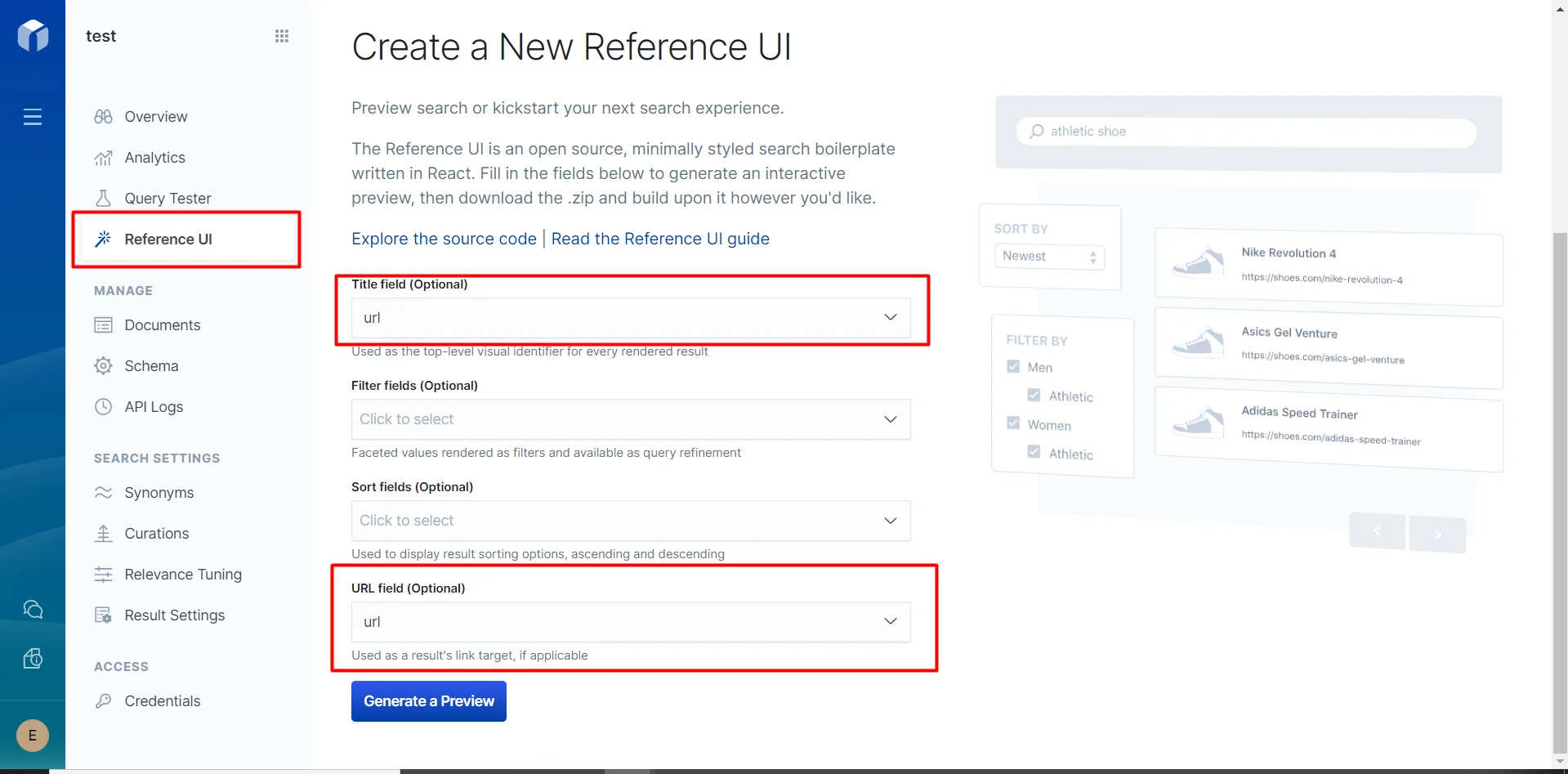
- Press "CTRL + CLICK" or middle mouse button on the Title and XSS will be executed.
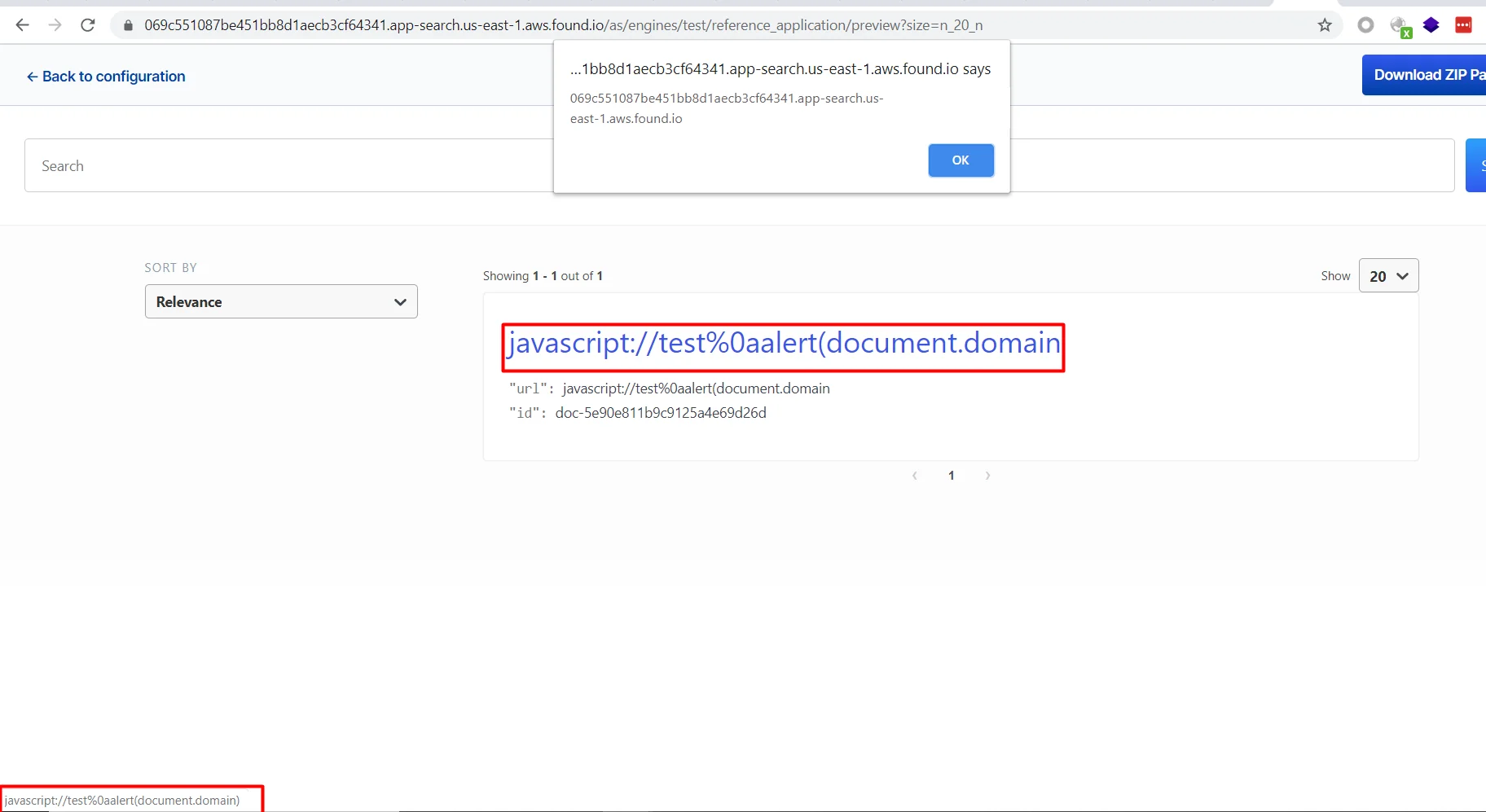
- The Generated link
https://069c551087be451bb8d1aecb3cf64341.app-search.us-east-1.aws.found.io/as/engines/test/reference_application/preview?titleField=url&urlField=urlcan directly be shared with High privileged users etc.
Impact
A low privileged user with only access to create/index documents can create a document with such evil JSON and can send a link of Reference UI to Admin/Owner which when clicked would lead to Stored XSS
Not written yet. The AI write-up for this report has not been written yet. The Original tab links to the source.
How it worked
Root cause
Likely the Reference UI placed a user-controlled document field directly into a link's href without restricting the URL scheme, so a javascript: URL was accepted.
Impact
A low-privileged user who can only create or index documents could store a malicious document and send the Reference UI preview link to an admin or owner, and the script would run in that user's browser when the title link was clicked.
What the attacker needed
An App Search deployment; a low-privileged account that can index documents; victim clicks the title link
How it was found
- Log in to the cloud console and create a deployment, choosing App Search under the deployment optimisation options.
- Launch the App Search instance and log in with the provided credentials.
- Create an engine, then use the paste-JSON option to add a document whose url field holds a javascript-scheme value.
- In the Reference UI tab, set both the title field and the URL field to that url field and generate the preview.
- Open the generated title link with Ctrl+click or the middle mouse button, which runs the script.
Explained by bugbounty.wiki with AI from the original and checked against quotes from it; it can still be wrong. Read the original before relying on a detail.
Not written yet. The AI write-up for this report has not been written yet. The Original tab links to the source.
Cross-site scripting (XSS) is when a website shows attacker-supplied text as if it were part of the page, so the browser runs it as code. Here a document field was used as a link address, and the link address could start with 'javascript:', which makes the browser run script when the link is clicked. Because the document stays saved on the server, the attack is called stored.
What is XSS?
Script an attacker supplies runs in another user's browser, on the target's origin, with that user's session.



