Subdomain takeover due to misconfigured project settings for custom domain
A subdomain of the target company pointed via a CNAME record to a third-party documentation service, and the custom domain setting on that service did not verify ownership. An attacker could register an account on the service and claim the subdomain, serving their own content from it.
 Published on medium.com
Ethical Hacking
The full write-up lives on its author's site
It belongs to its author, so we link to it rather than copy it. The other two tabs are our own rewrites, checked against it.
Context
Flock is a company whose main site is flock.com. While testing it, the researcher found that the company also controls flock.co, a separate domain under the same organisation. The write-up is about a subdomain of that second domain, newdev.flock.co, and about the third-party documentation service it was pointed at.
That service is readme.io, which hosts project documentation. Its custom domain feature lets a customer serve a readme.io project from their own subdomain. According to the readme.io custom domain documentation the researcher read, two things are required:
- A subdomain pointing to your readme.io subdomain,
yoursubdomain.readme.io. - That subdomain configured in the domains settings at
https://dash.readme.io/project/<project_Name>/v1.0/domains.
Subdomain takeover, as the author frames it, is a developer mistake: an unused or unclaimed DNS CNAME record for a subdomain is left pointing at a third-party service, and someone else can claim that subdomain through the external service it points to. The linked background reading is the Detectify blog post on hostile subdomain takeover.
Setup
The researcher was testing flock.com and moved on to enumerating subdomains of flock.co. No special tooling beyond a browser and dig is described. To attempt the takeover, a readme.io account was needed; the author opened one, which produced the readme.io subdomain newdev.readme.io. The account used was a trial account, which matters later because it changes what the claimed domain serves.
Finding it
Subdomain enumeration turned up newdev.flock.co. Visiting it in a browser returned an error page.
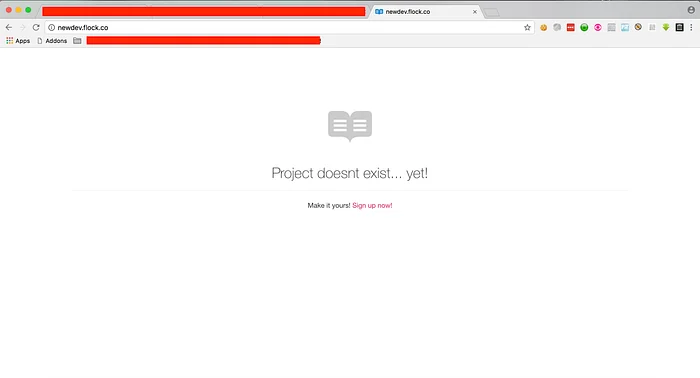
The error drew the researcher's attention, so the next step was to look at DNS for the name.
Exploitation
Step 1: Inspect the DNS record
$ dig newdev.flock.co; <<>> DiG 9.10.6 <<>> newdev.flock.co;; global options: +cmd;; Got answer:;; ->>HEADER<<- opcode: QUERY, status: NOERROR, id: 13182;; flags: qr rd ra; QUERY: 1, ANSWER: 4, AUTHORITY: 0, ADDITIONAL: 1;; OPT PSEUDOSECTION:; EDNS: version: 0, flags:; udp: 512;; QUESTION SECTION:;newdev.flock.co. IN A;; ANSWER SECTION:newdev.flock.co. 299 IN CNAME cname.readme.io.cname.readme.io. 299 IN CNAME readme-cache-prod-1392018356.us-east-1.elb.amazonaws.com.readme-cache-prod-1392018356.us-east-1.elb.amazonaws.com. 59 IN A 52.0.214.29readme-cache-prod-1392018356.us-east-1.elb.amazonaws.com. 59 IN A [redacted];; Query time: 69 msec;; SERVER: [redacted]#53([redacted]);; WHEN: Mon Jul 09 04:58:06 +06 2018;; MSG SIZE rcvd: 175
The answer section shows the chain: newdev.flock.co is a CNAME to cname.readme.io, which is itself a CNAME to readme-cache-prod-1392018356.us-east-1.elb.amazonaws.com, an AWS load balancer that resolves to two addresses. In short, the subdomain points at readme.io's shared custom domain infrastructure.
Step 2: Check whether the CNAME target is already claimed
A takeover requires the readme.io side of the mapping to be unclaimed. The researcher checked whether cname.readme.io was already claimed, and it was: the attempt to take over through that path failed.
Step 3: Try the custom domain setting instead
The author notes that many such services do not force users to verify ownership of a domain with a TXT record matching the service subdomain, so there was still a route to try. The plan was to claim newdev.flock.co as a custom domain on a readme.io project rather than through the shared CNAME target.
A readme.io account was created, yielding the project subdomain newdev.readme.io. The domains settings page for that project is:
https://dash.readme.io/project/newdev/v1.0/domains
In the Custom Domain field, newdev.flock.co was entered as the value and the changes were saved. No verification of ownership of flock.co is described at this point.
Step 4: Observe the result
After saving, visiting newdev.flock.co redirected to http://newdev.flock.co/inactive, a page saying the project is Not Yet Active.
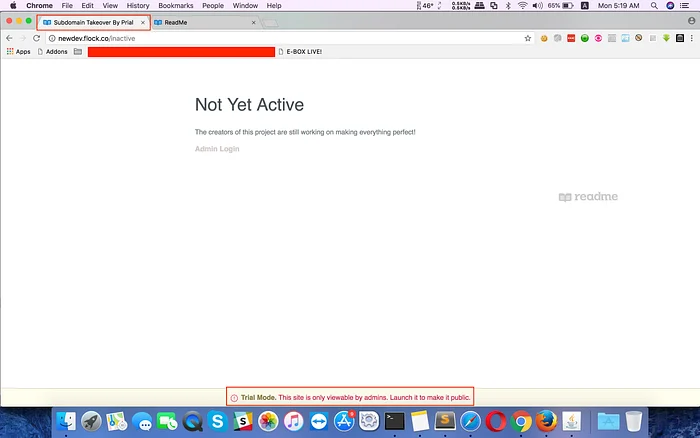
The inactive state is because the readme.io account was a trial account. The page title shows the project name used when creating the project, which demonstrates that the domain is now serving content from the newdev.readme.io project page. In other words, the flock.co subdomain was successfully claimed and was serving the researcher's readme.io project.
Root cause
newdev.flock.co had a DNS CNAME pointing at readme.io's custom domain infrastructure. The shared CNAME target was already claimed, but readme.io accepted the hostname as a custom domain on a new project. readme.io accepted the custom domain in the project's domain settings without any ownership verification being described, so the researcher's project was served from the subdomain. The dangling CNAME is the precondition; the missing ownership check on the custom domain setting is what made the claim possible. The report does not describe any additional defence on readme.io's side that was bypassed.
Impact
The researcher's own project was served from newdev.flock.co, showing that content from a readme.io project could be served on a subdomain of the company's domain. Because the hostname belongs to the organisation, content served there inherits the trust users place in that domain, which the author describes as potentially leading to serious issues. The report does not enumerate specific attack scenarios beyond that, and the demonstration itself only reached the inactive page of a trial project.
Fix
The advice given is to keep DNS records up to date and remove CNAME or any other DNS records that are no longer in use. The report does not say what flock or readme.io changed in response.
Variants to test
- Enumerate subdomains and resolve each one; a CNAME into a third-party service (documentation hosts, marketing pages, status pages, form builders) is the candidate. A positive result is a CNAME whose target service has no project bound to that hostname.
- For each candidate, check whether the service's shared CNAME target is already claimed. If it is, try the service's per-project custom domain setting instead, as was done here. A positive result is the service accepting the hostname and serving your project from it.
- Look for services that do not require a TXT or other ownership record before accepting a custom domain. A positive result is a custom domain saved with no verification step.
- Check whether the service serves a distinct page (such as an inactive or setup page) whose title or content reflects your project, which confirms the claim took effect even before the site is live.
- Test trial or free accounts, since the report shows a trial account is enough to claim the domain, with the only difference being the inactive state of the served page.
What happened, in plain words
A security researcher was looking at a company called Flock. Flock's main website is flock.com, but the researcher noticed the company also owns a second domain, flock.co. A domain is simply a name you type into a browser, like flock.co, and it can have smaller names in front of it called subdomains, such as newdev.flock.co. Think of the domain as a building and the subdomains as different doors into it.
One of those doors, newdev.flock.co, was broken. When the researcher opened it in a browser, an error page appeared. That error was the clue. It suggested that the subdomain had been set up to point at an outside company's service. When a name points at an outside service that nobody has claimed, a stranger can walk in and claim it. That is called a subdomain takeover, and it is the subject of this write-up.
The outside service in question is readme.io, a website that hosts documentation (help pages and manuals) for software projects. readme.io lets its customers show their documentation on their own subdomain instead of on a readme.io address. That feature is called a custom domain. The researcher worked out that Flock's subdomain was still wired to readme.io, and that the shared CNAME target was already claimed. So the researcher created a readme.io account, told readme.io to serve that project on newdev.flock.co, and no ownership verification is described. From that moment, the Flock subdomain was serving the researcher's own content.
This article walks through the same steps the researcher took, explaining each idea from scratch along the way.
Background: what the pieces are
Domains, subdomains and DNS
A domain name like flock.co is a human-friendly label for a computer somewhere on the internet. Computers find each other using numbers called IP addresses, which look like 52.0.214.29. The system that translates names into numbers is called DNS, short for Domain Name System. You can picture DNS as a giant phone book: you look up a name, and it tells you the number to call.
A subdomain is a name that sits under a domain, written with a dot in front: newdev.flock.co is a subdomain of flock.co. Companies use subdomains to separate services, for example one for the shop, one for support, one for development.
DNS has several kinds of records, which are the entries in that phone book:
- An A record maps a name directly to an IP address.
- A CNAME record (short for Canonical Name) does not give an address. Instead it says "this name is really just another name, go look that one up instead". It is like a mail forwarding note: post sent to this address should be delivered to that other address.
CNAME records are how companies hand a subdomain over to an outside service. Flock's subdomain had a CNAME pointing at readme.io, which is exactly the setup readme.io asks its customers to create.
What readme.io does
readme.io hosts documentation. A customer signs up, gets a project, and the project is reachable at an address like yoursubdomain.readme.io. If the customer wants the documentation to appear on their own domain instead, readme.io offers a custom domain feature.
According to the readme.io custom domain documentation the researcher read, two things are required to use it:
- A subdomain pointing to your readme.io subdomain,
yoursubdomain.readme.io. - That subdomain configured in the domains settings at
https://dash.readme.io/project/<project_Name>/v1.0/domains.
In other words, the customer does half the work in DNS (pointing the name at readme.io) and the other half in readme.io's settings (telling readme.io to answer for that name).
What a subdomain takeover is
A subdomain takeover happens when the first half exists but the second half does not. The DNS record still points at the outside service, but no account at that service is using the name. Anyone who can create an account at the service and claim that name gets to decide what the subdomain shows.
The author describes this as a developer mistake: an unused or unclaimed DNS CNAME record for a subdomain is left pointing at a third-party service, and someone else can claim that subdomain through the external service it points to. The report links to the Detectify blog post on hostile subdomain takeover for further reading.
Why does it matter? Because visitors trust a company's domain. If a stranger can put content on a subdomain of that domain, visitors may believe the content comes from the company.
How the researcher found it
The researcher was testing flock.com and then started looking at subdomains of flock.co, the second domain owned by the same company. This kind of search is called subdomain enumeration: trying many possible names to see which ones exist. No special tooling beyond a browser and dig is described.
That search turned up newdev.flock.co. Visiting it in a browser returned an error page.
The screenshot shows the error page the browser displayed for the subdomain. The error is what drew the researcher's attention: a subdomain that exists in DNS but shows an error is a hint that it may be pointed at a service nobody is using. So the next step was to look at the DNS records for the name.
Step by step
Step 1: Inspect the DNS record
To see where a name really points, the researcher used dig, a command-line tool that asks DNS servers questions and prints the answers. The command and its output were:
$ dig newdev.flock.co; <<>> DiG 9.10.6 <<>> newdev.flock.co;; global options: +cmd;; Got answer:;; ->>HEADER<<- opcode: QUERY, status: NOERROR, id: 13182;; flags: qr rd ra; QUERY: 1, ANSWER: 4, AUTHORITY: 0, ADDITIONAL: 1;; OPT PSEUDOSECTION:; EDNS: version: 0, flags:; udp: 512;; QUESTION SECTION:;newdev.flock.co. IN A;; ANSWER SECTION:newdev.flock.co. 299 IN CNAME cname.readme.io.cname.readme.io. 299 IN CNAME readme-cache-prod-1392018356.us-east-1.elb.amazonaws.com.readme-cache-prod-1392018356.us-east-1.elb.amazonaws.com. 59 IN A 52.0.214.29readme-cache-prod-1392018356.us-east-1.elb.amazonaws.com. 59 IN A [redacted];; Query time: 69 msec;; SERVER: [redacted]#53([redacted]);; WHEN: Mon Jul 09 04:58:06 +06 2018;; MSG SIZE rcvd: 175
What each part means, in plain words:
dig newdev.flock.cois the question: "what does this name resolve to?"- The
QUESTION SECTIONrepeats the question:newdev.flock.co. IN A, meaning an A record lookup for that name. - The
ANSWER SECTIONis the answer, and it comes in a chain. First,newdev.flock.co. 299 IN CNAME cname.readme.io.says the name is a CNAME pointing atcname.readme.io. The number 299 is how many seconds the answer may be cached (kept temporarily) before asking again. - Next,
cname.readme.io. 299 IN CNAME readme-cache-prod-1392018356.us-east-1.elb.amazonaws.com.says that name is itself a CNAME pointing at an Amazon Web Services load balancer. A load balancer is a machine that spreads incoming traffic across several servers. - Finally, two A records give the actual IP addresses of that load balancer:
[redacted]and[redacted]. - The remaining lines are metadata: the query took 69 milliseconds, the DNS server used was
[redacted], and the query was made on Monday 09 July 2018.
In short, the subdomain points at readme.io's shared custom domain infrastructure. That is the first half of the readme.io setup, the DNS half, and it was still in place.
Step 2: Check whether the CNAME target is already claimed
For a takeover to work, the readme.io side of the mapping must be unclaimed. The researcher checked whether cname.readme.io was already claimed, and it was. That route was closed: the shared target already belonged to someone, so it could not be taken over through that path.
Step 3: Try the custom domain setting instead
The author notes that many such services do not force users to verify ownership of a domain with a TXT record matching the service subdomain, so there was still a route to try. A TXT record is another kind of DNS entry, used to hold short pieces of text; services sometimes use it to make a customer prove they control a domain. The plan here was to claim newdev.flock.co as a custom domain on a readme.io project rather than through the shared CNAME target.
To do that, a readme.io account was created, which produced the project subdomain newdev.readme.io. The domains settings page for that project is:
https://dash.readme.io/project/newdev/v1.0/domains
Reading that address piece by piece: dash.readme.io is readme.io's dashboard, the control panel where a customer manages their project. project/newdev selects the project named newdev, and v1.0/domains opens the domains settings for it. The <project_Name> placeholder in the documentation is replaced here by the actual project name, newdev.
In the Custom Domain field on that page, newdev.flock.co was entered as the value and the changes were saved. No verification of ownership of flock.co is described at this point: readme.io accepted the name without asking the researcher to prove the domain belonged to them.
Step 4: Observe the result
After saving, visiting newdev.flock.co redirected to http://newdev.flock.co/inactive, a page saying the project is Not Yet Active.
The screenshot shows that page. The inactive state is because the readme.io account was a trial account. The page title shows the project name used when creating the project, which demonstrates that the domain is now serving content from the newdev.readme.io project page. In other words, the flock.co subdomain had been successfully claimed and was serving the researcher's readme.io project.
Why it worked
newdev.flock.co had a DNS CNAME pointing at readme.io's custom domain infrastructure, and readme.io accepted the hostname as a custom domain on a new project. readme.io accepted the custom domain in the project's domain settings with no ownership verification described, so the researcher's project was served from the subdomain.
The dangling CNAME is the precondition: the forwarding note was still in the phone book. The missing ownership check on the custom domain setting is what made the claim possible: the service accepted the name from a stranger. The report does not describe any additional defence on readme.io's side that was bypassed.
What the impact is
The researcher's own project was served from newdev.flock.co, showing that a readme.io project's content could be served on a subdomain of the company's domain. Because the hostname belongs to the organisation, content served there inherits the trust users place in that domain, which the author describes as potentially leading to serious issues. The report does not enumerate specific attack scenarios beyond that, and the demonstration itself only reached the inactive page of a trial project.
How to avoid it
The advice given is to keep DNS records up to date and remove CNAME or any other DNS records that are no longer in use. The report does not say what flock or readme.io changed in response.
Other places to look for the same problem
- Enumerate subdomains and resolve each one; a CNAME into a third-party service (documentation hosts, marketing pages, status pages, form builders) is the candidate. A positive result is a CNAME whose target service has no project bound to that hostname.
- For each candidate, check whether the service's shared CNAME target is already claimed. If it is, try the service's per-project custom domain setting instead, as was done here. A positive result is the service accepting the hostname and serving your project from it.
- Look for services that do not require a TXT or other ownership record before accepting a custom domain. A positive result is a custom domain saved with no verification step.
- Check whether the service serves a distinct page (such as an inactive or setup page) whose title or content reflects your project, which confirms the claim took effect even before the site is live.
- Test trial or free accounts, since the report shows a trial account is enough to claim the domain, with the only difference being the inactive state of the served page.
Glossary
- Domain: a name on the internet, such as flock.co, that people type into a browser.
- Subdomain: a name that sits under a domain, written with a dot in front, such as newdev.flock.co.
- DNS (Domain Name System): the internet's phone book, which translates names into IP addresses and other information.
- IP address: a number that identifies a computer on the internet, such as 52.0.214.29.
- A record: a DNS entry that maps a name directly to an IP address.
- CNAME record: a DNS entry that says one name is really another name, so the lookup should continue at that other name.
- DNS record: a single entry in DNS, of which A, CNAME and TXT are examples.
- TXT record: a DNS entry holding short pieces of text, sometimes used to prove ownership of a domain.
- dig: a command-line tool that asks DNS servers questions and prints the answers.
- Load balancer: a machine that spreads incoming traffic across several servers.
- Subdomain enumeration: searching for subdomains that exist under a domain by trying many possible names.
- Subdomain takeover: claiming a subdomain that still points at an outside service nobody is using, so that you control what it shows.
- Dangling CNAME: a CNAME record left pointing at a service that no longer has anything configured for that name.
- Third-party service: an outside company's product that a business uses, such as readme.io for documentation.
- readme.io: a service that hosts documentation for software projects.
- Custom domain: a readme.io feature that lets a customer serve their project from their own subdomain instead of a readme.io address.
- Dashboard: a website's control panel where a customer manages their account and settings.
- Trial account: a free, time-limited account, which here caused the claimed domain to show an inactive page.
- Ownership verification: a step where a service makes you prove you control a domain before accepting it, for example with a TXT record.
- Redirect: when a web address sends the browser on to a different address.
- Impact: the harm a security problem could cause if someone abused it.