ATO without any interaction [aws cognito misconfiguration]
The AWS Cognito user pool allowed an OAuth-issued access token to change the account email to an unverified address that already belonged to another user. The application only checked email verification on the client side, so disabling JavaScript let the attacker log in as the victim.
 Published on shreyaskoli.medium.com
This is Shreyas koli from Maharashtra, India. It’s my first article.
The full write-up lives on its author's site
It belongs to its author, so we link to it rather than copy it. The other two tabs are our own rewrites, checked against it.
Context
The target, referred to throughout as target.com, is a website that provides an online application for managing devices connected to a LAN, such as servers and Raspberry Pis. Login was handled by AWS Cognito, and both the email and password flow and the OAuth flow issued access tokens through it.
Amazon Cognito provides authentication, authorisation and user management for web and mobile apps. Users can sign in directly with a username and password, or through a third party such as Facebook, Amazon, Google or Apple.
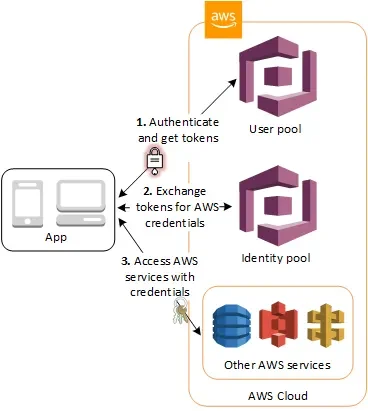
AWS cognito flow
The flow shown above works in three steps:
- The app user signs in through a user pool and receives user pool tokens after successful authentication.
- The app exchanges the user pool tokens for AWS credentials through an identity pool.
- The app user can then use those AWS credentials to access other AWS services such as Amazon S3 or DynamoDB.
Setup
The researcher tested with two kinds of account on the same target: one created with email and password, and one created through OAuth (Google). The tooling was the AWS CLI, Burp Suite to intercept and hold requests, and a browser whose JavaScript could be disabled. The access token was taken from Burp history after logging in through OAuth.
Finding it
User data can be fetched with an access token using the following command:
$ aws cognito-idp get-user --region us-west-2 --access-token <token>
Comparing the output for tokens issued by the two login methods showed that the tokens referred to different usernames even though they belonged to the same account. The email and password token returned:
{ "Username": "3b84472e-5b44-4d9e-bbea-a49592b8e162", "UserAttributes": [ { "Name": "sub", "Value": "3b84472e-5b44-4d9e-bbea-a49592b8e162" }, { "Name": "email_verified", "Value": "true" }, { "Name": "email", "Value": "[redacted]" } ]}
The OAuth token returned:
{ "Username": "google_107427578229077464095", "UserAttributes": [ { "Name": "sub", "Value": "0080f3d4-2173-469f-a929-8a67225d446c" }, { "Name": "identities", "Value": "[{\"userId\":\"107427578229077464095\",\"providerName\":\"Google\",\"providerType\":\"Google\",\"issuer\":null,\"primary\":true,\"dateCreated\":1651166579396}]" }, { "Name": "email_verified", "Value": "true" }, { "Name": "given_name", "Value": "Shreyas" }, { "Name": "family_name", "Value": "Koli" }, { "Name": "email", "Value": "[redacted]" } ]}
The usernames differ, yet both tokens belong to the same account. The two tokens therefore refer to different usernames when modifying account details such as name and email. The researcher then found that the OAuth-issued access token allowed the account email to be changed to an email address that already existed.
Exploitation
Step 1: log in through OAuth and take the access token
Log in to your own account using OAuth and take the access token from Burp history.
Step 2: change your email to the victim's email
The following command changes the email of the account:
$ aws cognito-idp update-user-attributes --region us-west-2 --user-attributes 'Name=email,Value=[redacted]' --access-token [access token]
It returned:
{ "CodeDeliveryDetailsList": [ { "Destination": "v***@g***", "DeliveryMedium": "EMAIL", "AttributeName": "email" } ]}
After running it, the researcher refreshed the page and got an error.
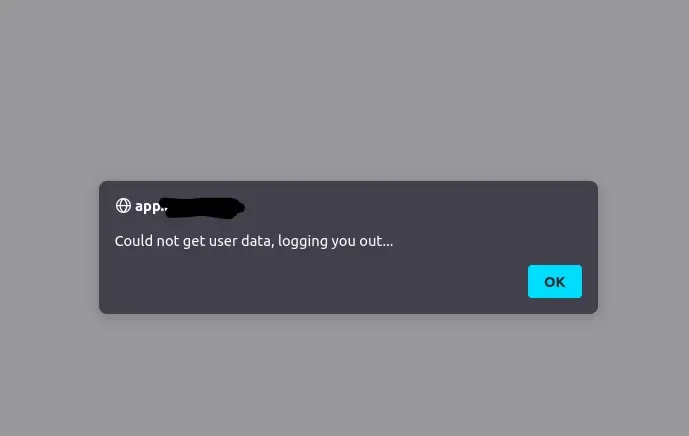
Error popup
On refresh, the browser sent a get-user request to fetch user data. That request checked whether the email was verified, and if it was not, the session was expired. The popup read "Could not get user data, logging you out..." and the user was logged out. In the request, the email_verified field was set to false, showing the email was not verified.
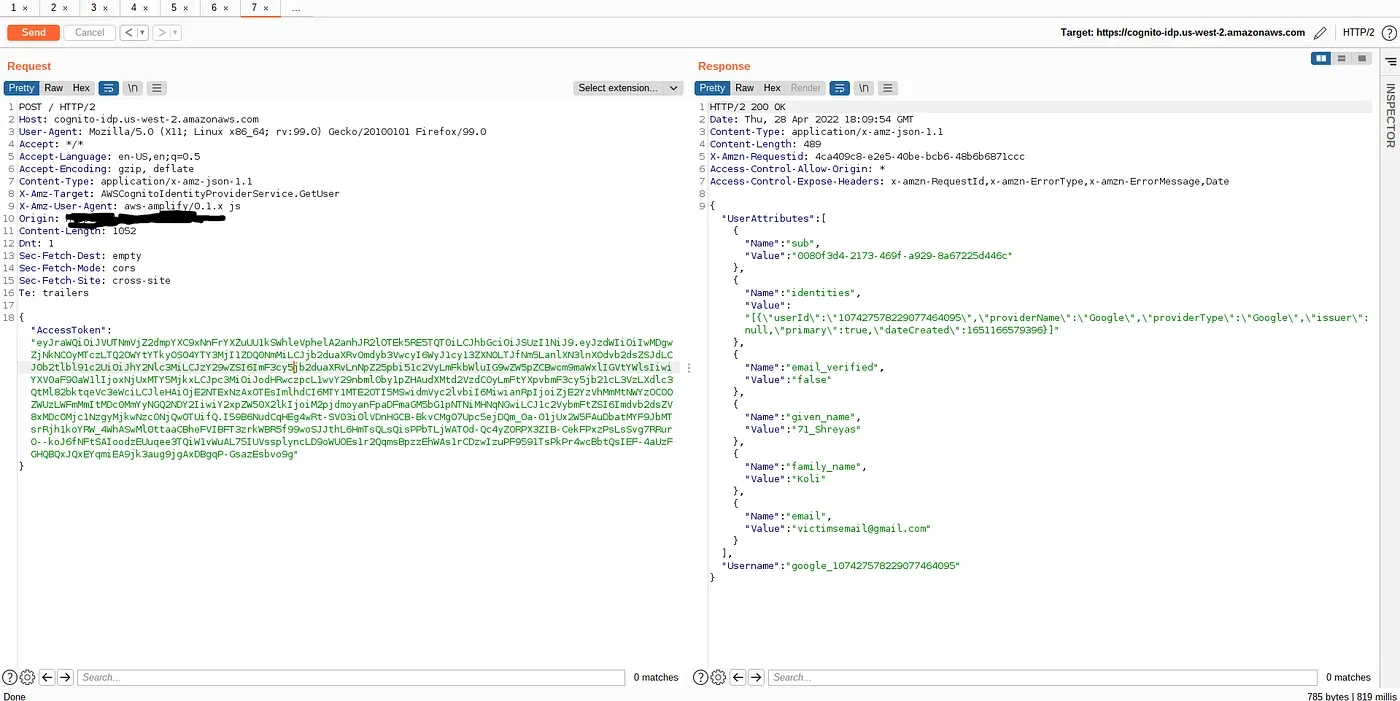
get-user request
Response manipulation and other methods were tried to bypass the verification without success.
Step 3: hold the get-user request
The next day, the researcher changed the account email to the victim's email again with the same AWS Cognito command, refreshed the page and monitored requests in Burp. Forwarding was stopped when the get-user request with the access token arrived.
Step 4: disable JavaScript and forward
With the request held, JavaScript was disabled in the browser (new tab, about:config, search for JS, disable JS). The get-user request was then forwarded, and the login to the victim's account succeeded, because the check on whether the user's email was verified existed only on the client side.
Root cause
The email change through the OAuth-issued token was accepted for an address that already existed, and the only check that the new address had been verified was performed client side, in the browser, on the get-user response. Holding the request, disabling JavaScript and forwarding it removed that check. The verification check was performed only on the client side, so disabling JavaScript and forwarding the held request let the login proceed.
Impact
An attacker with an OAuth-issued access token for their own account could change the account email to a victim's address and, by suppressing the client-side verification check, log in as the victim. The report describes this as account takeover and states the target paid 500 USD for it, with a further 50 USD for the missing rate limit.
Separately, every email change sent an OTP to the new address. Because Gmail delivers mail sent to me+[anything]@gmail.com to [redacted], this can be used to target a specific user. The change-email command can be run in a loop to spam any user, and there was no rate limit. The script used was:
#!/bin/bashfor i in {1..100}do echo "$i]" aws cognito-idp update-user-attributes --region us-west-2 --user- attributes "Name=email,Value=victimemail+$[redacted]" --access-token [token here]done
Fix
The report does not describe any fix applied by the target.
Variants to test
- Compare the
Usernamereturned byget-userfor tokens from different login methods on the same account. A positive result is two different usernames for one account, as seen here. - Try
update-user-attributeswith an email that already belongs to another account. A positive result is a successful response withCodeDeliveryDetailsListinstead of an error. - Hold the get-user request, disable JavaScript and forward it. A positive result is a successful login to the victim's account after the held request is forwarded with JavaScript disabled.
- Run the email-change command repeatedly against a plus-addressed Gmail target. A positive result is a stream of OTP emails with no throttling.
What happened, in plain words
A security researcher found a way to log into someone else's account on a website without ever needing that person's password. The website let people sign in either with an email and password, or through Google (this is called OAuth). Both routes used a service from Amazon called AWS Cognito to handle logins.
The trick was this: the researcher could change the email address on their own account to the victim's email address, even though that address was already in use by the victim. The website did notice that the new email had not been confirmed, and it tried to log the researcher out. But that check happened only inside the browser, in JavaScript. By pausing the request in a tool called Burp Suite, turning off JavaScript, and then letting the request continue, the researcher skipped the check and was logged in as the victim.
Separately, the researcher found that the website would send a confirmation code (an OTP) to the new email address every time the email was changed, with no limit on how often this could be done. Because Gmail treats [redacted] as the same inbox as [redacted], this could be used to flood a specific person's inbox with codes.
The target paid 500 USD for the account takeover and 50 USD for the missing rate limit.
The target and the login system
The website, called target.com throughout, is an online application for managing devices connected to a local network (a LAN), such as servers and Raspberry Pis. A Raspberry Pi is a small, cheap computer often used for hobby projects and small servers. A LAN is the network inside a home or office, as opposed to the wider internet.
Login was handled by AWS Cognito. Amazon Cognito is a service that provides authentication (proving who you are), authorisation (deciding what you are allowed to do) and user management for web and mobile apps. Users can sign in directly with a username and password, or through a third party such as Facebook, Amazon, Google or Apple. Signing in through a third party like this is called OAuth: instead of giving the website your Google password, you log in to Google, and Google tells the website that you are who you say you are.
The diagram shows the AWS Cognito flow, which works in three steps:
- The app user signs in through a user pool and receives user pool tokens after successful authentication. A user pool is Cognito's list of user accounts; a token is a short string of text that proves you have logged in, a bit like a cloakroom ticket: you show it to get your coat back, and you do not need to prove who you are again each time.
- The app exchanges the user pool tokens for AWS credentials through an identity pool. Credentials here are temporary keys that let the app talk to other Amazon services.
- The app user can then use those AWS credentials to access other AWS services such as Amazon S3 or DynamoDB. S3 is Amazon's file storage service; DynamoDB is Amazon's database service.
Setting up
The researcher tested with two kinds of account on the same target: one created with email and password, and one created through OAuth (Google). The tools used were:
- The AWS CLI, a command-line program that lets you send instructions to Amazon services from a terminal window.
- Burp Suite, a tool that sits between your browser and the website and lets you look at, pause and change the requests going back and forth. A request is a message your browser sends to a server asking for something; a response is the server's reply.
- A browser in which JavaScript could be disabled. JavaScript is the programming language that runs inside web pages and makes them interactive; if you turn it off, parts of a page stop working.
The access token was taken from Burp history after logging in through OAuth. Burp history is the list of all requests and responses Burp has recorded.
Finding it
User data can be fetched with an access token using the following command:
$ aws cognito-idp get-user --region us-west-2 --access-token <token>
Line by line:
awsruns the AWS command-line program.cognito-idpselects the part of AWS that deals with Cognito user accounts (IDP stands for identity provider).get-useris the instruction: fetch the details of the user this token belongs to.--region us-west-2says which Amazon data centre region to talk to. Regions are named areas where Amazon runs its servers.--access-token <token>supplies the token. The angle brackets are a placeholder: you paste your real token in place of<token>.
Comparing the output for tokens issued by the two login methods showed that the tokens referred to different usernames even though they belonged to the same account. The email and password token returned:
{ "Username": "3b84472e-5b44-4d9e-bbea-a49592b8e162", "UserAttributes": [ { "Name": "sub", "Value": "3b84472e-5b44-4d9e-bbea-a49592b8e162" }, { "Name": "email_verified", "Value": "true" }, { "Name": "email", "Value": "[redacted]" } ]}
What this output means:
Usernameis the internal name Cognito uses for this account. Here it is a long random-looking string, called a UUID.UserAttributesis a list of facts about the user.subis a unique identifier for the account. It matches the username here.email_verifiedistrue, meaning Cognito considers the email address confirmed.emailis the address on the account.
The OAuth token returned:
{ "Username": "google_107427578229077464095", "UserAttributes": [ { "Name": "sub", "Value": "0080f3d4-2173-469f-a929-8a67225d446c" }, { "Name": "identities", "Value": "[{\"userId\":\"107427578229077464095\",\"providerName\":\"Google\",\"providerType\":\"Google\",\"issuer\":null,\"primary\":true,\"dateCreated\":1651166579396}]" }, { "Name": "email_verified", "Value": "true" }, { "Name": "given_name", "Value": "Shreyas" }, { "Name": "family_name", "Value": "Koli" }, { "Name": "email", "Value": "[redacted]" } ]}
What is different here:
Usernameis nowgoogle_followed by a long number. That number is the user's Google account identifier.subis a different UUID from the one in the first output.identitiesrecords that this account is linked to Google.providerNameandproviderTypesay Google;userIdis the Google account number;primarybeingtruemeans this is the main identity;dateCreatedis a timestamp.given_nameandfamily_nameare first and last name, taken from the Google account.email_verifiedistrueandemailis the same address as before.
The usernames differ, yet both tokens belong to the same account. The two tokens therefore refer to different usernames when modifying account details such as name and email. In other words, the same person has two different internal usernames depending on how they logged in.
The researcher then found that the OAuth-issued access token allowed the account email to be changed to an email address that already existed. Normally a system should refuse this, because two accounts cannot share one address without confusion about who owns it.
Exploitation
Step 1: log in through OAuth and take the access token
Log in to your own account using OAuth and take the access token from Burp history. You need your own account first, because the attack starts from an account you control. The token is what proves to the server that you are logged in, so you need to capture it to reuse it in the commands below.
Step 2: change your email to the victim's email
The following command changes the email of the account:
$ aws cognito-idp update-user-attributes --region us-west-2 --user-attributes 'Name=email,Value=[redacted]' --access-token [access token]
Line by line:
aws cognito-idpagain selects the Cognito user service.update-user-attributesis the instruction: change some facts about the user.--region us-west-2picks the Amazon region.--user-attributes 'Name=email,Value=[redacted]'says which fact to change: the attribute calledemail, set to the victim's address. The single quotes keep the whole thing together as one argument.--access-token [access token]supplies your token. The square brackets are a placeholder for the real value.
It returned:
{ "CodeDeliveryDetailsList": [ { "Destination": "v***@g***", "DeliveryMedium": "EMAIL", "AttributeName": "email" } ]}
What this means:
CodeDeliveryDetailsListis a list of where confirmation codes were sent.Destinationis the address the code went to, partly hidden with asterisks.DeliveryMediumisEMAIL, so the code went by email.AttributeNameisemail, the attribute that was changed.
The important point is that the command succeeded: the server accepted the change to an address that already belonged to someone else, and it sent a confirmation code to that address.
After running it, the researcher refreshed the page and got an error.
Error popup
On refresh, the browser sent a get-user request to fetch user data. That request checked whether the email was verified, and if it was not, the session was expired. A session is the period during which the website treats you as logged in. The popup read "Could not get user data, logging you out..." and the user was logged out. In the request, the email_verified field was set to false, showing the email was not verified.
get-user request
This is the key observation: the website did not simply refuse the email change. It accepted it, then noticed the new address was unconfirmed and tried to end the session. That reaction is a check, and the question is where the check lives.
Response manipulation and other methods were tried to bypass the verification without success. Response manipulation means editing the server's reply on its way back to the browser, for example changing false to true.
Step 3: hold the get-user request
The next day, the researcher changed the account email to the victim's email again with the same AWS Cognito command, refreshed the page and monitored requests in Burp. Forwarding was stopped when the get-user request with the access token arrived. Forwarding means letting a paused request continue on to the server. Holding it gives you time to change something in the browser before the server replies.
Step 4: disable JavaScript and forward
With the request held, JavaScript was disabled in the browser (new tab, about:config, search for JS, disable JS). about:config is a settings page in some browsers where advanced options can be changed. The get-user request was then forwarded, and the login to the victim's account succeeded, because the check on whether the user's email was verified existed only on the client side. Client side means it runs in your browser, on your computer, where you are in control; server side means it runs on the website's own computers, where you are not.
Root cause
The email change through the OAuth-issued token was accepted for an address that already existed, and the only check that the new address had been verified was performed client side, in the browser, on the get-user response. Holding the request, disabling JavaScript and forwarding it removed that check. The verification check was performed only on the client side, so disabling JavaScript and forwarding the held request let the login proceed.
In everyday terms: a bouncer checked your ticket at the door of the club, but the ticket was printed by you at home. If you print a better-looking ticket, the bouncer cannot tell. The fix is for the club to keep its own list.
Impact
An attacker with an OAuth-issued access token for their own account could change the account email to a victim's address and, by suppressing the client-side verification check, log in as the victim. The report describes this as account takeover and states the target paid 500 USD for it, with a further 50 USD for the missing rate limit.
Separately, every email change sent an OTP to the new address. OTP stands for one-time password: a short code sent to you to prove you control an address or phone. Because Gmail delivers mail sent to me+[anything]@gmail.com to [redacted], this can be used to target a specific user. The + part is ignored by Gmail, so all those addresses land in the same inbox. The change-email command can be run in a loop to spam any user, and there was no rate limit. A rate limit is a cap on how many times something can be done in a period; without one, a program can repeat an action as fast as it likes. The script used was:
#!/bin/bashfor i in {1..100}do echo "$i]" aws cognito-idp update-user-attributes --region us-west-2 --user- attributes "Name=email,Value=victimemail+$[redacted]" --access-token [token here]done
Line by line:
#!/bin/bashtells the computer to run the file with the bash shell, a program that runs commands.for i in {1..100}starts a loop that repeats 100 times, withicounting from 1 to 100.domarks the start of what to repeat.echo "$i]"prints the current number, so you can see progress.- The
aws cognito-idp update-user-attributesline is the same email-change command as before, but the address isvictimemail+$[redacted], so each pass uses a different plus-address that still lands in the victim's inbox. donemarks the end of the loop.
Fix
The report does not describe any fix applied by the target.
Variants to test
- Compare the
Usernamereturned byget-userfor tokens from different login methods on the same account. A positive result is two different usernames for one account, as seen here. - Try
update-user-attributeswith an email that already belongs to another account. A positive result is a successful response withCodeDeliveryDetailsListinstead of an error. - Hold the get-user request, disable JavaScript and forward it. A positive result is a successful login to the victim's account after the held request is forwarded with JavaScript disabled.
- Run the email-change command repeatedly against a plus-addressed Gmail target. A positive result is a stream of OTP emails with no throttling.
Glossary
- Access token: a string of text that proves you are logged in and lets you ask the server for your data.
- Account takeover (ATO): when an attacker gains control of someone else's account.
- API: a way for one program to ask another program to do something, like a waiter taking your order to the kitchen.
- Attribute: a named fact about a user account, such as
emailoremail_verified. - Authentication: proving who you are, usually by logging in.
- Authorisation: deciding what a logged-in user is allowed to do.
- AWS: Amazon Web Services, Amazon's collection of cloud computing services.
- AWS CLI: a command-line program for sending instructions to AWS.
- AWS Cognito: Amazon's service for handling user sign-up, sign-in and permissions.
- Burp Suite: a tool that sits between browser and server so you can inspect, pause and change traffic.
- Client side: code that runs in your own browser, on your computer.
- Credentials: keys or tokens that let a program access a service.
- DynamoDB: Amazon's database service.
- Email verification: confirming that an email address really belongs to the person using it, usually by sending a code.
- Identity pool: the Cognito part that hands out temporary AWS credentials to logged-in users.
- JavaScript: the programming language that runs inside web pages.
- LAN: local area network, the network inside a home or office.
- OAuth: logging in to a website through another provider such as Google, without sharing your password with the website.
- OTP: one-time password, a short code sent to an email address or phone to prove you control it.
- Rate limit: a cap on how many times an action can be performed in a period.
- Raspberry Pi: a small, inexpensive computer often used for small servers and hobby projects.
- Request: a message your browser sends to a server asking for something.
- Response: the server's reply to a request.
- Response manipulation: editing a server's reply on its way back to the browser.
- S3: Amazon's file storage service.
- Server side: code that runs on the website's own computers, which you cannot change.
- Session: the period during which a website treats you as logged in.
- Token: a short string that stands in for proof of identity, like a cloakroom ticket.
- User pool: Cognito's list of user accounts.
- UUID: a long, random-looking identifier used to name something uniquely.
- Vulnerability class: a category of security weakness, such as account takeover or missing rate limiting.



