Again, from Nay to Yay in Google Vulnerability Reward Program!
 Published on blog.yappare.com
{{media:0}} |
The full write-up lives on its author's site
It belongs to its author, so we link to it rather than copy it. The other two tabs are our own rewrites, checked against it.
Context
In early 2014 Ahmad Ashraff published a write-up about a bug he had reported to Google's Vulnerability Reward Program (VRP) in December 2013. The target was YouTube, specifically the video manager's caption feature. YouTube lets a video owner create captions or subtitles for their own videos, and it also lets the owner request a translation of those captions, either from a third party or from other Google users. The write-up describes a self stored XSS in the caption editor and then shows how the translation workflow turns that self-XSS into something that runs in another user's session.
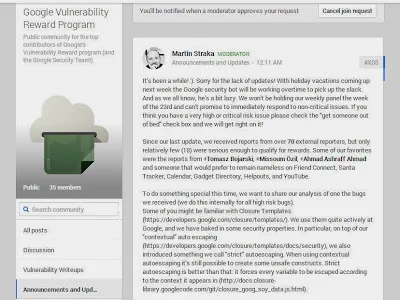
The author frames the post as a follow-up to an earlier Google AdWords stored XSS write-up of his, and notes that the bug got him into the Google Vulnerability Reward Program G+ community.
Setup
The report does not describe any special tooling, browser version or test accounts. The preconditions it implies are:
- A YouTube account that owns at least one video, so the video manager and its caption editor are available.
- For the second stage, the ability to request a translation of a video's captions and to invite other Google users to translate them.
- For the attacker side of the second stage, a Google account that can accept such an invitation.
The author does not state which accounts or videos he used.
Finding it
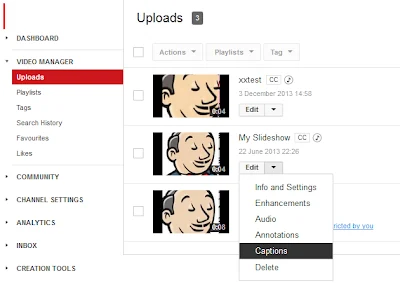
The author starts from the caption editor in the YouTube video manager. A user can create captions for their own videos, and the editor includes a script box where the caption text is entered. Putting an XSS payload into that box and saving it, then playing the video, causes the payload to execute.

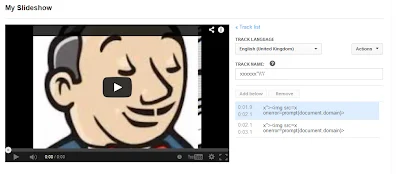
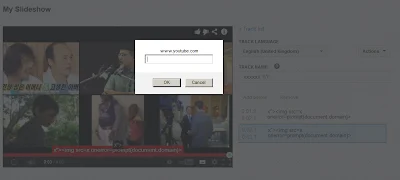
The report does not reproduce the exact payload used. What it does say is that the execution is confined to the caption's video manager: the XSS is stored only for the user who entered it. That makes it a self-XSS, which on its own is not interesting, because the only person who can trigger it is the person who typed it.

The author then went looking for a way to make the stored payload reach someone else. He says he browsed the caption feature repeatedly to see whether there was any share or embed function attached to it. What he did find was the translation request function.

Exploitation
Step 1: store the payload in the caption editor
In the video manager, open the caption editor for a video, place the XSS payload in the script box and save. The report does not give the payload text. Playing the video executes it, but only inside the owner's own video manager view.
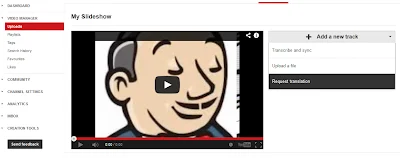
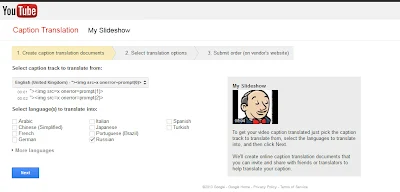
Step 2: request a translation
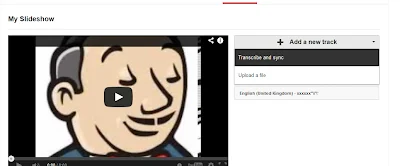
The translation workflow works as follows, according to the report:
- A user requests a translation for his or her video.
- The user chooses whether the translation comes from a third party or from other Google users.
Step 3: the attacker accepts the invitation and edits the translation
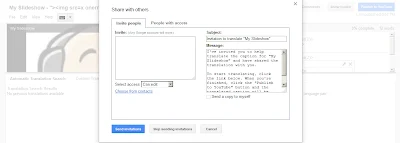
The author sets up a scenario: a community that translates English series, films or Korean dramas, with translators working on YouTube captions, and an attacker among them.
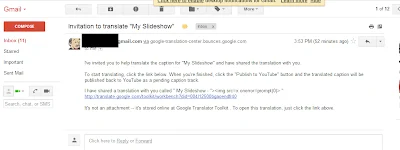
- The attacker receives the invitation to translate.
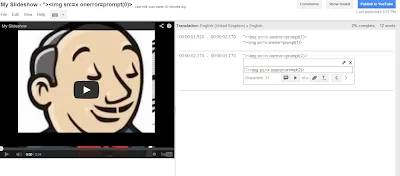
- The attacker inserts the malicious code in the middle of the translation.
- The attacker sends the translation back to the requester for approval.
Step 4: the requester approves and the payload runs
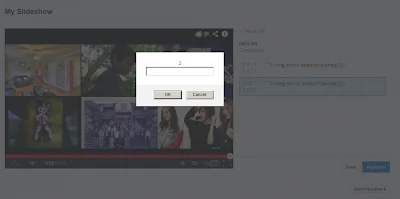
When the translation is submitted, the requester receives an email notification. All the requester has to do is review the translated caption and approve it. At that point the XSS executes in the requester's session.
Root cause
The report does not analyse the server-side code. What it establishes is that caption text, including the script box content, is stored and later rendered without adequate sanitisation, so a payload survives into the caption view. The self-XSS limit comes from where that rendering happens: the stored caption is only shown back to its owner in the video manager. The translation feature breaks that limit because it lets a different user supply caption content that is then rendered to the requester for review and approval. In other words, the trust boundary the caption editor assumed, that only the owner ever sees the caption, does not hold once translations are accepted from other users. Whether the rendering flaw is in the editor, the review screen or both is not stated in the report.
Impact
The impact depends on the second stage. A plain self-XSS in the caption editor has no impact beyond the user attacking themselves. Through the translation workflow, an attacker who is invited to translate a video can get script to run in the session of the person who requested the translation, at the moment that person reviews and approves the submitted caption. The author's scenario assumes the requester accepts translations from other Google users; the report only describes that path.
Fix
Google fixed the issue between 8 and 10 December 2013, according to the timeline in the post, and Kevin from the Google Security Team confirmed the fix on 10 January 2014.
Timeline
| Date | Event |
|---|---|
| 03 December 2013 | Reported via the VRP form |
| 07 December 2013 | Reply received from Martin, Google Security Team |
| 07 December 2013 | Google asked for more information to reproduce |
| 08-10 December 2013 | Fixed around these dates |
| 11 December 2013 | Reward email received from Google |
| 10 January 2014 | Kevin, Google Security Team, confirmed the fix |
Variants to test
- Other content fields that are reviewed by a second user. Look for features where user A submits content and user B previews or approves it: subtitle and caption translations, ad copy review, document comments, store listing localisations. A positive result is a payload entered by the submitter executing in the reviewer's session when the preview or approval screen renders it.
- Self-XSS features with a sharing or invitation path. Enumerate every place a stored value is shown only to its owner, then check whether any workflow (invitations, collaboration, translation, review) causes that value to be rendered to someone else. A positive result is the owner's stored payload firing for a different account.
- Translation and localisation pipelines generally. Submit a translation containing markup and watch the notification email, the review page and the published caption separately, since each may render the text differently. A positive result is execution at any of those three points.
- Third-party versus user translation paths. Test both options in the translation request, since the report only describes the path where other Google users are invited. A positive result is the same execution when the translation is supplied through the other route.
What happened, in plain words
In December 2013 a security researcher named Ahmad Ashraff found a bug in YouTube and reported it to Google through Google's Vulnerability Reward Program, usually shortened to VRP. That program is Google's scheme for paying people who find security problems in Google products and report them privately instead of misusing them.
The bug was in YouTube's caption feature. Captions are the text that appears at the bottom of a video, for example subtitles for people who cannot hear the audio or for viewers who speak another language. YouTube lets the owner of a video write captions for it, and it also lets the owner ask someone else to translate those captions.
The researcher found that if you typed a piece of code into the caption editor, YouTube would later run that code as if it were part of the page. Code that runs inside someone else's web page is called cross-site scripting, or XSS. On its own this was not very useful, because the code only ran in the account of the person who typed it. That situation is called self-XSS: you can only attack yourself.
Then he found the translation feature. A video owner can invite other Google users to translate the captions. When the translator sends the translation back, the owner gets an email and reviews the translation before approving it. If the translator slips the code into the translation, the code runs in the owner's browser at the moment the owner reviews and approves it. That turns a harmless self-XSS into an attack on another person.
Google fixed the bug within a few days of the report and later confirmed the fix. The researcher wrote the post in January 2014, and it is also how he ended up in the Google Vulnerability Reward Program community on Google+.
Background you need first
A few ideas come up again and again in this story, so here they are from scratch.
A web page is a program. When you open a page, your browser downloads text and instructions and then builds what you see. Some of those instructions are small programs written in a language called JavaScript. They run inside your browser, on your computer, in the context of that page.
A session is your logged-in state. When you sign in to a site, the site gives your browser a small piece of data, often called a cookie or a session token, and your browser sends it back with every request. That is how the site knows the next request is still you and not a stranger. Anything that runs inside your page can, in principle, act with your permissions, because the browser treats it as part of the site you are visiting.
XSS means someone else's code runs in your page. If a site takes text that a user typed and later puts it into a page without cleaning it, a malicious user can type code instead of plain text. When the page is shown, the browser cannot tell the difference between the site's own code and the injected code, so it runs both. The injected code then has the same access as the site itself: it can read what you see, click things for you, or send requests as you.
Stored versus reflected. A stored XSS is one where the malicious text is saved on the server and shown later, possibly to a different person. A reflected XSS is one where the text is bounced straight back in the same response. This story is about a stored one.
Self-XSS. If the only person who ever sees the stored text is the person who typed it, the bug is called self-XSS. It is like writing a rude note and hiding it in your own drawer: only you will be shocked when you open it. Security teams usually treat self-XSS as low priority, because the victim and the attacker are the same person.
Sanitising and escaping. When a site shows user text on a page, it should either remove anything that looks like code (sanitising) or convert special characters into harmless text so the browser shows them literally (escaping). If it does neither, the text can become code.
An API is a way for one program to talk to another over the network, usually by sending a request to a specific address and getting structured data back. You do not need to know the details here; just think of it as the site's internal switchboard.
The setup
The post does not mention any special tools, browser versions or test accounts. To follow along you would need:
- A YouTube account that owns at least one video, so that the video manager and its caption editor are available to you.
- For the second part, the ability to request a translation of a video's captions and to invite other Google users to do the translating.
- On the attacker side, a Google account that can accept such an invitation.
The post does not say which accounts or videos the researcher used.
Finding the bug
The researcher started in the YouTube video manager, the page where a video owner manages their uploads. There is a caption editor there, and inside it a script box where the caption text is typed. He put an XSS payload into that box and saved it. When the video was played, the payload ran.
The post does not show the exact payload he used. What it does say is that the code only ran inside the caption's video manager, meaning the stored text was only shown back to the person who entered it. That is the self-XSS limit: the only possible victim is the author of the payload.
So he went looking for a way to make the stored text reach somebody else. He says he browsed the caption feature several times looking for a share or embed function attached to it. What he did find was the translation request function.
Turning it into a real attack
Step 1: store the payload in the caption editor
In the video manager, open the caption editor for a video, put the XSS payload in the script box and save. The post does not give the payload text. Playing the video runs it, but only inside the owner's own video manager view. This step is the same as before; it is the seed that the next steps will carry to another person.
Step 2: request a translation
According to the post, the translation workflow works like this:
- A user requests a translation for his or her video.
- The user chooses whether the translation comes from a third party or from other Google users.
Why this matters: the second option is the door. It lets a different person supply text that will end up inside the owner's caption, and the owner will later look at that text in their own browser.
Step 3: the attacker accepts the invitation and edits the translation
The researcher describes a realistic setting: a community that translates English series, films or Korean dramas, with translators working on YouTube captions, and an attacker among them.
- The attacker receives the invitation to translate.
- The attacker inserts the malicious code in the middle of the translation.
- The attacker sends the translation back to the requester for approval.
Why this matters: the attacker never needs to break into anything. They are simply doing the job they were invited to do, and hiding code inside the text they submit. The requester is the one who will bring that text into their own browser.
Step 4: the requester approves and the payload runs
When the translation is submitted, the requester gets an email notification. All the requester has to do is review the translated caption and approve it. At that point the XSS runs in the requester's session, meaning it runs with the requester's logged-in permissions.
The post does not show the notification email, the approval screen or the execution beyond the screenshots above, and it does not say which account or video was used.
Why the bug existed
The post does not analyse the server-side code. What it establishes is that caption text, including whatever is typed into the script box, is saved and later shown on a page without adequate cleaning, so a payload survives into the caption view. The self-XSS limit comes from where that display happens: the stored caption is only shown back to its owner in the video manager.
The translation feature breaks that limit, because it lets a different user supply caption content that is then shown to the requester for review and approval. In other words, the caption editor assumed that only the owner would ever see the caption, and that assumption stops being true once translations from other users are accepted. Whether the flaw is in the editor, the review screen or both is not stated in the post.
What the impact was
The impact depends entirely on the second stage. A plain self-XSS in the caption editor has no impact beyond the user attacking themselves. Through the translation workflow, an attacker who is invited to translate a video can get code to run in the session of the person who requested the translation, at the moment that person reviews and approves the submitted caption.
The researcher's scenario assumes the requester accepts translations from other Google users; the report only describes that route. The post does not describe what the payload did once it ran, nor which account privileges it could reach.
The fix
According to the timeline in the post, Google fixed the issue between 8 and 10 December 2013, and Kevin from the Google Security Team confirmed the fix on 10 January 2014. The post does not say what the fix changed.
Timeline
| Date | Event |
|---|---|
| 03 December 2013 | Reported via the VRP form |
| 07 December 2013 | Reply received from Martin, Google Security Team |
| 07 December 2013 | Google asked for more information to reproduce |
| 08-10 December 2013 | Fixed around these dates |
| 11 December 2013 | Reward email received from Google |
| 10 January 2014 | Kevin, Google Security Team, confirmed the fix |
Similar things worth testing
- Other content fields that a second user reviews. Look for features where user A submits content and user B previews or approves it: subtitle and caption translations, ad copy review, document comments, store listing localisations. A positive result is a payload entered by the submitter running in the reviewer's session when the preview or approval screen shows it.
- Self-XSS features with a sharing or invitation path. List every place a stored value is shown only to its owner, then check whether any workflow (invitations, collaboration, translation, review) causes that value to be shown to someone else. A positive result is the owner's stored payload firing for a different account.
- Translation and localisation pipelines generally. Submit a translation containing markup and watch the notification email, the review page and the published caption separately, since each may show the text differently. A positive result is execution at any of those three points.
- Third-party versus user translation paths. Test both options in the translation request, since the post only describes the path where other Google users are invited. A positive result is the same execution when the translation is supplied through the other route.
Glossary
- API: a way for one program to talk to another over the network, usually by sending a request to a specific address and getting structured data back.
- Browser: the program you use to open web pages, such as Chrome or Firefox; it downloads pages and runs the code inside them.
- Caption: the text shown at the bottom of a video, such as subtitles for people who cannot hear the audio or who speak another language.
- Cookie: a small piece of data a site stores in your browser and gets back on each request, often used to remember that you are logged in.
- Cross-site scripting (XSS): a bug where text supplied by a user is later shown on a page as if it were code, so the browser runs it.
- Escaping: converting special characters in user text into harmless text so the browser shows them literally instead of treating them as code.
- JavaScript: the programming language that runs inside web pages in your browser.
- Payload: the piece of code an attacker wants to get executed.
- Reflected XSS: an XSS where the malicious text is bounced straight back in the same response rather than saved.
- Sanitising: removing or neutralising anything in user text that could be interpreted as code before showing it on a page.
- Self-XSS: an XSS where the only person who can trigger the payload is the person who typed it.
- Session: your logged-in state on a site, kept alive by a cookie or token your browser sends with each request.
- Session token: the value that identifies your session to the server; anyone who has it can act as you until it expires.
- Stored XSS: an XSS where the malicious text is saved on the server and shown later, possibly to a different person.
- Third party: here, an outside translation service rather than another Google user.
- Trust boundary: the line between parties a system assumes will behave differently, for example the owner of a video versus a stranger invited to translate it.
- Video manager: the YouTube page where a video owner manages their uploads, including captions.
- Vulnerability Reward Program (VRP): Google's scheme for paying people who find and privately report security problems in Google products.



