Broken Access Control can create Asset library whereas role access is billing + IDOR | Google Ads
A user with a billing-only role could create asset library folders despite lacking permission, and an IDOR allowed access to other users' asset library breadcrumbs by changing a file ID. An attacker could thus perform actions beyond their assigned role and view other users' asset library data.
 Published on medium.com
gilangr
The full write-up lives on its author's site
It belongs to its author, so we link to it rather than copy it. The other two tabs are our own rewrites, checked against it.
Context
Google Ads is Google's advertising platform, and the report concerns its Asset Library, the part of the interface where an advertiser stores reusable assets such as folders and labels. The researcher describes two issues in the same area: a broken access control flaw that lets a user create an Asset Library folder even though the account role is limited to billing, and an IDOR in the Asset Library breadcrumb lookup. The write-up was published on 9 February 2023.
Setup
The researcher used two accounts:
| Role | Account |
|---|---|
| Attacker | [redacted] |
| Victim | [redacted] |
The report labels [redacted] as the attacker and [redacted] as the victim. The tooling named in the report is Burp Suite, used to intercept and replay the requests below. The target is https://ads.google.com.
Finding it
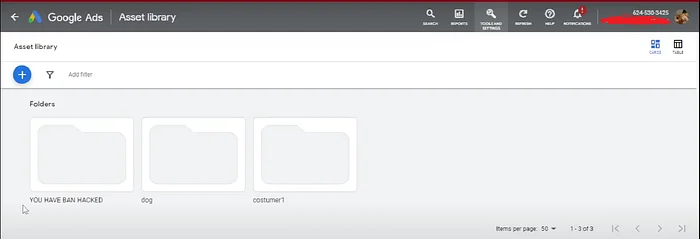
The account role is billing only, yet the request that creates a folder in the Asset Library succeeded. The same area also exposed a breadcrumb lookup that takes a file identifier from the client.
Exploitation
Step 1: log in as the attacker and open Google Ads
- Log in as the attacker, [redacted]
- Open
https://ads.google.com. - Start Burp Suite to intercept traffic.
Step 2: replay the folder creation request
The researcher copies the following request into Burp Suite. It is a POST to the LabelService Mutate RPC, with the Asset Library page as the referrer:
POST /aw_cm/editing/_/rpc/LabelService/Mutate?

Referer: https://ads.google.com/aw/assetlibrary?

f.req=%7B%221%22%3A%7B%223%22%3A%7B%222%22%3A%22520918757%22%7D%2C%228%22%3A%22%7B%5C%221%5C%22%3A%5B%7B%5C%221%5C%22%3A%5C%221000004%5C%22%2C%5C%222%5C%22%3A%5C%22TREATMENT%5C%22%7D%2C%7B%5C%221%5C%22%3A%5C%221000009%5C%22%2C%5C%222%5C%22%3A%5C%22TREATMENT%5C%22%7D%2C%7B%5C%221%5C%22%3A%5C%221000033%5C%22%2C%5C%222%5C%22%3A%5C%22TREATMENT%5C%22%7D%2C%7B%5C%221%5C%22%3A%5C%221000042%5C%22%2C%5C%222%5C%22%3A%5C%22TREATMENT%5C%22%7D%2C%7B%5C%221%5C%22%3A%5C%221090016%5C%22%2C%5C%222%5C%22%3A%5C%22TREATMENT%5C%22%7D%2C%7B%5C%221%5C%22%3A%5C%221090020%5C%22%2C%5C%222%5C%22%3A%5C%22TREATMENT%5C%22%7D%2C%7B%5C%221%5C%22%3A%5C%221090024%5C%22%2C%5C%222%5C%22%3A%5C%22TREATMENT%5C%22%7D%2C%7B%5C%221%5C%22%3A%5C%2210000021%5C%22%2C%5C%222%5C%22%3A%5C%22TREATMENT%5C%22%7D%5D%7D%22%7D%2C%222%22%3A%5B%7B%221%22%3A1%2C%222%22%3A%5B%22label_id%22%2C%22name%22%2C%22level%22%2C%22parent_label_id%22%5D%2C%223%22%3A%7B%221%22%3A%22–1%22%2C%222%22%3A%22dog%22%2C%225%22%3A%22520918757%22%2C%2226%22%3A%220%22%7D%7D%5D%7D&activityContext=AssetLibraryRootComponent.HeaderView.AssetFolderNameDialog.AssetLibraryCreateNewFolder&requestPriority=HIGH_LATENCY_SENSITIVE&activityType=SAVE
The f.req parameter carries the operation. Decoded, the relevant part is a mutation that supplies the fields label_id, name, level and parent_label_id, with the name dog, the parent label 520918757 and level set to 0. The activityContext value AssetLibraryRootComponent.HeaderView.AssetFolderNameDialog.AssetLibraryCreateNewFolder identifies the action as creating a new folder from the Asset Library header dialog, and activityType=SAVE marks it as a write. The Referer points at the Asset Library page.
The result is that the folder is created even though the account's role is billing only. The researcher labels this broken access control: the attacker can create an Asset Library entry without the permission that the defined role should require.
Step 3: test the breadcrumb lookup with a foreign file identifier
The second request is a POST to the AssetLibraryService GetBreadcrumbs RPC:
POST
/aw_cm/editing/_/rpc/AssetLibraryService/GetBreadcrumbs?authuser=0&acx-v-bv=awn_cm_auto_20220803–0011_RC000

&ps=aw&__ar=%7B%221%22%3A%7B%223%22%3A%7B%221%22%3A%22520918757%22%7D%7D%2C%222%22%3A%2221662032294%22%7D%26activityContext%3DAssetLibraryRootComponent.MainView.AssetLibrarySearchWithinFolder%26requestPriority%3DHIGH_LATENCY_SENSITIVE%26activityType%3DPLACE_CHANGE
The __ar parameter is URL-encoded JSON. Decoded, it contains the label 520918757 and the file identifier 21662032294. The activityContext value AssetLibraryRootComponent.MainView.AssetLibrarySearchWithinFolder shows the request comes from searching within a folder in the Asset Library main view.
The researcher records two file identifiers:
| File ID |
|---|
| 21662032294 |
| 21670924584 |
The Asset Library name used in the test is dog1. The researcher records the file identifiers used in the breadcrumb lookup and labels the issue IDOR.
Root cause
Both issues come from the server trusting client-supplied context instead of enforcing the account's role and ownership. In the first case, the LabelService/Mutate RPC performs the folder creation without checking that the caller's role permits writes to the Asset Library; the request succeeds even though the role is billing only. In the second case, AssetLibraryService/GetBreadcrumbs accepts the file identifier from __ar and resolves it without verifying that the asset belongs to the requesting account. The report does not describe the server-side code, so the exact check that is missing is likely an authorisation check on the role and on asset ownership.
Impact
An attacker whose account role is limited to billing can create folders in the Asset Library, an action the role should not allow. The report labels the breadcrumb lookup an IDOR but does not show what a foreign identifier returns. The report does not state what else the identifiers expose or whether the folder creation affects the victim account directly.
Fix
Variants to test
- Replay other Asset Library RPCs, such as rename or delete, from a billing-only account. A positive result is a successful mutation that the role should not permit.
- Change the
parent_label_idin thef.reqpayload to a label belonging to another account. A positive result is a folder created under a foreign parent. - Enumerate file identifiers in
__arforGetBreadcrumbs. A positive result is a breadcrumb returned for an identifier that does not belong to the test account. - Try the same requests with the
RefererandactivityContextvalues removed or altered. A positive result is that the server still performs the action, showing the checks rely on client-supplied context.
Timeline
The report lists the following status changes:
| Status | Time | Date |
|---|---|---|
| CLOSED | 00:01 | 23.07.2022 |
| TRIAGED | 15:34 | 25.07.2022 |
| ACCEPTED | 22:08 | 05.08.2022 |
| TRIAGED | 15:39 | 08.08.2022 |
| ACCEPTED | 20:46 | 17.08.2022 |
| REWARD DECIDED | $xxxx |
The bounty amount is redacted in the report.
What happened, in plain words
Google Ads is Google's advertising platform. Advertisers use it to run ad campaigns, and inside it there is a feature called the Asset Library, a place where an advertiser keeps reusable things such as folders and labels so they can be attached to campaigns later. Think of it like a shared filing cabinet for an advertising account.
Google Ads accounts can have different roles. A role is a set of permissions: what a person is allowed to do and what they are not. One common role is billing only, which means the person can deal with payments and invoices but should not be able to change advertising content. The researcher in this report had an account whose role was limited to billing.
The report describes two problems in the Asset Library area:
- Broken access control: the billing-only account was still able to create a folder in the Asset Library. The request that creates a folder was accepted even though the role is billing only.
- IDOR (Insecure Direct Object Reference): a request that looks up the "breadcrumb" of a file (the path showing where the file sits, like
Home > Folder > File) takes a file identifier supplied by the client, which the researcher labels an IDOR.
A useful comparison for IDOR is a cloakroom ticket. If the attendant hands you whatever coat matches the number you say, without checking that the number is really yours, you can ask for someone else's coat by guessing or reading their ticket number. Here the "ticket number" is a file identifier in the request.
The write-up was published on 9 February 2023.
Setup
The researcher used two accounts:
| Role | Account |
|---|---|
| Attacker | [redacted] |
| Victim | [redacted] |
The attacker account is the one whose role is restricted to billing. The report labels [redacted] as the victim.
The tool named in the report is Burp Suite. Burp Suite is a program that sits between your browser and a website and lets you see, pause, edit and resend the requests the browser makes. A request is simply the message your browser sends to a server, for example "please show me this page" or "please save this folder". Being able to replay a request by hand is how you test whether the server checks permissions properly, rather than trusting that the browser's buttons are the only way in.
The target is https://ads.google.com.
Finding it
The account role is billing only, yet the request that creates a folder in the Asset Library succeeded. The same area also exposed a breadcrumb lookup that takes a file identifier from the client.
In other words: the browser showed one thing, but the server behind it accepted another. This is the classic shape of an access control bug. The check exists in the interface (the button is hidden or disabled) but not on the server, which is the only place a check really counts.
Exploitation
Step 1: log in as the attacker and open Google Ads
- Log in as the attacker, [redacted]
- Open
https://ads.google.com. - Start Burp Suite to intercept traffic.
Intercepting means Burp Suite catches the request on its way out of the browser so the researcher can look at it and copy it.
Step 2: replay the folder creation request
The researcher copies the following request into Burp Suite. It is a POST to the LabelService Mutate RPC, with the Asset Library page as the referrer:
POST /aw_cm/editing/_/rpc/LabelService/Mutate?

Referer: https://ads.google.com/aw/assetlibrary?

f.req=%7B%221%22%3A%7B%223%22%3A%7B%222%22%3A%22520918757%22%7D%2C%228%22%3A%22%7B%5C%221%5C%22%3A%5B%7B%5C%221%5C%22%3A%5C%221000004%5C%22%2C%5C%222%5C%22%3A%5C%22TREATMENT%5C%22%7D%2C%7B%5C%221%5C%22%3A%5C%221000009%5C%22%2C%5C%222%5C%22%3A%5C%22TREATMENT%5C%22%7D%2C%7B%5C%221%5C%22%3A%5C%221000033%5C%22%2C%5C%222%5C%22%3A%5C%22TREATMENT%5C%22%7D%2C%7B%5C%221%5C%22%3A%5C%221000042%5C%22%2C%5C%222%5C%22%3A%5C%22TREATMENT%5C%22%7D%2C%7B%5C%221%5C%22%3A%5C%221090016%5C%22%2C%5C%222%5C%22%3A%5C%22TREATMENT%5C%22%7D%2C%7B%5C%221%5C%22%3A%5C%221090020%5C%22%2C%5C%222%5C%22%3A%5C%22TREATMENT%5C%22%7D%2C%7B%5C%221%5C%22%3A%5C%221090024%5C%22%2C%5C%222%5C%22%3A%5C%22TREATMENT%5C%22%7D%2C%7B%5C%221%5C%22%3A%5C%2210000021%5C%22%2C%5C%222%5C%22%3A%5C%22TREATMENT%5C%22%7D%5D%7D%22%7D%2C%222%22%3A%5B%7B%221%22%3A1%2C%222%22%3A%5B%22label_id%22%2C%22name%22%2C%22level%22%2C%22parent_label_id%22%5D%2C%223%22%3A%7B%221%22%3A%22–1%22%2C%222%22%3A%22dog%22%2C%225%22%3A%22520918757%22%2C%2226%22%3A%220%22%7D%7D%5D%7D&activityContext=AssetLibraryRootComponent.HeaderView.AssetFolderNameDialog.AssetLibraryCreateNewFolder&requestPriority=HIGH_LATENCY_SENSITIVE&activityType=SAVE
Line by line, in plain words:
POST /aw_cm/editing/_/rpc/LabelService/Mutate?is the address being called. POST is the kind of request used when you are sending data to the server to change something. The path points at an RPC, which stands for Remote Procedure Call: a way for the browser to ask the server to run a named operation, hereMutatein a service calledLabelService. A mutation is a change, so this is a write operation, not a read.Referer: https://ads.google.com/aw/assetlibrary?is a header, a small piece of extra information attached to the request. The Referer header normally tells the server which page the request came from. Here it says the request came from the Asset Library page. Servers sometimes use this to decide whether a request looks legitimate, but it is supplied by the client and can be set to anything.f.req=...is a parameter carrying the actual operation. The value is URL-encoded, which is why it is full of%sequences. URL encoding is how special characters are written safely inside a URL: for example%22stands for a double quote and%7Bstands for{. Decoded, the relevant part is a mutation that supplies the fieldslabel_id,name,levelandparent_label_id, with the namedog, the parent label520918757andlevelset to0.activityContext=AssetLibraryRootComponent.HeaderView.AssetFolderNameDialog.AssetLibraryCreateNewFolderis a parameter that describes which part of the interface the action came from. The value identifies the action as creating a new folder from the Asset Library header dialog. It is context supplied by the client, not proof of permission.requestPriority=HIGH_LATENCY_SENSITIVEis a parameter about how the request should be handled.activityType=SAVEmarks the request as a write, a save rather than a read.
The result is that the folder is created even though the account's role is billing only. The researcher labels this broken access control: the attacker can create an Asset Library entry without the permission that the defined role should require.
Why this step matters: the researcher is not using the normal interface at all. They are taking the exact request the interface would send and replaying it from an account that should not be allowed to send it. If the server had checked the role, the request would have been refused. It was not.
Step 3: test the breadcrumb lookup with a foreign file identifier
The second request is a POST to the AssetLibraryService GetBreadcrumbs RPC:
POST
/aw_cm/editing/_/rpc/AssetLibraryService/GetBreadcrumbs?authuser=0&acx-v-bv=awn_cm_auto_20220803–0011_RC000

&ps=aw&__ar=%7B%221%22%3A%7B%223%22%3A%7B%221%22%3A%22520918757%22%7D%7D%2C%222%22%3A%2221662032294%22%7D%26activityContext%3DAssetLibraryRootComponent.MainView.AssetLibrarySearchWithinFolder%26requestPriority%3DHIGH_LATENCY_SENSITIVE%26activityType%3DPLACE_CHANGE
Line by line:
POSTis the request method, followed by the path/aw_cm/editing/_/rpc/AssetLibraryService/GetBreadcrumbs, which names the operation: get the breadcrumbs for an asset in the Asset Library. A breadcrumb is the trail showing where something sits, likeHome > Folder > File.authuser=0is a parameter that tells Google which signed-in account to use when several are available.acx-v-bv=awn_cm_auto_20220803–0011_RC000is a version-style parameter identifying a build of the interface.&ps=awis another parameter in the query string, the part of the address after the?that carries extra values.__ar=...is the important one. It is URL-encoded JSON. JSON is a text format for structured data, built from names and values in braces. Decoded, it contains the label520918757and the file identifier21662032294.activityContext=AssetLibraryRootComponent.MainView.AssetLibrarySearchWithinFoldershows the request comes from searching within a folder in the Asset Library main view.requestPriority=HIGH_LATENCY_SENSITIVEandactivityType=PLACE_CHANGEdescribe handling and the kind of action.
The researcher records two file identifiers:
| File ID |
|---|
| 21662032294 |
| 21670924584 |
The Asset Library name used in the test is dog1. The researcher records the file identifiers used in the breadcrumb lookup and labels the issue IDOR.
Why this step matters: the file identifier is just a number the client sends. If the server looks it up and answers without asking "does this file belong to you?", then anyone who knows or guesses a number can learn about someone else's asset. The two identifiers in the table are the ones the researcher worked with during the test.
Root cause
Both issues come from the server trusting client-supplied context instead of enforcing the account's role and ownership. In the first case, the LabelService/Mutate RPC performs the folder creation without checking that the caller's role permits writes to the Asset Library; the request succeeds even though the role is billing only. In the second case, AssetLibraryService/GetBreadcrumbs accepts the file identifier from __ar and resolves it without verifying that the asset belongs to the requesting account. The report does not describe the server-side code, so the exact check that is missing is likely an authorisation check on the role and on asset ownership.
A simple way to remember the principle: the browser is the client, and the client can be edited by anyone. Anything the client sends, including the Referer, the activityContext and the file identifier, is a claim, not a fact. The server has to verify every claim against what the account is actually allowed to do.
Impact
An attacker whose account role is limited to billing can create folders in the Asset Library, an action the role should not allow. The report labels the breadcrumb lookup an IDOR but does not show what a foreign identifier returns. The report does not state what else the identifiers expose or whether the folder creation affects the victim account directly.
Fix
Variants to test
- Replay other Asset Library RPCs, such as rename or delete, from a billing-only account. A positive result is a successful mutation that the role should not permit.
- Change the
parent_label_idin thef.reqpayload to a label belonging to another account. A positive result is a folder created under a foreign parent. - Enumerate file identifiers in
__arforGetBreadcrumbs. A positive result is a breadcrumb returned for an identifier that does not belong to the test account. - Try the same requests with the
RefererandactivityContextvalues removed or altered. A positive result is that the server still performs the action, showing the checks rely on client-supplied context.
Timeline
The report lists the following status changes:
| Status | Time | Date |
|---|---|---|
| CLOSED | 00:01 | 23.07.2022 |
| TRIAGED | 15:34 | 25.07.2022 |
| ACCEPTED | 22:08 | 05.08.2022 |
| TRIAGED | 15:39 | 08.08.2022 |
| ACCEPTED | 20:46 | 17.08.2022 |
| REWARD DECIDED | $xxxx |
The bounty amount is redacted in the report.
Glossary
- Access control: the rules that decide who is allowed to do what. Broken access control means those rules are not enforced where they should be.
- Asset Library: the part of Google Ads where an advertiser stores reusable items such as folders and labels.
- Authorisation: the check that a particular user is allowed to perform a particular action.
- Breadcrumb: the trail showing where an item sits, such as
Home > Folder > File. - Burp Suite: a tool that sits between the browser and a website so requests can be viewed, paused, edited and replayed.
- Client: the program on your side, usually the browser. Anything it sends can be changed by the user.
- Endpoint: a specific address on a server that accepts a particular kind of request.
- File identifier: a number or string that names a specific file or asset on the server.
- GET / POST: two kinds of HTTP request. GET is normally used to fetch something; POST is normally used to send data that changes something.
- Header: extra information attached to a request, such as
Referer. - IDOR (Insecure Direct Object Reference): a bug where the server takes an identifier from the request and returns the matching object without checking that it belongs to the caller.
- JSON: a text format for structured data, made of names and values in braces.
- Mutation: a change operation, such as creating, renaming or deleting something.
- Parameter: a named value sent with a request, in the URL or in the body.
- Referer: a header that normally says which page a request came from. It is supplied by the client and can be set to anything.
- Role: a set of permissions assigned to an account, for example billing only.
- RPC (Remote Procedure Call): a way for the client to ask the server to run a named operation.
- Server: the computer that receives requests and decides what to do with them.
- URL encoding: how special characters are written safely in a URL, for example
%22for a double quote. - Write operation: a request that changes data on the server, as opposed to only reading it.

