Google bugs stories and the shiny pixelbook
The author describes several cross-site scripting bugs found in Google products, including DOM XSS via a callback URL parameter, stored XSS in a business website editor, and a token leak through a referer header. An attacker could execute script in a victim's browser or steal an access token to control smart home devices.
 Published on bughunt1307.herokuapp.com
Peace upon you hunters, hope y'all doing good, My gift from google security team has landed today, Here I am sharing the bugs that got it for me, along the past year (2017) which also ranked me at 7 onto google HOF, anyway, there is nothing special about them, but folks wanted to see them.
The full write-up lives on its author's site
It belongs to its author, so we link to it rather than copy it. The other two tabs are our own rewrites, checked against it.
Context
This is a collection of bugs found across Google products during 2017, published by Missoum Said (@missoum1307) after the Google security team sent him a gift. The write-up covers six separate issues: a DOM XSS on the AdSense application, a stored XSS on business.google.com, an access token leak in the Nest integration of Google Assistant, a stored XSS via AngularJS injection in Local Guides, a reflected XSS in Google Maps, and a reflected XSS in Earth Engine that only worked in Internet Explorer. The author notes that these were the bugs he could collect, and that two or three high-bounty bugs remained out of reach.
The targets are all Google-owned web applications and one Android app integration. The AdSense feature in question is the publisher home page, which accepts a host-callback-url parameter. The business.google.com feature is the website editor for a business location, which lets an owner add links. The Google Assistant feature is the third-party linking flow for smart home devices, where Nest is one of the providers. Local Guides is the review and meetup product attached to Google Maps. Earth Engine is described as a planetary-scale platform for Earth science data and analysis, with a feature to add a data layer from Fusion Table.
Setup
The author used Burp Suite while examining the Google Assistant app on an Android device, after an update that installed the assistant. For the web bugs, the main precondition was a Google account with access to the relevant product. For the AdSense bug, the URL contained a publisher identifier (pub-444 in the example). For business.google.com, the account needed access to edit a business location's website. For Local Guides, the account needed enough contribution history for Google to offer the option to create a meetup. For Earth Engine, the Fusion Table data layer feature was available in some accounts and not in others; the author says he still does not know why.
For the Maps reflected XSS, the author used multiple Google accounts: one with meetup creation privilege and one without. For the Earth Engine bug, the relevant browser was Internet Explorer 11.
Finding it
AdSense DOM XSS
While rediscovering the AdSense app, a habit the author keeps with Google VRP because updates and new designs appear from time to time, he noticed this URL loading:
https://www.google.com/adsense/new/u/pub-444/home?host-callback-url=domain.com
A parameter that takes a URL and is used as a callback is an obvious candidate for a javascript: payload, and the author says any hunter would try it there.
business.google.com stored XSS
The business location website editor allows adding links. The author's reasoning was that any website editing feature will let you inject at least tags such as <a> and <img>. From the editing area, the link button accepts a URL for the generated link.
Nest access token in the Referer
After the Google Assistant update installed, the author ran Burp Suite and started looking around the app. In the assistant, smart home devices can be controlled by linking third-party providers. The Nest app caught his attention because Nest is owned by Google, while the other providers are third parties and would not be rewarded. The linking flow redirected back through a meta refresh:
<meta http-equiv="refresh" content="0;URL='evil.com'" />
The author notes that a few years earlier this would have allowed XSS, because the refresh target could be a javascript: URL, but most browsers now refuse to refresh to a javascript: URL.
Local Guides stored XSS via AngularJS
Local Guides is the product behind reviews, photos and information about places in Google Maps. At a certain contribution level, Google offers the user the option to create a meetup. The meetup name field accepted an AngularJS expression, which was stored and executed when rendered back.
Maps reflected XSS
While trying to access a URL from an account with meetup creation privilege using an account without that privilege, something interesting appeared on screen: a URL with a parameter and value the author had not seen before. The value was reflected back naked, without sanitising special characters. The vulnerable URL was something like:
google.com/maps/apis/authen?par=XSS-goes-here
The author did not take screenshots or record a proof of concept, and deleted the report email. His Local Guides account was also blocked by a Google staff member.
Earth Engine reflected XSS, IE only
The author found this one after reading a tweet by Sasi Levi (@sasi2103) about a combination of techniques leading to DOM-based XSS in Google. He took a look at Earth Engine, felt it was vulnerable, and his perspective was correct. When it comes to data, an application should have something like uploading or downloading data, and examining the application revealed a feature to add a data layer from Fusion Table. Uploading data showed that the table name was stored without sanitising. The response was application/json, and checking the HTTP headers showed neither X-Frame-Options nor X-Content-Type-Options. The author cites Cure53's research on forcing the content type to text/html, which he recommends reading carefully.
Exploitation
Step 1: AdSense DOM XSS
The payload was placed in the host-callback-url parameter:
https://www.google.com/adsense/new/u/pub-444/home?host-callback-url=javascript:alert(0)
The javascript: scheme in the callback parameter fired the XSS.
Step 2: business.google.com stored XSS
From the website editing area, click the link button and add the payload as the link URL:
javascript:alert(1)
Clicking normally on the generated link did not fire the XSS. A CTRL or Shift click was needed to fire it.
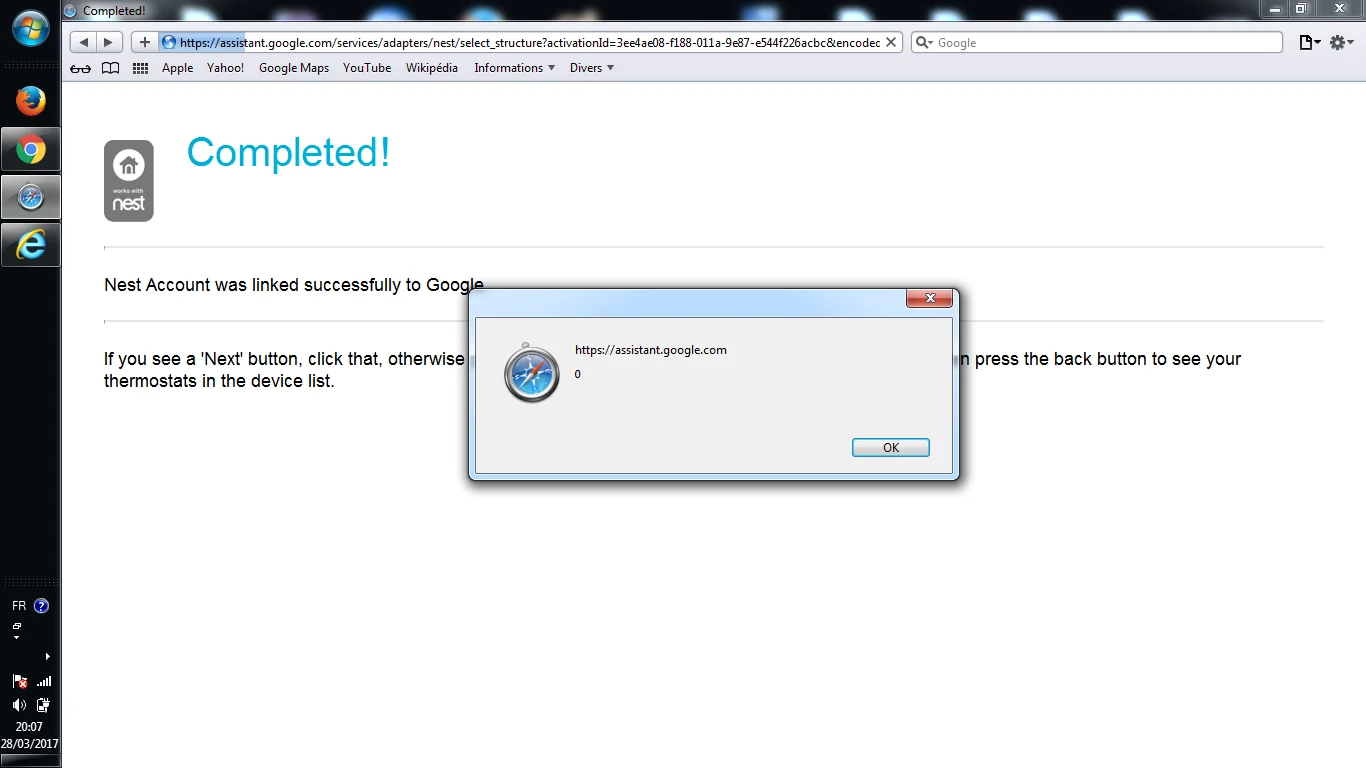
Step 3: Nest access token leak via Referer
The linking flow redirected back through the meta refresh shown above. The XSS itself was not rewarded because it only works on older browsers, but leaking the Nest access token was. The author notes that sometimes having Google products or devices gives you advantages.
Step 4: Local Guides stored XSS via AngularJS
Creating a meetup with an AngularJS expression in the meetup name stored the expression, and it was executed when rendered back.
Step 5: Maps reflected XSS
The parameter value was reflected without sanitising special characters, so the vulnerable URL was something like:
google.com/maps/apis/authen?par=XSS-goes-here
No proof of concept was recorded for this one.
Step 6: Earth Engine reflected XSS in IE 11
The author combined several minor issues:
- Force the
application/jsonresponse to betext/html. - The attacker controls input within it (
<and>are not sanitised). - The page is vulnerable to clickjacking.
- CSRF allows storing the XSS in the victim's account.
With these combined, the author could XSS the victim account. The XSS was self-stored until he discovered that adding the data lacked CSRF protection.
Root cause
For AdSense, the host-callback-url parameter accepted a javascript: URL, which executed in the page context. For business.google.com, the link URL field accepted a javascript: scheme; a normal click did not fire it, but CTRL or Shift click did. For the Nest flow, the redirect came back through a meta refresh, and the Nest access token leaked in the Referer. For Local Guides, an AngularJS expression in the meetup name was stored and executed when rendered back. For Maps, the parameter value was reflected without sanitising special characters. For Earth Engine, the table name was stored without sanitising, the response was application/json with neither X-Frame-Options nor X-Content-Type-Options, the page was clickjackable, and the data-adding action lacked CSRF protection.
Impact
AdSense: script execution in the context of the AdSense application for a user who follows the crafted URL. business.google.com: stored script execution when the crafted link is activated with CTRL or Shift click. Nest: leak of the Nest access token, which the author says was rewarded, while the XSS itself was not because it only works on older browsers. Local Guides: stored script execution via the meetup name. Maps: reflected script execution via the parameter, though no proof of concept was kept. Earth Engine: script execution in the victim's account in IE 11, combining the content-type forcing, the unsanitised input, clickjacking and CSRF to store the payload in the victim's account.
Fix
Variants to test
- Callback and redirect parameters: try
javascript:anddata:schemes in any parameter that looks like a URL or callback. A positive result is script execution in the page context. - Link URL fields in editors: try
javascript:in link URL fields. A positive result is execution on CTRL or Shift click, or on normal click. - Third-party linking flows: inspect redirects for tokens in URLs and check the Referer of the resulting request. A positive result is a token appearing in a cross-origin Referer.
- AngularJS-rendered fields: try
{{constructor.constructor('alert(1)')()}}or similar expressions in name fields. A positive result is execution when the value is rendered. - Reflected parameters: try
<script>alert(1)</script>and check whether special characters are encoded. A positive result is unencoded reflection. - JSON endpoints in IE 11: check for missing
X-Content-Type-OptionsandX-Frame-Options, and whether the response can be forced totext/html. A positive result is script execution in IE 11. - CSRF on data-adding actions: check whether the action can be triggered cross-site. A positive result is a stored payload in the victim's account.
What happened, in plain words
In 2017, a security researcher named Missoum Said (@missoum1307) found several bugs in Google products. He reported them through Google's bug bounty programme, called the Vulnerability Reward Program (VRP). Google sent him a gift, and he wrote this article to share the bugs that earned it. He also says that two or three high-bounty bugs remained out of reach.
The bugs are of a type called cross-site scripting, or XSS. XSS means getting a website to run code that the attacker wrote, as if it were part of the site. The code usually runs in the browser of someone who visits a crafted link or page. The attacker can then do things in that person's session, such as read data or act on their behalf.
There are three main flavours in this article:
- Reflected XSS: the malicious input is sent in a request (often in the URL) and the site immediately sends it back in the response, unsanitised. The victim has to click a crafted link.
- Stored XSS: the malicious input is saved by the site (for example in a profile or a review) and later shown to other users, so the code runs whenever the page is viewed.
- DOM XSS: the malicious input is handled by JavaScript running in the page itself, which writes it into the page without proper checks.
The six issues are:
- A DOM XSS on the AdSense publisher home page, via a parameter called
host-callback-url. - A stored XSS on business.google.com, in the website editor for a business location.
- A leak of a Nest access token through the
Refererheader, in the Google Assistant flow for linking smart home devices. - A stored XSS in Google Local Guides, via an AngularJS expression in the name of a meetup.
- A reflected XSS in Google Maps, via a parameter whose value was reflected without sanitising.
- A reflected XSS in Earth Engine that only worked in Internet Explorer 11, combining several weaknesses.
Below, each bug is explained from scratch: what the product does, what the vulnerable feature is, what was sent, and why it worked. The payloads and URLs are copied exactly as they appear in the article.
Setup
For most of the web bugs, the only precondition was a Google account with access to the relevant product. For the AdSense bug, the URL contained a publisher identifier, shown as pub-444 in the example. For business.google.com, the account needed permission to edit a business location's website. For Local Guides, the account needed enough contribution history for Google to offer the option to create a meetup. For Earth Engine, the feature to add a data layer from Fusion Table was available in some accounts and not in others; the author says he still does not know why.
For the Maps reflected XSS, the author used two Google accounts: one with meetup creation privilege and one without. For the Earth Engine bug, the relevant browser was Internet Explorer 11.
For the Google Assistant bug, the author used an Android phone. After an update installed the Google Assistant, he ran Burp Suite and started looking around the app. Burp Suite is a tool that sits between the phone and the internet, letting you see and change the requests and responses. Think of it as a transparent proxy that also lets you pause and edit the traffic.
Finding it
AdSense DOM XSS
The author was rediscovering the AdSense app. He says he does this regularly with Google VRP because Google pushes updates and new designs from time to time. While doing so, he noticed this URL loading:
https://www.google.com/adsense/new/u/pub-444/home?host-callback-url=domain.com
Let's break it down:
https://www.google.com/adsense/new/u/pub-444/homeis the AdSense publisher home page.pub-444is a publisher identifier.?host-callback-url=domain.comis a query parameter. A query parameter is the part of a URL after the?, made of name=value pairs. Here the name ishost-callback-urland the value isdomain.com.- A parameter whose name contains
callbackand whose value looks like a URL is a strong hint: the application probably takes that value and navigates to it, or uses it as a redirect target. If the application does not restrict which schemes are allowed, an attacker can supply ajavascript:URL. When a browser navigates to ajavascript:URL, it runs the JavaScript code in the context of the current page. That is exactly what an XSS needs.
The author says any hunter would try their bullet in that parameter, and so did he.
business.google.com stored XSS
The business.google.com product lets a business owner manage their location, including editing the website of the business location. The author's reasoning was that any website editing feature will let you inject at least tags such as <a> and <img>. Tags are the building blocks of HTML, the language of web pages. An <a> tag creates a link, and an <img> tag displays an image. If a feature lets you add a link, it must accept a URL for that link. The question is whether it accepts any URL, including a javascript: URL.
From the editing area, the link button accepts a URL for the generated link. The author put his payload there.
Nest access token in the Referer
After the Google Assistant update installed, the author ran Burp Suite and started looking around the app. In the assistant, smart home devices can be controlled by linking third-party providers. A third-party provider is a company other than Google that makes smart home devices, such as lights or thermostats. The assistant needs permission to control those devices, so the user goes through a linking flow: the assistant sends the user to the provider's site, the user logs in and approves, and the provider sends the user back to the assistant with a token. A token is a piece of text that proves the user has authorised access. Think of it as a temporary key that the assistant can use to talk to the provider on the user's behalf.
The Nest app caught the author's attention because Nest is owned by Google, while the other providers are third parties and would not be rewarded. In other words, a bug in the Nest integration was in scope for Google's VRP, while a bug in a third-party provider's own site would not be.
The linking flow redirected back through a meta refresh:
<meta http-equiv="refresh" content="0;URL='evil.com'" />
Line by line:
<meta>is an HTML tag that provides metadata about the page, information that is not displayed as content.http-equiv="refresh"tells the browser to treat this meta tag as if the server had sent aRefreshheader. In practice, it means "reload or navigate".content="0;URL='evil.com'"says: after 0 seconds, navigate to the URLevil.com. The URL is in single quotes here, which is just how the value is written.
So this meta refresh is a redirect. The author notes that a few years earlier this would have allowed XSS, because the refresh target could be a javascript: URL. Most browsers now refuse to refresh to a javascript: URL, so that particular trick no longer works. But the redirect itself was still interesting, because of what it carried.
Local Guides stored XSS via AngularJS
Local Guides is the product behind reviews, photos and information about places in Google Maps. Users contribute reviews and photos, and at a certain contribution level, Google offers the option to create a meetup. A meetup is an event that other Local Guides can join.
The meetup has a name. The author put an AngularJS expression in the meetup name. AngularJS is a JavaScript framework that lets a web page use special syntax in its HTML, such as {{ expression }}, and the framework evaluates that expression and inserts the result into the page. If user input containing such an expression is stored and later rendered by AngularJS without being treated as plain text, the expression is evaluated. That is a form of XSS, because the expression can contain JavaScript.
The expression was stored and executed when the meetup page was rendered back.
Maps reflected XSS
This one was also related to Local Guides but had a different root cause. The author has multiple Google accounts, like many hunters. At one point, he was trying to access a URL from an account with meetup creation privilege using an account without that privilege. Something interesting appeared on screen: a URL with a parameter and value he had not seen before. He says he did not use to see such things, especially when familiar with Google VRP.
The value was reflected back naked, meaning without sanitising special characters. Sanitising means cleaning input so that characters with special meaning in HTML, such as < and >, cannot break out of the surrounding text and become code. The vulnerable URL was something like:
google.com/maps/apis/authen?par=XSS-goes-here
Line by line:
google.com/maps/apis/authenis the path of the page. The author writes it withouthttps://, as a shorthand.?par=XSS-goes-hereis the query parameter. The name isparand the value isXSS-goes-here. In a real attack, the value would be a script payload.
The author did not take screenshots or record a proof of concept, and he deleted the report email. His Local Guides account was also blocked by a Google staff member. He draws a lesson: always check apps, links and features with a low-privilege account, especially with Google VRP, because you have no idea what will show up.
Earth Engine reflected XSS, IE only
The author found this one after reading a tweet by Sasi Levi (@sasi2103) about a combination of techniques leading to DOM-based XSS in Google. He took a look at Earth Engine. Earth Engine is described as a planetary-scale platform for Earth science data and analysis. He felt it was vulnerable, and his perspective was correct.
His reasoning: when it comes to data, an application should have something like uploading or downloading data. Examining the application revealed a feature to add a data layer from Fusion Table. A data layer is an overlay of data on a map. Fusion Table was a Google service for storing and sharing tables of data.
He notes that this feature was available in some accounts and not in others; he still does not know why. Uploading data showed that the table name was stored without sanitising. The response was application/json. JSON is a text format for data, often used by APIs. An API is a way for one program to talk to another, like a waiter taking your order to the kitchen and bringing back the food. The response being JSON means the browser is told the content is data, not a web page.
Checking the HTTP headers also showed there was neither X-Frame-Options nor X-Content-Type-Options. HTTP headers are extra pieces of information sent with a request or response. X-Frame-Options controls whether a page can be embedded in a frame on another site; without it, the page can be framed, which enables clickjacking. Clickjacking is tricking a user into clicking something they did not intend, by placing an invisible frame over a button. X-Content-Type-Options with the value nosniff stops the browser from guessing the content type; without it, a browser may treat a JSON response as HTML if it looks like HTML.
The author cites Cure53's research on forcing the content type to text/html, which he recommends reading carefully. The idea is that in Internet Explorer 11, if the response lacks X-Content-Type-Options: nosniff, the browser can be made to interpret a JSON response as HTML. If the JSON contains attacker-controlled text with < and > unescaped, that text becomes HTML and can include a script.
This was a self-stored XSS until he discovered that adding the data lacked CSRF protection. CSRF stands for Cross-Site Request Forgery. It means another site can make the victim's browser send a request to the vulnerable site, using the victim's existing session, without the victim intending it. Think of it as someone using your logged-in browser to submit a form on your behalf. Without CSRF protection, an attacker can make the victim's account store the malicious data layer, so the XSS runs in the victim's account.
He combined these minor issues:
- Force the
application/jsonresponse to betext/html. - The attacker has control over input within it (
<and>are not sanitised). - The page is vulnerable to clickjacking.
- CSRF allows storing the XSS in the victim's account.
With these combined, he could XSS the victim account.
Exploitation
Step 1: AdSense DOM XSS
The payload was placed in the host-callback-url parameter:
https://www.google.com/adsense/new/u/pub-444/home?host-callback-url=javascript:alert(0)
Line by line:
- The base URL is the same AdSense publisher home page.
- The parameter name is still
host-callback-url. - The value is now
javascript:alert(0). Thejavascript:scheme tells the browser that what follows is JavaScript code.alert(0)is a built-in browser function that shows a dialog box with the number 0. It is a harmless way to prove that code is running.
The javascript: scheme in the callback parameter fired the XSS. In other words, the application took the value and navigated to it, and the browser executed the JavaScript in the context of the AdSense page.
Step 2: business.google.com stored XSS
From the website editing area, click the link button and add the payload as the link URL:
javascript:alert(1)
Line by line:
javascript:is the scheme.alert(1)is the JavaScript code. It shows a dialog with the number 1.
Clicking normally on the generated link did not fire the XSS. A CTRL or Shift click was needed to fire it. Why? A normal click is handled by the application's own JavaScript, which probably prevents the default navigation. A CTRL or Shift click is often handled by the browser itself, for example to open the link in a new tab or window, and the browser follows the javascript: URL. The exact reason is not stated in the article, but the behaviour is described.
Step 3: Nest access token leak via Referer
The linking flow redirected back through the meta refresh shown above. The XSS itself was not rewarded because it only works on older browsers, but leaking the Nest access token was. The author notes that sometimes having Google products or devices gives you advantages.
What is the Referer header? When a browser follows a link or is redirected, it often sends the address of the previous page in a header called Referer (the name is a historical misspelling of "referrer"). If the previous page's URL contains a token, that token ends up in the Referer header sent to the next site. If the next site is controlled by an attacker, the attacker can read the token from their server logs. The token can then be used to access the Nest account.
The article does not give the exact request or the token value. It only describes the flow and the meta refresh.
Step 4: Local Guides stored XSS via AngularJS
Creating a meetup with an AngularJS expression in the meetup name stored the expression, and it was executed when rendered back. The article does not give the exact expression used. In general, an AngularJS expression looks like {{ 1+1 }} and is evaluated by the framework. If the expression calls JavaScript functions, it can run code.
Step 5: Maps reflected XSS
The parameter value was reflected without sanitising special characters, so the vulnerable URL was something like:
google.com/maps/apis/authen?par=XSS-goes-here
Line by line:
- The path is the same as before.
- The parameter
partakes the valueXSS-goes-here. In a real attack, the value would be a script payload, and because special characters are not sanitised, the browser would execute it.
No proof of concept was recorded for this one.
Step 6: Earth Engine reflected XSS in IE 11
The author combined several minor issues:
- The attacker controls input within it (
<and>are not sanitised). - The page is vulnerable to clickjacking.
With these combined, the author could XSS the victim account. The XSS was self-stored until he discovered that adding the data lacked CSRF protection. Self-stored means the payload is stored in the attacker's own account first; with CSRF, the attacker can make the victim's account store it instead.
Root cause
For AdSense, the host-callback-url parameter accepted a javascript: URL, which executed in the page context. In plain words, the application trusted the parameter to be a normal web address, but it could be a JavaScript address.
For business.google.com, the link URL field accepted a javascript: scheme; a normal click did not fire it, but CTRL or Shift click did.
For the Nest flow, the redirect came back through a meta refresh, and the Nest access token leaked in the Referer. In plain words, the token was put in a URL, and URLs leak through Referer.
For Local Guides, an AngularJS expression in the meetup name was stored and executed when rendered back. In plain words, the framework treated the name as code, not as text.
For Maps, the parameter value was reflected without sanitising special characters. In plain words, the page echoed back whatever was in the URL, including characters that turn text into HTML.
For Earth Engine, the table name was stored without sanitising, the response was application/json with neither X-Frame-Options nor X-Content-Type-Options, the page was clickjackable, and the data-adding action lacked CSRF protection. In plain words, several small weaknesses lined up: unsanitised input, a browser that guesses content type, a page that can be framed, and an action that can be triggered from another site.
Impact
AdSense: script execution in the context of the AdSense application for a user who follows the crafted URL. In plain words, an attacker could run code as the AdSense page in the victim's browser.
business.google.com: stored script execution when the crafted link is activated with CTRL or Shift click. In plain words, the malicious link is saved, and runs when clicked in a certain way.
Nest: leak of the Nest access token, which the author says was rewarded, while the XSS itself was not because it only works on older browsers. In plain words, the token could be stolen and used to control the Nest device.
Local Guides: stored script execution via the meetup name. In plain words, anyone viewing the meetup page runs the code.
Maps: reflected script execution via the parameter, though no proof of concept was kept. In plain words, a crafted link runs code when opened.
Earth Engine: script execution in the victim's account in IE 11, combining the content-type forcing, the unsanitised input, clickjacking and CSRF to store the payload in the victim's account. In plain words, an attacker could make the victim's account store and run code, but only in Internet Explorer 11.
Fix
In plain words, only allow normal web addresses, not javascript:.
In plain words, validate the scheme when saving a link.
In plain words, keep tokens out of URLs.
In plain words, escape or sanitise the name before rendering.
In plain words, turn special characters into harmless text.
In plain words, stop the browser from guessing the content type, stop the page from being framed, and require a CSRF token for the action.
Variants to test
- Callback and redirect parameters: try
javascript:anddata:schemes in any parameter that looks like a URL or callback. A positive result is script execution in the page context. - Link URL fields in editors: try
javascript:in link URL fields. A positive result is execution on CTRL or Shift click, or on normal click. - Third-party linking flows: inspect redirects for tokens in URLs and check the
Refererof the resulting request. A positive result is a token appearing in a cross-originReferer. - AngularJS-rendered fields: try
{{constructor.constructor('alert(1)')()}}or similar expressions in name fields. A positive result is execution when the value is rendered. - Reflected parameters: try
<script>alert(1)</script>and check whether special characters are encoded. A positive result is unencoded reflection. - JSON endpoints in IE 11: check for missing
X-Content-Type-OptionsandX-Frame-Options, and whether the response can be forced totext/html. A positive result is script execution in IE 11. - CSRF on data-adding actions: check whether the action can be triggered cross-site. A positive result is a stored payload in the victim's account.
Glossary
- XSS (Cross-Site Scripting): a vulnerability where an attacker gets a website to run code they wrote, in another user's browser.
- DOM XSS: XSS where the malicious input is handled by JavaScript in the page itself, which writes it into the page without proper checks.
- Stored XSS: XSS where the malicious input is saved by the site and later shown to other users.
- Reflected XSS: XSS where the malicious input is sent in a request and immediately echoed back in the response.
- Self-stored XSS: a stored XSS where the payload is stored in the attacker's own account first.
- Payload: the piece of code or input an attacker sends to trigger a vulnerability.
- Parameter: a name=value pair in a URL after the
?, used to pass data to the page. - Query parameter: same as parameter, the part of the URL after the
?. - Scheme: the first part of a URL, such as
http:,https:orjavascript:, which tells the browser how to handle the address. javascript:URL: a URL whose scheme isjavascript:, causing the browser to run the following text as JavaScript in the current page.alert(): a browser function that shows a dialog box; often used to prove code execution.- HTML: the language used to structure web pages, made of tags such as
<a>and<img>. - Tag: a building block of HTML, such as
<a>for a link or<img>for an image. - Sanitising: cleaning input so that characters with special meaning cannot break out of the surrounding text and become code.
- Encoding: converting special characters into a safe representation, such as
<for<. - AngularJS: a JavaScript framework that evaluates expressions in
{{ }}inside HTML. - Expression: in AngularJS, code inside
{{ }}that the framework evaluates and inserts into the page. - API: a way for one program to talk to another, like a waiter taking your order to the kitchen.
- JSON: a text format for data, often used by APIs.
- HTTP header: extra information sent with a request or response, such as
RefererorX-Frame-Options. Refererheader: a header that tells the next site the address of the previous page; it can leak tokens if they are in the URL.- Token: a piece of text that proves authorisation, like a temporary key.
- Access token: a token that grants access to a service on behalf of a user.
X-Frame-Options: a header that controls whether a page can be embedded in a frame on another site.X-Content-Type-Options: a header that, with the valuenosniff, stops the browser from guessing the content type.- Clickjacking: tricking a user into clicking something they did not intend, by placing an invisible frame over a button.
- CSRF (Cross-Site Request Forgery): another site making the victim's browser send a request to a vulnerable site, using the victim's session, without the victim intending it.
- Burp Suite: a tool that sits between the browser or phone and the internet, letting you see and change requests and responses.
- Meta refresh: an HTML tag that tells the browser to navigate to a URL after a delay.
- Fusion Table: a Google service for storing and sharing tables of data.
- Data layer: an overlay of data on a map.
- Internet Explorer 11: an older Microsoft browser, relevant here because it can be made to treat JSON as HTML when
nosniffis missing. - VRP (Vulnerability Reward Program): Google's bug bounty programme, which pays for security bugs.
- Proof of concept (POC): a demonstration that a vulnerability can be exploited, often a screenshot or recording.



