Writeup for the 2019 Google Cloud Platform VRP Prize!
An upload feature on a Google Cloud AI product did not restrict the types of files that could be uploaded, and served them with an image content type. An attacker could upload a Flash file and, if the browser played it inline, bypass the same-origin policy to read data or perform actions on the site.
 Published on medium.com
Missoum Said
The full write-up lives on its author's site
It belongs to its author, so we link to it rather than copy it. The other two tabs are our own rewrites, checked against it.
Context
This is an account of a hunt for a critical server-side vulnerability in Google Cloud Platform, carried out for the 2019 Google Cloud Platform VRP Prize. The scope was Google Cloud Platform products only, as the prize title implies. The researcher's focus throughout was a single class of bug: file read and file upload functionality, and specifically the oldest tricks in that area, on the theory that developers may have forgotten about them.
The product that eventually gave way was the upload functionality on https://aihub.cloud.google.com/. The report does not describe what that upload feature is normally used for beyond accepting files.
Setup
No accounts, roles, tool versions or special preconditions are described. The work was done from the public product catalogue and public search pages, with the products opened in browser tabs. The only tooling mentioned is the ln and zip command line utilities used to build the payload archive, and Google search and Google support search for reconnaissance.
Finding it
The starting point was the list of Cloud Platform products at:
https://cloud.google.com/products/
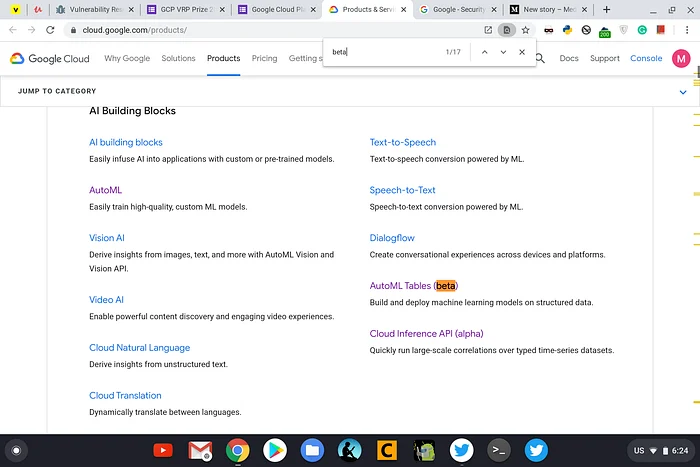
To avoid products that other hackers were likely to have looked at already, the researcher picked only the beta products, of which there were 11. No alpha products were available. All of them were opened in new tabs, with attention fixed on one goal: a critical server-side vulnerability, approached through file read and upload functionality.
The idea was to reach for the oldest trick regarding the vulnerability, old enough that a developer might have forgotten about it. Google search tools helped narrow the search to old write-ups published before a certain year, and the technique settled on was a symlink attack.
A second reconnaissance trick was to use Google support search to surface endpoints, with queries such as:
https://cloud.google.com/s/results/?q=upload+zip&p=%2F
https://cloud.google.com/s/results/?q=export+zip&p=%2F
https://cloud.google.com/s/results/?q=import+zip&p=%2F
https://cloud.google.com/s/results/?q=download+zip&p=%2F
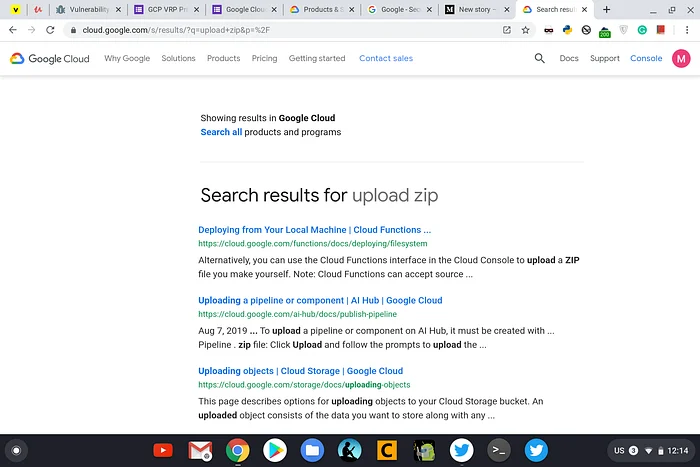
All of the endpoints found this way were immune to the symlink attack. One upload functionality on https://aihub.cloud.google.com/ stood out for a different reason: it did not restrict the types of files that were allowed to be uploaded.
Exploitation
Step 1: build a symlink archive
The symlink attack the researcher set out to try works as follows.
- Create a symlink to
/etc/passwd, the file to be pulled out:
ln -s /etc/passwd link
- Zip the created link while preserving symlinks:
zip — symlinks vrp.zip link
-
Upload
vrp.zipeverywhere, in case the server unzips it. -
Hope the server serves up the passwd file in the response.
This approach did not work against the endpoints that were tried. The report does not say which products were tested with the archive or what any of them returned.
Step 2: upload an unrestricted file type
The upload functionality on https://aihub.cloud.google.com/ accepted file types without restriction. The obstacle was on the serving side: the file came back with a content type of image/*. Rather than rendering the file inline, the browser then forces the content to be downloaded, as if Content-Disposition: attachment had been added to the response header.
In this case that header was likely not present, which is what made the behaviour exploitable. Without it, the door opens to bypassing the same-origin policy by uploading an SWF file. The report notes that a Content-Disposition header may prevent SWF files from playing.
Step 3: what the bypass yields
With the SWF playing from the aihub.cloud.google.com origin, the researcher describes leaking email or whatever else is on https://aihub.cloud.google.com/*, and performing CSRF in all browsers. The same attack can be carried out by uploading a PDF file and exploiting CVE-2014-8453 on Internet Explorer with Adobe Reader installed.
A video proof of concept accompanies the write-up:
https://www.youtube.com/watch?v=wZrB44KIguM
The bug resulted in a reward of $1337.00.
Root cause
The upload functionality on https://aihub.cloud.google.com/ did not restrict the types of files that were allowed to be uploaded. Serving user-supplied content from the same origin as the application, with a content type of image/* and likely without a Content-Disposition: attachment header, left the browser free to handle the file in ways the application did not intend. The report treats the absence of that header as likely rather than confirmed, and it is that likely absence which opens the door to a same-origin policy bypass.
Impact
Under the conditions described, an attacker could upload an SWF file and have it play from the aihub.cloud.google.com origin, bypassing the same-origin policy. That allows leaking email or whatever else is on https://aihub.cloud.google.com/*, and performing CSRF in all browsers. A PDF upload combined with CVE-2014-8453 on Internet Explorer with Adobe Reader installed achieves the same. The report does not enumerate which data or actions were actually reachable.
Fix
Variants to test
- Upload an archive containing a symlink to a sensitive file, as in the
ln -sandzip --symlinkssteps above, against any product that unzips uploads. A positive result is the server returning the contents of the linked file. - Use Google support search with
upload zip,export zip,import zipanddownload zipqueries to enumerate endpoints on other products, then repeat the archive test against each. A positive result is an endpoint that accepts the archive and processes it. - Find upload features that accept any file type and check the content type and
Content-Dispositionof the served file. A positive result is a file served from the application origin withoutContent-Disposition: attachment, which may allow an SWF to play in that origin. - Where PDFs are accepted and served inline, test CVE-2014-8453 on Internet Explorer with Adobe Reader installed. A positive result is the PDF attack succeeding on Internet Explorer with Adobe Reader installed.
What happened, in plain words
A security researcher spent some time looking for a serious bug in Google Cloud Platform, as part of a contest called the 2019 Google Cloud Platform VRP Prize. VRP stands for Vulnerability Reward Program: a scheme where a company pays people for reporting security flaws instead of punishing them. The prize was limited to Google Cloud Platform products, which is a collection of online services Google runs for businesses, things like storage, databases, artificial intelligence tools and so on.
The researcher was not looking for any bug. The target was one specific kind: features that let you read files or upload files. The reasoning was simple. These are old, well-known problems, and a developer who is busy building a new product might forget about them. Old tricks are sometimes the easiest to miss.
After looking through the product catalogue and trying a classic trick called a symlink attack, the researcher found an upload feature on https://aihub.cloud.google.com/ that accepted any kind of file. That upload feature was the one that gave way, and the report of it earned a reward of $1337.00.
This article walks through the same steps in the same order, explaining every idea from scratch along the way.
The goal and the scope
The hunt was for a critical server-side vulnerability. A server is the computer somewhere in a data centre that holds a website and answers the requests your browser sends. A server-side vulnerability is a flaw in that computer's software, as opposed to a flaw in the browser. Critical means the most serious category: a bug that could expose data or let an attacker act on other people's accounts.
The scope was Google Cloud Platform products only, because the prize title says so. Scope matters in bug hunting: testing systems outside the agreed scope is not allowed, even if you find something.
The focus throughout was file read and file upload functionality. File read means a feature that fetches a file and shows it to you. File upload means a feature that accepts a file from you and stores it. Both are common, both touch the server directly, and both have a long history of mistakes.
Finding it
The starting point was the public list of Cloud Platform products:
https://cloud.google.com/products/
This is a normal web page that lists Google's cloud products. The researcher opened it to see what existed and to pick targets.
To avoid products that other hackers were likely to have looked at already, the researcher picked only the beta products. Beta means a product that is released but still being finished, so it may have fewer users and less scrutiny. There were 11 beta products. No alpha products were available. Alpha is an even earlier stage than beta, so there were no pre-release products to look at.
All of the beta products were opened in new browser tabs. Keeping many tabs open is a simple way to hold several targets at once and switch between them. The attention stayed on one goal: a critical server-side vulnerability, approached through file read and upload features.
The plan was to reach for the oldest trick in that area, old enough that a developer might have forgotten about it. To jog memory, Google search was used with date filters, asking it to show only old write-ups published before a certain year. A write-up is a public article where a researcher explains a bug they found. Reading old ones is a way to collect techniques that still work.
The technique settled on was a symlink attack. A symlink, short for symbolic link, is a special kind of file that does not contain data itself. It is a signpost that points at another file. When a program opens the symlink, the operating system quietly opens the file it points to instead. That is useful for legitimate reasons, but it becomes dangerous when a server accepts an archive from a stranger and unpacks it without checking what is inside.
A second reconnaissance trick was to use Google support search to surface endpoints. An endpoint is a specific address on a server that does something when you send a request to it, like a counter you can walk up to and ask a question. Google's support search indexes pages under cloud.google.com, so searching it for words like "upload zip" can reveal addresses that are not linked from the main menus. The queries used were:
https://cloud.google.com/s/results/?q=upload+zip&p=%2F
https://cloud.google.com/s/results/?q=export+zip&p=%2F
https://cloud.google.com/s/results/?q=import+zip&p=%2F
https://cloud.google.com/s/results/?q=download+zip&p=%2F
Line by line, these are four ordinary web addresses. Each one points at Google's search results page. The q= part is the search query: upload+zip, export+zip, import+zip and download+zip. The plus signs stand for spaces, so the first one searches for the words "upload zip". The p=%2F part tells the search which section of the site to look in; %2F is the encoded form of a forward slash, the root of the site. The point of these searches was to find pages that mention zip files, because a page that mentions zip files may sit next to a feature that accepts zip files.
All of the endpoints found this way were immune to the symlink attack. The report does not say which products were tested with the archive or what any of them returned.
One upload functionality on https://aihub.cloud.google.com/ stood out for a different reason: it did not restrict the types of files that were allowed to be uploaded. Most upload features check the file extension or the file type and reject anything unexpected. This one accepted whatever it was given. The report does not describe what that upload feature is normally used for beyond accepting files.
Exploitation
Step 1: build a symlink archive
The symlink attack the researcher set out to try works as follows.
- Create a symlink to
/etc/passwd, the file to be pulled out:
ln -s /etc/passwd link
- Zip the created link while preserving symlinks:
zip — symlinks vrp.zip link
-
Upload
vrp.zipeverywhere, in case the server unzips it. -
Hope the server serves up the passwd file in the response.
Here is what each line means.
ln -s /etc/passwd link is a command typed into a terminal, the text window where you can give a computer instructions directly. ln means link, and -s means symbolic. The command creates a new file called link that points at /etc/passwd. On Linux and similar systems, /etc/passwd is a file that lists the user accounts on the machine. It is a classic target because it sits in a predictable place and its contents are interesting to an attacker.
zip — symlinks vrp.zip link packs files into a zip archive, the same kind of compressed folder you may have downloaded before. The --symlinks option tells the zip program to store the symlink as a symlink rather than following it and copying the contents of the target file. That distinction is the whole trick. If the archive contained a copy of /etc/passwd, the server would just hand back a harmless copy. If the archive contains a signpost, the server may follow the signpost when it unpacks, and read whatever the signpost points at on its own disk.
Step 3 is the delivery: upload vrp.zip everywhere, in case the server unzips it. Many upload features unpack archives automatically, for example to show you the files inside. Step 4 is the payoff: hope the server serves up the passwd file in the response, meaning the reply it sends back to your browser contains the contents of the file the symlink pointed at.
This approach did not work against the endpoints that were tried.
Step 2: upload an unrestricted file type
The upload functionality on https://aihub.cloud.google.com/ accepted file types without restriction. That is the first half of the problem. The second half was on the serving side: the file came back with a content type of image/*.
A content type is a label the server attaches to every file it sends, telling the browser what kind of thing it is. image/* means "some kind of image". Browsers treat images as safe to display inside the page. But when the browser is told a file is an image and the file is not really an image, the browser may still try to handle it, and that is where things get interesting.
Rather than rendering the file inline, the browser then forces the content to be downloaded, as if Content-Disposition: attachment had been added to the response header. Rendering inline means showing the file inside the page, like a picture in an article. Content-Disposition is a response header, a small piece of information the server sends alongside the file. The value attachment tells the browser "do not display this, save it to disk instead".
In this case that header was likely not present, which is what made the behaviour exploitable. Without it, the door opens to bypassing the same-origin policy by uploading an SWF file. The same-origin policy is a rule built into every browser: a page from one website is not allowed to read data from another website. It is the main wall that stops one site from stealing your information from another. An origin is the combination of protocol, host and port, so https://aihub.cloud.google.com is one origin. An SWF file is an old Adobe Flash file, a small program that a browser can play. If such a file plays from the aihub.cloud.google.com origin, it counts as part of that site, and the same-origin policy no longer protects the site from it.
The report notes that a Content-Disposition header may prevent SWF files from playing. That is why the absence of the header mattered so much: with it, the file would be downloaded and never run; without it, the file could run in the site's own origin.
Step 3: what the bypass yields
With the SWF playing from the aihub.cloud.google.com origin, the researcher describes leaking email or whatever else is on https://aihub.cloud.google.com/*, and performing CSRF in all browsers. Leaking means reading data that should not be readable by an outsider. The * at the end of the address means any page under that site. CSRF stands for Cross-Site Request Forgery: a trick where a page the victim visits makes their browser send a request to another site where they are logged in, so the action happens with their permissions. Because the SWF runs as part of the site, it can make those requests with the victim's own login.
The same attack can be carried out by uploading a PDF file and exploiting CVE-2014-8453 on Internet Explorer with Adobe Reader installed. A PDF is a document format, and Adobe Reader is the program many people use to open PDFs. CVE-2014-8453 is the public identifier of a known flaw; CVE numbers are how the security world names vulnerabilities so everyone refers to the same one. Internet Explorer is Microsoft's older browser.
A video proof of concept accompanies the write-up:
https://www.youtube.com/watch?v=wZrB44KIguM
A proof of concept is a demonstration that the bug is real, usually a recording or a short script that shows the effect. The bug resulted in a reward of $1337.00.
Root cause
The upload functionality on https://aihub.cloud.google.com/ did not restrict the types of files that were allowed to be uploaded. Serving user-supplied content from the same origin as the application, with a content type of image/* and likely without a Content-Disposition: attachment header, left the browser free to handle the file in ways the application did not intend. The report treats the absence of that header as likely rather than confirmed, and it is that likely absence which opens the door to a same-origin policy bypass.
In everyday terms: the site let anyone leave any object at its front desk, then handed the object back to visitors with a label saying "this is a picture", without a note saying "do not open it here". The browser did not refuse to act on it, and the object could end up running inside the site's own walls.
Impact
Under the conditions described, an attacker could upload an SWF file and have it play from the aihub.cloud.google.com origin, bypassing the same-origin policy. That allows leaking email or whatever else is on https://aihub.cloud.google.com/*, and performing CSRF in all browsers. A PDF upload combined with CVE-2014-8453 on Internet Explorer with Adobe Reader installed achieves the same. The report does not enumerate which data or actions were actually reachable.
Fix
It only notes that a Content-Disposition header may prevent SWF files from playing.
Variants to test
- Upload an archive containing a symlink to a sensitive file, as in the
ln -sandzip --symlinkssteps above, against any product that unzips uploads. A positive result is the server returning the contents of the linked file. - Use Google support search with
upload zip,export zip,import zipanddownload zipqueries to enumerate endpoints on other products, then repeat the archive test against each. A positive result is an endpoint that accepts the archive and processes it. - Find upload features that accept any file type and check the content type and
Content-Dispositionof the served file. A positive result is a file served from the application origin withoutContent-Disposition: attachment, which may allow an SWF to play in that origin. - Where PDFs are accepted and served inline, test CVE-2014-8453 on Internet Explorer with Adobe Reader installed. A positive result is the PDF attack succeeding on Internet Explorer with Adobe Reader installed.
Glossary
- VRP (Vulnerability Reward Program): a scheme where a company pays researchers for reporting security flaws.
- Google Cloud Platform: Google's collection of online services for businesses, such as storage, databases and AI tools.
- Server: the computer in a data centre that holds a website and answers requests from browsers.
- Server-side vulnerability: a security flaw in the server's software rather than in the browser.
- Critical: the most serious severity category, where data or accounts could be exposed.
- Scope: the set of systems a researcher is allowed to test.
- File read: a feature that fetches a file and shows it to the user.
- File upload: a feature that accepts a file from the user and stores it.
- Beta: a product that is released but still being finished.
- Alpha: an earlier, less finished stage than beta.
- Write-up: a public article explaining a bug and how it was found.
- Symlink (symbolic link): a file that points at another file, so opening it opens the target instead.
- Endpoint: a specific address on a server that performs an action when a request is sent to it.
- Reconnaissance: the information-gathering phase before testing, such as listing products and searching for addresses.
- Content type: a label the server attaches to a file saying what kind of file it is, such as
image/*. - Rendering inline: displaying a file inside the page rather than downloading it.
- Response header: a small piece of information the server sends alongside a file or page.
Content-Disposition: attachment: a header value telling the browser to download the file instead of displaying it.- Same-origin policy: the browser rule that stops one website from reading data belonging to another.
- Origin: the combination of protocol, host and port that identifies a website, for example
https://aihub.cloud.google.com. - SWF: an old Adobe Flash file format that a browser can play as a small program.
- CSRF (Cross-Site Request Forgery): a trick where a page makes the victim's browser send a request to another site where they are logged in.
- PDF: a document format, often opened with Adobe Reader.
- CVE: a public identifier for a known vulnerability, so everyone refers to the same one.
- Proof of concept: a demonstration that a bug is real, such as a recording or a short script.
- Zip archive: a compressed folder containing one or more files.
- Terminal: a text window where you type commands directly to a computer.



