Bypassing “How I hacked Google’s bug tracking system itself for $15,600 in bounties.”
The issue tracker's email-based comment system allowed an attacker to receive verification codes sent to a Google email address, enabling them to verify and sign up for a Google account using a crafted email address. This gave access to internal resources and allowed sending emails from a google.com address.
 Published on medium.com
I was reading some write-ups, and I came across this bug which I liked: “Getting a Google employee account.” It was a nice find by Alex Birsan. I started testing the issue tracker, and I was trying to see if I could get a Google account.
The full write-up lives on its author's site
It belongs to its author, so we link to it rather than copy it. The other two tabs are our own rewrites, checked against it.
Context
Google's issue tracker, Buganizer, accepts bug reports by email. Each component has an address of the form buganizer-system+<componentID>@google.com, and once an issue exists, replies can be sent to an address that also carries the issue ID. The Android public issue tracker is one of the public trackers reachable from the browse components view, and its component ID is 190923.
The feature that made this report possible is the way the tracker turns email into issue comments: mail sent to the per-issue address is posted into the conversation, and the tracker also sends its own notifications back out by email. The researcher tested whether a Google address could be verified by adding it as a Gmail forwarding address and reading the confirmation code in the tracker.
Setup
No special tooling is described. The researcher needed:
- A normal email account to send reports from and to receive tracker notifications.
- Access to the public Android issue tracker through the browse components view.
- A Gmail account whose forwarding settings he could change.
- Patience: the first report was closed as Won't Fix, and the second attempt started from scratch on other Google subdomains.
The researcher credits Alex Birsan's earlier write-up, "Getting a Google employee account", as the starting point.
Finding it
While reading write-ups, the researcher came across Alex Birsan's work on the Google bug tracking system. He started testing the issue tracker himself, looking for a way to obtain a Google account.
Looking around the browse components section, he noticed two public issue trackers and clicked on the Android Public Tracker. Bugs reported to Android were visible there. To report a bug to the Android public issue tracker, the address is:
[redacted]
with Android's component ID being 190923. His issue appeared in the public tracker, and he received a confirmation email from [redacted]. A reply to that email is directed to:
[redacted]
He replied to the email and a comment was posted in the conversation.
Exploitation
Step 1: confirm that mail to the issue address lands in the public thread
The researcher sent a report to the Android component address and saw it listed in the public issue tracker. He then replied to the confirmation email, which goes to the per-issue address, and the reply was posted as a comment in the conversation. This showed that a reply to the per-issue address is posted as a comment in the conversation.
Step 2: get a verification code delivered into the issue
To test whether a Google address could be verified this way, he opened Forwarding and POP/IMAP in Gmail settings and added a Google email as a forwarding address. Gmail sends a confirmation code to the address being added. He was surprised to see the confirmation code arrive in the Android public issue tracker conversation.
In other words, the confirmation code for the forwarding address appeared in the Android public issue tracker conversation.
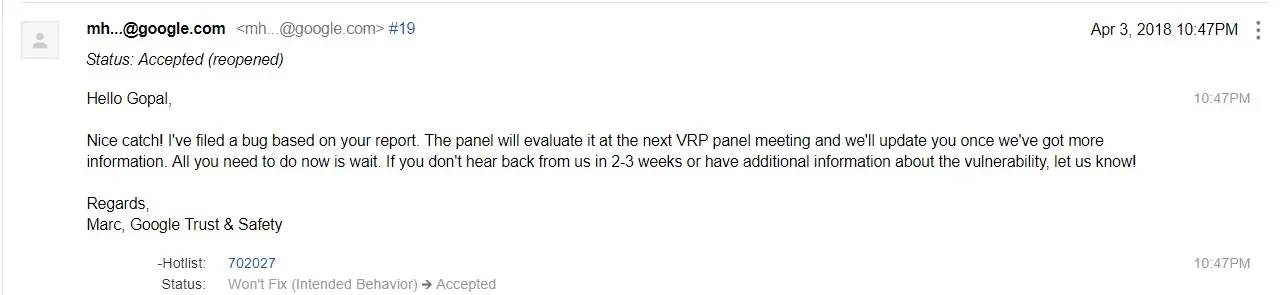
Step 3: first report closed as Won't Fix
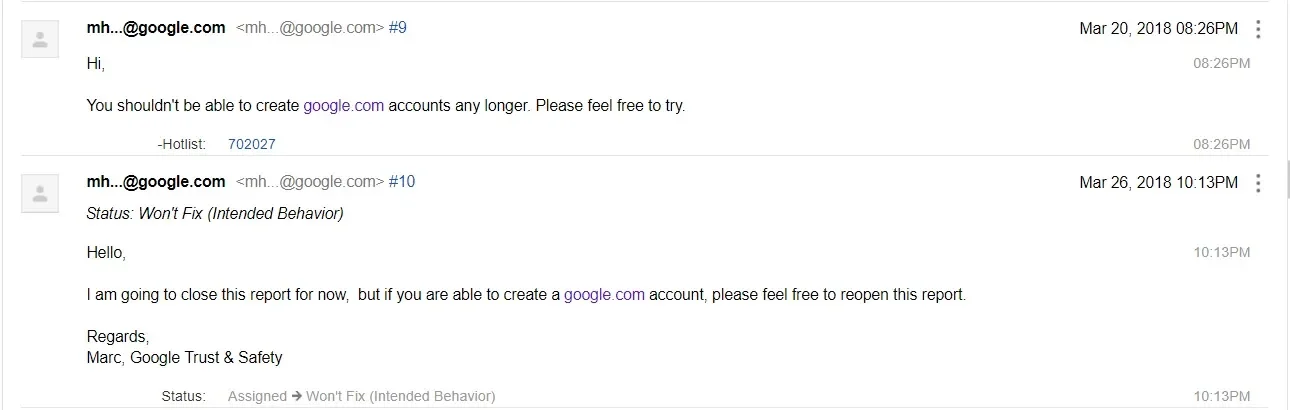
There are two parts to obtaining a Google account: signup and verification. He could verify a Google account, but he could not sign up for an @google.com account, so the report was closed as Won't Fix. After the initial fix he could no longer use his google.com email, and he almost gave up.
Step 4: find a signup page that accepts an existing email address
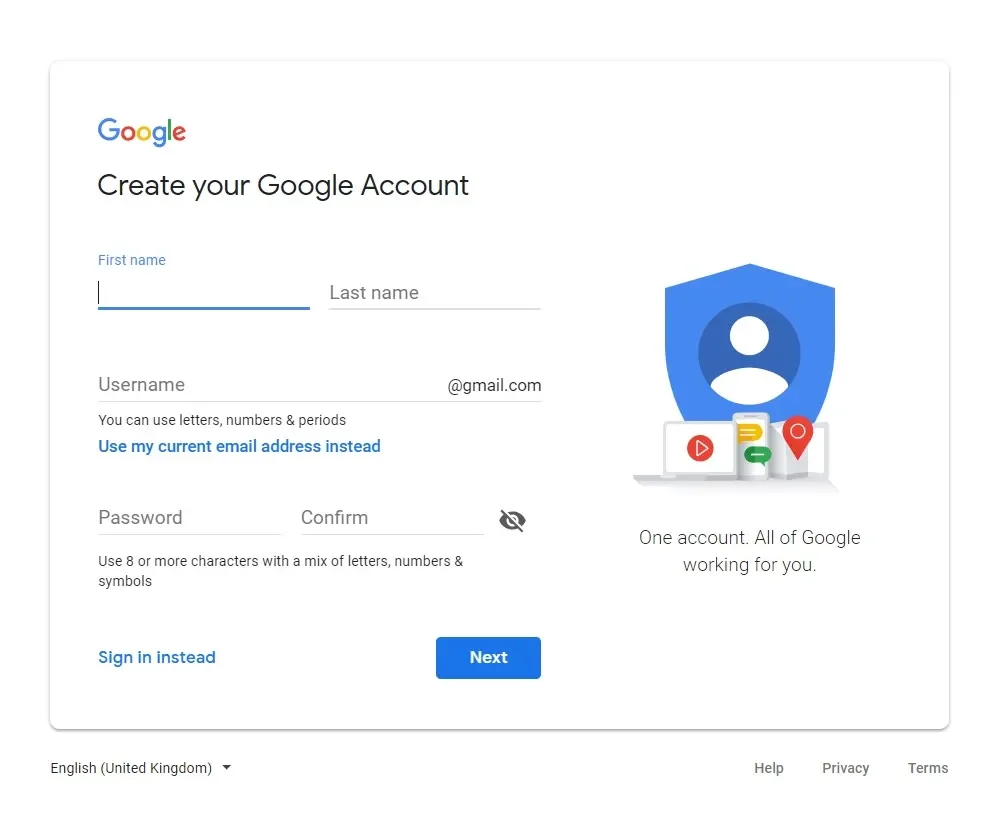
He then visited every Google subdomain looking for a place where a google.com email could be used to sign up. A new signup page appeared. At first he could not find the "Use my current email address instead" option that leads to https://[redacted].google.com/. From there, clicking Create an account shows the option to use your current email address.
Step 5: sign up with the tracker-derived address
He began to sign up using the address:
[redacted]
The signup flow asked him to verify by entering a code.
Step 6: read the verification code from the issue conversation
He waited for the verification code in the conversation, and the code arrived both in the email and in the issue tracker conversation.
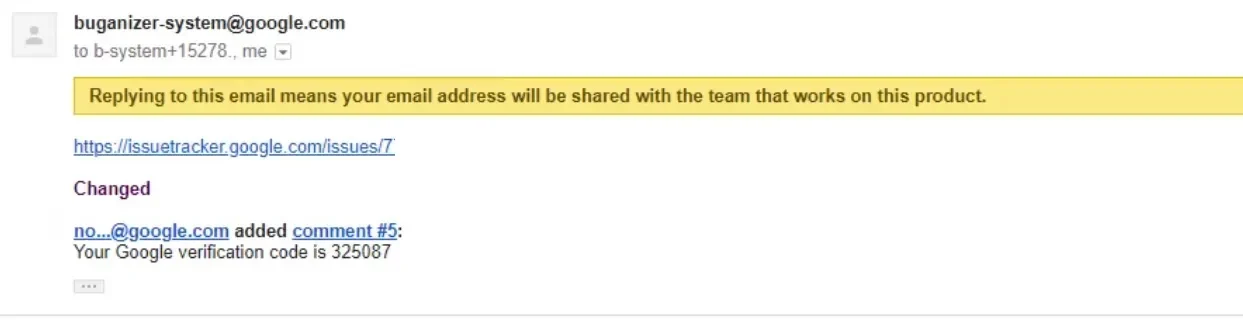
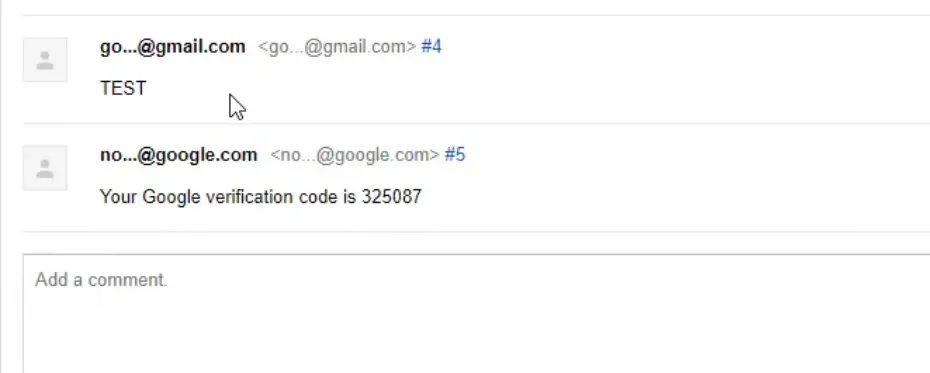
After entering the code, the signup completed and he had a Google Account.
Step 7: use the account
After successfully signing up, he reopened the issue. The impact was that the account could access https://google.ridecell.com, which requires a Google account. He also tried to upgrade the account to Gmail now that he had a Google account. He added it to his Gmail and was able to send email from:
[redacted]
Normally, if you try to spoof a google.com email address, your mail lands in spam. His email appeared in the inbox and was from @google.com, so an attacker could pretend to be a Google employee.
Step 8: the reward
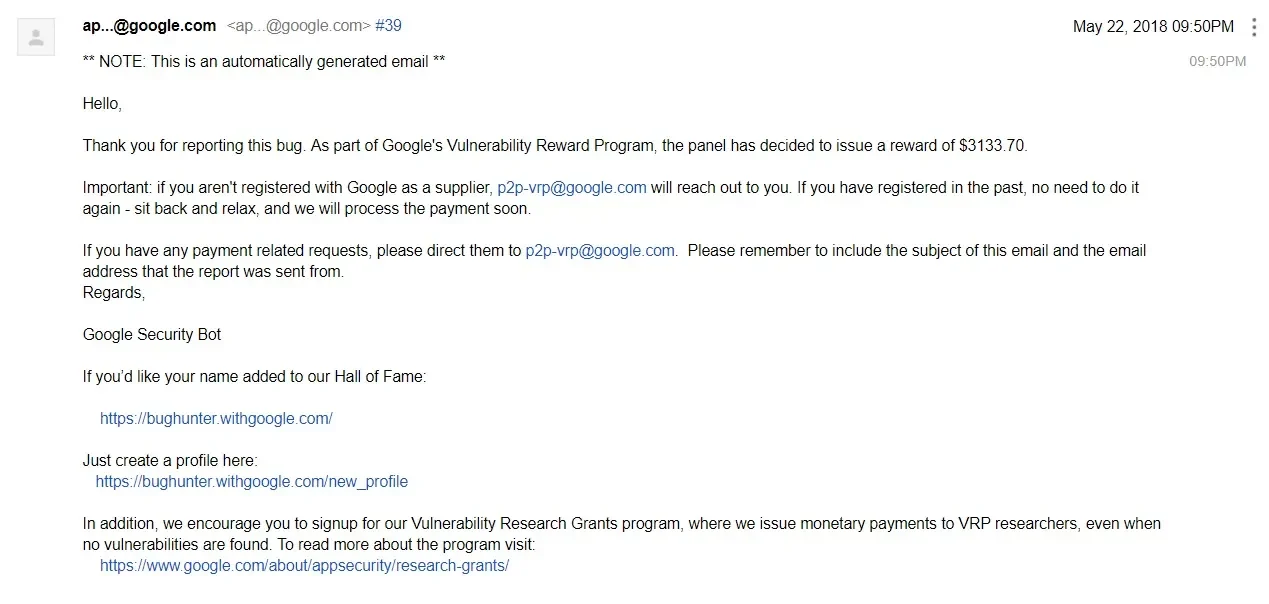
At 9:50 PM the email arrived: the bounty was $3133.70.
Root cause
The tracker accepts mail at an address derived from a component ID and an issue ID and posts it as a comment on a public issue. Because the issue is public, anyone who knows the component and issue IDs can read what is delivered there.
The signup flow accepted the tracker-derived address and a code that could be read in the public issue. The two behaviours combine into a way to verify an address that belongs to Google's own domain.
The first attempt showed that verification worked but signup did not, and the report was closed as Won't Fix. The second attempt found a signup page that accepted an existing email address, which is what turned verification into a usable account. The report does not describe the code change behind the initial fix.
Impact
Under the conditions shown, an attacker could:
- Obtain a Google Account tied to a
[redacted]address. - Use that account to access services that require a Google account, such as
https://google.ridecell.com. - Add the address to Gmail and send mail from it, which arrived in the inbox rather than spam, allowing the attacker to pose as a Google employee.
The report does not state which other services would accept the account, or whether the address could be used to reach internal Google systems.
Fix
The report only records that an initial fix stopped the researcher from using his google.com email after the first report.
Variants to test
- Other trackers with email-in addresses: send a report to a component address, reply to the per-issue address, and check whether the reply is published. A positive result is your comment appearing in a public thread.
- Verification mail to a public sink: add a tracker-derived address as a forwarding address or as the recovery address on an account, and watch the public thread. A positive result is the confirmation code appearing as a comment.
- Signup flows that accept an existing email: look for "use my current email address instead" options on other Google subdomains, as the researcher did. A positive result is a signup that completes with a code read from a public source.
- Mail spoofing checks: send mail from the derived address to a mailbox you control and see whether it lands in the inbox rather than spam. A positive result is inbox delivery from a
@google.comaddress you do not own. - Access checks: with the resulting account, try services that require a Google account, such as the one named in the report. A positive result is access granted to an account you should not have.
What happened, in plain words
Google runs an internal bug tracking system called Buganizer. It is the place where bugs and issues are recorded and discussed. One of its features is that you can report a bug by sending an ordinary email, and the system turns that email into a comment on an issue. It also sends notifications back out by email.
Gopal Singh read a write-up by Alex Birsan about getting a Google employee account through this tracker, and decided to test the tracker himself. He found that a reply sent to a tracker address is posted in a public issue thread. He added a Google address as a Gmail forwarding address, and the confirmation code appeared in the public issue. With that code he could verify an @google.com address that was not really his, though the first report could not sign up with it.
The first report was closed as Won't Fix because he could verify an address but could not sign up with it. He kept looking, found a signup page on another Google subdomain that accepted an existing email address, and completed the account. The bounty was $3133.70.
Background: what Buganizer and its email addresses are
Buganizer is Google's issue tracker. Think of it as a shared noticeboard with many sections, called components. Each component is a topic, such as Android, and each issue inside a component is a conversation thread.
The tracker accepts bug reports by email. Each component has its own address, built like this:
[redacted]
This is an email address in the usual form: a name, an @, and a domain. The part after the plus sign is a label that tells the tracker which component the message belongs to. Email systems commonly allow this kind of plus label, and the receiving side can read it to route the message. Here, componentID is a placeholder for a number that identifies the component.
Once an issue exists, replies can go to an address that also carries the issue number:
[redacted]
Again, componentID and issueID are placeholders for numbers. The tracker reads them and knows which issue the message belongs to.
The Android public issue tracker is one of the public trackers you can reach from the browse components view, and its component ID is 190923. Public means anyone can read the issues in it, without logging in.
The tracker turns email into comments: mail sent to the per-issue address is posted into the conversation. The researcher tested whether a Google address could be verified by reading the confirmation code in the tracker.
Setting up
No special tools are described. The researcher needed:
- A normal email account to send reports from and to receive tracker notifications.
- Access to the public Android issue tracker through the browse components view.
- A Gmail account whose forwarding settings he could change.
- Patience: the first report was closed as Won't Fix, and the second attempt started from scratch on other Google subdomains.
He credits Alex Birsan's earlier write-up, "Getting a Google employee account", as the starting point.
Finding it
While reading write-ups, the researcher came across Alex Birsan's work on the Google bug tracking system. He started testing the issue tracker himself, looking for a way to obtain a Google account.
Looking around the browse components section, he noticed two public issue trackers and clicked on the Android Public Tracker. Bugs reported to Android were visible there. To report a bug to the Android public issue tracker, the address is:
[redacted]
with Android's component ID being 190923. His issue appeared in the public tracker, and he received a confirmation email from [redacted]. A reply to that email is directed to:
[redacted]
He replied to the email and a comment was posted in the conversation.
Exploitation
Step 1: confirm that mail to the issue address lands in the public thread
The researcher sent a report to the Android component address and saw it listed in the public issue tracker. He then replied to the confirmation email, which goes to the per-issue address, and the reply was posted as a comment in the conversation. This showed that a reply to the per-issue address is posted as a comment in the conversation.
Why this step matters: before building anything on top of the behaviour, he had to prove it happens. A public thread that shows your own reply is proof that the tracker treats incoming mail as content for everyone to read.
Step 2: get a verification code delivered into the issue
To test whether a Google address could be verified this way, he opened Forwarding and POP/IMAP in Gmail settings and added a Google email as a forwarding address. Gmail sends a confirmation code to the address being added. He was surprised to see the confirmation code arrive in the Android public issue tracker conversation.
In other words, the confirmation code for the forwarding address appeared in the Android public issue tracker conversation.
Why this step matters: a verification code is meant to prove that you control the mailbox it is sent to. If the code is published in a public thread, anyone reading the thread can use it, so the proof no longer means anything.
Step 3: first report closed as Won't Fix
There are two parts to obtaining a Google account: signup and verification. He could verify a Google account, but he could not sign up for an @google.com account, so the report was closed as Won't Fix. After the initial fix he could no longer use his google.com email, and he almost gave up.
Why this step matters: verification alone was not enough. The signup step was the missing half, and the first report did not show a complete path to an account.
Step 4: find a signup page that accepts an existing email address
He then visited every Google subdomain looking for a place where a google.com email could be used to sign up. A new signup page appeared. At first he could not find the "Use my current email address instead" option that leads to https://[redacted].google.com/. From there, clicking Create an account shows the option to use your current email address.
Why this step matters: most signup pages create a new address for you. He needed one that lets you bring an address you already have, because the tracker address was the one he could read codes for.
Step 5: sign up with the tracker-derived address
He began to sign up using the address:
[redacted]
The signup flow asked him to verify by entering a code.
Why this step matters: the signup form is where the address becomes an account. The verification step that follows is the gate, and he already knew where the code would appear.
Step 6: read the verification code from the issue conversation
He waited for the verification code in the conversation, and the code arrived both in the email and in the issue tracker conversation.
After entering the code, the signup completed and he had a Google Account.
Why this step matters: this is the moment the two halves join. The code that was supposed to go only to the mailbox owner was readable by anyone watching the public issue, and entering it completed the signup.
Step 7: use the account
After successfully signing up, he reopened the issue. The impact was that the account could access https://google.ridecell.com, which requires a Google account. He also tried to upgrade the account to Gmail now that he had a Google account. He added it to his Gmail and was able to send email from:
[redacted]
Normally, if you try to spoof a google.com email address, your mail lands in spam. His email appeared in the inbox and was from @google.com, so an attacker could pretend to be a Google employee.
Why this step matters: an account is only as useful as what it unlocks. Access to a service that requires a Google account, and the ability to send mail that looks like it comes from Google, are the concrete consequences.
Step 8: the reward
At 9:50 PM the email arrived: the bounty was $3133.70.
Root cause
The tracker accepts mail at an address derived from a component ID and an issue ID and posts it as a comment on a public issue. Because the issue is public, anyone who knows the component and issue IDs can read what is delivered there.
The signup flow accepted the tracker-derived address and a code that could be read in the public issue. The two behaviours combine into a way to verify an address that belongs to Google's own domain.
The first attempt showed that verification worked but signup did not, and the report was closed as Won't Fix. The second attempt found a signup page that accepted an existing email address, which is what turned verification into a usable account. The report does not describe the code change behind the initial fix.
Impact
Under the conditions shown, an attacker could:
- Obtain a Google Account tied to a
[redacted]address. - Use that account to access services that require a Google account, such as
https://google.ridecell.com. - Add the address to Gmail and send mail from it, which arrived in the inbox rather than spam, allowing the attacker to pose as a Google employee.
The report does not state which other services would accept the account, or whether the address could be used to reach internal Google systems.
Fix
The report only records that an initial fix stopped the researcher from using his google.com email after the first report.
Variants to test
- Other trackers with email-in addresses: send a report to a component address, reply to the per-issue address, and check whether the reply is published. A positive result is your comment appearing in a public thread.
- Verification mail to a public sink: add a tracker-derived address as a forwarding address or as the recovery address on an account, and watch the public thread. A positive result is the confirmation code appearing as a comment.
- Signup flows that accept an existing email: look for "use my current email address instead" options on other Google subdomains, as the researcher did. A positive result is a signup that completes with a code read from a public source.
- Mail spoofing checks: send mail from the derived address to a mailbox you control and see whether it lands in the inbox rather than spam. A positive result is inbox delivery from a
@google.comaddress you do not own. - Access checks: with the resulting account, try services that require a Google account, such as the one named in the report. A positive result is access granted to an account you should not have.
Glossary
- Buganizer: Google's internal bug and issue tracking system, where bugs are recorded and discussed.
- Issue tracker: software that stores bug reports and the conversations around them.
- Component: a section of an issue tracker that groups related issues, such as Android.
- Component ID: the number that identifies a component, used in the tracker's email addresses.
- Issue ID: the number that identifies a single issue inside a component.
- Public issue tracker: a tracker whose issues anyone can read without logging in.
- Email address: a name, an
@, and a domain, used to send and receive mail. - Plus addressing: the practice of adding a
+labelafter the name part of an email address so the receiver can route or filter the message. - Alias: an email address that is not a real mailbox but forwards or routes mail somewhere else.
- Verification code: a short code sent to an address or phone to prove that the person using it controls that address or phone.
- Signup: the process of creating an account.
- Verification: the step in signup where you prove you control the address or phone you gave.
- Forwarding address: an address you add to a mail account so that incoming mail is also sent there.
- Spoofing: making a message or identity look like it comes from someone else.
- Spam folder: the place where mail systems put messages they think are unwanted or forged.
- Inbox: the main folder where accepted incoming mail arrives.
- Subdomain: a part of a domain placed before it, such as
[redacted].google.comundergoogle.com. - Won't Fix: a status meaning the report was reviewed and no change will be made.
- Bounty: a payment made to a researcher who reports a security problem.
- Root cause: the underlying behaviour that makes a problem possible.
- Impact: the concrete harm or access an attacker gains.
- Variant: a related version of the same problem, tested in another place or product.



